
בסוגים מסוימים של ישויות, צריך ליצור את הקשר בין התוכן בפיד. המידע הזה עוזר ל-Google להציג למשתמשים את הסדר והמבנה הנכונים של התוכן שלכם, ולזהות את התוכן הנכון כשהשאילתה של המשתמש לא ברורה.
בוחרים את סוג התוכן שאתם מספקים:
תוכנית טלוויזיה
אם אתם ספקי תוכניות טלוויזיה, אתם צריכים להוסיף את סוגי הישויות TVEpisode, TVSeason ו-TVSeries לפיד קטלוג המדיה שלכם. אפשר למצוא את ההגדרות של הישויות האלה בקטע הסבר על סוגי הישויות הזמינים על ידי סינון לפי הסוגים האלה.
זיהוי הקשרים
צריך לוודא שקיימים ביניהם קשרי הגומלין הבאים:
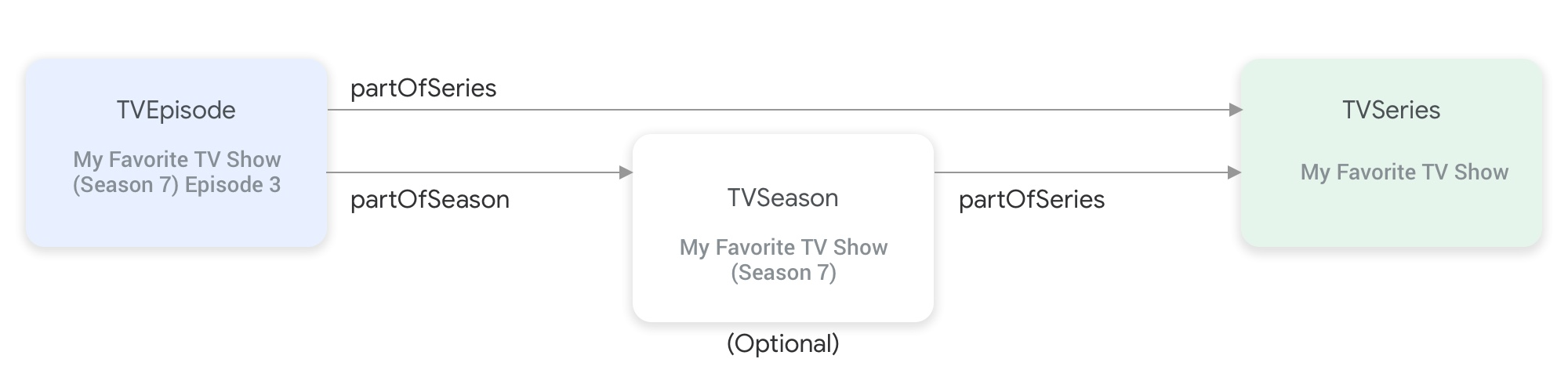
partOfSeries ו-partOfSeason מחברים בין סוגי הישויות של תוכנית הטלוויזיה.כדי להשתמש בישות
TVEpisode, צריך לספק את המאפייןpartOfSeries, שמציין את@idו-nameשל הישותTVSeriesשל הפרק."partOfSeries": { "@type": "TVSeries", "@id": "http://www.example.com/my_favorite_tv_show", "name": "My Favorite TV Show", },אם הפיד שלכם מכיל עונות של תוכניות טלוויזיה, צריך לציין גם את הישות
.TVSeriesשל הישותTVSeasonבמאפייןpartOfSeries.כדי להשתמש בישות
TVEpisode, צריך לספק את המאפייןpartOfSeason, שמציין את@idו-seasonNumberשל הישותTVSeasonשל הפרק."partOfSeason": { "@type": "TVSeason", "@id": "http://www.example.com/my_favorite_tv_show/s7", "seasonNumber": 7 },אם לישות
TVEpisodeאין ישותTVSeasonתואמת בפיד, צריך לבצע את הפעולות הבאות כדי לספק את המאפייניםpartOfSeason.@idו-partOfSeason.seasonNumberשל הישותTVEpisode:- לוקחים את
partofSeries.@idומצרפים שדה שאילתה של placeholder (לדוגמה, ?season1) כדי ליצורpartOfSeason.@idייחודי (לדוגמה, http://www.example.com/my_favorite_tv_show?season1). - מגדירים את
partOfSeason.seasonNumberל-1.
partOfSeason.@idהקיים עבור הישותTVSeasonהמתאימה או להחליף את ערך ה-placeholderpartOfSeason.@idבערך@idבפועל של הישותTVSeason.- לוקחים את
דוגמה
TVSeries
תוכנית הטלוויזיה האהובה עליי
{
"@context": ["http://schema.org", {"@language": "en"}],
"@type": "TVSeries",
"@id": "http://www.example.com/my_favorite_tv_show",
"url": "http://www.example.com/my_favorite_tv_show",
"name": "My Favorite TV Show",
"potentialAction":{ … },
...
}
TVSeason
תוכנית הטלוויזיה המועדפת עליי (עונה 7)
{
"@context": ["http://schema.org", {"@language": "en"}],
"@type": "TVSeason",
"@id": "http://www.example.com/my_favorite_tv_show/s7",
"url": "http://www.example.com/my_favorite_tv_show/s7",
"name": "My Favorite TV Show, Season 7",
"seasonNumber": 7,
"partOfSeries": {
  "@type": "TVSeries",
  "@id": "http://www.example.com/my_favorite_tv_show",
  "name": "My Favorite TV Show",
},
"potentialAction":{ … },
...
}
TVEpisode
פרק 3 של התוכנית האהובה עליי (עונה 7)
{
"@context": ["http://schema.org", {"@language": "en"}],
"@type": "TVEpisode",
"@id": "http://www.example.com/my_favorite_tv_show/s7/e3",
"url": "http://www.example.com/my_favorite_tv_show/s7/e3",
"name": "John Doe returns at night",
"episodeNumber": 3,
"partOfSeason": {
  "@type": "TVSeason",
  "@id": "http://www.example.com/my_favorite_tv_show/s7",
  "seasonNumber": 7
},
"partOfSeries": {
"@type": "TVSeries",
"@id": "http://www.example.com/my_favorite_tv_show",
"name": "My Favorite TV Show",
},
"potentialAction":{ … },
...
}
טלוויזיה בשידור חי
אם אתם ספקי טלוויזיה בשידור חי, אתם צריכים להוסיף את סוגי הישויות Organization, BroadcastService, CableOrSatelliteService ו-TelevisionChannel בפיד של קטלוג המדיה כדי לייצג את רשימת הערוצים שלכם. יכול להיות שתצטרכו לספק גם את הישויות BroadcastEvent, TVSeries, TVEpisode, Movie ו-SportsEvent כדי לייצג את מדריך התוכניות האלקטרוני (EPG) המשויך. כדי למצוא את ההגדרות של הישויות האלה, אתם יכולים לסנן לפי סוגי הישויות בקטע הסבר על סוגי הישויות הזמינים. הסבר מפורט יותר זמין בדף ערוצי טלוויזיה בשידור חי.
קשרים בין ישויות שמייצגות ערוצי טלוויזיה בשידור חי
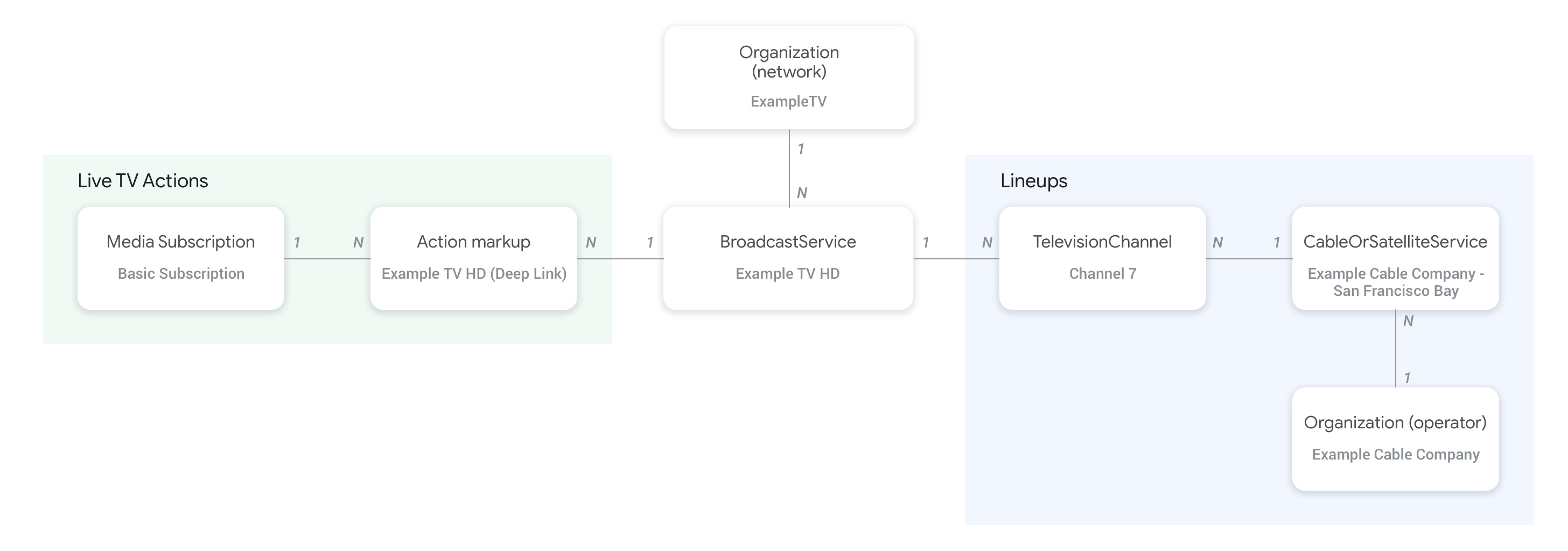
התרשים הבא מראה איך הישויות Organization, BroadcastService, CableOrSatelliteService ו-TelevisionChannel קשורות זו לזו:
- הישות
Organization(מפעיל) שמייצגת את ספק הפיד וגם את ארגון ההורה של השירותCableOrSatelliteServiceמחוברת באמצעות המאפייןproviderבישותCableOrSatelliteService. - ישויות מסוג
Organizationשתואמות לישויות מסוגBroadcastServiceמקושרות באמצעות המאפייןbroadcastAffiliateOfבישות מסוגBroadcastService. - ישויות
TelevisionChannelמתחברות לישותCableOrSatelliteService, שמייצגת את חבילת הערוצים שהן שייכות אליה, באמצעות המאפייןinBroadcastLineup. - ישויות מסוג
TelevisionChannelמתחברות לישות מסוגBroadcastService, שהערוץ הזה מספק את לוח הזמנים שלה לפרסום תוכן, באמצעות המאפייןprovidesBroadcastService.
מומלץ מאוד לעיין בדף הקונספט של ערוצי טלוויזיה בשידור חי כדי לראות דוגמאות קונקרטיות לאופן שבו צריך ליצור את הקשר בין הישויות BroadcastService ו-Organization.
הקשר בין הערוצים לבין מדריך התוכניות שלהם (EPG)
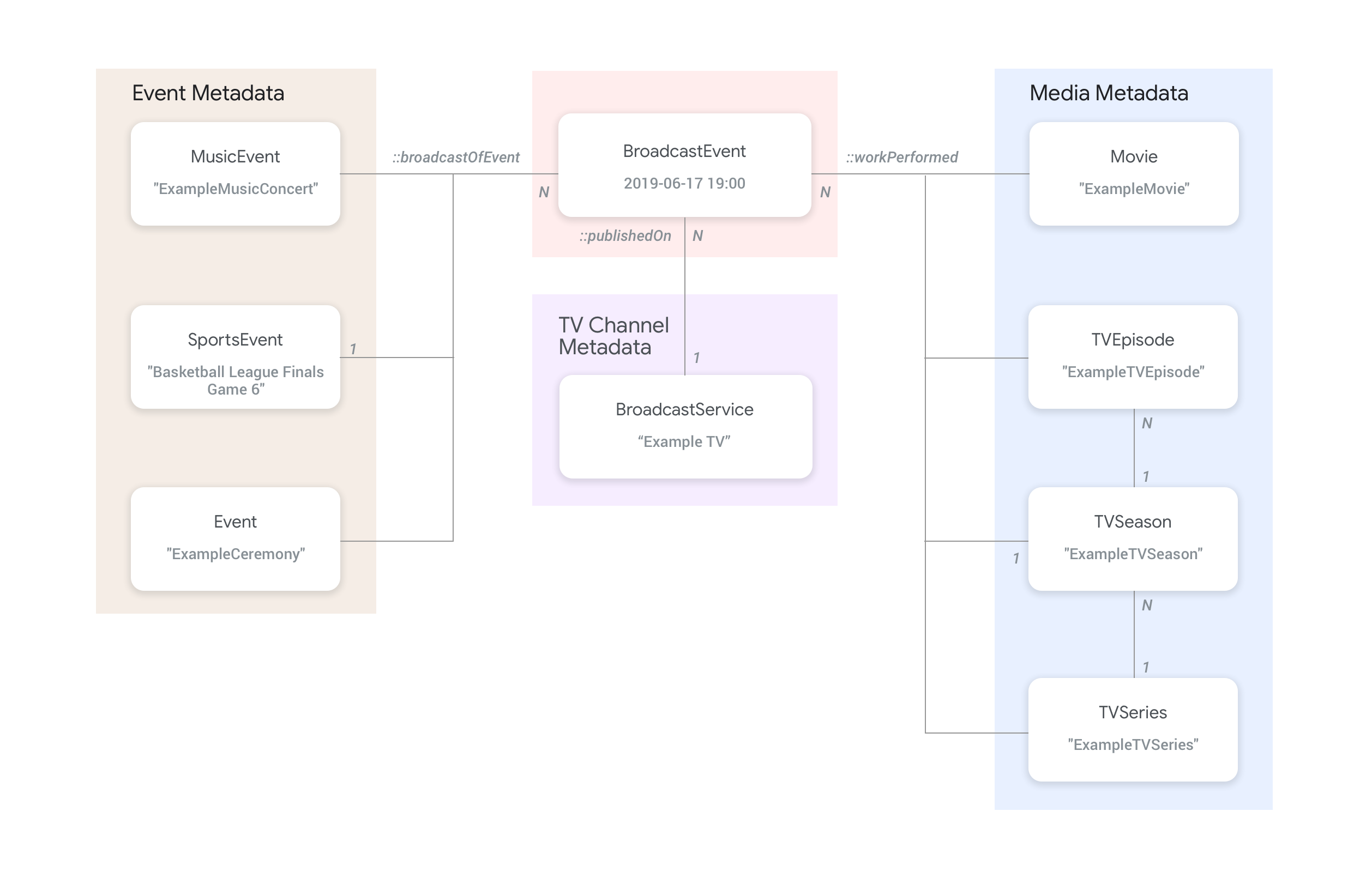
התרשים הבא מראה איך הישות BroadcastEvent מקושרת לשאר הישויות בפיד.
- ישויות מסוג
BroadcastEvent, שמייצגות את מדריך התוכניות (EPG) שלBroadcastService, מקושרות לישויות מסוגBroadcastServiceבאמצעות המאפייןpublishedOnבישות מסוגBroadcastEvent. - אפשר גם לקשר ישויות מסוג
BroadcastEventלישויות ברמה העליונה מסוגTVEpisode,TVSeriesו-Movieבאמצעות המאפייןworkPerformed. - אפשר גם לקשר ישויות מסוג
BroadcastEventלישויות מסוגSportsEventברמה העליונה באמצעות המאפייןbroadcastOfEvent. - באירועים שמשודרים אונליין ללא ערוץ, הישויות
BroadcastEventמתחברות לישות שמייצגת את האירוע בשידור חי באמצעות המאפייןworkPerformedאוbroadcastOfEvent, בהתאם למה שמשודר בשידור חי. במקרים כאלה, צריך להשמיט את המאפייןpublishedOnכי השידור לא מצורף לערוץ לינארי. כש-broadcastOfEventמפנה אלSportsEvent, צריך לספק את קישור העומק (potentialAction) ישירות בישותSportsEvent(ולא ב-BroadcastEvent).
דוגמאות
בקטע הבא מופיעות דוגמאות וקטע קוד לתרחישים שונים של שימוש בפעולת צפייה.
ספק שירותי טלוויזיה ארצי באינטרנט
ארגון
ספק שירות פיקטיבי של טלוויזיה בפרוטוקול אינטרנט, ExampleTV Digital Service (Organization), מספק שירות טלוויזיה בשידור חי באינטרנט, שכולל את שני הערוצים הבאים: ExampleTV-Movie (Organization) ו-ExampleTV-Comedy (Organization):
{
  "@context": ["http://schema.org", {"@language": "en"}],
  "@type":"Organization",
  "@id":"http://example.com/exampletv/digital",
  "name":"ExampleTV Digital Service",
  "sameAs": "https://en.wikipedia.org/wiki/exampletv_digital_service"
},
{
  "@context": ["http://schema.org", {"@language": "en"}],
  "@type":"Organization",
  "@id":"http://example.com/exampletv/movie",
  "name":"ExampleTV Movie",
  "sameAs": "https://en.wikipedia.org/wiki/exampletv_movie"
},
{
  "@context": ["http://schema.org", {"@language": "en"}],
  "@type":"Organization",
  "@id":"http://example.com/exampletv/comedy",
  "name":"ExampleTV Comedy",
  "sameAs": "https://en.wikipedia.org/wiki/exampletv_comedy"
}
BroadcastService
שתי הישויות האלה של BroadcastService מספקות את הפרטים של קישורי העומק ודרישות הגישה לערוצים הפיקטיביים ExampleTV-Movie ו-ExampleTV-Comedy:
{
  "@context": ["http://schema.org", {"@language": "en"}],
  "@type":"BroadcastService",
  "@id":"https://www.example.com/exampletv/broadcast/movie",
  "name": "ExampleTV-Movie",
  "alternateName": [
    "Example Television Movie",
    "Example TV Movie"
  ],
  "description": "A fictional Internet Protocol TV movie channel.",
  "broadcastDisplayName":"ExampleTV-Movie",
  "broadcastAffiliateOf":{
    "@type":"Organization",
    "@id":"http://www.example.com/exampletv/movie"
  },
  "potentialAction": {
    "@type": "WatchAction",
    "target": {
      "@type": "EntryPoint",
      "urlTemplate": "http://www.example.com/exampletv/broadcast/movie?autoplay=true",
      "inLanguage": "en",
      "actionPlatform": [
        "http://schema.org/DesktopWebPlatform",
        "http://schema.org/MobileWebPlatform",
        "http://schema.org/AndroidPlatform",
        "http://schema.org/AndroidTVPlatform",
        "http://schema.org/IOSPlatform",
        "http://schema.googleapis.com/GoogleVideoCast"
      ]
    },
    "actionAccessibilityRequirement": {
      "@type": "ActionAccessSpecification",
      "category": "subscription",
      "requiresSubscription": {
        "@type": "MediaSubscription",
        "@id": "http://www.example.com/exampletv/basic_subscription",
        "name": "Basic subscription",
        "identifier": "example.com:basic",
        "commonTier": true
      },
      "eligibleRegion": [
        {
          "@type": "Country",
          "name": "US"
        }
      ]
    }
  },
  "identifier": [
    {
      "@type": "PropertyValue",
      "propertyID": "TMS_ID",
      "value": "12345"
    },
    {
      "@type": "PropertyValue",
      "propertyID": "_PARTNER_ID_",
      "value": "exampletv-movie-33345"
    }
  ]
},
{
  "@context": ["http://schema.org", {"@language": "en"}],
  "@type":"BroadcastService",
  "@id":"https://www.example.com/exampletv/broadcast/comedy",
  "name": "ExampleTV-Comedy",
  "alternateName": [
    "Example Television Comedy",
    "Example TV Comedy"
  ],
  "description": "A fictional Internet Protocol TV comedy channel.",
  "broadcastDisplayName":"ExampleTV-Comedy",
  "broadcastAffiliateOf":{
    "@type":"Organization",
    "@id":"http://www.example.com/exampletv/comedy"
  },
  "potentialAction": {
    "@type": "WatchAction",
    "target": {
      "@type": "EntryPoint",
      "urlTemplate": "http://www.example.com/exampletv/broadcast/comedy?autoplay=true",
      "inLanguage": "en",
      "actionPlatform": [
        "http://schema.org/DesktopWebPlatform",
        "http://schema.org/MobileWebPlatform",
        "http://schema.org/AndroidPlatform",
        "http://schema.org/AndroidTVPlatform",
        "http://schema.org/IOSPlatform",
        "http://schema.googleapis.com/GoogleVideoCast"
      ]
    },
    "actionAccessibilityRequirement": {
      "@type": "ActionAccessSpecification",
      "category": "subscription",
      "requiresSubscription": {
        "@type": "MediaSubscription",
        "@id": "http://www.example.com/exampletv/basic_subscription",
        "name": "Basic subscription",
        "identifier": "example.com:basic",
        "commonTier": true
      },
      "eligibleRegion": [
        {
          "@type": "Country",
          "name": "US"
        }
      ]
    }
  },
  "identifier": [
    {
      "@type": "PropertyValue",
      "propertyID": "TMS_ID",
      "value": "15555"
    },
    {
      "@type": "PropertyValue",
      "propertyID": "_PARTNER_ID_",
      "value": "exampletv-comedy-12323"
    }
  ]
}
CableOrSatelliteService
ה-CableOrSatelliteService הזה מתאר את ספק השירות ExampleTV Digital Service, שיש לו כיסוי ארצי:
{
  "@context": ["http://schema.org", {"@language": "en"}],
  "@type":"CableOrSatelliteService",
  "@id":"http://example.com/example_iptv/us",
  "name":"Example TV Digital Service - US",
  "provider": {
    "@type": "Organization",
    "@id": "http://example.com/exampletv/digital"
  },
  "areaServed":[
    {
      "@type":"Country",
      "name": "US"
    }
  ]
}
TelevisionChannel
הישויות האלה של TelevisionChannel מציינות שב-IPTV של ExampleTV Digital Service יש את התוכניות של ExampleTV Movie בערוץ ExTV-Movie ואת התוכניות של ExampleTV Comedy בערוץ ExTV-Comedy:
{
  "@context": ["http://schema.org", {"@language": "en"}],
  "@type":"TelevisionChannel",
  "@id":"http://example.com/exampletv/extv-movie",
  "broadcastChannelId":"ExTV-Movie",
  "broadcastServiceTier":"Basic",
  "inBroadcastLineup":{
    "@type":"CableOrSatelliteService",
    "@id":"http://example.com/example_iptv/us"
  },
  "providesBroadcastService":{
    "@type":"BroadcastService",
    "@id":"https://www.example.com/exampletv/broadcast/movie"
  }
},
{
  "@context": ["http://schema.org", {"@language": "en"}],
  "@type":"TelevisionChannel",
  "@id":"http://example.com/exampletv/extv-comedy",
  "broadcastChannelId":"ExTV-Comedy",
  "broadcastServiceTier":"Basic",
  "inBroadcastLineup":{
    "@type":"CableOrSatelliteService",
    "@id":"http://example.com/example_iptv/us"
  },
  "providesBroadcastService":{
    "@type":"BroadcastService",
    "@id":"https://www.example.com/exampletv/broadcast/comedy"
  }
}
דוגמאות נוספות מפורטות בקטע דוגמאות לטלוויזיה בשידור חי.
שידור של סרט בערוץ טלוויזיה
סרט משודר בערוץ הטלוויזיה Example TV (BroadcastService) בין השעות 17:00 ל-19:00 ב-12 ביולי 2019.
BroadcastEvent
{
  "@context": ["http://schema.org", {"@language": "en"}],
  "@type": "BroadcastEvent",
  "@id": "http://example.com/live/movie/new_release",
  "name": "My Favorite Movie",
  "description": "John Doe spent years perfecting his survival skills in a tropical jungle.",
  "startDate": "2019-07-12T17:00-08:00",
  "endDate": "2019-07-12T19:00-08:00",
  "videoFormat": "HD",
  "isLiveBroadcast": false,
  "publishedOn": {
    "@type": "BroadcastService",
    "@id": "http://example.com/stations/example_tv"
  },
  "workPerformed": {
    "@type": "Movie",
    "@id": "http://www.example.com/my_favorite_movie"
  }
}
BroadcastService
{
  "@context": ["http://schema.org", {"@language": "en"}],
  "@type":"BroadcastService",
  "@id":"http://example.com/stations/example_tv",
  "name":"EXAMPLE-TV",
  "broadcastDisplayName":"ABCD",
  "callSign": "EXA-TV",
  "videoFormat":"SD",
  "broadcastTimezone":"America/Los_Angeles",
  "broadcastAffiliateOf":{
    "@type":"Organization",
    "@id":"http://example.com/networks/abcd-network"
  },
  "identifier": [
   {
     "@type": "PropertyValue",
     "propertyID": "TMS_ID",
     "value": "12258"
   },
   {
     "@type": "PropertyValue",
     "propertyID": "_PARTNER_ID_",
     "value": "exampletv-123456"
   }
  ],
  "potentialAction": {
    "@type": "WatchAction",
    "target": {
      "@type": "EntryPoint",
      "urlTemplate": "http://example.com/livestream",
      "actionPlatform": [
        "http://schema.org/DesktopWebPlatform",
        "http://schema.org/MobileWebPlatform",
        "http://schema.org/AndroidPlatform",
        "http://schema.org/IOSPlatform",
        "http://schema.googleapis.com/GoogleVideoCast",
        "http://schema.org/AndroidTVPlatform"
      ]
    },
    "actionAccessibilityRequirement": {
      "@type": "ActionAccessSpecification",
      "category": "externalsubscription",
      "availabilityStarts": "2018-07-21T10:35:29Z",
      "availabilityEnds": "2019-10-21T10:35:29Z",
      "requiresSubscription": {
        "@type": "MediaSubscription",
        "@id": "http://example.com/subscription",
        "name": "ABCD",
        "sameAs": "http://example.com/subscription",
        "authenticator": {
          "@type": "Organization",
          "name": "TVE"
        }
      },
      "eligibleRegion": [
        {
          "@type": "Country",
          "name": "US"
        }
      ]
    }
  }
}
סרט
{
  "@context": ["http://schema.org", {"@language": "en"}],
  "@type": "Movie",
  "@id": "http://www.example.com/my_favorite_movie",
  "url": "http://www.example.com/my_favorite_movie",
  "name": "My Favorite Movie",
  "sameAs": "https://en.wikipedia.org/wiki/my_favorite_movie",
  "releasedEvent": {
    "@type": "PublicationEvent",
    "startDate": "2008-01-20",
    "location": {
      "@type": "Country",
      "name": "US"
    }
  },
  "description": "John Doe spent years perfecting his survival skills in a tropical jungle.",
  "actor": [
    {
      "@type": "Person",
      "name": "John Doe",
      "sameAs": "https://en.wikipedia.org/wiki/John_Doe"
    },
    {
      "@type": "Person",
      "name": "Jane Doe",
      "sameAs": "https://en.wikipedia.org/wiki/Jane_Doe"
    }
  ],
  "identifier": [
    {
      "@type": "PropertyValue",
      "propertyID": "IMDB_ID",
      "value":  "tt0123456"
    }
  ]
}
בקטע דוגמאות לאירועי טלוויזיה בשידור חי יש דוגמאות נוספות.
משחק ספורט בשידור חי שמועבר בסטרימינג באינטרנט
אירוע שידור
{
  "@context": ["http://schema.org", {"@language": "en"}],
  "@type": "BroadcastEvent",
  "@id": "http://example.com/live_event/basketball/professional/final_game_6",
  "name": "2019 Professional Basketball Finals, Game 6: Team A at Team B",
  "description": "Game 6 of the 2019 Professional Basketball Finals. Team A leads the series 3-2 against Team B.",
  "startDate": "2019-09-16T10:00-08:00",
  "endDate": "2019-09-16T13:00-08:00",
  "videoFormat": "HD",
  "isLiveBroadcast": true,
  "broadcastOfEvent": {
    "@type": "SportsEvent",
    "@id": "http://example.com/basketball/professional/final_game_6"
  },
  "location": {
    "@type": "Country",
    "name": "US"
  }
}
אירוע ספורט
{
  "@context": ["http://schema.org", {"@language": "en"}],
  "@type": "SportsEvent",
  "@id": "http://example.com/basketball/professional/final_game_6",
  "name": "2019 Professional Basketball Finals, Game 6: Team A at Team B",
  "sport": "https://en.wikipedia.org/wiki/Basketball",
  "description": {
    "@language": "en",
    "@value": "Game 6 of the 2019 Professional Basketball Finals. Team A leads the series 3-2 against Team B."
  },
  "startDate": "2019-09-16T10:00-08:00",
  "endDate": "2019-09-16T13:00-08:00",
  "homeTeam": {
    "@type": "SportsTeam",
    "name": "Team B",
    "sport": "https://en.wikipedia.org/wiki/Basketball",
    "parentOrganization": {
      "@type": "SportsOrganization",
      "name": "Professional Basketball League",
      "sameAs": "https://en.wikipedia.org/wiki/Professional_Basketball_League"
    },
    "athlete": [
      {
        "@type": "Person",
        "name": "John Doe"
      }
    ]
  },
  "awayTeam": {
    "@type": "SportsTeam",
    "name": "Team A",
    "sport": "https://en.wikipedia.org/wiki/Basketball",
    "parentOrganization": {
      "@type": "SportsOrganization",
      "name": "Professional Basketball League",
      "sameAs": "https://en.wikipedia.org/wiki/Professional_Basketball_League"
    },
    "athlete": [
      {
        "@type": "Person",
        "name": "Jane Doe"
      }
    ]
  },
  "location": {
    "@type": "Place",
    "name": "Example Stadium",
    "address": {
      "@type": "PostalAddress",
      "streetAddress": "1600 Amphitheatre Pkwy",
      "addressLocality": "Mountain View",
      "addressRegion": "CA",
      "postalCode": "94043",
      "addressCountry": "US"
    }
  },
  "identifier": [
    {
      "@type": "PropertyValue",
      "propertyID": "TMS_ID",
      "value": "EP000194303282"
    }
  ],
  "potentialAction": {
    "@type": "WatchAction",
    "target": {
      "@type": "EntryPoint",
      "urlTemplate": "http://www.example.com/pbl_finals_game_6?autoplay=true",
      "inLanguage": "en",
      "actionPlatform": [
        "http://schema.org/DesktopWebPlatform",
        "http://schema.org/MobileWebPlatform",
        "http://schema.org/AndroidPlatform",
        "http://schema.org/AndroidTVPlatform",
        "http://schema.org/IOSPlatform",
        "http://schema.googleapis.com/GoogleVideoCast"
      ]
    },
    "actionAccessibilityRequirement": {
      "@type": "ActionAccessSpecification",
      "category": "subscription",
      "availabilityStarts": "2019-09-01T10:00-08:00",
      "availabilityEnds": "2019-09-16T16:00-08:00",
      "requiresSubscription": {
        "@type": "MediaSubscription",
        "name": "Example Package",
        "commonTier": true,
        "@id": "http://www.example.com/example_package"
      },
      "eligibleRegion": [
        {
          "@type": "Country",
          "name": "US"
        }
      ]
    }
  }
}
בקטע דוגמאות לספורט יש דוגמאות נוספות.