
Pour certains types d'entités, vous devez établir la relation entre les contenus de votre flux. Ces informations aident Google à afficher la bonne structure et l'ordre appropriés de vos contenus auprès des utilisateurs, et à identifier le bon contenu lorsqu'une requête est ambiguë.
Sélectionnez le type de contenu que vous fournissez:
Série TV
Si vous êtes un fournisseur de programmes TV, vous devez ajouter les types d'entités TVEpisode, TVSeason et TVSeries dans votre flux de catalogue multimédia. Vous pouvez trouver les définitions de ces entités dans la section Comprendre les types d'entités disponibles en filtrant sur ces types.
Identifier les relations
Assurez-vous que les relations suivantes sont établies entre elles :
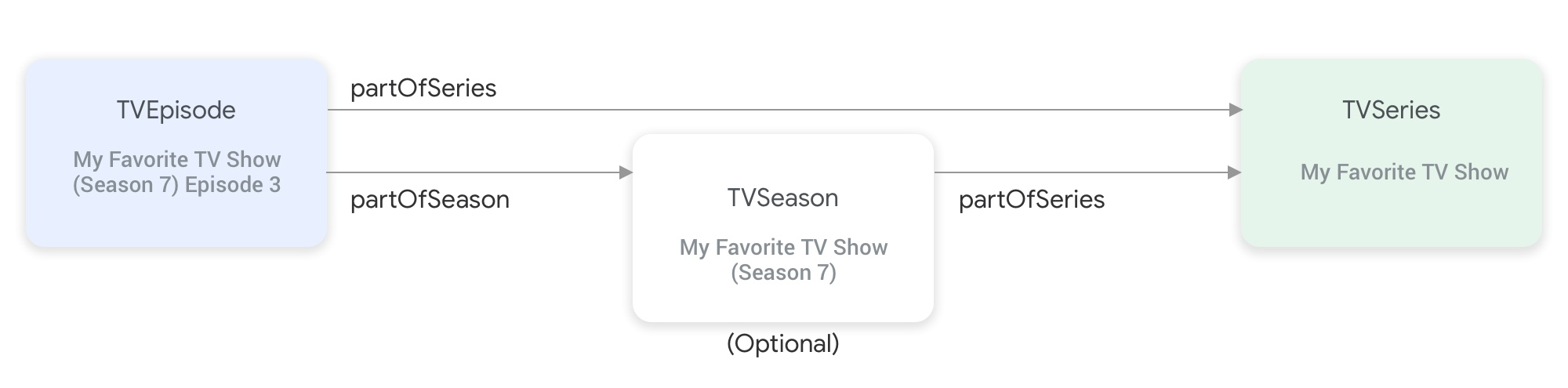
partOfSeries et partOfSeason connectent les types d'entités de programmes TV.Une entité
TVEpisodenécessite que vous fournissiez la propriétépartOfSeries, qui spécifie l'@idet lenamede l'entitéTVSeriesde l'épisode."partOfSeries": { "@type": "TVSeries", "@id": "http://www.example.com/my_favorite_tv_show", "name": "My Favorite TV Show", },Si votre flux contient des saisons TV, une entité
TVSeasonnécessite également que vous spécifiiez son entitéTVSeriesdans la propriétépartOfSeries.Une entité
TVEpisodenécessite que vous fournissiez la propriétépartOfSeason, qui spécifie l'@idet leseasonNumberde l'entitéTVSeasonde l'épisode."partOfSeason": { "@type": "TVSeason", "@id": "http://www.example.com/my_favorite_tv_show/s7", "seasonNumber": 7 },Si une entité
TVEpisodene possède pas d'entitéTVSeasoncorrespondante dans le flux, procédez comme suit pour fournir les propriétéspartOfSeason.@idetpartOfSeason.seasonNumberpour l'entitéTVEpisode:- Prenez son
partofSeries.@idet ajoutez un champ de requête d'espace réservé (par exemple, ?season1) pour créer unpartOfSeason.@idunique (par exemple, http://www.example.com/my_favorite_tv_show?season1). - Définissez
partOfSeason.seasonNumbersur 1.
partOfSeason.@idexistant pour l'entitéTVSeasoncorrespondante ou remplacer cet espace réservépartOfSeason.@idpar le@idréel de l'entitéTVSeason.- Prenez son
Exemple
TVSeries
Mon programme TV préféré
{
"@context": ["http://schema.org", {"@language": "en"}],
"@type": "TVSeries",
"@id": "http://www.example.com/my_favorite_tv_show",
"url": "http://www.example.com/my_favorite_tv_show",
"name": "My Favorite TV Show",
"potentialAction":{ … },
...
}
TVSeason
Mon programme TV préféré (saison 7)
{
"@context": ["http://schema.org", {"@language": "en"}],
"@type": "TVSeason",
"@id": "http://www.example.com/my_favorite_tv_show/s7",
"url": "http://www.example.com/my_favorite_tv_show/s7",
"name": "My Favorite TV Show, Season 7",
"seasonNumber": 7,
"partOfSeries": {
  "@type": "TVSeries",
  "@id": "http://www.example.com/my_favorite_tv_show",
  "name": "My Favorite TV Show",
},
"potentialAction":{ … },
...
}
TVEpisode
Épisode 3 de Mon programme TV préféré (saison 7)
{
"@context": ["http://schema.org", {"@language": "en"}],
"@type": "TVEpisode",
"@id": "http://www.example.com/my_favorite_tv_show/s7/e3",
"url": "http://www.example.com/my_favorite_tv_show/s7/e3",
"name": "John Doe returns at night",
"episodeNumber": 3,
"partOfSeason": {
  "@type": "TVSeason",
  "@id": "http://www.example.com/my_favorite_tv_show/s7",
  "seasonNumber": 7
},
"partOfSeries": {
"@type": "TVSeries",
"@id": "http://www.example.com/my_favorite_tv_show",
"name": "My Favorite TV Show",
},
"potentialAction":{ … },
...
}
TV en direct
Si vous êtes un fournisseur de télévision en direct, vous devez ajouter les types d'entités Organization, BroadcastService, CableOrSatelliteService et TelevisionChannel dans votre flux de catalogue multimédia pour représenter votre programmation. Vous devrez peut-être également fournir les entités BroadcastEvent, TVSeries, TVEpisode, Movie et SportsEvent pour représenter le guide électronique des programmes associé. Vous trouverez les définitions de ces entités dans la section Comprendre les types d'entités disponibles en filtrant sur ces types. Pour obtenir une explication plus détaillée, consultez la page Chaînes de télévision en direct.
Relations entre les entités représentant les chaînes de télévision en direct
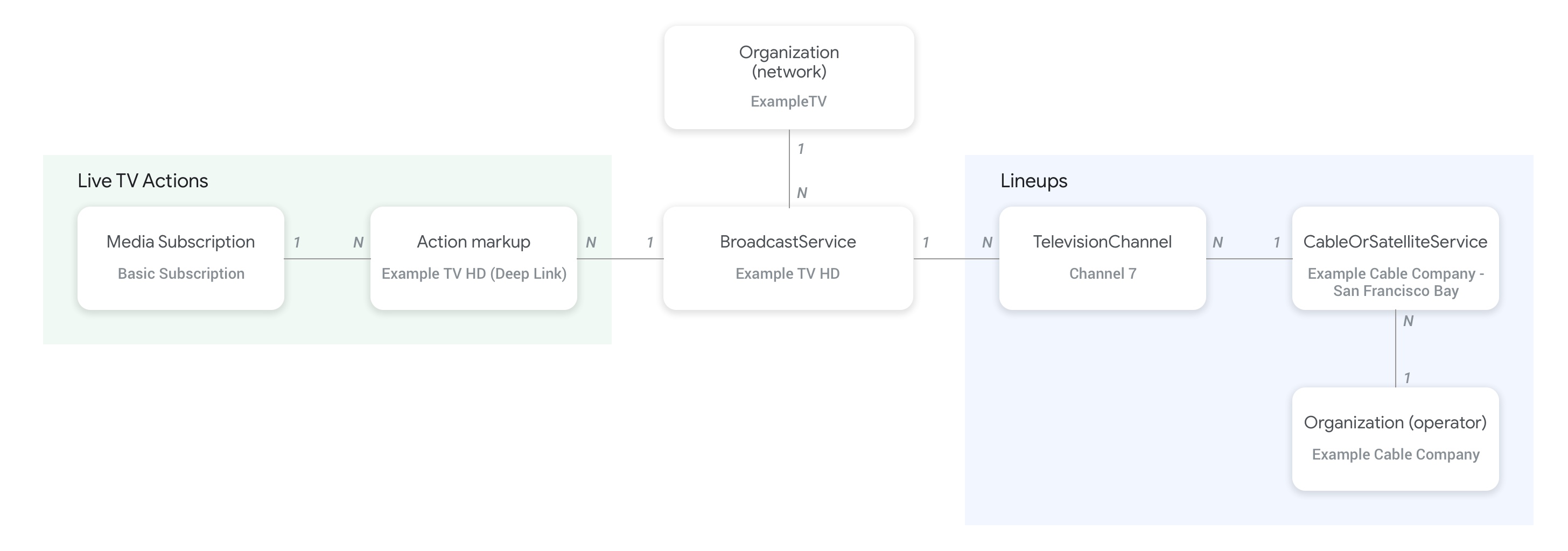
La figure ci-dessous montre comment les entités Organization, BroadcastService, CableOrSatelliteService et TelevisionChannel sont liées :
- L'entité
Organization(opérateur) représentant le fournisseur du flux et l'organisation parente du serviceCableOrSatelliteServicesont connectées à l'aide de la propriétéproviderde l'entitéCableOrSatelliteService. - Les entités
Organizationcorrespondant aux entitésBroadcastServicesont connectées à l'aide de la propriétébroadcastAffiliateOfde l'entitéBroadcastService. - Les entités
TelevisionChannelse connectent à l'entitéCableOrSatelliteService, qui représente la programmation à laquelle elles appartiennent, à l'aide de la propriétéinBroadcastLineup. - Les entités
TelevisionChannelse connectent à l'entitéBroadcastService, dont cette chaîne fournit la programmation, à l'aide de la propriétéprovidesBroadcastService.
Nous vous recommandons vivement de consulter la page de concept Chaînes de télévision en direct pour obtenir des exemples concrets de la manière dont la relation entre les entités BroadcastService et Organization doit être établie.
Relations entre les chaînes et leur guide des programmes (EPG)
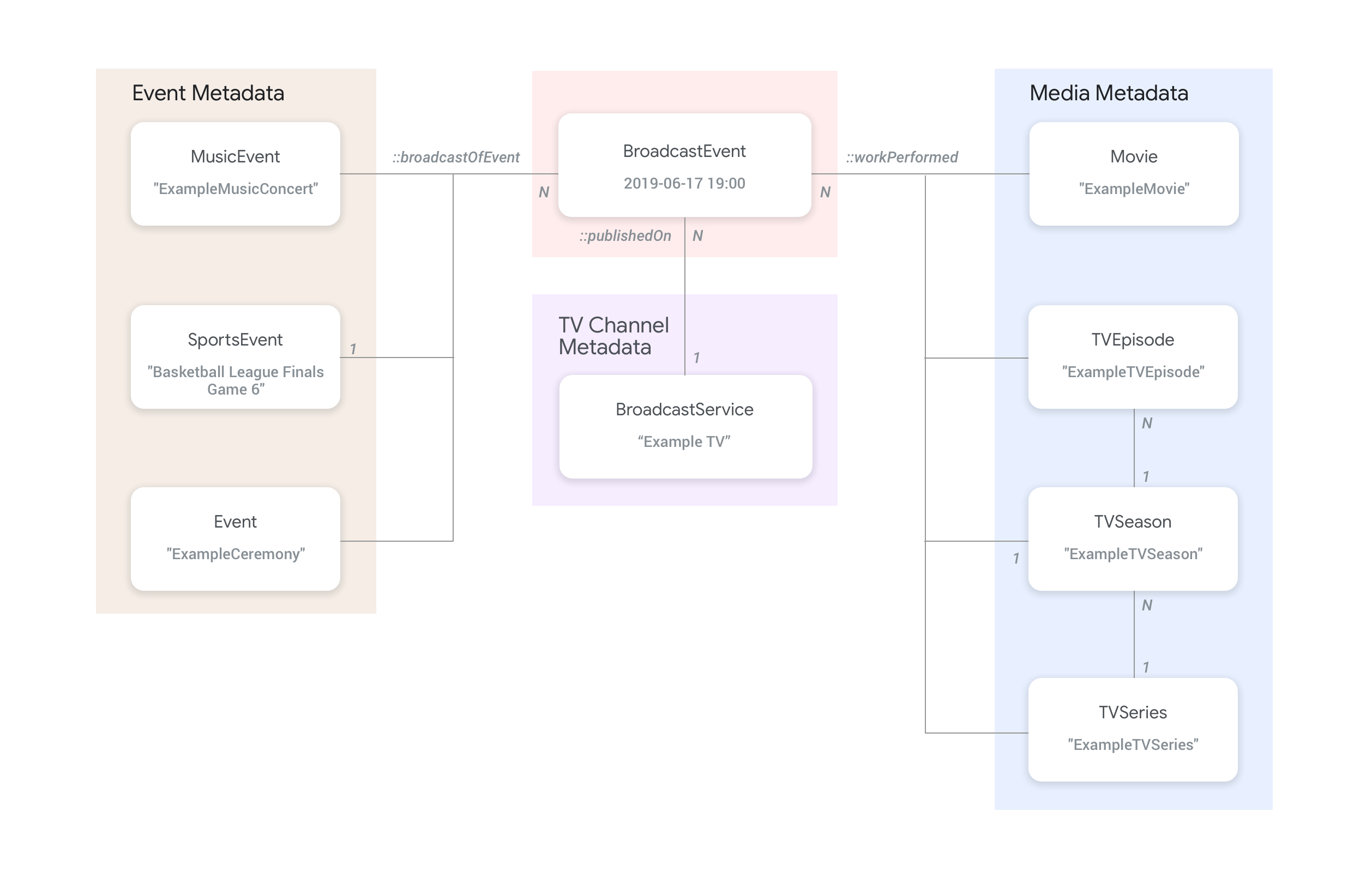
La figure ci-dessous montre comment l'entité BroadcastEvent est liée au reste des entités du flux.
- Les entités
BroadcastEvent, qui représentent le guide des programmes (EPG) d'unBroadcastService, sont connectées aux entitésBroadcastServiceà l'aide de la propriétépublishedOnde l'entitéBroadcastEvent. - Les entités
BroadcastEventpeuvent également être connectées aux entités de premier niveauTVEpisode,TVSeriesetMovieà l'aide de la propriétéworkPerformed. - Les entités
BroadcastEventpeuvent également être connectées aux entités de premier niveauSportsEventà l'aide de la propriétébroadcastOfEvent. - Pour les événements sans chaîne diffusés en streaming en ligne, les entités
BroadcastEventse connectent à l'entité représentant l'événement en direct à l'aide de la propriétéworkPerformedoubroadcastOfEvent, selon ce qui est diffusé en direct. Dans ce cas, la propriétépublishedOnn'est pas requise, car la connexion à une chaîne n'est pas nécessaire.
Exemples
La section suivante fournit des exemples et des extraits de code pour différents cas d'utilisation de l'action de visionnage.
Fournisseur de services de télévision nationale sur Internet
Organisation
Un fournisseur de services de télévision par protocole Internet fictif, ExampleTV Digital Service (Organization), fournit un service de télévision en direct sur Internet, qui contient les deux chaînes suivantes : ExampleTV-Movie (Organization) et ExampleTV-Comedy (Organization) :
{
  "@context": ["http://schema.org", {"@language": "en"}],
  "@type":"Organization",
  "@id":"http://example.com/exampletv/digital",
  "name":"ExampleTV Digital Service",
  "sameAs": "https://en.wikipedia.org/wiki/exampletv_digital_service"
},
{
  "@context": ["http://schema.org", {"@language": "en"}],
  "@type":"Organization",
  "@id":"http://example.com/exampletv/movie",
  "name":"ExampleTV Movie",
  "sameAs": "https://en.wikipedia.org/wiki/exampletv_movie"
},
{
  "@context": ["http://schema.org", {"@language": "en"}],
  "@type":"Organization",
  "@id":"http://example.com/exampletv/comedy",
  "name":"ExampleTV Comedy",
  "sameAs": "https://en.wikipedia.org/wiki/exampletv_comedy"
}
BroadcastService
Ces deux entités BroadcastService fournissent les détails des liens profonds et les exigences d'accès pour les chaînes fictives ExampleTV-Movie et ExampleTV-Comedy :
{
  "@context": ["http://schema.org", {"@language": "en"}],
  "@type":"BroadcastService",
  "@id":"https://www.example.com/exampletv/broadcast/movie",
  "name": "ExampleTV-Movie",
  "alternateName": [
    "Example Television Movie",
    "Example TV Movie"
  ],
  "description": "A fictional Internet Protocol TV movie channel.",
  "broadcastDisplayName":"ExampleTV-Movie",
  "broadcastAffiliateOf":{
    "@type":"Organization",
    "@id":"http://www.example.com/exampletv/movie"
  },
  "potentialAction": {
    "@type": "WatchAction",
    "target": {
      "@type": "EntryPoint",
      "urlTemplate": "http://www.example.com/exampletv/broadcast/movie?autoplay=true",
      "inLanguage": "en",
      "actionPlatform": [
        "http://schema.org/DesktopWebPlatform",
        "http://schema.org/MobileWebPlatform",
        "http://schema.org/AndroidPlatform",
        "http://schema.org/AndroidTVPlatform",
        "http://schema.org/IOSPlatform",
        "http://schema.googleapis.com/GoogleVideoCast"
      ]
    },
    "actionAccessibilityRequirement": {
      "@type": "ActionAccessSpecification",
      "category": "subscription",
      "requiresSubscription": {
        "@type": "MediaSubscription",
        "@id": "http://www.example.com/exampletv/basic_subscription",
        "name": "Basic subscription",
        "identifier": "example.com:basic",
        "commonTier": true
      },
      "eligibleRegion": [
        {
          "@type": "Country",
          "name": "US"
        }
      ]
    }
  },
  "identifier": [
    {
      "@type": "PropertyValue",
      "propertyID": "TMS_ID",
      "value": "12345"
    },
    {
      "@type": "PropertyValue",
      "propertyID": "_PARTNER_ID_",
      "value": "exampletv-movie-33345"
    }
  ]
},
{
  "@context": ["http://schema.org", {"@language": "en"}],
  "@type":"BroadcastService",
  "@id":"https://www.example.com/exampletv/broadcast/comedy",
  "name": "ExampleTV-Comedy",
  "alternateName": [
    "Example Television Comedy",
    "Example TV Comedy"
  ],
  "description": "A fictional Internet Protocol TV comedy channel.",
  "broadcastDisplayName":"ExampleTV-Comedy",
  "broadcastAffiliateOf":{
    "@type":"Organization",
    "@id":"http://www.example.com/exampletv/comedy"
  },
  "potentialAction": {
    "@type": "WatchAction",
    "target": {
      "@type": "EntryPoint",
      "urlTemplate": "http://www.example.com/exampletv/broadcast/comedy?autoplay=true",
      "inLanguage": "en",
      "actionPlatform": [
        "http://schema.org/DesktopWebPlatform",
        "http://schema.org/MobileWebPlatform",
        "http://schema.org/AndroidPlatform",
        "http://schema.org/AndroidTVPlatform",
        "http://schema.org/IOSPlatform",
        "http://schema.googleapis.com/GoogleVideoCast"
      ]
    },
    "actionAccessibilityRequirement": {
      "@type": "ActionAccessSpecification",
      "category": "subscription",
      "requiresSubscription": {
        "@type": "MediaSubscription",
        "@id": "http://www.example.com/exampletv/basic_subscription",
        "name": "Basic subscription",
        "identifier": "example.com:basic",
        "commonTier": true
      },
      "eligibleRegion": [
        {
          "@type": "Country",
          "name": "US"
        }
      ]
    }
  },
  "identifier": [
    {
      "@type": "PropertyValue",
      "propertyID": "TMS_ID",
      "value": "15555"
    },
    {
      "@type": "PropertyValue",
      "propertyID": "_PARTNER_ID_",
      "value": "exampletv-comedy-12323"
    }
  ]
}
CableOrSatelliteService
Ce CableOrSatelliteService décrit le fournisseur de services ExampleTV Digital Service qui a une couverture nationale :
{
  "@context": ["http://schema.org", {"@language": "en"}],
  "@type":"CableOrSatelliteService",
  "@id":"http://example.com/example_iptv/us",
  "name":"Example TV Digital Service - US",
  "provider": {
    "@type": "Organization",
    "@id": "http://example.com/exampletv/digital",
  },
  "areaServed":[
    {
      "@type":"Country",
      "name": "US",
    }
  ]
}
TelevisionChannel
Ces entités TelevisionChannel indiquent que l'IPTV ExampleTV Digital Service diffuse la programmation ExampleTV Movie sur la chaîne ExTV-Movie et la programmation ExampleTV Comedy sur la chaîne ExTV-Comedy :
{
  "@context": ["http://schema.org", {"@language": "en"}],
  "@type":"TelevisionChannel",
  "@id":"http://example.com/exampletv/extv-movie",
  "broadcastChannelId":"ExTV-Movie",
  "broadcastServiceTier":"Basic",
  "inBroadcastLineup":{
    "@type":"CableOrSatelliteService",
    "@id":"http://example.com/example_iptv/us"
  },
  "providesBroadcastService":{
    "@type":"BroadcastService",
    "@id":"https://www.example.com/exampletv/broadcast/movie"
  }
},
{
  "@context": ["http://schema.org", {"@language": "en"}],
  "@type":"TelevisionChannel",
  "@id":"http://example.com/exampletv/extv-comedy",
  "broadcastChannelId":"ExTV-Comedy",
  "broadcastServiceTier":"Basic",
  "inBroadcastLineup":{
    "@type":"CableOrSatelliteService",
    "@id":"http://example.com/example_iptv/us"
  },
  "providesBroadcastService":{
    "@type":"BroadcastService",
    "@id":"https://www.example.com/exampletv/broadcast/comedy"
  }
}
Pour obtenir d'autres exemples, consultez la section Exemples de télévision en direct.
Diffusion d'un film sur une chaîne de télévision
Un film est diffusé sur le réseau de télévision Example TV (BroadcastService) entre 17h et 19h le 12 juillet 2019.
BroadcastEvent
{
  "@context": ["http://schema.org", {"@language": "en"}],
  "@type": "BroadcastEvent",
  "@id": "http://example.com/live/movie/new_release",
  "name": "My Favorite Movie",
  "description": "John Doe spent years perfecting his survival skills in a tropical jungle.",
  "startDate": "2019-07-12T17:00-08:00",
  "endDate": "2019-07-12T19:00-08:00",
  "videoFormat": "HD",
  "isLiveBroadcast": "False",
  "publishedOn": {
    "@type": "BroadcastService",
    "@id": "http://example.com/stations/example_tv"
  },
  "workPerformed": {
    "@type": "Movie",
    "@id": "http://www.example.com/my_favorite_movie"
  }
}
BroadcastService
{
  "@context": ["http://schema.org", {"@language": "en"}],
  "@type":"BroadcastService",
  "@id":"http://example.com/stations/example_tv",
  "name":"EXAMPLE-TV",
  "broadcastDisplayName":"ABCD",
  "callSign": "EXA-TV",
  "videoFormat":"SD",
  "broadcastTimezone":"America/Los_Angeles",
  "broadcastAffiliateOf":{
    "@type":"Organization",
    "@id":"http://example.com/networks/abcd-network",
  }
  "identifier": [
   {
     "@type": "PropertyValue",
     "propertyID": "TMS_ID",
     "value": "12258"
   },
   {
     "@type": "PropertyValue",
     "propertyID": "_PARTNER_ID_",
     "value": "exampletv-123456"
   }
  ],
  "potentialAction": {
    "@type": "WatchAction",
    "target": {
      "@type": "EntryPoint",
      "urlTemplate": "http://example.com/livestream",
      "actionPlatform": [
        "http://schema.org/DesktopWebPlatform",
        "http://schema.org/MobileWebPlatform",
        "http://schema.org/AndroidPlatform",
        "http://schema.org/IOSPlatform",
        "http://schema.googleapis.com/GoogleVideoCast",
        "http://schema.org/AndroidTVPlatform"
      ]
    },
    "actionAccessibilityRequirement": {
      "@type": "ActionAccessSpecification",
      "category": "externalsubscription",
      "availabilityStarts": "2018-07-21T10:35:29Z",
      "availabilityEnds": "2019-10-21T10:35:29Z",
      "requiresSubscription": {
        "@type": "MediaSubscription",
        "@id": "http://example.com/subscription",
        "name": "ABCD",
        "sameAs": "http://example.com/subscription",
        "authenticator": {
          "@type": "Organization",
          "name": "TVE"
        }
      },
      "eligibleRegion": [
        {
          "@type": "Country",
          "name": "US"
        }
      ]
    }
  }
}
Film
{
  "@context": ["http://schema.org", {"@language": "en"}],
  "@type": "Movie",
  "@id": "http://www.example.com/my_favorite_movie",
  "url": "http://www.example.com/my_favorite_movie",
  "name": "My Favorite Movie",
  "sameAs": "https://en.wikipedia.org/wiki/my_favorite_movie",
  "releasedEvent": {
    "@type": "PublicationEvent",
    "startDate": "2008-01-20",
    "location": {
      "@type": "Country",
      "name": "US"
    }
  },
  "description": "John Doe spent years perfecting his survival skills in a tropical jungle.",
  "actor": [
    {
      "@type": "Person",
      "name": "John Doe",
      "sameAs": "https://en.wikipedia.org/wiki/John_Doe"
    },
    {
      "@type": "Person",
      "name": "Jane Doe",
      "sameAs": "https://en.wikipedia.org/wiki/Jane_Doe"
    }
  ],
  "identifier": [
    {
      "@type": "PropertyValue",
      "propertyID": "IMDB_ID",
      "value":  "tt0123456"
    }
  ]
}
Pour obtenir d'autres exemples, consultez la section Exemples d'événements de télévision en direct.
Match sportif en direct diffusé en streaming en ligne
Événement de diffusion
{
  "@context": ["http://schema.org", {"@language": "en"}],
  "@type": "BroadcastEvent",
  "@id": "http://example.com/live_eevent/basketball/professional/final_game_6",
  "name": "2019 Professional Basketball Finals, Game 6: Team A at Team B",
  "description": "Game 6 of the 2019 Professional Basketball Finals. Team A leads the series 3-2 against Team B.",
  "startDate": "2018-09-16T10:00-08:00",
  "endDate": "2018-09-16T13:00-08:00",
  "videoFormat": "HD",
  "isLiveBroadcast": "False",
  "potentialAction": {
    "@type": "WatchAction",
    "target": {
      "@type": "EntryPoint",
      "urlTemplate": "http://www.example.com/pbl_semis_game?autoplay=true",
      "inLanguage": "en",
      "actionPlatform": [
        "http://schema.org/DesktopWebPlatform",
        "http://schema.org/MobileWebPlatform",
        "http://schema.org/AndroidPlatform",
        "http://schema.org/AndroidTVPlatform",
        "http://schema.org/IOSPlatform",
        "http://schema.googleapis.com/GoogleVideoCast"
      ]
    },
    "actionAccessibilityRequirement": {
      "@type": "ActionAccessSpecification",
      "category": "subscription",
      "availabilityStarts": "2018-09-16T10:00-08:00",
      "availabilityEnds": "2018-09-16T10:00-08:00",
      "requiresSubscription": {
        "@type": "MediaSubscription",
        "name": "Example Package",
        "commonTier": true,
        "@id": "http://www.example.com/example_package"
      },
      "eligibleRegion": [
        {
          "@type": "Country",
          "name": "US"
        }
      ]
    }
  },
  "broadcastOfEvent": {
    "@type": "SportsEvent",
    "@id": "http://example.com/basketball/professional/final_game_6"
  }
}
Événement sportif
{
  "@context": ["http://schema.org", {"@language": "en"}],
  "@type":"SportsEvent",
  "@id": "http://example.com/basketball/professional/final_game_6",
  "name":"2019 Professional Basketball Finals, Game 6: Team A vs Team B",
  "sport":"https://en.wikipedia.org/wiki/Basketball",
  "description": {
      "@language": "en",
      "@value": "Game 6 of the 2019 Professional Basketball Finals. Team A leads the series 3-2 against Team B."
    },
  "startDate": "2019-09-16T10:00-08:00",
  "endDate": "2019-09-16T13:00-08:00",
  "homeTeam":{
    "@type":"SportsTeam",
    "name":"Team B",
    "sport":"https://en.wikipedia.org/wiki/Basketball",
    "parentOrganization":{
      "@type":"SportsOrganization",
      "name":"Professional Basketball League",
      "sameAs":"http://www.example.com/professional_basketball_league"
    },
    "athlete":[
      {
        "@type":"Person",
        "name":"John doe"
      }
    ]
  },
  "awayTeam":{
    "@type":"SportsTeam",
    "name":"Team A",
    "sport":"https://en.wikipedia.org/wiki/Basketball",
    "athlete":[
      {
        "@type":"Person",
        "name":"Jane Doe"
      }
    ]
  },
  "location":{
    "@type":"Place",
    "name":"Example Stadium",
    "address":{
      "@type":"PostalAddress",
      "streetAddress":"1600 Amphitheatre Pkwy",
      "addressLocality":"Mountain View",
      "addressRegion":"CA",
      "postalCode":"94043",
      "addressCountry":"US"
    }
  },
  "identifier": [
    {
      "@type": "PropertyValue",
      "propertyID": "TMS_ID",
      "value":  "TMS ID of this game"
    }
  ]
}
Pour obtenir d'autres exemples, consultez la section Exemples de sports.