
Một số loại thực thể yêu cầu bạn thiết lập mối quan hệ giữa nội dung trong nguồn cấp dữ liệu. Thông tin này giúp Google hiển thị thứ tự và cấu trúc nội dung phù hợp cho người dùng, đồng thời xác định nội dung chính xác khi cụm từ tìm kiếm của người dùng không rõ ràng.
Chọn loại nội dung mà bạn cung cấp:
Chương trình truyền hình
Nếu là nhà cung cấp chương trình truyền hình, bạn cần thêm các loại thực thể TVEpisode, TVSeason và TVSeries vào nguồn cấp dữ liệu danh mục nội dung nghe nhìn. Bạn có thể tìm thấy định nghĩa của các thực thể này trong phần Tìm hiểu các loại thực thể có sẵn bằng cách lọc theo các loại này.
Xác định mối quan hệ
Đảm bảo rằng bạn thiết lập các mối quan hệ sau đây giữa các đối tượng:
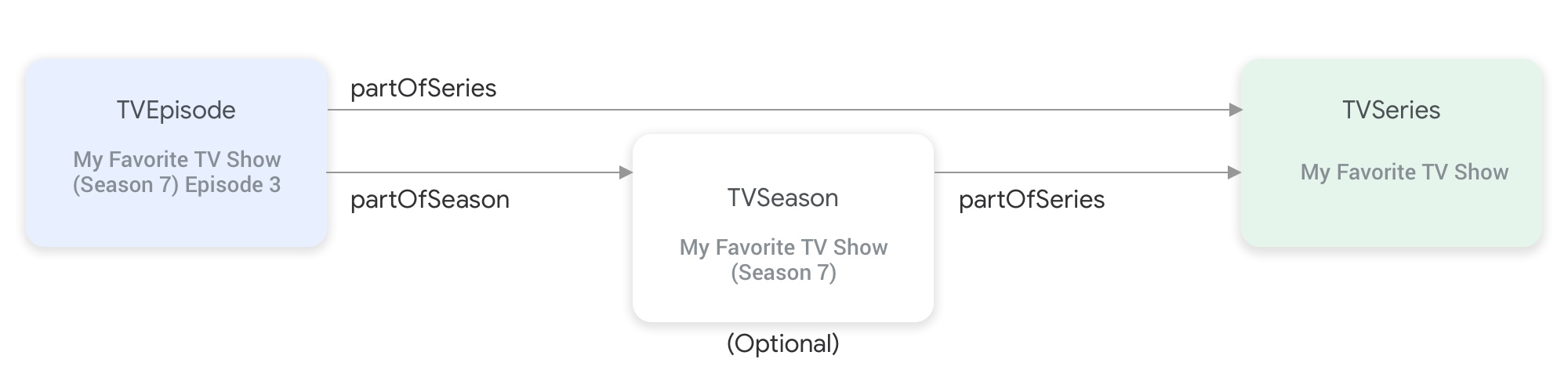
partOfSeries và partOfSeason kết nối các loại thực thể chương trình truyền hình với nhau.Thực thể
TVEpisodeyêu cầu bạn cung cấp thuộc tínhpartOfSeries, chỉ định@idvànamecủa thực thểTVSeriestrong tập."partOfSeries": { "@type": "TVSeries", "@id": "http://www.example.com/my_favorite_tv_show", "name": "My Favorite TV Show", },Nếu nguồn cấp dữ liệu của bạn chứa các phần phim truyền hình, thì thực thể
TVSeasoncũng yêu cầu bạn chỉ định thực thểTVSeriestrong thuộc tínhpartOfSeries.Thực thể
TVEpisodeyêu cầu bạn cung cấp thuộc tínhpartOfSeason, chỉ định@idvàseasonNumbercủa thực thểTVSeasontrong tập."partOfSeason": { "@type": "TVSeason", "@id": "http://www.example.com/my_favorite_tv_show/s7", "seasonNumber": 7 },Nếu một thực thể
TVEpisodekhông có thực thểTVSeasontương ứng trong nguồn cấp dữ liệu, hãy thực hiện các bước sau để cung cấp các thuộc tínhpartOfSeason.@idvàpartOfSeason.seasonNumbercho thực thểTVEpisode:- Lấy
partofSeries.@idcủa video đó và thêm một trường truy vấn giữ chỗ (ví dụ: ?season1) để tạo mộtpartOfSeason.@idduy nhất (ví dụ: http://www.example.com/my_favorite_tv_show?season1). - Đặt
partOfSeason.seasonNumberthành 1.
partOfSeason.@idhiện có cho thực thểTVSeasontương ứng hoặc thay thế phần giữ chỗpartOfSeason.@idnày bằng@idthực tế của thực thểTVSeason.- Lấy
Ví dụ:
TVSeries
Chương trình truyền hình yêu thích của tôi
{
"@context": ["http://schema.org", {"@language": "en"}],
"@type": "TVSeries",
"@id": "http://www.example.com/my_favorite_tv_show",
"url": "http://www.example.com/my_favorite_tv_show",
"name": "My Favorite TV Show",
"potentialAction":{ … },
...
}
TVSeason
Chương trình truyền hình yêu thích của tôi (phần 7)
{
"@context": ["http://schema.org", {"@language": "en"}],
"@type": "TVSeason",
"@id": "http://www.example.com/my_favorite_tv_show/s7",
"url": "http://www.example.com/my_favorite_tv_show/s7",
"name": "My Favorite TV Show, Season 7",
"seasonNumber": 7,
"partOfSeries": {
  "@type": "TVSeries",
  "@id": "http://www.example.com/my_favorite_tv_show",
  "name": "My Favorite TV Show",
},
"potentialAction":{ … },
...
}
TVEpisode
Tập 3 của Chương trình truyền hình yêu thích của tôi (phần 7)
{
"@context": ["http://schema.org", {"@language": "en"}],
"@type": "TVEpisode",
"@id": "http://www.example.com/my_favorite_tv_show/s7/e3",
"url": "http://www.example.com/my_favorite_tv_show/s7/e3",
"name": "John Doe returns at night",
"episodeNumber": 3,
"partOfSeason": {
  "@type": "TVSeason",
  "@id": "http://www.example.com/my_favorite_tv_show/s7",
  "seasonNumber": 7
},
"partOfSeries": {
"@type": "TVSeries",
"@id": "http://www.example.com/my_favorite_tv_show",
"name": "My Favorite TV Show",
},
"potentialAction":{ … },
...
}
Truyền hình trực tuyến
Nếu là nhà cung cấp truyền hình trực tuyến, bạn cần thêm các loại thực thể Organization, BroadcastService, CableOrSatelliteService và TelevisionChannel vào nguồn cấp dữ liệu danh mục nội dung nghe nhìn để thể hiện danh sách kênh của bạn. Bạn cũng có thể cần cung cấp các thực thể BroadcastEvent, TVSeries, TVEpisode, Movie và SportsEvent để biểu thị EPG (hướng dẫn chương trình điện tử) được liên kết. Bạn có thể tìm thấy định nghĩa của các thực thể này trong phần Tìm hiểu các loại thực thể có sẵn bằng cách lọc theo các loại này. Để biết nội dung giải thích chi tiết hơn, bạn có thể truy cập vào trang Kênh truyền hình trực tuyến.
Mối quan hệ giữa các thực thể đại diện cho kênh truyền hình trực tiếp
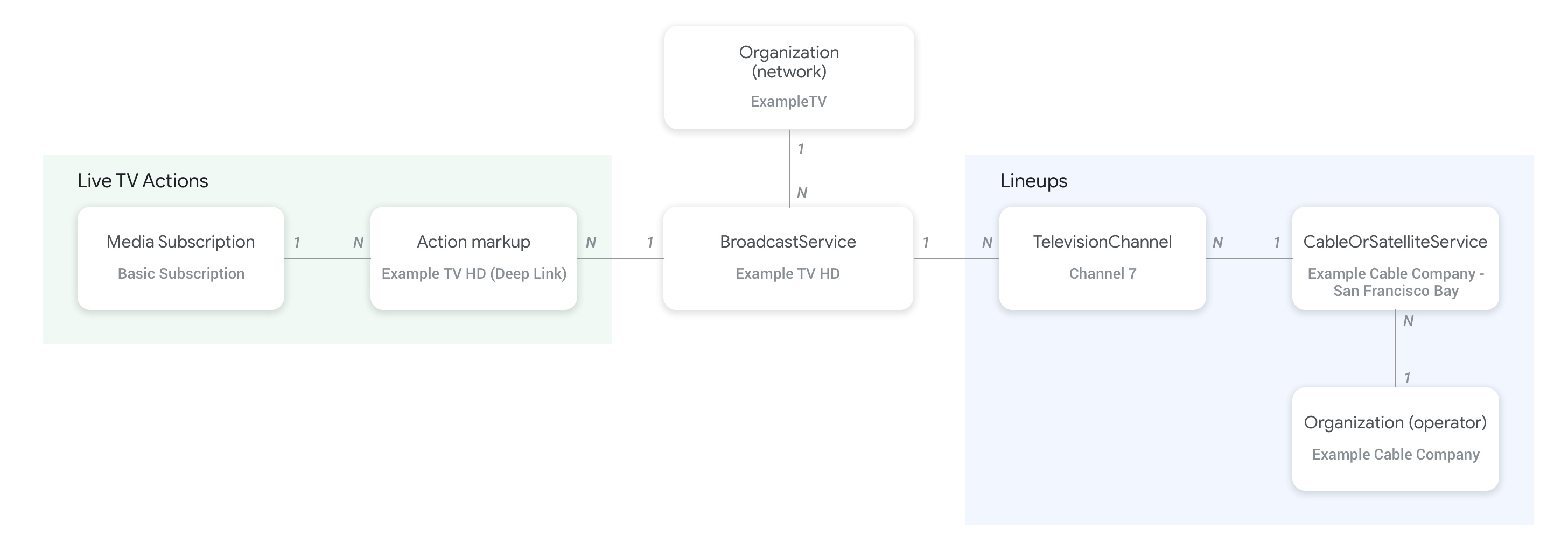
Hình bên dưới cho thấy mối quan hệ giữa các thực thể Organization, BroadcastService, CableOrSatelliteService và TelevisionChannel:
- Thực thể
Organization(nhà điều hành) đại diện cho nhà cung cấp nguồn cấp dữ liệu và cả tổ chức mẹ của dịch vụCableOrSatelliteServiceđược kết nối bằng cách sử dụng thuộc tínhprovidertrên thực thểCableOrSatelliteService. - Các thực thể
Organizationtương ứng với các thực thểBroadcastServiceđược kết nối bằng thuộc tínhbroadcastAffiliateOftrên thực thểBroadcastService. - Các thực thể
TelevisionChannelkết nối với thực thểCableOrSatelliteService(đại diện cho nhóm kênh nổi tiếng mà các thực thể đó thuộc về) bằng cách sử dụng thuộc tínhinBroadcastLineup. - Các thực thể
TelevisionChannelkết nối với thực thểBroadcastService(chương trình mà kênh này cung cấp) bằng cách sử dụng thuộc tínhprovidesBroadcastService.
Bạn nên xem trang khái niệm về các kênh truyền hình trực tiếp để biết các ví dụ cụ thể về cách thiết lập mối quan hệ giữa các thực thể BroadcastService và Organization.
Mối quan hệ giữa các kênh và hướng dẫn chương trình (EPG)
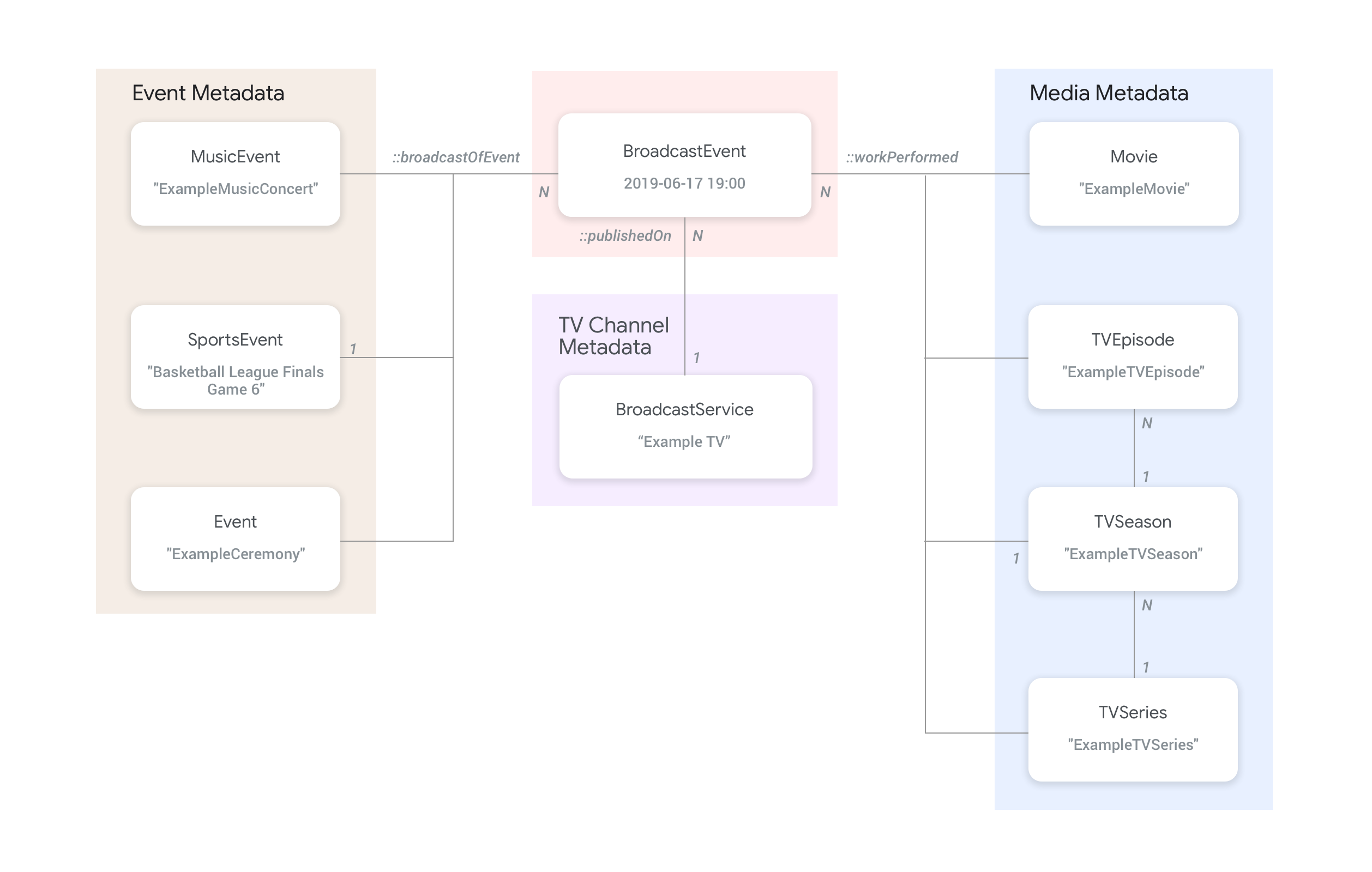
Hình dưới đây cho thấy cách thực thể BroadcastEvent liên kết với các thực thể còn lại trong nguồn cấp dữ liệu.
- Các thực thể
BroadcastEvent(đại diện cho hướng dẫn chương trình (EPG) của mộtBroadcastService) được kết nối với các thực thểBroadcastServicebằng cách sử dụng thuộc tínhpublishedOntrên thực thểBroadcastEvent. - Bạn cũng có thể kết nối các thực thể
BroadcastEventvới các thực thểTVEpisode,TVSeries,Moviecấp cao nhất bằng cách sử dụng thuộc tínhworkPerformed. - Bạn cũng có thể kết nối các thực thể
BroadcastEventvới các thực thểSportsEventcấp cao nhất bằng thuộc tínhbroadcastOfEvent. - Đối với những sự kiện không có kênh phát trực tuyến trên mạng, các thực thể
BroadcastEventkết nối với thực thể đại diện cho sự kiện phát trực tiếp bằng cách sử dụng thuộc tínhworkPerformedhoặcbroadcastOfEvent, tuỳ thuộc vào nội dung đang được phát trực tiếp. Trong những trường hợp như vậy, bạn không bắt buộc phải có thuộc tínhpublishedOnvì không cần kết nối với kênh.
Ví dụ
Phần sau đây cung cấp ví dụ và đoạn mã cho nhiều trường hợp sử dụng Watch Action.
Nhà cung cấp dịch vụ truyền hình quốc gia trên Internet
Tổ chức
ExampleTV Digital Service (Organization) là một nhà cung cấp dịch vụ truyền hình qua giao thức Internet (IPTV) hư cấu. Nhà cung cấp này cung cấp dịch vụ truyền hình trực tiếp trên Internet, bao gồm 2 kênh sau: ExampleTV-Movie (Organization) và ExampleTV-Comedy (Organization):
{
  "@context": ["http://schema.org", {"@language": "en"}],
  "@type":"Organization",
  "@id":"http://example.com/exampletv/digital",
  "name":"ExampleTV Digital Service",
  "sameAs": "https://en.wikipedia.org/wiki/exampletv_digital_service"
},
{
  "@context": ["http://schema.org", {"@language": "en"}],
  "@type":"Organization",
  "@id":"http://example.com/exampletv/movie",
  "name":"ExampleTV Movie",
  "sameAs": "https://en.wikipedia.org/wiki/exampletv_movie"
},
{
  "@context": ["http://schema.org", {"@language": "en"}],
  "@type":"Organization",
  "@id":"http://example.com/exampletv/comedy",
  "name":"ExampleTV Comedy",
  "sameAs": "https://en.wikipedia.org/wiki/exampletv_comedy"
}
BroadcastService
Hai thực thể BroadcastService này cung cấp thông tin chi tiết về đường liên kết sâu và yêu cầu truy cập đối với các kênh giả tưởng ExampleTV-Movie và ExampleTV-Comedy:
{
  "@context": ["http://schema.org", {"@language": "en"}],
  "@type":"BroadcastService",
  "@id":"https://www.example.com/exampletv/broadcast/movie",
  "name": "ExampleTV-Movie",
  "alternateName": [
    "Example Television Movie",
    "Example TV Movie"
  ],
  "description": "A fictional Internet Protocol TV movie channel.",
  "broadcastDisplayName":"ExampleTV-Movie",
  "broadcastAffiliateOf":{
    "@type":"Organization",
    "@id":"http://www.example.com/exampletv/movie"
  },
  "potentialAction": {
    "@type": "WatchAction",
    "target": {
      "@type": "EntryPoint",
      "urlTemplate": "http://www.example.com/exampletv/broadcast/movie?autoplay=true",
      "inLanguage": "en",
      "actionPlatform": [
        "http://schema.org/DesktopWebPlatform",
        "http://schema.org/MobileWebPlatform",
        "http://schema.org/AndroidPlatform",
        "http://schema.org/AndroidTVPlatform",
        "http://schema.org/IOSPlatform",
        "http://schema.googleapis.com/GoogleVideoCast"
      ]
    },
    "actionAccessibilityRequirement": {
      "@type": "ActionAccessSpecification",
      "category": "subscription",
      "requiresSubscription": {
        "@type": "MediaSubscription",
        "@id": "http://www.example.com/exampletv/basic_subscription",
        "name": "Basic subscription",
        "identifier": "example.com:basic",
        "commonTier": true
      },
      "eligibleRegion": [
        {
          "@type": "Country",
          "name": "US"
        }
      ]
    }
  },
  "identifier": [
    {
      "@type": "PropertyValue",
      "propertyID": "TMS_ID",
      "value": "12345"
    },
    {
      "@type": "PropertyValue",
      "propertyID": "_PARTNER_ID_",
      "value": "exampletv-movie-33345"
    }
  ]
},
{
  "@context": ["http://schema.org", {"@language": "en"}],
  "@type":"BroadcastService",
  "@id":"https://www.example.com/exampletv/broadcast/comedy",
  "name": "ExampleTV-Comedy",
  "alternateName": [
    "Example Television Comedy",
    "Example TV Comedy"
  ],
  "description": "A fictional Internet Protocol TV comedy channel.",
  "broadcastDisplayName":"ExampleTV-Comedy",
  "broadcastAffiliateOf":{
    "@type":"Organization",
    "@id":"http://www.example.com/exampletv/comedy"
  },
  "potentialAction": {
    "@type": "WatchAction",
    "target": {
      "@type": "EntryPoint",
      "urlTemplate": "http://www.example.com/exampletv/broadcast/comedy?autoplay=true",
      "inLanguage": "en",
      "actionPlatform": [
        "http://schema.org/DesktopWebPlatform",
        "http://schema.org/MobileWebPlatform",
        "http://schema.org/AndroidPlatform",
        "http://schema.org/AndroidTVPlatform",
        "http://schema.org/IOSPlatform",
        "http://schema.googleapis.com/GoogleVideoCast"
      ]
    },
    "actionAccessibilityRequirement": {
      "@type": "ActionAccessSpecification",
      "category": "subscription",
      "requiresSubscription": {
        "@type": "MediaSubscription",
        "@id": "http://www.example.com/exampletv/basic_subscription",
        "name": "Basic subscription",
        "identifier": "example.com:basic",
        "commonTier": true
      },
      "eligibleRegion": [
        {
          "@type": "Country",
          "name": "US"
        }
      ]
    }
  },
  "identifier": [
    {
      "@type": "PropertyValue",
      "propertyID": "TMS_ID",
      "value": "15555"
    },
    {
      "@type": "PropertyValue",
      "propertyID": "_PARTNER_ID_",
      "value": "exampletv-comedy-12323"
    }
  ]
}
CableOrSatelliteService
CableOrSatelliteService này mô tả nhà cung cấp dịch vụ ExampleTV Digital Service có phạm vi cung cấp trên toàn quốc:
{
  "@context": ["http://schema.org", {"@language": "en"}],
  "@type":"CableOrSatelliteService",
  "@id":"http://example.com/example_iptv/us",
  "name":"Example TV Digital Service - US",
  "provider": {
    "@type": "Organization",
    "@id": "http://example.com/exampletv/digital",
  },
  "areaServed":[
    {
      "@type":"Country",
      "name": "US",
    }
  ]
}
TelevisionChannel
Các thực thể TelevisionChannel này cho biết dịch vụ IPTV ExampleTV Digital Service có chương trình ExampleTV Movie trên kênh ExTV-Movie và chương trình ExampleTV Comedy trên kênh ExTV-Comedy:
{
  "@context": ["http://schema.org", {"@language": "en"}],
  "@type":"TelevisionChannel",
  "@id":"http://example.com/exampletv/extv-movie",
  "broadcastChannelId":"ExTV-Movie",
  "broadcastServiceTier":"Basic",
  "inBroadcastLineup":{
    "@type":"CableOrSatelliteService",
    "@id":"http://example.com/example_iptv/us"
  },
  "providesBroadcastService":{
    "@type":"BroadcastService",
    "@id":"https://www.example.com/exampletv/broadcast/movie"
  }
},
{
  "@context": ["http://schema.org", {"@language": "en"}],
  "@type":"TelevisionChannel",
  "@id":"http://example.com/exampletv/extv-comedy",
  "broadcastChannelId":"ExTV-Comedy",
  "broadcastServiceTier":"Basic",
  "inBroadcastLineup":{
    "@type":"CableOrSatelliteService",
    "@id":"http://example.com/example_iptv/us"
  },
  "providesBroadcastService":{
    "@type":"BroadcastService",
    "@id":"https://www.example.com/exampletv/broadcast/comedy"
  }
}
Hãy xem phần Ví dụ về truyền hình trực tiếp để biết thêm ví dụ.
Phát sóng một bộ phim trên kênh truyền hình
Một bộ phim được phát sóng trên mạng truyền hình Example TV (BroadcastService) từ 5 giờ chiều đến 7 giờ tối ngày 12 tháng 7 năm 2019.
BroadcastEvent
{
  "@context": ["http://schema.org", {"@language": "en"}],
  "@type": "BroadcastEvent",
  "@id": "http://example.com/live/movie/new_release",
  "name": "My Favorite Movie",
  "description": "John Doe spent years perfecting his survival skills in a tropical jungle.",
  "startDate": "2019-07-12T17:00-08:00",
  "endDate": "2019-07-12T19:00-08:00",
  "videoFormat": "HD",
  "isLiveBroadcast": "False",
  "publishedOn": {
    "@type": "BroadcastService",
    "@id": "http://example.com/stations/example_tv"
  },
  "workPerformed": {
    "@type": "Movie",
    "@id": "http://www.example.com/my_favorite_movie"
  }
}
BroadcastService
{
  "@context": ["http://schema.org", {"@language": "en"}],
  "@type":"BroadcastService",
  "@id":"http://example.com/stations/example_tv",
  "name":"EXAMPLE-TV",
  "broadcastDisplayName":"ABCD",
  "callSign": "EXA-TV",
  "videoFormat":"SD",
  "broadcastTimezone":"America/Los_Angeles",
  "broadcastAffiliateOf":{
    "@type":"Organization",
    "@id":"http://example.com/networks/abcd-network",
  }
  "identifier": [
   {
     "@type": "PropertyValue",
     "propertyID": "TMS_ID",
     "value": "12258"
   },
   {
     "@type": "PropertyValue",
     "propertyID": "_PARTNER_ID_",
     "value": "exampletv-123456"
   }
  ],
  "potentialAction": {
    "@type": "WatchAction",
    "target": {
      "@type": "EntryPoint",
      "urlTemplate": "http://example.com/livestream",
      "actionPlatform": [
        "http://schema.org/DesktopWebPlatform",
        "http://schema.org/MobileWebPlatform",
        "http://schema.org/AndroidPlatform",
        "http://schema.org/IOSPlatform",
        "http://schema.googleapis.com/GoogleVideoCast",
        "http://schema.org/AndroidTVPlatform"
      ]
    },
    "actionAccessibilityRequirement": {
      "@type": "ActionAccessSpecification",
      "category": "externalsubscription",
      "availabilityStarts": "2018-07-21T10:35:29Z",
      "availabilityEnds": "2019-10-21T10:35:29Z",
      "requiresSubscription": {
        "@type": "MediaSubscription",
        "@id": "http://example.com/subscription",
        "name": "ABCD",
        "sameAs": "http://example.com/subscription",
        "authenticator": {
          "@type": "Organization",
          "name": "TVE"
        }
      },
      "eligibleRegion": [
        {
          "@type": "Country",
          "name": "US"
        }
      ]
    }
  }
}
Phim
{
  "@context": ["http://schema.org", {"@language": "en"}],
  "@type": "Movie",
  "@id": "http://www.example.com/my_favorite_movie",
  "url": "http://www.example.com/my_favorite_movie",
  "name": "My Favorite Movie",
  "sameAs": "https://en.wikipedia.org/wiki/my_favorite_movie",
  "releasedEvent": {
    "@type": "PublicationEvent",
    "startDate": "2008-01-20",
    "location": {
      "@type": "Country",
      "name": "US"
    }
  },
  "description": "John Doe spent years perfecting his survival skills in a tropical jungle.",
  "actor": [
    {
      "@type": "Person",
      "name": "John Doe",
      "sameAs": "https://en.wikipedia.org/wiki/John_Doe"
    },
    {
      "@type": "Person",
      "name": "Jane Doe",
      "sameAs": "https://en.wikipedia.org/wiki/Jane_Doe"
    }
  ],
  "identifier": [
    {
      "@type": "PropertyValue",
      "propertyID": "IMDB_ID",
      "value":  "tt0123456"
    }
  ]
}
Hãy xem phần Ví dụ về sự kiện truyền hình trực tiếp để xem thêm ví dụ.
Một trận đấu thể thao trực tiếp được phát trực tuyến
Sự kiện phát sóng
{
  "@context": ["http://schema.org", {"@language": "en"}],
  "@type": "BroadcastEvent",
  "@id": "http://example.com/live_eevent/basketball/professional/final_game_6",
  "name": "2019 Professional Basketball Finals, Game 6: Team A at Team B",
  "description": "Game 6 of the 2019 Professional Basketball Finals. Team A leads the series 3-2 against Team B.",
  "startDate": "2018-09-16T10:00-08:00",
  "endDate": "2018-09-16T13:00-08:00",
  "videoFormat": "HD",
  "isLiveBroadcast": "False",
  "potentialAction": {
    "@type": "WatchAction",
    "target": {
      "@type": "EntryPoint",
      "urlTemplate": "http://www.example.com/pbl_semis_game?autoplay=true",
      "inLanguage": "en",
      "actionPlatform": [
        "http://schema.org/DesktopWebPlatform",
        "http://schema.org/MobileWebPlatform",
        "http://schema.org/AndroidPlatform",
        "http://schema.org/AndroidTVPlatform",
        "http://schema.org/IOSPlatform",
        "http://schema.googleapis.com/GoogleVideoCast"
      ]
    },
    "actionAccessibilityRequirement": {
      "@type": "ActionAccessSpecification",
      "category": "subscription",
      "availabilityStarts": "2018-09-16T10:00-08:00",
      "availabilityEnds": "2018-09-16T10:00-08:00",
      "requiresSubscription": {
        "@type": "MediaSubscription",
        "name": "Example Package",
        "commonTier": true,
        "@id": "http://www.example.com/example_package"
      },
      "eligibleRegion": [
        {
          "@type": "Country",
          "name": "US"
        }
      ]
    }
  },
  "broadcastOfEvent": {
    "@type": "SportsEvent",
    "@id": "http://example.com/basketball/professional/final_game_6"
  }
}
Sự kiện thể thao
{
  "@context": ["http://schema.org", {"@language": "en"}],
  "@type":"SportsEvent",
  "@id": "http://example.com/basketball/professional/final_game_6",
  "name":"2019 Professional Basketball Finals, Game 6: Team A vs Team B",
  "sport":"https://en.wikipedia.org/wiki/Basketball",
  "description": {
      "@language": "en",
      "@value": "Game 6 of the 2019 Professional Basketball Finals. Team A leads the series 3-2 against Team B."
    },
  "startDate": "2019-09-16T10:00-08:00",
  "endDate": "2019-09-16T13:00-08:00",
  "homeTeam":{
    "@type":"SportsTeam",
    "name":"Team B",
    "sport":"https://en.wikipedia.org/wiki/Basketball",
    "parentOrganization":{
      "@type":"SportsOrganization",
      "name":"Professional Basketball League",
      "sameAs":"http://www.example.com/professional_basketball_league"
    },
    "athlete":[
      {
        "@type":"Person",
        "name":"John doe"
      }
    ]
  },
  "awayTeam":{
    "@type":"SportsTeam",
    "name":"Team A",
    "sport":"https://en.wikipedia.org/wiki/Basketball",
    "athlete":[
      {
        "@type":"Person",
        "name":"Jane Doe"
      }
    ]
  },
  "location":{
    "@type":"Place",
    "name":"Example Stadium",
    "address":{
      "@type":"PostalAddress",
      "streetAddress":"1600 Amphitheatre Pkwy",
      "addressLocality":"Mountain View",
      "addressRegion":"CA",
      "postalCode":"94043",
      "addressCountry":"US"
    }
  },
  "identifier": [
    {
      "@type": "PropertyValue",
      "propertyID": "TMS_ID",
      "value":  "TMS ID of this game"
    }
  ]
}
Hãy xem phần Ví dụ về thể thao để biết thêm ví dụ.