
এই পৃষ্ঠাটি কাস্টম সার্চ JSON API-এর XML সংস্করণকে নির্দেশ করে, যা শুধুমাত্র গুগল সাইট সার্চ গ্রাহকদের জন্য উপলব্ধ।
- সংক্ষিপ্ত বিবরণ
- প্রোগ্রামেবল সার্চ ইঞ্জিন অনুরোধ ফর্ম্যাট
- এক্সএমএল ফলাফল
সংক্ষিপ্ত বিবরণ
গুগল ওয়েবসার্চ পরিষেবা গুগল সাইট সার্চ গ্রাহকদের তাদের নিজস্ব ওয়েবসাইটে গুগল অনুসন্ধানের ফলাফল প্রদর্শন করতে সক্ষম করে। ওয়েবসার্চ পরিষেবাটি অনুসন্ধানের ফলাফল পরিবেশন করার জন্য একটি সহজ HTTP-ভিত্তিক প্রোটোকল ব্যবহার করে। অনুসন্ধান প্রশাসকদের অনুসন্ধানের ফলাফলের জন্য অনুরোধ করার এবং সেই ফলাফলগুলো অন্তিম ব্যবহারকারীর কাছে উপস্থাপন করার পদ্ধতির উপর সম্পূর্ণ নিয়ন্ত্রণ থাকে। এই নথিতে গুগল অনুসন্ধানের অনুরোধ এবং ফলাফলের ফরম্যাটের প্রযুক্তিগত বিবরণ বর্ণনা করা হয়েছে।
গুগল ওয়েবসার্চের ফলাফল পেতে, আপনার অ্যাপ্লিকেশনটি গুগলকে একটি সাধারণ HTTP অনুরোধ পাঠায়। এরপর গুগল XML ফরম্যাটে অনুসন্ধানের ফলাফল ফেরত দেয়। XML-ফরম্যাটের ফলাফল আপনাকে ফলাফল প্রদর্শনের পদ্ধতি নিজের মতো করে সাজিয়ে নেওয়ার সুযোগ দেয়।
ওয়েব অনুসন্ধান অনুরোধের বিন্যাস
- অনুরোধের সংক্ষিপ্ত বিবরণ
- অনুসন্ধানের শর্তাবলী
- অনুরোধের পরামিতি
- নমুনা ওয়েবসার্চ কোয়েরি
- ওয়েবসার্চ কোয়েরি প্যারামিটার সংজ্ঞা
- নমুনা চিত্র কোয়েরি
- ইমেজ সার্চ কোয়েরি প্যারামিটারের সংজ্ঞা
- উন্নত অনুসন্ধান
- উন্নত অনুসন্ধান কোয়েরি প্যারামিটার
- বিশেষ অনুসন্ধানের শর্তাবলী
- অনুরোধের সীমা
অনুরোধের সংক্ষিপ্ত বিবরণ
গুগল সার্চ রিকোয়েস্ট হলো একটি স্ট্যান্ডার্ড HTTP GET কমান্ড। এতে আপনার কোয়েরির সাথে প্রাসঙ্গিক কিছু প্যারামিটার অন্তর্ভুক্ত থাকে। এই প্যারামিটারগুলো রিকোয়েস্ট URL-এ name=value জোড়া হিসেবে থাকে, যা অ্যামপারস্যান্ড (&) অক্ষর দ্বারা পৃথক করা থাকে। প্যারামিটারগুলোর মধ্যে সার্চ কোয়েরির মতো ডেটা এবং একটি অনন্য ইঞ্জিন আইডি ( cx ) থাকে, যা HTTP রিকোয়েস্টকারী ইঞ্জিনকে শনাক্ত করে। WebSearch বা Image Search সার্ভিস আপনার HTTP রিকোয়েস্টের জবাবে XML রেজাল্ট ফেরত দেয়।
অনুসন্ধানের শর্তাবলী
বেশিরভাগ অনুসন্ধান অনুরোধে এক বা একাধিক কোয়েরি টার্ম অন্তর্ভুক্ত থাকে। একটি কোয়েরি টার্ম অনুসন্ধান অনুরোধে একটি প্যারামিটারের মান হিসাবে প্রদর্শিত হয়।
গুগলের দেখানো সার্চ রেজাল্ট ফিল্টার ও সাজানোর জন্য কোয়েরি টার্মের মাধ্যমে বিভিন্ন ধরনের তথ্য নির্দিষ্ট করা যায়। কোয়েরিতে উল্লেখ করা যেতে পারে:
- অন্তর্ভুক্ত বা বাদ দেওয়ার জন্য শব্দ বা বাক্যাংশ
- অনুসন্ধান ক্যোয়ারির সমস্ত শব্দ (ডিফল্ট)
- অনুসন্ধান কোয়েরিতে একটি সঠিক বাক্যাংশ
- সার্চ কোয়েরিতে যেকোনো শব্দ বা বাক্যাংশ
- ডকুমেন্টের কোথায় সার্চ টার্মগুলো খুঁজতে হবে
- ডকুমেন্টের যেকোনো স্থানে (ডিফল্ট)
- শুধুমাত্র নথির লিঙ্কগুলিতে
- নথিগুলির উপর বিধিনিষেধ
- নির্দিষ্ট ফাইল টাইপের নথি (যেমন পিডিএফ ফাইল বা ওয়ার্ড ডকুমেন্ট) অন্তর্ভুক্ত করা বা বাদ দেওয়া
- বিশেষ ইউআরএল কোয়েরি যা অনুসন্ধান করার পরিবর্তে একটি নির্দিষ্ট ইউআরএল সম্পর্কে তথ্য প্রদান করে।
- যেসব কোয়েরি কোনো URL সম্পর্কে সাধারণ তথ্য প্রদান করে, যেমন এর ওপেন ডিরেক্টরি ক্যাটাগরি, স্নিপেট বা ভাষা।
- যেসব কোয়েরি একটি URL-এর সাথে লিঙ্কযুক্ত ওয়েব পেজগুলোর সেট ফেরত দেয়।
- যেসব কোয়েরি একটি প্রদত্ত URL-এর অনুরূপ একাধিক ওয়েব পেজ ফেরত দেয়।
ডিফল্ট অনুসন্ধান
সার্চ কোয়েরি প্যারামিটারের মান অবশ্যই ইউআরএল-এসকেপ করতে হবে। মনে রাখবেন, সার্চ কোয়েরিতে থাকা যেকোনো স্পেসের ক্রমের পরিবর্তে প্লাস চিহ্ন ("+") ব্যবহার করতে হবে। এই ডকুমেন্টের ইউআরএল এসকেপিং (URL Escaping) অংশে এ বিষয়ে আরও আলোচনা করা হয়েছে।
‘q’ প্যারামিটার ব্যবহার করে ওয়েবসার্চ সার্ভিসে সার্চ কোয়েরি টার্মটি জমা দেওয়া হয়। একটি নমুনা সার্চ কোয়েরি টার্ম হলো:
q=horses+cows+pigs
ডিফল্টরূপে, গুগল ওয়েবসার্চ পরিষেবা শুধুমাত্র সেইসব ডকুমেন্ট ফেরত দেয়, যেগুলিতে সার্চ কোয়েরির সমস্ত পদ অন্তর্ভুক্ত থাকে।
অনুরোধের পরামিতি
এই বিভাগে সেই প্যারামিটারগুলোর তালিকা দেওয়া আছে যা আপনি অনুসন্ধানের অনুরোধ করার সময় ব্যবহার করতে পারেন। প্যারামিটারগুলো দুটি তালিকায় বিভক্ত। প্রথম তালিকায় এমন প্যারামিটারগুলো রয়েছে যা সব ধরনের অনুসন্ধানের অনুরোধের জন্য প্রাসঙ্গিক। দ্বিতীয় তালিকায় এমন প্যারামিটারগুলো রয়েছে যা শুধুমাত্র উন্নত অনুসন্ধানের অনুরোধের জন্য প্রাসঙ্গিক।
তিনটি অনুরোধ প্যারামিটার প্রয়োজন:
- ক্লায়েন্ট প্যারামিটারটি অবশ্যই
google-csbeতে সেট করতে হবে। - আউটপুট প্যারামিটারটি ফেরত আসা XML ফলাফলের ফরম্যাট নির্দিষ্ট করে; ফলাফল Google-এর DTD-এর রেফারেন্স সহ (xml) অথবা রেফারেন্স ছাড়া (
xml_no_dtd) ফেরত দেওয়া যেতে পারে। আমরা এই মানটিxml_no_dtdতে সেট করার পরামর্শ দিই। দ্রষ্টব্য: আপনি যদি এই প্যারামিটারটি নির্দিষ্ট না করেন, তাহলে ফলাফল XML-এর পরিবর্তে HTML-এ ফেরত দেওয়া হবে। - cx প্যারামিটারটি ইঞ্জিনের অনন্য আইডি নির্দেশ করে।
উপরে উল্লিখিত প্যারামিটারগুলো ছাড়াও সবচেয়ে বেশি ব্যবহৃত রিকোয়েস্ট প্যারামিটারগুলো হলো:
নমুনা ওয়েবসার্চ কোয়েরি
বিভিন্ন কোয়েরি প্যারামিটার কীভাবে ব্যবহৃত হয় তা বোঝানোর জন্য নিচের উদাহরণগুলোতে কয়েকটি ওয়েবসার্চ HTTP অনুরোধ দেখানো হয়েছে। এই ডকুমেন্টের ‘ ওয়েবসার্চ কোয়েরি প্যারামিটার সংজ্ঞা’ এবং ‘ উন্নত অনুসন্ধান কোয়েরি প্যারামিটার’ অংশে বিভিন্ন কোয়েরি প্যারামিটারের সংজ্ঞা দেওয়া হয়েছে।
এই অনুরোধটি "red sox" ( q=red+sox ) কোয়েরি টার্মটির জন্য প্রথম ১০টি ফলাফল ( start=0&num=10 ) জানতে চায়। কোয়েরিটিতে আরও উল্লেখ করা হয়েছে যে ফলাফলগুলো কানাডিয়ান ওয়েবসাইট ( cr=countryCA ) থেকে আসতে হবে এবং ফরাসি ভাষায় ( lr=lang_fr ) লেখা থাকতে হবে। সবশেষে, কোয়েরিটিতে client , output , এবং cx প্যারামিটারগুলোর জন্য মান নির্দিষ্ট করা হয়েছে, যে তিনটিই আবশ্যক।
http://www.google.com/search?
  start=0
  &num=10
  &q=red+sox
  &cr=countryCA
  &lr=lang_fr
  &client=google-csbe
  &output=xml_no_dtd
  &cx=00255077836266642015:u-scht7a-8i
এই উদাহরণটি সার্চ কোয়েরিকে আরও কাস্টমাইজ করার জন্য কিছু অ্যাডভান্সড সার্চ কোয়েরি প্যারামিটার ব্যবহার করে। এই অনুরোধটি q প্যারামিটারের পরিবর্তে as_q প্যারামিটার ( as_q=red+sox ) ব্যবহার করে। এটি সার্চ ফলাফল থেকে "Yankees" শব্দটি থাকা যেকোনো ডকুমেন্ট বাদ দেওয়ার জন্য as_eq প্যারামিটারও ব্যবহার করে ( as_eq=yankees )।
http://www.google.com/search?
  start=0
  &num=10
  &as_q=red+sox
  &as_eq=Yankees
  &client=google-csbe
  &output=xml_no_dtd
  &cx=00255077836266642015:u-scht7a-8i
ওয়েবসার্চ কোয়েরি প্যারামিটার সংজ্ঞা
| সি২কফ | |||||||
|---|---|---|---|---|---|---|---|
| বর্ণনা | ঐচ্ছিক । c2coff প্যারামিটারটি সরলীকৃত এবং প্রথাগত চীনা ভাষার অনুসন্ধান বৈশিষ্ট্যটি চালু বা বন্ধ করে। এই প্যারামিটারের ডিফল্ট মান হলো
| ||||||
| উদাহরণ | q=google&c2coff=1 | ||||||
| ক্লায়েন্ট | |
|---|---|
| বর্ণনা | আবশ্যক । |
| উদাহরণ | q=google&client=google-csbe |
| সিআর | |
|---|---|
| বর্ণনা | ঐচ্ছিক । গুগল ওয়েবসার্চ নিম্নলিখিত বিষয়গুলো বিশ্লেষণ করে একটি ডকুমেন্টের দেশ নির্ধারণ করে:
এই প্যারামিটারের জন্য বৈধ মানগুলির তালিকা দেখতে Country (cr) Parameter Values বিভাগটি দেখুন। |
| উদাহরণ | q=Frodo&cr=countryNZ |
| সিএক্স | |
|---|---|
| বর্ণনা | আবশ্যক । |
| উদাহরণ | q=Frodo&cx=00255077836266642015:u-scht7a-8i |
| ফিল্টার | |||||||
|---|---|---|---|---|---|---|---|
| বর্ণনা | ঐচ্ছিক । ফিল্টার প্যারামিটারটি গুগল সার্চ ফলাফলের স্বয়ংক্রিয় ফিল্টারিং সক্রিয় বা নিষ্ক্রিয় করে। গুগলের সার্চ ফলাফল ফিল্টার সম্পর্কে আরও তথ্যের জন্য এই ডকুমেন্টের স্বয়ংক্রিয় ফিল্টারিং বিভাগটি দেখুন।
দ্রষ্টব্য: সার্চ রেজাল্টগুলোর মান উন্নত করার জন্য গুগল ডিফল্টভাবে সব রেজাল্টেই ফিল্টারিং প্রয়োগ করে। | ||||||
| উদাহরণ | q=google&filter=0 | ||||||
| জিএল | |
|---|---|
| বর্ণনা | ঐচ্ছিক । ওয়েবসার্চ অনুরোধে একটি |
| উদাহরণ | এই অনুরোধটি ওয়েবসার্চ ফলাফলে যুক্তরাজ্যে লেখা নথিগুলোকে অগ্রাধিকার দেয়: |
| hl | |
|---|---|
| বর্ণনা | ঐচ্ছিক । আরও তথ্যের জন্য ‘Internationalizing Queries and Results Presentation’- এর ‘Interface Languages’ বিভাগটি এবং সমর্থিত ভাষাগুলির তালিকার জন্য ‘Supported Interface Languages’ বিভাগটি দেখুন। |
| উদাহরণ | এই অনুরোধটি ফরাসি ভাষায় ওয়াইনের বিজ্ঞাপনগুলোকে লক্ষ্য করে করা হয়েছে। ( Vin হলো ওয়াইনের ফরাসি পরিভাষা।) q=vin&ip=10.10.10.10&ad=w5& hl=fr |
| সদর দপ্তর | |
|---|---|
| বর্ণনা | ঐচ্ছিক । |
| উদাহরণ | এই অনুরোধটি 'pizza' এবং 'cheese' উভয়ই অনুসন্ধান করে। এক্সপ্রেশনটি |
| অর্থাৎ | |
|---|---|
| বর্ণনা | ঐচ্ছিক । এই প্যারামিটারটি কখন ব্যবহার করার প্রয়োজন হতে পারে, সে সম্পর্কে আলোচনার জন্য ক্যারেক্টার এনকোডিং বিভাগটি দেখুন। সম্ভাব্য |
| উদাহরণ | q=google&ie=utf8&oe=utf8 |
| এলআর | |
|---|---|
| বর্ণনা | ঐচ্ছিক । গুগল ওয়েবসার্চ একটি ডকুমেন্টের ভাষা নির্ধারণ করে নিম্নলিখিত বিষয়গুলো বিশ্লেষণ করে:
এই প্যারামিটারের জন্য বৈধ মানগুলির তালিকা পেতে ভাষা ( |
| উদাহরণ | q=Frodo&lr=lang_en |
| সংখ্যা | |
|---|---|
| বর্ণনা | ঐচ্ছিক । ডিফল্ট দ্রষ্টব্য: অনুসন্ধানের মোট ফলাফলের সংখ্যা অনুরোধ করা ফলাফলের সংখ্যার চেয়ে কম হলে, উপলব্ধ সমস্ত ফলাফলই দেখানো হবে। |
| উদাহরণ | q=google& num=10 |
| ওই | |
|---|---|
| বর্ণনা | ঐচ্ছিক । এই প্যারামিটারটি কখন ব্যবহার করার প্রয়োজন হতে পারে, সে সম্পর্কে আলোচনার জন্য ক্যারেক্টার এনকোডিং বিভাগটি দেখুন। সম্ভাব্য |
| উদাহরণ | q=google&ie=utf8& oe=utf8 |
| আউটপুট | |||||||
|---|---|---|---|---|---|---|---|
| বর্ণনা | আবশ্যক ।
| ||||||
| উদাহরণ | output=xml_no_dtd | ||||||
| প্রশ্ন | |
|---|---|
| বর্ণনা | ঐচ্ছিক । এছাড়াও বেশ কিছু বিশেষ কোয়েরি টার্ম রয়েছে যা গুগল সার্চ কন্ট্রোল প্যানেলে দ্রষ্টব্য: q প্যারামিটারের জন্য নির্দিষ্ট করা মান অবশ্যই URL-escaped হতে হবে। |
| উদাহরণ | q=vacation &as_oq=london+paris |
| নিরাপদ | |||||||||
|---|---|---|---|---|---|---|---|---|---|
| বর্ণনা | ঐচ্ছিক ।
এই বৈশিষ্ট্যটি সম্পর্কে আরও বিস্তারিত জানতে ‘সেফসার্চের মাধ্যমে প্রাপ্তবয়স্কদের জন্য অনুপযুক্ত বিষয়বস্তু ফিল্টার করা’ বিভাগটি দেখুন। | ||||||||
| উদাহরণ | q=adult&safe=high | ||||||||
| শুরু | |
|---|---|
| বর্ণনা | ঐচ্ছিক । কোন সার্চ রেজাল্টগুলো দেখানো হবে তা নির্ধারণ করতে |
| উদাহরণ | start=10 |
| সাজানো | |
|---|---|
| বর্ণনা | ঐচ্ছিক । |
| উদাহরণ | |
| উদ | |
|---|---|
| বর্ণনা | ঐচ্ছিক । http://www.花井鮨.com এই প্যারামিটারের জন্য বৈধ মান হলো যদি http://www.xn--elq438j.com. দ্রষ্টব্য: এটি একটি বিটা ফিচার। |
| উদাহরণ | q=google&ud=1 |
উন্নত অনুসন্ধান
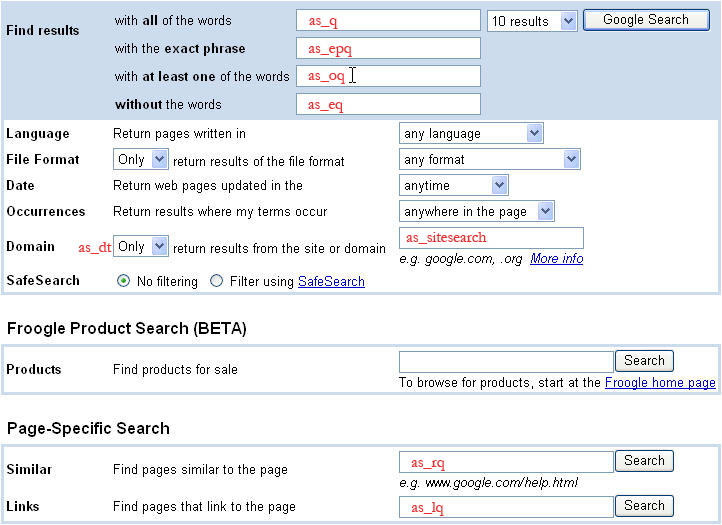
ছবির নিচে তালিকাভুক্ত অতিরিক্ত কোয়েরি প্যারামিটারগুলো অ্যাডভান্সড সার্চ কোয়েরির জন্য প্রাসঙ্গিক। আপনি যখন একটি অ্যাডভান্সড সার্চ সাবমিট করেন, তখন বিভিন্ন প্যারামিটারের মান (যেমন as_eq , as_epq , as_oq , ইত্যাদি) সেই সার্চের কোয়েরি টার্মগুলোর মধ্যে অন্তর্ভুক্ত করা হয়। ছবিতে গুগলের অ্যাডভান্সড সার্চ পেজটি দেখানো হয়েছে। ছবিতে, প্রতিটি অ্যাডভান্সড সার্চ প্যারামিটারের নাম লাল রঙে পেজের সেই ফিল্ডের ভিতরে বা পাশে লেখা আছে, যেটির সাথে সেই প্যারামিটারটি সম্পর্কিত।
উন্নত অনুসন্ধান কোয়েরি প্যারামিটার
| as_dt | |
|---|---|
| বর্ণনা | ঐচ্ছিক । |
| উদাহরণ | as_dt=i,as_dt=e |
| as_epq | |
|---|---|
| বর্ণনা | ঐচ্ছিক । |
| উদাহরণ | as_epq=abraham+lincoln |
| as_eq | |
|---|---|
| বর্ণনা | ঐচ্ছিক । |
| উদাহরণ | |
| as_lq | |
|---|---|
| বর্ণনা | ঐচ্ছিক । |
| উদাহরণ | |
| as_nlo | |
|---|---|
| বর্ণনা | ঐচ্ছিক । |
| উদাহরণ | নিম্নলিখিতটি ৫ থেকে ১০ পর্যন্ত (উভয় সংখ্যাসহ) একটি অনুসন্ধান পরিসীমা নির্ধারণ করে: |
| as_nhi | |
|---|---|
| বর্ণনা | ঐচ্ছিক । |
| উদাহরণ | নিম্নলিখিতটি ৫ থেকে ১০ পর্যন্ত (উভয় সংখ্যাসহ) একটি অনুসন্ধান পরিসীমা নির্ধারণ করে: |
| as_oq | |
|---|---|
| বর্ণনা | ঐচ্ছিক । |
| উদাহরণ | |
| as_q | |
|---|---|
| বর্ণনা | ঐচ্ছিক । |
| উদাহরণ | |
| as_qdr | |
|---|---|
| বর্ণনা | ঐচ্ছিক । |
| উদাহরণ | এই উদাহরণটি গত বছরের ফলাফল অনুরোধ করে: এই উদাহরণটি বিগত ১০ দিনের ফলাফল জানতে চায়: |
| as_sitesearch | |
|---|---|
| বর্ণনা | ঐচ্ছিক । |
| উদাহরণ | |
বিশেষ অনুসন্ধানের শর্তাবলী
গুগল ওয়েবসার্চ বেশ কিছু বিশেষ কোয়েরি টার্ম ব্যবহারের সুযোগ দেয়, যা গুগল সার্চ ইঞ্জিনের অতিরিক্ত সক্ষমতাগুলো অ্যাক্সেস করতে সাহায্য করে। এই বিশেষ কোয়েরি টার্মগুলো অবশ্যই `q` রিকোয়েস্ট প্যারামিটারের ভ্যালুতে অন্তর্ভুক্ত করতে হবে। অন্যান্য কোয়েরি টার্মের মতোই, এই বিশেষ কোয়েরি টার্মগুলোকেও অবশ্যই ইউআরএল-এসকেপ করতে হবে। বেশ কিছু বিশেষ কোয়েরি টার্মে একটি কোলন (:) থাকে। এই ক্যারেক্টারটিকেও অবশ্যই ইউআরএল-এসকেপ করতে হবে; এর ইউআরএল-এসকেপ করা ভ্যালু হলো %3A ।
| পূর্ববর্তী লিঙ্ক [লিঙ্ক:] | |
|---|---|
| বর্ণনা | ` আপনি লিঙ্ক জমা দেওয়ার জন্য as_lq রিকোয়েস্ট প্যারামিটারটিও ব্যবহার করতে পারেন দ্রষ্টব্য: |
| উদাহরণ | |
| বুলিয়ান OR অনুসন্ধান [ OR ] | |
|---|---|
| বর্ণনা | এছাড়াও আপনি একাধিক টার্মের সেট থেকে যেকোনো টার্মের জন্য সার্চ সাবমিট করতে as_oq রিকোয়েস্ট প্যারামিটারটি ব্যবহার করতে পারেন। দ্রষ্টব্য: যদি কোনো অনুসন্ধান অনুরোধে "London+OR+Paris" এই কোয়েরিটি নির্দিষ্ট করা থাকে, তাহলে অনুসন্ধানের ফলাফলে এমন নথি অন্তর্ভুক্ত হবে যেগুলিতে এই দুটি শব্দের মধ্যে অন্তত একটি রয়েছে। কিছু ক্ষেত্রে, অনুসন্ধানের ফলাফলে থাকা নথিগুলিতে উভয় শব্দই থাকতে পারে। |
| উদাহরণ | লন্ডন বা প্যারিস অনুসন্ধান করুন: ব্যবহারকারীর ইনপুট: london OR paris কোয়েরি টার্ম: q=london+OR+parisছুটির জন্য লন্ডন অথবা প্যারিস অনুসন্ধান করুন: অনুসন্ধান পদ: q=vacation+london+OR+parisঅবকাশ যাপনের জন্য লন্ডন, প্যারিস বা চকলেটের মধ্যে যেকোনো একটি খুঁজুন: অনুসন্ধান পদ: q=vacation+london+OR+paris+OR+chocolatesছুটি ও চকোলেট এবং লন্ডন অথবা প্যারিস লিখে অনুসন্ধান করুন, যেখানে চকোলেটকে সবচেয়ে কম গুরুত্ব দেওয়া হবে: অনুসন্ধান পদ: q=vacation+london+OR+paris+chocolatesযেসব নথিতে লন্ডন বা প্যারিসের উল্লেখ আছে, সেগুলিতে ছুটি, চকোলেট এবং ফুল অনুসন্ধান করুন: অনুসন্ধান পদ: q=vacation+london+OR+paris+chocolates+flowersঅবকাশ যাপনের জন্য অনুসন্ধান করুন এবং লন্ডন বা প্যারিসের মধ্যে একটির কথা ভাবুন, সাথে চকলেট বা ফুলের মধ্যে একটির কথাও ভাবুন: অনুসন্ধান পদ: q=vacation+london+OR+paris+chocolates+OR+flowers |
| অনুসন্ধান পদ বাদ দিন [-] | |
|---|---|
| বর্ণনা | exclude ( যখন কোনো সার্চ টার্মের একাধিক অর্থ থাকে, তখন এক্সক্লুড কোয়েরি টার্মটি কার্যকর হয়। উদাহরণস্বরূপ, 'bass' শব্দটি মাছ বা সঙ্গীত—উভয় সম্পর্কিত ফলাফল দেখাতে পারে। আপনি যদি মাছ সম্পর্কিত ডকুমেন্ট খুঁজে থাকেন, তাহলে এক্সক্লুড কোয়েরি টার্মটি ব্যবহার করে আপনার সার্চ ফলাফল থেকে সঙ্গীত সম্পর্কিত ডকুমেন্টগুলো বাদ দিতে পারেন। আপনি as_eq রিকোয়েস্ট প্যারামিটার ব্যবহার করে সার্চ রেজাল্ট থেকে কোনো নির্দিষ্ট শব্দ বা বাক্যাংশের সাথে মিলে যাওয়া ডকুমেন্টগুলো বাদ দিতে পারেন। |
| উদাহরণ | ব্যবহারকারীর ইনপুট: bass -musicঅনুসন্ধান পদ: q=bass+ %2Dmusic |
| ফাইলের প্রকার বর্জন [ -ফাইলের প্রকার: ] | |
|---|---|
| বর্ণনা | দ্রষ্টব্য: আপনার কোয়েরিতে একাধিক গুগল দ্বারা সমর্থিত ফাইলের প্রকারগুলির মধ্যে রয়েছে:
ভবিষ্যতে আরও ফাইলের ধরন যোগ করা হতে পারে। একটি হালনাগাদ তালিকা সর্বদা গুগলের ফাইলের ধরন সম্পর্কিত প্রায়শই জিজ্ঞাসিত প্রশ্নাবলীতে (FAQ) পাওয়া যাবে। |
| উদাহরণ | এই উদাহরণটি এমন নথিগুলি ফেরত দেয় যেগুলিতে "Google" উল্লেখ আছে কিন্তু সেগুলি PDF নথি নয়: এই উদাহরণটি সেইসব ডকুমেন্ট ফেরত দেয় যেগুলিতে "Google" এর উল্লেখ আছে, কিন্তু PDF এবং Word উভয় ডকুমেন্টই বাদ দেয়: |
| ফাইলের ধরন অনুযায়ী ফিল্টারিং [ ফাইলের ধরন: ] | |
|---|---|
| বর্ণনা | ` আপনার কোয়েরিতে আরও ডিফল্টরূপে, অনুসন্ধানের ফলাফলে যেকোনো ফাইল এক্সটেনশনযুক্ত নথি অন্তর্ভুক্ত থাকবে। গুগল দ্বারা সমর্থিত ফাইলের প্রকারগুলির মধ্যে রয়েছে:
ভবিষ্যতে আরও ফাইলের ধরন যোগ করা হতে পারে। একটি হালনাগাদ তালিকা সর্বদা গুগলের ফাইলের ধরন সম্পর্কিত প্রায়শই জিজ্ঞাসিত প্রশ্নাবলীতে (FAQ) পাওয়া যাবে। |
| উদাহরণ | এই উদাহরণটি সেইসব PDF ডকুমেন্ট ফেরত দেয় যেগুলিতে "Google" এর উল্লেখ আছে: এই উদাহরণটি সেইসব PDF এবং Word ডকুমেন্ট ফেরত দেয় যেগুলিতে "Google" এর উল্লেখ আছে: |
| অনুসন্ধানের শর্ত অন্তর্ভুক্ত করুন [+] | |
|---|---|
| বর্ণনা | include (+) কোয়েরি টার্মটি নির্দিষ্ট করে যে, সার্চ রেজাল্টে অন্তর্ভুক্ত সমস্ত ডকুমেন্টে একটি নির্দিষ্ট শব্দ বা শব্দগুচ্ছ অবশ্যই থাকতে হবে। include কোয়েরি টার্মটি ব্যবহার করার জন্য, যে শব্দ বা শব্দগুচ্ছটি সমস্ত সার্চ রেজাল্টে অবশ্যই অন্তর্ভুক্ত করতে হবে, তার আগে "+" (একটি প্লাস চিহ্ন) বসাতে হবে। যেসব সাধারণ শব্দ গুগল সাধারণত সার্চ রেজাল্ট শনাক্ত করার আগে বাদ দিয়ে দেয়, সেগুলোর আগে |
| উদাহরণ | ব্যবহারকারীর ইনপুট: Star Wars Episode +Iঅনুসন্ধান পদ: q=Star+Wars+Episode+ %2BI |
| শুধুমাত্র লিঙ্ক অনুসন্ধান, সমস্ত পদ [ allinlinks: ] | |
|---|---|
| বর্ণনা | ` আপনার সার্চ কোয়েরিতে যদি ` |
| উদাহরণ | ব্যবহারকারীর ইনপুট: allinlinks: Google searchঅনুসন্ধান পদ: q= allinlinks%3A+Google+search |
| বাক্যাংশ অনুসন্ধান | |
|---|---|
| বর্ণনা | ফ্রেজ সার্চ (") কোয়েরি টার্মটি আপনাকে উদ্ধৃতি চিহ্নের মধ্যে বাক্যাংশ রেখে অথবা হাইফেন দিয়ে সংযুক্ত করে সম্পূর্ণ বাক্যাংশ অনুসন্ধান করার সুযোগ দেয়। বিখ্যাত উক্তি বা বিশেষ নাম খোঁজার ক্ষেত্রে শব্দগুচ্ছ দিয়ে অনুসন্ধান বিশেষভাবে কার্যকর। আপনি as_epq রিকোয়েস্ট প্যারামিটার ব্যবহার করেও ফ্রেজ সার্চ সাবমিট করতে পারেন। |
| উদাহরণ | ব্যবহারকারীর ইনপুট: "Abraham Lincoln"অনুসন্ধান পদ: q= %22Abraham+Lincoln%22 |
| ওয়েব ডকুমেন্ট তথ্য [তথ্য:] | |
|---|---|
| বর্ণনা | দ্রষ্টব্য: |
| উদাহরণ | ব্যবহারকারীর ইনপুট: info:www.google.comঅনুসন্ধান পদ: q= info%3Awww.google.com |
নমুনা চিত্র কোয়েরি
নিচের উদাহরণগুলোতে বিভিন্ন কোয়েরি প্যারামিটার কীভাবে ব্যবহৃত হয় তা দেখানোর জন্য কয়েকটি ইমেজ HTTP রিকোয়েস্ট দেখানো হয়েছে। বিভিন্ন কোয়েরি প্যারামিটারের সংজ্ঞা এই ডকুমেন্টের 'ইমেজ কোয়েরি প্যারামিটার ডেফিনিশন' অংশে দেওয়া হয়েছে।
এই অনুরোধটি 'monkey' ( q=monkey ) কোয়েরি টার্মের জন্য .png ফাইলটাইপের প্রথম ৫টি ফলাফল ( start=0&num=5 ) জানতে চায়। সবশেষে, কোয়েরিটি client , output , এবং cx প্যারামিটারগুলোর জন্য মান নির্দিষ্ট করে, যে তিনটিই আবশ্যক।
http://www.google.com/cse?
  searchtype=image
  start=0
  &num=5
  &q=monkey
  &as_filetype=png
  &client=google-csbe
  &output=xml_no_dtd
  &cx=00255077836266642015:u-scht7a-8i
ইমেজ সার্চ কোয়েরি প্যারামিটার
| as_filetype | |
|---|---|
| বর্ণনা | ঐচ্ছিক । নির্দিষ্ট ধরনের ছবি ফেরত দেয়। অনুমোদিত মানগুলো হলো: |
| উদাহরণ | q=google&as_filetype=png |
| imgsz | |
|---|---|
| বর্ণনা | ঐচ্ছিক । নির্দিষ্ট আকারের ছবি ফেরত দেয়, যেখানে আকার নিম্নলিখিতগুলির মধ্যে একটি হতে পারে:
|
| উদাহরণ | q=google&as_filetype=png&imgsz=icon |
| ছবির ধরন | |
|---|---|
| বর্ণনা | ঐচ্ছিক । কোনো একটি নির্দিষ্ট ধরনের ছবি ফেরত দেয়, যা নিম্নলিখিতগুলির মধ্যে একটি হতে পারে:
|
| উদাহরণ | q=google&as_filetype=png&imgtype=photo |
| imgc | |
|---|---|
| বর্ণনা | ঐচ্ছিক । সাদা-কালো, ধূসর বা রঙিন ছবি ফেরত দেয়:
|
| উদাহরণ | q=google&as_filetype=png&imgc=gray |
| ছবির রঙ | |
|---|---|
| বর্ণনা | ঐচ্ছিক । একটি নির্দিষ্ট প্রধান রঙের ছবি ফেরত দেয়:
|
| উদাহরণ | q=google&as_filetype=png&imgcolor=yellow |
| as_rights | |
|---|---|
| বর্ণনা | ঐচ্ছিক । লাইসেন্সিংয়ের উপর ভিত্তি করে ফিল্টার করা হয়। সমর্থিত মানগুলো হলো:
|
| উদাহরণ | q=cats&as_filetype=png&as_rights=cc_attribute |
অনুরোধের সীমা
নিচের চার্টটিতে গুগলে আপনার পাঠানো সার্চ রিকোয়েস্টগুলোর ওপর আরোপিত সীমাবদ্ধতাগুলো তালিকাভুক্ত করা হয়েছে:
| উপাদান | সীমা | মন্তব্য |
|---|---|---|
| অনুসন্ধান অনুরোধের দৈর্ঘ্য | ২০৪৮ বাইট | |
| অনুসন্ধানের শর্তাবলীর সংখ্যা | ১০ | নিম্নলিখিত প্যারামিটারগুলির পদগুলি অন্তর্ভুক্ত: q , as_epq , as_eq , as_lq , as_oq , as_q |
| ফলাফলের সংখ্যা | ২০ | আপনি যদি num প্যারামিটারটিকে ২০-এর চেয়ে বড় কোনো সংখ্যায় সেট করেন, তাহলে কেবল ২০টি ফলাফল ফেরত দেওয়া হবে। আরও ফলাফল পেতে হলে, আপনাকে একাধিক অনুরোধ পাঠাতে হবে এবং প্রতিটি অনুরোধের সাথে start প্যারামিটারের মান বাড়াতে হবে। |
কোয়েরি এবং ফলাফল উপস্থাপনার আন্তর্জাতিকীকরণ
গুগল ওয়েবসার্চ পরিষেবা আপনাকে একাধিক ভাষায় নথি অনুসন্ধান করার সুযোগ দেয়। আপনার HTTP অনুরোধটি ব্যাখ্যা করতে এবং আপনার XML প্রতিক্রিয়া এনকোড করতে কোন ক্যারেক্টার এনকোডিং ব্যবহার করা হবে, তা আপনি নির্দিষ্ট করে দিতে পারেন ( ie এবং oe সার্চ প্যারামিটার ব্যবহার করে)। এছাড়াও, আপনি ফলাফল ফিল্টার করে শুধুমাত্র নির্দিষ্ট ভাষায় লেখা নথিগুলো অন্তর্ভুক্ত করতে পারেন।
নিম্নলিখিত বিভাগগুলিতে একাধিক ভাষায় অনুসন্ধান সম্পর্কিত বিষয়গুলি আলোচনা করা হয়েছে:
ক্যারেক্টার এনকোডিং
সার্ভারগুলো ওয়েব পেজের মতো ডেটা, ব্রাউজারের মতো ইউজার এজেন্টের কাছে, এনকোড করা বাইটের একটি অনুক্রম হিসেবে পাঠায়। এরপর ইউজার এজেন্ট সেই বাইটগুলোকে ডিকোড করে অক্ষরের একটি অনুক্রমে পরিণত করে। WebSearch সার্ভিসে অনুরোধ পাঠানোর সময়, আপনি আপনার সার্চ কোয়েরি এবং প্রাপ্ত XML রেসপন্স উভয়ের জন্যই এনকোডিং স্কিম নির্দিষ্ট করে দিতে পারেন।
আপনার HTTP অনুরোধের অক্ষরগুলির জন্য এনকোডিং পদ্ধতি নির্দিষ্ট করতে আপনি ie রিকোয়েস্ট প্যারামিটারটি ব্যবহার করতে পারেন। এছাড়াও, আপনার XML প্রতিক্রিয়া এনকোড করার জন্য Google কোন এনকোডিং স্কিম ব্যবহার করবে, তা নির্দিষ্ট করতে আপনি oe প্যারামিটারটি ব্যবহার করতে পারেন। আপনি যদি ISO-8859-1 (বা latin1 ) ছাড়া অন্য কোনো এনকোডিং স্কিম ব্যবহার করেন, তাহলে অনুগ্রহ করে নিশ্চিত করুন যে আপনি ie এবং oe প্যারামিটারগুলির জন্য সঠিক মান নির্দিষ্ট করেছেন।
দ্রষ্টব্য: আপনি যদি একাধিক ভাষার জন্য অনুসন্ধান কার্যকারিতা প্রদান করেন, তাহলে আমরা আপনাকে ie এবং oe উভয় প্যারামিটারের জন্য utf8 (UTF-8) এনকোডিং মান ব্যবহার করার পরামর্শ দিই।
ie এবং oe প্যারামিটারগুলোর জন্য আপনি যে মানগুলো ব্যবহার করতে পারবেন, তার সম্পূর্ণ তালিকার জন্য অনুগ্রহ করে ক্যারেক্টার এনকোডিং স্কিমস পরিশিষ্টটি দেখুন।
ক্যারেক্টার এনকোডিং সম্পর্কে আরও সাধারণ তথ্যের জন্য, অনুগ্রহ করে http://www.w3.org/TR/REC-html40/charset.html দেখুন।
ইন্টারফেস ভাষা
আপনি আপনার গ্রাফিক্যাল ইন্টারফেসের ভাষা শনাক্ত করতে hl রিকোয়েস্ট প্যারামিটারটি ব্যবহার করতে পারেন। hl প্যারামিটারের মান XML সার্চের ফলাফলকে প্রভাবিত করতে পারে, বিশেষ করে আন্তর্জাতিক অনুসন্ধানের ক্ষেত্রে, যখন lr প্যারামিটার ব্যবহার করে ভাষার সীমাবদ্ধতা স্পষ্টভাবে উল্লেখ করা থাকে না। এই ধরনের ক্ষেত্রে, hl প্যারামিটারটি ব্যবহারকারীর ইনপুট করা ভাষার সাথে একই ভাষায় সার্চের ফলাফলকে প্রাধান্য দিতে পারে।
আমরা আপনাকে সার্চ রেজাল্টে hl প্যারামিটারটি স্পষ্টভাবে সেট করার পরামর্শ দিচ্ছি, যাতে গুগল প্রতিটি কোয়েরির জন্য সর্বোচ্চ মানের সার্চ রেজাল্ট নির্বাচন করে।
hl প্যারামিটারের জন্য বৈধ মানগুলির সম্পূর্ণ তালিকার জন্য অনুগ্রহ করে সমর্থিত ইন্টারফেস ভাষা বিভাগটি দেখুন।
নির্দিষ্ট ভাষায় লেখা নথি অনুসন্ধান করা
আপনি lr রিকোয়েস্ট প্যারামিটার ব্যবহার করে সার্চের ফলাফলকে কোনো নির্দিষ্ট ভাষা বা একাধিক ভাষায় লেখা ডকুমেন্টের মধ্যে সীমাবদ্ধ রাখতে পারেন।
lr প্যারামিটারটি বুলিয়ান অপারেটর সমর্থন করে, যার মাধ্যমে আপনি অনুসন্ধানের ফলাফলে অন্তর্ভুক্ত (বা বাদ) করার জন্য একাধিক ভাষা নির্দিষ্ট করতে পারেন।
নিম্নলিখিত উদাহরণগুলিতে দেখানো হয়েছে, কীভাবে আপনি বিভিন্ন ভাষায় নথি অনুরোধ করতে বুলিয়ান অপারেটর ব্যবহার করতে পারেন।
জাপানি ভাষায় লেখা নথিপত্রের জন্য:
lr=lang_jp
ইতালীয় বা জার্মান ভাষায় লেখা নথিপত্রের জন্য:
lr=lang_it|lang_de
হাঙ্গেরীয় বা চেক ভাষায় লেখা নয় এমন নথিপত্রের জন্য:
lr=(-lang_hu).(-lang_cs)
lr প্যারামিটারের সম্ভাব্য মানগুলির একটি সম্পূর্ণ তালিকার জন্য অনুগ্রহ করে 'Language Collection Values' বিভাগটি এবং এই অপারেটরগুলির ব্যবহার সম্পর্কে বিস্তারিত আলোচনার জন্য ' Boolean Operators' বিভাগটি দেখুন।
সরলীকৃত এবং ঐতিহ্যবাহী চীনা অনুসন্ধান
সরলীকৃত চীনা এবং প্রথাগত চীনা হলো চীনা ভাষার দুটি লিখন পদ্ধতি। একই ধারণা প্রতিটি পদ্ধতিতে ভিন্নভাবে লেখা হতে পারে। এই পদ্ধতিগুলোর যেকোনো একটিতে অনুসন্ধান করা হলে, গুগল ওয়েবসার্চ পরিষেবা এমন ফলাফল দেখাতে পারে যেখানে উভয় পদ্ধতির পৃষ্ঠাই অন্তর্ভুক্ত থাকে।
এই বৈশিষ্ট্যটি ব্যবহার করতে:
- c2coff অনুরোধ প্যারামিটারটি 0 -তে সেট করুন।
এবং - নিম্নলিখিতগুলির মধ্যে যেকোনো একটি করুন:
নিম্নলিখিত উদাহরণটি সরলীকৃত এবং প্রথাগত উভয় চীনা ভাষায় ফলাফল অনুরোধ করার জন্য প্রয়োজনীয় কোয়েরি প্যারামিটারগুলো দেখায়। (উল্লেখ্য যে, ক্লায়েন্টের মতো অতিরিক্ত প্রয়োজনীয় তথ্য এই উদাহরণে অন্তর্ভুক্ত করা হয়নি।)
search?hl=zh-CN
    &lr=lang_zh-TW|lang_zh-CN
    &c2coff=0
ফলাফল ফিল্টার করা
গুগল ওয়েবসার্চ আপনার অনুসন্ধানের ফলাফল ফিল্টার করার জন্য বিভিন্ন উপায় প্রদান করে:
- অনুসন্ধানের ফলাফলের স্বয়ংক্রিয় ফিল্টারিং
- ভাষা এবং দেশ ফিল্টারিং
- সেফসার্চ দিয়ে প্রাপ্তবয়স্কদের জন্য অনুপযুক্ত বিষয়বস্তু ফিল্টার করা
অনুসন্ধানের ফলাফলের স্বয়ংক্রিয় ফিল্টারিং
সর্বোত্তম সম্ভাব্য অনুসন্ধান ফলাফল প্রদানের প্রচেষ্টায়, গুগল সাধারণত অনাকাঙ্ক্ষিত বলে বিবেচিত অনুসন্ধান ফলাফলগুলিকে স্বয়ংক্রিয়ভাবে ফিল্টার করতে দুটি কৌশল ব্যবহার করে:
সদৃশ বিষয়বস্তু — যদি একাধিক নথিতে একই তথ্য থাকে, তাহলে আপনার অনুসন্ধানের ফলাফলে সেই সেট থেকে কেবল সবচেয়ে প্রাসঙ্গিক নথিটিই অন্তর্ভুক্ত করা হবে।
হোস্ট ক্রাউডিং — যদি একই সাইট থেকে অনেক সার্চ রেজাল্ট আসে, তাহলে গুগল সেই সাইটের সব রেজাল্ট নাও দেখাতে পারে অথবা নিচের দিকের রেজাল্টগুলো দেখাতে পারে।
অন্যথায় যা হতো, তার চেয়ে র্যাঙ্কিং।
সাধারণ অনুসন্ধানের ক্ষেত্রে আমরা আপনাকে এই ফিল্টারগুলো চালু রাখার পরামর্শ দিই, কারণ এই ফিল্টারগুলো বেশিরভাগ অনুসন্ধানের ফলাফলের মান উল্লেখযোগ্যভাবে উন্নত করে। তবে, আপনার অনুসন্ধানের অনুরোধে ফিল্টার কোয়েরি প্যারামিটারটি ০ -তে সেট করে আপনি এই স্বয়ংক্রিয় ফিল্টারগুলো এড়িয়ে যেতে পারেন।
ভাষা এবং দেশ ফিল্টারিং
গুগল ওয়েবসার্চ পরিষেবা সমস্ত ওয়েব ডকুমেন্টের একটি প্রধান সূচী থেকে ফলাফল প্রদান করে। এই প্রধান সূচীতে ডকুমেন্টের উপ-সংগ্রহ থাকে, যেগুলোকে ভাষা এবং উৎস দেশসহ নির্দিষ্ট বৈশিষ্ট্য অনুসারে শ্রেণিবদ্ধ করা হয়।
আপনি যথাক্রমে নির্দিষ্ট ভাষায় লেখা বা নির্দিষ্ট দেশ থেকে আসা নথিপত্রের উপ-সংগ্রহে অনুসন্ধানের ফলাফল সীমাবদ্ধ করতে lr এবং cr অনুরোধ প্যারামিটার ব্যবহার করতে পারেন।
গুগল ওয়েবসার্চ একটি ডকুমেন্টের ভাষা নির্ধারণ করে নিম্নলিখিত বিষয়গুলো বিশ্লেষণ করে:
- ডকুমেন্টের URL-এর শীর্ষ-স্তরের ডোমেইন (TLD)
- ডকুমেন্টের মধ্যে ভাষা মেটা ট্যাগ
- নথির মূল অংশে ব্যবহৃত প্রাথমিক ভাষা
Please also see the definition of the lr parameter, the section on Searching for Documents Written in Specific Languages and the Language Collection Values that can be used as values for the lr parameter for more information on restricting results based on language.
Google WebSearch determines the country of a document by analyzing:
- the top-level domain (TLD) of the document's URL
- the geographic location of the Web server's IP address
Please also see the definition of the cr parameter and the Country Collection Values that can be used as values for the cr parameter for more information on restricting results by country of origin.
Note: You can combine language values and country values to customize your search results. For example, you could request documents that are written in French and come from France or Canada, or you could request documents that come from Holland and are not written in English. The lr and cr parameters both support Boolean Operators .
Filtering Adult Content with SafeSearch
Many Google customers do not want to display search results for sites that contain adult content. Using our SafeSearch filter, you can screen for search results that contain adult content and eliminate them. Google's filters use proprietary technology to check keywords, phrases and URLs. While no filters are 100 percent accurate, SafeSearch will remove the overwhelming majority of adult content from your search results.
Google strives to keep SafeSearch as current and comprehensive as possible by continually crawling the Web and by incorporating updates from user suggestions.
SafeSearch is available in the following languages:
| ডাচ ইংরেজি ফরাসি জার্মান | ইতালীয় পর্তুগিজ (ব্রাজিলীয়) স্প্যানিশ ঐতিহ্যবাহী চীনা |
You can adjust the degree to which Google filters your results for adult content using the safe query parameter. The following table explains Google's SafeSearch settings and how those settings will affect your search results:
| SafeSearch Level | বর্ণনা |
|---|---|
| উচ্চ | Enables a stricter version of safe search. |
| মাঝারি | Blocks web pages containing pornography and other explicit sexual content. |
| বন্ধ | Does not filter adult content from search results. |
* The default SafeSearch setting is off .
If you have SafeSearch activated and you find sites that contain offensive content in your results, please email the site's URL to safesearch@google.com , and we will investigate the site.
XML Results
- Google XML Results DTD
- About the XML Response
- XML Results for Regular and Advanced Search Queries
- Regular/Advanced Search: Sample Query and XML Result
- Regular/Advanced Search: XML Tags
Google XML Results DTD
Google uses the same DTD to describe the XML format for all types of search results. Many of the tags and attributes are applicable for all search types. Some tags, however, are applicable only for certain search types. Consequently, the definitions in the DTD may be less restrictive than the definitions given in this document.
This document describes those aspects of the DTD that are relevant for WebSearch. When you look at the DTD, if you're working on WebSearch, you can safely ignore tags and attributes that are not documented here. If the definition differs between the DTD and the documentation, that fact is noted in this document.
Google can return XML results either with or without a reference to the most recent DTD. The DTD is a guide to help search administrators and XML parsers understand Google's XML results. Because Google's XML grammar may change from time to time, you should not configure your parser to use the DTD to validate each XML result.
Additionally, you should not configure your XML parser to fetch the DTD each time you submit a search request. Google updates the DTD infrequently, and these requests create unnecessary delay and bandwidth requirements.
Google recommends that you use the xml_no_dtd output format to get XML results. If you specify the xml output format in your search request, the only difference is the inclusion of the following line in the XML results:
<!DOCTYPE GSP SYSTEM "google.dtd">You can access the latest DTD at http://www.google.com/google.dtd .
Please note that not all features in the DTD may be available or supported at this time.
About the XML Response
- All element values are valid HTML suitable for display unless otherwise noted in the XML tag definitions.
- Some element values are URLs that need to be HTML-encoded before they are displayed.
- Your XML parser should ignore undocumented attributes and tags. This allows your application to continue working without modification if Google adds more features to the XML output.
- Certain characters must be escaped when included as values in XML tags. Your XML processor should convert these entities back to the appropriate characters. If you do not convert entities properly, the browser may, for example, render the & character as "&". The XML Standard documents these characters; these characters are reproduced in the table below:
চরিত্র Escaped Forms সত্তা অক্ষর কোড Ampersand এবং & & Single Quote ' ' ' Double Quote " " " Greater Than > > > Less Than < < <
XML Results for Regular and Advanced Search Queries
Regular/Advanced Search: Sample Query and XML Result
This sample WebSearch request asks for 10 results ( num=10 ) about the search term "socer" ( q=socer ), which is the word "soccer" intentionally spelled wrong for this example.)
http://www.google.com/search?
    q=socer
    &hl=en
    &start=10
    &num=10
    &output=xml
    &client=google-csbe
    &cx=00255077836266642015:u-scht7a-8i
This request yields the XML result below. Note that there are several comments in the XML result to indicate where certain tags not included in the result would appear.
<?xml version="1.0" encoding="ISO-8859-1" standalone="no" ?>

<GSP VER="3.2">
   <TM>0.452923</TM>
   <Q>socer</Q>

<PARAM name="cx" value="00255077836266642015:u-scht7a-8i" original_value="00255077836266642015%3Au-scht7a-8i"/>
   <PARAM name="hl" value="en" original_value="en"/>
   <PARAM name="q" value="socer" original_value="socer"/>
   <PARAM name="output" value="xml" original_value="xml"/>
   <PARAM name="client" value="google-csbe" original_value="google-csbe"/>
   <PARAM name="num" value="10" original_value="10"/>
   <Spelling>
      <Suggestion q="soccer"><b><i>soccer</i></b></Suggestion>
   </Spelling>
   <Context>

<title>Sample Vacation CSE</title>
    <Facet>
      <FacetItem>
        <label>restaurants</label>
        <anchor_text>restaurants</anchor_text>
      </FacetItem>
      <FacetItem>
        <label>wineries</label>
        <anchor_text>wineries</anchor_text>
      </FacetItem>
    </Facet>
    <Facet>
      <FacetItem>
        <label>golf_courses</label>
        <anchor_text>golf courses</anchor_text>
      </FacetItem>
    </Facet>
    <Facet>
     <FacetItem>
        <label>hotels</label>
        <anchor_text>hotels</anchor_text>
      </FacetItem>
    </Facet>
    <Facet>
      <FacetItem>
        <label>nightlife</label>
        <anchor_text>nightlife</anchor_text>
      </FacetItem>
    </Facet>
    <Facet>
      <FacetItem>
        <label>soccer_sites</label>
        <anchor_text>soccer sites</anchor_text>
      </FacetItem>
    </Facet>
   </Context>
   <RES SN="1" EN="10">
      <M>6080</M>
      /*
       * The FI tag after the comment indicates that the result
       * set has been filtered. If the number of results were exact, the
       * FI tag would be replaced by an XT tag in the same format.
       */
      <FI />
      <NB>
         /*
          * Since the request is for the first page of results, the PU tag,
          * which contains a link to the previous page of search results,
          * is not included in this XML result. If the sample result did include
          * a previous page of results, it would be listed here, in the same format
          * as the NU tag on the following line
          */
         <NU>/search?q=socer&hl=en&lr=&ie=UTF-8&output=xml&client=test&start=10&sa=N</NU>
      </NB>
      <R N="1">
         <U>http://www.soccerconnection.net/</U>
         <UE>http://www.soccerconnection.net/</UE>
         <T>SoccerConnection.net</T>
              <CRAWLDATE>May 21, 2007</CRAWLDATE>
         <S><b>soccer</b>; players; coaches; ball; world cup;<b>...</b></S>
  <Label>transcodable_pages</Label>
    <Label>accessible</Label>
         <Label>soccer_sites</Label>
         <LANG>en</LANG>
         <HAS>
            <DI>
               <DT>SoccerConnection.net</DT>
               <DS>Post your <b>soccer</b> resume directly on the Internet.</DS>
            </DI>
            <L/>
            <C SZ="8k" CID="kWAPoYw1xIUJ"/>
            <RT/>
         </HAS>
      </R>
      /*
       * The result includes nine more results, each enclosed by an R tag.
       */
   </RES>
</GSP>
Regular/Advanced Search: XML Tags
XML responses for regular search requests and advanced search requests both use the same set of XML tags. These XML tags are shown in the XML example above and explained in the tables below.
The XML tags below are listed alphabetically by tag name, and each tag definition contains a description of the tag, an example showing how the tag would appear in an XML result and the format of the tag's content. If the tag is a subtag of another XML tag or if the tag has subtags or attributes of its own, that information is also provided in the tag's definition table.
Certain symbols may be displayed next to some subtags in the definitions below. These symbols, and their meanings, are:
* = zero or more instances of the subtag
+ = one or more instances of the subtag
| একটি | বি | সি | ডি | এফ | জি | এইচ | আমি | এল | এম | এন | পি | প্রশ্ন | আর | এস | টি | ইউ | এক্স |
| anchor_text | |
|---|---|
| সংজ্ঞা | The <anchor_text> tag specifies the text that you should display to users to identify a refinement label associated with a search result set. Since refinement labels replace nonalphanumeric characters with underscores, you should not display the value of the <label> tag in your user interface. Instead, you should display the value of the <anchor_text> tag. |
| উদাহরণ | <anchor_text>golf courses</anchor_text> |
| Subtag of | FacetItem |
| Content Format | পাঠ্য |
| ব্লক | |
|---|---|
| সংজ্ঞা | This tag encapsulates the contents of a block in a body line of a promotion result. Each block has subtags T , U , and L . A nonempty T tag denotes that the block contains text; nonempty U and L tags denote that the block contains a link (with URL given in the U subtag and anchor text in the L subtag). |
| Subtags | T , U , L |
| Subtag of | BODY_LINE |
| Content Format | খালি |
| BODY_LINE | |
|---|---|
| সংজ্ঞা | This tag encapsulates the contents of a line in the body of promoted result. Each body line consists of several BLOCK tags, which either contain some text or a link with URL and anchor text. |
| Subtags | BLOCK * |
| Subtag of | SL_MAIN |
| Content Format | খালি |
| সি | ||||||||||
|---|---|---|---|---|---|---|---|---|---|---|
| সংজ্ঞা | The <C> tag indicates that the WebSearch service can retrieve a cached version of this search result URL. You cannot retrieve cached pages through the XML API, but you can redirect users to www.google.com for this content. | |||||||||
| বৈশিষ্ট্য |
| |||||||||
| উদাহরণ | <C SZ="6k" CID="kvOXK_cYSSgJ" /> | |||||||||
| Subtag of | HAS | |||||||||
| Content Format | খালি | |||||||||
| সি২সি | |
|---|---|
| সংজ্ঞা | The <C2C> tag indicates that the result refers to a Traditional Chinese language page. This tag appears only when Simplified and Traditional Chinese Search is enabled. See the c2coff query parameter definition for more information about enabling and disabling this feature. |
| Content Format | পাঠ্য |
| প্রেক্ষাপট | |
|---|---|
| সংজ্ঞা | The <Context> tag encapsulates a list of refinement labels associated with a set of search results. |
| উদাহরণ | <Context> |
| Subtags | title , Facet + |
| Content Format | কন্টেইনার |
| CRAWLDATE | |
|---|---|
| সংজ্ঞা | The <CRAWLDATE> tag identifies the date that the page was last crawled. |
| উদাহরণ | <CRAWLDATE>May 21, 2005</CRAWLDATE> |
| Subtag of | আর |
| Content Format | পাঠ্য |
| ডিআই | |
|---|---|
| সংজ্ঞা | The <DI> tag encapsulates Open Directory Project (ODP) category information for a single search result. |
| উদাহরণ | <DI> |
| Subtags | DT ?, DS ? |
| Subtag of | HAS |
| Content Format | খালি |
| DS | |
|---|---|
| সংজ্ঞা | The <DS> tag provides the summary listed for a single category in the ODP directory. |
| উদাহরণ | <DS>Post your <b>soccer</b> resume directly on the Internet.</DS> |
| Subtag of | ডিআই |
| Content Format | Text (may contain HTML) |
| ডিটি | |
|---|---|
| সংজ্ঞা | The <DT> tag provides the title for a single category listed in the ODP directory. |
| উদাহরণ | <DT>SoccerConnection.net</DT> |
| Subtag of | ডিআই |
| Content Format | Text (may contain HTML) |
| Facet | |
|---|---|
| সংজ্ঞা | The <Facet> tag contains a logical grouping of <FacetItem> tags. You can create these groupings using the Programmable Search Engine Engine XML Specification format . If you do not create these groupings, the results_xml_tag_Context><Context> tag will contain up to four <Facet> tags. The items within each <Facet> tag will be grouped for display purposes but may not have a logical relationship. |
| উদাহরণ | <Facet> |
| Subtags | FacetItem +, title + |
| Subtag of | প্রেক্ষাপট |
| Content Format | কন্টেইনার |
| FacetItem | |
|---|---|
| সংজ্ঞা | The <FacetItem> tag encapsulates information about a refinement label associated with a set of search results. |
| উদাহরণ | <FacetItem> |
| Subtags | label , anchor_text + |
| Subtag of | Facet |
| Content Format | FacetItem |
| FI | |
|---|---|
| সংজ্ঞা | The <FI> tag serves as a flag that indicates whether document filtering was performed for the search. See the Automatic Filtering section of this document for more information about Google's search results filters. |
| উদাহরণ | <FI /> |
| Subtag of | আরইএস |
| Content Format | খালি |
| জিএসপি | |||||||
|---|---|---|---|---|---|---|---|
| সংজ্ঞা | The <GSP> tag encapsulates all data returned in Google XML search results. "GSP" is an abbreviation for "Google Search Protocol". | ||||||
| বৈশিষ্ট্য |
| ||||||
| উদাহরণ | <GSP VER="3.2"> | ||||||
| Subtags | PARAM +, Q , RES ?, TM | ||||||
| Content Format | খালি | ||||||
| HAS | |
|---|---|
| সংজ্ঞা | The <HAS> tag encapsulates information about any special search request parameters supported for a particular URL. Note: The definition of <HAS> for WebSearch is more restrictive than in the DTD . |
| Subtags | DI ?, L ?, C ?, RT ? |
| Subtag of | আর |
| ISURL | |
|---|---|
| সংজ্ঞা | Google returns the <ISURL> tag if the associated search query is a URL. |
| Subtag of | জিএসপি |
| Content Format | খালি |
| এল | |
|---|---|
| সংজ্ঞা | The presence of the <L> tag indicates that the WebSearch service can find other sites that link to this search result URL. To find such sites, you would use the link: special query term. |
| Subtag of | HAS |
| Content Format | খালি |
| লেবেল | |
|---|---|
| সংজ্ঞা | The <label> tag specifies a refinement label that you can use to filter the search results that you receive. To use a refinement label, add the string more: [[label tag value]] to the value of the q parameter in your HTTP request to Google as shown in the following example. Please note that this value must be URL-escaped before you send the query to Google. This example uses the refinement label golf_courses to Note: The <label> tag is not the same as the <Label> tag, which identifies a refinement label associated with a particular URL in your search results. |
| উদাহরণ | <label>golf_courses</label> |
| Subtag of | FacetItem |
| Content Format | পাঠ্য |
| ল্যাং | |
|---|---|
| সংজ্ঞা | The <LANG> tag contains Google's best guess of the language of the search result. |
| উদাহরণ | <LANG>en</LANG> |
| Subtag of | আর |
| Content Format | পাঠ্য |
| এম | |
|---|---|
| সংজ্ঞা | The <M> tag identifies the estimated total number of results for the search. Note: This estimate may not be accurate. |
| উদাহরণ | <M>16200000</M> |
| Subtag of | আরইএস |
| Content Format | পাঠ্য |
| এনবি | |
|---|---|
| সংজ্ঞা | The <NB> tag encapsulates navigation information—links to the next page of search results or the previous page of search results—for the result set. Note: This tag is only present if more results are available. |
| উদাহরণ | <NB> |
| Subtags | NU ?, PU ? |
| Subtag of | আরইএস |
| Content Format | খালি |
| এনইউ | |
|---|---|
| সংজ্ঞা | The <NU> tag contains a relative link to the next page of search results. |
| উদাহরণ | <NU>/search?q=flowers&num=10&hl=en&ie=UTF-8 &output=xml&client=test&start=10</NU> |
| Subtag of | এনবি |
| Content Format | Text (Relative URL) |
| PARAM | |||||||||||||
|---|---|---|---|---|---|---|---|---|---|---|---|---|---|
| সংজ্ঞা | The <PARAM> tag identifies an input parameter submitted in the HTTP request associated with the XML result. Information about the parameter is contained in the tag attributes—name, value, original_value—and there will be one PARAM tag for each parameter submitted in the HTTP request. | ||||||||||||
| বৈশিষ্ট্য |
| ||||||||||||
| উদাহরণ | <PARAM name="cr" value="countryNZ" original_value="countryNZ" /> | ||||||||||||
| Subtag of | জিএসপি | ||||||||||||
| Content Format | জটিল | ||||||||||||
| পিইউ | |
|---|---|
| সংজ্ঞা | The <PU> tag provides a relative link to the previous page of search results. |
| উদাহরণ | <PU>/search?q=flowers&num=10&hl=en&output=xml &client=test&start=10</PU> |
| Subtag of | এনবি |
| Content Format | Text (Relative URL) |
| প্রশ্ন | |
|---|---|
| সংজ্ঞা | The <Q> tag identifies the search query submitted in the HTTP request associated with the XML result. |
| উদাহরণ | <Q>pizza</Q> |
| Subtag of | জিএসপি |
| Content Format | পাঠ্য |
| আর | ||||||||||
|---|---|---|---|---|---|---|---|---|---|---|
| সংজ্ঞা | The <R> tag encapsulates the details of an individual search result. Note: The definition of the <R> tag for WebSearch is more restrictive than in the DTD . | |||||||||
| বৈশিষ্ট্য |
| |||||||||
| Subtags | U , UE , T ?, CRAWLDATE , S ?, LANG ?, HAS | |||||||||
| Subtag of | আরইএস | |||||||||
| আরইএস | ||||||||||
|---|---|---|---|---|---|---|---|---|---|---|
| সংজ্ঞা | The <RES> tag encapsulates the set of individual search results and details about those results. | |||||||||
| বৈশিষ্ট্য |
| |||||||||
| উদাহরণ | <RES SN="1" EN="10"> | |||||||||
| Subtags | M , FI ?, XT ?, NB ?, R * | |||||||||
| Subtag of | জিএসপি | |||||||||
| Content Format | খালি | |||||||||
| এস | |
|---|---|
| সংজ্ঞা | The <S> tag contains an excerpt for a search result that shows query terms highlighted in bold. Line breaks are included in the excerpt for proper text wrapping. |
| উদাহরণ | <S>Washington (CNN) -- A bid to end the Senate standoff over President <b>Bush's</b> judicial picks would let five nominees advance to a final vote while preserving the <b>...<b>...</b><S> |
| Subtag of | আর |
| Content Format | Text (HTML) |
| SL_MAIN | |
|---|---|
| সংজ্ঞা | This tag encapsulates the contents of a promotion result. Use for parsing promotions. The anchor text and URL of the title link are contained in T and U subtags respectively. The lines of body text and links are contained in BODY_LINE subtags. |
| Subtags | BODY_LINE *, T , U |
| Subtag of | SL_RESULTS |
| Content Format | খালি |
| SL_RESULTS | |
|---|---|
| সংজ্ঞা | Container tag for promoted results. One of these will appear whenever you have a promotion in your search results. The SL_MAIN subtag contains the main result data. |
| Subtags | SL_MAIN * |
| Subtag of | আর |
| Content Format | খালি |
| বানান | |
|---|---|
| সংজ্ঞা | The <Spelling> tag encapsulates an alternate spelling suggestion for the submitted query. This tag only appears on the first page of search results. Spelling suggestions are available in English, Chinese, Japanese and Korean. Note: Google will only return spelling suggestions for queries where the gl parameter value is in lowercase letters. |
| উদাহরণ | <Spelling> |
| Subtags | পরামর্শ |
| Subtag of | জিএসপি |
| Content Format | খালি |
| পরামর্শ | |||||||
|---|---|---|---|---|---|---|---|
| সংজ্ঞা | The <Suggestion> tag contains an alternate spelling suggestion for the submitted query. You can use the tag's content to suggest the alternate spelling to your search user. The value of the q attribute is the URL-escaped spelling suggestion that you can use as a query term. | ||||||
| বৈশিষ্ট্য |
| ||||||
| উদাহরণ | <Suggestion q="soccer"><b><i>soccer</i></b></Suggestion> | ||||||
| Subtag of | বানান | ||||||
| Content Format | Text (HTML) | ||||||
| টি | |
|---|---|
| সংজ্ঞা | The <T> tag contains the title of the result. |
| উদাহরণ | <T>Amici's East Coast Pizzeria</T> |
| Subtag of | আর |
| Content Format | Text (HTML) |
| শিরোনাম | |
|---|---|
| সংজ্ঞা | As a child of <Context> , the <title> tag contains the name of your Programmable Search Engine. As a child of <Facet> , the <title> tag provides a title for a set of facets. |
| উদাহরণ | As a child of <Context>: <title>My Search Engine</title> As a child of <Facet>: <title>facet title</title> |
| Subtag of | Context , Facet |
| Content Format | পাঠ্য |
| টিএম | |
|---|---|
| সংজ্ঞা | The <TM> tag identifies the total server time needed to return search results, measured in seconds. |
| উদাহরণ | <TM>0.100445</TM> |
| Subtag of | জিএসপি |
| Content Format | Text (Floating-point number) |
| টিটি | |
|---|---|
| সংজ্ঞা | The <TT> tag provides a search tip. |
| উদাহরণ | <TT><i>Tip: For most browsers, pressing the Return key produces the same results as clicking the Search button.</i></TT> |
| Subtag of | জিএসপি |
| ইউ | |
|---|---|
| সংজ্ঞা | The <U> tag provides the URL of the search result. |
| উদাহরণ | <U>http://www.dominos.com/</U> |
| Subtag of | আর |
| Content Format | Text (Absolute URL) |
| ইউডি | |
|---|---|
| সংজ্ঞা | The <UD> tag provides the IDN-encoded (International Domain Name) URL for the search result. The value allows domains to be displayed using local languages. For example, the IDN-encoded URL http://www.%E8%8A%B1%E4%BA%95.com could be decoded and displayed as http://www.花井鮨.com . This <UD> tag will only be included in search results for requests that included the ud parameter. Note: This is a beta feature. |
| উদাহরণ | <UD>http://www.%E8%8A%B1%E4%BA%95.com/</UD> |
| Subtag of | আর |
| Content Format | Text (IDN-encoded URL) |
| ইউই | |
|---|---|
| সংজ্ঞা | The <UE> tag provides the URL of the search result. The value is URL-escaped so that it is suitable for passing as a query parameter in a URL. |
| উদাহরণ | <UE>http://www.dominos.com/</UE> |
| Subtag of | আর |
| Content Format | Text (URL-escaped URL) |
| এক্সটি | |
|---|---|
| সংজ্ঞা | The <XT> tag indicates that the estimated total number of results, as specified by the M tag, actually represents the exact total number of results. See the Automatic Filtering section of this document for more details. |
| উদাহরণ | <XT /> |
| Subtag of | আরইএস |
| Content Format | খালি |
XML Results for Image Search Queries
This sample Image request asks for 5 results (num=5) about the search term "monkey" (q=monkey).
http://www.google.com/cse?
  searchtype=image
  &num=2
  &q=monkey
  &client=google-csbe
  &output=xml_no_dtd
  &cx=00255077836266642015:u-scht7a-8i
This request yields the XML result below.
<GSP VER="3.2">
  <TM>0.395037</TM>
  <Q>monkeys</Q>

  <PARAM name="cx" value="011737558837375720776:mbfrjmyam1g" original_value="011737558837375720776:mbfrjmyam1g" url_<escaped_value="011737558837375720776%3Ambfrjmyam1g" js_escaped_value="011737558837375720776:mbfrjmyam1g"/>
  <PARAM name="client" value="google-csbe" original_value="google-csbe" url_escaped_value="google-csbe" js_escaped_value="google-csbe"/>
  <PARAM name="q" value="monkeys" original_value="monkeys" url_escaped_value="monkeys" js_escaped_value="monkeys"/>
  <PARAM name="num" value="2" original_value="2" url_escaped_value="2" js_escaped_value="2"/>
  <PARAM name="output" value="xml_no_dtd" original_value="xml_no_dtd" url_escaped_value="xml_no_dtd" js_escaped_value="xml_no_dtd"/>
  <PARAM name="adkw" value="AELymgUP4VYSok20wy9SeYczEZ5UXxpBmRsJH4oC4aXhVuZgwGKuponcNXjrYkkw2bRv1BylIm89ndJ-Q4vxvyW0tcbiqipcQC9op_cBG84T12WMvX8660A" original_value="AELymgUP4VYSok20wy9SeYczEZ5UXxpBmRsJH4oC4aXhVuZgwGKuponcNXjrYkkw2bRv1BylIm89ndJ-Q4vxvyW0tcbiqipcQC9op_cBG84T12WMvX8660A" url_escaped_value="AELymgUP4VYSok20wy9SeYczEZ5UXxpBmRsJH4oC4aXhVuZgwGKuponcNXjrYkkw2bRv1BylIm89ndJ-Q4vxvyW0tcbiqipcQC9op_cBG84T12WMvX8660A" js_escaped_value="AELymgUP4VYSok20wy9SeYczEZ5UXxpBmRsJH4oC4aXhVuZgwGKuponcNXjrYkkw2bRv1BylIm89ndJ-Q4vxvyW0tcbiqipcQC9op_cBG84T12WMvX8660A"/>
  <PARAM name="hl" value="en" original_value="en" url_escaped_value="en" js_escaped_value="en"/>
  <PARAM name="oe" value="UTF-8" original_value="UTF-8" url_escaped_value="UTF-8" js_escaped_value="UTF-8"/>
  <PARAM name="ie" value="UTF-8" original_value="UTF-8" url_escaped_value="UTF-8" js_escaped_value="UTF-8"/>
  <PARAM name="boostcse" value="0" original_value="0" url_escaped_value="0" js_escaped_value="0"/>

  <Context>
    <title>domestigeek</title>
  </Context>

  <ARES/>
  <RES SN="1" EN="2">
    <M>2500000</M>
    <NB>
      <NU>/images?q=monkeys&num=2&hl=en&client=google-csbe&cx=011737558837375720776:mbfrjmyam1g&boostcse=0&output=xml_no_dtd
        &ie=UTF-8&oe=UTF-8&tbm=isch&ei=786oTsLiJaaFiALKrPChBg&start=2&sa=N
      </NU>
    </NB>
    <RG START="1" SIZE="2"/>
      <R N="1" MIME="image/jpeg">
        <RU>http://www.flickr.com/photos/fncll/135465558/</RU>
        <U>
          http://farm1.static.flickr.com/46/135465558_123402af8c.jpg
        </U>
        <UE>
          http://farm1.static.flickr.com/46/135465558_123402af8c.jpg
        </UE>
        <T>Computer <b>Monkeys</b> | Flickr - Photo Sharing!</T>
        <RK>0</RK>
        <BYLINEDATE>1146034800</BYLINEDATE>
        <S>Computer <b>Monkeys</b> | Flickr</S>
        <LANG>en</LANG>
        <IMG WH="500" HT="305" IID="ANd9GcQARKLwzi-t4lpWi2AERV3kJb4ansaQzTn3MNDZR9fD_JDiktPKByKUBLs">
          <SZ>88386</SZ>
          <IN/>
        </IMG>
        <TBN TYPE="0" WH="130" HT="79" URL="http://t0.gstatic.com/images?q=tbn:ANd9GcQARKLwzi-
t4lpWi2AERV3kJb4ansaQzTn3MNDZR9fD_JDiktPKByKUBLs"/>
      </R>
      <R N="2" MIME="image/jpeg">
        <RU>
          http://www.flickr.com/photos/flickerbulb/187044366/
        </RU>
        <U>
          http://farm1.static.flickr.com/73/187044366_506a1933f4.jpg
        </U>
        <UE>
          http://farm1.static.flickr.com/73/187044366_506a1933f4.jpg
        </UE>
        <T>
          one. ugly. <b>monkey</b>. | Flickr - Photo Sharing!
        </T>
        <RK>0</RK>
        <BYLINEDATE>1152514800</BYLINEDATE>
        <S>one. ugly. <b>monkey</b>.</S>
        <LANG>en</LANG>
        <IMG WH="400" HT="481" IID="ANd9GcQ3Qom0bYbee4fThCQVi96jMEwMU6IvVf2b8K5vERKVw-
           EF4tQQnDDKOq0"><SZ>58339</SZ>
          <IN/>
        </IMG>
        <TBN TYPE="0" WH="107" HT="129" URL="http://t1.gstatic.com/images?q=tbn:ANd9GcQ3Qom0bYbee4fThCQ
          Vi96jMEwMU6IvVf2b8K5vERKVw-EF4tQQnDDKOq0"/>
      </R>
  </RES>
</GSP>
Image Search: XML Tags
The table below shows additional XML tags used in XML responses for image search queries.
Certain symbols may be displayed next to some subtags in the definitions below. These symbols, and their meanings, are:
* = zero or more instances of the subtag
+ = one or more instances of the subtag
| আরজি | ||||||||||
|---|---|---|---|---|---|---|---|---|---|---|
| সংজ্ঞা | The <RG> tag encloses the details of an individual image search result. | |||||||||
| বৈশিষ্ট্য |
| |||||||||
| Subtag of | আরইএস | |||||||||
| আরইউ | |
|---|---|
| সংজ্ঞা | The <RU tag> tag encloses details of each image search result. |
| Subtag of | আর |