
Page Summary
-
App Flip allows users to quickly link their accounts in your authentication system to their Google accounts by seamlessly flipping to your installed app.
-
This method leverages existing user credentials in your app, eliminating the need for re-entering username and password.
-
To implement App Flip, you must have an Android or iOS app and own or manage an OAuth 2.0 server supporting the authorization code flow.
-
Specific design guidelines must be followed for the account linking consent screen displayed within your app.
-
You can test App Flip using provided sample and test tools before production testing.
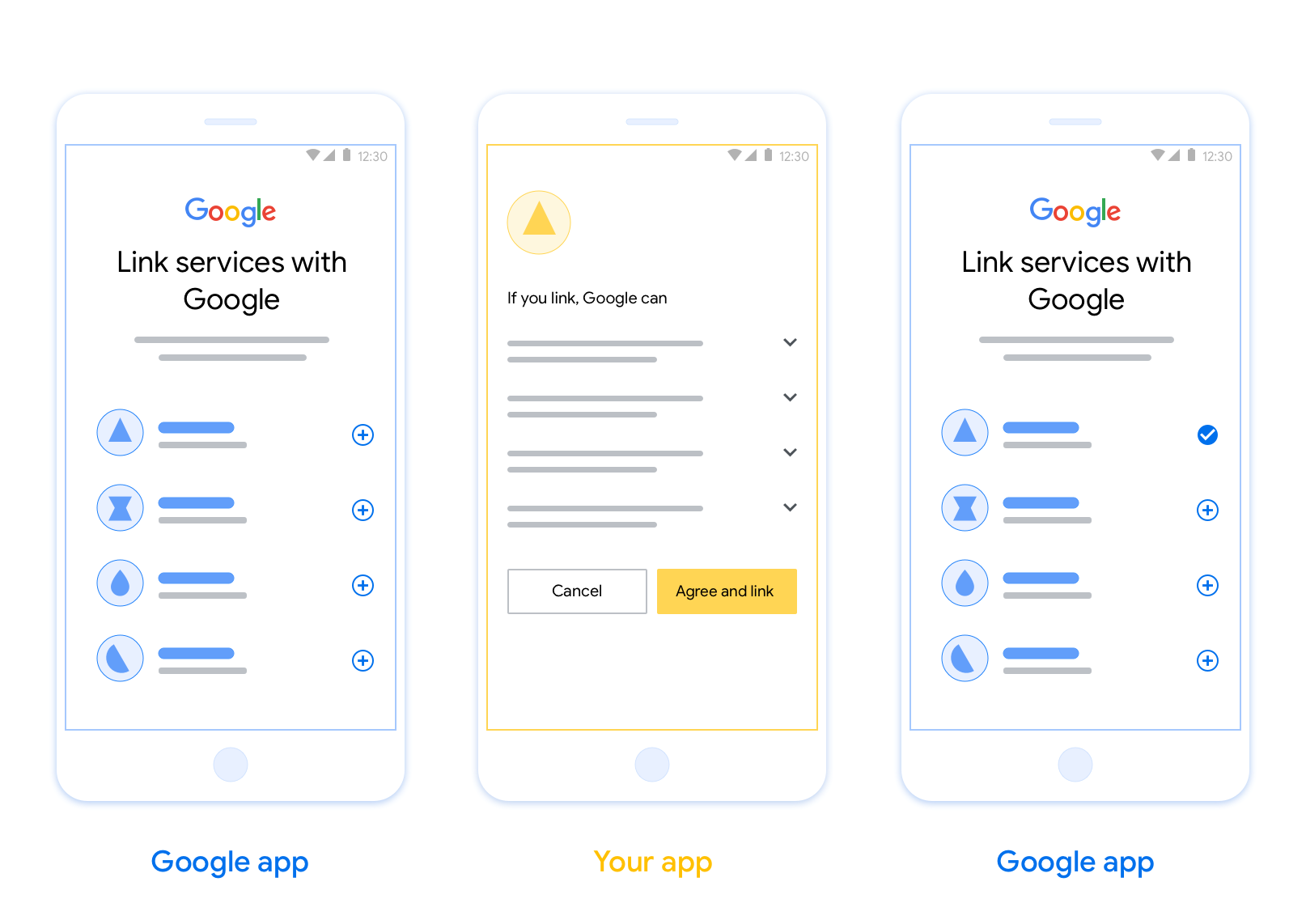
OAuth-based App Flip Linking (App Flip) allows your users to quickly link their accounts in your authentication system to their Google Accounts. If your app is installed on your user's phone when they initiate the account linking process, they are seamlessly flipped to your app to obtain user authorization.
This approach provides a faster linking process since the user does not have to re-enter their username and password to authenticate; instead, App Flip leverages the credentials from the user's account on your app. Once a user has linked their Google Account with your app, they can take advantage of any integrations that you have developed.
You can set up App Flip for both iOS and Android apps.
Requirements
To implement App Flip, you must fulfill the following requirements:
- You must have an Android or iOS app.
- You must own, manage and maintain an OAuth 2.0 server which supports the OAuth 2.0 authorization code flow.
OAuth-based App Flip Flow
The following sequence diagram details the interaction between the User, Google App, Your App, and Your Authorization Server for App Flip.
Roles and responsibilities
The following table defines the roles and responsibilities of the actors in the App Flip flow.
| Actor / Component | GAL Role | Responsibilities |
|---|---|---|
| Google App / Server | OAuth Client | Initiates the linking process, triggers a deep link to your mobile app, exchanges the authorization code for tokens, and securely stores them to access your service's APIs. |
| Your App | Authorization Agent | Authenticates the user (typically using existing app credentials), obtains consent, and retrieves an authorization code from your server. |
| Your Authorization Server | Authorization Server | Validates authorization codes and refresh tokens, and issues access tokens to the Google Server. |
Design guidelines
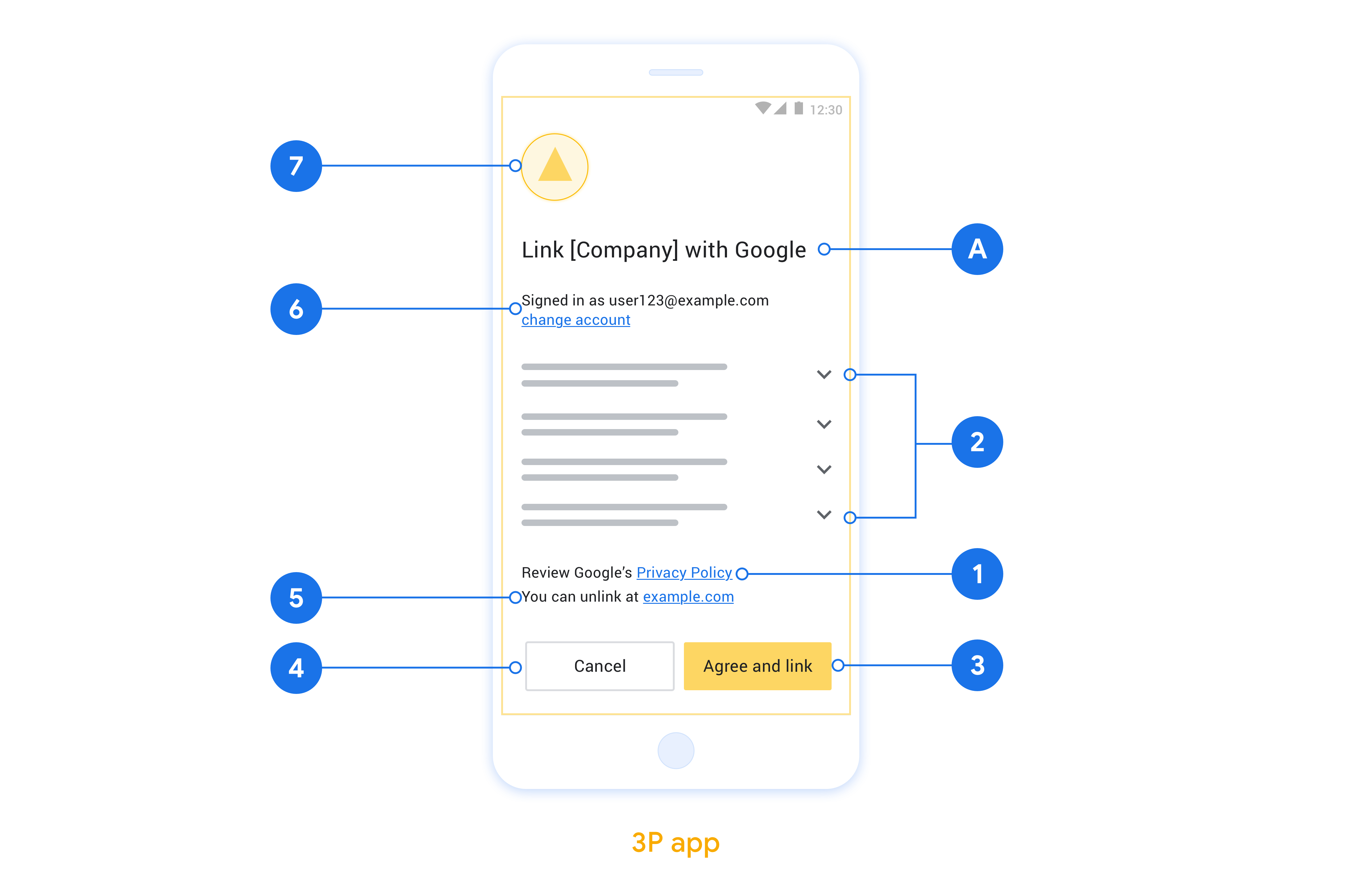
This section describes the design requirements and recommendations for the App Flip account linking consent screen. After Google calls your app, your app displays the consent screen to the user.
Requirements
- You must communicate that the user’s account is being linked to Google, not to a specific Google product, such as Google Home or Google Assistant.
Recommendations
We recommend that you do the following:
Display Google's Privacy Policy. Include a link to Google’s Privacy Policy on the consent screen.
Data to be shared. Use clear and concise language to tell the user what data of theirs Google requires and why.
Clear call-to-action. State a clear call-to-action on your consent screen, such as “Agree and link.” This is because users need to understand what data they're required to share with Google to link their accounts.
Ability to deny or cancel. Provide a way for users to go back, deny, or cancel, if they choose not to link.
Ability to unlink. Offer a mechanism for users to unlink, such as a URL to their account settings on your platform. Alternatively, you can include a link to Google Account where users can manage their linked account.
Ability to change user account. Suggest a method for users to switch their account(s). This is especially beneficial if users tend to have multiple accounts.
- If a user must close the consent screen to switch accounts, send a recoverable error to Google so the user can sign in to the desired account with OAuth linking and the implicit flow.
Include your logo. Display your company logo on the consent screen. Use your style guidelines to place your logo. If you wish to also display Google's logo, see Logos and trademarks.
Implement App Flip in your apps
To implement App Flip, you need to modify the user authorization code in your app to accept a deep link from Google.
To support App Flip on your Android app, follow the instructions on the Android implementation guide.
To support App Flip on your iOS app, follow the instructions on the iOS implementation guide.
Test App Flip
App Flip may be simulated using sample and test apps before verified production apps and a working OAuth 2.0 server are available.
During App Flip a Google app will first open your app which then requests an authorization code response from your OAuth 2.0 server, in the final step the response is returned to the Google app.
Prerequisites
To simulate a Google app and trigger the intent which launches your app, download and install the App Flip Test Tool for Android and iOS.
Download and install the App Flip Sample for Android and iOS to simulate your app and select an OAuth 2.0 response type.
Test sequence
- Open the App Flip Test Tool.
- Press
Try Flip!to launch your App Flip Sample app. - Select a response from the radio buttons in the Sample app.
- Press
Sendto return a simulated OAuth 2.0 response back to the Test Tool. - Check the Test Tool log messages for an auth_code or error details.
Production testing
App Flip may be tested in production after completing registration and your OAuth 2.0 server implementation.
A single Google Account and a task specific email address are recommended for automated testing.
Accounts linking state can be viewed using Linked accounts when signed in as the Google Account holder. Accounts may be unlinked between repeated tests from here as well.
Optionally, you may choose to implement RISC to programmatically unlink and notify Google of the change.