
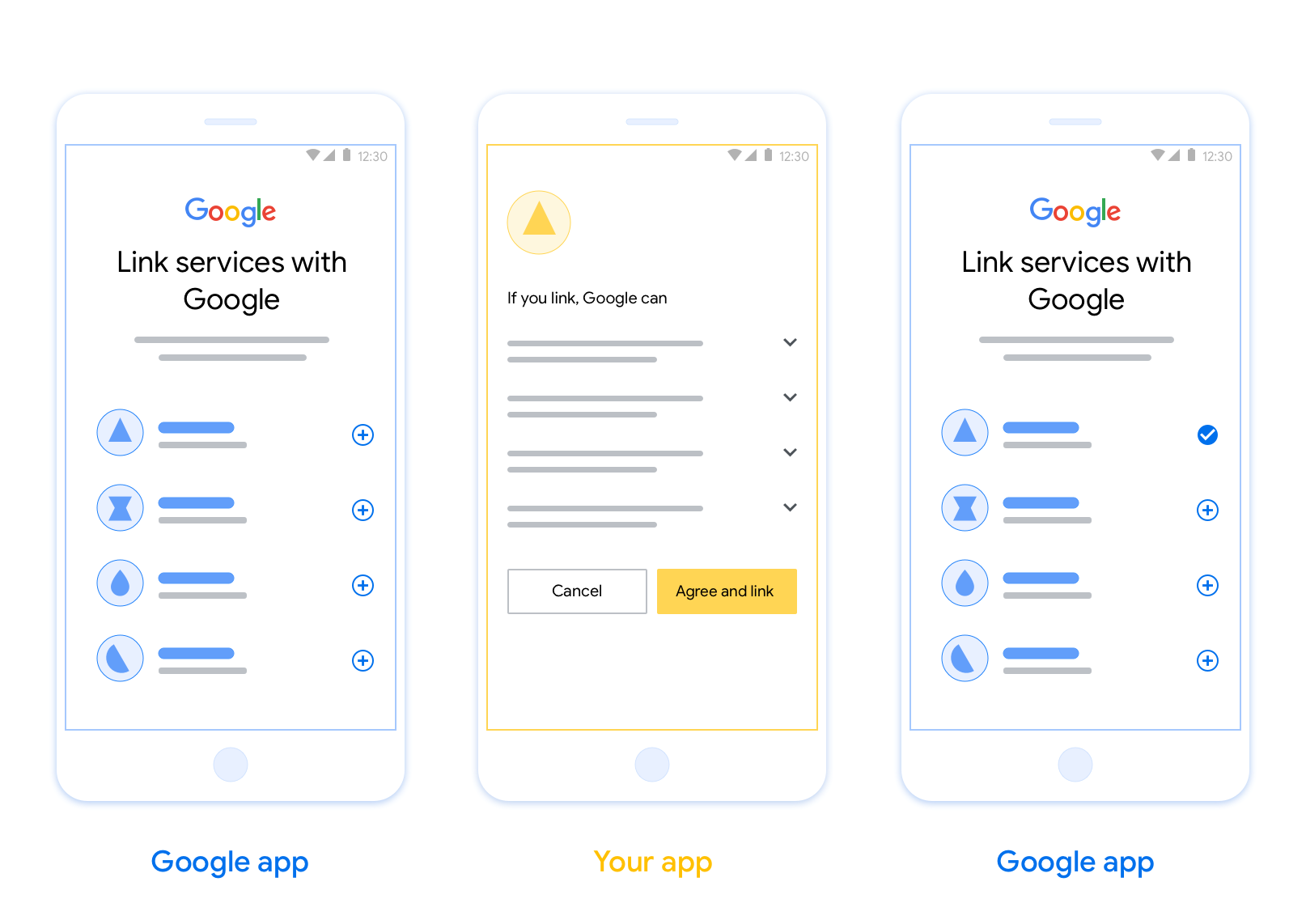
基于 OAuth 的应用快速关联 (App Flip) 关联功能可让用户快速将其在您的身份验证系统中的账号关联到其 Google 账号。 如果用户在发起账户关联过程时手机上已安装您的应用,系统会顺畅地将他们转到您的应用以获取用户授权。
这种方法可提供更快的账户关联过程,因为用户无需重新输入用户名和密码进行身份验证;相反,App Flip 会利用用户在您的应用中的账号凭据。用户将其 Google 账号与您的应用关联后,便可利用您开发的任何集成。
您可以为 iOS 和 Android 应用设置 App Flip。
要求
如需实现 App Flip,您必须满足以下要求:
- 您必须拥有 Android 或 iOS 应用。
- 您必须拥有、管理和维护支持 OAuth 2.0 授权代码流程的 OAuth 2.0 服务器。
基于 OAuth 的 App Flip 流程
以下序列图详细说明了用户、Google 应用、您的应用和您的授权服务器之间针对 App Flip 的交互。
角色和职责
下表定义了 App Flip 流程中执行者的角色和职责。
| 执行者 / 组件 | GAL 角色 | 职责 |
|---|---|---|
| Google 应用 / 服务器 | OAuth 客户端 | 发起账户关联过程,触发到您的移动应用深层链接,将授权代码交换为令牌,并安全地存储这些令牌以访问您服务的 API。 |
| 您的应用 | 授权代理 | 对用户进行身份验证(通常使用现有应用凭据), 获取意见征求,并从您的服务器检索授权代码。 |
| 您的授权服务器 | 授权服务器 | 验证授权代码和刷新令牌,并向 Google 服务器颁发访问 令牌。 |
הנחיות עיצוב
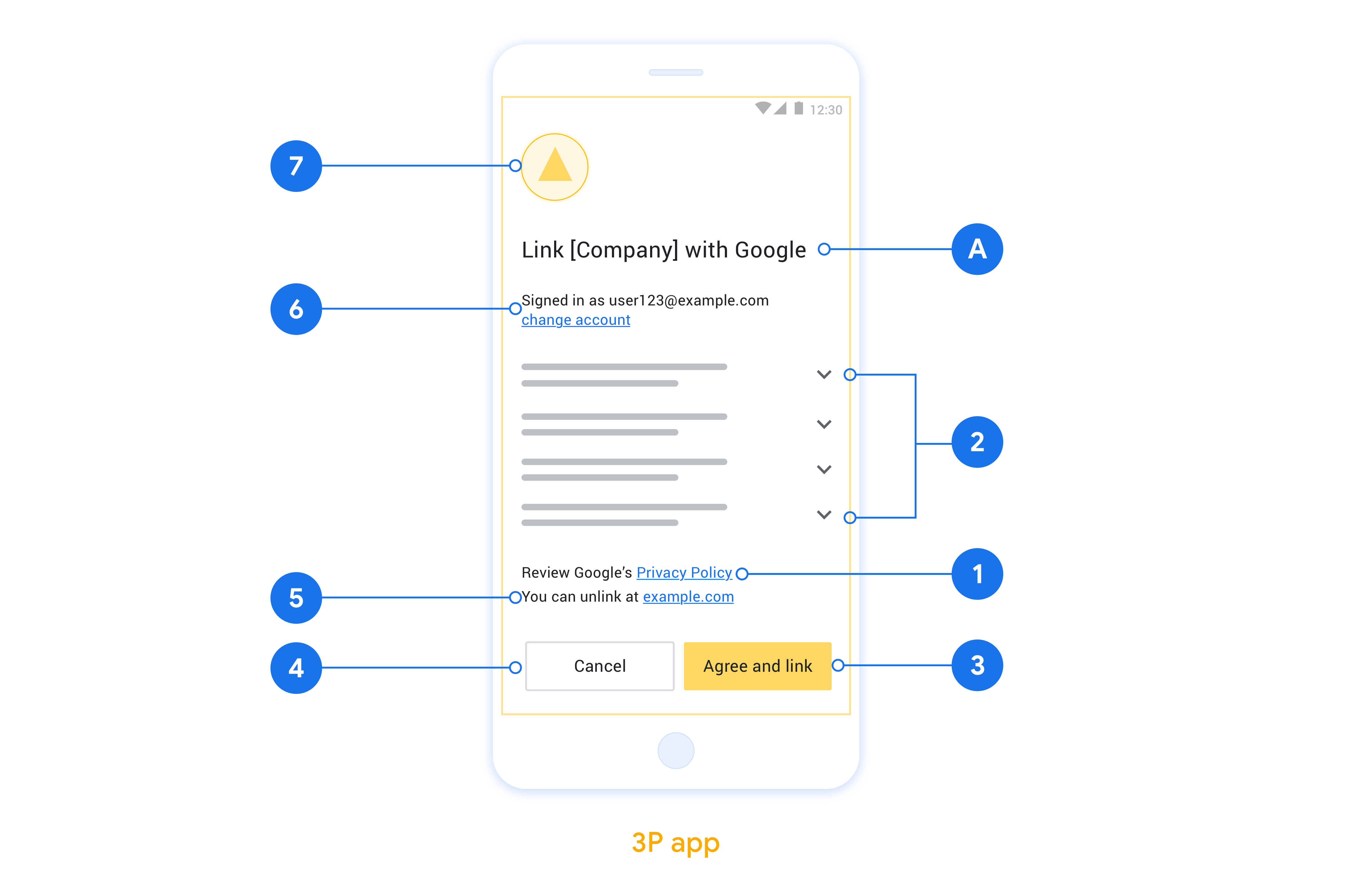
בקטע הזה מתוארות הדרישות וההמלצות לעיצוב מסך ההסכמה לקישור חשבון באפליקציה. אחרי ש-Google מפעילה את האפליקציה, האפליקציה מציגה למשתמש את מסך ההסכמה.
דרישות
- עליכם להבהיר למשתמש שהחשבון שלו מקושר ל-Google, ולא למוצר ספציפי של Google, כמו Google Home או Google Assistant.
המלצות
מה אתם יכולים לעשות?
הצגת מדיניות הפרטיות של Google במסך ההסכמה, צריך לכלול קישור למדיניות הפרטיות של Google.
הנתונים שישותפו. חשוב להשתמש בשפה ברורה ותמציתית כדי להסביר למשתמשים אילו נתונים שלהם נדרשים ל-Google ולמה.
קריאה ברורה לפעולה. צריך להציג קריאה ברורה לפעולה במסך ההסכמה, כמו 'הסכמה וקישור'. הסיבה לכך היא שהמשתמשים צריכים להבין אילו נתונים הם נדרשים לשתף עם Google כדי לקשר את החשבונות שלהם.
האפשרות לדחות או לבטל. לספק למשתמשים דרך לחזור, לדחות או לבטל את הקישור, אם הם בוחרים לא לקשר את החשבון.
אפשרות לבטל את הקישור. מציעים למשתמשים מנגנון לביטול הקישור, כמו כתובת URL להגדרות החשבון שלהם בפלטפורמה שלכם. לחלופין, אפשר לכלול קישור לחשבון Google שבו המשתמשים יכולים לנהל את החשבון המקושר שלהם.
אפשרות לשנות את חשבון המשתמש. הצעת שיטה למשתמשים להחלפת החשבונות שלהם. האפשרות הזו שימושית במיוחד אם למשתמשים יש בדרך כלל כמה חשבונות.
- אם משתמש צריך לסגור את מסך ההסכמה כדי לעבור בין חשבונות, צריך לשלוח שגיאה שניתן לתקן ל-Google כדי שהמשתמש יוכל להיכנס לחשבון הרצוי באמצעות קישור OAuth והתהליך המשתמע.
הוסיפו את הלוגו שלכם. להציג את הלוגו של החברה במסך בקשת ההסכמה. משתמשים בהנחיות הסגנון כדי למקם את הלוגו. אם רוצים להציג גם את הלוגו של Google, אפשר לעיין במאמר בנושא לוגו וסימנים מסחריים.
הטמעה של App Flip באפליקציות
כדי להטמיע את התכונה 'החלפת אפליקציות', צריך לשנות את קוד הרשאת המשתמש באפליקציה כך שיקבל קישור עומק מ-Google.
כדי לתמוך בהעברה מהירה לאפליקציה באפליקציית Android, צריך לפעול לפי ההוראות במדריך ההטמעה של Android.
כדי לתמוך בהעברה לאפליקציה באפליקציית iOS, צריך לפעול לפי ההוראות שבמדריך ההטמעה ל-iOS.
בדיקת קישור אפליקציות
אפשר לדמות את התכונה 'החלפת אפליקציות' באמצעות אפליקציות לדוגמה ואפליקציות לבדיקה לפני שזמינות אפליקציות מאומתות בייצור ושרת OAuth 2.0 תקין.
במהלך קישור אפליקציות, אפליקציית Google תפתח קודם את האפליקציה שלכם, ואז תבקש תגובה עם קוד הרשאה משרת OAuth 2.0 שלכם. בשלב האחרון, התגובה מוחזרת לאפליקציית Google.
דרישות מוקדמות
כדי לדמות אפליקציית Google ולהפעיל את ה-Intent שפותח את האפליקציה שלכם, צריך להוריד ולהתקין את כלי הבדיקה App Flip ל-Android ול-iOS.
מורידים ומתקינים את App Flip Sample ל-Android ול-iOS כדי לדמות את האפליקציה ולבחור סוג תגובה של OAuth 2.0.
רצף בדיקה
- פותחים את הכלי לבדיקת החלפת אפליקציות.
- לוחצים על
Try Flip!כדי להפעיל את אפליקציית הדוגמה App Flip. - בוחרים תשובה מלחצני הבחירה באפליקציה לדוגמה.
- לוחצים על
Sendכדי להחזיר תשובה מדומה של OAuth 2.0 לכלי הבדיקה. - בודקים את הודעות היומן של כלי הבדיקה כדי למצוא auth_code או פרטים על השגיאה.
בדיקות בסביבת הייצור
אפשר לבדוק את התכונה 'החלפת אפליקציות' בסביבת הייצור אחרי השלמת ההרשמה וההטמעה של שרת OAuth 2.0.
מומלץ להשתמש בחשבון Google אחד ובכתובת אימייל ספציפית למשימה לבדיקות אוטומטיות.
אפשר לראות את סטטוס קישור החשבונות באמצעות חשבונות מקושרים כשנכנסים לחשבון בתור בעל חשבון Google. יכול להיות שגם כאן יבוטל הקישור בין החשבונות אחרי בדיקות חוזרות.
אופציונלי, אתם יכולים להטמיע RISC כדי לבטל את הקישור באופן אוטומטי ולעדכן את Google לגבי השינוי.