将 Google 帐号关联至 OAuth

账号关联使用行业标准 OAuth 2.0 授权代码流程。

适用于代理的 OAuth 2.1 和 PKCE

对于无状态 AI 代理和多模态流水线,建议强制执行 OAuth 2.1

  • PKCE(用于代码交换的证明密钥):必须用于保护授权代码流程,防止拦截攻击。
  • 无隐式流程:隐式流程会在网址中公开访问令牌,这对于代理环境而言是一种安全风险。

您的服务必须支持符合 OAuth 2.0/2.1 标准的授权令牌交换端点。

Create the project

To create your project to use account linking:

  1. Go to the Google API Console.
  2. Click Create project.
  3. Enter a name or accept the generated suggestion.
  4. Confirm or edit any remaining fields.
  5. Click Create.

To view your project ID:

  1. Go to the Google API Console.
  2. Find your project in the table on the landing page. The project ID appears in the ID column.

The Google Account Linking process includes a consent screen which tells users the application requesting access to their data, what kind of data they are asking for and the terms that apply. You will need to configure your OAuth consent screen before generating a Google API client ID.

  1. Open the OAuth consent screen page of the Google APIs console.
  2. If prompted, select the project you just created.
  3. On the "OAuth consent screen" page, fill out the form and click the “Save” button.

    Application name: The name of the application asking for consent. The name should accurately reflect your application and be consistent with the application name users see elsewhere. The application name will be shown on the Account Linking consent screen.

    Application logo: An image on the consent screen that will help users recognize your app. The logo is shown on Account linking consent screen and on account settings

    Support email: For users to contact you with questions about their consent.

    Scopes for Google APIs: Scopes allow your application to access your user's private Google data. For the Google Account Linking use case, default scope (email, profile, openid) is sufficient, you don’t need to add any sensitive scopes. It is generally a best practice to request scopes incrementally, at the time access is required, rather than up front. Learn more.

    Authorized domains: To protect you and your users, Google only allows applications that authenticate using OAuth to use Authorized Domains. Your applications' links must be hosted on Authorized Domains. Learn more.

    Application Homepage link: Home page for your application. Must be hosted on an Authorized Domain.

    Application Privacy Policy link: Shown on Google Account Linking consent screen. Must be hosted on an Authorized Domain.

    Application Terms of Service link (Optional): Must be hosted on an Authorized Domain.

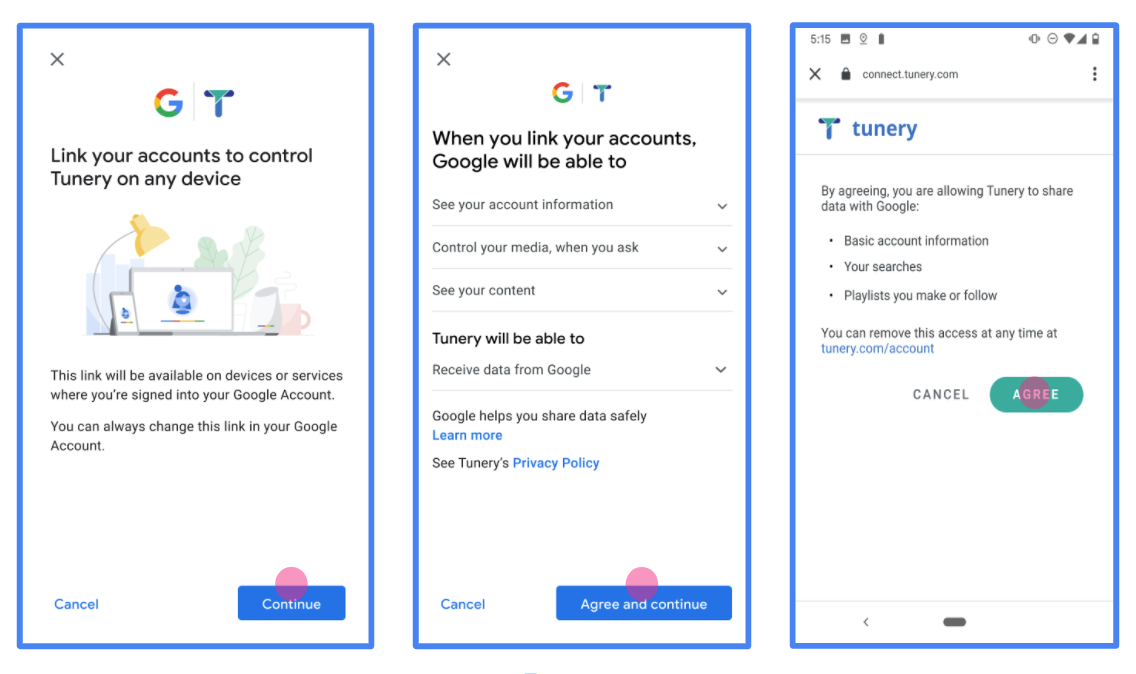
    Figure 1. Google Account Linking Consent Screen for a fictitious Application, Tunery

  4. Check "Verification Status", if your application needs verification then click the "Submit For Verification" button to submit your application for verification. Refer to OAuth verification requirements for details.

实现 OAuth 服务器

An OAuth 2.0 server implementation of the authorization code flow consists of two endpoints, which your service makes available by HTTPS. The first endpoint is the authorization endpoint, which is responsible for finding or obtaining consent from users for data access. The authorization endpoint presents a sign-in UI to your users that aren't already signed in and records consent to the requested access. The second endpoint is the token exchange endpoint, which is used to obtain encrypted strings, called tokens, that authorize a user to access your service.

When a Google application needs to call one of your service's APIs, Google uses these endpoints together to get permission from your users to call these APIs on their behalf.

Google Account Linking: OAuth Authorization Code Flow

The following sequence diagram details interactions between the User, Google, and your service's endpoints.

User Google App / Browser Google Server Your Auth Endpoint Your Token Endpoint 1. User initiates linking 2. Redirect to Auth Endpoint (GET) client_id, redirect_uri, state, scope 3. Display Sign-in & Consent Screen 4. User Authenticates & Grants Consent 5. Redirect back to Google (GET) code, state 6. Handle redirect & pass code/state 7. Token Exchange (POST) grant_type=authorization_code, code 8. Return Tokens (200 OK) access_token, refresh_token 9. Store user tokens 10. Access user resources
Figure 1. The sequence of events in the OAuth 2.0 Authorization Code flow for Google Account Linking.

Roles and responsibilities

The following table defines the roles and responsibilities of the actors in the Google Account Linking (GAL) OAuth flow. Note that in GAL, Google acts as the OAuth Client, while your service acts as the Identity/Service Provider.

Actor / Component GAL Role Responsibilities
Google App / Server OAuth Client Initiates the flow, receives the authorization code, exchanges it for tokens, and securely stores them to access your service's APIs.
Your Authorization Endpoint Authorization Server Authenticates your users and obtains their consent to share access to their data with Google.
Your Token Exchange Endpoint Authorization Server Validates authorization codes and refresh tokens, and issues access tokens to the Google Server.
Google Redirect URI Callback Endpoint Receives the user redirect from your authorization service with the code and state values.

An OAuth 2.0 authorization code flow session initiated by Google has the following flow:

  1. Google opens your authorization endpoint in the user's browser. If the flow started on a voice-only device for an Action, Google transfers the execution to a phone.
  2. The user signs in, if not signed in already, and grants Google permission to access their data with your API, if they haven't already granted permission.
  3. Your service creates an authorization code and returns it to Google. To do so, redirect the user's browser back to Google with the authorization code attached to the request.
  4. Google sends the authorization code to your token exchange endpoint, which verifies the authenticity of the code and returns an access token and a refresh token. The access token is a short-lived token that your service accepts as credentials to access APIs. The refresh token is a long-lived token that Google can store and use to acquire new access tokens when they expire.
  5. After the user has completed the account linking flow, every subsequent request sent from Google contains an access token.

Implementation Recipe

Follow these steps to implement the Authorization Code flow.

Step 1: Handle authorization requests

When Google initiates account linking, it redirects the user to your authorization endpoint. For detailed protocol contracts and parameter requirements, see the Authorization Endpoint.

To handle the request, perform the following actions:

  1. Validate the request:

    • Confirm that the client_id matches the Client ID assigned to Google.
    • Confirm that the redirect_uri matches the expected Google redirect URL: none https://oauth-redirect.googleusercontent.com/r/YOUR_PROJECT_ID https://oauth-redirect-sandbox.googleusercontent.com/r/YOUR_PROJECT_ID
    • Verify that response_type is code.
  2. Authenticate the user:

    • Check if the user is signed in to your service.
    • If the user is not signed in, prompt them to complete your sign-in or sign-up flow.
  3. Generate authorization code:

    • Create a unique, non-guessable authorization code associated with the user and client.
    • Set the code to expire in approximately 10 minutes.
  4. Redirect back to Google:

    • Redirect the browser to the URL provided in redirect_uri.
    • Append the following query parameters:
      • code: The authorization code you generated.
      • state: The unmodified state value received from Google.

Step 2: Handle token exchange requests

Your token exchange endpoint processes two types of requests: exchanging codes for tokens, and refreshing expired access tokens. For detailed protocol contracts and parameter requirements, see the Token Exchange Endpoint.

A. Exchange authorization codes for tokens

When Google receives the authorization code, it calls your token exchange endpoint (POST) to retrieve tokens.

  1. Validate the request:

    • Verify client_id and client_secret.
    • Verify the authorization code is valid and not expired.
    • Confirm redirect_uri matches the value used in Step 1.
    • If validation fails, return an HTTP 400 Bad Request with {"error": "invalid_grant"}.
  2. Issue tokens:

    • Generate a long-lived refresh_token and a short-lived access_token (typically 1 hour).
    • Return an HTTP 200 OK with the standard JSON token response.

B. Refresh access tokens

When the access token expires, Google requests a new one using the refresh token.

  1. Validate the request:

    • Verify client_id, client_secret, and refresh_token.
    • If validation fails, return an HTTP 400 Bad Request with {"error": "invalid_grant"}.
  2. Issue new access token:

    • Generate a new short-lived access_token.
    • Return an HTTP 200 OK with the JSON token response (optionally including a new refresh token).
Handle userinfo requests

The userinfo endpoint is an OAuth 2.0 protected resource that return claims about the linked user. Implementing and hosting the userinfo endpoint is optional, except for the following use cases:

After the access token has been successfully retrieved from your token endpoint, Google sends a request to your userinfo endpoint to retrieve basic profile information about the linked user.

userinfo endpoint request headers
Authorization header The access token of type Bearer.

For example, if your userinfo endpoint is available at https://myservice.example.com/userinfo, a request might look like the following:

GET /userinfo HTTP/1.1
Host: myservice.example.com
Authorization: Bearer ACCESS_TOKEN

For your userinfo endpoint to handle requests, do the following steps:

  1. Extract access token from the Authorization header and return information for the user associated with the access token.
  2. If the access token is invalid, return an HTTP 401 Unauthorized error with using the WWW-Authenticate Response Header. Below is an example of a userinfo error response:
    HTTP/1.1 401 Unauthorized
    WWW-Authenticate: error="invalid_token",
    error_description="The Access Token expired"
    
    If a 401 Unauthorized, or any other unsuccessful error response is returned during the linking process, the error will be non-recoverable, the retrieved token will be discarded and the user will have to initiate the linking process again.
  3. If the access token is valid, return and HTTP 200 response with the following JSON object in the body of the HTTPS response:

    {
    "sub": "USER_UUID",
    "email": "EMAIL_ADDRESS",
    "given_name": "FIRST_NAME",
    "family_name": "LAST_NAME",
    "name": "FULL_NAME",
    "picture": "PROFILE_PICTURE",
    }
    If your userinfo endpoint returns an HTTP 200 success response, the retrieved token and claims are registered against the user's Google account.

    userinfo endpoint response
    sub A unique ID that identifies the user in your system.
    email Email address of the user.
    given_name Optional: First name of the user.
    family_name Optional: Last name of the user.
    name Optional: Full name of the user.
    picture Optional: Profile picture of the user.

验证您的实现

您可以使用 OAuth 2.0 Playground 工具验证您的实现。

在该工具中,执行以下步骤:

  1. 点击配置 以打开“OAuth 2.0 配置”窗口。
  2. OAuth flow(OAuth 流程)字段中,选择 Client-side(客户端)。
  3. OAuth Endpoints 字段中,选择 Custom
  4. 在相应字段中指定您的 OAuth 2.0 端点以及您分配给 Google 的客户端 ID。
  5. 第 1 步部分中,请勿选择任何 Google 范围。请将此字段留空,或输入适用于您服务器的范围(如果您不使用 OAuth 范围,则输入任意字符串)。完成后,点击 Authorize APIs
  6. 第 2 步第 3 步部分中,完成 OAuth 2.0 流程,并验证每个步骤是否按预期运行。

您可以使用 Google 账号关联演示工具验证您的实现。

在该工具中,执行以下步骤:

  1. 点击使用 Google 账号登录按钮。
  2. 选择您要关联的账号。
  3. 输入服务 ID。
  4. (可选)输入您将请求访问的一个或多个范围。
  5. 点击开始演示
  6. 当系统提示时,请确认您可以同意或拒绝关联请求。
  7. 确认您已重定向到相应平台。