概览
基于 OAuth 的“使用 Google 账号登录”精简关联流程在 OAuth 关联流程的基础上添加了“使用 Google 账号登录”功能。这为 Google 用户提供了顺畅的关联体验,并且还支持创建账号,让用户可以使用自己的 Google 账号在您的服务中创建新账号。
如需使用 OAuth 和“使用 Google 账号登录”功能执行账号关联,请按照以下一般步骤操作:
- 首先,要求用户同意访问其 Google 个人资料。
- 使用其个人资料中的信息检查用户账号是否存在。
- 对于现有用户,关联账号。
- 如果您在身份验证系统中找不到与 Google 用户匹配的账号,请验证从 Google 收到的 ID 令牌。然后,您可以根据 ID 令牌中包含的个人资料信息创建用户。
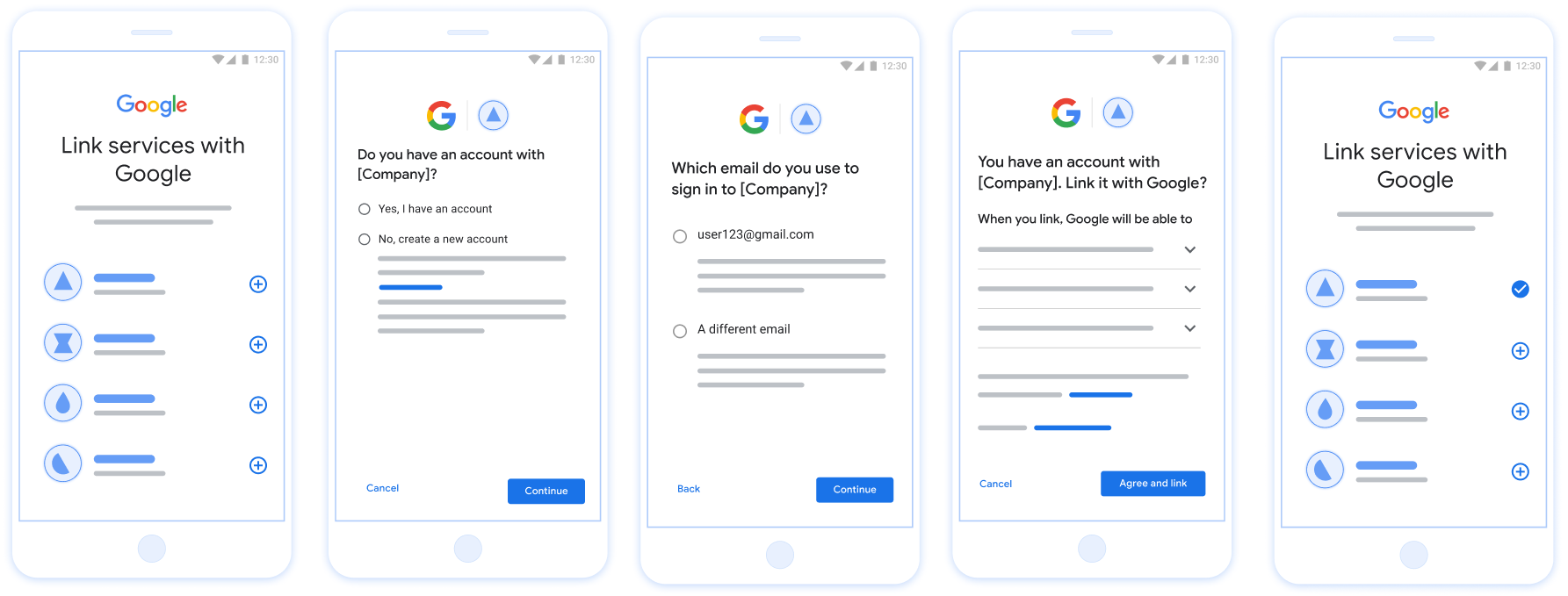
图 1. 在用户手机上使用精简关联流程进行账号关联
精简关联流程:OAuth +“使用 Google 账号登录”流程
以下序列图详细介绍了用户、Google 和您的令牌交换端点之间针对精简关联流程的交互。
角色和职责
下表定义了精简关联流程中执行者的角色和职责。
| 执行者 / 组件 | GAL 角色 | 职责 |
|---|---|---|
| Google 应用 / 服务器 | OAuth 客户端 | 获取用户对“使用 Google 账号登录”的同意,将身份断言 (JWT) 传递给您的服务器,并安全地存储生成的令牌。 |
| 您的令牌交换端点 | 身份提供商 / 授权服务器 | 验证身份断言,检查现有账号,处理
账号关联 intent(check、get、create),并根据请求的
intent 发布令牌。 |
| 您的服务 API | 资源服务器 | 在提供有效的访问 令牌时,提供对用户数据的访问权限。 |
精简关联流程的要求
- 实现基本的 Web OAuth 关联流程。您的服务必须支持符合 OAuth 2.0 标准的 授权 和 令牌交换 端点。
- 您的 令牌交换 端点必须支持 JSON Web 令牌 (JWT) 断言,并实现
check、create和getintent。
实现 OAuth 服务器
您的 令牌交换 端点必须支持 check、create、get intent。
请按照以下步骤完成账号关联流程,并了解何时使用不同的
intent:
- 用户在您的身份验证系统中是否有账号?(用户通过选择“是”或“否”来决定)
- 是:用户是否使用与其 Google 账号关联的电子邮件地址登录您的平台?(用户通过选择“是”或“否”来决定)
- 是:用户在您的身份验证系统中是否有匹配的账号?(
check intentis called to confirm)- 是:系统会调用
get intent,如果 get intent 成功返回,则关联账号。 - 否:创建新账号?(用户通过选择“是”或“否”来决定)
- 是:系统会调用
create intent,如果 create intent 成功返回,则关联账号。 - 否:系统会触发 Web OAuth 流程,用户会被定向到其浏览器,并且用户可以选择使用其他电子邮件地址进行关联。
- 是:系统会调用
- 是:系统会调用
- 否:系统会触发 Web OAuth 流程,用户会被定向到其浏览器,并且用户可以选择使用其他电子邮件地址进行关联。
- 是:用户在您的身份验证系统中是否有匹配的账号?(
- 否:用户在您的身份验证系统中是否有匹配的账号?(
check intentis called to confirm)- 是:系统会调用
get intent,如果 get intent 成功返回,则关联账号。 - 否:系统会调用
create intent,如果 create intent 成功返回,则关联账号。
- 是:系统会调用
- 是:用户是否使用与其 Google 账号关联的电子邮件地址登录您的平台?(用户通过选择“是”或“否”来决定)
Check for an existing user account (check intent)
After the user gives consent to access their Google profile, Google sends a request that contains a signed assertion of the Google user's identity. The assertion contains information that includes the user's Google Account ID, name, and email address. The token exchange endpoint configured for your project handles that request.
If the corresponding Google account is already present in your authentication
system, your token exchange endpoint responds with account_found=true. If the
Google account doesn't match an existing user, your token exchange endpoint
returns an HTTP 404 Not Found error with account_found=false.
The request has the following form:
POST /token HTTP/1.1
Host: oauth2.example.com
Content-Type: application/x-www-form-urlencoded

grant_type=urn:ietf:params:oauth:grant-type:jwt-bearer&intent=check&assertion=JWT&scope=SCOPES&client_id=GOOGLE_CLIENT_ID&client_secret=GOOGLE_CLIENT_SECRET
Your token exchange endpoint must be able to handle the following parameters:
| Token endpoint parameters | |
|---|---|
intent |
For these requests, the value of this parameter is
check. |
grant_type |
The type of token being exchanged. For these requests, this
parameter has the value urn:ietf:params:oauth:grant-type:jwt-bearer. |
assertion |
A JSON Web Token (JWT) that provides a signed assertion of the Google user's identity. The JWT contains information that includes the user's Google Account ID, name, and email address. |
client_id |
The client ID you assigned to Google. |
client_secret |
The client secret you assigned to Google. |
To respond to the check intent requests, your token exchange endpoint must perform the following steps:
- Validate and decode the JWT assertion.
- Check if the Google account is already present in your authentication system.
验证和解码 JWT 断言
您可以使用 适用于您所用语言的 JWT 解码库。使用 Google 的公钥,在 JWK 或 PEM 格式,用于验证 令牌的签名。
解码后,JWT 断言如以下示例所示:
{
  "sub": "1234567890",      // The unique ID of the user's Google Account
  "iss": "https://accounts.google.com",        // The assertion's issuer
  "aud": "123-abc.apps.googleusercontent.com", // Your server's client ID
  "iat": 233366400,         // Unix timestamp of the assertion's creation time
  "exp": 233370000,         // Unix timestamp of the assertion's expiration time
  "name": "Jan Jansen",
  "given_name": "Jan",
  "family_name": "Jansen",
  "email": "jan@gmail.com", // If present, the user's email address
  "email_verified": true,   // true, if Google has verified the email address
  "hd": "example.com",      // If present, the host domain of the user's GSuite email address
                            // If present, a URL to user's profile picture
  "picture": "https://lh3.googleusercontent.com/a-/AOh14GjlTnZKHAeb94A-FmEbwZv7uJD986VOF1mJGb2YYQ",
  "locale": "en_US"         // User's locale, from browser or phone settings
}
除了验证令牌的签名之外,还要验证断言的
颁发者(iss 字段)为 https://accounts.google.com,
(aud 字段)是分配给您的客户端 ID,并且令牌未过期
(exp 字段)。
使用 email、email_verified 和 hd 字段,您可以确定
Google 负责托管电子邮件地址,并对其具有权威性。如果 Google
权威性 - 用户当前被认定为合法账号所有者
您可以跳过密码或其他验证方法。否则,这些方法
可用于在关联之前验证账号。
Google 具有权威性的情形:
email的后缀为@gmail.com,这是一个 Gmail 账号。email_verified为 true 且hd已设置,这是 G Suite 账号。
用户无需使用 Gmail 或 G Suite 即可注册 Google 账号。时间
email 不包含 @gmail.com 后缀,且 hd 不存在 Google 不
建议使用权威凭据和密码或其他验证方法进行验证
用户。email_verified 可能为 true,因为 Google 最初验证了
创建 Google 账号后,该用户会获得第三方的所有权,
后,电子邮件账号可能已更改。
Check if the Google account is already present in your authentication system
Check whether either of the following conditions are true:
- The Google Account ID, found in the assertion's
subfield, is in your user database. - The email address in the assertion matches a user in your user database.
If either condition is true, the user has already signed up. In that case, return a response like the following:
HTTP/1.1 200 Success
Content-Type: application/json;charset=UTF-8

{
  "account_found":"true",
}
If neither the Google Account ID nor the email address specified in the
assertion matches a user in your database, the user hasn't signed up yet. In
this case, your token exchange endpoint needs to reply with a HTTP 404 error
that specifies "account_found": "false", as in the following example:
HTTP/1.1 404 Not found
Content-Type: application/json;charset=UTF-8

{
  "account_found":"false",
}
Handle automatic linking (get intent)
After the user gives consent to access their Google profile, Google sends a request that contains a signed assertion of the Google user's identity. The assertion contains information that includes the user's Google Account ID, name, and email address. The token exchange endpoint configured for your project handles that request.
If the corresponding Google Account is already present in your authentication
system, your token exchange endpoint returns a token for the user. If the
Google Account doesn't match an existing user, your token exchange endpoint
returns a linking_error error and optional login_hint.
The request has the following form:
POST /token HTTP/1.1
Host: oauth2.example.com
Content-Type: application/x-www-form-urlencoded

grant_type=urn:ietf:params:oauth:grant-type:jwt-bearer&intent=get&assertion=JWT&scope=SCOPES&client_id=GOOGLE_CLIENT_ID&client_secret=GOOGLE_CLIENT_SECRET
Your token exchange endpoint must be able to handle the following parameters:
| Token endpoint parameters | |
|---|---|
intent |
For these requests, the value of this parameter is get. |
grant_type |
The type of token being exchanged. For these requests, this
parameter has the value urn:ietf:params:oauth:grant-type:jwt-bearer. |
assertion |
A JSON Web Token (JWT) that provides a signed assertion of the Google user's identity. The JWT contains information that includes the user's Google Account ID, name, and email address. |
scope |
Optional: Any scopes that you've configured Google to request from users. |
client_id |
The client ID you assigned to Google. |
client_secret |
The client secret you assigned to Google. |
To respond to the get intent requests, your token exchange endpoint must perform the following steps:
- Validate and decode the JWT assertion.
- Check if the Google account is already present in your authentication system.
验证和解码 JWT 断言
您可以使用 适用于您所用语言的 JWT 解码库。使用 Google 的公钥,在 JWK 或 PEM 格式,用于验证 令牌的签名。
解码后,JWT 断言如以下示例所示:
{
  "sub": "1234567890",      // The unique ID of the user's Google Account
  "iss": "https://accounts.google.com",        // The assertion's issuer
  "aud": "123-abc.apps.googleusercontent.com", // Your server's client ID
  "iat": 233366400,         // Unix timestamp of the assertion's creation time
  "exp": 233370000,         // Unix timestamp of the assertion's expiration time
  "name": "Jan Jansen",
  "given_name": "Jan",
  "family_name": "Jansen",
  "email": "jan@gmail.com", // If present, the user's email address
  "email_verified": true,   // true, if Google has verified the email address
  "hd": "example.com",      // If present, the host domain of the user's GSuite email address
                            // If present, a URL to user's profile picture
  "picture": "https://lh3.googleusercontent.com/a-/AOh14GjlTnZKHAeb94A-FmEbwZv7uJD986VOF1mJGb2YYQ",
  "locale": "en_US"         // User's locale, from browser or phone settings
}
除了验证令牌的签名之外,还要验证断言的
颁发者(iss 字段)为 https://accounts.google.com,
(aud 字段)是分配给您的客户端 ID,并且令牌未过期
(exp 字段)。
使用 email、email_verified 和 hd 字段,您可以确定
Google 负责托管电子邮件地址,并对其具有权威性。如果 Google
权威性 - 用户当前被认定为合法账号所有者
您可以跳过密码或其他验证方法。否则,这些方法
可用于在关联之前验证账号。
Google 具有权威性的情形:
email的后缀为@gmail.com,这是一个 Gmail 账号。email_verified为 true 且hd已设置,这是 G Suite 账号。
用户无需使用 Gmail 或 G Suite 即可注册 Google 账号。时间
email 不包含 @gmail.com 后缀,且 hd 不存在 Google 不
建议使用权威凭据和密码或其他验证方法进行验证
用户。email_verified 可能为 true,因为 Google 最初验证了
创建 Google 账号后,该用户会获得第三方的所有权,
后,电子邮件账号可能已更改。
Check if the Google account is already present in your authentication system
Check whether either of the following conditions are true:
- The Google Account ID, found in the assertion's
subfield, is in your user database. - The email address in the assertion matches a user in your user database.
If an account is found for the user, issue an access token and return the values in a JSON object in the body of your HTTPS response, like in the following example:
{
  "token_type": "Bearer",
  "access_token": "ACCESS_TOKEN",
  "refresh_token": "REFRESH_TOKEN",
  "expires_in": SECONDS_TO_EXPIRATION
}
In some cases, account linking based on ID token might fail for the user. If it
does so for any reason, your token exchange endpoint needs to reply with a HTTP
401 error that specifies error=linking_error, as the following example shows:
HTTP/1.1 401 Unauthorized
Content-Type: application/json;charset=UTF-8

{
  "error":"linking_error",
  "login_hint":"foo@bar.com"
}
When Google receives a 401 error response with linking_error, Google sends
the user to your authorization endpoint with login_hint as a parameter. The
user completes account linking using the OAuth linking flow in their browser.
Handle account creation using Sign in with Google (create intent)
When a user needs to create an account on your service, Google makes a request
to your token exchange endpoint that specifies intent=create.
The request has the following form:
POST /token HTTP/1.1
Host: oauth2.example.com
Content-Type: application/x-www-form-urlencoded

response_type=token&grant_type=urn:ietf:params:oauth:grant-type:jwt-bearer&scope=SCOPES&intent=create&assertion=JWT&client_id=GOOGLE_CLIENT_ID&client_secret=GOOGLE_CLIENT_SECRET
Your token exchange endpoint must able to handle the following parameters:
| Token endpoint parameters | |
|---|---|
intent |
For these requests, the value of this parameter is create. |
grant_type |
The type of token being exchanged. For these requests, this
parameter has the value urn:ietf:params:oauth:grant-type:jwt-bearer. |
assertion |
A JSON Web Token (JWT) that provides a signed assertion of the Google user's identity. The JWT contains information that includes the user's Google Account ID, name, and email address. |
client_id |
The client ID you assigned to Google. |
client_secret |
The client secret you assigned to Google. |
The JWT within the assertion parameter contains the user's Google Account ID,
name, and email address, which you can use to create a new account on your
service.
To respond to the create intent requests, your token exchange endpoint must perform the following steps:
- Validate and decode the JWT assertion.
- Validate user information and create new account.
验证和解码 JWT 断言
您可以使用 适用于您所用语言的 JWT 解码库。使用 Google 的公钥,在 JWK 或 PEM 格式,用于验证 令牌的签名。
解码后,JWT 断言如以下示例所示:
{
  "sub": "1234567890",      // The unique ID of the user's Google Account
  "iss": "https://accounts.google.com",        // The assertion's issuer
  "aud": "123-abc.apps.googleusercontent.com", // Your server's client ID
  "iat": 233366400,         // Unix timestamp of the assertion's creation time
  "exp": 233370000,         // Unix timestamp of the assertion's expiration time
  "name": "Jan Jansen",
  "given_name": "Jan",
  "family_name": "Jansen",
  "email": "jan@gmail.com", // If present, the user's email address
  "email_verified": true,   // true, if Google has verified the email address
  "hd": "example.com",      // If present, the host domain of the user's GSuite email address
                            // If present, a URL to user's profile picture
  "picture": "https://lh3.googleusercontent.com/a-/AOh14GjlTnZKHAeb94A-FmEbwZv7uJD986VOF1mJGb2YYQ",
  "locale": "en_US"         // User's locale, from browser or phone settings
}
除了验证令牌的签名之外,还要验证断言的
颁发者(iss 字段)为 https://accounts.google.com,
(aud 字段)是分配给您的客户端 ID,并且令牌未过期
(exp 字段)。
使用 email、email_verified 和 hd 字段,您可以确定
Google 负责托管电子邮件地址,并对其具有权威性。如果 Google
权威性 - 用户当前被认定为合法账号所有者
您可以跳过密码或其他验证方法。否则,这些方法
可用于在关联之前验证账号。
Google 具有权威性的情形:
email的后缀为@gmail.com,这是一个 Gmail 账号。email_verified为 true 且hd已设置,这是 G Suite 账号。
用户无需使用 Gmail 或 G Suite 即可注册 Google 账号。时间
email 不包含 @gmail.com 后缀,且 hd 不存在 Google 不
建议使用权威凭据和密码或其他验证方法进行验证
用户。email_verified 可能为 true,因为 Google 最初验证了
创建 Google 账号后,该用户会获得第三方的所有权,
后,电子邮件账号可能已更改。
Validate user information and create new account
Check whether either of the following conditions are true:
- The Google Account ID, found in the assertion's
subfield, is in your user database. - The email address in the assertion matches a user in your user database.
If either condition is true, prompt the user to link their existing account
with their Google Account. To do so, respond to the request with an HTTP 401 error
that specifies error=linking_error and gives the user's email address as the
login_hint. The following is a sample response:
HTTP/1.1 401 Unauthorized
Content-Type: application/json;charset=UTF-8

{
  "error":"linking_error",
  "login_hint":"foo@bar.com"
}
When Google receives a 401 error response with linking_error, Google sends
the user to your authorization endpoint with login_hint as a parameter. The
user completes account linking using the OAuth linking flow in their browser.
If neither condition is true, create a new user account with the information provided in the JWT. New accounts don't typically have a password set. It's recommended that you add Sign in with Google to other platforms to enable users to sign in with Google across the surfaces of your application. Alternatively, you can email the user a link that starts your password recovery flow to allow the user to set a password to sign in on other platforms.
When the creation is completed, issue an access token and refresh token and return the values in a JSON object in the body of your HTTPS response, like in the following example:
{
  "token_type": "Bearer",
  "access_token": "ACCESS_TOKEN",
  "refresh_token": "REFRESH_TOKEN",
  "expires_in": SECONDS_TO_EXPIRATION
}
获取您的 Google API 客户端 ID
在账号 关联注册流程中,您需要提供 Google API 客户端 ID。 如需使用您在完成 OAuth 关联步骤时创建的项目获取 API 客户端 ID,请完成以下步骤:
- 前往“客户端”页面。
创建或选择 Google API 项目。
如果您的项目没有 Web 应用类型的客户端 ID,请点击创建客户端 进行创建。请务必在已获授权的 JavaScript 来源 框中添加您网站的网域。在执行本地测试或开发时,您 必须将
http://localhost和http://localhost:<port_number>都添加到 已获授权的 JavaScript 来源 字段中。
验证您的实现效果
您可以使用 OAuth 2.0 Playground 工具验证您的实现。
在该工具中,执行以下步骤:
- 点击配置 以打开“OAuth 2.0 配置”窗口。
- 在 OAuth flow(OAuth 流程)字段中,选择 Client-side(客户端)。
- 在 OAuth Endpoints 字段中,选择 Custom。
- 在相应字段中指定您的 OAuth 2.0 端点以及您分配给 Google 的客户端 ID。
- 在第 1 步部分中,请勿选择任何 Google 范围。请将此字段留空,或输入适用于您服务器的范围(如果您不使用 OAuth 范围,则输入任意字符串)。完成后,点击 Authorize APIs。
- 在第 2 步和第 3 步部分中,完成 OAuth 2.0 流程,并验证每个步骤是否按预期运行。
您可以使用 Google 账号关联演示工具验证您的实现。
在该工具中,执行以下步骤:
- 点击使用 Google 账号登录按钮。
- 选择您要关联的账号。
- 输入服务 ID。
- (可选)输入您将请求访问的一个或多个范围。
- 点击开始演示。
- 当系统提示时,请确认您可以同意或拒绝关联请求。
- 确认您已重定向到相应平台。