
Übersicht
Mit OAuth-basierter Anmeldung mit Google und vereinfachter Verknüpfung wird die Anmeldung mit Google zusätzlich zur OAuth-Verknüpfung eingeführt. So können Google-Nutzer ihre Konten nahtlos verknüpfen und optional ein Konto erstellen, mit dem sie über ihr Google-Konto einen neuen Account für Ihren Dienst erstellen können.
So verknüpfen Sie Konten mit OAuth und der Anmeldung mit Google:
- Bitten Sie den Nutzer zuerst um die Einwilligung zum Zugriff auf sein Google-Profil.
- Prüfen Sie anhand der Informationen im Profil, ob das Nutzerkonto vorhanden ist.
- Verknüpfen Sie die Konten für bestehende Nutzer.
- Wenn Sie im Authentifizierungssystem keine Übereinstimmung für den Google-Nutzer finden, validieren Sie das von Google erhaltene ID-Token. Wenn Ihr Dienst die Kontoerstellung unterstützt, können Sie dann einen Nutzer anhand der im ID-Token enthaltenen Profilinformationen erstellen.
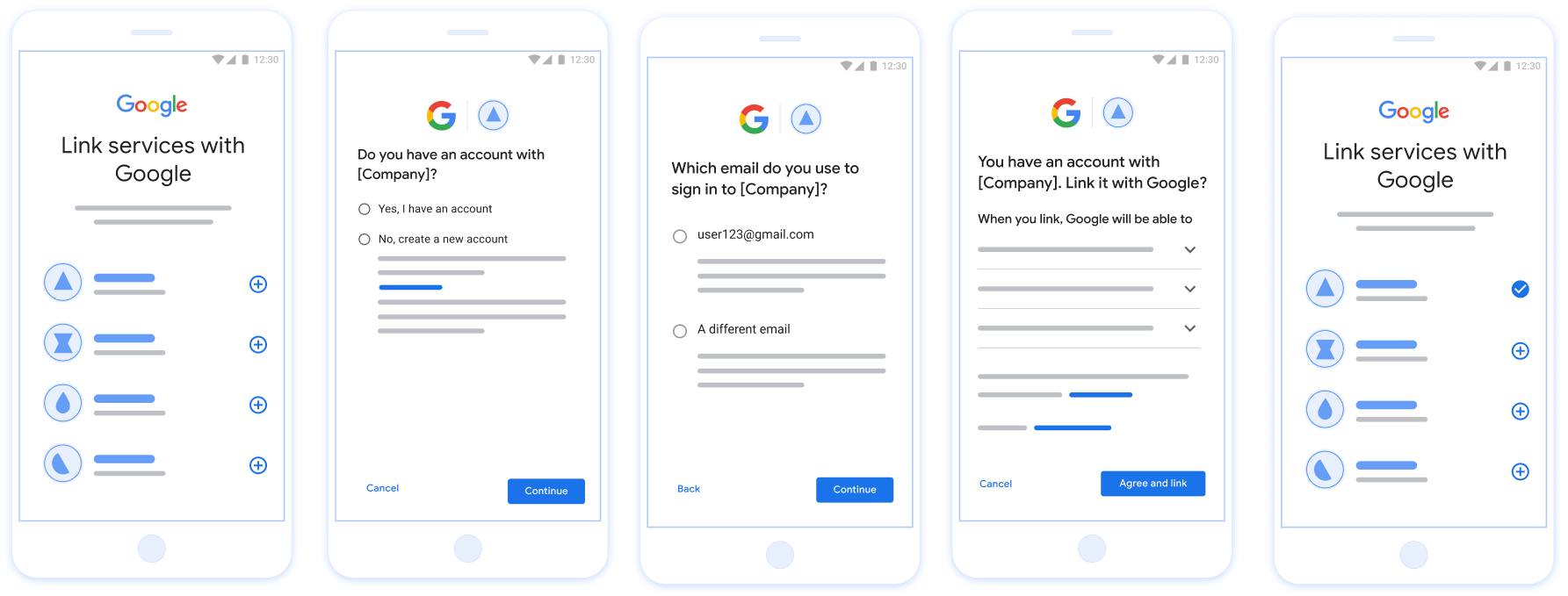
Abbildung 1. Kontoverknüpfung auf dem Smartphone eines Nutzers mit vereinfachter Verknüpfung
Vereinfachte Verknüpfung: OAuth- und Anmeldung mit Google-Vorgang
Das folgende Sequenzdiagramm zeigt die Interaktionen zwischen dem Nutzer, Google und Ihrem Endpunkt für den Tokenaustausch für die vereinfachte Verknüpfung.
Rollen und Verantwortlichkeiten
In der folgenden Tabelle sind die Rollen und Verantwortlichkeiten der Akteure im Vorgang für die vereinfachte Verknüpfung definiert.
| Akteur / Komponente | GAL-Rolle | Verantwortlichkeiten |
|---|---|---|
| Google-App / Server | OAuth-Client | Holt die Einwilligung des Nutzers für die Anmeldung mit Google ein, übergibt Identitätsassertions (JWT) an Ihren Server und speichert die resultierenden Tokens sicher. |
| Endpunkt für den Tokenaustausch | Identitätsanbieter / Autorisierungsserver | Validiert Identitätsassertions, prüft auf vorhandene Konten, verarbeitet
die erforderlichen Absichten für die Kontoverknüpfung (check,
get) und die optionale create Absicht und stellt
Tokens basierend auf den angeforderten Absichten aus. |
| Ihre Dienst-API | Ressourcenserver | Gewährt Zugriff auf Nutzerdaten, wenn ein gültiges Zugriff token vorgelegt wird. |
Anforderungen für die vereinfachte Verknüpfung
- Implementieren Sie den grundlegenden OAuth-Verknüpfungsvorgang. Ihr Dienst muss OAuth 2.0-konforme Autorisierungs- und Tokenaustausch-Endpunkte unterstützen.
- Ihr Tokenaustausch-Endpunkt muss
JSON Web Token (JWT)
Assertions unterstützen und die erforderlichen Absichten
checkundgetsowie optional die Absichtcreateimplementieren.
Entscheidungslogik für die vereinfachte Verknüpfung
Die folgende Logik bestimmt, wie Absichten während des Vorgangs für die vereinfachte Verknüpfung aufgerufen werden:
- Hat der Nutzer ein Konto in Ihrem Authentifizierungssystem? (Der Nutzer entscheidet, indem er JA oder NEIN auswählt.)
- JA : Meldet sich der Nutzer mit der E‑Mail-Adresse, die mit seinem Google-Konto verknüpft ist, auf Ihrer Plattform an? (Der Nutzer entscheidet, indem er JA oder NEIN auswählt.)
- JA : Hat der Nutzer ein entsprechendes Konto in Ihrem Authentifizierungssystem? (
checkAbsicht wird aufgerufen, um dies zu bestätigen)- JA :
getAbsicht wird aufgerufen und das Konto wird verknüpft, wenn die Absicht `get` erfolgreich zurückgegeben wird. - NEIN : Neues Konto erstellen? (Der Nutzer entscheidet, indem er JA oder NEIN auswählt. Dies ist nur möglich, wenn Ihr Dienst die Kontoerstellung unterstützt.)
- JA :
createAbsicht wird aufgerufen und das Konto wird verknüpft, wenn die Absicht „create“ erfolgreich zurückgegeben wird. - NEIN : Der OAuth-Verknüpfungsvorgang wird ausgelöst, der Nutzer wird zu seinem Browser weitergeleitet und hat die Möglichkeit, eine Verknüpfung mit einer anderen E‑Mail-Adresse herzustellen.
- JA :
- JA :
- NEIN : Der OAuth-Verknüpfungsvorgang wird ausgelöst, der Nutzer wird zu seinem Browser weitergeleitet und hat die Möglichkeit, eine Verknüpfung mit einer anderen E‑Mail-Adresse herzustellen.
- JA : Hat der Nutzer ein entsprechendes Konto in Ihrem Authentifizierungssystem? (
- NEIN : Hat der Nutzer ein entsprechendes Konto in Ihrem Authentifizierungssystem? (
checkAbsicht wird aufgerufen, um dies zu bestätigen)- JA :
getAbsicht wird aufgerufen und das Konto wird verknüpft, wenn get Absicht erfolgreich zurückgegeben wird. - NEIN : Wenn Ihr Dienst die Kontoerstellung unterstützt, wird die
createAbsicht aufgerufen und das Konto wird verknüpft, wenn create Absicht erfolgreich zurückgegeben wird. Wenn die Kontoerstellung nicht unterstützt wird, sollte Ihr Endpunkt HTTP 401 linking_error zurückgeben, um den Fallback-OAuth-Verknüpfungsvorgang auszulösen.
- JA :
- JA : Meldet sich der Nutzer mit der E‑Mail-Adresse, die mit seinem Google-Konto verknüpft ist, auf Ihrer Plattform an? (Der Nutzer entscheidet, indem er JA oder NEIN auswählt.)
Implementierungsrezept
Ihr Endpunkt für den Tokenaustausch muss die erforderlichen Absichten check und get sowie optional die Absicht create implementieren, um die vereinfachte Verknüpfung zu unterstützen.
So verarbeiten Sie die verschiedenen Absichten:
检查现有用户账号(检查 intent)
Google 会调用您的令牌交换端点,以验证 Google 用户是否存在于您的系统中。如需了解参数详情,请参阅简化的关联 intent。
实现方案
如需处理所需的 check intent,请执行以下操作:
验证请求:
- 验证
client_id、client_secret和grant_type(必须为urn:ietf:params:oauth:grant-type:jwt-bearer)。 - 使用 JWT
验证 中的条件验证
assertion(JWT)。
- 验证
查找用户:
- 检查 JWT 中的 Google 账号 ID (
sub) 或电子邮件地址是否与数据库中的用户匹配。
- 检查 JWT 中的 Google 账号 ID (
回应:
- 如果找到:返回 HTTP
200 OK,并附带{"account_found": "true"}。 - 如果未找到:返回 HTTP
404 Not Found,并附带{"account_found": "false"}。
- 如果找到:返回 HTTP
Automatische Verknüpfung verarbeiten (Intent abrufen)
Wenn das Konto vorhanden ist, ruft Google Ihren Endpunkt mit intent=get auf, um Tokens abzurufen. Weitere Informationen zu den Parametern finden Sie unter Intents für die vereinfachte Verknüpfung.
Implementierungsanleitung
So verarbeiten Sie den erforderlichen Intent get:
Anfrage validieren:
- Bestätigen Sie
client_id,client_secretundgrant_type. - Validieren Sie das
assertion(JWT).
- Bestätigen Sie
Nutzer suchen:
- Prüfen Sie anhand des
sub- oderemail-Claims, ob der Nutzer vorhanden ist.
- Prüfen Sie anhand des
Antworten:
- Bei Erfolg: Generieren und geben Sie
access_token,refresh_tokenundexpires_inin einer JSON-Antwort (HTTP200 OK) zurück. - Wenn die Verknüpfung fehlschlägt: Gib HTTP
401 Unauthorizedmit{"error": "linking_error"}und optionallogin_hintzurück, um auf die standardmäßige OAuth-Verknüpfung zurückzugreifen.
- Bei Erfolg: Generieren und geben Sie
Kontoerstellung mit „Über Google anmelden“ verarbeiten (Intent „create“)
Wenn Ihr Dienst die Kontoerstellung unterstützt und kein Konto vorhanden ist, ruft Google Ihren Endpunkt mit intent=create auf, um einen neuen Nutzer zu erstellen. Weitere Informationen zu den Parametern finden Sie unter Intents für die vereinfachte Verknüpfung.
Implementierungsrezept
So verarbeiten Sie das optionale Intent create:
Anfrage validieren:
client_id,client_secretundgrant_typeüberprüfen.- Die
assertion(JWT) validieren.
Prüfen, ob der Nutzer nicht vorhanden ist:
- Prüfen, ob
suboderemailbereits in Ihrer Datenbank vorhanden ist. - Wenn der Nutzer vorhanden ist: HTTP
401 Unauthorizedmit{"error": "linking_error", "login_hint": "USER_EMAIL"}zurückgeben, um ein Fallback auf die OAuth-Verknüpfung zu erzwingen.
- Prüfen, ob
Konto erstellen:
- Verwenden Sie die Ansprüche
sub,email,nameundpictureaus dem JWT, um einen neuen Nutzereintrag zu erstellen.
- Verwenden Sie die Ansprüche
Antworten:
- Tokens in einer JSON-Antwort generieren und zurückgeben (HTTP
200 OK).
- Tokens in einer JSON-Antwort generieren und zurückgeben (HTTP
Google API-Client-ID abrufen
Sie müssen Ihre Google API-Client-ID während der Kontoverknüpfung Registrierung Prozess angeben. So rufen Sie Ihre API-Client-ID mit dem Projekt ab, das Sie beim Ausführen der Schritte zur OAuth-Verknüpfung erstellt haben: Führen Sie dazu die folgenden Schritte aus:
- Rufen Sie die Seite „Clients“ auf.
Erstellen oder wählen Sie ein Google APIs-Projekt aus.
Wenn Ihr Projekt keine Client-ID für den Webanwendungstyp hat, klicken Sie auf Client erstellen , um eine zu erstellen. Fügen Sie die Domain Ihrer Website im Feld Autorisierte JavaScript-Quellen hinzu. Wenn Sie lokale Tests oder Entwicklungen durchführen, müssen Sie sowohl
http://localhostals auchhttp://localhost:<port_number>in das Feld Autorisierte JavaScript-Quellen eingeben.
Implementierung validieren
Sie können Ihre Implementierung mit dem OAuth 2.0 Playground Tool validieren.
Führen Sie im Tool die folgenden Schritte aus:
- Klicken Sie auf die Konfigurationseinstellungen , um das Fenster „OAuth 2.0-Konfiguration“ zu öffnen.
- Wählen Sie im Feld OAuth-Ablauf die Option Clientseitig aus.
- Wählen Sie im Feld OAuth-Endpunkte die Option Benutzerdefiniert aus.
- Geben Sie in den entsprechenden Feldern Ihren OAuth 2.0-Endpunkt und die Client-ID an, die Sie Google zugewiesen haben.
- Wählen Sie im Abschnitt Schritt 1 keine Google-Bereiche aus. Lassen Sie dieses Feld stattdessen leer oder geben Sie einen für Ihren Server gültigen Bereich ein (oder eine beliebige Zeichenfolge, wenn Sie keine OAuth-Bereiche verwenden). Klicken Sie anschließend auf APIs autorisieren.
- Führen Sie in den Abschnitten Schritt 2 und Schritt 3 den OAuth 2.0-Ablauf durch und prüfen Sie, ob jeder Schritt wie vorgesehen funktioniert.
Sie können Ihre Implementierung mit dem Tool „Google-Kontoverknüpfung – Demo“ validieren.
Führen Sie im Tool die folgenden Schritte aus:
- Klicken Sie auf die Schaltfläche Mit Google anmelden.
- Wählen Sie das Konto aus, das Sie verknüpfen möchten.
- Geben Sie die Dienst-ID ein.
- Optional können Sie einen oder mehrere Bereiche eingeben, für die Sie Zugriff anfordern möchten.
- Klicken Sie auf Demo starten.
- Bestätigen Sie bei Aufforderung, dass Sie der Verknüpfungsanfrage zustimmen und sie ablehnen können.
- Bestätigen Sie, dass Sie zu Ihrer Plattform weitergeleitet werden.