选择集成路径
选择最符合您需求的路径:
| 路径 | 适用场景 | 了解详情 |
|---|---|---|
| 通用商务协议 (UCP) | 商家和零售商。 | UCP 文档 |
| 标准账号关联 | 智能家居、电视和 YouTube。 | 文档 |
账号关联功能可让 Google 账号持有者快速、顺畅且安全地连接到您的服务。您可以选择实现 Google 账号关联,以便将用户在您平台上的数据与 Google 应用和服务分享。
借助安全的 OAuth 2.0 协议,您可以安全地将用户的 Google 账号与其在您平台上的账号相关联,从而授予 Google 应用和设备对您服务的访问权限。
用户可以关联或解除关联账号,也可以视需要在您的平台上通过 Google 账号关联创建新账号。
使用场景
实现 Google 账号关联的一些原因如下:
与 Google 应用和服务共享您平台上的用户数据。
使用通用商务协议 (UCP) 与 Google 购物和 AI 平台(Google 搜索、Gemini)集成。
使用 Google TV 播放视频和电影内容。
使用 Google Home 应用和 Google 助理管理和控制Google 智能家居关联的设备,例如说“Hey Google,开灯”。
借助对话 Action,打造用户自定义的 Google 助理体验和功能,例如“Hey Google,在 Starbucks 订购我常点的餐品”。
让用户在将 Google 账号与奖励合作伙伴账号相关联后,通过在 YouTube 上观看符合条件的直播来赢取奖励。
在注册期间,使用Google 账号个人资料中经用户同意分享的数据预先填充新账号。
支持的功能
Google 账号关联支持以下功能:
使用 OAuth Linking implicit 流程快速分享您的数据。
通过 OAuth 关联授权代码流程提供更高的安全性。
让现有用户登录您的平台或让新用户注册经过 Google 验证的账号,征得用户同意并安全地通过简化的关联流程共享数据。
使用 App Flip 减少摩擦。在可信的 Google 应用中,只需点按一下即可安全地打开已验证的 Android 或 iOS 应用,再点按一下即可征得用户同意并关联账号。
通过定义自定义范围来仅共享必要的数据,从而提升用户隐私保护水平;通过明确定义用户数据的使用方式,提高用户信任度。
通过解除账号关联,可以撤消对您平台托管的数据和服务的访问权限。通过实现可选的令牌撤消端点,您可以与 Google 发起的事件保持同步,而通过跨账号保护 (RISC),您可以将平台上发生的任何取消关联事件通知给 Google。
账号关联流程
Google 账号关联流程共有 3 种,全部基于 OAuth,并且要求您管理或控制符合 OAuth 2.0 标准的授权和令牌交换端点。
在账户关联过程中,您在征得账号持有人的同意后,向 Google 针对各个 Google 账号发放访问令牌,以关联账号并共享数据。
OAuth 关联(“Web OAuth”)
这是将用户引导至您的网站以进行关联的基本 OAuth 流程。用户会被重定向到您的网站,以便登录其账号。用户登录后,即表示同意与 Google 分享其在您的服务中的数据。此时,用户的 Google 账号与您的服务已关联。
OAuth 关联支持授权代码和隐式 OAuth 流程。您的服务必须托管符合 OAuth 2.0 标准的隐式流程授权端点,并且在使用授权代码流程时必须公开授权端点和令牌交换端点。
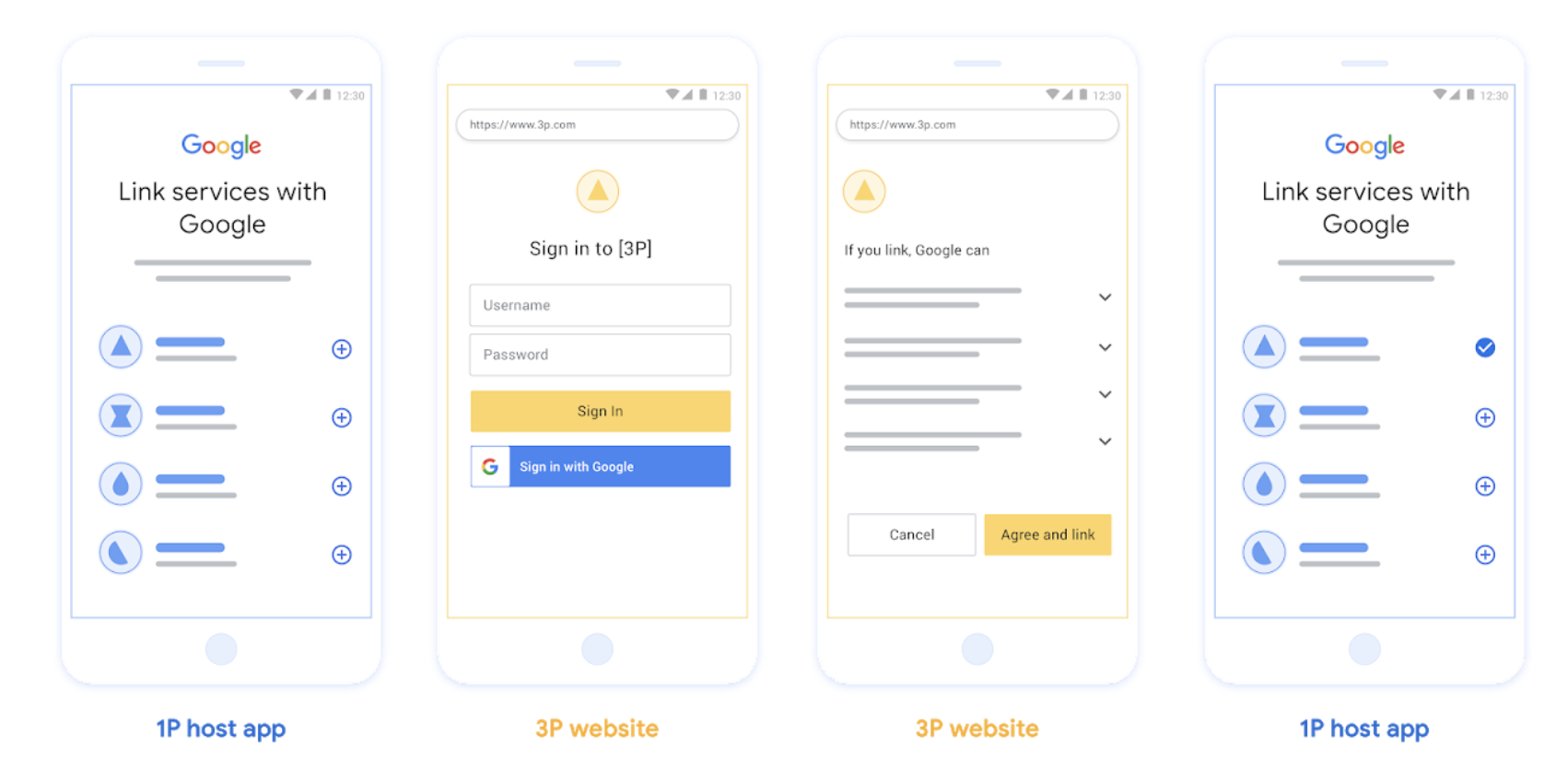
图 1. 在用户手机上通过 Web OAuth 进行账号关联
基于 OAuth 的应用快速关联(“应用快速关联”)
一种 OAuth 流程,可将用户引导至您的应用以进行关联。
基于 OAuth 的 App Flip 关联会在用户在经过验证的 Android 或 iOS 移动应用与 Google 平台之间切换时引导用户查看建议的数据访问权限变更,并同意将其在您的平台上的账号与Google 账号相关联。如需启用 App Flip,您的服务必须使用授权代码流程支持 OAuth 关联或基于 OAuth 的“使用 Google 账号登录”关联。
运作方式:
Google 应用会检查您的应用是否已安装在用户的设备上:
- 如果找到该应用,系统会将用户“翻转”到您的应用。您的应用会征得用户同意,以将账号与 Google 相关联,然后“翻转回”Google 界面。
- 如果找不到应用,或者在 app flip 账户关联过程 中发生错误,系统会将用户重定向到简化的 OAuth 流程或网页 OAuth 流程。
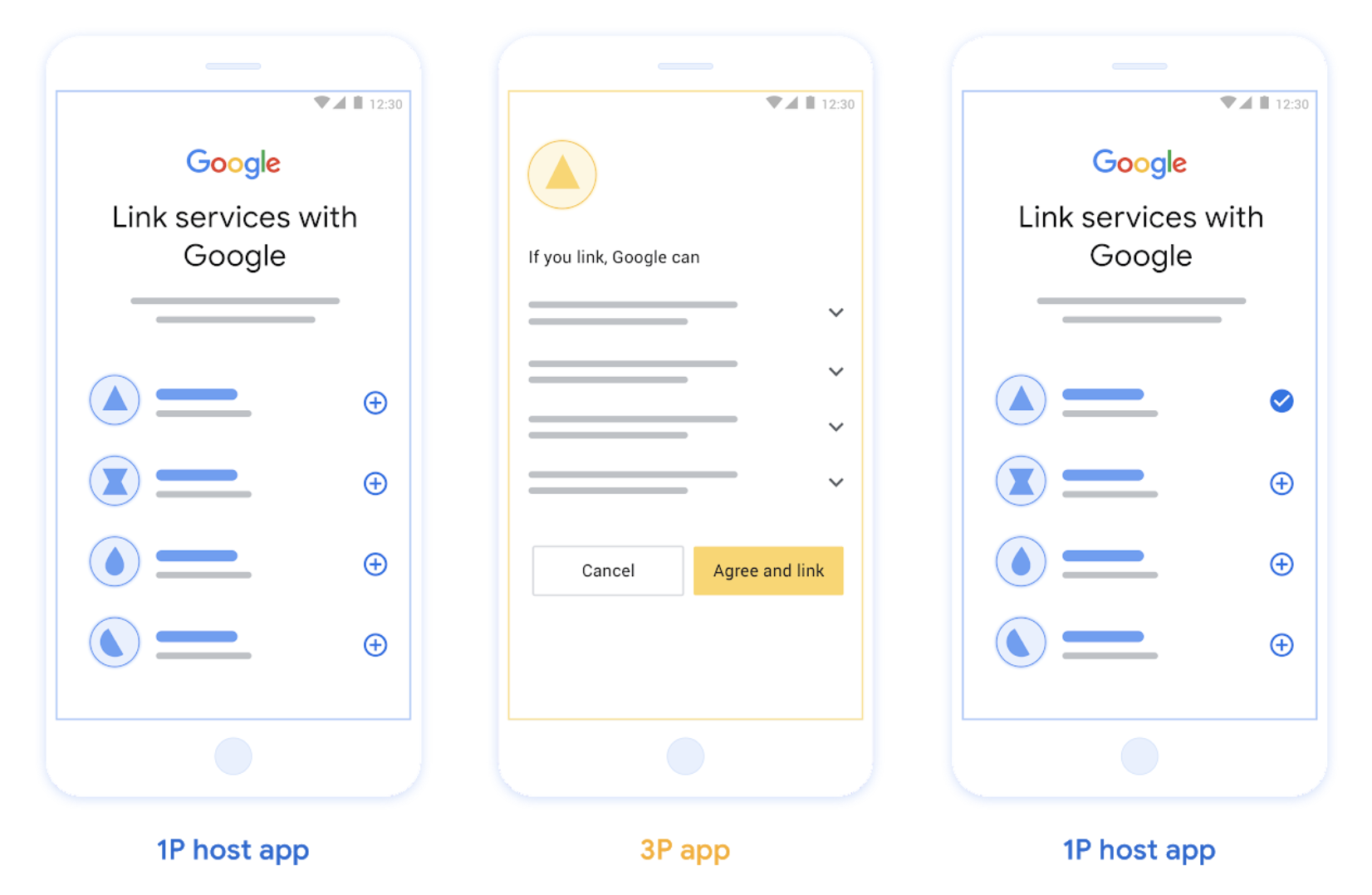
图 2. 在用户手机上使用 App Flip 进行账号关联
基于 OAuth 的简化关联(“简化”)
基于 OAuth 的“使用 Google 账号登录”简化版关联在 OAuth 关联的基础上添加了“使用 Google 账号登录”功能,让用户无需离开 Google 界面即可完成账户关联过程,从而减少摩擦和用户流失。基于 OAuth 的精简关联通过将“使用 Google 账号登录”与 OAuth 关联相结合,提供顺畅的登录、账号创建和账号关联体验,从而实现最佳的用户体验。您的服务必须支持符合 OAuth 2.0 标准的授权和令牌交换端点。此外,您的令牌交换端点必须支持 JSON Web 令牌 (JWT) 断言,并实现 check、create 和 get intent。
运作方式:
Google 会断言用户账号并将此信息传递给您:
- 如果您的数据库中存在该用户的账号,则用户会成功将其 Google 账号与您服务中的账号相关联。
- 如果您的数据库中不存在相应用户的账号,用户可以选择使用 Google 提供的断言信息(电子邮件地址、姓名和个人资料照片)创建新的第三方账号,也可以选择登录并与其他电子邮件地址相关联(这需要用户使用 Web OAuth 登录您的服务)。
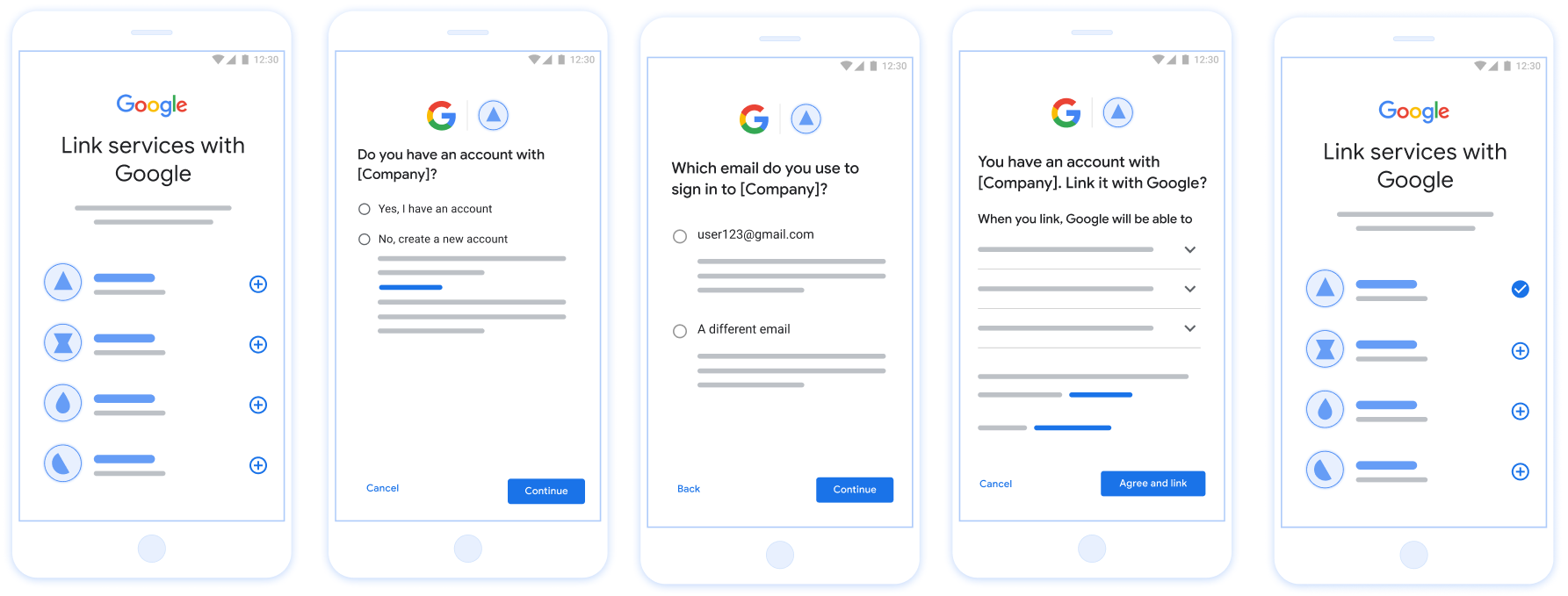
图 3. 在用户手机上使用精简的关联方式进行账号关联
您应该使用哪个流程?
我们建议您实现所有流程,以确保用户获得最佳的关联体验。简化的关联流程和 app flip 流程可减少关联摩擦,因为用户只需极少的步骤即可完成账户关联过程。Web OAuth 关联的难度最低,因此您可以先从这种关联方式入手,然后再添加其他关联流程。
使用令牌
Google 账号关联基于 OAuth 2.0 行业标准。
在征得账号持有人的同意以关联其账号并共享数据后,您会向 Google 针对各个 Google 账号发放访问令牌。
Token types
OAuth 2.0 uses strings called tokens to communicate between the user agent, the client application, and the OAuth 2.0 server.
Three types of OAuth 2.0 tokens can be used during account linking:
Authorization code. A short-lived token that can be exchanged for an access and a refresh token. For security purposes, Google calls your authorization endpoint to obtain a single use or very short-lived code.
Access token. A token that grants the bearer access to a resource. To limit exposure that could result from the loss of this token, it has a limited lifetime, usually expiring after an hour or so.
Refresh token. A long-lived token that can be exchanged for a new access token when an access token expires. When your service integrates with Google, this token is exclusively stored and used by Google. Google calls your token exchange endpoint to exchange refresh tokens for access tokens, which are in turn used to access user data.
Token handling
Race conditions in clustered environments and client-server exchanges can result in complex timing and error handling scenarios when working with tokens. For example:
- You receive a request for a new access token, and you issue a new access token. Concurrently, you receive a request for access to your service's resource using the previous, unexpired access token.
- Your refresh token reply is yet to be received (or is never received) by Google. Meanwhile, the previously valid refresh token is used in a request from Google.
Requests and replies can arrive in any order, or not at all due to asynchronous services running in a cluster, network behavior, or other means.
Immediate and fully consistent shared state both within, and between, your and Google's token handling systems cannot be guaranteed. Multiple valid, unexpired tokens can coexist within or across systems short period of time. To minimize negative user impact we recommend you do the following:
- Accept unexpired access tokens, even after a newer token is issued.
- Use alternatives to Refresh Token Rotation.
- Support multiple, concurrently valid access and refresh tokens. For security, you should limit the number of tokens and token lifetime.
Maintenance and outage handling
During maintenance or unplanned outages Google might be unable to call your authorization or token exchange endpoints to obtain access and refresh tokens.
Your endpoints should respond with a 503 error code and empty body. In this
case, Google retries failed token exchange requests for a limited time. Provided
that Google is later able to obtain refresh and access tokens, failed requests
are not visible to users.
Failing requests for an access token result in a visible error, if initiated by a user. Users will be required to retry linking failures if the implicit OAuth 2.0 flow is used.
Recommendations
There are many solutions to minimize maintenance impact. Some options to consider:
Maintain your existing service and route a limited number of requests to your newly updated service. Migrate all requests only after confirming expected functionality.
Reduce the number of token requests during the maintenance period:
Limit maintenance periods to less than the access token lifetime.
Temporarily increase the access token lifetime:
- Increase token lifetime to greater than maintenance period.
- Wait twice the duration of your access token lifetime, enabling users to exchange short lived tokens for longer duration tokens.
- Enter maintenance.
- Respond to token requests with a
503error code and empty body. - Exit maintenance.
- Decrease token lifetime back to normal.
使用 Google 账号注册
我们需要了解您的 OAuth 2.0 设置的详细信息,并共享凭据以启用账号关联。如需了解详情,请参阅注册。