
获取数据
获取收集到的位置数据的方法有很多。下面,我们将介绍两种 获取数据以用于 道路贴合 功能的技术,该功能是 Roads API的一部分。
GPX
GPX 是一种基于 XML 的开放格式,用于分享 GPS 设备捕获的路线、轨迹和航点。此示例使用了 XmlPull 解析器,这是一种轻量级 XML 解析器,适用于 Java 服务器和移动环境。
/**
 * Parses the waypoint (wpt tags) data into native objects from a GPX stream.
 */
private List<LatLng> loadGpxData(XmlPullParser parser, InputStream gpxIn)
        throws XmlPullParserException, IOException {
    // We use a List<> as we need subList for paging later
    List<LatLng> latLngs = new ArrayList<>();
    parser.setInput(gpxIn, null);
    parser.nextTag();

    while (parser.next() != XmlPullParser.END_DOCUMENT) {
        if (parser.getEventType() != XmlPullParser.START_TAG) {
            continue;
        }

        if (parser.getName().equals("wpt")) {
            // Save the discovered latitude/longitude attributes in each <wpt>.
            latLngs.add(new LatLng(
                    Double.valueOf(parser.getAttributeValue(null, "lat")),
                    Double.valueOf(parser.getAttributeValue(null, "lon"))));
        }
        // Otherwise, skip irrelevant data
    }

    return latLngs;
}
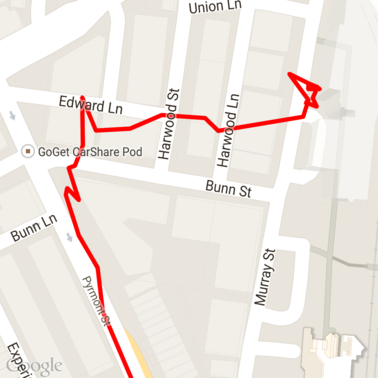
以下是一些加载到地图上的原始 GPX 数据。
Android 位置信息服务
从 Android 设备捕获 GPS 数据的最佳方式因使用场景而异。请查看 Android 培训课程中的 接收位置信息更新, 以及 GitHub 上的 Google Play 位置信息示例。
处理长路径
由于 道路贴合 功能会根据完整路径( 而不是单个点)推断位置,因此在处理长 路径(即超出每个请求 100 个点的限制的路径)时,您需要格外注意。
为了将各个请求视为一条长路径,您应包含一些重叠部分,以便将上一个请求的最后一个点作为后续请求的第一个点。要包含的点数取决于数据的准确性。对于准确性较低的请求,您应包含更多点。
此示例使用 Java Client for Google Maps Services 发送分页请求,然后 将数据(包括插值点)重新加入到返回的列表中。
/**
 * Snaps the points to their most likely position on roads using the Roads API.
 */
private List<SnappedPoint> snapToRoads(GeoApiContext context) throws Exception {
    List<SnappedPoint> snappedPoints = new ArrayList<>();

    int offset = 0;
    while (offset < mCapturedLocations.size()) {
        // Calculate which points to include in this request. We can't exceed the API's
        // maximum and we want to ensure some overlap so the API can infer a good location for
        // the first few points in each request.
        if (offset > 0) {
            offset -= PAGINATION_OVERLAP;   // Rewind to include some previous points.
        }
        int lowerBound = offset;
        int upperBound = Math.min(offset + PAGE_SIZE_LIMIT, mCapturedLocations.size());

        // Get the data we need for this page.
        LatLng[] page = mCapturedLocations
                .subList(lowerBound, upperBound)
                .toArray(new LatLng[upperBound - lowerBound]);

        // Perform the request. Because we have interpolate=true, we will get extra data points
        // between our originally requested path. To ensure we can concatenate these points, we
        // only start adding once we've hit the first new point (that is, skip the overlap).
        SnappedPoint[] points = RoadsApi.snapToRoads(context, true, page).await();
        boolean passedOverlap = false;
        for (SnappedPoint point : points) {
            if (offset == 0 || point.originalIndex >= PAGINATION_OVERLAP - 1) {
                passedOverlap = true;
            }
            if (passedOverlap) {
                snappedPoints.add(point);
            }
        }

        offset = upperBound;
    }

    return snappedPoints;
}
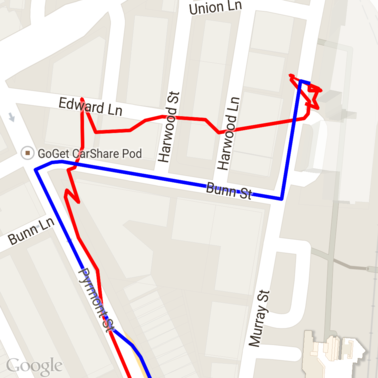
以下是运行道路贴合请求后的上述数据。红线是原始数据,蓝线是贴合后的数据。
高效利用配额
道路贴合请求的响应包含一个地点 ID 列表
,这些 ID 映射到您提供的点,如果您
设置了 interpolate=true,则可能包含其他点。
为了高效利用速度限制请求的允许配额,您应仅在请求中查询唯一的地点 ID。此示例使用 Java Client for Google Maps Services 从地点 ID 列表中查询速度限制。
/**
 * Retrieves speed limits for the previously-snapped points. This method is efficient in terms
 * of quota usage as it will only query for unique places.
 *
 * Note: Speed limit data is only available for requests using an API key enabled for a
 * Google Maps APIs Premium Plan license.
 */
private Map<String, SpeedLimit> getSpeedLimits(GeoApiContext context, List<SnappedPoint> points)
        throws Exception {
    Map<String, SpeedLimit> placeSpeeds = new HashMap<>();

    // Pro tip: Save on quota by filtering to unique place IDs.
    for (SnappedPoint point : points) {
        placeSpeeds.put(point.placeId, null);
    }

    String[] uniquePlaceIds =
            placeSpeeds.keySet().toArray(new String[placeSpeeds.keySet().size()]);

    // Loop through the places, one page (API request) at a time.
    for (int i = 0; i < uniquePlaceIds.length; i += PAGE_SIZE_LIMIT) {
        String[] page = Arrays.copyOfRange(uniquePlaceIds, i,
                Math.min(i + PAGE_SIZE_LIMIT, uniquePlaceIds.length));

        // Execute!
        SpeedLimit[] placeLimits = RoadsApi.speedLimits(context, page).await();
        for (SpeedLimit sl : placeLimits) {
            placeSpeeds.put(sl.placeId, sl);
        }
    }

    return placeSpeeds;
}
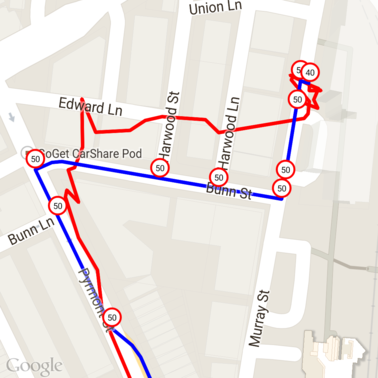
以下是上述数据,其中每个唯一地点 ID 处都标有速度限制。
与其他 API 的交互
在 道路贴合 响应中返回地点 ID 的好处之一是,您可以在许多 Google Maps Platform API 中使用该地点 ID。此示例使用 Java Client for Google Maps Services 对从上述道路贴合请求返回的地点进行地理编码。
/**
 * Geocodes a snapped point using the place ID.
 */
private GeocodingResult geocodeSnappedPoint(GeoApiContext context, SnappedPoint point) throws Exception {
    GeocodingResult[] results = GeocodingApi.newRequest(context)
            .place(point.placeId)
            .await();

    if (results.length > 0) {
        return results[0];
    }
    return null;
}
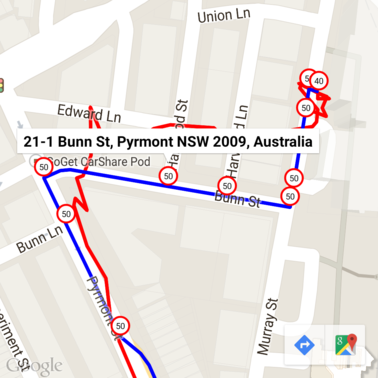
此处,速度限制标记已使用 Geocoding API 中的地址进行注释。
示例代码
注意事项
为便于说明,支持本文档的代码以单个 Android 应用的形式提供。实际上,您不应在 Android 应用中分发服务器端 API 密钥,因为您的密钥无法防止第三方未经授权的访问。相反,为了保护您的密钥,您应将面向 API 的代码部署为服务器端代理,并让 Android 应用使用该代理发送请求,以确保请求获得授权。
下载
从 GitHub 下载代码。