
This document shows you how to make your first request to the Route Optimization API using a real-world use-case scenario.
For simplicity, the example uses HTTP and JSON to demonstrate the REST API. For your production environment, however, the overall recommendation is to use gRPC for its performance benefits. However, gRPC requires some installation. For more information, see Route Optimization API client libraries.
Scenario
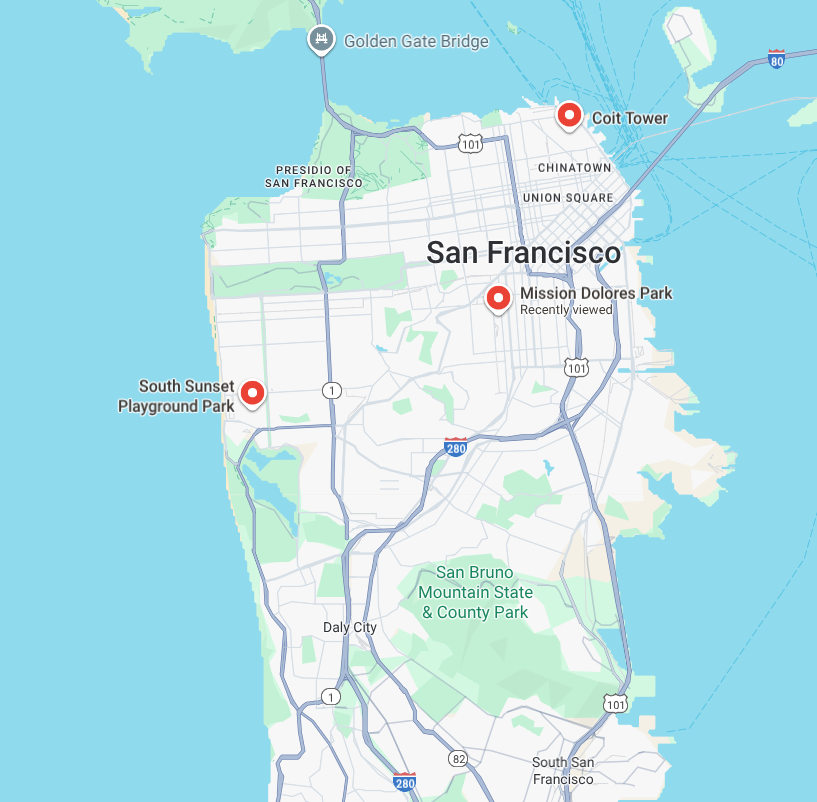
You run a doggy daycare service from 7 AM to 7 PM in San Francisco. This morning, you want to pick up three dogs from different locations in the city and bring them to your daycare center.
The Bernese mountain dog and the Chihuahua are regular clients who booked their appointments last week. The German shepherd is a new, last-minute request. You want to accommodate the German shepherd if possible, but not at the expense of your regular clients.
You have one van for the job, and you pay the driver $27 an hour. The driver and van start the day at your daycare center at 7 AM and need to be back from the morning pickups by noon for a lunch break.
Today is February 13, 2024. All times in this scenario are San Francisco local time, which is Pacific Standard Time (UTC-8) in February. The driver has the following tasks:
- Pick up the Bernese mountain dog near Coit Tower. The owner requested a tight pickup window between 8 AM and 8:20 AM.
- Pick up the Chihuahua at the South Sunset Playground Park. The owner offered a more flexible pickup window between 7:30 AM and 9:30 AM.
- Pick up the German shepherd at Land's End. The owner also requested a tight pickup window between 8 AM and 8:20 AM.
- Drop off the dogs at the daycare center at Mission Dolores Park. The daycare requires dropoffs between 9:30 AM and 11:30 AM.
Each pickup and dropoff visit takes 5 minutes to load or unload the dog.
Because Land's End is far from Coit Tower and their pickup windows conflict, the driver cannot perform all three pickups. The optimizer must choose which dog to skip to minimize the total cost (driver wages and any skip penalties).
Before you begin
To run the code in this example scenario, you must first complete the instructions in Set up the Route Optimization API.
1. Choose your route optimization approach
The Route Optimization API has multiple methods for you to choose from depending on the complexity of your optimization problem.
Because this doggy daycare scenario is a small and straightforward request, use
a blocking method, such as optimizeTours, which quickly delivers results
for small requests. For more information about the Route Optimization API
endpoints, see Choose an endpoint.
Use the following URL to make an HTTP POST request to the optimizeTours
method:
https://routeoptimization.googleapis.com/v1/projects/PROJECT_OR_ID:optimizeTours
You also need to set the timeout and deadline settings to be short to reduce any unnecessary wait time. For this doggy daycare scenario, the optimizer doesn't need a lot of time to respond to your request, so use the following settings:
- Set the
timeoutparameter to 2 seconds. - Leave the deadline settings at the default, which is 60 seconds for REST requests.
2. Construct the request message body
After choosing the blocking optimizeTours method and defining the timeout
and deadline settings, your next step is to construct the body of the request
message.
For this scenario, the request is an OptimizeToursRequest message
encoded as JSON in the REST API.
To construct the request message, follow the next steps:
Start with the basic request structure, which is as follows:
{
  "timeout": ...,
  "model": {
    "shipments": [...],
    "vehicles": [...],
    "globalStartTime": "...",
    "globalEndTime": "..."
  }
}
For more information on the structure, see the key concept guide for Base structure (ShipmentModel, Shipment, and Vehicle).
Define shipments. In the
shipmentsfield, add aShipmentmessage for each dog that needs to be picked up and dropped off in the morning. This is where you define each of the dog owner's preferred pickup location and times and the daycare center's location and times to drop the dogs off.For each dog, create a
VisitRequestfor pickups and another for the deliveries, which, for this scenario, is referred to as the daycare dropoff.In pickups, set the
arrivalWaypointto the dog's pickup location (Coit Tower for the Bernese mountain dog, South Sunset Playground Park for the Chihuahua, or Land's End for the German shepherd). Set thetimeWindowsto the owner's requested pickup time (8 AM to 8:20 AM for the Bernese mountain dog and German shepherd, and 7:30 AM to 9:30 AM for the Chihuahua).In deliveries, set the
arrivalWaypointto the daycare center and thetimeWindowsfor the required dropoff time (9:30 AM to 11:30 AM).For all pickups and deliveries, set the
durationto 5 minutes (300s) to account for loading and unloading the dogs.
For more information on time windows, see Time windows.
To prioritize regular clients, you set the
penaltyCostto1000for the Bernese mountain dog and Chihuahua, and100for the German shepherd. With penalty costs set, the optimizer can skip any of the dogs, but it considers skipping the German shepherd (which has a lower penalty) first if constraints make it impossible to perform all pickups.You can use the
labelfield to add an identifier for each shipment, like "Bernese mountain dog", "Chihuahua", and "German shepherd". This can help you identify the shipments in the response.
For more information on defining shipments, see Shipment.
Define vehicles. In the
vehiclesfield, add aVehiclemessage for your one van with the daycare center as the starting and end points, the cost of the driver's wage, and the operational hours for the van.Set the
startWaypointandendWaypointfor the van to the start and end locations of the day, which is the daycare center near Mission Dolores Park.To minimize your costs of operation, you must define the cost constraints of your business. Set the cost parameter
costPerHourto27, which is how much you pay the driver for driving the doggy daycare van. For more information on cost parameters, see Cost model.To ensure the optimizer creates a route within the van's operational hours, define a window of operation for the vehicle. This window sets the starting and ending time constraints for the route. By defining only one half of each time window, you'll give the optimizer flexibility to start the route later or end it earlier:
Setting
startTimeinstartTimeWindowsto 7 AM means the driver can start their shift as early as 7 AM. They can also start later if there are no early morning pickups.Setting
endTimeinendTimeWindowsto noon means the driver must end their shift by noon. They can also end their shift as soon as they complete the last delivery.
Omitting the other half of the windows minimizes the driver's wait and detour times. For more information on time windows, see Time windows.
For more information on defining vehicles, see Vehicle.
Set a global time window. The global time window represents the timeframe for when the van may perform pickups and dropoffs for your daycare throughout the day. For this scenario, set
globalStartTimeto 7 AM andglobalEndTimeto 7 PM for February 13, 2024, which represent your doggy daycare operational hours.
3. Send the request
The following is a simple curl request based on the doggy daycare scenario and
uses the blocking optimizeTours method.
Before you send the request, replace PROJECT_NUMBER_OR_ID in the sample code with your Google Cloud project ID.
curl -X POST 'https://routeoptimization.googleapis.com/v1/projects/PROJECT_NUMBER_OR_ID:optimizeTours' \
-H "Content-Type: application/json" \
-H "Authorization: Bearer $(gcloud auth application-default print-access-token)" \
--data @- << EOM
{
  "timeout": "2s",
  "model": {
    "shipments": [
      {
        "pickups": [
          {
            "arrivalWaypoint": {
              "location": {
                "latLng": {
                  "latitude": 37.802395,
                  "longitude": -122.405822
                }
              }
            },
            "timeWindows": [
              {
                "startTime": "2024-02-13T08:00:00-08:00",
                "endTime": "2024-02-13T08:20:00-08:00"
              }
            ],
            "duration": "300s"
          }
        ],
        "deliveries": [
          {
            "arrivalWaypoint": {
              "location": {
                "latLng": {
                  "latitude": 37.759719,
                  "longitude": -122.42798
                }
              }
            },
            "timeWindows": [
              {
                "startTime": "2024-02-13T09:30:00-08:00",
                "endTime": "2024-02-13T11:30:00-08:00"
              }
            ],
            "duration": "300s"
          }
        ],
        "label": "Bernese mountain dog",
        "penaltyCost": 1000
      },
      {
        "pickups": [
          {
            "arrivalWaypoint": {
              "location": {
                "latLng": {
                  "latitude": 37.738067,
                  "longitude": -122.498593
                }
              }
            },
            "timeWindows": [
              {
                "startTime": "2024-02-13T07:30:00-08:00",
                "endTime": "2024-02-13T09:30:00-08:00"
              }
            ],
            "duration": "300s"
          }
        ],
        "deliveries": [
          {
            "arrivalWaypoint": {
              "location": {
                "latLng": {
                  "latitude": 37.759719,
                  "longitude": -122.42798
                }
              }
            },
            "timeWindows": [
              {
                "startTime": "2024-02-13T09:30:00-08:00",
                "endTime": "2024-02-13T11:30:00-08:00"
              }
            ],
            "duration": "300s"
          }
        ],
        "label": "Chihuahua",
        "penaltyCost": 1000
      },
      {
        "pickups": [
          {
            "arrivalWaypoint": {
              "location": {
                "latLng": {
                  "latitude": 37.78018,
                  "longitude": -122.51194
                }
              }
            },
            "timeWindows": [
              {
                "startTime": "2024-02-13T08:00:00-08:00",
                "endTime": "2024-02-13T08:20:00-08:00"
              }
            ],
            "duration": "300s"
          }
        ],
        "deliveries": [
          {
            "arrivalWaypoint": {
              "location": {
                "latLng": {
                  "latitude": 37.759719,
                  "longitude": -122.42798
                }
              }
            },
            "timeWindows": [
              {
                "startTime": "2024-02-13T09:30:00-08:00",
                "endTime": "2024-02-13T11:30:00-08:00"
              }
            ],
            "duration": "300s"
          }
        ],
        "label": "German shepherd",
        "penaltyCost": 100
      }
    ],
    "vehicles": [
      {
        "startWaypoint": {
          "location": {
            "latLng": {
              "latitude": 37.759719,
              "longitude": -122.42798
            }
          }
        },
        "endWaypoint": {
          "location": {
            "latLng": {
              "latitude": 37.759719,
              "longitude": -122.42798
            }
          }
        },
        "costPerHour": 27,
        "startTimeWindows": [
          {
            "startTime": "2024-02-13T07:00:00-08:00"
          }
        ],
        "endTimeWindows": [
          {
            "endTime": "2024-02-13T12:00:00-08:00"
          }
        ]
      }
    ],
    "globalStartTime": "2024-02-13T07:00:00-08:00",
    "globalEndTime": "2024-02-13T19:00:00-08:00"
  }
}
EOM
Request parameters used in the request
The following table describes the request parameters used in the request body of the example scenario. You can filter the contents by parent or by text search.
| Parent | Parameter | Property Type | Description |
|---|---|---|---|
OptimizeToursRequest |
model |
object (ShipmentModel) |
This is the core of your request. It's a single object where you
define your entire problem, including all the dogs you need to pick up and
drop off (shipments)
and the van in your fleet
(vehicles).
Think of it as the complete blueprint for the problem you need to optimize. |
timeout |
Duration | This parameter specifies the maximum time the server works on a request before returning a response. Use this parameter to shorten your wait time. For small and quick requests, such as this doggy daycare scenario, set this value to 2s. | |
ShipmentModel |
shipments[] |
array of objects (Shipment) |
This is an array of objects where each object represents a dog that needs to be picked up or dropped off. |
vehicles[] |
array of objects (Vehicle) |
This is an array of objects where each object defines a vehicle in your fleet. It's where you describe your resources, such as the van that performs the pickups and dropoffs. You must define at least one vehicle to get an optimized route. | |
globalStartTime |
Timestamp | This is the earliest possible time for any event in your entire model to occur. This parameter narrows the optimization problem down in time, which is crucial for accurate traffic and routing calculations. For this doggy daycare scenario, set this to the earliest time the driver can operate the van for the day, which is 7 AM for February 13, 2024. | |
globalEndTime |
Timestamp | This is the latest possible time for any event in your entire model to occur. For this doggy daycare scenario, set this to when the van is expected to end its operation, which is 7 PM for February 13, 2024. | |
Shipment |
pickups[] |
array of objects (VisitRequest) |
This is a list of all possible pickup options for the shipment. The optimizer chooses the best one to solve your problem. For this doggy daycare scenario, list the pickup locations and time windows that each owner provided for each dog. |
deliveries[] |
array of objects (VisitRequest) |
This is a list of all possible dropoff options for the shipment. The optimizer chooses the best one to solve your problem. For this doggy daycare scenario, list the location of the doggy daycare facility and the time window for when the driver needs to return for lunch for each dog. | |
label |
string | This is an identifier for a specific shipment in your request. You can specify labels in your request to make it easier to read the response. For this doggy daycare scenario, use a descriptive string like "Chihuahua", "Bernese mountain dog" or the dog's name to match the solution to your input when you receive the API response. | |
penaltyCost |
double | This is the penalty cost incurred if the optimizer skips this shipment. By default, shipments are mandatory—the optimizer prioritizes minimizing skipped mandatory shipments and skips them only when there's no other option. Setting a penalty cost lets the optimizer skip a shipment if it's infeasible or too costly to perform, and lets you weigh priorities between shipments. In this scenario, you set a higher penalty cost (1000) for your regular clients (Bernese mountain dog and Chihuahua) and a lower penalty cost (100) for the last-minute German shepherd request. This tells the optimizer to prioritize the regular clients, so it considers skipping the German shepherd first when it can't perform all pickups. |
|
VisitRequest |
arrivalWaypoint |
object (Waypoint) |
This is the location of a specific visit on the route. You can define this
using latitude and longitude coordinates, a place ID, or a heading. In
this doggy daycare scenario, set this to the location provided by the owner for
pickups
and to the daycare center's address for
deliveries. |
timeWindows[] |
array of objects (TimeWindow) |
This is an array of objects that define the time constraints for a pickup or delivery. For this scenario, use this to define the pickup window for each of the dogs and the acceptable window for dropping the dogs off at the daycare center. | |
duration |
Duration | This parameter specifies the duration of the visit (e.g. loading or unloading time). In this scenario, you set a 5-minute buffer (300s) for all pickups and deliveries to account for the driver loading and unloading the dogs. |
|
Vehicle |
startWaypoint |
object (Waypoint) |
This is the starting location of the vehicle's route, defined with latitude and longitude coordinates or a place ID. This parameter tells the optimizer where the vehicle must begin the route. If you don't define this waypoint, the optimizer chooses one of the pickups or deliveries as the starting location. For this doggy daycare scenario, because the driver starts the day at the daycare facility, use the coordinates for Mission Dolores Park. |
endWaypoint |
object (Waypoint) |
This is the final destination for the vehicle's route, defined with latitude and longitude coordinates or a place ID. This parameter tells the optimizer where the vehicle must end the route. If you don't define this waypoint, the optimizer chooses one of the pickups or deliveries as the end of the route. For this doggy daycare scenario, because the driver must end the day at the daycare facility, use the coordinates for Mission Dolores Park. | |
costPerHour |
number | This is the cost incurred for every hour a vehicle is used, regardless of whether it's traveling or stopped. For this doggy daycare scenario, use this to model a driver's hourly wage. | |
startTimeWindows[] |
array of objects (TimeWindow) |
This is the acceptable time window for when the driver can start their
shift. For this doggy daycare scenario, define the startTime as 7 AM
but omit the endTime. This allows the optimizer to delay the start of
the shift if the first pickup is later in the morning. Note that even if you
don't provide an endTime for startTimeWindows, the start
time is implicitly bounded by the endTimeWindows. The vehicle must
start the route before the route ends. |
|
endTimeWindows[] |
array of objects (TimeWindow) |
This is the acceptable time window for the driver to finish the route.
For this doggy daycare scenario, define the endTime as noon but omit
the startTime. This allows the driver to return to the daycare center
immediately after the last dropoff. |