

Page Summary
-
The Issuer can revoke a Digital Credential (DC), which removes it from all user devices and prevents it from being added again.
-
Revoking a DC is different from a user deleting it, as deletion only removes it from the device where the action was taken.
-
The revocation process involves the Issuer notifying Google of the revocation, Google verifying the status, and then the user's devices deleting the DC.
-
Once a DC is revoked, it is permanently removed from the user's Google Wallet on all devices, and the user will be unable to re-add it.
-
The Issuer is informed by Google when the DC has been successfully removed from all of the user's devices.
In this phase, the Issuer revokes the VDC after it has been issued to a user. This will remove the local VDCs from all devices. The user will no longer have the option to add the VDC to another device (including the same one) in the future.
Request flow
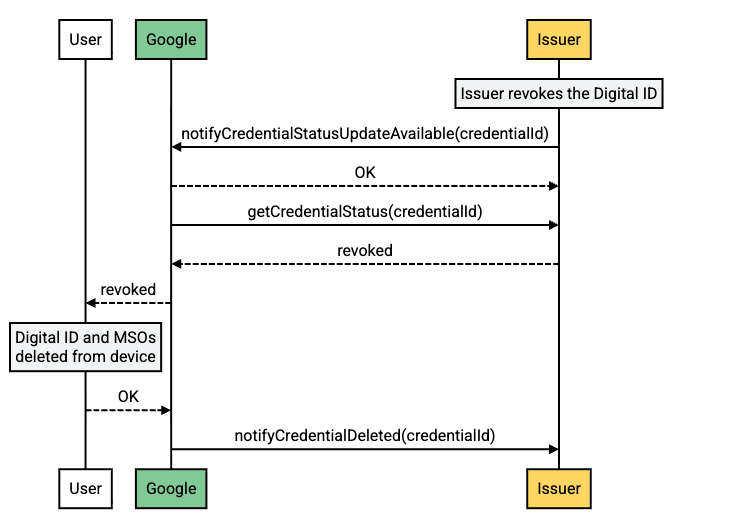
Flow description
| Step | Source | Description |
|---|---|---|
| 1 | Issuer servers | The Issuer revokes the VDC and notifies Google by calling the `notifyCredentialStatusUpdateAvailable` method. |
| 2 | Google uses the `getCredentialStatus` method to request the new status of the VDC. | |
| 3 | Issuer servers | The Issuer returns the `revoked` status. |
| 4 | Google notifies the user's device(s) that the credential has been revoked. | |
| 5 | Android-powered device | The user's devices delete the VDC from the Google Wallet app and notify Google on success. |
| 6 | Google notifies the Issuer that the VDC has been deleted from the user's device(s). |