

Page Summary
-
The Issuer reviews identity verification evidence submitted by a user through an Android-powered device for digital credential (DC) registration.
-
In both approved and rejected cases, the process involves a series of steps where Google servers and Issuer servers communicate to process and update the proofing status.
-
The Issuer sets the initial approval status to
pendingbefore reviewing the evidence and ultimately returning anacceptedorrejectedstatus. -
Google's system is notified of status updates via
notifyProofingStatusUpdateAvailableand then checks for this viagetProofingStatus, and finally relays it to the user. -
The user initially submits a liveness video and physical identity document images for the digital credentials.
In this phase, the Issuer receives identity verification evidence and makes an approval decision.
Approved case
Request flow
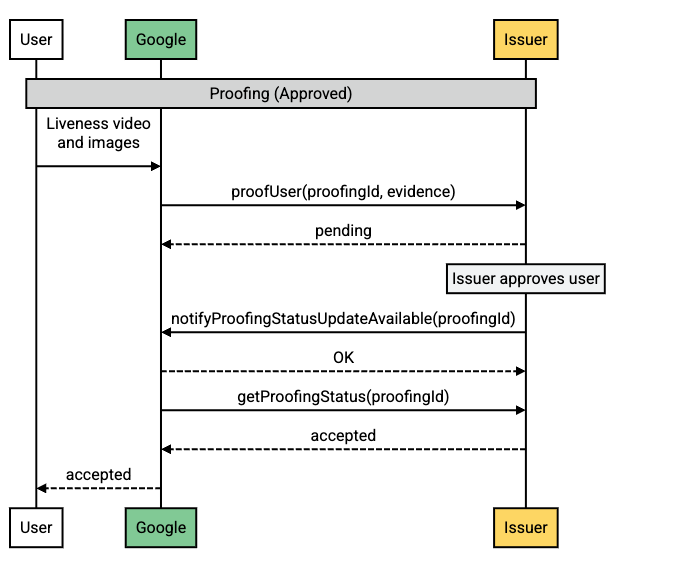
Flow description
| Step | Source | Description |
|---|---|---|
| 1 | Android-powered device | A user submits the liveness video and physical identity document images for VDC registration. |
| 2 | Google servers |
Google calls proofUser, sending the
evidence and a proofing ID to the Issuer.
|
| 3 | Issuer servers |
The Issuer sets the approval to pending and reviews the
submitted evidence.
|
| 4 | Issuer servers |
The Issuer calls notifyProofingStatusUpdateAvailable to
notify Google that a status update is available for this proofing
request.
|
| 5 | Google servers |
Google calls getProofingStatus to determine the status of
the proofing request.
|
| 6 | Issuer servers | The Issuer returns the accepted status. |
| 7 | Google servers | Google relays the status to the user. |
Rejected case
Request flow
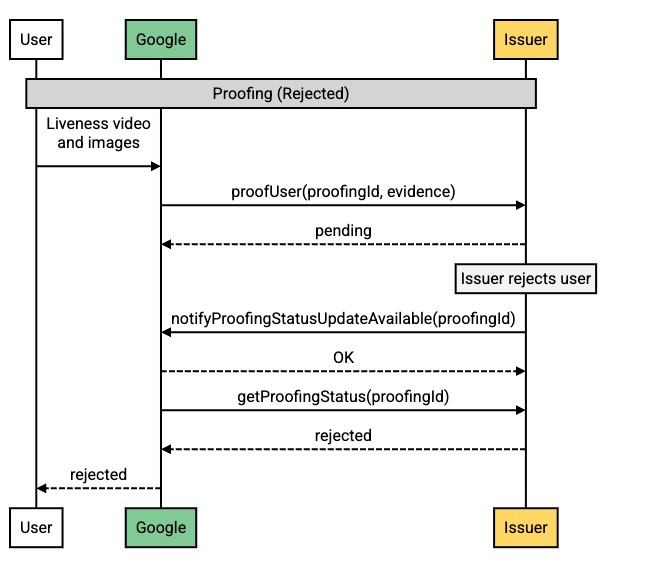
Flow description
| Step | Source | Description |
|---|---|---|
| 1 | Android-powered device | A user submits the liveness video and physical identity document images for VDC registration. |
| 2 | Google servers |
Google calls proofUser, sending the
evidence and a proofing ID to the Issuer.
|
| 3 | Issuer servers |
The Issuer sets the approval to pending and reviews the
submitted evidence.
|
| 4 | Issuer servers |
The Issuer calls notifyProofingStatusUpdateAvailable to
notify Google that a status update is available for this proofing
request.
|
| 5 | Google servers |
Google calls getProofingStatus to determine the status of
the proofing request.
|
| 6 | Issuer servers | The Issuer returns the rejected status. |
| 7 | Google servers | Google relays the status to the user. |