

코딩 수준: 중급
소요 시간: 45분
프로젝트 유형: Google Workspace 부가기능
목표
- 솔루션의 기능을 이해합니다.
- 솔루션 내에서 Apps Script 서비스의 기능을 이해합니다.
- 스크립트를 설정합니다.
- 스크립트를 실행합니다.
이 솔루션 정보
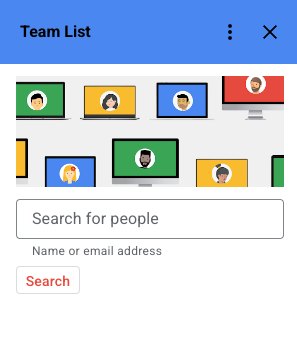
Google Workspace에서 작업하는 동안 조직에서 공동작업하는 사용자에 관한 정보(예: 이메일, 전화번호, 부서)를 표시합니다. Gmail 메시지에 답장하거나 Google Drive 파일을 수정하거나 Google Calendar 일정을 볼 때 이 정보를 확인할 수 있습니다.
작동 방식
스크립트는 활성 메시지, 파일 또는 일정에서 이메일 주소를 가져옵니다. 컨텍스트에 따라 Gmail 메시지 수신자, Drive 파일 편집자, Calendar 일정 참석자가 포함될 수 있습니다. 스크립트는 조직의 이메일 주소에 관한 정보만 표시합니다.
Apps Script 서비스
이 솔루션은 다음 서비스를 사용합니다.
- Admin SDK 디렉터리 고급 서비스– Directory API를 사용하여 사용자를 검색합니다.
- 기본 서비스–Session 클래스 를 사용하여 이메일 주소를 필터링하고 검색 결과에 현재 사용자를 표시하지 않습니다.
- 캐시 서비스–먼저 캐시를 검색합니다. Directory API에서 한 명의 사용자를 조회할 때
- Calendar 서비스–컨텍스트가 Calendar 일정인 경우 활성 일정에서 이메일 주소를 가져옵니다.
- 카드 서비스–부가기능의 사용자 인터페이스 를 만듭니다.
- Drive 서비스–컨텍스트가 Drive 파일인 경우 사용자가 활성 파일에서 공동작업자의 이메일 주소를 볼 수 있는 권한이 있으면 해당 이메일 주소를 가져옵니다.
- Gmail 서비스–컨텍스트가 Gmail 메시지인 경우 활성 Gmail 메시지의 '받는사람', '참조', '보낸사람' 필드에서 이메일 주소를 가져옵니다.
기본 요건
- 인터넷에 액세스할 수 있는 웹브라우저
- Google Workspace 계정 (관리자 승인이 필요할 수 있음)
스크립트 설정
Apps Script 프로젝트 만들기
다음 버튼을 클릭하여 팀 목록 Apps Script 프로젝트를 엽니다.
프로젝트 열기개요 를 클릭합니다.
개요 페이지에서 사본 만들기
 를 클릭합니다.
테스트 배포 설치
- 복사된 Apps Script 프로젝트에서 편집기 를 클릭합니다.
Code.gs파일을 열고 실행 을 클릭합니다. 메시지가 표시되면 스크립트를 승인합니다.- 배포 > 테스트 배포 를 클릭합니다.
- 설치 > 완료를 클릭합니다.
스크립트 실행
- Gmail 메시지, Calendar 일정 또는 Drive 파일을 엽니다.
- 오른쪽 사이드바에서 팀 목록 부가기능 을 엽니다.
- 메시지가 표시되면 부가기능을 승인합니다.
- 부가기능은 팀 구성원에 관한 정보를 표시하거나 메시지, 일정 또는 파일에 팀 구성원이 없음을 나타냅니다.
- 팀 구성원을 찾으려면 사용자 검색 을 클릭하고 이름 또는 이메일 주소를 입력합니다. 검색 을 클릭합니다.
코드 검토
이 솔루션의 Apps Script 코드를 검토하려면 아래의 소스 코드 보기 를 클릭하세요.
소스 코드 보기
Code.gs
// Copyright 2022 Google Inc. All Rights Reserved.
//
// Licensed under the Apache License, Version 2.0 (the "License");
// you may not use this file except in compliance with the License.
// You may obtain a copy of the License at
//
//     http://www.apache.org/licenses/LICENSE-2.0
//
// Unless required by applicable law or agreed to in writing, software
// distributed under the License is distributed on an "AS IS" BASIS,
// WITHOUT WARRANTIES OR CONDITIONS OF ANY KIND, either express or implied.
// See the License for the specific language governing permissions and
// limitations under the License.

// Sample Google Workspace add-on that displays profile information about people
// the user is collaborating with. Collaborators are based on the context --
// recipients of a gmail message, Drive file ACLs, or event attendees.
//
// Profile information is from the Directory API in the Admin SDK. As a result,
// the add-on only shows information for email addresses in the same domain
// as as the current user. Different  strategies can be used for other use cases,
// such as integration with a CRM where the focus may be on external email
// addresses/customers.

// See https://github.com/contributorpw/lodashgs
var _ = LodashGS.load();

/**
* Renders the home page for the add-on. Used in all host apps when
* no context selected.
*
* @param {Object} event - current add-on event
* @return {Card[]} Card(s) to display
*/
function onHomePage(event) {
  var card = buildSearchCard_();
  return [card];
}

/**
* Renders the contextual interface for a Gmail message.
*
* @param {Object} event - current add-on event
* @return {Card[]} Card(s) to display
*/
function onGmailMessageSelected(event) {
  var emails = extractEmailsFromMessage_(event);
  var people = fetchPeople_(emails);
  if (people.length == 0) {
    var card = buildSearchCard_("No team members found for current message.");
    return [card];
  }
  var card = buildTeamListCard_(people)
  return [card];
}

/**
* Renders the contextual interface for a calendar event.
*
* @param {Object} event - current add-on event
* @return {Card[]} Card(s) to display
*/
function onCalendarEventOpen(event) {
  var emails = extractEmailsFromCalendarEvent_(event);
  var people = fetchPeople_(emails);
  if (people.length == 0) {
    var card = buildSearchCard_("No team members found for current event.");
    return [card];
  }
  var card = buildTeamListCard_(people)
  return [card];
}

/**
* Renders the contextual interface for a selected Drive file.
*
* @param {Object} event - current add-on event
* @return {Card[]} Card(s) to display
*/
function onDriveItemsSelected(event) {
  // For demo, only allow single select on files.
  if (event.drive.selectedItems.length != 1) {
    var message = "To view team members collaborating on a file, select one file only.";
    var card = buildSearchCard_(message);
    return [card];
  }

  var selectedItem = event.drive.selectedItems[0];
  if (!selectedItem.addonHasFileScopePermission) {
    // Need file access to read ACL, ask user to authorize.
    var authorizeFilesAction = CardService.newAction()
    .setFunctionName("onAuthorizeDriveFiles")
    .setLoadIndicator(CardService.LoadIndicator.SPINNER)
    .setParameters({id: selectedItem.id});
    var authorizationMessage = CardService.newTextParagraph()
    .setText("To view the people on your team the file is shared with, click *Authorize* to grant access.");
    var authorizeButton = CardService.newTextButton()
    .setText("Authorize")
    .setOnClickAction(authorizeFilesAction);
    var card = CardService.newCardBuilder()
    .addSection(CardService.newCardSection()
                .addWidget(authorizationMessage)
                .addWidget(authorizeButton))
    .build();
    return [card];
  }

  // Have access, extract ACLs to find co-workers
  var emails = extractEmailsFromDrivePermissions_(event);
  var people = fetchPeople_(emails);
  if (people.length == 0) {
    var card = buildSearchCard_("No team members found for current file.");
    return [card];
  }
  var card = buildTeamListCard_(people)
  return [card];
}

/**
* Handles the click for requesting drive file access.
*
* @param {Object} event - current add-on event
* @return {ActionResponse} Request to authorize access to a drive item
*/
function onAuthorizeDriveFiles(event) {
  var id = event.parameters.id;
  return CardService.newDriveItemsSelectedActionResponseBuilder()
  .requestFileScope(id)
  .build();
}

/**
* Handles the user search request.
*
* @param {Object} event - current add-on event
* @return {Card[]} Card(s) to display
*/
function onSearch(event) {
  if (!event.formInputs || !event.formInputs.query) {
    var notification = CardService.newNotification()
    .setText("Enter a query before searching.");
    return CardService.newActionResponseBuilder()
    .setNotification(notification)
    .build();
  }

  var query =  event.formInputs.query[0];
  var people = queryPeople_(query);

  if (!people || people.length == 0) {
    var notification = CardService.newNotification().setText("No people found.");
    return CardService.newActionResponseBuilder()
    .setNotification(notification)
    .build();
  }

  var card = buildTeamListCard_(people);
  var navigation = CardService.newNavigation().pushCard(card);
  return CardService.newActionResponseBuilder()
  .setNavigation(navigation)
  .build();
}

/**
* Handles the drill down to view detailed information about a person.
*
* @param {Object} event - current add-on event
* @return {Card[]} Card(s) to display
*/
function onShowPersonDetails(event) {
  var person = fetchPerson_(event.parameters.email);
  var card = buildPersonDetailsCard_(person);
  return [card]
}

/**
* Builds a card for displaying detailed information about a team member. Currently only shows
* a small subset of available information for demo purposes.
*
* @param {Object} person - User object from the Directory API
* @return {Card} Card to display
*/
function buildPersonDetailsCard_(person) {
  var photoUrl = person.thumbnailPhotoUrl ?
      person.thumbnailPhotoUrl : "https://ssl.gstatic.com/s2/profiles/images/silhouette200.png";
  var cardHeader = CardService.newCardHeader()
  .setImageUrl(photoUrl)
  .setImageStyle(CardService.ImageStyle.CIRCLE)
  .setTitle(person.name.fullName)
  if (person.organizations && person.organizations.length) {
    cardHeader.setSubtitle(person.organizations[0].title);
  }
  var section = CardService.newCardSection();
  if (person.emails) {
    person.emails.forEach(function(email) {
      section.addWidget(CardService.newDecoratedText()
                        .setStartIcon(CardService.newIconImage().setIcon(CardService.Icon.EMAIL))
                        .setText(email.address));
    });
  }
  if (person.phones) {
    person.phones.forEach(function(phone) {
      section.addWidget(CardService.newDecoratedText()
                        .setStartIcon(CardService.newIconImage().setIcon(CardService.Icon.PHONE))
                        .setText(phone.value));
    });
  }
  if (person.organizations) {
    person.organizations.forEach(function(org) {
      section.addWidget(CardService.newDecoratedText()
                        .setStartIcon(CardService.newIconImage().setIcon(CardService.Icon.MEMBERSHIP))
                        .setText(org.department));
    });
  }

  if (person.locations) {
    person.locations.forEach(function(location) {
      var formattedLocation =
        Utilities.formatString("%s<br>%s", location.area, location.buildingId);
      section.addWidget(CardService.newDecoratedText()
                        .setStartIcon(CardService.newIconImage().setIcon(CardService.Icon.MAP_PIN))
                        .setText(formattedLocation));
    });
  }

  return CardService.newCardBuilder()
  .setHeader(cardHeader)
  .addSection(section)
  .build();
}

/**
* Builds a card for displaying a list of people
*
* @param {Object[]} people - Array of users from the Directory API
* @return {Card} Card to display
*/
function buildTeamListCard_(people) {
  var resultsSection = CardService.newCardSection();
  people.forEach(function(person) {
    var photoUrl = person.thumbnailPhotoUrl ?
        person.thumbnailPhotoUrl : "https://ssl.gstatic.com/s2/profiles/images/silhouette200.png";
    var title = person.organizations ? person.organizations[0].title : null;
    var clickAction = CardService.newAction()
    .setFunctionName("onShowPersonDetails")
    .setLoadIndicator(CardService.LoadIndicator.SPINNER)
    .setParameters({email: person.primaryEmail});
    var personSummaryWidget = CardService.newDecoratedText()
    .setText(person.name.fullName)
    .setStartIcon(CardService.newIconImage().setIconUrl(photoUrl))
    .setOnClickAction(clickAction);
    if (person.organizations && person.organizations.length) {
      personSummaryWidget.setBottomLabel(person.organizations[0].title);
    }
    resultsSection.addWidget(personSummaryWidget);
  });
  return CardService.newCardBuilder()
  .addSection(resultsSection)
  .build();
}

/**
* Builds the search interface for looking up people.
*
* @param {string} opt_error - Optional message to include (typically when
*    contextual search failed.)
* @return {Card} Card to display
*/
function buildSearchCard_(opt_error) {
  var banner = CardService.newImage()
  .setImageUrl('https://storage.googleapis.com/gweb-cloudblog-publish/original_images/Workforce_segmentation_1.png');

  var searchField = CardService.newTextInput()
  .setFieldName("query")
  .setHint("Name or email address")
  .setTitle("Search for people");

  var onSubmitAction = CardService.newAction()
  .setFunctionName("onSearch")
  .setLoadIndicator(CardService.LoadIndicator.SPINNER);

  var submitButton = CardService.newTextButton()
  .setText("Search")
  .setOnClickAction(onSubmitAction);

  var section = CardService.newCardSection()
  .addWidget(banner)
  .addWidget(searchField)
  .addWidget(submitButton);

  if (opt_error) {
    var message = CardService.newTextParagraph()
    .setText("Note: " + opt_error);
    section.addWidget(message);
  }


  return CardService.newCardBuilder()
  .addSection(section)
  .build();
}

/**
* Extracts email addresses from the selected Gmail message. Grabs all emails
* from the to/cc/from headers.
*
* @param {Object} event - current add-on event
* @return {string[]} Array of email addresses.
*/
function extractEmailsFromMessage_(event) {
  // Fetch currently selected message
  var accessToken = event.messageMetadata.accessToken;
  var messageId = event.messageMetadata.messageId;
  GmailApp.setCurrentMessageAccessToken(accessToken);
  var message = GmailApp.getMessageById(messageId);

  if (!message) {
    return [];
  }

  // Parse/emit any email addresses in the to/cc/from headers
  var splitEmailsRegexp = /\b[A-Z0-9._%+-]+@(?:[A-Z0-9-]+\.)+[A-Z]{2,6}\b/gi;
  var emails = _.union(
    message.getTo().match(splitEmailsRegexp),
    message.getCc().match(splitEmailsRegexp),
    message.getFrom().match(splitEmailsRegexp)
  );

  // Remove any +suffixes in the user name portion to get the canonical email
  var normalizeRegexp = /(.*)\+.*@(.*)/;
  emails = emails.map(function(email) {
    return email.replace(normalizeRegexp, "$1@$2");
  });

  return filterAndSortEmails_(emails);
}

/**
* Extracts email addresses from the selected Drive item. Grabs all emails
* from the file ACLs (if user has permission to view them.)
*
* @param {Object} event - current add-on event
* @return {string[]} Array of email addresses.
*/
function extractEmailsFromDrivePermissions_(event) {

  // Make sure just 1 file selected.
  if (event.drive.selectedItems.length != 1) {
    return [];
  }

  var itemId = event.drive.selectedItems[0].id;
  var emails = [];

  var item = Drive.Files.get(itemId, {fields: "owners, sharingUser"});
  if (item.sharingUser) {
    emails.push(item.sharingUser.emailAddress);
  }
  if (item.owners) {
    item.owners.forEach(function(owner) {
      emails.push(owner.emailAddress);
    });
  }
  try {
    var permissions = Drive.Permissions.list(itemId, {fields: '*'});
    if (permissions) {
      permissions.permissions.forEach(function(permission) {
        if (permission.type != 'domain') {
          emails.push(permission.emailAddress);
        }
      });
    }
  } catch (e) {
    // Ignore inability to fetch permissions, may not have access
    console.warn(e);
  }

  return filterAndSortEmails_(emails)
}

/**
* Extracts email addresses from the selected calendar event (attendees.)
*
* @param {Object} event - current add-on event
* @return {string[]} Array of email addresses.
*/
function extractEmailsFromCalendarEvent_(event) {
  if (!event.calendar || !event.calendar.attendees) {
    return [];
  }

  var emails = event.calendar.attendees.map(function(attendee) {
    return attendee.email;
  });
  return filterAndSortEmails_(emails);
}

/**
 * Filter email addresses to include only those in the same
 * domain and excluding the current user.
 *
 * @param {string[]} emails - Array of email addresses
 * @return {string[]}
 */
function filterAndSortEmails_(emails) {
  if (!emails) {
    return [];
  }

  var userEmail = Session.getActiveUser().getEmail();
  var domain = userEmail.slice(userEmail.indexOf('@') + 1);

  emails = emails.filter(function(email) {
    return _.endsWith(email, domain) && email != userEmail;
  });
  emails = _.uniq(emails);
  return emails.sort();
}

/**
 * Look up one or more people from the Directory API. May omit items
 * if email addresses aren't valid domain users.
 *
 * @param {string[]} emails - Array of email addresses to fetch
 * @return {Object[]} Array of user objects.
 */
function fetchPeople_(emails) {
  if (!emails || emails.length == 0) {
    return [];
  }

  return emails.map(fetchPerson_).filter(function(item) {
    return item != null && item.primaryEmail;
  });
}

/**
 * Look up a single person from the Directory API.
 *
 * @param {string} email - Email addresses to fetch
 * @return {Object} User object or null if not a valid user
 */
function fetchPerson_(email) {
  if (!email) {
    return null;
  }

  // Check cache first
  var person = CacheService.getUserCache().get(email);
  if (person && person.primaryEmail) {
    return JSON.parse(person);
  }

  try {
    person = AdminDirectory.Users.get(
        email, { projection: 'full', viewType: 'domain_public'});
    CacheService.getUserCache().put(email, JSON.stringify(person));
    return person;
  } catch (e) {
    // Ignore error, may not be valid domain user anymore.
    console.warn(e);
  }
  return null;
}

/**
 * Search for people from the Directory API by name or email address.
 *
 * @param {string} query - Name or email address to search for.
 * @return {Object[]} Array of user objects.
 */
function queryPeople_(query) {
  try {
    var options = {
      query: query,
      maxResults: 10,
      customer: 'my_customer',
      projection: 'full',
      viewType: 'domain_public'
    };
    var results = AdminDirectory.Users.list(options);
    var cacheValues = results.users.reduce(function(map, person) {
      map[person.primaryEmail] = JSON.stringify(person);
      return map;
    }, {});
    CacheService.getUserCache().putAll(cacheValues);
    return results.users;
  } catch (e) {
    // Ignore error
    console.warn(e);
  }
  return [];
}
appsscript.json
{
  "timeZone": "America/Denver",
  "dependencies": {
    "enabledAdvancedServices": [{
      "userSymbol": "Drive",
      "serviceId": "drive",
      "version": "v3"
    }, {
      "userSymbol": "AdminDirectory",
      "serviceId": "admin",
      "version": "directory_v1"
    }],
    "libraries": [{
      "userSymbol": "LodashGS",
      "libraryId": "1SQ0PlSMwndIuOAgtVJdjxsuXueECtY9OGejVDS37ckSVbMll73EXf2PW",
      "version": "5"
    }]
  },
  "exceptionLogging": "STACKDRIVER",
  "oauthScopes": [
    "https://www.googleapis.com/auth/userinfo.email",
    "https://www.googleapis.com/auth/admin.directory.user.readonly",
    "https://www.googleapis.com/auth/gmail.addons.execute",
    "https://www.googleapis.com/auth/gmail.addons.current.message.metadata",
    "https://www.googleapis.com/auth/calendar.addons.execute",
    "https://www.googleapis.com/auth/calendar.addons.current.event.read",
    "https://www.googleapis.com/auth/drive.addons.metadata.readonly",
    "https://www.googleapis.com/auth/drive.file"
  ],
  "urlFetchWhitelist": [],
  "runtimeVersion": "V8",
  "addOns": {
    "common": {
      "name": "Team List",
      "logoUrl": "https://www.gstatic.com/images/icons/material/system/1x/people_black_24dp.png",
      "layoutProperties": {
        "primaryColor": "#4285f4",
        "secondaryColor": "#ea4335"
      },
      "homepageTrigger": {
        "runFunction": "onHomePage",
        "enabled": true
      },
      "universalActions": [{
        "label": "Feedback",
        "openLink": "https://github.com/googleworkspace/add-ons-samples/issues"
      }],
      "openLinkUrlPrefixes": [
        "https://github.com/googleworkspace/add-ons-samples/"
      ]
    },
    "gmail": {
      "contextualTriggers": [{
        "unconditional": {
        },
        "onTriggerFunction": "onGmailMessageSelected"
      }]
    },
    "drive": {
      "homepageTrigger": {
        "runFunction": "onHomePage",
        "enabled": true
      },
      "onItemsSelectedTrigger": {
        "runFunction": "onDriveItemsSelected"
      }
    },
    "calendar": {
      "homepageTrigger": {
        "runFunction": "onHomePage",
        "enabled": true
      },
      "eventOpenTrigger": {
        "runFunction": "onCalendarEventOpen"
      },
      "currentEventAccess": "READ"
    }
  }
}
참여자
이 샘플은 Google Developer Experts의 도움을 받아 Google에서 유지관리합니다.