

Nivel de programación: Intermedio
Duración: 30 minutos
Tipo de proyecto: Complemento de Google Workspace
Objetivos
- Comprender qué hace la solución
- Comprender qué hacen los servicios de Apps Script dentro de la solución
- Configurar la secuencia de comandos
- Ejecutar la secuencia de comandos
Acerca de esta solución
Con esta solución, puedes traducir texto desde Documentos, Hojas de cálculo y Presentaciones de Google.
Cómo funciona
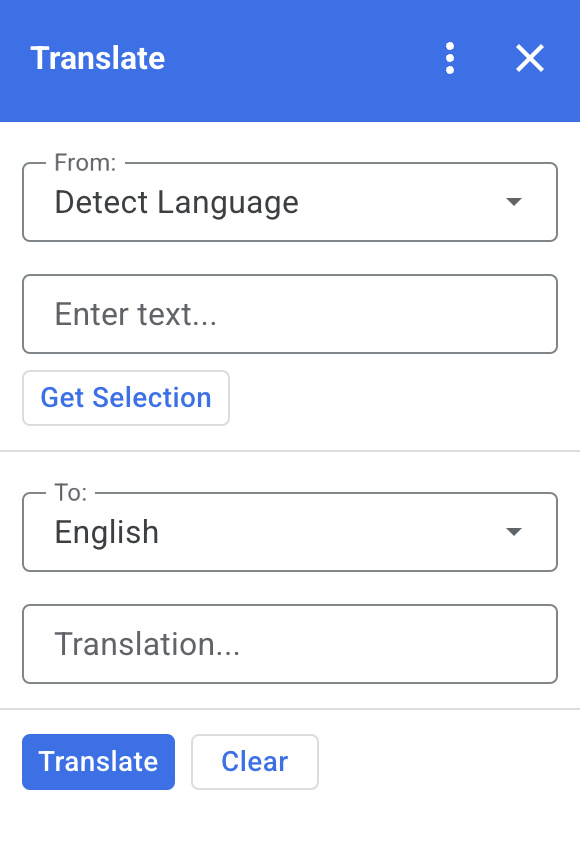
Cuando seleccionas texto en Documentos, Hojas de cálculo o Presentaciones y haces clic en Get Selection en el complemento, la secuencia de comandos copia el texto en el complemento, lo traduce y muestra el texto traducido.
De forma predeterminada, la secuencia de comandos detecta el idioma de origen y traduce el texto a inglés. Puedes editar los idiomas de origen y destino.
Servicios de Apps Script
En esta solución, se usan los siguientes servicios:
- Servicio de tarjetas: Crea la interfaz de usuario del complemento.
- Servicio de idiomas: Traduce el texto con Google Traductor.
Requisitos previos
Para usar esta muestra, debes cumplir con los siguientes requisitos previos:
- Una Cuenta de Google (es posible que las cuentas de Google Workspace requieran la aprobación del administrador)
- Un navegador web con acceso a Internet
Configura la secuencia de comandos
Crea el proyecto de Apps Script
Haz clic en el siguiente botón para abrir el proyecto de Apps Script de Translate.
Abre el proyectoHaz clic en Overview .
En la página de descripción general, haz clic en Make a copy
 .
.
Instala una implementación de prueba
- En el proyecto de Apps Script copiado, haz clic en Editor .
- Abre el archivo
Code.gsy haz clic en Run. Cuando se te solicite, autoriza la secuencia de comandos. - Haz clic en Deploy > Test deployments.
- Haz clic en Install > Done.
Ejecuta la secuencia de comandos:
- Abre un archivo de Documentos, Hojas de cálculo o Presentaciones de Google, o crea uno nuevo.
- En la barra lateral derecha, abre el complemento Translate .
- Si se te solicita, autoriza el complemento.
- Selecciona texto en el archivo.
- En el complemento, haz clic en Get Selection > Translate.
Revisa el código
Para revisar el código de Apps Script de esta solución, haz clic en Ver el código fuente:
Ver el código fuente
Code.gs
const DEFAULT_INPUT_TEXT = '';
const DEFAULT_OUTPUT_TEXT = '';
const DEFAULT_ORIGIN_LAN = ''; // Empty string means detect langauge
const DEFAULT_DESTINATION_LAN = 'en' // English

const LANGUAGE_MAP =
  [
    { text: 'Detect Language', val: '' },
    { text: 'Afrikaans', val: 'af' },
    { text: 'Albanian', val: 'sq' },
    { text: 'Amharic', val: 'am' },
    { text: 'Arabic', val: 'ar' },
    { text: 'Armenian', val: 'hy' },
    { text: 'Azerbaijani', val: 'az' },
    { text: 'Basque', val: 'eu' },
    { text: 'Belarusian', val: 'be' },
    { text: 'Bengali', val: 'bn' },
    { text: 'Bosnian', val: 'bs' },
    { text: 'Bulgarian', val: 'bg' },
    { text: 'Catalan', val: 'ca' },
    { text: 'Cebuano', val: 'ceb' },
    { text: 'Chinese (Simplified)', val: 'zh-CN' },
    { text: 'Chinese (Traditional)', val: 'zh-TW' },
    { text: 'Corsican', val: 'co' },
    { text: 'Croatian', val: 'hr' },
    { text: 'Czech', val: 'cs' },
    { text: 'Danish', val: 'da' },
    { text: 'Dutch', val: 'nl' },
    { text: 'English', val: 'en' },
    { text: 'Esperanto', val: 'eo' },
    { text: 'Estonian', val: 'et' },
    { text: 'Finnish', val: 'fi' },
    { text: 'French', val: 'fr' },
    { text: 'Frisian', val: 'fy' },
    { text: 'Galician', val: 'gl' },
    { text: 'Georgian', val: 'ka' },
    { text: 'German', val: 'de' },
    { text: 'Greek', val: 'el' },
    { text: 'Gujarati', val: 'gu' },
    { text: 'Haitian Creole', val: 'ht' },
    { text: 'Hausa', val: 'ha' },
    { text: 'Hawaiian', val: 'haw' },
    { text: 'Hebrew', val: 'he' },
    { text: 'Hindi', val: 'hi' },
    { text: 'Hmong', val: 'hmn' },
    { text: 'Hungarian', val: 'hu' },
    { text: 'Icelandic', val: 'is' },
    { text: 'Igbo', val: 'ig' },
    { text: 'Indonesian', val: 'id' },
    { text: 'Irish', val: 'ga' },
    { text: 'Italian', val: 'it' },
    { text: 'Japanese', val: 'ja' },
    { text: 'Javanese', val: 'jv' },
    { text: 'Kannada', val: 'kn' },
    { text: 'Kazakh', val: 'kk' },
    { text: 'Khmer', val: 'km' },
    { text: 'Korean', val: 'ko' },
    { text: 'Kurdish', val: 'ku' },
    { text: 'Kyrgyz', val: 'ky' },
    { text: 'Lao', val: 'lo' },
    { text: 'Latin', val: 'la' },
    { text: 'Latvian', val: 'lv' },
    { text: 'Lithuanian', val: 'lt' },
    { text: 'Luxembourgish', val: 'lb' },
    { text: 'Macedonian', val: 'mk' },
    { text: 'Malagasy', val: 'mg' },
    { text: 'Malay', val: 'ms' },
    { text: 'Malayalam', val: 'ml' },
    { text: 'Maltese', val: 'mt' },
    { text: 'Maori', val: 'mi' },
    { text: 'Marathi', val: 'mr' },
    { text: 'Mongolian', val: 'mn' },
    { text: 'Myanmar (Burmese)', val: 'my' },
    { text: 'Nepali', val: 'ne' },
    { text: 'Norwegian', val: 'no' },
    { text: 'Nyanja (Chichewa)', val: 'ny' },
    { text: 'Pashto', val: 'ps' },
    { text: 'Persian', val: 'fa' },
    { text: 'Polish', val: 'pl' },
    { text: 'Portuguese (Portugal, Brazil)', val: 'pt' },
    { text: 'Punjabi', val: 'pa' },
    { text: 'Romanian', val: 'ro' },
    { text: 'Russian', val: 'ru' },
    { text: 'Samoan', val: 'sm' },
    { text: 'Scots Gaelic', val: 'gd' },
    { text: 'Serbian', val: 'sr' },
    { text: 'Sesotho', val: 'st' },
    { text: 'Shona', val: 'sn' },
    { text: 'Sindhi', val: 'sd' },
    { text: 'Sinhala (Sinhalese)', val: 'si' },
    { text: 'Slovak', val: 'sk' },
    { text: 'Slovenian', val: 'sl' },
    { text: 'Somali', val: 'so' },
    { text: 'Spanish', val: 'es' },
    { text: 'Sundanese', val: 'su' },
    { text: 'Swahili', val: 'sw' },
    { text: 'Swedish', val: 'sv' },
    { text: 'Tagalog (Filipino)', val: 'tl' },
    { text: 'Tajik', val: 'tg' },
    { text: 'Tamil', val: 'ta' },
    { text: 'Telugu', val: 'te' },
    { text: 'Thai', val: 'th' },
    { text: 'Turkish', val: 'tr' },
    { text: 'Ukrainian', val: 'uk' },
    { text: 'Urdu', val: 'ur' },
    { text: 'Uzbek', val: 'uz' },
    { text: 'Vietnamese', val: 'vi' },
    { text: 'Welsh', val: 'cy' },
    { text: 'Xhosa', val: 'xh' },
    { text: 'Yiddish', val: 'yi' },
    { text: 'Yoruba', val: 'yo' },
    { text: 'Zulu', val: 'zu' }
  ];


/**
 * Callback for rendering the main card.
 * @return {CardService.Card} The card to show the user.
 */
function onHomepage(e) {
  return createSelectionCard(e, DEFAULT_ORIGIN_LAN, DEFAULT_DESTINATION_LAN, DEFAULT_INPUT_TEXT, DEFAULT_OUTPUT_TEXT);
}

/**
 * Main function to generate the main card.
 * @param {String} originLanguage Language of the original text.
 * @param {String} destinationLanguage Language of the translation.
 * @param {String} inputText The text to be translated.
 * @param {String} outputText The text translated.
 * @return {CardService.Card} The card to show to the user.
 */
function createSelectionCard(e, originLanguage, destinationLanguage, inputText, outputText) {
  var hostApp = e['hostApp'];
  var builder = CardService.newCardBuilder();

  // "From" language selection & text input section
  var fromSection = CardService.newCardSection()
    .addWidget(generateLanguagesDropdown('origin', 'From: ', originLanguage))
    .addWidget(CardService.newTextInput()
      .setFieldName('input')
      .setValue(inputText)
      .setTitle('Enter text...')
      .setMultiline(true));

  if (hostApp === 'docs') {
    fromSection.addWidget(CardService.newButtonSet()
      .addButton(CardService.newTextButton()
        .setText('Get Selection')
        .setOnClickAction(CardService.newAction().setFunctionName('getDocsSelection'))
        .setDisabled(false)))
  } else if (hostApp === 'sheets') {
    fromSection.addWidget(CardService.newButtonSet()
      .addButton(CardService.newTextButton()
        .setText('Get Selection')
        .setOnClickAction(CardService.newAction().setFunctionName('getSheetsSelection'))
        .setDisabled(false)))
  } else if (hostApp === 'slides') {
    fromSection.addWidget(CardService.newButtonSet()
      .addButton(CardService.newTextButton()
        .setText('Get Selection')
        .setOnClickAction(CardService.newAction().setFunctionName('getSlidesSelection'))
        .setDisabled(false)))
  }


  builder.addSection(fromSection);

  // "Translation" language selection & text input section
  builder.addSection(CardService.newCardSection()
    .addWidget(generateLanguagesDropdown('destination', 'To: ', destinationLanguage))
    .addWidget(CardService.newTextInput()
      .setFieldName('output')
      .setValue(outputText)
      .setTitle('Translation...')
      .setMultiline(true)));

  //Buttons section
  builder.addSection(CardService.newCardSection()
    .addWidget(CardService.newButtonSet()
      .addButton(CardService.newTextButton()
        .setText('Translate')
        .setTextButtonStyle(CardService.TextButtonStyle.FILLED)
        .setOnClickAction(CardService.newAction().setFunctionName('translateText'))
        .setDisabled(false))
      .addButton(CardService.newTextButton()
        .setText('Clear')
        .setOnClickAction(CardService.newAction().setFunctionName('clearText'))
        .setDisabled(false))));

  return builder.build();

}

/**
 * Helper function to generate the drop down language menu. It checks what language the user had selected.
 * @param {String} fieldName
 * @param {String} fieldTitle
 * @param {String} previousSelected The language the user previously had selected.
 * @return {CardService.SelectionInput} The card to show to the user.
 */
function generateLanguagesDropdown(fieldName, fieldTitle, previousSelected) {
  var selectionInput = CardService.newSelectionInput().setTitle(fieldTitle)
    .setFieldName(fieldName)
    .setType(CardService.SelectionInputType.DROPDOWN);

  LANGUAGE_MAP.forEach((language, index, array) => {
    selectionInput.addItem(language.text, language.val, language.val == previousSelected);
  })

  return selectionInput;
}

/**
 * Helper function to translate the text. If the originLanguage is an empty string, the API detects the language
 * @return {CardService.Card} The card to show to the user.
 */
function translateText(e) {
  var originLanguage = e.formInput.origin;
  var destinationLanguage = e.formInput.destination;
  var inputText = e.formInput.input;

  if (originLanguage !== destinationLanguage && inputText !== undefined) {
    var translation = LanguageApp.translate(e.formInput.input, e.formInput.origin, e.formInput.destination);
    return createSelectionCard(e, originLanguage, destinationLanguage, inputText, translation);
  }
}

/**
 * Helper function to clean the text.
 * @return {CardService.Card} The card to show to the user.
 */
function clearText(e) {
  var originLanguage = e.formInput.origin;
  var destinationLanguage = e.formInput.destination;
  return createSelectionCard(e, originLanguage, destinationLanguage, DEFAULT_INPUT_TEXT, DEFAULT_OUTPUT_TEXT);
}

/**
 * Helper function to get the text selected.
 * @return {CardService.Card} The selected text.
 */
function getDocsSelection(e) {
  var text = '';
  var selection = DocumentApp.getActiveDocument().getSelection();
  Logger.log(selection)
  if (selection) {
    var elements = selection.getRangeElements();
    for (var i = 0; i < elements.length; i++) {
      Logger.log(elements[i]);
      var element = elements[i];
      // Only modify elements that can be edited as text; skip images and other non-text elements.
      if (element.getElement().asText() && element.getElement().asText().getText() !== '') {
        text += element.getElement().asText().getText() + '\n';
      }
    }
  }

  if (text !== '') {
    var originLanguage = e.formInput.origin;
    var destinationLanguage = e.formInput.destination;
    var translation = LanguageApp.translate(text, e.formInput.origin, e.formInput.destination);
    return createSelectionCard(e, originLanguage, destinationLanguage, text, translation);
  }
}

/**
 * Helper function to get the text of the selected cells.
 * @return {CardService.Card} The selected text.
 */
function getSheetsSelection(e) {
  var text = '';
  var ranges = SpreadsheetApp.getActive().getSelection().getActiveRangeList().getRanges();
  for (var i = 0; i < ranges.length; i++) {
    const range = ranges[i];
    const numRows = range.getNumRows();
    const numCols = range.getNumColumns();
    for (let i = 1; i <= numCols; i++) {
      for (let j = 1; j <= numRows; j++) {
        const cell = range.getCell(j, i);
        if (cell.getValue()) {
          text += cell.getValue() + '\n';
        }
      }
    }
  }
  if (text !== '') {
    var originLanguage = e.formInput.origin;
    var destinationLanguage = e.formInput.destination;
    var translation = LanguageApp.translate(text, e.formInput.origin, e.formInput.destination);
    return createSelectionCard(e, originLanguage, destinationLanguage, text, translation);
  }
}

/**
 * Helper function to get the selected text of the active slide.
 * @return {CardService.Card} The selected text.
 */
function getSlidesSelection(e) {
  var text = '';
  var selection = SlidesApp.getActivePresentation().getSelection();
  var selectionType = selection.getSelectionType();
  if (selectionType === SlidesApp.SelectionType.TEXT) {
    var textRange = selection.getTextRange();
    if (textRange.asString() !== '') {
      text += textRange.asString() + '\n';
    }
  }
  if (text !== '') {
    var originLanguage = e.formInput.origin;
    var destinationLanguage = e.formInput.destination;
    var translation = LanguageApp.translate(text, e.formInput.origin, e.formInput.destination);
    return createSelectionCard(e, originLanguage, destinationLanguage, text, translation);
  }
}
appsscript.json
{
  "timeZone": "America/New_York",
  "dependencies": {},
  "exceptionLogging": "STACKDRIVER",
  "oauthScopes": [
    "https://www.googleapis.com/auth/documents.currentonly",
    "https://www.googleapis.com/auth/spreadsheets.currentonly",
    "https://www.googleapis.com/auth/presentations.currentonly"
  ],
  "runtimeVersion": "V8",
  "addOns": {
    "common": {
      "name": "Translate",
      "logoUrl": "https://www.gstatic.com/images/branding/product/1x/translate_24dp.png",
      "layoutProperties": {
        "primaryColor": "#2772ed"
      },
      "homepageTrigger": {
        "runFunction": "onHomepage"
      }
    },
    "docs" : {},
    "slides" : {},
    "sheets" : {}
  }
}
Colaboradores
Google mantiene esta muestra con la ayuda de Expertos de Google Developers.
Próximos pasos
- Amplía Google Workspace con complementos
- Crea complementos de Google Workspace
- Cómo publicar una app