

Cấp độ lập trình: Trung cấp
Thời lượng: 30 phút
Loại dự án: Tiện ích bổ sung của Google Workspace
Mục tiêu
- Tìm hiểu chức năng của giải pháp.
- Tìm hiểu chức năng của các dịch vụ Apps Script trong giải pháp.
- Thiết lập tập lệnh.
- Chạy tập lệnh.
Giới thiệu về giải pháp này
Với giải pháp này, bạn có thể dịch văn bản ngay trong Google Tài liệu, Trang tính và Trang trình bày.
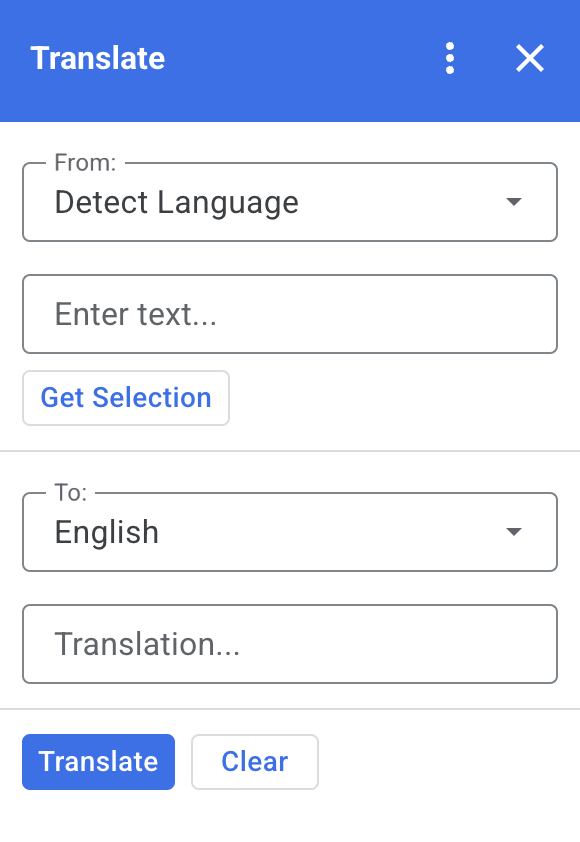
Cách hoạt động
Khi bạn chọn văn bản trong Tài liệu, Trang tính hoặc Trang trình bày rồi nhấp vào Lấy nội dung đã chọn trong tiện ích bổ sung, tập lệnh sẽ sao chép văn bản vào tiện ích bổ sung, dịch văn bản đó rồi hiển thị văn bản đã dịch.
Theo mặc định, tập lệnh sẽ phát hiện ngôn ngữ gốc và dịch văn bản sang tiếng Anh. Bạn có thể chỉnh sửa ngôn ngữ nguồn và ngôn ngữ đích.
Dịch vụ Apps Script
Giải pháp này sử dụng các dịch vụ sau:
- Dịch vụ thẻ – Tạo giao diện người dùng của tiện ích bổ sung.
- Dịch vụ ngôn ngữ – Dịch văn bản bằng Google Dịch.
Điều kiện tiên quyết
Để sử dụng mẫu này, bạn cần đáp ứng các điều kiện tiên quyết sau:
- Tài khoản Google (tài khoản Google Workspace có thể cần được quản trị viên phê duyệt).
- Trình duyệt web có quyền truy cập vào Internet.
Thiết lập tập lệnh
Tạo dự án Apps Script
Nhấp vào nút sau để mở dự án Apps Script Dịch.
Mở dự ánNhấp vào Tổng quan .
Trên trang tổng quan, hãy nhấp vào Tạo bản sao
 .
.
Cài đặt bản triển khai thử nghiệm
- Trong dự án Apps Script đã sao chép, hãy nhấp vào Trình chỉnh sửa .
- Mở tệp
Code.gsrồi nhấp vào Chạy. Khi được nhắc, hãy cho phép tập lệnh chạy. - Nhấp vào Triển khai > Bản triển khai thử nghiệm.
- Nhấp vào Cài đặt > Xong.
Chạy tập lệnh
- Mở một tệp trong Google Tài liệu, Trang tính hoặc Trang trình bày, hoặc tạo một tệp mới.
- Trên thanh bên phải, hãy mở tiện ích bổ sung Dịch .
- Nếu được nhắc, hãy cho phép tiện ích bổ sung chạy.
- Chọn văn bản trong tệp.
- Trong tiện ích bổ sung, hãy nhấp vào Lấy nội dung đã chọn > Dịch.
Xem lại mã
Để xem lại mã Apps Script cho giải pháp này, hãy nhấp vào Xem mã nguồn:
Xem mã nguồn
Code.gs
const DEFAULT_INPUT_TEXT = '';
const DEFAULT_OUTPUT_TEXT = '';
const DEFAULT_ORIGIN_LAN = ''; // Empty string means detect langauge
const DEFAULT_DESTINATION_LAN = 'en' // English

const LANGUAGE_MAP =
  [
    { text: 'Detect Language', val: '' },
    { text: 'Afrikaans', val: 'af' },
    { text: 'Albanian', val: 'sq' },
    { text: 'Amharic', val: 'am' },
    { text: 'Arabic', val: 'ar' },
    { text: 'Armenian', val: 'hy' },
    { text: 'Azerbaijani', val: 'az' },
    { text: 'Basque', val: 'eu' },
    { text: 'Belarusian', val: 'be' },
    { text: 'Bengali', val: 'bn' },
    { text: 'Bosnian', val: 'bs' },
    { text: 'Bulgarian', val: 'bg' },
    { text: 'Catalan', val: 'ca' },
    { text: 'Cebuano', val: 'ceb' },
    { text: 'Chinese (Simplified)', val: 'zh-CN' },
    { text: 'Chinese (Traditional)', val: 'zh-TW' },
    { text: 'Corsican', val: 'co' },
    { text: 'Croatian', val: 'hr' },
    { text: 'Czech', val: 'cs' },
    { text: 'Danish', val: 'da' },
    { text: 'Dutch', val: 'nl' },
    { text: 'English', val: 'en' },
    { text: 'Esperanto', val: 'eo' },
    { text: 'Estonian', val: 'et' },
    { text: 'Finnish', val: 'fi' },
    { text: 'French', val: 'fr' },
    { text: 'Frisian', val: 'fy' },
    { text: 'Galician', val: 'gl' },
    { text: 'Georgian', val: 'ka' },
    { text: 'German', val: 'de' },
    { text: 'Greek', val: 'el' },
    { text: 'Gujarati', val: 'gu' },
    { text: 'Haitian Creole', val: 'ht' },
    { text: 'Hausa', val: 'ha' },
    { text: 'Hawaiian', val: 'haw' },
    { text: 'Hebrew', val: 'he' },
    { text: 'Hindi', val: 'hi' },
    { text: 'Hmong', val: 'hmn' },
    { text: 'Hungarian', val: 'hu' },
    { text: 'Icelandic', val: 'is' },
    { text: 'Igbo', val: 'ig' },
    { text: 'Indonesian', val: 'id' },
    { text: 'Irish', val: 'ga' },
    { text: 'Italian', val: 'it' },
    { text: 'Japanese', val: 'ja' },
    { text: 'Javanese', val: 'jv' },
    { text: 'Kannada', val: 'kn' },
    { text: 'Kazakh', val: 'kk' },
    { text: 'Khmer', val: 'km' },
    { text: 'Korean', val: 'ko' },
    { text: 'Kurdish', val: 'ku' },
    { text: 'Kyrgyz', val: 'ky' },
    { text: 'Lao', val: 'lo' },
    { text: 'Latin', val: 'la' },
    { text: 'Latvian', val: 'lv' },
    { text: 'Lithuanian', val: 'lt' },
    { text: 'Luxembourgish', val: 'lb' },
    { text: 'Macedonian', val: 'mk' },
    { text: 'Malagasy', val: 'mg' },
    { text: 'Malay', val: 'ms' },
    { text: 'Malayalam', val: 'ml' },
    { text: 'Maltese', val: 'mt' },
    { text: 'Maori', val: 'mi' },
    { text: 'Marathi', val: 'mr' },
    { text: 'Mongolian', val: 'mn' },
    { text: 'Myanmar (Burmese)', val: 'my' },
    { text: 'Nepali', val: 'ne' },
    { text: 'Norwegian', val: 'no' },
    { text: 'Nyanja (Chichewa)', val: 'ny' },
    { text: 'Pashto', val: 'ps' },
    { text: 'Persian', val: 'fa' },
    { text: 'Polish', val: 'pl' },
    { text: 'Portuguese (Portugal, Brazil)', val: 'pt' },
    { text: 'Punjabi', val: 'pa' },
    { text: 'Romanian', val: 'ro' },
    { text: 'Russian', val: 'ru' },
    { text: 'Samoan', val: 'sm' },
    { text: 'Scots Gaelic', val: 'gd' },
    { text: 'Serbian', val: 'sr' },
    { text: 'Sesotho', val: 'st' },
    { text: 'Shona', val: 'sn' },
    { text: 'Sindhi', val: 'sd' },
    { text: 'Sinhala (Sinhalese)', val: 'si' },
    { text: 'Slovak', val: 'sk' },
    { text: 'Slovenian', val: 'sl' },
    { text: 'Somali', val: 'so' },
    { text: 'Spanish', val: 'es' },
    { text: 'Sundanese', val: 'su' },
    { text: 'Swahili', val: 'sw' },
    { text: 'Swedish', val: 'sv' },
    { text: 'Tagalog (Filipino)', val: 'tl' },
    { text: 'Tajik', val: 'tg' },
    { text: 'Tamil', val: 'ta' },
    { text: 'Telugu', val: 'te' },
    { text: 'Thai', val: 'th' },
    { text: 'Turkish', val: 'tr' },
    { text: 'Ukrainian', val: 'uk' },
    { text: 'Urdu', val: 'ur' },
    { text: 'Uzbek', val: 'uz' },
    { text: 'Vietnamese', val: 'vi' },
    { text: 'Welsh', val: 'cy' },
    { text: 'Xhosa', val: 'xh' },
    { text: 'Yiddish', val: 'yi' },
    { text: 'Yoruba', val: 'yo' },
    { text: 'Zulu', val: 'zu' }
  ];


/**
 * Callback for rendering the main card.
 * @return {CardService.Card} The card to show the user.
 */
function onHomepage(e) {
  return createSelectionCard(e, DEFAULT_ORIGIN_LAN, DEFAULT_DESTINATION_LAN, DEFAULT_INPUT_TEXT, DEFAULT_OUTPUT_TEXT);
}

/**
 * Main function to generate the main card.
 * @param {String} originLanguage Language of the original text.
 * @param {String} destinationLanguage Language of the translation.
 * @param {String} inputText The text to be translated.
 * @param {String} outputText The text translated.
 * @return {CardService.Card} The card to show to the user.
 */
function createSelectionCard(e, originLanguage, destinationLanguage, inputText, outputText) {
  var hostApp = e['hostApp'];
  var builder = CardService.newCardBuilder();

  // "From" language selection & text input section
  var fromSection = CardService.newCardSection()
    .addWidget(generateLanguagesDropdown('origin', 'From: ', originLanguage))
    .addWidget(CardService.newTextInput()
      .setFieldName('input')
      .setValue(inputText)
      .setTitle('Enter text...')
      .setMultiline(true));

  if (hostApp === 'docs') {
    fromSection.addWidget(CardService.newButtonSet()
      .addButton(CardService.newTextButton()
        .setText('Get Selection')
        .setOnClickAction(CardService.newAction().setFunctionName('getDocsSelection'))
        .setDisabled(false)))
  } else if (hostApp === 'sheets') {
    fromSection.addWidget(CardService.newButtonSet()
      .addButton(CardService.newTextButton()
        .setText('Get Selection')
        .setOnClickAction(CardService.newAction().setFunctionName('getSheetsSelection'))
        .setDisabled(false)))
  } else if (hostApp === 'slides') {
    fromSection.addWidget(CardService.newButtonSet()
      .addButton(CardService.newTextButton()
        .setText('Get Selection')
        .setOnClickAction(CardService.newAction().setFunctionName('getSlidesSelection'))
        .setDisabled(false)))
  }


  builder.addSection(fromSection);

  // "Translation" language selection & text input section
  builder.addSection(CardService.newCardSection()
    .addWidget(generateLanguagesDropdown('destination', 'To: ', destinationLanguage))
    .addWidget(CardService.newTextInput()
      .setFieldName('output')
      .setValue(outputText)
      .setTitle('Translation...')
      .setMultiline(true)));

  //Buttons section
  builder.addSection(CardService.newCardSection()
    .addWidget(CardService.newButtonSet()
      .addButton(CardService.newTextButton()
        .setText('Translate')
        .setTextButtonStyle(CardService.TextButtonStyle.FILLED)
        .setOnClickAction(CardService.newAction().setFunctionName('translateText'))
        .setDisabled(false))
      .addButton(CardService.newTextButton()
        .setText('Clear')
        .setOnClickAction(CardService.newAction().setFunctionName('clearText'))
        .setDisabled(false))));

  return builder.build();

}

/**
 * Helper function to generate the drop down language menu. It checks what language the user had selected.
 * @param {String} fieldName
 * @param {String} fieldTitle
 * @param {String} previousSelected The language the user previously had selected.
 * @return {CardService.SelectionInput} The card to show to the user.
 */
function generateLanguagesDropdown(fieldName, fieldTitle, previousSelected) {
  var selectionInput = CardService.newSelectionInput().setTitle(fieldTitle)
    .setFieldName(fieldName)
    .setType(CardService.SelectionInputType.DROPDOWN);

  LANGUAGE_MAP.forEach((language, index, array) => {
    selectionInput.addItem(language.text, language.val, language.val == previousSelected);
  })

  return selectionInput;
}

/**
 * Helper function to translate the text. If the originLanguage is an empty string, the API detects the language
 * @return {CardService.Card} The card to show to the user.
 */
function translateText(e) {
  var originLanguage = e.formInput.origin;
  var destinationLanguage = e.formInput.destination;
  var inputText = e.formInput.input;

  if (originLanguage !== destinationLanguage && inputText !== undefined) {
    var translation = LanguageApp.translate(e.formInput.input, e.formInput.origin, e.formInput.destination);
    return createSelectionCard(e, originLanguage, destinationLanguage, inputText, translation);
  }
}

/**
 * Helper function to clean the text.
 * @return {CardService.Card} The card to show to the user.
 */
function clearText(e) {
  var originLanguage = e.formInput.origin;
  var destinationLanguage = e.formInput.destination;
  return createSelectionCard(e, originLanguage, destinationLanguage, DEFAULT_INPUT_TEXT, DEFAULT_OUTPUT_TEXT);
}

/**
 * Helper function to get the text selected.
 * @return {CardService.Card} The selected text.
 */
function getDocsSelection(e) {
  var text = '';
  var selection = DocumentApp.getActiveDocument().getSelection();
  Logger.log(selection)
  if (selection) {
    var elements = selection.getRangeElements();
    for (var i = 0; i < elements.length; i++) {
      Logger.log(elements[i]);
      var element = elements[i];
      // Only modify elements that can be edited as text; skip images and other non-text elements.
      if (element.getElement().asText() && element.getElement().asText().getText() !== '') {
        text += element.getElement().asText().getText() + '\n';
      }
    }
  }

  if (text !== '') {
    var originLanguage = e.formInput.origin;
    var destinationLanguage = e.formInput.destination;
    var translation = LanguageApp.translate(text, e.formInput.origin, e.formInput.destination);
    return createSelectionCard(e, originLanguage, destinationLanguage, text, translation);
  }
}

/**
 * Helper function to get the text of the selected cells.
 * @return {CardService.Card} The selected text.
 */
function getSheetsSelection(e) {
  var text = '';
  var ranges = SpreadsheetApp.getActive().getSelection().getActiveRangeList().getRanges();
  for (var i = 0; i < ranges.length; i++) {
    const range = ranges[i];
    const numRows = range.getNumRows();
    const numCols = range.getNumColumns();
    for (let i = 1; i <= numCols; i++) {
      for (let j = 1; j <= numRows; j++) {
        const cell = range.getCell(j, i);
        if (cell.getValue()) {
          text += cell.getValue() + '\n';
        }
      }
    }
  }
  if (text !== '') {
    var originLanguage = e.formInput.origin;
    var destinationLanguage = e.formInput.destination;
    var translation = LanguageApp.translate(text, e.formInput.origin, e.formInput.destination);
    return createSelectionCard(e, originLanguage, destinationLanguage, text, translation);
  }
}

/**
 * Helper function to get the selected text of the active slide.
 * @return {CardService.Card} The selected text.
 */
function getSlidesSelection(e) {
  var text = '';
  var selection = SlidesApp.getActivePresentation().getSelection();
  var selectionType = selection.getSelectionType();
  if (selectionType === SlidesApp.SelectionType.TEXT) {
    var textRange = selection.getTextRange();
    if (textRange.asString() !== '') {
      text += textRange.asString() + '\n';
    }
  }
  if (text !== '') {
    var originLanguage = e.formInput.origin;
    var destinationLanguage = e.formInput.destination;
    var translation = LanguageApp.translate(text, e.formInput.origin, e.formInput.destination);
    return createSelectionCard(e, originLanguage, destinationLanguage, text, translation);
  }
}
appsscript.json
{
  "timeZone": "America/New_York",
  "dependencies": {},
  "exceptionLogging": "STACKDRIVER",
  "oauthScopes": [
    "https://www.googleapis.com/auth/documents.currentonly",
    "https://www.googleapis.com/auth/spreadsheets.currentonly",
    "https://www.googleapis.com/auth/presentations.currentonly"
  ],
  "runtimeVersion": "V8",
  "addOns": {
    "common": {
      "name": "Translate",
      "logoUrl": "https://www.gstatic.com/images/branding/product/1x/translate_24dp.png",
      "layoutProperties": {
        "primaryColor": "#2772ed"
      },
      "homepageTrigger": {
        "runFunction": "onHomepage"
      }
    },
    "docs" : {},
    "slides" : {},
    "sheets" : {}
  }
}
Người đóng góp
Mẫu này do Google duy trì với sự trợ giúp của các Chuyên gia về Google Developers.
Các bước tiếp theo
- Mở rộng Google Workspace bằng tiện ích bổ sung
- Tạo tiện ích bổ sung cho Google Workspace
- Phát hành ứng dụng