پیش نمایش لینک ها

برای جلوگیری از تغییر زمینه هنگام اشتراک‌گذاری لینک توسط کاربران در گوگل چت، برنامه چت شما می‌تواند با پیوست کردن کارتی به پیام آنها که اطلاعات بیشتری ارائه می‌دهد و به افراد امکان می‌دهد مستقیماً از گوگل چت اقدام کنند، پیش‌نمایشی از لینک را نمایش دهد .

برای مثال، یک فضای چت گوگل را تصور کنید که شامل تمام نمایندگان خدمات مشتری یک شرکت به علاوه یک برنامه چت به نام Case-y است. نمایندگان مرتباً پیوندهایی به پرونده‌های خدمات مشتری در فضای چت به اشتراک می‌گذارند و هر بار که این کار را انجام می‌دهند، همکارانشان باید لینک پرونده را باز کنند تا جزئیاتی مانند واگذارکننده، وضعیت و موضوع را ببینند. به همین ترتیب، اگر کسی بخواهد مالکیت یک پرونده را به دست بگیرد یا وضعیت را تغییر دهد، باید لینک را باز کند.

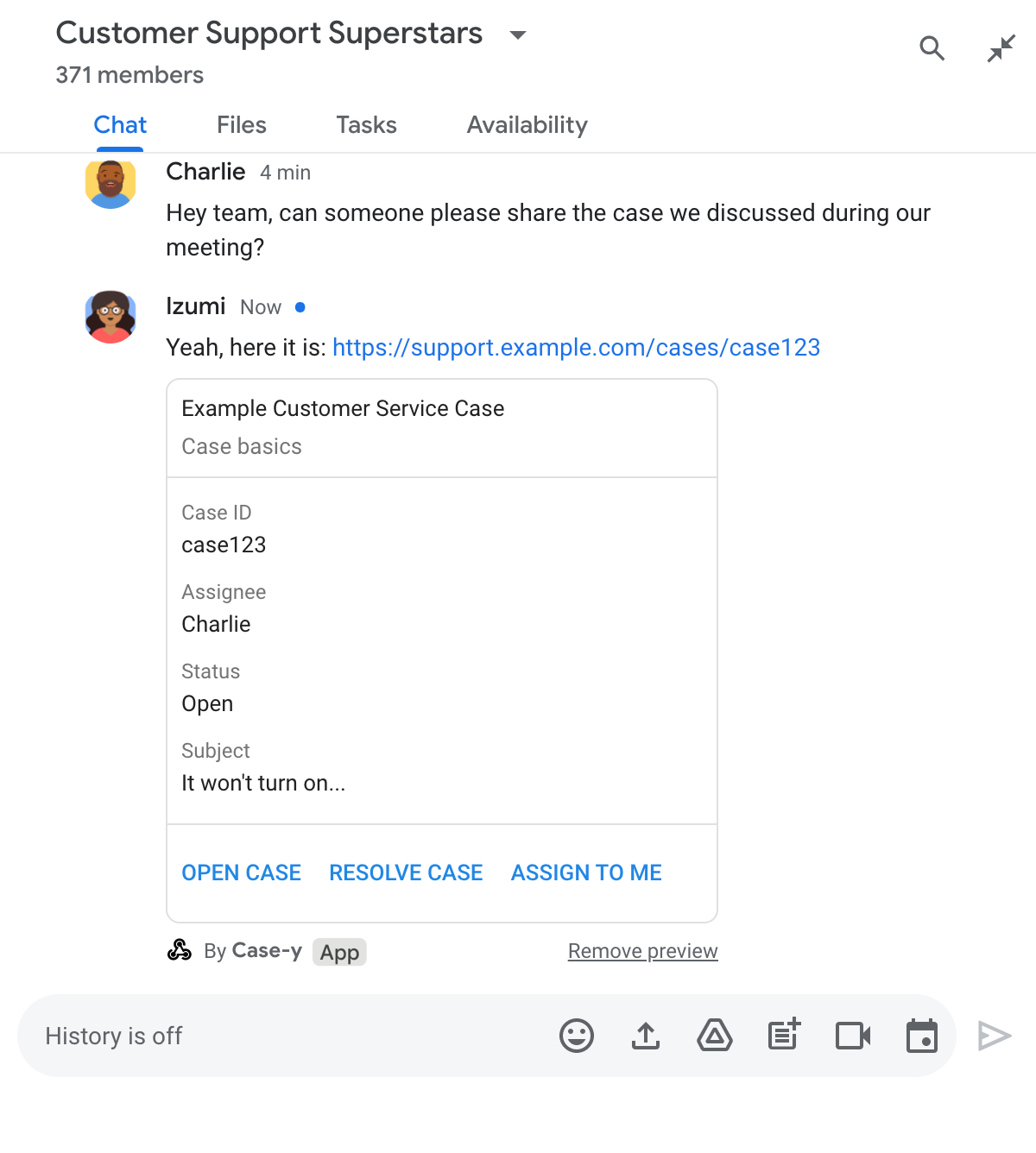
پیش‌نمایش لینک، برنامه چت مستقر در این فضا، Case-y، را قادر می‌سازد تا هر زمان که کسی لینک پرونده‌ای را به اشتراک می‌گذارد، کارتی را پیوست کند که نشان دهنده واگذارکننده، وضعیت و موضوع است. دکمه‌های روی کارت به نمایندگان اجازه می‌دهد تا مالکیت پرونده را به دست بگیرند و وضعیت را مستقیماً از جریان چت تغییر دهند.

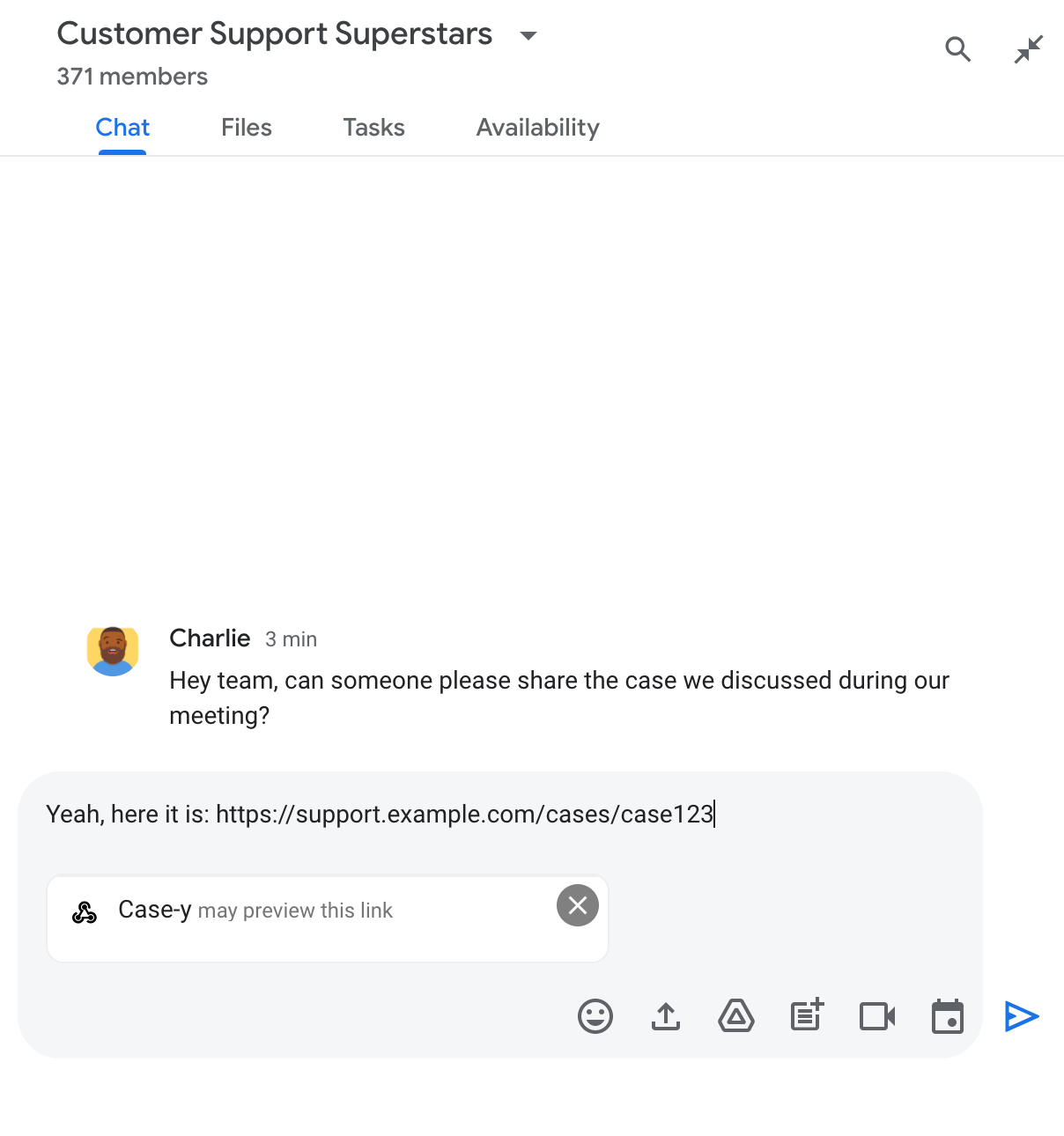
وقتی کسی لینکی به پیام خود اضافه می‌کند، یک تراشه ظاهر می‌شود که به او اطلاع می‌دهد که یک برنامه چت ممکن است لینک را پیش‌نمایش کند.

تراشه‌ای که نشان می‌دهد یک برنامه چت ممکن است لینکی را پیش‌نمایش کند

پس از ارسال پیام، لینک به برنامه چت ارسال می‌شود، که سپس کارت را تولید و به پیام کاربر پیوست می‌کند.

پیش‌نمایش لینک با پیوست کردن کارت به پیام در برنامه چت

در کنار لینک، کارت اطلاعات بیشتری در مورد لینک، از جمله عناصر تعاملی مانند دکمه‌ها، ارائه می‌دهد. برنامه چت شما می‌تواند کارت پیوست شده را در پاسخ به تعاملات کاربر، مانند کلیک روی دکمه، به‌روزرسانی کند.

اگر کسی نمی‌خواهد برنامه چت با پیوست کردن کارت به پیامش، پیش‌نمایش لینک او را نشان دهد، می‌تواند با کلیک روی روی تراشه پیش‌نمایش، از پیش‌نمایش جلوگیری کند. کاربران می‌توانند در هر زمان با کلیک روی حذف پیش‌نمایش، کارت پیوست‌شده را حذف کنند.

پیش‌نیازها

نود جی اس

یک برنامه چت گوگل که رویدادهای تعاملی را دریافت و به آنها پاسخ می‌دهد. برای ایجاد یک برنامه چت تعاملی با استفاده از سرویس HTTP، این راهنمای سریع را تکمیل کنید.

پایتون

یک برنامه چت گوگل که رویدادهای تعاملی را دریافت و به آنها پاسخ می‌دهد. برای ایجاد یک برنامه چت تعاملی با استفاده از سرویس HTTP، این راهنمای سریع را تکمیل کنید.

جاوا

یک برنامه چت گوگل که رویدادهای تعاملی را دریافت و به آنها پاسخ می‌دهد. برای ایجاد یک برنامه چت تعاملی با استفاده از سرویس HTTP، این راهنمای سریع را تکمیل کنید.

اسکریپت برنامه‌ها

یک برنامه چت گوگل که رویدادهای تعاملی را دریافت و به آنها پاسخ می‌دهد. برای ایجاد یک برنامه چت تعاملی در Apps Script، این راهنمای سریع را تکمیل کنید.

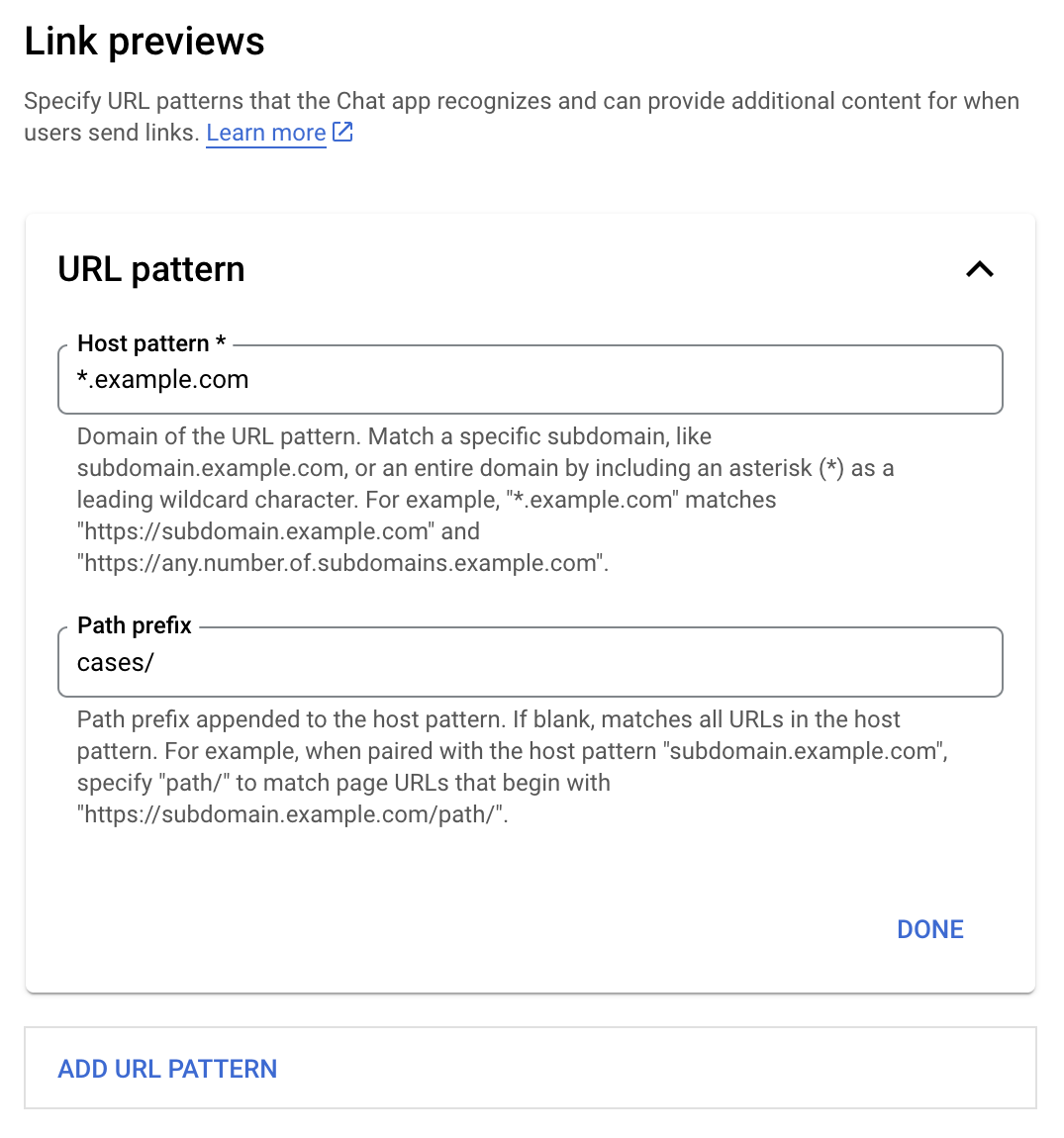
لینک‌های خاصی - مانند example.com ، support.example.com و support.example.com/cases/ - را به عنوان الگوهای URL در صفحه پیکربندی برنامه چت خود در کنسول Google Cloud ثبت کنید تا برنامه چت شما بتواند آنها را پیش‌نمایش کند.

منوی پیکربندی پیش‌نمایش لینک‌ها

  1. کنسول گوگل کلود را باز کنید.
  2. کنار «Google Cloud»، روی فلش رو به پایین کلیک کنید و پروژه برنامه چت خود را باز کنید.
  3. در فیلد جستجو، عبارت Google Chat API را تایپ کنید و روی Google Chat API کلیک کنید.
  4. روی مدیریت > پیکربندی کلیک کنید.
  5. در پیش‌نمایش‌های پیوند، الگوی نشانی وب را اضافه یا ویرایش کنید.
    1. برای پیکربندی پیش‌نمایش‌های لینک برای یک الگوی URL جدید، روی «افزودن الگوی URL» کلیک کنید.
    2. برای ویرایش پیکربندی یک الگوی URL موجود، روی پیکان رو به پایین کلیک کنید.
  6. در فیلد الگوی میزبان ، دامنه الگوی URL را وارد کنید. برنامه چت، لینک‌های این دامنه را پیش‌نمایش می‌دهد.

    برای اینکه لینک‌های پیش‌نمایش برنامه چت برای یک زیردامنه خاص، مانند subdomain.example.com ، نمایش داده شوند، زیردامنه را نیز اضافه کنید.

    برای داشتن لینک‌های پیش‌نمایش برنامه چت برای کل دامنه، یک کاراکتر wildcard با ستاره (*) به عنوان زیر دامنه مشخص کنید. برای مثال، *.example.com با subdomain.example.com و any.number.of.subdomains.example.com مطابقت دارد.

  7. در فیلد پیشوند مسیر ، مسیری را برای اضافه شدن به دامنه الگوی میزبان وارد کنید.

    برای تطبیق همه URLها در دامنه الگوی میزبان، پیشوند مسیر را خالی بگذارید.

    برای مثال، اگر الگوی میزبان support.example.com باشد، برای تطبیق URLها برای موارد میزبانی شده در support.example.com/cases/ ، cases/ را وارد کنید.

  8. روی انجام شد کلیک کنید.

  9. روی ذخیره کلیک کنید.

اکنون، هر زمان که کسی پیوندی را که با الگوی URL پیش‌نمایش پیوند مطابقت دارد، به پیامی در فضای چت که شامل برنامه چت شما می‌شود، اضافه کند، برنامه شما پیش‌نمایشی از پیوند را نشان می‌دهد.

پس از پیکربندی پیش‌نمایش لینک برای یک لینک مشخص، برنامه چت شما می‌تواند با پیوست کردن اطلاعات بیشتر به آن، لینک را شناسایی و پیش‌نمایش کند.

در فضاهای چت که شامل برنامه چت شما می‌شوند، وقتی پیام کسی حاوی لینکی است که با الگوی URL پیش‌نمایش لینک مطابقت دارد، برنامه چت شما یک رویداد تعامل MESSAGE دریافت می‌کند. محتوای JSON برای رویداد تعامل شامل فیلد matchedUrl است:

جی‌سون

message: {
  matchedUrl: {
    url: "https://support.example.com/cases/case123"
  },
  ... // other message attributes redacted
}

با بررسی وجود فیلد matchedUrl در رویداد MESSAGE ، برنامه چت شما می‌تواند اطلاعاتی را به پیام با لینک پیش‌نمایش‌شده اضافه کند. برنامه چت شما می‌تواند با یک پیام متنی ساده پاسخ دهد یا یک کارت پیوست کند.

با پیامک پاسخ دهید

برای پاسخ‌های اولیه، برنامه چت شما می‌تواند با پاسخ دادن به یک پیام متنی ساده به یک لینک، پیش‌نمایشی از آن را نمایش دهد. این مثال پیامی را پیوست می‌کند که URL لینکی را که با الگوی URL پیش‌نمایش لینک مطابقت دارد، تکرار می‌کند.

نود جی اس

گره/پیش‌نمایش-لینک/index.js
// Reply with a text message for URLs of the subdomain "text"
if (event.message.matchedUrl.url.includes("text.example.com")) {
  return {
    text: 'event.message.matchedUrl.url: ' + event.message.matchedUrl.url
  };
}

پایتون

python/preview-link/main.py
# Reply with a text message for URLs of the subdomain "text"
if 'text.example.com' in event.get('message').get('matchedUrl').get('url'):
  return {
    'text': 'event.message.matchedUrl.url: ' +
            event.get('message').get('matchedUrl').get('url')
  }

جاوا

java/preview-link/src/main/java/com/google/chat/preview/App.java
// Reply with a text message for URLs of the subdomain "text"
if (event.at("/message/matchedUrl/url").asText().contains("text.example.com")) {
  return new Message().setText("event.message.matchedUrl.url: " +
    event.at("/message/matchedUrl/url").asText());
}

اسکریپت برنامه‌ها

apps-script/preview-link/preview-link.gs
// Reply with a text message for URLs of the subdomain "text"
if (event.message.matchedUrl.url.includes("text.example.com")) {
  return {
    text: 'event.message.matchedUrl.url: ' + event.message.matchedUrl.url
  };
}

برای پیوست کردن یک کارت به لینک پیش‌نمایش‌شده، یک ActionResponse از نوع UPDATE_USER_MESSAGE_CARDS برگردانید. این مثال یک کارت ساده را پیوست می‌کند.

پیش‌نمایش لینک با پیوست کردن کارت به پیام در برنامه چت

نود جی اس

گره/پیش‌نمایش-لینک/index.js
// Attach a card to the message for URLs of the subdomain "support"
if (event.message.matchedUrl.url.includes("support.example.com")) {
  // A hard-coded card is used in this example. In a real-life scenario,
  // the case information would be fetched and used to build the card.
  return {
    actionResponse: { type: 'UPDATE_USER_MESSAGE_CARDS' },
    cardsV2: [{
      cardId: 'attachCard',
      card: {
        header: {
          title: 'Example Customer Service Case',
          subtitle: 'Case basics',
        },
        sections: [{ widgets: [
          { decoratedText: { topLabel: 'Case ID', text: 'case123'}},
          { decoratedText: { topLabel: 'Assignee', text: 'Charlie'}},
          { decoratedText: { topLabel: 'Status', text: 'Open'}},
          { decoratedText: { topLabel: 'Subject', text: 'It won\'t turn on...' }},
          { buttonList: { buttons: [{
            text: 'OPEN CASE',
            onClick: { openLink: {
              url: 'https://support.example.com/orders/case123'
            }},
          }, {
            text: 'RESOLVE CASE',
            onClick: { openLink: {
              url: 'https://support.example.com/orders/case123?resolved=y',
            }},
          }, {
            text: 'ASSIGN TO ME',
            onClick: { action: { function: 'assign'}}
          }]}}
        ]}]
      }
    }]
  };
}

پایتون

python/preview-link/main.py
# Attach a card to the message for URLs of the subdomain "support"
if 'support.example.com' in event.get('message').get('matchedUrl').get('url'):
  # A hard-coded card is used in this example. In a real-life scenario,
  # the case information would be fetched and used to build the card.
  return {
    'actionResponse': { 'type': 'UPDATE_USER_MESSAGE_CARDS' },
    'cardsV2': [{
      'cardId': 'attachCard',
      'card': {
        'header': {
          'title': 'Example Customer Service Case',
          'subtitle': 'Case basics',
        },
        'sections': [{ 'widgets': [
          { 'decoratedText': { 'topLabel': 'Case ID', 'text': 'case123'}},
          { 'decoratedText': { 'topLabel': 'Assignee', 'text': 'Charlie'}},
          { 'decoratedText': { 'topLabel': 'Status', 'text': 'Open'}},
          { 'decoratedText': { 'topLabel': 'Subject', 'text': 'It won\'t turn on...' }},
          { 'buttonList': { 'buttons': [{
            'text': 'OPEN CASE',
            'onClick': { 'openLink': {
              'url': 'https://support.example.com/orders/case123'
            }},
          }, {
            'text': 'RESOLVE CASE',
            'onClick': { 'openLink': {
              'url': 'https://support.example.com/orders/case123?resolved=y',
            }},
          }, {
            'text': 'ASSIGN TO ME',
            'onClick': { 'action': { 'function': 'assign'}}
          }]}}
        ]}]
      }
    }]
  }

جاوا

java/preview-link/src/main/java/com/google/chat/preview/App.java
// Attach a card to the message for URLs of the subdomain "support"
if (event.at("/message/matchedUrl/url").asText().contains("support.example.com")) {
  // A hard-coded card is used in this example. In a real-life scenario,
  // the case information would be fetched and used to build the card.
  return new Message()
    .setActionResponse(new ActionResponse()
      .setType("UPDATE_USER_MESSAGE_CARDS"))
    .setCardsV2(List.of(new CardWithId()
      .setCardId("attachCard")
      .setCard(new GoogleAppsCardV1Card()
        .setHeader(new GoogleAppsCardV1CardHeader()
          .setTitle("Example Customer Service Case")
          .setSubtitle("Case basics"))
        .setSections(List.of(new GoogleAppsCardV1Section().setWidgets(List.of(
          new GoogleAppsCardV1Widget().setDecoratedText(new GoogleAppsCardV1DecoratedText()
            .setTopLabel("Case ID")
            .setText("case123")),
          new GoogleAppsCardV1Widget().setDecoratedText(new GoogleAppsCardV1DecoratedText()
            .setTopLabel("Assignee")
            .setText("Charlie")),
          new GoogleAppsCardV1Widget().setDecoratedText(new GoogleAppsCardV1DecoratedText()
            .setTopLabel("Status")
            .setText("Open")),
          new GoogleAppsCardV1Widget().setDecoratedText(new GoogleAppsCardV1DecoratedText()
            .setTopLabel("Subject")
            .setText("It won't turn on...")),
          new GoogleAppsCardV1Widget()
            .setButtonList(new GoogleAppsCardV1ButtonList().setButtons(List.of(
              new GoogleAppsCardV1Button()
                .setText("OPEN CASE")
                .setOnClick(new GoogleAppsCardV1OnClick()
                  .setOpenLink(new GoogleAppsCardV1OpenLink()
                    .setUrl("https://support.example.com/orders/case123"))),
              new GoogleAppsCardV1Button()
                .setText("RESOLVE CASE")
                .setOnClick(new GoogleAppsCardV1OnClick()
                  .setOpenLink(new GoogleAppsCardV1OpenLink()
                    .setUrl("https://support.example.com/orders/case123?resolved=y"))),
              new GoogleAppsCardV1Button()
                .setText("ASSIGN TO ME")
                .setOnClick(new GoogleAppsCardV1OnClick()
                  .setAction(new GoogleAppsCardV1Action().setFunction("assign")))))))))))));
}

اسکریپت برنامه‌ها

این مثال با برگرداندن JSON کارت، یک پیام کارت ارسال می‌کند. همچنین می‌توانید از سرویس کارت Apps Script استفاده کنید.

apps-script/preview-link/preview-link.gs
// Attach a card to the message for URLs of the subdomain "support"
if (event.message.matchedUrl.url.includes("support.example.com")) {
  // A hard-coded card is used in this example. In a real-life scenario,
  // the case information would be fetched and used to build the card.
  return {
    actionResponse: { type: 'UPDATE_USER_MESSAGE_CARDS' },
    cardsV2: [{
      cardId: 'attachCard',
      card: {
        header: {
          title: 'Example Customer Service Case',
          subtitle: 'Case basics',
        },
        sections: [{ widgets: [
          { decoratedText: { topLabel: 'Case ID', text: 'case123'}},
          { decoratedText: { topLabel: 'Assignee', text: 'Charlie'}},
          { decoratedText: { topLabel: 'Status', text: 'Open'}},
          { decoratedText: { topLabel: 'Subject', text: 'It won\'t turn on...' }},
          { buttonList: { buttons: [{
            text: 'OPEN CASE',
            onClick: { openLink: {
              url: 'https://support.example.com/orders/case123'
            }},
          }, {
            text: 'RESOLVE CASE',
            onClick: { openLink: {
              url: 'https://support.example.com/orders/case123?resolved=y',
            }},
          }, {
            text: 'ASSIGN TO ME',
            onClick: { action: { function: 'assign'}}
          }]}}
        ]}]
      }
    }]
  };
}

برنامه چت شما می‌تواند کارت پیش‌نمایش لینک را هنگام تعامل کاربران با آن، مانند کلیک کردن روی دکمه‌ای روی کارت، به‌روزرسانی کند.

برای به‌روزرسانی کارت، برنامه چت شما باید رویداد تعامل CARD_CLICKED را مدیریت کند و یک actionResponse بر اساس اینکه چه کسی پیام حاوی پیش‌نمایش لینک را ارسال کرده است، برگرداند:

  • اگر کاربر پیام را ارسال کرده است، actionResponse.type را روی UPDATE_USER_MESSAGE_CARDS تنظیم کنید.
  • اگر برنامه چت پیام را ارسال کرده است، actionResponse.type را روی UPDATE_MESSAGE تنظیم کنید.

برای تعیین اینکه چه کسی پیام را ارسال کرده است، می‌توانید از فیلد message.sender.type در رویداد تعامل استفاده کنید تا ببینید فرستنده یک کاربر HUMAN بوده است یا BOT .

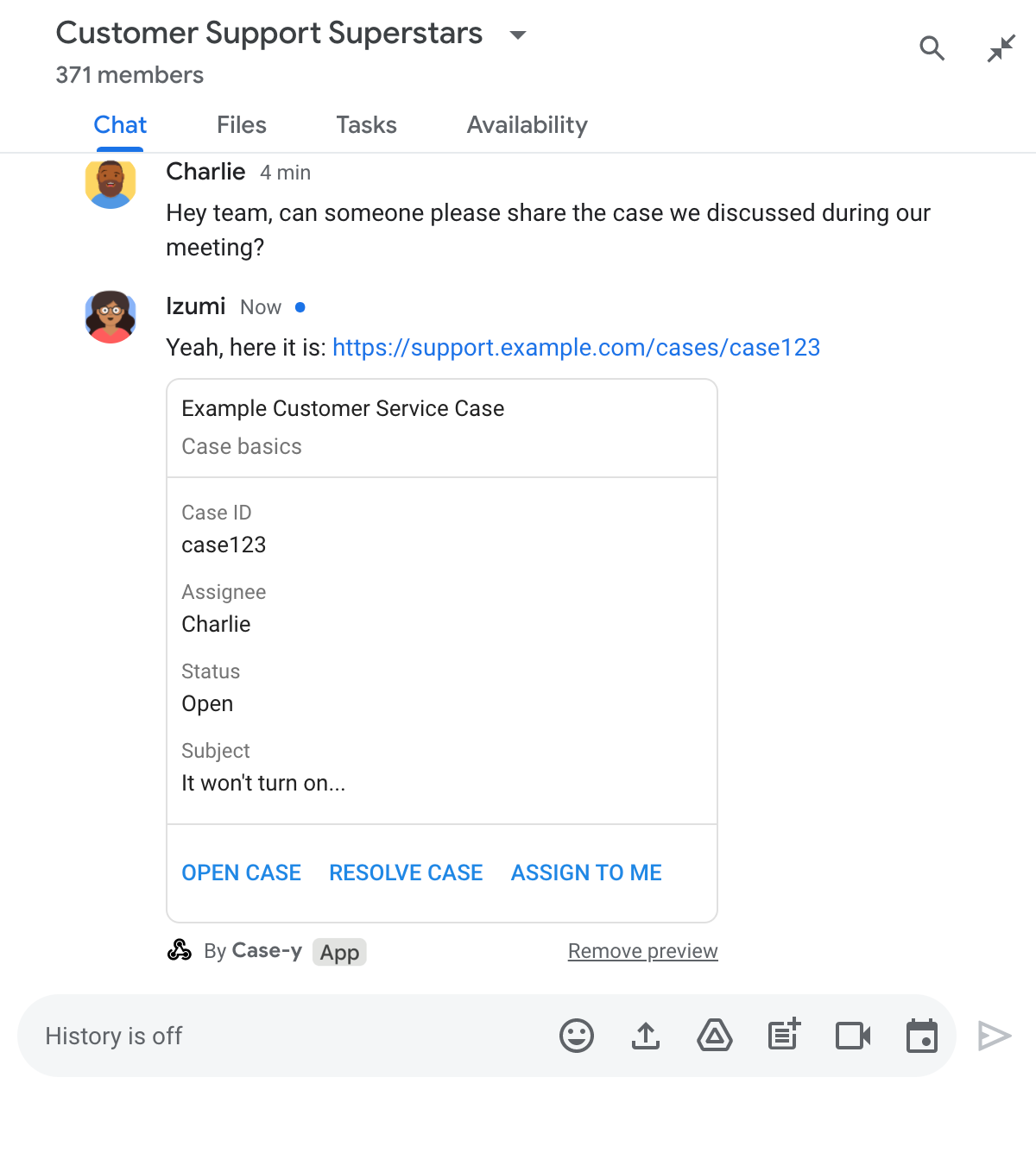
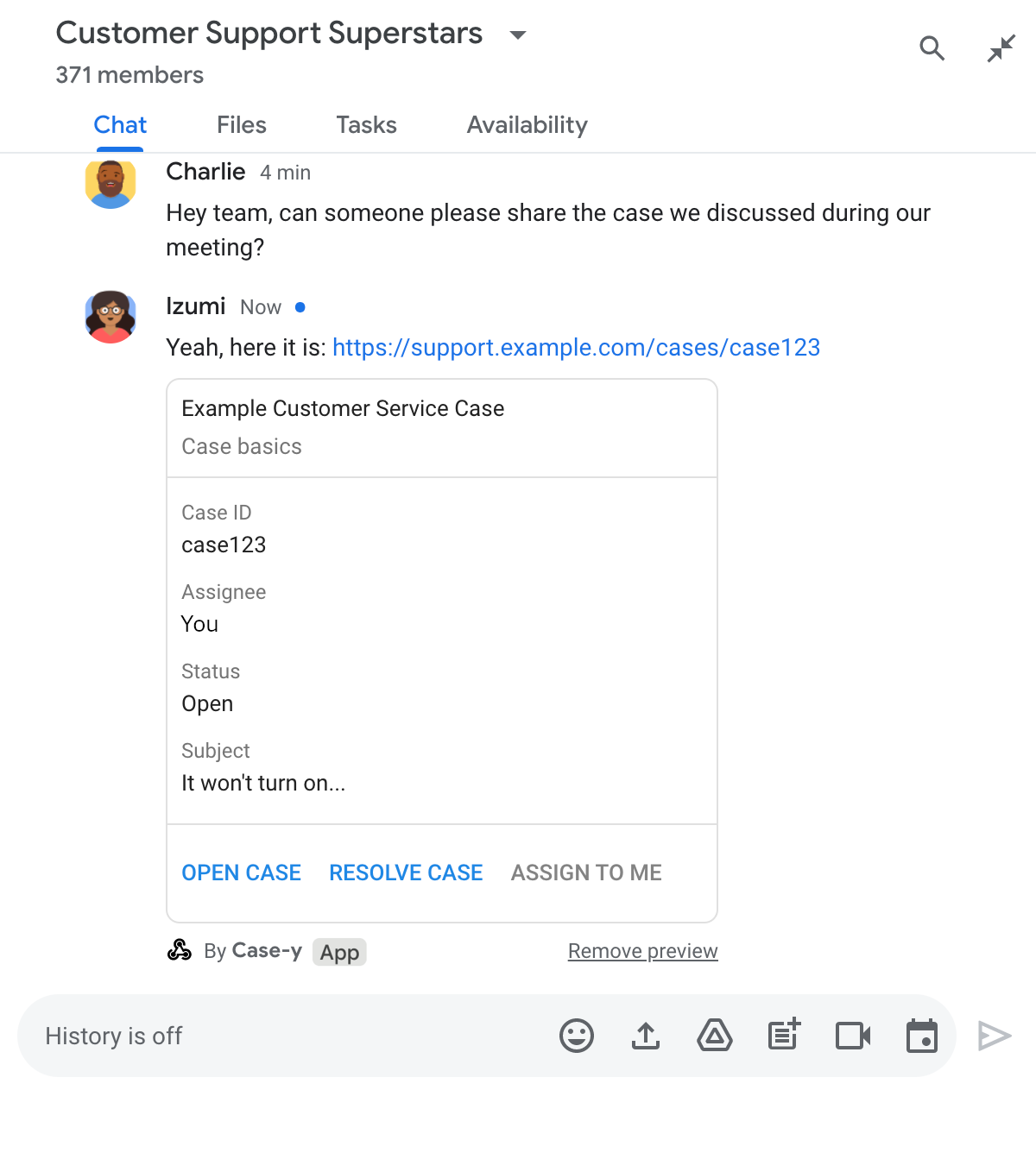
مثال زیر نشان می‌دهد که چگونه یک برنامه چت، هر زمان که کاربر روی دکمه «به من اختصاص بده» کلیک می‌کند، پیش‌نمایش لینک را با به‌روزرسانی فیلد «گیرنده کارت» و غیرفعال کردن دکمه، به‌روزرسانی می‌کند.

برنامه چت در حال پیش‌نمایش یک لینک به همراه نسخه به‌روز شده کارت پیوست شده به پیام است

نود جی اس

گره/پیش‌نمایش-لینک/index.js
/**
 * Updates a card that was attached to a message with a previewed link.
 *
 * @param {Object} event The event object from Chat.
 *
 * @return {Object} Response from the Chat app. Either a new card attached to
 * the message with the previewed link, or an update to an existing card.
 */
function onCardClick(event) {
  // To respond to the correct button, checks the button's actionMethodName.
  if (event.action.actionMethodName === 'assign') {
    // A hard-coded card is used in this example. In a real-life scenario,
    // an actual assign action would be performed before building the card.

    // Checks whether the message event originated from a human or a Chat app
    // and sets actionResponse.type to "UPDATE_USER_MESSAGE_CARDS if human or
    // "UPDATE_MESSAGE" if Chat app.
    const actionResponseType = event.message.sender.type === 'HUMAN' ?
      'UPDATE_USER_MESSAGE_CARDS' :
      'UPDATE_MESSAGE';

    // Returns the updated card that displays "You" for the assignee
    // and that disables the button.
    return {
      actionResponse: { type: actionResponseType },
      cardsV2: [{
        cardId: 'attachCard',
        card: {
          header: {
            title: 'Example Customer Service Case',
            subtitle: 'Case basics',
          },
          sections: [{ widgets: [
            { decoratedText: { topLabel: 'Case ID', text: 'case123'}},
            // The assignee is now "You"
            { decoratedText: { topLabel: 'Assignee', text: 'You'}},
            { decoratedText: { topLabel: 'Status', text: 'Open'}},
            { decoratedText: { topLabel: 'Subject', text: 'It won\'t turn on...' }},
            { buttonList: { buttons: [{
              text: 'OPEN CASE',
              onClick: { openLink: {
                url: 'https://support.example.com/orders/case123'
              }},
            }, {
              text: 'RESOLVE CASE',
              onClick: { openLink: {
                url: 'https://support.example.com/orders/case123?resolved=y',
              }},
            }, {
              text: 'ASSIGN TO ME',
              // The button is now disabled
              disabled: true,
              onClick: { action: { function: 'assign'}}
            }]}}
          ]}]
        }
      }]
    };
  }
}

پایتون

python/preview-link/main.py
def on_card_click(event: dict) -> dict:
  """Updates a card that was attached to a message with a previewed link."""
  # To respond to the correct button, checks the button's actionMethodName.
  if 'assign' == event.get('action').get('actionMethodName'):
    # A hard-coded card is used in this example. In a real-life scenario,
    # an actual assign action would be performed before building the card.

    # Checks whether the message event originated from a human or a Chat app
    # and sets actionResponse.type to "UPDATE_USER_MESSAGE_CARDS if human or
    # "UPDATE_MESSAGE" if Chat app.
    actionResponseType = 'UPDATE_USER_MESSAGE_CARDS' if \
      event.get('message').get('sender').get('type') == 'HUMAN' else \
      'UPDATE_MESSAGE'

    # Returns the updated card that displays "You" for the assignee
    # and that disables the button.
    return {
      'actionResponse': { 'type': actionResponseType },
      'cardsV2': [{
        'cardId': 'attachCard',
        'card': {
          'header': {
            'title': 'Example Customer Service Case',
            'subtitle': 'Case basics',
          },
          'sections': [{ 'widgets': [
            { 'decoratedText': { 'topLabel': 'Case ID', 'text': 'case123'}},
            # The assignee is now "You"
            { 'decoratedText': { 'topLabel': 'Assignee', 'text': 'You'}},
            { 'decoratedText': { 'topLabel': 'Status', 'text': 'Open'}},
            { 'decoratedText': { 'topLabel': 'Subject', 'text': 'It won\'t turn on...' }},
            { 'buttonList': { 'buttons': [{
              'text': 'OPEN CASE',
              'onClick': { 'openLink': {
                'url': 'https://support.example.com/orders/case123'
              }},
            }, {
              'text': 'RESOLVE CASE',
              'onClick': { 'openLink': {
                'url': 'https://support.example.com/orders/case123?resolved=y',
              }},
            }, {
              'text': 'ASSIGN TO ME',
              # The button is now disabled
              'disabled': True,
              'onClick': { 'action': { 'function': 'assign'}}
            }]}}
          ]}]
        }
      }]
    }

جاوا

java/preview-link/src/main/java/com/google/chat/preview/App.java
// Updates a card that was attached to a message with a previewed link.
Message onCardClick(JsonNode event) {
  // To respond to the correct button, checks the button's actionMethodName.
  if (event.at("/action/actionMethodName").asText().equals("assign")) {
    // A hard-coded card is used in this example. In a real-life scenario,
    // an actual assign action would be performed before building the card.

    // Checks whether the message event originated from a human or a Chat app
    // and sets actionResponse.type to "UPDATE_USER_MESSAGE_CARDS if human or
    // "UPDATE_MESSAGE" if Chat app.
    String actionResponseType =
      event.at("/message/sender/type").asText().equals("HUMAN")
      ? "UPDATE_USER_MESSAGE_CARDS" : "UPDATE_MESSAGE";

    // Returns the updated card that displays "You" for the assignee
    // and that disables the button.
    return new Message()
    .setActionResponse(new ActionResponse()
      .setType(actionResponseType))
    .setCardsV2(List.of(new CardWithId()
      .setCardId("attachCard")
      .setCard(new GoogleAppsCardV1Card()
        .setHeader(new GoogleAppsCardV1CardHeader()
          .setTitle("Example Customer Service Case")
          .setSubtitle("Case basics"))
        .setSections(List.of(new GoogleAppsCardV1Section().setWidgets(List.of(
          new GoogleAppsCardV1Widget().setDecoratedText(new GoogleAppsCardV1DecoratedText()
            .setTopLabel("Case ID")
            .setText("case123")),
          new GoogleAppsCardV1Widget().setDecoratedText(new GoogleAppsCardV1DecoratedText()
            .setTopLabel("Assignee")
            // The assignee is now "You"
            .setText("You")),
          new GoogleAppsCardV1Widget().setDecoratedText(new GoogleAppsCardV1DecoratedText()
            .setTopLabel("Status")
            .setText("Open")),
          new GoogleAppsCardV1Widget().setDecoratedText(new GoogleAppsCardV1DecoratedText()
            .setTopLabel("Subject")
            .setText("It won't turn on...")),
          new GoogleAppsCardV1Widget()
            .setButtonList(new GoogleAppsCardV1ButtonList().setButtons(List.of(
              new GoogleAppsCardV1Button()
                .setText("OPEN CASE")
                .setOnClick(new GoogleAppsCardV1OnClick()
                  .setOpenLink(new GoogleAppsCardV1OpenLink()
                    .setUrl("https://support.example.com/orders/case123"))),
              new GoogleAppsCardV1Button()
                .setText("RESOLVE CASE")
                .setOnClick(new GoogleAppsCardV1OnClick()
                  .setOpenLink(new GoogleAppsCardV1OpenLink()
                    .setUrl("https://support.example.com/orders/case123?resolved=y"))),
              new GoogleAppsCardV1Button()
                .setText("ASSIGN TO ME")
                // The button is now disabled
                .setDisabled(true)
                .setOnClick(new GoogleAppsCardV1OnClick()
                  .setAction(new GoogleAppsCardV1Action().setFunction("assign")))))))))))));
  }
  return null;
}

اسکریپت برنامه‌ها

این مثال با برگرداندن JSON کارت، یک پیام کارت ارسال می‌کند. همچنین می‌توانید از سرویس کارت Apps Script استفاده کنید.

apps-script/preview-link/preview-link.gs
/**
 * Updates a card that was attached to a message with a previewed link.
 *
 * @param {Object} event The event object from Chat.
 *
 * @return {Object} Response from the Chat app. Either a new card attached to
 * the message with the previewed link, or an update to an existing card.
 */
function onCardClick(event) {
  // To respond to the correct button, checks the button's actionMethodName.
  if (event.action.actionMethodName === 'assign') {
    // A hard-coded card is used in this example. In a real-life scenario,
    // an actual assign action would be performed before building the card.

    // Checks whether the message event originated from a human or a Chat app
    // and sets actionResponse.type to "UPDATE_USER_MESSAGE_CARDS if human or
    // "UPDATE_MESSAGE" if Chat app.
    const actionResponseType = event.message.sender.type === 'HUMAN' ?
      'UPDATE_USER_MESSAGE_CARDS' :
      'UPDATE_MESSAGE';

    // Returns the updated card that displays "You" for the assignee
    // and that disables the button.
    return {
      actionResponse: { type: actionResponseType },
      cardsV2: [{
        cardId: 'attachCard',
        card: {
          header: {
            title: 'Example Customer Service Case',
            subtitle: 'Case basics',
          },
          sections: [{ widgets: [
            { decoratedText: { topLabel: 'Case ID', text: 'case123'}},
            // The assignee is now "You"
            { decoratedText: { topLabel: 'Assignee', text: 'You'}},
            { decoratedText: { topLabel: 'Status', text: 'Open'}},
            { decoratedText: { topLabel: 'Subject', text: 'It won\'t turn on...' }},
            { buttonList: { buttons: [{
              text: 'OPEN CASE',
              onClick: { openLink: {
                url: 'https://support.example.com/orders/case123'
              }},
            }, {
              text: 'RESOLVE CASE',
              onClick: { openLink: {
                url: 'https://support.example.com/orders/case123?resolved=y',
              }},
            }, {
              text: 'ASSIGN TO ME',
              // The button is now disabled
              disabled: true,
              onClick: { action: { function: 'assign'}}
            }]}}
          ]}]
        }
      }]
    };
  }
}

محدودیت‌ها و ملاحظات

هنگام پیکربندی پیش‌نمایش لینک‌ها برای برنامه چت خود، به این محدودیت‌ها و ملاحظات توجه داشته باشید:

  • هر برنامه چت از پیش‌نمایش لینک‌ها برای حداکثر ۵ الگوی URL پشتیبانی می‌کند.
  • برنامه‌های چت در هر پیام، یک لینک را پیش‌نمایش می‌دهند. اگر چندین لینک قابل پیش‌نمایش در یک پیام وجود داشته باشد، فقط اولین لینک قابل پیش‌نمایش نمایش داده می‌شود.
  • برنامه‌های چت فقط لینک‌هایی را که با https:// شروع می‌شوند، پیش‌نمایش می‌دهند، بنابراین https://support.example.com/cases/ پیش‌نمایش می‌دهد، اما support.example.com/cases/ این کار را نمی‌کند.
  • مگر اینکه پیام شامل اطلاعات دیگری باشد که به برنامه چت ارسال می‌شود، مانند یک دستور اسلش ، در غیر این صورت فقط URL لینک از طریق پیش‌نمایش‌های لینک به برنامه چت ارسال می‌شود.
  • اگر کاربری لینک را ارسال کند، برنامه چت فقط در صورتی می‌تواند پیش‌نمایش کارت لینک را به‌روزرسانی کند که کاربران با کارت تعامل داشته باشند، مثلاً با کلیک روی دکمه. شما نمی‌توانید متد update() از API چت را روی منبع Message فراخوانی کنید تا پیام کاربر را به‌صورت غیرهمزمان به‌روزرسانی کنید.
  • برنامه‌های چت باید لینک‌ها را برای همه افراد حاضر در فضا پیش‌نمایش کنند، بنابراین فیلد privateMessageViewer در پیام باید حذف شود.

همزمان با پیاده‌سازی پیش‌نمایش لینک‌ها، ممکن است لازم باشد با خواندن گزارش‌های برنامه، برنامه چت خود را اشکال‌زدایی کنید. برای خواندن گزارش‌ها، به Logs Explorer در کنسول Google Cloud مراجعه کنید.