Tạo và điền vào thư mục

Thư mục là các tệp chỉ chứa siêu dữ liệu và có thể dùng để sắp xếp các tệp trong Google Drive. Chúng có các thuộc tính sau:

  • Thư mục là một tệp có loại MIME application/vnd.google-apps.folder và không có đuôi.
  • Bạn có thể dùng bí danh root để tham chiếu đến thư mục gốc ở bất cứ nơi nào có mã tệp.

Để biết thêm thông tin về giới hạn thư mục trên Drive, hãy xem bài viết Giới hạn về tệp và thư mục.

Hướng dẫn này giải thích cách thực hiện một số tác vụ cơ bản liên quan đến thư mục.

Tạo thư mục

Để tạo thư mục, hãy sử dụng files.create() phương thức với mimeTypeapplication/vnd.google-apps.foldername. Đoạn mã mẫu sau đây cho biết cách tạo thư mục bằng thư viện ứng dụng:

Java

drive/snippets/drive_v3/src/main/java/CreateFolder.java
import com.google.api.client.googleapis.json.GoogleJsonResponseException;
import com.google.api.client.http.HttpRequestInitializer;
import com.google.api.client.http.javanet.NetHttpTransport;
import com.google.api.client.json.gson.GsonFactory;
import com.google.api.services.drive.Drive;
import com.google.api.services.drive.DriveScopes;
import com.google.api.services.drive.model.File;
import com.google.auth.http.HttpCredentialsAdapter;
import com.google.auth.oauth2.GoogleCredentials;
import java.io.IOException;
import java.util.Arrays;

/* Class to demonstrate use of Drive's create folder API */
public class CreateFolder {


  /**
   * Create new folder.
   *
   * @return Inserted folder id if successful, {@code null} otherwise.
   * @throws IOException if service account credentials file not found.
   */
  public static String createFolder() throws IOException {
    // Load pre-authorized user credentials from the environment.
    // TODO(developer) - See https://developers.google.com/identity for
    // guides on implementing OAuth2 for your application.
    GoogleCredentials credentials = GoogleCredentials.getApplicationDefault()
        .createScoped(Arrays.asList(DriveScopes.DRIVE_FILE));
    HttpRequestInitializer requestInitializer = new HttpCredentialsAdapter(
        credentials);

    // Build a new authorized API client service.
    Drive service = new Drive.Builder(new NetHttpTransport(),
        GsonFactory.getDefaultInstance(),
        requestInitializer)
        .setApplicationName("Drive samples")
        .build();
    // File's metadata.
    File fileMetadata = new File();
    fileMetadata.setName("Test");
    fileMetadata.setMimeType("application/vnd.google-apps.folder");
    try {
      File file = service.files().create(fileMetadata)
          .setFields("id")
          .execute();
      System.out.println("Folder ID: " + file.getId());
      return file.getId();
    } catch (GoogleJsonResponseException e) {
      // TODO(developer) - handle error appropriately
      System.err.println("Unable to create folder: " + e.getDetails());
      throw e;
    }
  }
}

Python

drive/snippets/drive-v3/file_snippet/create_folder.py
import google.auth
from googleapiclient.discovery import build
from googleapiclient.errors import HttpError


def create_folder():
  """Create a folder and prints the folder ID
  Returns : Folder Id

  Load pre-authorized user credentials from the environment.
  TODO(developer) - See https://developers.google.com/identity
  for guides on implementing OAuth2 for the application.
  """
  creds, _ = google.auth.default()

  try:
    # create drive api client
    service = build("drive", "v3", credentials=creds)
    file_metadata = {
        "name": "Invoices",
        "mimeType": "application/vnd.google-apps.folder",
    }

    # pylint: disable=maybe-no-member
    file = service.files().create(body=file_metadata, fields="id").execute()
    print(f'Folder ID: "{file.get("id")}".')
    return file.get("id")

  except HttpError as error:
    print(f"An error occurred: {error}")
    return None


if __name__ == "__main__":
  create_folder()

Node.js

drive/snippets/drive_v3/file_snippets/create_folder.js
import {GoogleAuth} from 'google-auth-library';
import {google} from 'googleapis';

/**
 * Creates a new folder in Google Drive.
 * @return {Promise<string|null|undefined>} The ID of the created folder.
 */
async function createFolder() {
  // Authenticate with Google and get an authorized client.
  // TODO (developer): Use an appropriate auth mechanism for your app.
  const auth = new GoogleAuth({
    scopes: 'https://www.googleapis.com/auth/drive',
  });

  // Create a new Drive API client (v3).
  const service = google.drive({version: 'v3', auth});

  // The metadata for the new folder.
  const fileMetadata = {
    name: 'Invoices',
    mimeType: 'application/vnd.google-apps.folder',
  };

  // Create the new folder.
  const file = await service.files.create({
    requestBody: fileMetadata,
    fields: 'id',
  });

  // Print the ID of the new folder.
  console.log('Folder Id:', file.data.id);
  return file.data.id;
}

PHP

drive/snippets/drive_v3/src/DriveCreateFolder.php
<?php
use Google\Client;
use Google\Service\Drive;
function createFolder()
{
    try {
        $client = new Client();
        $client->useApplicationDefaultCredentials();
        $client->addScope(Drive::DRIVE);
        $driveService = new Drive($client);
        $fileMetadata = new Drive\DriveFile(array(
            'name' => 'Invoices',
            'mimeType' => 'application/vnd.google-apps.folder'));
        $file = $driveService->files->create($fileMetadata, array(
            'fields' => 'id'));
        printf("Folder ID: %s\n", $file->id);
        return $file->id;

    }catch(Exception $e) {
       echo "Error Message: ".$e;
    }
}

.NET

drive/snippets/drive_v3/DriveV3Snippets/CreateFolder.cs
using Google.Apis.Auth.OAuth2;
using Google.Apis.Drive.v3;
using Google.Apis.Services;

namespace DriveV3Snippets
{
    // Class to demonstrate use of Drive create folder API.
    public class CreateFolder
    {
        /// <summary>
        /// Creates a new folder.
        /// </summary>
        /// <returns>created folder id, null otherwise</returns>
        public static string DriveCreateFolder()
        {
            try
            {
                /* Load pre-authorized user credentials from the environment.
                 TODO(developer) - See https://developers.google.com/identity for 
                 guides on implementing OAuth2 for your application. */
                GoogleCredential credential = GoogleCredential.GetApplicationDefault()
                    .CreateScoped(DriveService.Scope.Drive);

                // Create Drive API service.
                var service = new DriveService(new BaseClientService.Initializer
                {
                    HttpClientInitializer = credential,
                    ApplicationName = "Drive API Snippets"
                });

                // File metadata
                var fileMetadata = new Google.Apis.Drive.v3.Data.File()
                {
                    Name = "Invoices",
                    MimeType = "application/vnd.google-apps.folder"
                };

                // Create a new folder on drive.
                var request = service.Files.Create(fileMetadata);
                request.Fields = "id";
                var file = request.Execute();
                // Prints the created folder id.
                Console.WriteLine("Folder ID: " + file.Id);
                return file.Id;
            }
            catch (Exception e)
            {
                // TODO(developer) - handle error appropriately
                if (e is AggregateException)
                {
                    Console.WriteLine("Credential Not found");
                }
                else
                {
                    throw;
                }
            }
            return null;
        }
    }
}

Tạo tệp trong một thư mục cụ thể

Để tạo tệp trong một thư mục cụ thể, hãy sử dụng phương thức files.create() và chỉ định mã thư mục trong thuộc tính parents của tệp.

Thuộc tính parents chứa mã của thư mục mẹ chứa tệp. Bạn có thể dùng thuộc tính parents khi tạo tệp trong thư mục cấp cao nhất hoặc bất kỳ thư mục nào khác.

Một tệp chỉ có thể có một thư mục mẹ. Hệ thống không hỗ trợ việc chỉ định nhiều thư mục mẹ. Nếu bạn không chỉ định trường parents, tệp sẽ được đặt trực tiếp vào thư mục Drive của tôi của người dùng.

Đoạn mã mẫu sau đây cho biết cách tạo tệp trong một thư mục cụ thể bằng thư viện ứng dụng:

Java

drive/snippets/drive_v3/src/main/java/UploadToFolder.java
import com.google.api.client.googleapis.json.GoogleJsonResponseException;
import com.google.api.client.http.FileContent;
import com.google.api.client.http.HttpRequestInitializer;
import com.google.api.client.http.javanet.NetHttpTransport;
import com.google.api.client.json.gson.GsonFactory;
import com.google.api.services.drive.Drive;
import com.google.api.services.drive.DriveScopes;
import com.google.api.services.drive.model.File;
import com.google.auth.http.HttpCredentialsAdapter;
import com.google.auth.oauth2.GoogleCredentials;
import java.io.IOException;
import java.util.Arrays;
import java.util.Collections;

/* Class to demonstrate Drive's upload to folder use-case. */
public class UploadToFolder {

  /**
   * Upload a file to the specified folder.
   *
   * @param realFolderId Id of the folder.
   * @return Inserted file metadata if successful, {@code null} otherwise.
   * @throws IOException if service account credentials file not found.
   */
  public static File uploadToFolder(String realFolderId) throws IOException {
    // Load pre-authorized user credentials from the environment.
    // TODO(developer) - See https://developers.google.com/identity for
    // guides on implementing OAuth2 for your application.
    GoogleCredentials credentials = GoogleCredentials.getApplicationDefault()
        .createScoped(Arrays.asList(DriveScopes.DRIVE_FILE));
    HttpRequestInitializer requestInitializer = new HttpCredentialsAdapter(
        credentials);

    // Build a new authorized API client service.
    Drive service = new Drive.Builder(new NetHttpTransport(),
        GsonFactory.getDefaultInstance(),
        requestInitializer)
        .setApplicationName("Drive samples")
        .build();

    // File's metadata.
    File fileMetadata = new File();
    fileMetadata.setName("photo.jpg");
    fileMetadata.setParents(Collections.singletonList(realFolderId));
    java.io.File filePath = new java.io.File("files/photo.jpg");
    FileContent mediaContent = new FileContent("image/jpeg", filePath);
    try {
      File file = service.files().create(fileMetadata, mediaContent)
          .setFields("id, parents")
          .execute();
      System.out.println("File ID: " + file.getId());
      return file;
    } catch (GoogleJsonResponseException e) {
      // TODO(developer) - handle error appropriately
      System.err.println("Unable to upload file: " + e.getDetails());
      throw e;
    }
  }
}

Python

drive/snippets/drive-v3/file_snippet/upload_to_folder.py
import google.auth
from googleapiclient.discovery import build
from googleapiclient.errors import HttpError
from googleapiclient.http import MediaFileUpload


def upload_to_folder(folder_id):
  """Upload a file to the specified folder and prints file ID, folder ID
  Args: Id of the folder
  Returns: ID of the file uploaded

  Load pre-authorized user credentials from the environment.
  TODO(developer) - See https://developers.google.com/identity
  for guides on implementing OAuth2 for the application.
  """
  creds, _ = google.auth.default()

  try:
    # create drive api client
    service = build("drive", "v3", credentials=creds)

    file_metadata = {"name": "photo.jpg", "parents": [folder_id]}
    media = MediaFileUpload(
        "download.jpeg", mimetype="image/jpeg", resumable=True
    )
    # pylint: disable=maybe-no-member
    file = (
        service.files()
        .create(body=file_metadata, media_body=media, fields="id")
        .execute()
    )
    print(f'File ID: "{file.get("id")}".')
    return file.get("id")

  except HttpError as error:
    print(f"An error occurred: {error}")
    return None


if __name__ == "__main__":
  upload_to_folder(folder_id="1s0oKEZZXjImNngxHGnY0xed6Mw-tvspu")

Node.js

drive/snippets/drive_v3/file_snippets/upload_to_folder.js
import fs from 'node:fs';
import {GoogleAuth} from 'google-auth-library';
import {google} from 'googleapis';

/**
 * Uploads a file to the specified folder.
 * @param {string} folderId The ID of the folder to upload the file to.
 * @return {Promise<string>} The ID of the uploaded file.
 */
async function uploadToFolder(folderId) {
  // Authenticate with Google and get an authorized client.
  // TODO (developer): Use an appropriate auth mechanism for your app.
  const auth = new GoogleAuth({
    scopes: 'https://www.googleapis.com/auth/drive',
  });

  // Create a new Drive API client (v3).
  const service = google.drive({version: 'v3', auth});

  // The request body for the file to be uploaded.
  const requestBody = {
    name: 'photo.jpg',
    parents: [folderId],
  };

  // The media content to be uploaded.
  const media = {
    mimeType: 'image/jpeg',
    body: fs.createReadStream('files/photo.jpg'),
  };

  // Upload the file to the specified folder.
  const file = await service.files.create({
    requestBody,
    media,
    fields: 'id',
  });

  // Print the ID of the uploaded file.
  console.log('File Id:', file.data.id);
  if (!file.data.id) {
    throw new Error('File ID not found.');
  }
  return file.data.id;
}

PHP

drive/snippets/drive_v3/src/DriveUploadToFolder.php
<?php
use Google\Client;
use Google\Service\Drive;
function uploadToFolder($folderId)
{
    try {
        $client = new Client();
        $client->useApplicationDefaultCredentials();
        $client->addScope(Drive::DRIVE);
        $driveService = new Drive($client);
        $fileMetadata = new Drive\DriveFile(array(
            'name' => 'photo.jpg',
            'parents' => array($folderId)
        ));
        $content = file_get_contents('../files/photo.jpg');
        $file = $driveService->files->create($fileMetadata, array(
            'data' => $content,
            'mimeType' => 'image/jpeg',
            'uploadType' => 'multipart',
            'fields' => 'id'));
        printf("File ID: %s\n", $file->id);
        return $file->id;
    } catch (Exception $e) {
        echo "Error Message: " . $e;
    }
}
require_once 'vendor/autoload.php';
uploadToFolder();

.NET

drive/snippets/drive_v3/DriveV3Snippets/UploadToFolder.cs
using Google.Apis.Auth.OAuth2;
using Google.Apis.Drive.v3;
using Google.Apis.Services;

namespace DriveV3Snippets
{
    // Class to demonstrate use of Drive upload to folder.
    public class UploadToFolder
    {
        /// <summary>
        /// Upload a file to the specified folder.
        /// </summary>
        /// <param name="filePath">Image path to upload.</param>
        /// <param name="folderId">Id of the folder.</param>
        /// <returns>Inserted file metadata if successful, null otherwise</returns>
        public static Google.Apis.Drive.v3.Data.File DriveUploadToFolder
            (string filePath, string folderId)
        {
            try
            {
                /* Load pre-authorized user credentials from the environment.
                 TODO(developer) - See https://developers.google.com/identity for
                 guides on implementing OAuth2 for your application. */
                GoogleCredential credential = GoogleCredential.GetApplicationDefault()
                    .CreateScoped(DriveService.Scope.Drive);

                // Create Drive API service.
                var service = new DriveService(new BaseClientService.Initializer
                {
                    HttpClientInitializer = credential,
                    ApplicationName = "Drive API Snippets"
                });

                // Upload file photo.jpg in specified folder on drive.
                var fileMetadata = new Google.Apis.Drive.v3.Data.File()
                {
                    Name = "photo.jpg",
                    Parents = new List<string>
                    {
                        folderId
                    }
                };
                FilesResource.CreateMediaUpload request;
                // Create a new file on drive.
                using (var stream = new FileStream(filePath,
                           FileMode.Open))
                {
                    // Create a new file, with metadata and stream.
                    request = service.Files.Create(
                        fileMetadata, stream, "image/jpeg");
                    request.Fields = "id";
                    request.Upload();
                }
                var file = request.ResponseBody;
                // Prints the uploaded file id.
                Console.WriteLine("File ID: " + file.Id);
                return file;
            }
            catch (Exception e)
            {
                // TODO(developer) - handle error appropriately
                if (e is AggregateException)
                {
                    Console.WriteLine("Credential Not found");
                }
                else if (e is FileNotFoundException)
                {
                    Console.WriteLine("File not found");
                }
                else if (e is DirectoryNotFoundException)
                {
                    Console.WriteLine("Directory Not found");
                }
                else
                {
                    throw;
                }
            }
            return null;
        }
    }
}

Di chuyển tệp giữa các thư mục

Để di chuyển tệp, bạn phải cập nhật mã của thuộc tính parents.

Để thêm hoặc xoá thư mục mẹ cho một tệp hiện có, hãy sử dụng phương thức files.update() với tham số truy vấn addParentsremoveParents.

Một tệp chỉ có thể có một thư mục mẹ. Hệ thống không hỗ trợ việc chỉ định nhiều thư mục mẹ.

Đoạn mã mẫu sau đây cho biết cách di chuyển tệp giữa các thư mục bằng thư viện ứng dụng:

Java

drive/snippets/drive_v3/src/main/java/MoveFileToFolder.java
import com.google.api.client.googleapis.json.GoogleJsonResponseException;
import com.google.api.client.http.HttpRequestInitializer;
import com.google.api.client.http.javanet.NetHttpTransport;
import com.google.api.client.json.gson.GsonFactory;
import com.google.api.services.drive.Drive;
import com.google.api.services.drive.DriveScopes;
import com.google.api.services.drive.model.File;
import com.google.auth.http.HttpCredentialsAdapter;
import com.google.auth.oauth2.GoogleCredentials;
import java.io.IOException;
import java.util.Arrays;
import java.util.List;

/* Class to demonstrate use case for moving file to folder.*/
public class MoveFileToFolder {


  /**
   * @param fileId   Id of file to be moved.
   * @param folderId Id of folder where the fill will be moved.
   * @return list of parent ids for the file.
   */
  public static List<String> moveFileToFolder(String fileId, String folderId)
      throws IOException {
        /* Load pre-authorized user credentials from the environment.
        TODO(developer) - See https://developers.google.com/identity for
        guides on implementing OAuth2 for your application.*/
    GoogleCredentials credentials = GoogleCredentials.getApplicationDefault()
        .createScoped(Arrays.asList(DriveScopes.DRIVE_FILE));
    HttpRequestInitializer requestInitializer = new HttpCredentialsAdapter(
        credentials);
    // Build a new authorized API client service.
    Drive service = new Drive.Builder(new NetHttpTransport(),
        GsonFactory.getDefaultInstance(),
        requestInitializer)
        .setApplicationName("Drive samples")
        .build();

    // Retrieve the existing parents to remove
    File file = service.files().get(fileId)
        .setFields("parents")
        .execute();
    StringBuilder previousParents = new StringBuilder();
    for (String parent : file.getParents()) {
      previousParents.append(parent);
      previousParents.append(',');
    }
    try {
      // Move the file to the new folder
      file = service.files().update(fileId, null)
          .setAddParents(folderId)
          .setRemoveParents(previousParents.toString())
          .setFields("id, parents")
          .execute();

      return file.getParents();
    } catch (GoogleJsonResponseException e) {
      // TODO(developer) - handle error appropriately
      System.err.println("Unable to move file: " + e.getDetails());
      throw e;
    }
  }
}

Python

drive/snippets/drive-v3/file_snippet/move_file_to_folder.py
import google.auth
from googleapiclient.discovery import build
from googleapiclient.errors import HttpError


def move_file_to_folder(file_id, folder_id):
  """Move specified file to the specified folder.
  Args:
      file_id: Id of the file to move.
      folder_id: Id of the folder
  Print: An object containing the new parent folder and other meta data
  Returns : Parent Ids for the file

  Load pre-authorized user credentials from the environment.
  TODO(developer) - See https://developers.google.com/identity
  for guides on implementing OAuth2 for the application.
  """
  creds, _ = google.auth.default()

  try:
    # call drive api client
    service = build("drive", "v3", credentials=creds)

    # pylint: disable=maybe-no-member
    # Retrieve the existing parents to remove
    file = service.files().get(fileId=file_id, fields="parents").execute()
    previous_parents = ",".join(file.get("parents"))
    # Move the file to the new folder
    file = (
        service.files()
        .update(
            fileId=file_id,
            addParents=folder_id,
            removeParents=previous_parents,
            fields="id, parents",
        )
        .execute()
    )
    return file.get("parents")

  except HttpError as error:
    print(f"An error occurred: {error}")
    return None


if __name__ == "__main__":
  move_file_to_folder(
      file_id="1KuPmvGq8yoYgbfW74OENMCB5H0n_2Jm9",
      folder_id="1jvTFoyBhUspwDncOTB25kb9k0Fl0EqeN",
  )

Node.js

drive/snippets/drive_v3/file_snippets/move_file_to_folder.js
import {GoogleAuth} from 'google-auth-library';
import {google} from 'googleapis';

/**
 * Moves a file to a new folder in Google Drive.
 * @param {string} fileId The ID of the file to move.
 * @param {string} folderId The ID of the folder to move the file to.
 * @return {Promise<number>} The status of the move operation.
 */
async function moveFileToFolder(fileId, folderId) {
  // Authenticate with Google and get an authorized client.
  // TODO (developer): Use an appropriate auth mechanism for your app.
  const auth = new GoogleAuth({
    scopes: 'https://www.googleapis.com/auth/drive',
  });

  // Create a new Drive API client (v3).
  const service = google.drive({version: 'v3', auth});

  // Get the file's metadata to retrieve its current parents.
  const file = await service.files.get({
    fileId,
    fields: 'parents',
  });

  // Get the current parents as a comma-separated string.
  const previousParents = (file.data.parents ?? []).join(',');

  // Move the file to the new folder.
  const result = await service.files.update({
    fileId,
    addParents: folderId,
    removeParents: previousParents,
    fields: 'id, parents',
  });

  // Print the status of the move operation.
  console.log(result.status);
  return result.status;
}

PHP

drive/snippets/drive_v3/src/DriveMoveFileToFolder.php
<?php
use Google\Client;
use Google\Service\Drive;
use Google\Service\Drive\DriveFile;
function moveFileToFolder($fileId,$folderId)
{
    try {
        $client = new Client();
        $client->useApplicationDefaultCredentials();
        $client->addScope(Drive::DRIVE);
        $driveService = new Drive($client);
        $emptyFileMetadata = new DriveFile();
        // Retrieve the existing parents to remove
        $file = $driveService->files->get($fileId, array('fields' => 'parents'));
        $previousParents = join(',', $file->parents);
        // Move the file to the new folder
        $file = $driveService->files->update($fileId, $emptyFileMetadata, array(
            'addParents' => $folderId,
            'removeParents' => $previousParents,
            'fields' => 'id, parents'));
        return $file->parents;
    } catch(Exception $e) {
        echo "Error Message: ".$e;
    }
}

.NET

drive/snippets/drive_v3/DriveV3Snippets/MoveFileToFolder.cs
using Google;
using Google.Apis.Auth.OAuth2;
using Google.Apis.Drive.v3;
using Google.Apis.Services;

namespace DriveV3Snippets
{
    // Class to demonstrate use-case of Drive move file to folder.
    public class MoveFileToFolder
    {
        /// <summary>
        /// Move specified file to the specified folder.
        /// </summary>
        /// <param name="fileId">Id of file to be moved.</param>
        /// <param name="folderId">Id of folder where the fill will be moved.</param>
        /// <returns>list of parent ids for the file, null otherwise.</returns>
        public static IList<string> DriveMoveFileToFolder(string fileId,
            string folderId)
        {
            try
            {
                /* Load pre-authorized user credentials from the environment.
                 TODO(developer) - See https://developers.google.com/identity for 
                 guides on implementing OAuth2 for your application. */
                GoogleCredential credential = GoogleCredential.GetApplicationDefault()
                    .CreateScoped(DriveService.Scope.Drive);

                // Create Drive API service.
                var service = new DriveService(new BaseClientService.Initializer
                {
                    HttpClientInitializer = credential,
                    ApplicationName = "Drive API Snippets"
                });

                // Retrieve the existing parents to remove
                var getRequest = service.Files.Get(fileId);
                getRequest.Fields = "parents";
                var file = getRequest.Execute();
                var previousParents = String.Join(",", file.Parents);
                // Move the file to the new folder
                var updateRequest =
                    service.Files.Update(new Google.Apis.Drive.v3.Data.File(),
                        fileId);
                updateRequest.Fields = "id, parents";
                updateRequest.AddParents = folderId;
                updateRequest.RemoveParents = previousParents;
                file = updateRequest.Execute();

                return file.Parents;
            }
            catch (Exception e)
            {
                // TODO(developer) - handle error appropriately
                if (e is AggregateException)
                {
                    Console.WriteLine("Credential Not found");
                }
                else if (e is GoogleApiException)
                {
                    Console.WriteLine("File or Folder not found");
                }
                else
                {
                    throw;
                }
            }
            return null;
        }
    }
}

Giới hạn về tệp và thư mục

Tệp và thư mục trên Drive có một số giới hạn về dung lượng lưu trữ.

Giới hạn về số mục của người dùng

Mỗi người dùng có thể có tối đa 500 triệu mục do tài khoản đó tạo. Khi đạt đến giới hạn, người dùng sẽ không thể tạo hoặc tải mục lên Drive nữa. Họ vẫn có thể xem và chỉnh sửa các mục hiện có. Để tạo lại tệp, người dùng phải xoá vĩnh viễn các mục hoặc sử dụng một tài khoản khác. Để biết thêm thông tin, hãy xem bài viết Chuyển tệp và thư mục vào thùng rác hoặc xoá tệp và thư mục.

Các đối tượng được tính vào giới hạn này là:

  • Các mục do người dùng tạo hoặc tải lên trong Drive
  • Các mục do người dùng tạo nhưng hiện do người khác sở hữu
  • Các mục trong thùng rác
  • Phím tắt
  • Phím tắt của bên thứ ba

Các đối tượng không được tính vào giới hạn này là:

  • Các mục đã bị xoá vĩnh viễn
  • Các mục được chia sẻ với người dùng nhưng do người khác sở hữu
  • Các mục do người dùng sở hữu nhưng do người khác tạo

Nếu bạn cố gắng thêm hơn 500 triệu mục, hệ thống sẽ trả về phản hồi mã trạng thái HTTP activeItemCreationLimitExceeded.

Xin lưu ý rằng tài khoản dịch vụ không thể sở hữu bất kỳ tệp nào. Thay vào đó, tài khoản dịch vụ phải tải tệp và thư mục lên bộ nhớ dùng chung hoặc sử dụng OAuth 2.0 để tải các mục lên thay mặt người dùng.

Giới hạn về số mục của thư mục

Mỗi thư mục trong Drive của tôi của người dùng có giới hạn là 500.000 mục. Giới hạn này không áp dụng cho thư mục gốc của Drive của tôi. Các mục được tính vào giới hạn này là:

Để biết thêm thông tin về giới hạn thư mục, hãy xem Giới hạn về thư mục trong Google Drive.

Giới hạn về độ sâu của thư mục

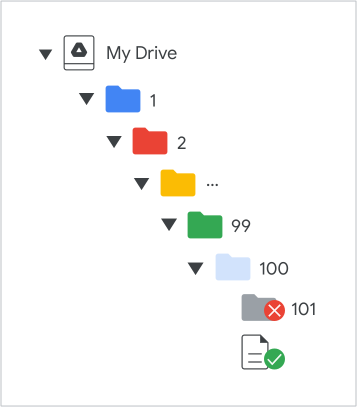
Drive của tôi của người dùng không thể chứa quá 100 cấp thư mục lồng nhau. Điều này có nghĩa là bạn không thể lưu trữ thư mục con trong một thư mục có độ sâu hơn 99 cấp. Giới hạn này chỉ áp dụng cho thư mục con. Tệp con có loại MIME khác application/vnd.google-apps.folder được miễn giới hạn này.

Ví dụ: trong sơ đồ sau, bạn có thể lồng thư mục mới bên trong thư mục số 99 nhưng không thể lồng bên trong thư mục số 100. Tuy nhiên, thư mục số 100 có thể lưu trữ tệp như bất kỳ thư mục nào khác trên Drive:

Giới hạn về chiều sâu của thư mục trong Drive.

Nếu bạn cố gắng thêm hơn 100 cấp thư mục, hệ thống sẽ trả về phản hồi mã trạng thái myDriveHierarchyDepthLimitExceeded HTTP.