
গ্রাহক API Android জিরো-টাচ এনরোলমেন্টের জন্য ডিভাইস ও কনফিগারেশনের প্রোগ্র্যামাটিক কন্ট্রোল প্রদান করে। এই ডকুমেন্ট এন্টারপ্রাইজ মোবিলিটি ম্যানেজমেন্ট (EMM) প্রদানকারী এবং এন্টারপ্রাইজ আইটি ডেভেলপারদের জন্য API-এর সাথে পরিচয় করিয়ে দেয়। এই ডকুমেন্ট পড়ার পরে, API-তে ব্যবহৃত মূল রিসোর্স এবং সেগুলি কীভাবে ইন্টার্যাক্ট করে তা আপনি বুঝতে পারবেন। আপনি জিরো-টাচ এনরোলমেন্টে নতুন হলে, android.com-এর সংক্ষিপ্ত ভূমিকা পড়ুন।
এক নজরে
গ্রাহক API সেইসব সংস্থাকে সাহায্য করে যারা Android জিরো-টাচ এনরোলমেন্ট ডিভাইস কেনে। আপনার অ্যাপ বা টুল আইটি অ্যাডমিনকে নিম্নলিখিত কাজ করতে সাহায্য করতে পারে:
- প্রভিশনিং কনফিগারেশন তৈরি, এডিট ও মুছে ফেলা।
- কোনও ডিভাইসে কনফিগারেশন প্রয়োগ করা বা সরিয়ে দেওয়া।
- জিরো-টাচ এনরোলমেন্টে যোগ করা যেকোনও ডিভাইসের জন্য ডিফল্ট কনফিগারেশন বেছে নিন।
API-এর মাধ্যমে, আইটি অ্যাডমিনরা জিরো-টাচ এনরোলমেন্ট থেকে ডিভাইসগুলি আন-রেজিস্টার করতে পারেন। তাদের সংস্থার ব্যবহারকারীদের ম্যানেজ করতে বা পরিষেবার শর্তাবলী গ্রহণ করতে, আইটি অ্যাডমিনরা জিরো-টাচ এনরোলমেন্ট পোর্টাল ব্যবহার করেন।
এই API-এর সাধারণ ব্যবহারকারী হতে পারেন:
- EMM পরিষেবা প্রদানকারীরা তাদের কনসোলে জিরো-টাচ এনরোলমেন্টের জন্য সহায়তা যোগ করছে।
- এন্টারপ্রাইজ আইটি ডেভেলপাররা জিরো-টাচ এনরোলমেন্ট টাস্ক অটোমেট করার জন্য টুল তৈরি করছেন।
মূল রিসোর্স
কনফিগারেশন ও ডিভাইস হল API-তে ব্যবহার করা মূল রিসোর্স। এছাড়াও, কোনও সংস্থা জিরো-টাচ এনরোলমেন্ট পোর্টাল ব্যবহার করে কনফিগারেশন ও ডিভাইস তৈরি করতে পারে।
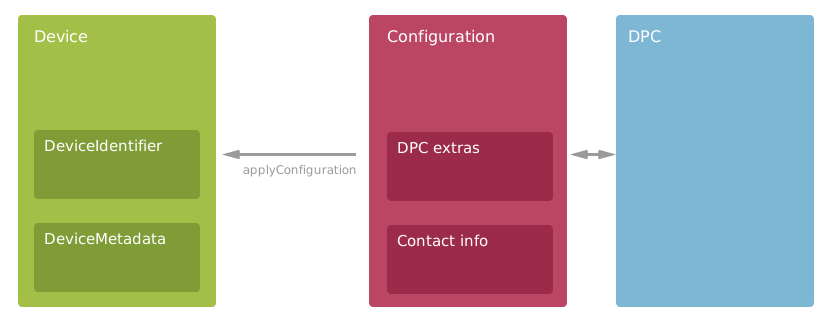
- কনফিগারেশন
- আইটি অ্যাডমিন কনফিগারেশন ব্যবহার করে ডিভাইসের জন্য প্রভিশনিং বিকল্প সেট করেন। কনফিগারেশনের মধ্যে EMM মোবাইল নীতি এবং ব্যবহারকারীদের সাহায্য করার জন্য দেখানো পরিচিতির তথ্য অন্তর্ভুক্ত থাকে। কনফিগারেশন API-এর জন্য অত্যন্ত গুরুত্বপূর্ণ, তাই আপনি অনেক পদ্ধতিতে সেগুলি ব্যবহার করেন। আরও জানতে, নিচে কনফিগারেশন দেখুন।
- ডিভাইস
- জিরো-টাচ এনরোলমেন্ট-উপযোগী Android ডিভাইস যা কোনও সংস্থা তাদের রিসেলারের থেকে কিনেছে। জিরো-টাচ এনরোলমেন্টে ডিভাইস অন্তর্ভুক্ত করতে কনফিগারেশন প্রয়োগ করুন। ডিভাইসে হার্ডওয়্যার আইডি ও অ্যাটাচ করা মেটাডেটা থাকে। আরও জানতে, নিচে ডিভাইস দেখুন।
- DPC
- EMM-এর DPC (ডিভাইস নীতি
কন্ট্রোলার)-এর জন্য শুধু-পড়ার রেফারেন্স। ডিভাইসের জন্য EMM সমাধান বেছে নিতে
কনফিগারেশনে DPC যোগ করুন। API-এর মাধ্যমে তালিকাভুক্ত সব DPC-তে
জিরো-টাচ এনরোলমেন্ট কাজ করে এবং Google Play-তে উপলভ্য। আরও
জানতে,
Dpcদেখুন।
আপনার অ্যাপ ব্যবহার করতে পারে এমন সব API পদ্ধতি ও রিসোর্সের তালিকা দেখতে, API রেফারেন্স দেখুন।
কনফিগারেশন
Configuration API রিসোর্স নিম্নলিখিতগুলি
একত্রিত করে:
- ডিভাইসে ইনস্টল করা EMM-এর DPC।
- ডিভাইসে EMM নীতি এনফোর্স করা হয়েছে।
- সেট-আপের সময় ব্যবহারকারীদের সাহায্য করার জন্য ডিভাইসে যোগাযোগের তথ্য দেখানো হয়।
API ব্যবহার করে, আপনার অ্যাপ আইটি অ্যাডমিনের জন্য কনফিগারেশন ম্যানেজ করতে পারে। কনফিগারেশন ফেচ, তৈরি, আপডেট ও মুছে ফেলতে API কল করুন। নিচের উদাহরণে দেখানো হয়েছে যে কীভাবে নতুন কনফিগারেশন তৈরি করতে হয়:
Java
// Add metadata to help the device user during provisioning.
Configuration configuration = new Configuration();
configuration.setConfigurationName("Sales team");
configuration.setCompanyName("XYZ Corp.");
configuration.setContactEmail("it-support@example.com");
configuration.setContactPhone("+1 (800) 555-0112");
configuration.setCustomMessage("We're setting up your phone. Call or email for help.");

// Set the DPC that zero-touch enrollment downloads and installs from Google Play.
configuration.setDpcResourcePath(dpc.getName());

// Set the JSON-formatted EMM provisioning extras that are passed to the DPC.
configuration.setDpcExtras("{"
      + "\"android.app.extra.PROVISIONING_LEAVE_ALL_SYSTEM_APPS_ENABLED\":true,"
      + "\"android.app.extra.PROVISIONING_ADMIN_EXTRAS_BUNDLE\":{"
      + "\"default_min_password_length\":6,"
      + "\"company_name\":\"XYZ Corp\","
      + "\"management_server\":\"emm.example.com\","
      + "\"terms_url\":\"https://www.example.com/policies/terms/\","
      + "\"allowed_user_domains\":\"[\\\"example.com\\\", \\\"example.org\\\"]\""
      + "}"
      + "}");

// Create the new configuration on the server.
AndroidProvisioningPartner.Customers.Configurations.Create request =
      service.customers().configurations().create(customerAccount, configuration);
Configuration response = request.execute();
.NET
// Add metadata to help the device user during provisioning.
Configuration configuration = new Configuration
{
    ConfigurationName = "Sales team",
    CompanyName = "XYZ Corp.",
    ContactEmail = "it-support@example.com",
    ContactPhone = "+1 (800) 555-0112",
    CustomMessage = "We're setting up your phone. Call or email for help."
};

// Set the DPC that zero-touch enrollment downloads and installs from Google Play.
configuration.DpcResourcePath = dpc.Name;

// Set the JSON-formatted EMM provisioning extras that are passed to the DPC.
configuration.DpcExtras = @"{
    ""android.app.extra.PROVISIONING_LEAVE_ALL_SYSTEM_APPS_ENABLED"":true,
    ""android.app.extra.PROVISIONING_ADMIN_EXTRAS_BUNDLE"":{
    ""default_min_password_length"":6,
    ""company_name"":""XYZ Corp"",
    ""management_server"":""emm.example.com"",
    ""terms_url"":""https://www.example.com/policies/terms/"",
    ""allowed_user_domains"":""[\""example.com\"", \""example.org\""]""
  }
}";

// Create the new configuration on the server.
var request = service.Customers.Configurations.Create(configuration, customerAccount);
var response = request.Execute();
Python
# Add metadata to help the device user during provisioning.
configuration = {
    'configurationName': 'Sales team',
    'companyName': 'XYZ Corp.',
    'contactEmail': 'it-support@example.com',
    'contactPhone': '+1 (800) 555-0112',
    'customMessage': 'We\'re setting up your phone. Call or email for help.'}

# Set the DPC that zero-touch enrollment installs from Google Play.
configuration['dpcResourcePath'] = dpc['name']

# Set the JSON-formatted EMM provisioning extras that are passed to the DPC.
configuration['dpcExtras'] = '''{
    "android.app.extra.PROVISIONING_LEAVE_ALL_SYSTEM_APPS_ENABLED":true,
    "android.app.extra.PROVISIONING_ADMIN_EXTRAS_BUNDLE":{
      "default_min_password_length":6,
      "company_name":"XYZ Corp",
      "management_server":"emm.example.com",
      "terms_url":"https://www.example.com/policies/terms/",
      "allowed_user_domains":"[\\"example.com\\", \\"example.org\\"]"}
}'''

# Create the new configuration on the server.
response = service.customers().configurations().create(
    parent=customer_account, body=configuration).execute()
প্যাচ API ব্যবহার করে কনফিগারেশন আপডেট করার সময়, ফিল্ড মাস্ক—অথবা আপনি null করতে চান না এমন প্রতিটি ফিল্ডের জন্য
ভ্যালু যোগ করতে ভুলবেন না। কীভাবে দক্ষতার সাথে কনফিগারেশন আপডেট করতে হয় তার উদাহরণ দেখতে ডিফল্ট
কনফিগারেশন (নিচে) দেখুন।
কনফিগারেশন মুছুন
কোনও কনফিগারেশন ডিভাইসে এখনও প্রয়োগ করা থাকলে, আপনি সেটি মুছতে পারবেন না। আপনি যদি
ব্যবহার করা হচ্ছে এমন কনফিগারেশন মুছে ফেলার চেষ্টা করেন, তাহলে API পদ্ধতি একটি HTTP 400 Bad Request
স্ট্যাটাস কোড এবং কতগুলি ডিভাইস কনফিগারেশন ব্যবহার করে তা ব্যাখ্যা করে একটি মেসেজ পাঠায়।
আবার চেষ্টা করার আগে ডিভাইস থেকে কনফিগারেশন সরাতে
customers.devices.removeConfiguration
-এ কল করুন।
ডিফল্ট কনফিগারেশন
জিরো-টাচ এনরোলমেন্ট সবচেয়ে ভাল কাজ করে যখন কোনও সংস্থা ডিফল্ট কনফিগারেশন সেট করে
যা সংস্থার কেনা যেকোনও নতুন ডিভাইসে প্রয়োগ করা হয়।
ডিফল্ট কনফিগারেশন সেট করা না থাকলে, আইটি অ্যাডমিনকে তা সেট করার জন্য প্রম্পট করার কথা বিবেচনা করুন।
নিচের উদাহরণে দেখানো হয়েছে যে কীভাবে isDefault-কে true-এ সেট করে
আগে থেকে থাকা কনফিগারেশনকে ডিফল্ট হিসেবে সেট করা যায়:
Java
// Send minimal data with the request. Just the 2 required fields.
// targetConfiguration is an existing configuration that we want to make the default.
Configuration configuration = new Configuration();
configuration.setIsDefault(true);
configuration.setConfigurationId(targetConfiguration.getConfigurationId());

// Call the API, including the FieldMask to avoid setting other fields to null.
AndroidProvisioningPartner.Customers.Configurations.Patch request = service
      .customers()
      .configurations()
      .patch(targetConfiguration.getName(), configuration);
request.setUpdateMask("isDefault");
Configuration results = request.execute();
.NET
// Send minimal data with the request. Just the 2 required fields.
// targetConfiguration is an existing configuration that we want to make the default.
Configuration configuration = new Configuration
{
    IsDefault = true,
    ConfigurationId = targetConfiguration.ConfigurationId,
};

// Call the API, including the FieldMask to avoid setting other fields to null.
var request = service.Customers.Configurations.Patch(configuration,
                                                     targetConfiguration.Name);
request.UpdateMask = "IsDefault";
Configuration results = request.Execute();
Python
# Send minimal data with the request. Just the 2 required fields.
# target_configuration is an existing configuration we'll make the default.
configuration = {
    'isDefault': True,
    'configurationId': target_configuration['configurationId']}

# Call the API, including the FieldMask to avoid setting other fields to null.
response = service.customers().configurations().patch(
    name=target_configuration['name'],
    body=configuration, updateMask='isDefault').execute()
শুধুমাত্র একটি ডিফল্ট কনফিগারেশন থাকতে পারে। নতুন ডিফল্ট কনফিগারেশন তৈরি করলে,
আগের কনফিগারেশনের isDefault ফিল্ড false-এ সেট হয়ে যায়। isDefault ফিল্ডে সঠিক ভ্যালু দেখতে
আপনাকে হয়ত যেকোনও ক্যাশে করা Configuration ইনস্ট্যান্স
রিফ্রেশ করতে হবে।
ডিভাইস ব্যবহারকারীদের গাইড করা
জিরো-টাচ কনফিগারেশন, ডিভাইস সেট-আপ উইজার্ডে কাস্টমাইজ করা ব্যবহারকারী নির্দেশিকা দেখায় যাতে ব্যবহারকারীরা সাহায্য পান। আপনাকে একটি কনফিগারেশনে ডিভাইস ম্যানেজ করে এমন সংস্থার নামের সাথে একটি যোগাযোগের টেলিফোন নম্বর এবং ইমেল ঠিকানা অন্তর্ভুক্ত করতে হবে। এছাড়াও, ব্যবহারকারীর ডিভাইসে কী ঘটছে সে সম্পর্কে আরও বিশদ বিবরণ দিতে
customMessage ফিল্ডে এক বা দুটি বাক্য যোগ করার জন্য আমরা সাজেস্ট করি।
যেহেতু ব্যবহারকারী যে ডিভাইস সেট-আপ করছেন সেখান থেকে কল বা ইমেল করতে পারবেন না, তাই টেলিফোন নম্বর এবং ইমেল আইডি ফর্ম্যাট করুন যাতে তথ্য এক নজরে দেখতে সুবিধা হয়।
ডিভাইস
জিরো-টাচ এনরোলমেন্টের জন্য কোনও গ্রাহক ডিভাইস কিনলে রিসেলার ডিভাইস তৈরি করেন—আইটি অ্যাডমিন ডিভাইস তৈরি করতে পারেন না। ডিভাইসের সাথে কাজ করতে, Device API রিসোর্সে
কল মেথড ব্যবহার করুন। আপনাকে ডিভাইস সার্চ করতে হলে, সব ডিভাইসের তালিকা তৈরি করুন এবং আপনার অ্যাপে লোকালভাবে প্রতিটি ব্যাচ ফিল্টার করুন। উদাহরণস্বরূপ, নিচে পৃষ্ঠা অনুযায়ী ফলাফল দেখুন।
ডিভাইস কনফিগার করুন
কোনও ডিভাইসে কনফিগারেশন প্রয়োগ করলে, ডিভাইসটি জিরো-টাচ এনরোলমেন্টের জন্য রেজিস্টার হয়ে যায়। কনফিগারেশন প্রয়োগ করতে, customers.devices.applyConfiguration কল করুন।
কনফিগারেশন প্রয়োগ করার পরে, ডিভাইসটি প্রথম বুট বা পরবর্তী ফ্যাক্টরি রিসেটে অটোমেটিক নিজেকে
প্রভিশন করে। নিচের উদাহরণে দেখানো হয়েছে যে কীভাবে আপনি ডিভাইসের একটি সংগ্রহে
কনফিগারেশন প্রয়োগ করতে পারেন:
Java
List<Device> devices = getDevicesToConfigure(service);
Configuration configurationToApply = getConfigurationToApply(service);

// Loop through the collection and apply the configuration to each device. This might
// take some time if the collection contains many devices.
for (Device device : devices) {
    System.out.println(device.getDeviceIdentifier().getImei());

    // Wrap the device ID in a DeviceReference.
    DeviceReference deviceRef = new DeviceReference();
    deviceRef.setDeviceId(device.getDeviceId());

    // Build and send the request to the API.
    CustomerApplyConfigurationRequest body = new CustomerApplyConfigurationRequest();
    body.setConfiguration(configurationToApply.getName());
    body.setDevice(deviceRef);

    AndroidProvisioningPartner.Customers.Devices.ApplyConfiguration request = service
          .customers()
          .devices()
          .applyConfiguration(customerAccount, body);
    request.execute();
}
.NET
IList<Device> devices = GetDevicesToConfigure(service);
Configuration configurationToApply = GetConfigurationToApply(service);

// Loop through the collection and apply the configuration to each device. This might
// take some time if the collection contains many devices.
foreach (Device device in devices)
{
    Console.WriteLine(device.DeviceIdentifier.Imei);

    // Wrap the device ID in a DeviceReference.
    var deviceRef = new DeviceReference
    {
        DeviceId = device.DeviceId
    };

    // Build and send the request to the API.
    CustomerApplyConfigurationRequest body = new CustomerApplyConfigurationRequest
    {
        Configuration = configurationToApply.Name,
        Device = deviceRef
    };
    var request = service.Customers.Devices.ApplyConfiguration(body,
                                                               customerAccount);
    request.Execute();
}
Python
devices = get_devices_to_configure(service)
configuration = get_configuration_to_apply(service)

# Loop through the collection and apply the configuration to each device.
# This might take some time if the collection contains many devices.
for device in devices:
  print(device['deviceIdentifier']['imei'])

  # Wrap the device ID in a DeviceReference.
  device_ref = {'deviceId': device['deviceId']}

  # Build and send the request to the API.
  body = {'configuration': configuration['name'], 'device': device_ref}
  service.customers().devices().applyConfiguration(
      parent=customer_account, body=body).execute()
কোনও ডিভাইস থেকে কনফিগারেশন সরাতে, customers.devices.removeConfiguration কল করুন।
ডিভাইস ফ্যাক্টরি রিসেট করার পরে পরিবর্তনটি কার্যকর হয়।
ডিভাইস দাবি বাতিল করুন
আইটি অ্যাডমিন কোনও ডিভাইস আনক্লেম করে জিরো-টাচ এনরোলমেন্ট থেকে সরিয়ে দিতে পারেন। কোনও আইটি অ্যাডমিন
এমন ডিভাইস আনক্লেম করতে পারেন যা তিনি অন্য অ্যাকাউন্টে মাইগ্রেট করতে, বিক্রি করতে
বা রিসেলারকে ফেরত দিতে চান। কোনও প্রতিষ্ঠান থেকে ডিভাইস আনক্লেম করতে
customers.devices.unclaim পদ্ধতিটি কল করুন।
IMEI নম্বর এবং প্রস্তুতকারকের নাম থেকে কীভাবে কোনও ডিভাইসের দাবি প্রত্যাহার করতে হয় তা নিচের উদাহরণে দেখানো হয়েছে:
Java
// Wrap the hardware ID and manufacturer values in a DeviceIdentifier.
// Then wrap the DeviceIdentifier in a DeviceReference.
DeviceIdentifier identifier = new DeviceIdentifier();
identifier.setImei("123456789012347");
identifier.setManufacturer("Google");
DeviceReference reference = new DeviceReference();
reference.setDeviceIdentifier(identifier);

// Create the body of the request.
CustomerUnclaimDeviceRequest body = new CustomerUnclaimDeviceRequest();
body.setDevice(reference);

// Call the API method to unclaim the device from the organization.
service.customers().devices().unclaim(customerAccount, body).execute();
.NET
// Wrap the hardware ID and manufacturer values in a DeviceIdentifier.
// Then wrap the DeviceIdentifier in a DeviceReference.
DeviceIdentifier identifier = new DeviceIdentifier
{
    Imei = "123456789012347",
    Manufacturer = "Google"
};
DeviceReference reference = new DeviceReference();
reference.DeviceIdentifier = identifier;

// Create the body of the request.
CustomerUnclaimDeviceRequest body = new CustomerUnclaimDeviceRequest();
body.Device = reference;

// Call the API method to unclaim the device from the organization.
service.Customers.Devices.Unclaim(body, customerAccount).Execute();
Python
# Wrap the hardware ID and manufacturer values in a DeviceIdentifier.
# Then wrap the DeviceIdentifier in a DeviceReference.
identifier = {'imei': '123456789012347', 'manufacturer': 'Google'}
reference = {'deviceIdentifier': identifier}

# Create the body of the request.
body = {'device': reference}

# Call the API method to unclaim the device from the organization.
service.customers().devices().unclaim(
    parent=customer_account, body=body).execute()
ডিভাইসের মেটাডেটা
রিসেলার ডিভাইসের সাথে যে মেটাডেটা অ্যাটাচ করেছেন তা আইটি অ্যাডমিন দেখতে পাবেন। আইটি অ্যাডমিনদের ডিভাইস শনাক্ত করতে সাহায্য করার জন্য আপনার অ্যাপে এই ডিভাইস মেটাডেটা প্রদর্শন করুন।
আপনি যে মেটাডেটা দেখতে পেতে পারেন, সেই সম্পর্কে আরও জানতে, রিসেলারদের জন্য ডিভাইস মেটাডেটা নির্দেশিকা পড়ুন।
পৃষ্ঠা অনুযায়ী ফলাফল
customers.devices.list API পদ্ধতি ডিভাইসের
অনেক বড় তালিকা দেখাতে পারে। উত্তরের সাইজ কমাতে, এই এবং অন্যান্য API
পদ্ধতি (যেমন customers.list) পেজ করা ফলাফলকে সাপোর্ট করে। পৃষ্ঠাভিত্তিক ফলাফলের মাধ্যমে, আপনার অ্যাপ্লিকেশন বারবার অনুরোধ করতে এবং একবারে একটি পৃষ্ঠা করে বড় তালিকা প্রসেস করতে পারে।
API মেথড কল করার পরে, রেসপন্সে
nextPageToken-এর জন্য কোনও ভ্যালু আছে কিনা তা চেক করুন। nextPageToken যদি
null না হয়, তাহলে আপনার অ্যাপ আবার মেথড কল করে ডিভাইসের অন্য পৃষ্ঠা ফেচ করার জন্য এটি ব্যবহার করতে পারে। pageSize প্যারামিটারে ডিভাইসের সংখ্যার জন্য আপনাকে একটি ঊর্ধ্বসীমা সেট করতে হবে। nextPageToken যদি null হয়, তাহলে আপনার অ্যাপ শেষ পৃষ্ঠার জন্য
অনুরোধ করেছে।
নিচের উদাহরণে দেখানো হয়েছে যে আপনার অ্যাপ কীভাবে ডিভাইসের তালিকা প্রিন্ট করতে পারে, একবারে একটি পৃষ্ঠা:
Java
private void printDevices(AndroidProvisioningPartner service, String customerAccount,
      String pageToken) throws IOException {

    // Call the API to get a page of Devices. Send a page token from the method argument.
    // If the page token is null, the API returns the first page.
    AndroidProvisioningPartner.Customers.Devices.List request =
          service.customers().devices().list(customerAccount);
    request.setPageSize(50L);
    request.setPageToken(pageToken);
    CustomerListDevicesResponse response = request.execute();

    // Print the devices included in this page of results.
    for (Device device : response.getDevices()) {
        System.out.format("Device: %s\n", device.getName());
    }
    System.out.println("---");

    // Check to see if another page of devices is available. If yes, fetch & print the devices.
    if (response.getNextPageToken() != null) {
        this.printDevices(service, customerAccount, response.getNextPageToken());
    }
}
.NET
private void PrintDevices(AndroidProvisioningPartnerService service, String customerAccount,
                          String pageToken)
{
    // Call the API to get a page of Devices. Send a page token from the method argument.
    // If the page token is null, the API returns the first page.
    var request = service.Customers.Devices.List(customerAccount);
    request.PageSize = 50;
    request.PageToken = pageToken;
    var response = request.Execute();

    // Print the devices included in this page of results.
    foreach (Device device in response.Devices)
    {
        Console.WriteLine("Device: {0}", device.Name);
    }
    Console.WriteLine("---");

    // Check to see if another page of devices is available. If yes, fetch and print the devices.
    if (response.NextPageToken != null)
    {
        this.PrintDevices(service, customerAccount, response.NextPageToken);
    }
}
Python
def print_devices(service, customer_account, page_token):
  """Demonstrates how to loop through paginated lists of devices."""

  # Call the API to get a page of Devices. Send a page token from the method
  # argument. If the page token is None, the API returns the first page.
  response = service.customers().devices().list(
      parent=customer_account, pageSize=50, pageToken=page_token).execute()

  # Print the devices included in this page of results.
  for device in response['devices']:
    print('Device: {0}'.format(device['name']))
  print('---')

  # Check to see if another page of devices is available. If yes,
  # fetch and print the devices.
  if 'nextPageToken' in response:
    print_devices(service, customer_account, response['nextPageToken'])
শুরু করুন
এরপর, অনুমোদন বিভাগে API কল কীভাবে অনুমোদন করতে হয় তা পড়ুন। আপনি যদি API এক্সপ্লোর করতে চান, তাহলে Java, .NET এবং Python-এর জন্য কুইকস্টার্ট গাইড দেখুন। API কলের উদাহরণ দেখতে এবং API কল করার এক্সপেরিমেন্ট করতে আপনি colab ব্যবহার করতে পারেন।