
Bei einigen Entitätstypen müssen Sie die Beziehung zwischen den Inhalten in Ihrem Feed herstellen. Anhand dieser Informationen kann Google Nutzern die richtigen Inhalte in der richtigen Reihenfolge und Struktur anzeigen und die richtigen Inhalte ermitteln, wenn die Suchanfrage eines Nutzers mehrdeutig ist.
Wählen Sie den Inhaltstyp aus, den Sie bereitstellen:
Serie
Wenn Sie ein Anbieter von Serien sind, müssen Sie die Entitätstypen TVEpisode, TVSeason und TVSeries in Ihren Media-Katalogfeed aufnehmen. Die Definitionen für diese Entitäten finden Sie im Abschnitt Verfügbare Entitätstypen, wenn Sie nach diesen Typen filtern.
Beziehungen identifizieren
Achten Sie darauf, dass die folgenden Beziehungen zwischen ihnen bestehen:
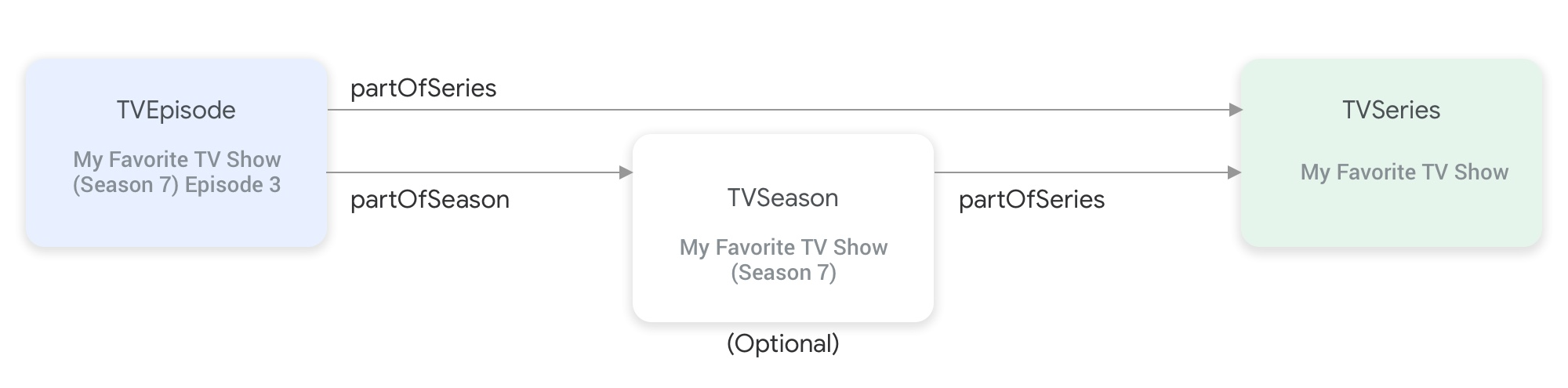
partOfSeries und partOfSeason verbinden die Entitätstypen für TV-Sendungen miteinander.Für eine
TVEpisode-Entität müssen Sie das AttributpartOfSeriesangeben, das die@idundnamederTVSeries-Entität der Folge angibt."partOfSeries": { "@type": "TVSeries", "@id": "http://www.example.com/my_favorite_tv_show", "name": "My Favorite TV Show", },Wenn dein Feed TV-Staffeln enthält, musst du für eine
TVSeason-Entität auch die zugehörigeTVSeries-Entität im AttributpartOfSeriesangeben.Für eine
TVEpisode-Entität müssen Sie das AttributpartOfSeasonangeben, das die@idundseasonNumberderTVSeason-Entität der Folge angibt."partOfSeason": { "@type": "TVSeason", "@id": "http://www.example.com/my_favorite_tv_show/s7", "seasonNumber": 7 },Wenn eine
TVEpisode-Entität keine entsprechendeTVSeason-Entität im Feed hat, gehen Sie so vor, um die AttributepartOfSeason.@idundpartOfSeason.seasonNumberfür dieTVEpisode-Entität anzugeben:- Nehmen Sie die
partofSeries.@idund hängen Sie ein Platzhalter-Anfragefeld an (z. B. ?season1), um eine eindeutigepartOfSeason.@idzu erstellen (z. B. http://www.example.com/my_favorite_tv_show?season1). - Setzen Sie
partOfSeason.seasonNumberauf 1.
partOfSeason.@idfür die entsprechendeTVSeason-Einheit wiederverwenden oder diesen PlatzhalterpartOfSeason.@iddurch die tatsächliche@idderTVSeason-Einheit ersetzen.- Nehmen Sie die
Beispiel
TVSeries
Meine Lieblings-TV-Sendung
{
"@context": ["http://schema.org", {"@language": "en"}],
"@type": "TVSeries",
"@id": "http://www.example.com/my_favorite_tv_show",
"url": "http://www.example.com/my_favorite_tv_show",
"name": "My Favorite TV Show",
"potentialAction":{ … },
...
}
TVSeason
Meine Lieblingsserie (Staffel 7)
{
"@context": ["http://schema.org", {"@language": "en"}],
"@type": "TVSeason",
"@id": "http://www.example.com/my_favorite_tv_show/s7",
"url": "http://www.example.com/my_favorite_tv_show/s7",
"name": "My Favorite TV Show, Season 7",
"seasonNumber": 7,
"partOfSeries": {
  "@type": "TVSeries",
  "@id": "http://www.example.com/my_favorite_tv_show",
  "name": "My Favorite TV Show",
},
"potentialAction":{ … },
...
}
TVEpisode
Folge 3 von Meine Lieblingsserie (Staffel 7)
{
"@context": ["http://schema.org", {"@language": "en"}],
"@type": "TVEpisode",
"@id": "http://www.example.com/my_favorite_tv_show/s7/e3",
"url": "http://www.example.com/my_favorite_tv_show/s7/e3",
"name": "John Doe returns at night",
"episodeNumber": 3,
"partOfSeason": {
  "@type": "TVSeason",
  "@id": "http://www.example.com/my_favorite_tv_show/s7",
  "seasonNumber": 7
},
"partOfSeries": {
"@type": "TVSeries",
"@id": "http://www.example.com/my_favorite_tv_show",
"name": "My Favorite TV Show",
},
"potentialAction":{ … },
...
}
Live-TV
Wenn Sie ein Live-TV-Anbieter sind, müssen Sie die Entitätstypen Organization, BroadcastService, CableOrSatelliteService und TelevisionChannel in Ihrem Media-Catalog-Feed hinzufügen, um Ihr Kanalangebot darzustellen. Möglicherweise müssen Sie auch die Entitäten BroadcastEvent, TVSeries, TVEpisode, Movie und SportsEvent angeben, um die zugehörige EPG (elektronische Programmübersicht) darzustellen. Die Definitionen für diese Entitäten finden Sie im Abschnitt Verfügbare Entitätstypen. Filtern Sie dazu nach diesen Typen. Eine detailliertere Erklärung finden Sie auf der Seite Live-TV-Kanäle.
Beziehungen zwischen Entitäten, die Live-TV-Kanäle darstellen
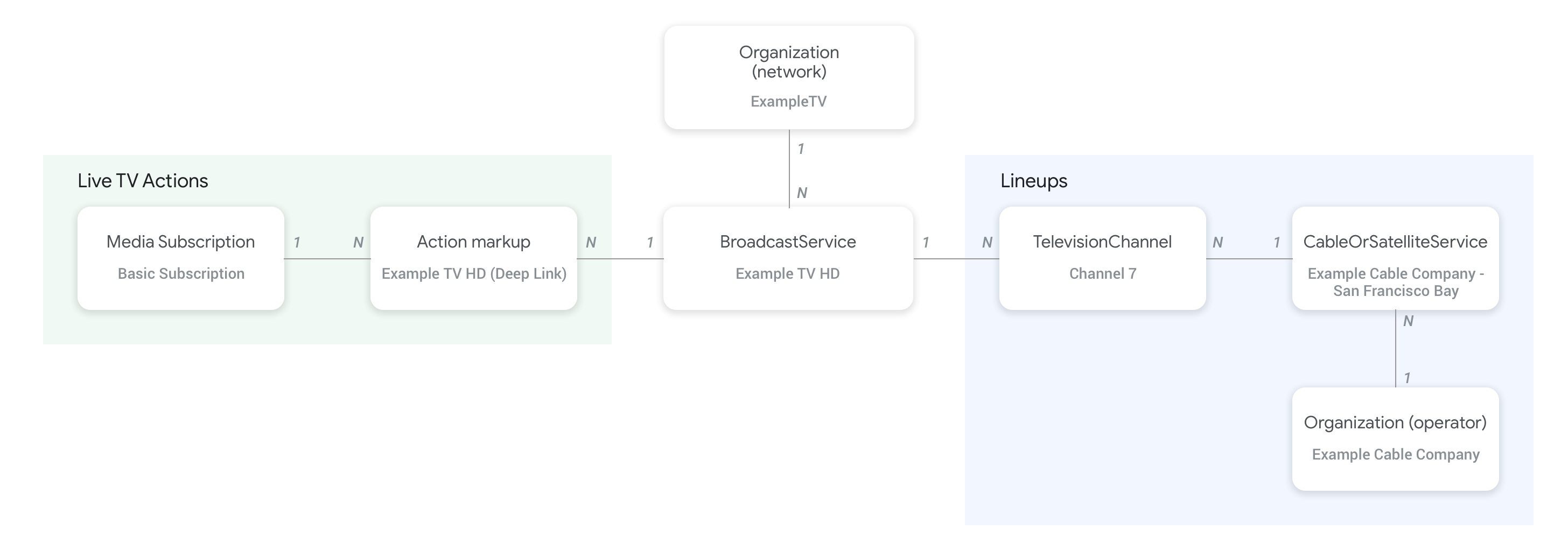
Die folgende Abbildung zeigt, wie die Entitäten Organization, BroadcastService, CableOrSatelliteService und TelevisionChannel miteinander verknüpft sind:
- Die Entität
Organization(Betreiber), die den Feedanbieter und auch die übergeordnete Organisation des DienstesCableOrSatelliteServicedarstellt, ist über die Propertyproviderder EntitätCableOrSatelliteServiceverbunden. - Die Entitäten
Organization, die den EntitätenBroadcastServiceentsprechen, sind über die PropertybroadcastAffiliateOfder EntitätBroadcastServiceverbunden. - Die Entitäten
TelevisionChannelsind über die PropertyinBroadcastLineupmit der EntitätCableOrSatelliteServiceverbunden, die das Angebot darstellt, zu dem sie gehören. - Die Entitäten
TelevisionChannelsind über die PropertyprovidesBroadcastServicemit der EntitätBroadcastServiceverbunden, deren Programm dieser Kanal bereitstellt.
Wir empfehlen dringend, die Konzeptseite zu Live-TV-Kanälen zu lesen, um konkrete Beispiele dafür zu erhalten, wie die Beziehung zwischen den Entitäten „BroadcastService“ und „Organization“ hergestellt werden muss.
Beziehungen zwischen Kanälen und ihrer Programmübersicht (EPG)
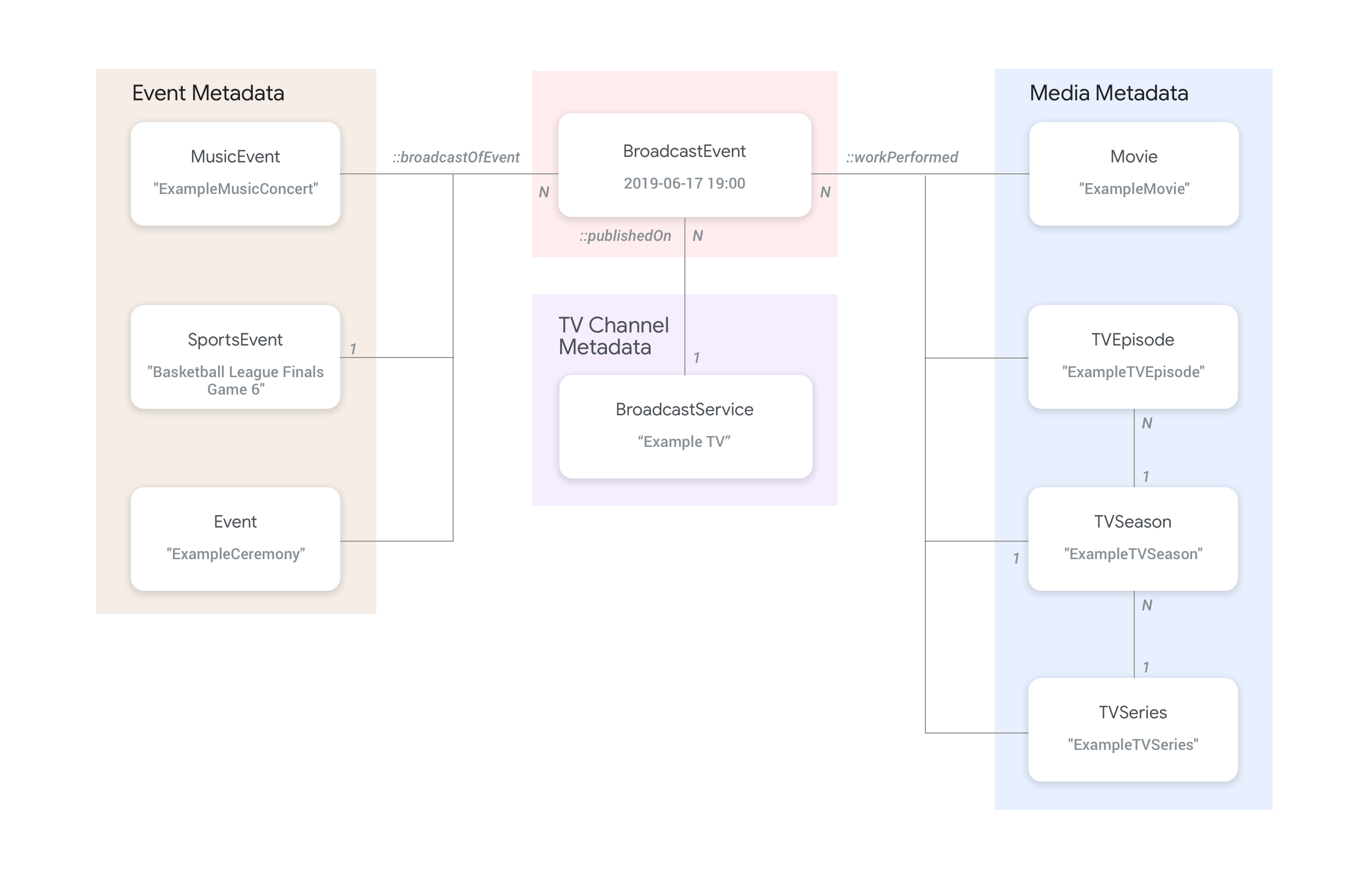
Die folgende Abbildung zeigt, wie die Entität BroadcastEvent mit den übrigen Entitäten im Feed verknüpft ist.
- Die Entitäten
BroadcastEvent, die die Programmübersicht (EPG) einesBroadcastServicedarstellen, sind über die PropertypublishedOnder EntitätBroadcastEventmit den EntitätenBroadcastServiceverbunden. - Die Entitäten
BroadcastEventkönnen auch über die PropertyworkPerformedmit den Entitäten der obersten EbeneTVEpisode,TVSeriesundMovieverbunden werden. - Die Entitäten
BroadcastEventkönnen auch über die PropertybroadcastOfEventmit den Entitäten der obersten EbeneSportsEventverbunden werden. - Bei ereignislosen Kanälen, die online gestreamt werden, sind die Entitäten
BroadcastEventmit der Entität verbunden, die das Live-Ereignis darstellt. Je nachdem, was live gestreamt wird, wird entweder die PropertyworkPerformedoderbroadcastOfEventverwendet. In solchen Fällen ist die PropertypublishedOnnicht erforderlich, da keine Verbindung zu einem Kanal erforderlich ist.
Beispiele
Im folgenden Abschnitt finden Sie Beispiele und Snippets für verschiedene Anwendungsfälle für die Wiedergabeaktion.
Nationaler TV-Dienstanbieter im Internet
Organisation
Ein fiktiver Internet Protocol Television-Dienstanbieter, ExampleTV Digital Service (Organization), bietet einen Live-TV-Dienst im Internet an, der die folgenden beiden Kanäle enthält: ExampleTV-Movie (Organization) und ExampleTV-Comedy (Organization):
{
  "@context": ["http://schema.org", {"@language": "en"}],
  "@type":"Organization",
  "@id":"http://example.com/exampletv/digital",
  "name":"ExampleTV Digital Service",
  "sameAs": "https://en.wikipedia.org/wiki/exampletv_digital_service"
},
{
  "@context": ["http://schema.org", {"@language": "en"}],
  "@type":"Organization",
  "@id":"http://example.com/exampletv/movie",
  "name":"ExampleTV Movie",
  "sameAs": "https://en.wikipedia.org/wiki/exampletv_movie"
},
{
  "@context": ["http://schema.org", {"@language": "en"}],
  "@type":"Organization",
  "@id":"http://example.com/exampletv/comedy",
  "name":"ExampleTV Comedy",
  "sameAs": "https://en.wikipedia.org/wiki/exampletv_comedy"
}
BroadcastService
Diese beiden BroadcastService Entitäten enthalten die Details zu Deeplinks und Zugriffsanforderungen für die fiktiven Kanäle ExampleTV-Movie und ExampleTV-Comedy:
{
  "@context": ["http://schema.org", {"@language": "en"}],
  "@type":"BroadcastService",
  "@id":"https://www.example.com/exampletv/broadcast/movie",
  "name": "ExampleTV-Movie",
  "alternateName": [
    "Example Television Movie",
    "Example TV Movie"
  ],
  "description": "A fictional Internet Protocol TV movie channel.",
  "broadcastDisplayName":"ExampleTV-Movie",
  "broadcastAffiliateOf":{
    "@type":"Organization",
    "@id":"http://www.example.com/exampletv/movie"
  },
  "potentialAction": {
    "@type": "WatchAction",
    "target": {
      "@type": "EntryPoint",
      "urlTemplate": "http://www.example.com/exampletv/broadcast/movie?autoplay=true",
      "inLanguage": "en",
      "actionPlatform": [
        "http://schema.org/DesktopWebPlatform",
        "http://schema.org/MobileWebPlatform",
        "http://schema.org/AndroidPlatform",
        "http://schema.org/AndroidTVPlatform",
        "http://schema.org/IOSPlatform",
        "http://schema.googleapis.com/GoogleVideoCast"
      ]
    },
    "actionAccessibilityRequirement": {
      "@type": "ActionAccessSpecification",
      "category": "subscription",
      "requiresSubscription": {
        "@type": "MediaSubscription",
        "@id": "http://www.example.com/exampletv/basic_subscription",
        "name": "Basic subscription",
        "identifier": "example.com:basic",
        "commonTier": true
      },
      "eligibleRegion": [
        {
          "@type": "Country",
          "name": "US"
        }
      ]
    }
  },
  "identifier": [
    {
      "@type": "PropertyValue",
      "propertyID": "TMS_ID",
      "value": "12345"
    },
    {
      "@type": "PropertyValue",
      "propertyID": "_PARTNER_ID_",
      "value": "exampletv-movie-33345"
    }
  ]
},
{
  "@context": ["http://schema.org", {"@language": "en"}],
  "@type":"BroadcastService",
  "@id":"https://www.example.com/exampletv/broadcast/comedy",
  "name": "ExampleTV-Comedy",
  "alternateName": [
    "Example Television Comedy",
    "Example TV Comedy"
  ],
  "description": "A fictional Internet Protocol TV comedy channel.",
  "broadcastDisplayName":"ExampleTV-Comedy",
  "broadcastAffiliateOf":{
    "@type":"Organization",
    "@id":"http://www.example.com/exampletv/comedy"
  },
  "potentialAction": {
    "@type": "WatchAction",
    "target": {
      "@type": "EntryPoint",
      "urlTemplate": "http://www.example.com/exampletv/broadcast/comedy?autoplay=true",
      "inLanguage": "en",
      "actionPlatform": [
        "http://schema.org/DesktopWebPlatform",
        "http://schema.org/MobileWebPlatform",
        "http://schema.org/AndroidPlatform",
        "http://schema.org/AndroidTVPlatform",
        "http://schema.org/IOSPlatform",
        "http://schema.googleapis.com/GoogleVideoCast"
      ]
    },
    "actionAccessibilityRequirement": {
      "@type": "ActionAccessSpecification",
      "category": "subscription",
      "requiresSubscription": {
        "@type": "MediaSubscription",
        "@id": "http://www.example.com/exampletv/basic_subscription",
        "name": "Basic subscription",
        "identifier": "example.com:basic",
        "commonTier": true
      },
      "eligibleRegion": [
        {
          "@type": "Country",
          "name": "US"
        }
      ]
    }
  },
  "identifier": [
    {
      "@type": "PropertyValue",
      "propertyID": "TMS_ID",
      "value": "15555"
    },
    {
      "@type": "PropertyValue",
      "propertyID": "_PARTNER_ID_",
      "value": "exampletv-comedy-12323"
    }
  ]
}
CableOrSatelliteService
Diese CableOrSatelliteService beschreibt den Dienstanbieter ExampleTV Digital Service mit nationaler Abdeckung:
{
  "@context": ["http://schema.org", {"@language": "en"}],
  "@type":"CableOrSatelliteService",
  "@id":"http://example.com/example_iptv/us",
  "name":"Example TV Digital Service - US",
  "provider": {
    "@type": "Organization",
    "@id": "http://example.com/exampletv/digital",
  },
  "areaServed":[
    {
      "@type":"Country",
      "name": "US",
    }
  ]
}
TelevisionChannel
Diese TelevisionChannel-Entitäten geben an, dass ExampleTV Digital Service IPTV das Programm ExampleTV Movie auf dem Kanal ExTV-Movie und das Programm ExampleTV Comedy auf dem Kanal ExTV-Comedy anbietet:
{
  "@context": ["http://schema.org", {"@language": "en"}],
  "@type":"TelevisionChannel",
  "@id":"http://example.com/exampletv/extv-movie",
  "broadcastChannelId":"ExTV-Movie",
  "broadcastServiceTier":"Basic",
  "inBroadcastLineup":{
    "@type":"CableOrSatelliteService",
    "@id":"http://example.com/example_iptv/us"
  },
  "providesBroadcastService":{
    "@type":"BroadcastService",
    "@id":"https://www.example.com/exampletv/broadcast/movie"
  }
},
{
  "@context": ["http://schema.org", {"@language": "en"}],
  "@type":"TelevisionChannel",
  "@id":"http://example.com/exampletv/extv-comedy",
  "broadcastChannelId":"ExTV-Comedy",
  "broadcastServiceTier":"Basic",
  "inBroadcastLineup":{
    "@type":"CableOrSatelliteService",
    "@id":"http://example.com/example_iptv/us"
  },
  "providesBroadcastService":{
    "@type":"BroadcastService",
    "@id":"https://www.example.com/exampletv/broadcast/comedy"
  }
}
Weitere Beispiele finden Sie im Abschnitt Beispiele für Live-TV.
Übertragung eines Films auf einem Fernsehkanal
Am 12. Juli 2019 wird zwischen 17:00 und 19:00 Uhr ein Film im Fernsehsender Example TV (BroadcastService) übertragen.
BroadcastEvent
{
  "@context": ["http://schema.org", {"@language": "en"}],
  "@type": "BroadcastEvent",
  "@id": "http://example.com/live/movie/new_release",
  "name": "My Favorite Movie",
  "description": "John Doe spent years perfecting his survival skills in a tropical jungle.",
  "startDate": "2019-07-12T17:00-08:00",
  "endDate": "2019-07-12T19:00-08:00",
  "videoFormat": "HD",
  "isLiveBroadcast": "False",
  "publishedOn": {
    "@type": "BroadcastService",
    "@id": "http://example.com/stations/example_tv"
  },
  "workPerformed": {
    "@type": "Movie",
    "@id": "http://www.example.com/my_favorite_movie"
  }
}
BroadcastService
{
  "@context": ["http://schema.org", {"@language": "en"}],
  "@type":"BroadcastService",
  "@id":"http://example.com/stations/example_tv",
  "name":"EXAMPLE-TV",
  "broadcastDisplayName":"ABCD",
  "callSign": "EXA-TV",
  "videoFormat":"SD",
  "broadcastTimezone":"America/Los_Angeles",
  "broadcastAffiliateOf":{
    "@type":"Organization",
    "@id":"http://example.com/networks/abcd-network",
  }
  "identifier": [
   {
     "@type": "PropertyValue",
     "propertyID": "TMS_ID",
     "value": "12258"
   },
   {
     "@type": "PropertyValue",
     "propertyID": "_PARTNER_ID_",
     "value": "exampletv-123456"
   }
  ],
  "potentialAction": {
    "@type": "WatchAction",
    "target": {
      "@type": "EntryPoint",
      "urlTemplate": "http://example.com/livestream",
      "actionPlatform": [
        "http://schema.org/DesktopWebPlatform",
        "http://schema.org/MobileWebPlatform",
        "http://schema.org/AndroidPlatform",
        "http://schema.org/IOSPlatform",
        "http://schema.googleapis.com/GoogleVideoCast",
        "http://schema.org/AndroidTVPlatform"
      ]
    },
    "actionAccessibilityRequirement": {
      "@type": "ActionAccessSpecification",
      "category": "externalsubscription",
      "availabilityStarts": "2018-07-21T10:35:29Z",
      "availabilityEnds": "2019-10-21T10:35:29Z",
      "requiresSubscription": {
        "@type": "MediaSubscription",
        "@id": "http://example.com/subscription",
        "name": "ABCD",
        "sameAs": "http://example.com/subscription",
        "authenticator": {
          "@type": "Organization",
          "name": "TVE"
        }
      },
      "eligibleRegion": [
        {
          "@type": "Country",
          "name": "US"
        }
      ]
    }
  }
}
Film
{
  "@context": ["http://schema.org", {"@language": "en"}],
  "@type": "Movie",
  "@id": "http://www.example.com/my_favorite_movie",
  "url": "http://www.example.com/my_favorite_movie",
  "name": "My Favorite Movie",
  "sameAs": "https://en.wikipedia.org/wiki/my_favorite_movie",
  "releasedEvent": {
    "@type": "PublicationEvent",
    "startDate": "2008-01-20",
    "location": {
      "@type": "Country",
      "name": "US"
    }
  },
  "description": "John Doe spent years perfecting his survival skills in a tropical jungle.",
  "actor": [
    {
      "@type": "Person",
      "name": "John Doe",
      "sameAs": "https://en.wikipedia.org/wiki/John_Doe"
    },
    {
      "@type": "Person",
      "name": "Jane Doe",
      "sameAs": "https://en.wikipedia.org/wiki/Jane_Doe"
    }
  ],
  "identifier": [
    {
      "@type": "PropertyValue",
      "propertyID": "IMDB_ID",
      "value":  "tt0123456"
    }
  ]
}
Weitere Beispiele finden Sie im Abschnitt Beispiele für Live-TV-Ereignisse.
Ein live gestreamtes Sportspiel
BroadcastEvent
{
  "@context": ["http://schema.org", {"@language": "en"}],
  "@type": "BroadcastEvent",
  "@id": "http://example.com/live_eevent/basketball/professional/final_game_6",
  "name": "2019 Professional Basketball Finals, Game 6: Team A at Team B",
  "description": "Game 6 of the 2019 Professional Basketball Finals. Team A leads the series 3-2 against Team B.",
  "startDate": "2018-09-16T10:00-08:00",
  "endDate": "2018-09-16T13:00-08:00",
  "videoFormat": "HD",
  "isLiveBroadcast": "False",
  "potentialAction": {
    "@type": "WatchAction",
    "target": {
      "@type": "EntryPoint",
      "urlTemplate": "http://www.example.com/pbl_semis_game?autoplay=true",
      "inLanguage": "en",
      "actionPlatform": [
        "http://schema.org/DesktopWebPlatform",
        "http://schema.org/MobileWebPlatform",
        "http://schema.org/AndroidPlatform",
        "http://schema.org/AndroidTVPlatform",
        "http://schema.org/IOSPlatform",
        "http://schema.googleapis.com/GoogleVideoCast"
      ]
    },
    "actionAccessibilityRequirement": {
      "@type": "ActionAccessSpecification",
      "category": "subscription",
      "availabilityStarts": "2018-09-16T10:00-08:00",
      "availabilityEnds": "2018-09-16T10:00-08:00",
      "requiresSubscription": {
        "@type": "MediaSubscription",
        "name": "Example Package",
        "commonTier": true,
        "@id": "http://www.example.com/example_package"
      },
      "eligibleRegion": [
        {
          "@type": "Country",
          "name": "US"
        }
      ]
    }
  },
  "broadcastOfEvent": {
    "@type": "SportsEvent",
    "@id": "http://example.com/basketball/professional/final_game_6"
  }
}
SportsEvent
{
  "@context": ["http://schema.org", {"@language": "en"}],
  "@type":"SportsEvent",
  "@id": "http://example.com/basketball/professional/final_game_6",
  "name":"2019 Professional Basketball Finals, Game 6: Team A vs Team B",
  "sport":"https://en.wikipedia.org/wiki/Basketball",
  "description": {
      "@language": "en",
      "@value": "Game 6 of the 2019 Professional Basketball Finals. Team A leads the series 3-2 against Team B."
    },
  "startDate": "2019-09-16T10:00-08:00",
  "endDate": "2019-09-16T13:00-08:00",
  "homeTeam":{
    "@type":"SportsTeam",
    "name":"Team B",
    "sport":"https://en.wikipedia.org/wiki/Basketball",
    "parentOrganization":{
      "@type":"SportsOrganization",
      "name":"Professional Basketball League",
      "sameAs":"http://www.example.com/professional_basketball_league"
    },
    "athlete":[
      {
        "@type":"Person",
        "name":"John doe"
      }
    ]
  },
  "awayTeam":{
    "@type":"SportsTeam",
    "name":"Team A",
    "sport":"https://en.wikipedia.org/wiki/Basketball",
    "athlete":[
      {
        "@type":"Person",
        "name":"Jane Doe"
      }
    ]
  },
  "location":{
    "@type":"Place",
    "name":"Example Stadium",
    "address":{
      "@type":"PostalAddress",
      "streetAddress":"1600 Amphitheatre Pkwy",
      "addressLocality":"Mountain View",
      "addressRegion":"CA",
      "postalCode":"94043",
      "addressCountry":"US"
    }
  },
  "identifier": [
    {
      "@type": "PropertyValue",
      "propertyID": "TMS_ID",
      "value":  "TMS ID of this game"
    }
  ]
}
Weitere Beispiele finden Sie im Abschnitt Beispiele für Sport.