
Page Summary
-
Inline adaptive banners allow you to specify the ad width to determine the optimal size and maximize performance by optimizing ad size for each device.
-
Compared to anchored adaptive banners, inline adaptive banners are larger, taller, use variable heights, and are placed in scrolling content.
-
To implement inline adaptive banners, you need to get the device width and then use a static method on the ad size class to get an inline adaptive ad size object.
-
You can specify the orientation for which to load the banner or limit the maximum height of the banner.
-
Sample applications are available on GitHub in both Java and Kotlin to demonstrate inline adaptive banners.
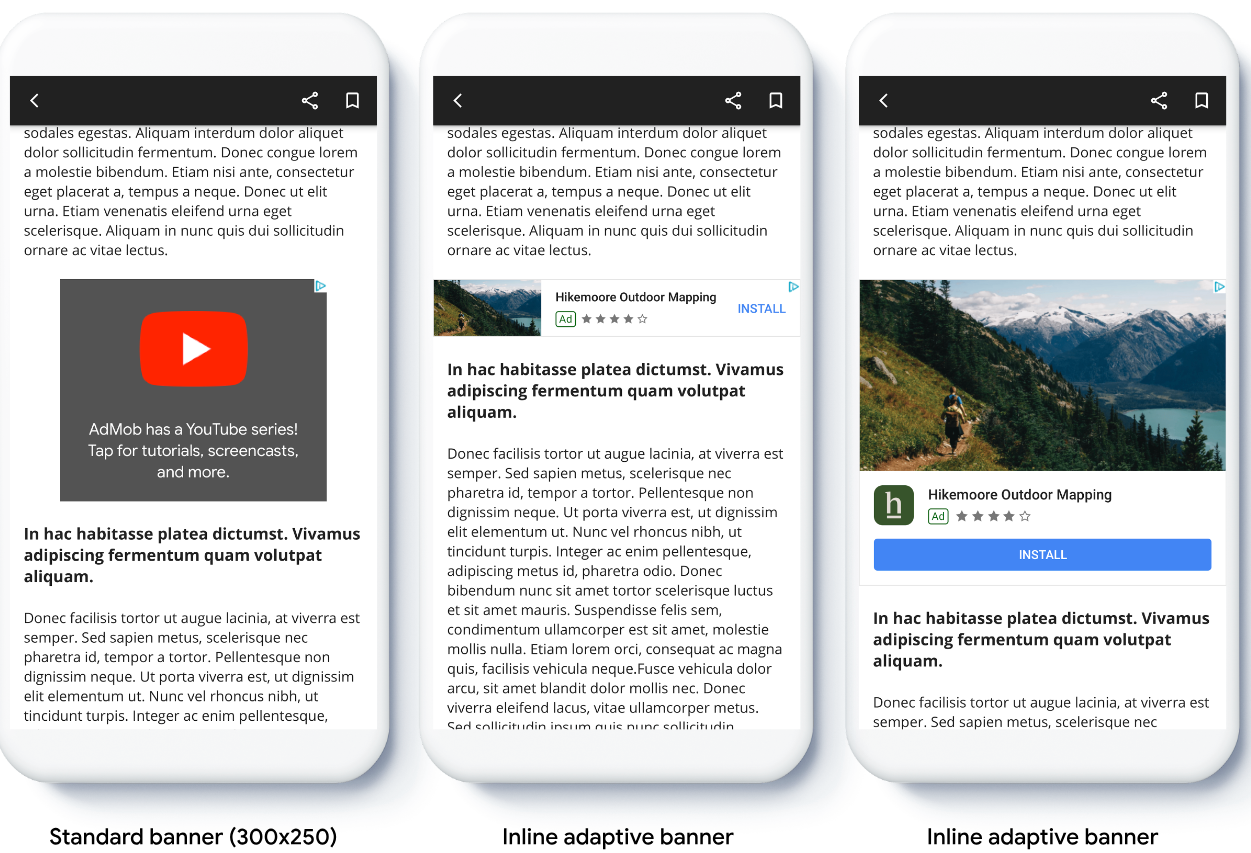
Adaptive banners let you specify the width of an ad to determine the optimal ad size for each device. Unlike anchored adaptive banners, inline adaptive banners are larger, taller, and don't use fixed heights. Inline adaptive banners have variable height. These banners might fill the entire screen or a maximum height you specify.
This guide covers creating inline adaptive banners and setting the banner size.
The following image shows inline adaptive banners in scrolling content:
Before you begin
Before continuing, make sure you set up banner ads.
To view a full inline adaptive banner example, download the following sample app:
Implement inline adaptive banners
To implement inline adaptive banners, you set the ad size, create an ad request, and load the ad.
To size an inline adaptive banner, determine the ad width. Common approaches include the following:
- Using the full-screen width.
- Using the width of the parent layout containing the ad.
- Adjusting the width to account for device safe areas.
When creating the ad size object, use this calculated width.
Complete the following steps:
Get the width of your device, or set a width:
Kotlin
private val adWidth: Int get() { val displayMetrics = resources.displayMetrics val adWidthPixels = if (Build.VERSION.SDK_INT >= Build.VERSION_CODES.R) { val windowMetrics: WindowMetrics = this.windowManager.currentWindowMetrics windowMetrics.bounds.width() } else { displayMetrics.widthPixels } val density = displayMetrics.density return (adWidthPixels / density).toInt() }Java
public int getAdWidth() { DisplayMetrics displayMetrics = getResources().getDisplayMetrics(); int adWidthPixels = displayMetrics.widthPixels; if (VERSION.SDK_INT >= VERSION_CODES.R) { WindowMetrics windowMetrics = this.getWindowManager().getCurrentWindowMetrics(); adWidthPixels = windowMetrics.getBounds().width(); } float density = displayMetrics.density; return (int) (adWidthPixels / density); }To get an inline adaptive ad size object, use a static method on the ad size class:
Kotlin
val adView = AdView(this@MainActivity) adView.setAdSize(AdSize.getCurrentOrientationInlineAdaptiveBannerAdSize(this, adWidth))Java
final AdView adView = new AdView(MainActivity.this); adView.setAdSize(AdSize.getCurrentOrientationInlineAdaptiveBannerAdSize(this, getAdWidth()));
Set the inline adaptive banner layout
To preload an inline adaptive banner ad for a specific layout, use the following methods:
AdSize.getPortraitInlineAdaptiveBannerAdSize(Context context, int width)AdSize.getLandscapeInlineAdaptiveBannerAdSize(Context context, int width)
If your app supports portrait and landscape views, and you want to preload
an adaptive banner ad in the current layout, use the
AdSize.getCurrentOrientationInlineAdaptiveBannerAdSize(Context context, int width)
method.
This method loads an ad in the current layout.
Limit inline adaptive banner height
By default, inline adaptive banners created without a maxHeight value
have a maximum height equal to the device height. To limit the inline adaptive
banner height, use the
AdSize.getInlineAdaptiveBannerAdSize(int width, int maxHeight)
method.