Authenticate requests with Web Bot Auth (experimental)

Google is testing usage of the Web Bot Auth IETF internet draft, which is a new cryptographic protocol that helps websites to validate that bots are authentic. We are testing the protocol with some AI agents hosted on Google infrastructure. This guide explains what Web Bot Auth is, the current status, and how you can implement verification in the experimental phase.

What is Web Bot Auth?

Web Bot Auth is an experimental cryptographic protocol used to authenticate requests sent by bots. Instead of relying solely on self-reported headers and IP addresses, Web Bot Auth allows agents to cryptographically sign their requests.

Using Web Bot Auth helps website owners identify automated traffic on their sites, and prevents other actors from attempting to spoof reputable agents. Web Bot Auth can bring the following benefits:

  • Cryptographic certainty: Move beyond easily spoofed headers to a verified identity and decouple agent identity from IP addresses.
  • Better observability: Gain clearer insights into how agents interact with your content.
  • Future-proofing: Help establish a web where agent providers and websites can build mutual trust and make informed access decisions.

Current status of Web Bot Auth: experimental

Google's implementation of Web Bot Auth is currently experimental for the following reasons:

  • Web Bot Auth is currently a draft specification developed by the IETF WBA Working Group, and it may change over time. Google continues to be engaged with the work of the Working Group as it evolves.
  • User-agent and IP-based bot verification is currently the de facto standard, with decades of systems, policies, and best practices built around it. Changing these requires time and a careful approach, and we're at an early stage, still evaluating the technical characteristics and potential ecosystem implications of the protocol.

What does this mean?

The experimental status means that:

  • Not all Google user agents are using Web Bot Auth.
  • Google is not yet signing every request of agents using the protocol.
  • We recommend that in addition to Web Bot Auth you continue relying on IP addresses, reverse DNS, and user-agent strings as we gradually roll out signed traffic.

For those that are interested in participating during the experimental phase, we're providing guidance on how to recognize and allowlist Google AI agents.

How to allowlist Google AI agents using Web Bot Auth

If you're a developer or system administrator looking to allowlist our experimental AI agents, you can implement verification through the Web Bot Auth protocol:

Use a product or service that supports Web Both Auth

Major bot-detection services, CDNs, and WAFs support Web Bot Auth. Some infrastructure services provide ways to look up the Google-Agent user agent and allowlist it; refer to your provider for the exact steps. A subset of requests made by the Google-Agent are signed with Web Bot Auth; in these cases, they are authenticated as https://agent.bot.goog. If your provider supports the protocol, they likely verify this automatically.

Verify requests yourself

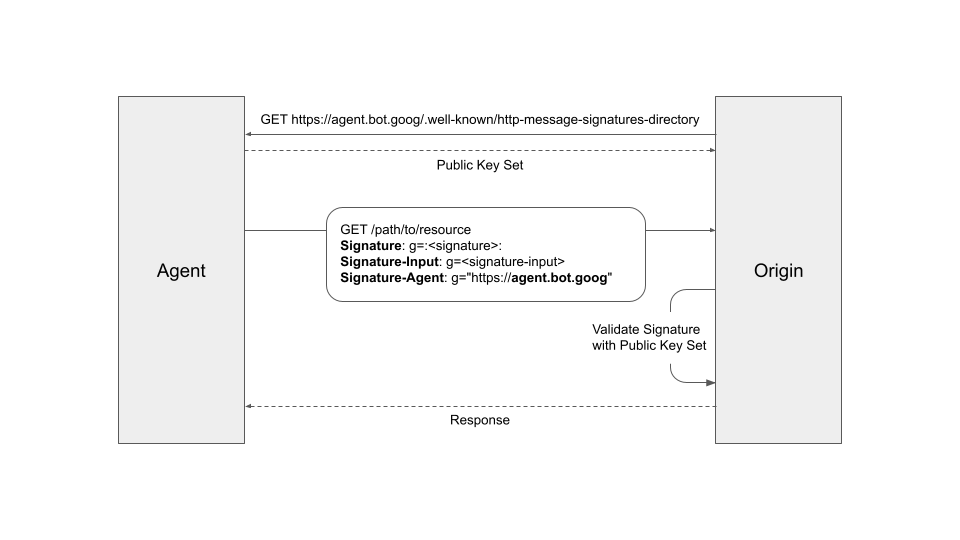
If you want to authenticate our requests yourself, refer to the HTTP Message Signatures for automated traffic architecture specification and example implementations on GitHub. In general, the key protocol steps are:

  1. Fetch the public key set of our agent from https://agent.bot.goog/.well-known/http-message-signatures-directory and cache them according to the Cache-Control header.
  2. Participating requests sent to your server will have the Signature-Agent HTTP request header set to g="https://agent.bot.goog" (take note of the g= label).
  3. Verify the Signature header according to the Signature-Input, following the HTTP Message Signatures standard (RFC 9421). Use the Signature and Signature-Input headers labeled as g.
  4. Don't forget to fall back to IP-based verification, as not all requests are signed.
Web Bot Auth verification steps

For latency-sensitive requests, you can return the response in advance and validate the signature within its expiry window. In this case, sanctioning will occur after the fact and you can apply that to the caller's future requests.

Next steps