Place Autocomplete (เดิม)
จัดทุกอย่างให้เป็นระเบียบอยู่เสมอด้วยคอลเล็กชัน
บันทึกและจัดหมวดหมู่เนื้อหาตามค่ากำหนดของคุณ
นักพัฒนาซอฟต์แวร์ในเขตเศรษฐกิจยุโรป (EEA)
หมายเหตุ: ไลบรารีฝั่งเซิร์ฟเวอร์
หน้านี้อธิบายไลบรารีฝั่งไคลเอ็นต์ที่ใช้ได้กับ Maps JavaScript API หากต้องการทำงานกับเว็บเซอร์วิส Places API บนเซิร์ฟเวอร์ของคุณ โปรดดูไคลเอ็นต์ Node.js สำหรับบริการ Google Maps หน้าเว็บที่ลิงก์นั้นยังแนะนำไคลเอ็นต์ Java, ไคลเอ็นต์ Python และไคลเอ็นต์ Go สำหรับบริการ Google Maps ด้วย
บทนำ
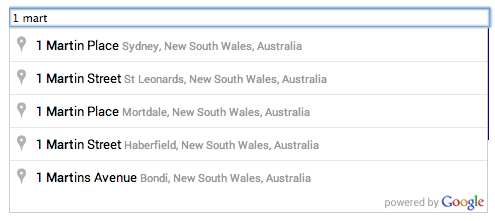
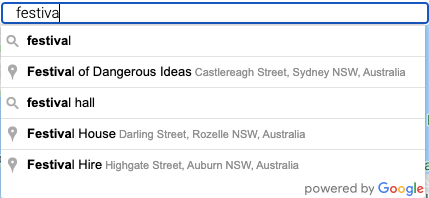
การเติมข้อความอัตโนมัติเป็นฟีเจอร์ของไลบรารี Places ใน Maps JavaScript API คุณสามารถใช้การเติมข้อความอัตโนมัติเพื่อให้แอปพลิเคชันมีลักษณะการทำงานของการค้นหาแบบพิมพ์ล่วงหน้าของช่องค้นหา Google Maps
บริการเติมข้อความอัตโนมัติสามารถจับคู่คำและสตริงย่อยแบบเต็ม โดยจะแสดงชื่อสถานที่ ที่อยู่ และ Plus Code ดังนั้น แอปพลิเคชันจึงสามารถส่งคำค้นหาขณะที่ผู้ใช้พิมพ์เพื่อแสดงการคาดคะเนสถานที่ได้ทันที ตามที่ Places API กำหนด "สถานที่" อาจเป็นสถานประกอบการ สถานที่ตั้งทางภูมิศาสตร์ หรือจุดที่น่าสนใจที่โดดเด่น
เริ่มต้นใช้งาน
ก่อนใช้ไลบรารี Places ใน Maps JavaScript API ให้ตรวจสอบก่อนว่า Places API เปิดใช้อยู่ในคอนโซล Google Cloud ในโปรเจ็กต์เดียวกับที่คุณตั้งค่าไว้สำหรับ Maps JavaScript API
คลิกปุ่มเลือกโปรเจ็กต์ แล้วเลือกโปรเจ็กต์เดียวกับที่ตั้งค่าไว้สำหรับ Maps JavaScript API แล้วคลิกเปิด
จากรายการ API ในแดชบอร์ด ให้มองหา Places API
หากเห็น API ในรายการ แสดงว่าทุกอย่างเรียบร้อยแล้ว อย่างไรก็ตาม โปรเจ็กต์นี้อยู่ในสถานะเดิม
ดูข้อมูลเพิ่มเติมเกี่ยวกับระยะเดิมและวิธีย้ายข้อมูลจากผลิตภัณฑ์เดิมไปยังบริการที่ใหม่กว่าได้ที่ผลิตภัณฑ์และฟีเจอร์เดิม
ข้อยกเว้นมีไว้สำหรับวิดเจ็ตการเติมข้อความอัตโนมัติและ SearchBox ซึ่งยังไม่พร้อมใช้งานเป็นผลิตภัณฑ์ GA ใน Places API (ใหม่)
โหลดไลบรารี
บริการ Places เป็นไลบรารีแบบสมบูรณ์ในตัวซึ่งแยกจากโค้ด Maps JavaScript API หลัก หากต้องการใช้ฟีเจอร์ที่มีอยู่ในไลบรารีนี้ คุณต้องโหลดไลบรารีก่อนโดยใช้พารามิเตอร์ libraries ใน URL บูตสแตรปของ Maps API ดังนี้
strictBounds คือ boolean ที่ระบุว่า API ต้องแสดงเฉพาะสถานที่ที่อยู่ภายในภูมิภาคที่กำหนดโดย bounds ที่ระบุเท่านั้นหรือไม่ API จะไม่แสดงผลลัพธ์นอกภูมิภาคนี้แม้ว่าจะตรงกับข้อมูลที่ผู้ใช้ป้อนก็ตาม
หมายเหตุ: หากคุณได้รับผลลัพธ์ที่ไม่คาดคิดเมื่อใช้รหัสประเทศ ให้ตรวจสอบว่าคุณใช้รหัสที่รวมประเทศ เขตแดนที่ขึ้นอยู่กับประเทศอื่น และพื้นที่พิเศษที่สนใจทางภูมิศาสตร์ตามที่คุณต้องการ คุณดูข้อมูลรหัสได้ที่ Wikipedia: List of ISO 3166 country codes หรือ ISO Online Browsing Platform
โดยค่าเริ่มต้น Place Autocomplete จะแสดงสถานที่ทุกประเภท โดยให้น้ำหนักกับการคาดคะเนที่อยู่ใกล้กับตำแหน่งของผู้ใช้ และดึงข้อมูลฟิลด์ข้อมูลทั้งหมดที่มีอยู่สำหรับสถานที่ที่ผู้ใช้เลือก ตั้งค่าตัวเลือกการเติมข้อความอัตโนมัติสำหรับสถานที่เพื่อแสดงการคาดคะเนที่เกี่ยวข้องมากขึ้นตาม Use Case ของคุณ
constcenter={lat:50.064192,lng:-130.605469};// Create a bounding box with sides ~10km away from the center pointconstdefaultBounds={north:center.lat+0.1,south:center.lat-0.1,east:center.lng+0.1,west:center.lng-0.1,};constinput=document.getElementById("pac-input")asHTMLInputElement;constoptions={bounds:defaultBounds,componentRestrictions:{country:"us"},fields:["address_components","geometry","icon","name"],strictBounds:false,};constautocomplete=newgoogle.maps.places.Autocomplete(input,options);
constcenter={lat:50.064192,lng:-130.605469};// Create a bounding box with sides ~10km away from the center pointconstdefaultBounds={north:center.lat+0.1,south:center.lat-0.1,east:center.lng+0.1,west:center.lng-0.1,};constinput=document.getElementById("pac-input");constoptions={bounds:defaultBounds,componentRestrictions:{country:"us"},fields:["address_components","geometry","icon","name"],strictBounds:false,};constautocomplete=newgoogle.maps.places.Autocomplete(input,options);
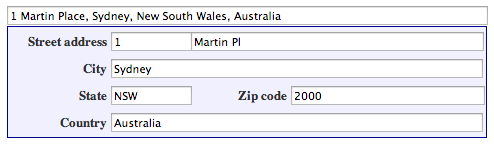
functionfillInAddress(){// Get the place details from the autocomplete object.constplace=autocomplete.getPlace();letaddress1="";letpostcode="";// Get each component of the address from the place details,// and then fill-in the corresponding field on the form.// place.address_components are google.maps.GeocoderAddressComponent objects// which are documented at http://goo.gle/3l5i5Mrfor(constcomponentofplace.address_componentsasgoogle.maps.GeocoderAddressComponent[]){// @ts-ignore remove once typings fixedconstcomponentType=component.types[0];switch(componentType){case"street_number":{address1=`${component.long_name}${address1}`;break;}case"route":{address1+=component.short_name;break;}case"postal_code":{postcode=`${component.long_name}${postcode}`;break;}case"postal_code_suffix":{postcode=`${postcode}-${component.long_name}`;break;}case"locality":(document.querySelector("#locality")asHTMLInputElement).value=component.long_name;break;case"administrative_area_level_1":{(document.querySelector("#state")asHTMLInputElement).value=component.short_name;break;}case"country":(document.querySelector("#country")asHTMLInputElement).value=component.long_name;break;}}address1Field.value=address1;postalField.value=postcode;// After filling the form with address components from the Autocomplete// prediction, set cursor focus on the second address line to encourage// entry of subpremise information such as apartment, unit, or floor number.address2Field.focus();}
functionfillInAddress(){// Get the place details from the autocomplete object.constplace=autocomplete.getPlace();letaddress1="";letpostcode="";// Get each component of the address from the place details,// and then fill-in the corresponding field on the form.// place.address_components are google.maps.GeocoderAddressComponent objects// which are documented at http://goo.gle/3l5i5Mrfor(constcomponentofplace.address_components){// @ts-ignore remove once typings fixedconstcomponentType=component.types[0];switch(componentType){case"street_number":{address1=`${component.long_name}${address1}`;break;}case"route":{address1+=component.short_name;break;}case"postal_code":{postcode=`${component.long_name}${postcode}`;break;}case"postal_code_suffix":{postcode=`${postcode}-${component.long_name}`;break;}case"locality":document.querySelector("#locality").value=component.long_name;break;case"administrative_area_level_1":{document.querySelector("#state").value=component.short_name;break;}case"country":document.querySelector("#country").value=component.long_name;break;}}address1Field.value=address1;postalField.value=postcode;// After filling the form with address components from the Autocomplete// prediction, set cursor focus on the second address line to encourage// entry of subpremise information such as apartment, unit, or floor number.address2Field.focus();}window.initAutocomplete=initAutocomplete;
// Listen for the event fired when the user selects a prediction and retrieve// more details for that place.searchBox.addListener("places_changed",()=>{constplaces=searchBox.getPlaces();if(places.length==0){return;}// Clear out the old markers.markers.forEach((marker)=>{marker.setMap(null);});markers=[];// For each place, get the icon, name and location.constbounds=newgoogle.maps.LatLngBounds();places.forEach((place)=>{if(!place.geometry||!place.geometry.location){console.log("Returned place contains no geometry");return;}consticon={url:place.iconasstring,size:newgoogle.maps.Size(71,71),origin:newgoogle.maps.Point(0,0),anchor:newgoogle.maps.Point(17,34),scaledSize:newgoogle.maps.Size(25,25),};// Create a marker for each place.markers.push(newgoogle.maps.Marker({map,icon,title:place.name,position:place.geometry.location,}));if(place.geometry.viewport){// Only geocodes have viewport.bounds.union(place.geometry.viewport);}else{bounds.extend(place.geometry.location);}});map.fitBounds(bounds);});
// Listen for the event fired when the user selects a prediction and retrieve// more details for that place.searchBox.addListener("places_changed",()=>{constplaces=searchBox.getPlaces();if(places.length==0){return;}// Clear out the old markers.markers.forEach((marker)=>{marker.setMap(null);});markers=[];// For each place, get the icon, name and location.constbounds=newgoogle.maps.LatLngBounds();places.forEach((place)=>{if(!place.geometry||!place.geometry.location){console.log("Returned place contains no geometry");return;}consticon={url:place.icon,size:newgoogle.maps.Size(71,71),origin:newgoogle.maps.Point(0,0),anchor:newgoogle.maps.Point(17,34),scaledSize:newgoogle.maps.Size(25,25),};// Create a marker for each place.markers.push(newgoogle.maps.Marker({map,icon,title:place.name,position:place.geometry.location,}),);if(place.geometry.viewport){// Only geocodes have viewport.bounds.union(place.geometry.viewport);}else{bounds.extend(place.geometry.location);}});map.fitBounds(bounds);});
// This example retrieves autocomplete predictions programmatically from the// autocomplete service, and displays them as an HTML list.// This example requires the Places library. Include the libraries=places// parameter when you first load the API. For example:// <script src="https://maps.googleapis.com/maps/api/js?key=YOUR_API_KEY&libraries=places">functioninitService():void{constdisplaySuggestions=function(predictions:google.maps.places.QueryAutocompletePrediction[]|null,status:google.maps.places.PlacesServiceStatus){if(status!=google.maps.places.PlacesServiceStatus.OK||!predictions){alert(status);return;}predictions.forEach((prediction)=>{constli=document.createElement("li");li.appendChild(document.createTextNode(prediction.description));(document.getElementById("results")asHTMLUListElement).appendChild(li);});};constservice=newgoogle.maps.places.AutocompleteService();service.getQueryPredictions({input:"pizza near Syd"},displaySuggestions);}declareglobal{interfaceWindow{initService:()=>void;}}window.initService=initService;
// This example retrieves autocomplete predictions programmatically from the// autocomplete service, and displays them as an HTML list.// This example requires the Places library. Include the libraries=places// parameter when you first load the API. For example:// <script src="https://maps.googleapis.com/maps/api/js?key=YOUR_API_KEY&libraries=places">functioninitService(){constdisplaySuggestions=function(predictions,status){if(status!=google.maps.places.PlacesServiceStatus.OK||!predictions){alert(status);return;}predictions.forEach((prediction)=>{constli=document.createElement("li");li.appendChild(document.createTextNode(prediction.description));document.getElementById("results").appendChild(li);});};constservice=newgoogle.maps.places.AutocompleteService();service.getQueryPredictions({input:"pizza near Syd"},displaySuggestions);}window.initService=initService;
<html>
<head>
<title>Retrieving Autocomplete Predictions</title>
<link rel="stylesheet" type="text/css" href="./style.css" />
<script type="module" src="./index.js"></script>
</head>
<body>
<p>Query suggestions for 'pizza near Syd':</p>
<ul id="results"></ul>
<!-- Replace Powered By Google image src with self hosted image. https://developers.google.com/maps/documentation/places/web-service/policies#other_attribution_requirements -->
<img
class="powered-by-google"
src="https://storage.googleapis.com/geo-devrel-public-buckets/powered_by_google_on_white.png"
alt="Powered by Google"
/>
<!--
The `defer` attribute causes the script to execute after the full HTML
document has been parsed. For non-blocking uses, avoiding race conditions,
and consistent behavior across browsers, consider loading using Promises. See
https://developers.google.com/maps/documentation/javascript/load-maps-js-api
for more information.
-->
<script
src="https://maps.googleapis.com/maps/api/js?key=AIzaSyB41DRUbKWJHPxaFjMAwdrzWzbVKartNGg&callback=initService&libraries=places&v=weekly"
defer
></script>
</body>
</html>
// Create a new session token.varsessionToken=newgoogle.maps.places.AutocompleteSessionToken();// Pass the token to the autocomplete service.varautocompleteService=newgoogle.maps.places.AutocompleteService();autocompleteService.getPlacePredictions({input:'pizza near Syd',sessionToken:sessionToken},displaySuggestions);
หากต้องการเพิ่มประสิทธิภาพค่าใช้จ่ายในการใช้บริการ Place Autocomplete (เดิม) ให้ใช้มาสก์ฟิลด์ในวิดเจ็ตรายละเอียดสถานที่ (เดิม) และ Place Autocomplete (เดิม) เพื่อแสดงเฉพาะฟิลด์ข้อมูลของ Place Autocomplete (เดิม) ที่คุณต้องการ
การเพิ่มประสิทธิภาพต้นทุนขั้นสูง
พิจารณาการติดตั้งใช้งาน Place Autocomplete (เดิม) แบบเป็นโปรแกรมเพื่อเข้าถึง
SKU: Autocomplete - ราคาต่อคำขอ
และขอผลลัพธ์ Geocoding API เกี่ยวกับสถานที่ที่เลือกแทนรายละเอียดสถานที่ (เดิม) ราคาต่อคำขอที่จับคู่กับ Geocoding API จะคุ้มค่ากว่าราคาต่อเซสชัน (อิงตามเซสชัน) หากเป็นไปตามเงื่อนไขทั้ง 2 ข้อต่อไปนี้
หากต้องการเพียงละติจูดและลองจิจูดหรือที่อยู่ของสถานที่ที่ผู้ใช้เลือก Geocoding API จะให้ข้อมูลนี้โดยมีค่าใช้จ่ายน้อยกว่าการเรียกใช้รายละเอียดสถานที่ (เดิม)
หากผู้ใช้เลือกการคาดคะเนการเติมข้อความอัตโนมัติภายในคำขอ Place Autocomplete (เดิม) โดยเฉลี่ย 4 รายการหรือน้อยกว่า การกำหนดราคาต่อคำขออาจคุ้มค่ากว่าการกำหนดราคาต่อเซสชัน
หากต้องการความช่วยเหลือในการเลือกการติดตั้งใช้งาน Place Autocomplete (เดิม) ที่ตรงกับความต้องการของคุณ ให้เลือกแท็บที่ตรงกับคำตอบของคุณสำหรับคำถามต่อไปนี้