معاينة الروابط في رسائل Google Chat

لمنع تبديل السياق عندما يشارك المستخدمون رابطًا في Google Chat، يمكن لتطبيق Chat معاينة الرابط من خلال إرفاق بطاقة بالرسالة تتضمّن المزيد من المعلومات وتتيح للمستخدمين اتّخاذ إجراء مباشرةً من Google Chat.

على سبيل المثال، تخيَّل مساحة في Google Chat تضم جميع موظفي خدمة العملاء في إحدى الشركات بالإضافة إلى تطبيق Chat باسم Case-y. يشارك الموظفون بشكل متكرر روابط لطلبات خدمة العملاء في مساحة Chat، وفي كل مرة يفعلون ذلك، يجب أن يفتح زملاؤهم رابط الطلب للاطّلاع على التفاصيل، مثل الشخص المسؤول والحالة والموضوع. وبالمثل، إذا أراد أحد المستخدمين تولي مسؤولية طلب دعم أو تغيير حالته، عليه فتح الرابط.

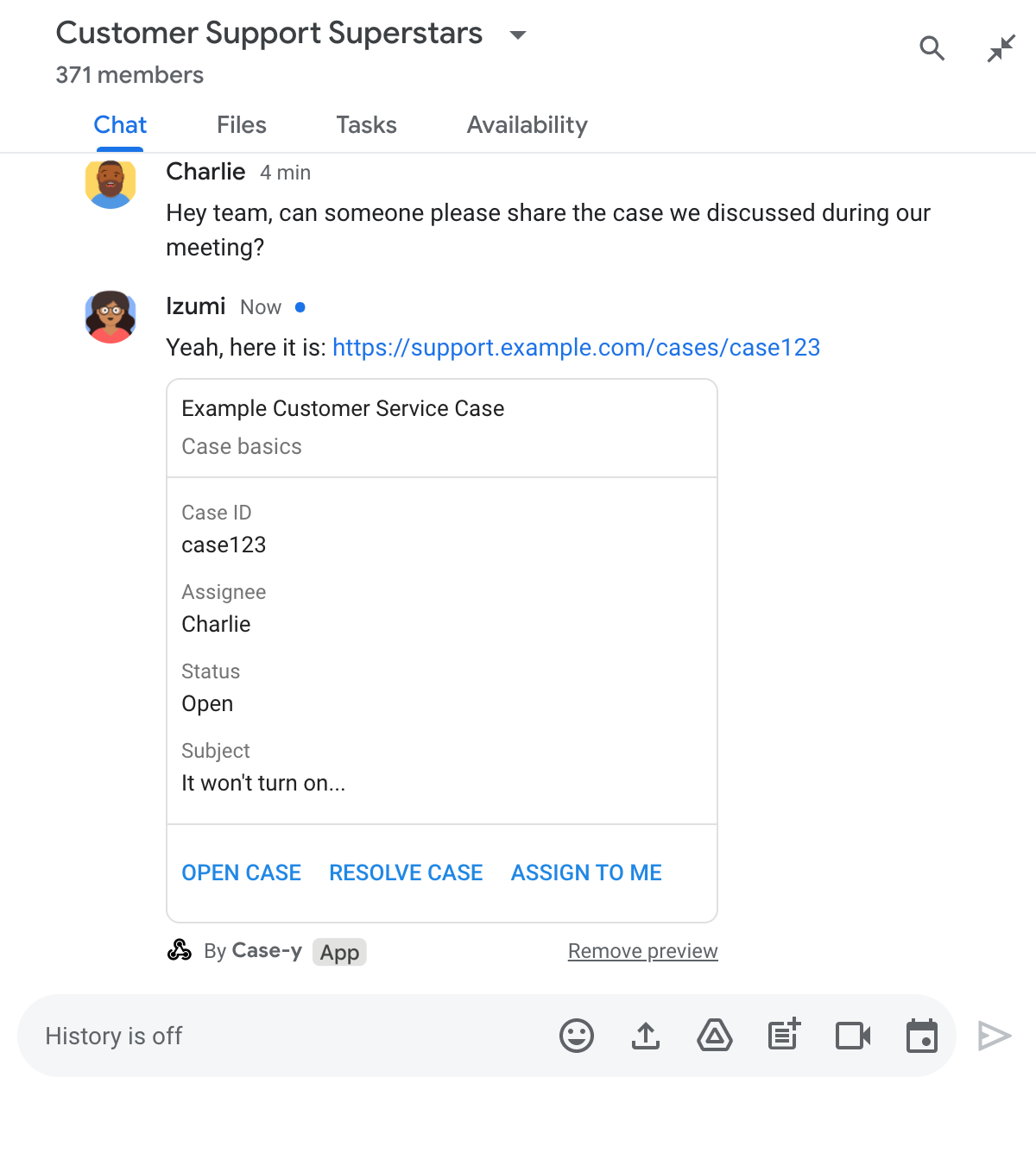
تتيح ميزة "معاينة الروابط" لتطبيق Chat المدمج في المساحة، Case-y، إرفاق بطاقة تعرض معلومات عن الشخص المسؤول والحالة والموضوع كلما شارك أحد المستخدمين رابطًا لطلب دعم. تتيح الأزرار الموجودة على البطاقة للموظفين تولي مسؤولية طلب الدعم وتغيير الحالة مباشرةً من المحادثة.

عندما يضيف مستخدم رابطًا إلى رسالته، يظهر رمز صغير يتيح له معرفة أنّ تطبيق Chat قد يعرض معاينة للرابط.
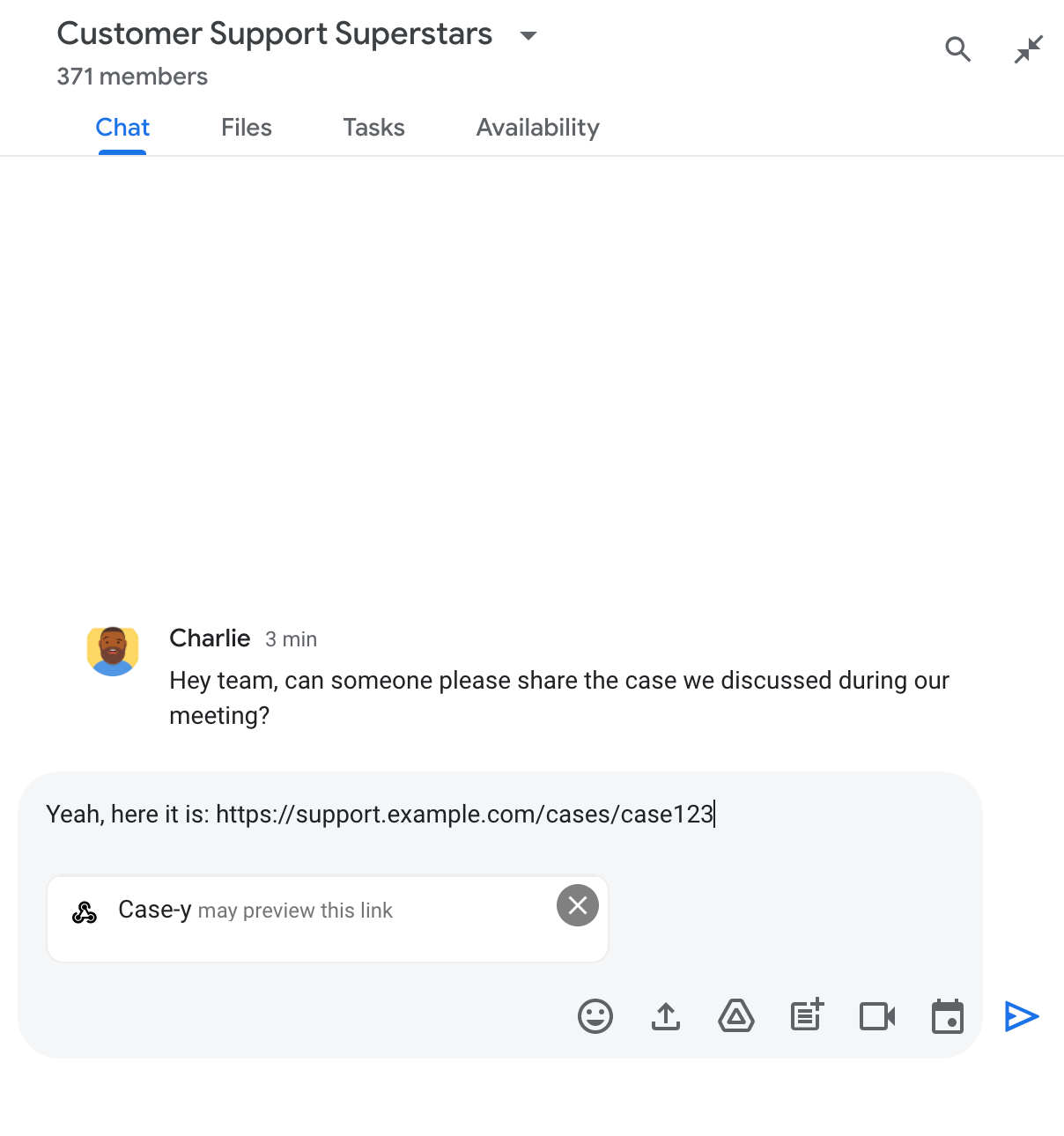
شريحة تشير إلى أنّ أحد تطبيقات Chat قد يعاين رابطًا

بعد إرسال الرسالة، يتم إرسال الرابط إلى تطبيق Chat، الذي ينشئ البطاقة ثم يرفقها برسالة المستخدم.

تطبيق Chat يعرض معاينة لرابط من خلال إرفاق بطاقة بالرسالة

تقدّم البطاقة معلومات إضافية عن الرابط، بما في ذلك عناصر تفاعلية مثل الأزرار. يمكن لتطبيق الدردشة تعديل البطاقة المرفقة استجابةً لتفاعلات المستخدمين، مثل النقر على الأزرار.

إذا كان المستخدم لا يريد أن يعرض تطبيق Chat معاينة للرابط من خلال إرفاق بطاقة بالرسالة، يمكنه منع المعاينة من خلال النقر على في شريحة المعاينة. يمكن للمستخدمين إزالة البطاقة المرفقة في أي وقت من خلال النقر على إزالة المعاينة.

المتطلبات الأساسية

HTTP

إضافة Google Workspace توسّع نطاق Google Chat. لإنشاء واحد، أكمل البدء السريع في HTTP.

برمجة التطبيقات

إضافة Google Workspace توسّع نطاق Google Chat. لإنشاء تطبيق، أكمِل دليل البدء السريع في Apps Script.

سجِّل روابط معيّنة، مثل example.com وsupport.example.com وsupport.example.com/cases/، كأنماط عناوين URL في صفحة إعداد تطبيق Chat ضمن "وحدة تحكّم Google Cloud" ليتمكّن تطبيق Chat من معاينتها.
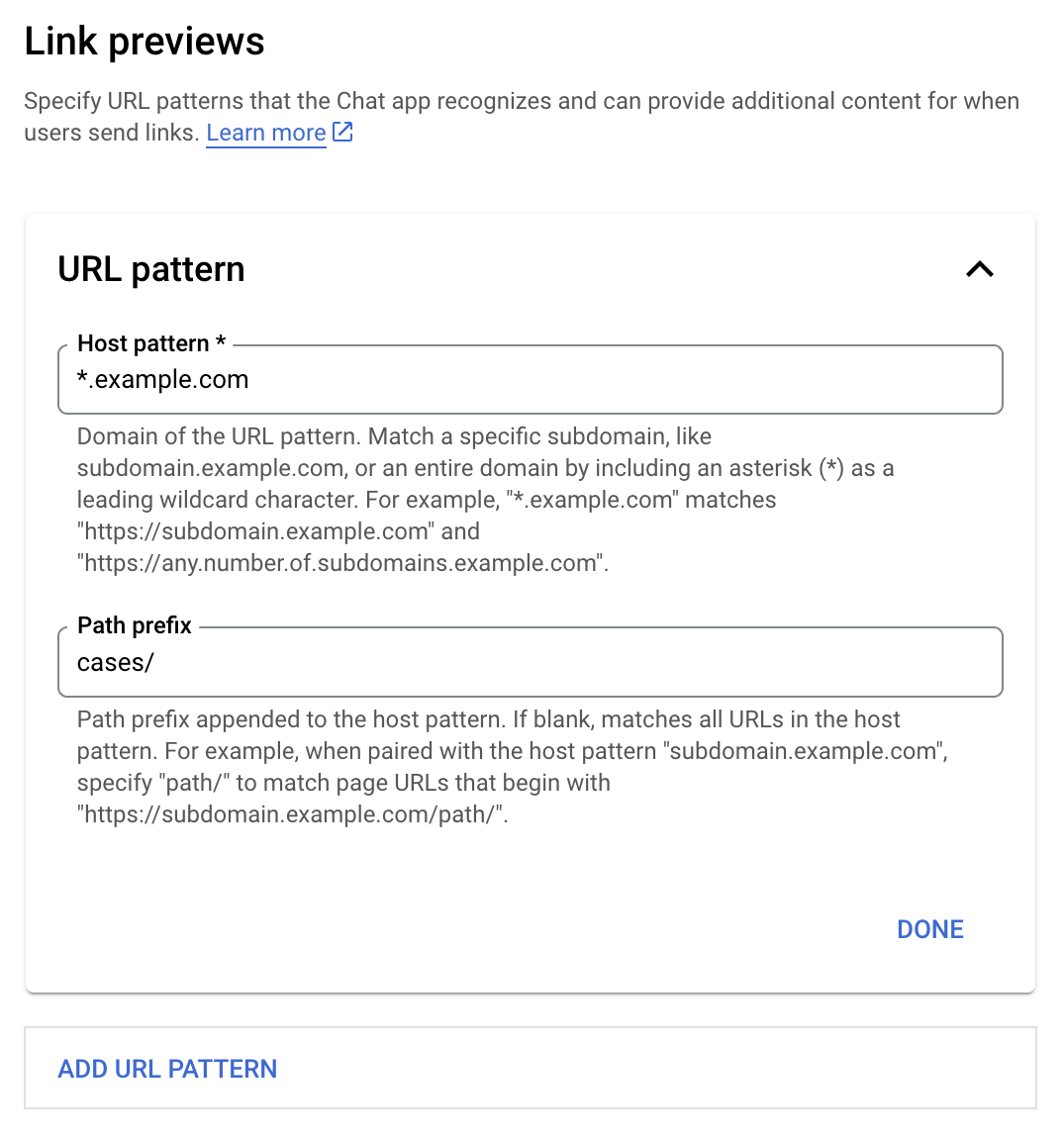
قائمة إعدادات معاينات الروابط

  1. افتح Google Cloud Console.
  2. بجانب "Google Cloud"، انقر على السهم المتّجه للأسفل وافتح مشروع تطبيق Chat.
  3. في حقل البحث، اكتب Google Chat API وانقر على واجهة برمجة تطبيقات Google Chat.
  4. انقر على إدارة > الإعداد.
  5. ضمن "معاينات الروابط"، أضِف نمط عنوان URL أو عدِّله.
    1. لضبط معاينات الروابط لنمط عنوان URL جديد، انقر على إضافة نمط عنوان URL.
    2. لتعديل إعدادات نمط عنوان URL حالي، انقر على السهم المتّجه للأسفل .
  6. في الحقل نمط المضيف، أدخِل نطاق نمط عنوان URL. سيعاين تطبيق Chat الروابط المؤدية إلى هذا النطاق.

    لكي يعرض تطبيق Chat معاينات للروابط الخاصة بنطاق فرعي معيّن، مثل subdomain.example.com، عليك تضمين النطاق الفرعي.

    لكي يعرض تطبيق Chat معاينة للروابط الخاصة بالنطاق بأكمله، حدِّد حرف بدل مع علامة نجمة (*) كنطاق فرعي. على سبيل المثال، تتطابق *.example.com مع subdomain.example.com وany.number.of.subdomains.example.com.

  7. في حقل بادئة المسار، أدخِل مسارًا لإلحاقه بنطاق نمط المضيف.

    لمطابقة جميع عناوين URL في نطاق نمط المضيف، اترك بادئة المسار فارغة.

    على سبيل المثال، إذا كان نمط المضيف هو support.example.com، ولتطابق عناوين URL للحالات المستضافة على support.example.com/cases/، أدخِل cases/.

  8. انقر على تم.

  9. انقر على حفظ.

من الآن فصاعدًا، عندما يضيف مستخدم رابطًا يتطابق مع نمط عنوان URL لمعاينة الرابط إلى رسالة في مساحة Chat تتضمّن تطبيق Chat، سيعرض تطبيقك معاينة للرابط.

بعد إعداد ميزة معاينة الروابط لرابط معيّن، يمكن لتطبيق Chat التعرّف على الرابط ومعاينته من خلال إرفاق المزيد من المعلومات به.

في مساحات Chat التي تتضمّن تطبيق Chat، عندما تتضمّن رسالة أحد المستخدمين رابطًا يتطابق مع نمط عنوان URL لمعاينة الرابط، يتلقّى تطبيق Chat عنصر حدث يتضمّن MessagePayload. في الحمولة، يحتوي العنصر message.matchedUrl على الرابط الذي أدرجه المستخدم في الرسالة:

JSON

message: {
  matchedUrl: {
    url: "https://support.example.com/cases/case123"
  },
  ... // other message attributes redacted
}

من خلال التحقّق من توفّر الحقل matchedUrl في حمولة حدث MESSAGE، يمكن لتطبيق Chat إضافة معلومات إلى الرسالة التي تتضمّن الرابط الذي تمت معاينته. يمكن لتطبيق Chat الردّ برسالة نصية أساسية أو إرفاق بطاقة.

الرد برسالة نصية

للحصول على ردود أساسية، يمكن لتطبيق Chat معاينة رابط من خلال الرد برسالة نصية على رابط. يرفق هذا المثال رسالة تكرّر عنوان URL للرابط الذي يتطابق مع نمط عنوان URL لمعاينة الرابط.

Node.js

node/chat/preview-link/index.js
// Reply with a text message for URLs of the subdomain "text"
if (chatMessage.matchedUrl.url.includes("text.example.com")) {
  return { hostAppDataAction: { chatDataAction: { createMessageAction: { message: {
    text: 'event.chat.messagePayload.message.matchedUrl.url: ' + chatMessage.matchedUrl.url
  }}}}};
}

استبدِل FUNCTION_URL بنقطة نهاية HTTP التي تعالج نقرات الأزرار.

Python

python/chat/preview-link/main.py
# Reply with a text message for URLs of the subdomain "text"
if "text.example.com" in chatMessage.get('matchedUrl').get('url'):
  return { 'hostAppDataAction': { 'chatDataAction': { 'createMessageAction': { 'message': {
    'text': 'event.chat.messagePayload.message.matchedUrl.url: ' + chatMessage.get('matchedUrl').get('url')
  }}}}}

استبدِل FUNCTION_URL بنقطة نهاية HTTP التي تعالج نقرات الأزرار.

Java

java/chat/preview-link/src/main/java/com/google/chat/previewLink/App.java
// Reply with a text message for URLs of the subdomain "text"
if (chatMessage.at("/matchedUrl/url").asText().contains("text.example.com")) {
  return new GenericJson() {{
    put("hostAppDataAction", new GenericJson() {{
      put("chatDataAction", new GenericJson() {{
        put("createMessageAction", new GenericJson() {{
          put("message", new GenericJson() {{
            put("text", "event.chat.messagePayload.message.matchedUrl.url: " + chatMessage.at("/matchedUrl/url").asText());
          }});
        }});
      }});
    }});
  }};
}

استبدِل FUNCTION_URL بنقطة نهاية HTTP التي تعالج نقرات الأزرار.

برمجة التطبيقات

apps-script/chat/preview-link/preview-link.gs
// Reply with a text message for URLs of the subdomain "text".
if (chatMessage.matchedUrl.url.includes("text.example.com")) {
  return { hostAppDataAction: { chatDataAction: { createMessageAction: { message: {
    text: 'event.chat.messagePayload.message.matchedUrl.url: ' + chatMessage.matchedUrl.url
  }}}}};
}

لإرفاق بطاقة برابط تمتت معاينته، عليك عرض الإجراء DataActions مع الكائن ChatDataActionMarkup من النوع UpdateInlinePreviewAction.

في المثال التالي، يضيف تطبيق Chat بطاقة معاينة إلى الرسائل التي تتضمّن نمط عنوان URL support.example.com.

تطبيق Chat يعرض معاينة لرابط من خلال إرفاق بطاقة بالرسالة

Node.js

node/chat/preview-link/index.js
// Attach a card to the message for URLs of the subdomain "support"
if (chatMessage.matchedUrl.url.includes("support.example.com")) {
  // A hard-coded card is used in this example. In a real-life scenario,
  // the case information would be fetched and used to build the card.
  return { hostAppDataAction: { chatDataAction: { updateInlinePreviewAction: { cardsV2: [{
    cardId: 'attachCard',
    card: {
      header: {
        title: 'Example Customer Service Case',
        subtitle: 'Case basics',
      },
      sections: [{ widgets: [
      { decoratedText: { topLabel: 'Case ID', text: 'case123'}},
      { decoratedText: { topLabel: 'Assignee', text: 'Charlie'}},
      { decoratedText: { topLabel: 'Status', text: 'Open'}},
      { decoratedText: { topLabel: 'Subject', text: 'It won\'t turn on...' }},
      { buttonList: { buttons: [{
        text: 'OPEN CASE',
        onClick: { openLink: {
          url: 'https://support.example.com/orders/case123'
        }},
      }, {
        text: 'RESOLVE CASE',
        onClick: { openLink: {
          url: 'https://support.example.com/orders/case123?resolved=y',
        }},
      }, {
        text: 'ASSIGN TO ME',
        onClick: { action: { function: FUNCTION_URL }}
      }]}}
      ]}]
    }
  }]}}}};
}

استبدِل FUNCTION_URL بنقطة نهاية HTTP التي تعالج نقرات الأزرار.

Python

python/chat/preview-link/main.py
# Attach a card to the message for URLs of the subdomain "support"
if "support.example.com" in chatMessage.get('matchedUrl').get('url'):
  # A hard-coded card is used in this example. In a real-life scenario,
  # the case information would be fetched and used to build the card.
  return { 'hostAppDataAction': { 'chatDataAction': { 'updateInlinePreviewAction': { 'cardsV2': [{
    'cardId': 'attachCard',
    'card': {
      'header': {
        'title': 'Example Customer Service Case',
        'subtitle': 'Case basics',
      },
      'sections': [{ 'widgets': [
      { 'decoratedText': { 'topLabel': 'Case ID', 'text': 'case123'}},
      { 'decoratedText': { 'topLabel': 'Assignee', 'text': 'Charlie'}},
      { 'decoratedText': { 'topLabel': 'Status', 'text': 'Open'}},
      { 'decoratedText': { 'topLabel': 'Subject', 'text': 'It won\'t turn on...' }},
      { 'buttonList': { 'buttons': [{
        'text': 'OPEN CASE',
        'onClick': { 'openLink': {
          'url': 'https://support.example.com/orders/case123'
        }},
      }, {
        'text': 'RESOLVE CASE',
        'onClick': { 'openLink': {
          'url': 'https://support.example.com/orders/case123?resolved=y',
        }},
      }, {
        'text': 'ASSIGN TO ME',
        'onClick': { 'action': { 'function': FUNCTION_URL }}
      }]}}
      ]}]
    }
  }]}}}}

استبدِل FUNCTION_URL بنقطة نهاية HTTP التي تعالج نقرات الأزرار.

Java

java/chat/preview-link/src/main/java/com/google/chat/previewLink/App.java
// Attach a card to the message for URLs of the subdomain "support"
if (chatMessage.at("/matchedUrl/url").asText().contains("support.example.com")) {
  // A hard-coded card is used in this example. In a real-life scenario,
  // the case information would be fetched and used to build the card.
  CardWithId cardV2 = new CardWithId()
    .setCardId("attachCard")
    .setCard(new GoogleAppsCardV1Card()
      .setHeader(new GoogleAppsCardV1CardHeader()
        .setTitle("Example Customer Service Case")
        .setSubtitle("Case basics"))
      .setSections(List.of(new GoogleAppsCardV1Section().setWidgets(List.of(
        new GoogleAppsCardV1Widget().setDecoratedText(new GoogleAppsCardV1DecoratedText()
          .setTopLabel("Case ID")
          .setText("case123")),
        new GoogleAppsCardV1Widget().setDecoratedText(new GoogleAppsCardV1DecoratedText()
          .setTopLabel("Assignee")
          .setText("Charlie")),
        new GoogleAppsCardV1Widget().setDecoratedText(new GoogleAppsCardV1DecoratedText()
          .setTopLabel("Status")
          .setText("Open")),
        new GoogleAppsCardV1Widget().setDecoratedText(new GoogleAppsCardV1DecoratedText()
          .setTopLabel("Subject")
          .setText("It won't turn on...")),
        new GoogleAppsCardV1Widget().setButtonList(new GoogleAppsCardV1ButtonList()
          .setButtons(List.of(
            new GoogleAppsCardV1Button()
              .setText("OPEN CASE")
            .setOnClick(new GoogleAppsCardV1OnClick()
                .setOpenLink(new GoogleAppsCardV1OpenLink()
                  .setUrl("https://support.example.com/orders/case123"))),
            new GoogleAppsCardV1Button()
              .setText("RESOLVE CASE")
            .setOnClick(new GoogleAppsCardV1OnClick()
                .setOpenLink(new GoogleAppsCardV1OpenLink()
                  .setUrl("https://support.example.com/orders/case123?resolved=y"))),
            new GoogleAppsCardV1Button()
              .setText("ASSIGN TO ME")
              .setOnClick(new GoogleAppsCardV1OnClick()
                .setAction(new GoogleAppsCardV1Action().setFunction(FUNCTION_URL)))
          ))
        )
      ))))
    );

  return new GenericJson() {{
    put("hostAppDataAction", new GenericJson() {{
      put("chatDataAction", new GenericJson() {{
        put("updateInlinePreviewAction", new GenericJson() {{
          put("cardsV2", List.of(cardV2));
        }});
      }});
    }});
  }};
}

استبدِل FUNCTION_URL بنقطة نهاية HTTP التي تعالج نقرات الأزرار.

برمجة التطبيقات

apps-script/chat/preview-link/preview-link.gs
// Attach a card to the message for URLs of the subdomain "support".
if (chatMessage.matchedUrl.url.includes("support.example.com")) {
  // A hard-coded card is used in this example. In a real-life scenario,
  // the case information would be fetched and used to build the card.
  return { hostAppDataAction: { chatDataAction: { updateInlinePreviewAction: { cardsV2: [{
    cardId: 'attachCard',
    card: {
      header: {
        title: 'Example Customer Service Case',
        subtitle: 'Case summary',
      },
      sections: [{ widgets: [
      { decoratedText: { topLabel: 'Case ID', text: 'case123'}},
      { decoratedText: { topLabel: 'Assignee', text: 'Charlie'}},
      { decoratedText: { topLabel: 'Status', text: 'Open'}},
      { decoratedText: { topLabel: 'Subject', text: 'It won\'t turn on...' }},
      { buttonList: { buttons: [{
        text: 'OPEN CASE',
        onClick: { openLink: {
          url: 'https://support.example.com/orders/case123'
        }},
      }, {
        text: 'RESOLVE CASE',
        onClick: { openLink: {
          url: 'https://support.example.com/orders/case123?resolved=y',
        }},
      }, {
        text: 'ASSIGN TO ME',
        // Clicking this button triggers the execution of the function
        // "assign" from the Apps Script project.
        onClick: { action: { function: 'assign'}}
      }]}}
      ]}]
    }
  }]}}}};
}

يمكن لتطبيق Chat تعديل بطاقة معاينة الرابط عندما يتفاعل المستخدمون معها، مثلاً من خلال النقر على زر في البطاقة.

لتعديل البطاقة، يجب أن يعرض تطبيق Chat الإجراء DataActions مع أحد عناصر ChatDataActionMarkup التالية:

لتحديد هوية مرسل الرسالة، استخدِم حمولة الحدث (buttonClickedPayload) للتحقّق مما إذا تم ضبط المرسل (message.sender.type) على HUMAN (مستخدم) أو BOT (تطبيق Chat).

يوضّح المثال التالي كيف يحدّث تطبيق Chat معاينة الرابط عندما ينقر مستخدم على الزر تعييني من خلال تعديل حقل المسؤول في البطاقة وإيقاف الزر.
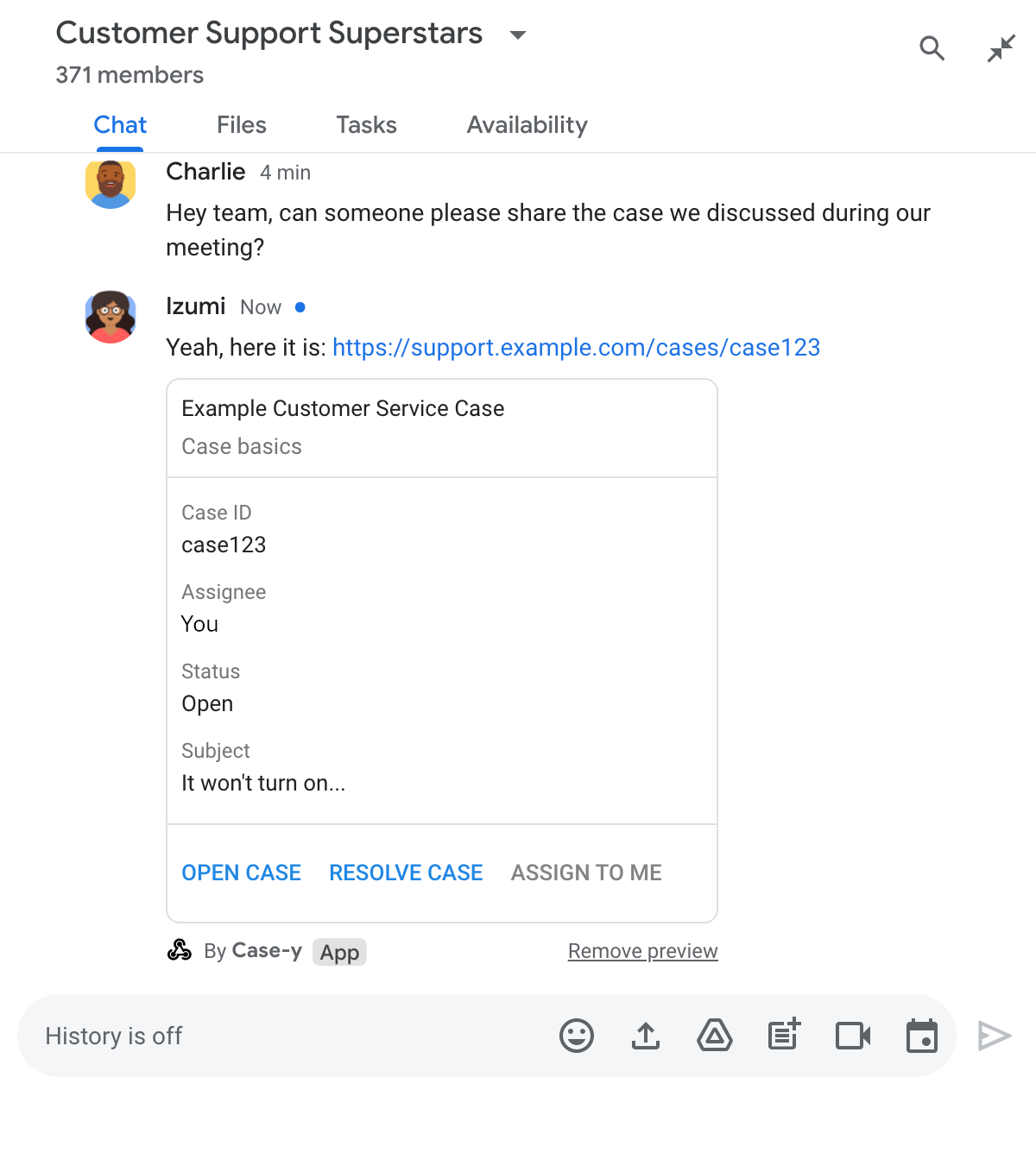
تطبيق Chat يعرض معاينة لرابط يتضمّن نسخة معدَّلة من بطاقة مرفقة برسالة

Node.js

node/chat/preview-link/index.js
/**
 * Respond to clicks by assigning and updating the card that's attached to a
 * message previewed link of the pattern "support.example.com".
 *
 * @param {Object} chatMessage The chat message object from Google Workspace Add On event.
 * @return {Object} Action response depending on the message author.
 */
function handleCardClick(chatMessage) {
  // Creates the updated card that displays "You" for the assignee
  // and that disables the button.
  //
  // A hard-coded card is used in this example. In a real-life scenario,
  // an actual assign action would be performed before building the card.
  const message = { cardsV2: [{
    cardId: 'attachCard',
    card: {
      header: {
        title: 'Example Customer Service Case',
        subtitle: 'Case basics',
      },
      sections: [{ widgets: [
        { decoratedText: { topLabel: 'Case ID', text: 'case123'}},
        // The assignee is now "You"
        { decoratedText: { topLabel: 'Assignee', text: 'You'}},
        { decoratedText: { topLabel: 'Status', text: 'Open'}},
        { decoratedText: { topLabel: 'Subject', text: 'It won\'t turn on...' }},
        { buttonList: { buttons: [{
          text: 'OPEN CASE',
          onClick: { openLink: {
            url: 'https://support.example.com/orders/case123'
          }},
        }, {
          text: 'RESOLVE CASE',
          onClick: { openLink: {
            url: 'https://support.example.com/orders/case123?resolved=y',
          }},
        }, {
          text: 'ASSIGN TO ME',
          // The button is now disabled
          disabled: true,
          onClick: { action: { function: FUNCTION_URL }}
        }]}}
      ]}]
    }
  }]};

  // Use the adequate action response type. It depends on whether the message
  // the preview link card is attached to was created by a human or a Chat app.
  if(chatMessage.sender.type === 'HUMAN') {
    return { hostAppDataAction: { chatDataAction: { updateInlinePreviewAction: message }}};
  } else {
    return { hostAppDataAction: { chatDataAction: { updateMessageAction: message }}};
  }
}

استبدِل FUNCTION_URL بنقطة نهاية HTTP التي تعالج نقرات الأزرار.

Python

python/chat/preview-link/main.py
def handle_card_click(chatMessage: dict) -> dict:
  """Respond to clicks by assigning and updating the card that's attached to a
  message previewed link of the pattern "support.example.com".

  - Reply with text messages that echo "text.example.com" link URLs in messages.
  - Attach cards to messages with "support.example.com" link URLs.

  Args:
      chatMessage (Mapping[str, Any]): The chat message object from Google Workspace Add On event.

  Returns:
      Mapping[str, Any]: Action response depending on the message author.
  """
  # Creates the updated card that displays "You" for the assignee
  # and that disables the button.
  #
  # A hard-coded card is used in this example. In a real-life scenario,
  # an actual assign action would be performed before building the card.
  message = { 'cardsV2': [{
    'cardId': 'attachCard',
    'card': {
      'header': {
        'title': 'Example Customer Service Case',
        'subtitle': 'Case basics',
      },
      'sections': [{ 'widgets': [
      { 'decoratedText': { 'topLabel': 'Case ID', 'text': 'case123'}},
      # The assignee is now "You"
      { 'decoratedText': { 'topLabel': 'Assignee', 'text': 'You'}},
      { 'decoratedText': { 'topLabel': 'Status', 'text': 'Open'}},
      { 'decoratedText': { 'topLabel': 'Subject', 'text': 'It won\'t turn on...' }},
      { 'buttonList': { 'buttons': [{
        'text': 'OPEN CASE',
        'onClick': { 'openLink': {
          'url': 'https://support.example.com/orders/case123'
        }},
      }, {
        'text': 'RESOLVE CASE',
        'onClick': { 'openLink': {
          'url': 'https://support.example.com/orders/case123?resolved=y',
        }},
      }, {
        'text': 'ASSIGN TO ME',
        # The button is now disabled
        'disabled': True,
        'onClick': { 'action': { 'function': FUNCTION_URL }}
      }]}}
      ]}]
    }
  }]}

  # Use the adequate action response type. It depends on whether the message
  # the preview link card is attached to was created by a human or a Chat app.
  if chatMessage.get('sender').get('type') == 'HUMAN':
    return { 'hostAppDataAction': { 'chatDataAction': { 'updateInlinePreviewAction': message }}}
  else:
    return { 'hostAppDataAction': { 'chatDataAction': { 'updateMessageAction': message }}}

استبدِل FUNCTION_URL بنقطة نهاية HTTP التي تعالج نقرات الأزرار.

Java

java/chat/preview-link/src/main/java/com/google/chat/previewLink/App.java
/**
 * Respond to clicks by assigning and updating the card that's attached to a
 * message previewed link of the pattern "support.example.com".
 *
 * @param chatMessage The chat message object from Google Workspace Add On event.
 * @return Action response depending on the message author.
 */
GenericJson handleCardClick(JsonNode chatMessage) {
  // Creates the updated card that displays "You" for the assignee
  // and that disables the button.
  //
  // A hard-coded card is used in this example. In a real-life scenario,
  // an actual assign action would be performed before building the card.
  Message message = new Message().setCardsV2(List.of(new CardWithId()
    .setCardId("attachCard")
    .setCard(new GoogleAppsCardV1Card()
      .setHeader(new GoogleAppsCardV1CardHeader()
        .setTitle("Example Customer Service Case")
        .setSubtitle("Case basics"))
      .setSections(List.of(new GoogleAppsCardV1Section().setWidgets(List.of(
        new GoogleAppsCardV1Widget().setDecoratedText(new GoogleAppsCardV1DecoratedText()
          .setTopLabel("Case ID")
          .setText("case123")),
        // The assignee is now "You"
        new GoogleAppsCardV1Widget().setDecoratedText(new GoogleAppsCardV1DecoratedText()
          .setTopLabel("Assignee")
          .setText("You")),
        new GoogleAppsCardV1Widget().setDecoratedText(new GoogleAppsCardV1DecoratedText()
          .setTopLabel("Status")
          .setText("Open")),
        new GoogleAppsCardV1Widget().setDecoratedText(new GoogleAppsCardV1DecoratedText()
          .setTopLabel("Subject")
          .setText("It won't turn on...")),
        new GoogleAppsCardV1Widget().setButtonList(new GoogleAppsCardV1ButtonList()
          .setButtons(List.of(
            new GoogleAppsCardV1Button()
              .setText("OPEN CASE")
              .setOnClick(new GoogleAppsCardV1OnClick()
                .setOpenLink(new GoogleAppsCardV1OpenLink()
                  .setUrl("https://support.example.com/orders/case123"))),
            new GoogleAppsCardV1Button()
              .setText("RESOLVE CASE")
              .setOnClick(new GoogleAppsCardV1OnClick()
                .setOpenLink(new GoogleAppsCardV1OpenLink()
                  .setUrl("https://support.example.com/orders/case123?resolved=y"))),
            new GoogleAppsCardV1Button()
              .setText("ASSIGN TO ME")
              // The button is now disabled
              .setDisabled(true)
              .setOnClick(new GoogleAppsCardV1OnClick()
                .setAction(new GoogleAppsCardV1Action().setFunction(FUNCTION_URL)))
          ))
        )
      ))))
    )
  ));

  // Use the adequate action response type. It depends on whether the message
  // the preview link card is attached to was created by a human or a Chat app.
  if("HUMAN".equals(chatMessage.at("/sender/type").asText())) {
    return new GenericJson() {{
      put("hostAppDataAction", new GenericJson() {{
        put("chatDataAction", new GenericJson() {{
          put("updateInlinePreviewAction", message);
        }});
      }});
    }};
  } else {
    return new GenericJson() {{
      put("hostAppDataAction", new GenericJson() {{
        put("chatDataAction", new GenericJson() {{
          put("updateMessageAction", message);
        }});
      }});
    }};
  }
}

استبدِل FUNCTION_URL بنقطة نهاية HTTP التي تعالج نقرات الأزرار.

برمجة التطبيقات

apps-script/chat/preview-link/preview-link.gs
/**
 * Assigns and updates the card that's attached to a message with a
 * previewed link of the pattern "support.example.com".
 *
 * @param {Object} event The event object from the Google Workspace add-on.
 * @return {Object} Action response depending on the message author.
 */
function assign(event) {
  // Creates the updated card that displays "You" for the assignee
  // and that disables the button.
  //
  // A hard-coded card is used in this example. In a real-life scenario,
  // an actual assign action would be performed before building the card.
  const message = { cardsV2: [{
    cardId: 'attachCard',
    card: {
      header: {
        title: 'Example Customer Service Case',
        subtitle: 'Case summary',
      },
      sections: [{ widgets: [
        { decoratedText: { topLabel: 'Case ID', text: 'case123'}},
        // The assignee is now "You"
        { decoratedText: { topLabel: 'Assignee', text: 'You'}},
        { decoratedText: { topLabel: 'Status', text: 'Open'}},
        { decoratedText: { topLabel: 'Subject', text: 'It won\'t turn on...' }},
        { buttonList: { buttons: [{
          text: 'OPEN CASE',
          onClick: { openLink: {
            url: 'https://support.example.com/orders/case123'
          }},
        }, {
          text: 'RESOLVE CASE',
          onClick: { openLink: {
            url: 'https://support.example.com/orders/case123?resolved=y',
          }},
        }, {
          text: 'ASSIGN TO ME',
          // The button is now disabled
          disabled: true,
          onClick: { action: { function: 'assign'}}
        }]}}
      ]}]
    }
  }]};

  // Use the adequate action response type. It depends on whether the message
  // the preview link card is attached to was created by a human or a Chat app.
  if(event.chat.buttonClickedPayload.message.sender.type === 'HUMAN') {
    return { hostAppDataAction: { chatDataAction: { updateInlinePreviewAction: message }}};
  } else {
    return { hostAppDataAction: { chatDataAction: { updateMessageAction: message }}};
  }
}

الحدود والاعتبارات

أثناء إعداد معاينات الروابط لتطبيق Chat، يُرجى الانتباه إلى هذه الحدود والاعتبارات:

  • يتيح كل تطبيق من تطبيقات Chat معاينات الروابط لما يصل إلى 5 أنماط عناوين URL.
  • تعرض تطبيقات المحادثة معاينة لرابط واحد في كل رسالة. إذا كانت هناك روابط متعددة يمكن معاينتها في رسالة واحدة، ستتم معاينة الرابط الأول فقط.
  • تعرض تطبيقات الدردشة معاينات للروابط التي تبدأ بـ https:// فقط، لذا تعرض https://support.example.com/cases/ معاينات، ولكن لا يعرض support.example.com/cases/ معاينات.
  • ما لم تتضمّن الرسالة معلومات أخرى يتم إرسالها إلى تطبيق Chat، مثل أمر يبدأ بشرطة مائلة، لن يتم إرسال سوى عنوان URL للرابط إلى تطبيق Chat من خلال معاينات الروابط.
  • إذا نشر مستخدم الرابط، لا يمكن لتطبيق Chat تعديل بطاقة معاينة الرابط إلا إذا تفاعل المستخدمون مع البطاقة، مثلاً من خلال النقر على زر. لا يمكنك استدعاء طريقة update() في Chat API على المورد Message لتعديل رسالة مستخدم بشكل غير متزامن.
  • يجب أن تعاين تطبيقات الدردشة الروابط لجميع المشاركين في المساحة، لذا يجب أن تحذف الرسالة الحقل privateMessageViewer.

أثناء تنفيذ معاينات الروابط، قد تحتاج إلى تصحيح أخطاء تطبيق Chat من خلال قراءة سجلات التطبيق. لقراءة السجلّات، انتقِل إلى مستكشف السجلّات في Google Cloud Console.