הצגת תצוגה מקדימה של קישורים בהודעות ב-Google Chat

כדי למנוע מעבר הקשר כשמשתמשים משתפים קישור ב-Google Chat, אפליקציית Chat יכולה להציג תצוגה מקדימה של הקישור על ידי צירוף כרטיס להודעה שלהם עם מידע נוסף, ולאפשר לאנשים לבצע פעולה ישירות מ-Google Chat.

לדוגמה, נניח שיש מרחב ב-Google Chat שכולל את כל נציגי שירות הלקוחות של חברה מסוימת, וגם אפליקציה ל-Chat בשם Case-y. נציגי שירות לקוחות משתפים לעיתים קרובות קישורים לפנייות שירות במרחב הצ'אט, ובכל פעם שהם עושים זאת, הקולגות שלהם צריכים לפתוח את הקישור לפנייה כדי לראות פרטים כמו הנציג שאליו הוקצתה הפנייה, הסטטוס והנושא. באופן דומה, אם מישהו רוצה לקבל בעלות על פנייה או לשנות את הסטטוס שלה, הוא צריך לפתוח את הקישור.

התצוגה המקדימה של קישורים מאפשרת לאפליקציית Chat שפועלת במרחב, Case-y, לצרף כרטיס עם פרטים על המקרה, כמו המקצה, הסטטוס והנושא, בכל פעם שמישהו משתף קישור למקרה. הכפתורים בכרטיס מאפשרים לנציגים לקבל בעלות על הפנייה ולשנות את הסטטוס שלה ישירות מזרם הצ'אט.

כשמישהו מוסיף קישור להודעה שלו, מופיע צ'יפ שמודיע לו שאפליקציית Chat עשויה להציג תצוגה מקדימה של הקישור.
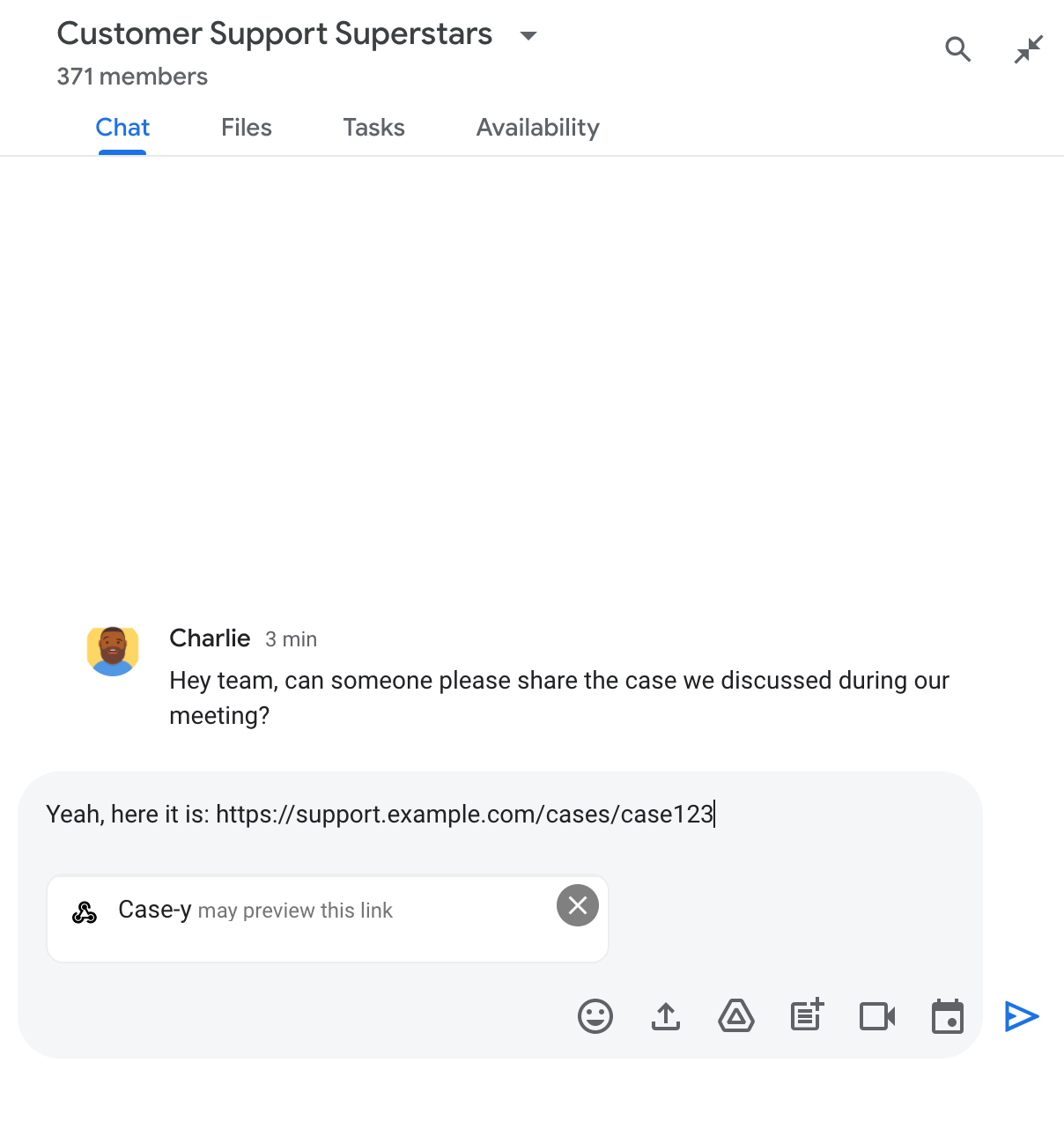
צ'יפ שמציין שאפליקציית Chat עשויה להציג תצוגה מקדימה של קישור

אחרי שליחת ההודעה, הקישור נשלח לאפליקציית Chat, שיוצרת את הכרטיס ומצרפת אותו להודעה של המשתמש.
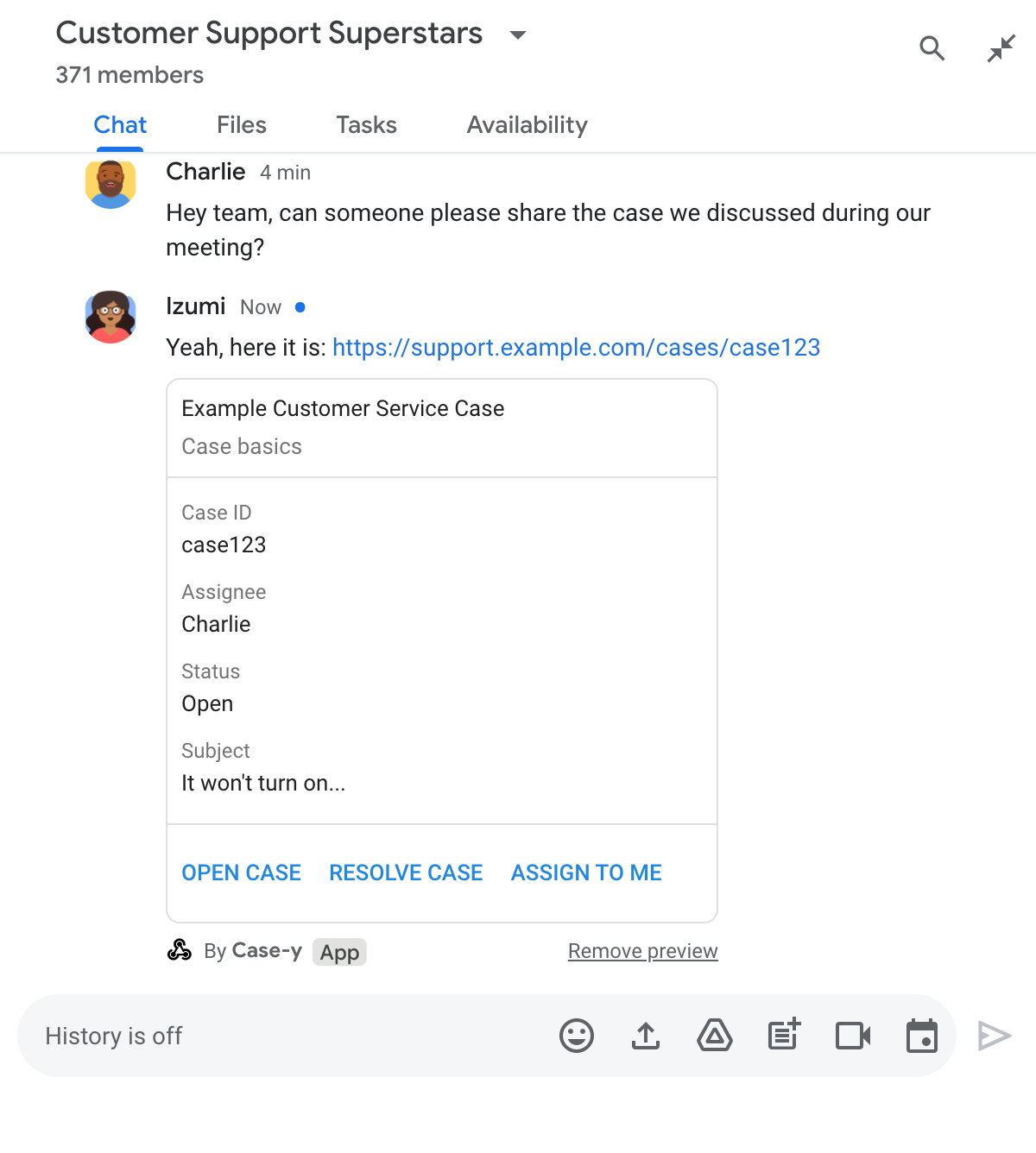
תצוגה מקדימה של קישור באפליקציית Chat על ידי צירוף כרטיס להודעה

בכרטיס מוצג מידע נוסף על הקישור, כולל רכיבים אינטראקטיביים כמו לחצנים. אפליקציית הצ'אט יכולה לעדכן את הכרטיס המצורף בתגובה לאינטראקציות של המשתמשים, כמו קליקים על לחצנים.

אם מישהו לא רוצה שאפליקציית Chat תציג תצוגה מקדימה של הקישור שלו על ידי צירוף כרטיס להודעה, הוא יכול למנוע את התצוגה המקדימה על ידי לחיצה על בצ'יפ התצוגה המקדימה. המשתמשים יכולים להסיר את הכרטיס המצורף מתי שרוצים בלחיצה על הסרת התצוגה המקדימה.

דרישות מוקדמות

HTTP

תוסף ל-Google Workspace שמרחיב את Google Chat. כדי ליצור אחד כזה, צריך להשלים את המדריך להתחלה מהירה בנושא HTTP.

Apps Script

תוסף ל-Google Workspace שמרחיב את Google Chat. כדי ליצור אחד כזה, צריך להשלים את המדריך למתחילים בנושא Apps Script.

רושמים קישורים ספציפיים – כמו example.com, ‏ support.example.com ו-support.example.com/cases/ – כתבניות URL בדף ההגדרות של אפליקציית Chat במסוף Google Cloud, כדי שאפליקציית Chat תוכל להציג אותם בתצוגה מקדימה.
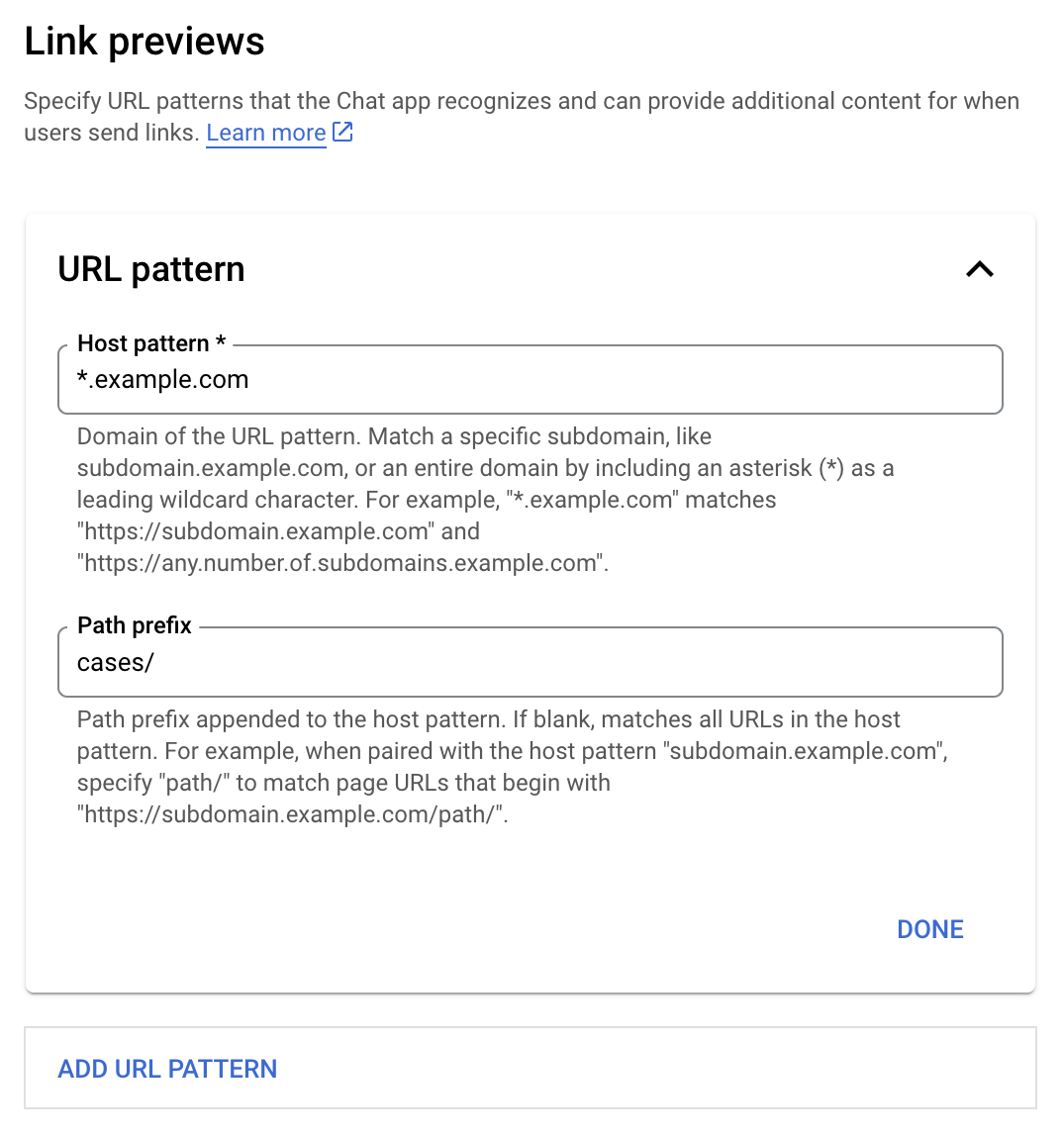
תפריט ההגדרות של התצוגה המקדימה של הקישור

  1. פותחים את מסוף Google Cloud.
  2. לצד Google Cloud, לוחצים על החץ למטה ופותחים את הפרויקט של אפליקציית Chat.
  3. בשדה החיפוש, מקלידים Google Chat API ולוחצים על Google Chat API.
  4. לוחצים על ניהול > הגדרות.
  5. בקטע 'תצוגה מקדימה של קישורים', מוסיפים או עורכים תבנית של כתובת URL.
    1. כדי להגדיר תצוגה מקדימה של קישורים לתבנית חדשה של כתובת URL, לוחצים על הוספת תבנית של כתובת URL.
    2. כדי לערוך את ההגדרה של תבנית כתובת URL קיימת, לוחצים על החץ למטה .
  6. בשדה תבנית מארח, מזינים את הדומיין של תבנית כתובת ה-URL. אפליקציית Chat תציג תצוגה מקדימה של קישורים לדומיין הזה.

    כדי שאפליקציית Chat תציג תצוגה מקדימה של קישורים לתת-דומיין ספציפי, כמו subdomain.example.com, צריך לכלול את תת-הדומיין.

    כדי שאפליקציית Chat תציג תצוגה מקדימה של קישורים לכל הדומיין, צריך לציין תו כללי לחיפוש עם כוכבית (*) כתת-הדומיין. לדוגמה, *.example.com מתאים ל-subdomain.example.com ול-any.number.of.subdomains.example.com.

  7. בשדה קידומת נתיב, מזינים נתיב לצירוף לדומיין של תבנית המארח.

    כדי להתאים את כל כתובות ה-URL בדומיין של תבנית המארח, משאירים את קידומת הנתיב ריקה.

    לדוגמה, אם תבנית המארח היא support.example.com, כדי להתאים לכתובות URL של מקרים שמתארחים ב-support.example.com/cases/, צריך להזין cases/.

  8. לוחצים על סיום.

  9. לוחצים על שמירה.

מעכשיו, בכל פעם שמישהו יכלול בהודעה במרחב ב-Chat שבו מותקנת אפליקציית Chat שלכם קישור שתואם לתבנית של כתובת URL לתצוגה מקדימה של קישור, האפליקציה שלכם תציג תצוגה מקדימה של הקישור.

אחרי שמגדירים תצוגה מקדימה של קישור מסוים, אפליקציית Chat יכולה לזהות את הקישור ולהציג אותו בתצוגה מקדימה על ידי הוספת מידע נוסף אליו.

במרחבים ב-Chat שכוללים את אפליקציית Chat שלכם, כשמישהו שולח הודעה שמכילה קישור שתואם לתבנית של כתובת URL לתצוגה מקדימה של קישור, אפליקציית Chat שלכם מקבלת אובייקט אירוע עם MessagePayload. ב-payload, האובייקט message.matchedUrl מכיל את הקישור שהמשתמש כלל בהודעה:

JSON

message: {
  matchedUrl: {
    url: "https://support.example.com/cases/case123"
  },
  ... // other message attributes redacted
}

אפליקציית Chat יכולה להוסיף מידע להודעה עם הקישור שמוצגת לגביו תצוגה מקדימה, על ידי בדיקה אם השדה matchedUrl קיים במטען הייעודי (payload) של אירוע MESSAGE. אפליקציית Chat יכולה לענות באמצעות הודעת טקסט בסיסית או לצרף כרטיס.

איך עונים להודעות טקסט

כדי לקבל תשובות בסיסיות, אפליקציית Chat יכולה להציג תצוגה מקדימה של קישור על ידי שליחת תשובה עם הודעת טקסט לקישור. בדוגמה הזו מצורפת הודעה שחוזרת על כתובת ה-URL של הקישור שתואמת לתבנית של כתובת URL של תצוגה מקדימה של קישור.

Node.js

node/chat/preview-link/index.js
// Reply with a text message for URLs of the subdomain "text"
if (chatMessage.matchedUrl.url.includes("text.example.com")) {
  return { hostAppDataAction: { chatDataAction: { createMessageAction: { message: {
    text: 'event.chat.messagePayload.message.matchedUrl.url: ' + chatMessage.matchedUrl.url
  }}}}};
}

מחליפים את הערך FUNCTION_URL בנקודת הקצה של HTTP שמטפלת בלחיצות על הלחצן.

Python

python/chat/preview-link/main.py
# Reply with a text message for URLs of the subdomain "text"
if "text.example.com" in chatMessage.get('matchedUrl').get('url'):
  return { 'hostAppDataAction': { 'chatDataAction': { 'createMessageAction': { 'message': {
    'text': 'event.chat.messagePayload.message.matchedUrl.url: ' + chatMessage.get('matchedUrl').get('url')
  }}}}}

מחליפים את הערך FUNCTION_URL בנקודת הקצה של HTTP שמטפלת בלחיצות על הלחצן.

Java

java/chat/preview-link/src/main/java/com/google/chat/previewLink/App.java
// Reply with a text message for URLs of the subdomain "text"
if (chatMessage.at("/matchedUrl/url").asText().contains("text.example.com")) {
  return new GenericJson() {{
    put("hostAppDataAction", new GenericJson() {{
      put("chatDataAction", new GenericJson() {{
        put("createMessageAction", new GenericJson() {{
          put("message", new GenericJson() {{
            put("text", "event.chat.messagePayload.message.matchedUrl.url: " + chatMessage.at("/matchedUrl/url").asText());
          }});
        }});
      }});
    }});
  }};
}

מחליפים את הערך FUNCTION_URL בנקודת הקצה של ה-HTTP שמטפלת בלחיצות על הלחצן.

Apps Script

apps-script/chat/preview-link/preview-link.gs
// Reply with a text message for URLs of the subdomain "text".
if (chatMessage.matchedUrl.url.includes("text.example.com")) {
  return { hostAppDataAction: { chatDataAction: { createMessageAction: { message: {
    text: 'event.chat.messagePayload.message.matchedUrl.url: ' + chatMessage.matchedUrl.url
  }}}}};
}

כדי לצרף כרטיס לקישור בתצוגה מקדימה, מחזירים את הפעולה DataActions עם האובייקט ChatDataActionMarkup מסוג UpdateInlinePreviewAction.

בדוגמה הבאה, אפליקציה ל-Chat מוסיפה כרטיס תצוגה מקדימה להודעות שמכילות את תבנית כתובת ה-URL‏ support.example.com.

אפליקציית Chat מציגה תצוגה מקדימה של קישור על ידי צירוף כרטיס להודעה

Node.js

node/chat/preview-link/index.js
// Attach a card to the message for URLs of the subdomain "support"
if (chatMessage.matchedUrl.url.includes("support.example.com")) {
  // A hard-coded card is used in this example. In a real-life scenario,
  // the case information would be fetched and used to build the card.
  return { hostAppDataAction: { chatDataAction: { updateInlinePreviewAction: { cardsV2: [{
    cardId: 'attachCard',
    card: {
      header: {
        title: 'Example Customer Service Case',
        subtitle: 'Case basics',
      },
      sections: [{ widgets: [
      { decoratedText: { topLabel: 'Case ID', text: 'case123'}},
      { decoratedText: { topLabel: 'Assignee', text: 'Charlie'}},
      { decoratedText: { topLabel: 'Status', text: 'Open'}},
      { decoratedText: { topLabel: 'Subject', text: 'It won\'t turn on...' }},
      { buttonList: { buttons: [{
        text: 'OPEN CASE',
        onClick: { openLink: {
          url: 'https://support.example.com/orders/case123'
        }},
      }, {
        text: 'RESOLVE CASE',
        onClick: { openLink: {
          url: 'https://support.example.com/orders/case123?resolved=y',
        }},
      }, {
        text: 'ASSIGN TO ME',
        onClick: { action: { function: FUNCTION_URL }}
      }]}}
      ]}]
    }
  }]}}}};
}

מחליפים את הערך FUNCTION_URL בנקודת הקצה של HTTP שמטפלת בלחיצות על הלחצן.

Python

python/chat/preview-link/main.py
# Attach a card to the message for URLs of the subdomain "support"
if "support.example.com" in chatMessage.get('matchedUrl').get('url'):
  # A hard-coded card is used in this example. In a real-life scenario,
  # the case information would be fetched and used to build the card.
  return { 'hostAppDataAction': { 'chatDataAction': { 'updateInlinePreviewAction': { 'cardsV2': [{
    'cardId': 'attachCard',
    'card': {
      'header': {
        'title': 'Example Customer Service Case',
        'subtitle': 'Case basics',
      },
      'sections': [{ 'widgets': [
      { 'decoratedText': { 'topLabel': 'Case ID', 'text': 'case123'}},
      { 'decoratedText': { 'topLabel': 'Assignee', 'text': 'Charlie'}},
      { 'decoratedText': { 'topLabel': 'Status', 'text': 'Open'}},
      { 'decoratedText': { 'topLabel': 'Subject', 'text': 'It won\'t turn on...' }},
      { 'buttonList': { 'buttons': [{
        'text': 'OPEN CASE',
        'onClick': { 'openLink': {
          'url': 'https://support.example.com/orders/case123'
        }},
      }, {
        'text': 'RESOLVE CASE',
        'onClick': { 'openLink': {
          'url': 'https://support.example.com/orders/case123?resolved=y',
        }},
      }, {
        'text': 'ASSIGN TO ME',
        'onClick': { 'action': { 'function': FUNCTION_URL }}
      }]}}
      ]}]
    }
  }]}}}}

מחליפים את הערך FUNCTION_URL בנקודת הקצה של HTTP שמטפלת בלחיצות על הלחצן.

Java

java/chat/preview-link/src/main/java/com/google/chat/previewLink/App.java
// Attach a card to the message for URLs of the subdomain "support"
if (chatMessage.at("/matchedUrl/url").asText().contains("support.example.com")) {
  // A hard-coded card is used in this example. In a real-life scenario,
  // the case information would be fetched and used to build the card.
  CardWithId cardV2 = new CardWithId()
    .setCardId("attachCard")
    .setCard(new GoogleAppsCardV1Card()
      .setHeader(new GoogleAppsCardV1CardHeader()
        .setTitle("Example Customer Service Case")
        .setSubtitle("Case basics"))
      .setSections(List.of(new GoogleAppsCardV1Section().setWidgets(List.of(
        new GoogleAppsCardV1Widget().setDecoratedText(new GoogleAppsCardV1DecoratedText()
          .setTopLabel("Case ID")
          .setText("case123")),
        new GoogleAppsCardV1Widget().setDecoratedText(new GoogleAppsCardV1DecoratedText()
          .setTopLabel("Assignee")
          .setText("Charlie")),
        new GoogleAppsCardV1Widget().setDecoratedText(new GoogleAppsCardV1DecoratedText()
          .setTopLabel("Status")
          .setText("Open")),
        new GoogleAppsCardV1Widget().setDecoratedText(new GoogleAppsCardV1DecoratedText()
          .setTopLabel("Subject")
          .setText("It won't turn on...")),
        new GoogleAppsCardV1Widget().setButtonList(new GoogleAppsCardV1ButtonList()
          .setButtons(List.of(
            new GoogleAppsCardV1Button()
              .setText("OPEN CASE")
            .setOnClick(new GoogleAppsCardV1OnClick()
                .setOpenLink(new GoogleAppsCardV1OpenLink()
                  .setUrl("https://support.example.com/orders/case123"))),
            new GoogleAppsCardV1Button()
              .setText("RESOLVE CASE")
            .setOnClick(new GoogleAppsCardV1OnClick()
                .setOpenLink(new GoogleAppsCardV1OpenLink()
                  .setUrl("https://support.example.com/orders/case123?resolved=y"))),
            new GoogleAppsCardV1Button()
              .setText("ASSIGN TO ME")
              .setOnClick(new GoogleAppsCardV1OnClick()
                .setAction(new GoogleAppsCardV1Action().setFunction(FUNCTION_URL)))
          ))
        )
      ))))
    );

  return new GenericJson() {{
    put("hostAppDataAction", new GenericJson() {{
      put("chatDataAction", new GenericJson() {{
        put("updateInlinePreviewAction", new GenericJson() {{
          put("cardsV2", List.of(cardV2));
        }});
      }});
    }});
  }};
}

מחליפים את הערך FUNCTION_URL בנקודת הקצה של ה-HTTP שמטפלת בלחיצות על הלחצן.

Apps Script

apps-script/chat/preview-link/preview-link.gs
// Attach a card to the message for URLs of the subdomain "support".
if (chatMessage.matchedUrl.url.includes("support.example.com")) {
  // A hard-coded card is used in this example. In a real-life scenario,
  // the case information would be fetched and used to build the card.
  return { hostAppDataAction: { chatDataAction: { updateInlinePreviewAction: { cardsV2: [{
    cardId: 'attachCard',
    card: {
      header: {
        title: 'Example Customer Service Case',
        subtitle: 'Case summary',
      },
      sections: [{ widgets: [
      { decoratedText: { topLabel: 'Case ID', text: 'case123'}},
      { decoratedText: { topLabel: 'Assignee', text: 'Charlie'}},
      { decoratedText: { topLabel: 'Status', text: 'Open'}},
      { decoratedText: { topLabel: 'Subject', text: 'It won\'t turn on...' }},
      { buttonList: { buttons: [{
        text: 'OPEN CASE',
        onClick: { openLink: {
          url: 'https://support.example.com/orders/case123'
        }},
      }, {
        text: 'RESOLVE CASE',
        onClick: { openLink: {
          url: 'https://support.example.com/orders/case123?resolved=y',
        }},
      }, {
        text: 'ASSIGN TO ME',
        // Clicking this button triggers the execution of the function
        // "assign" from the Apps Script project.
        onClick: { action: { function: 'assign'}}
      }]}}
      ]}]
    }
  }]}}}};
}

אפליקציית Chat יכולה לעדכן את כרטיס התצוגה המקדימה של הקישור כשמשתמשים מבצעים אינטראקציה עם הכרטיס, למשל לחיצה על לחצן בכרטיס.

כדי לעדכן את הכרטיס, אפליקציית Chat צריכה להחזיר את הפעולה DataActions עם אחד מהאובייקטים הבאים של ChatDataActionMarkup:

כדי לדעת מי שלח את ההודעה, משתמשים במטען הייעודי (payload) של האירוע (buttonClickedPayload) כדי לבדוק אם השולח (message.sender.type) מוגדר כ-HUMAN (משתמש) או כ-BOT (אפליקציית Chat).

בדוגמה הבאה אפשר לראות איך אפליקציית Chat מעדכנת את התצוגה המקדימה של הקישור בכל פעם שמשתמש לוחץ על הלחצן הקצאה לי. כדי לעדכן את השדה מקבל ההקצאה בכרטיס ולהשבית את הלחצן.
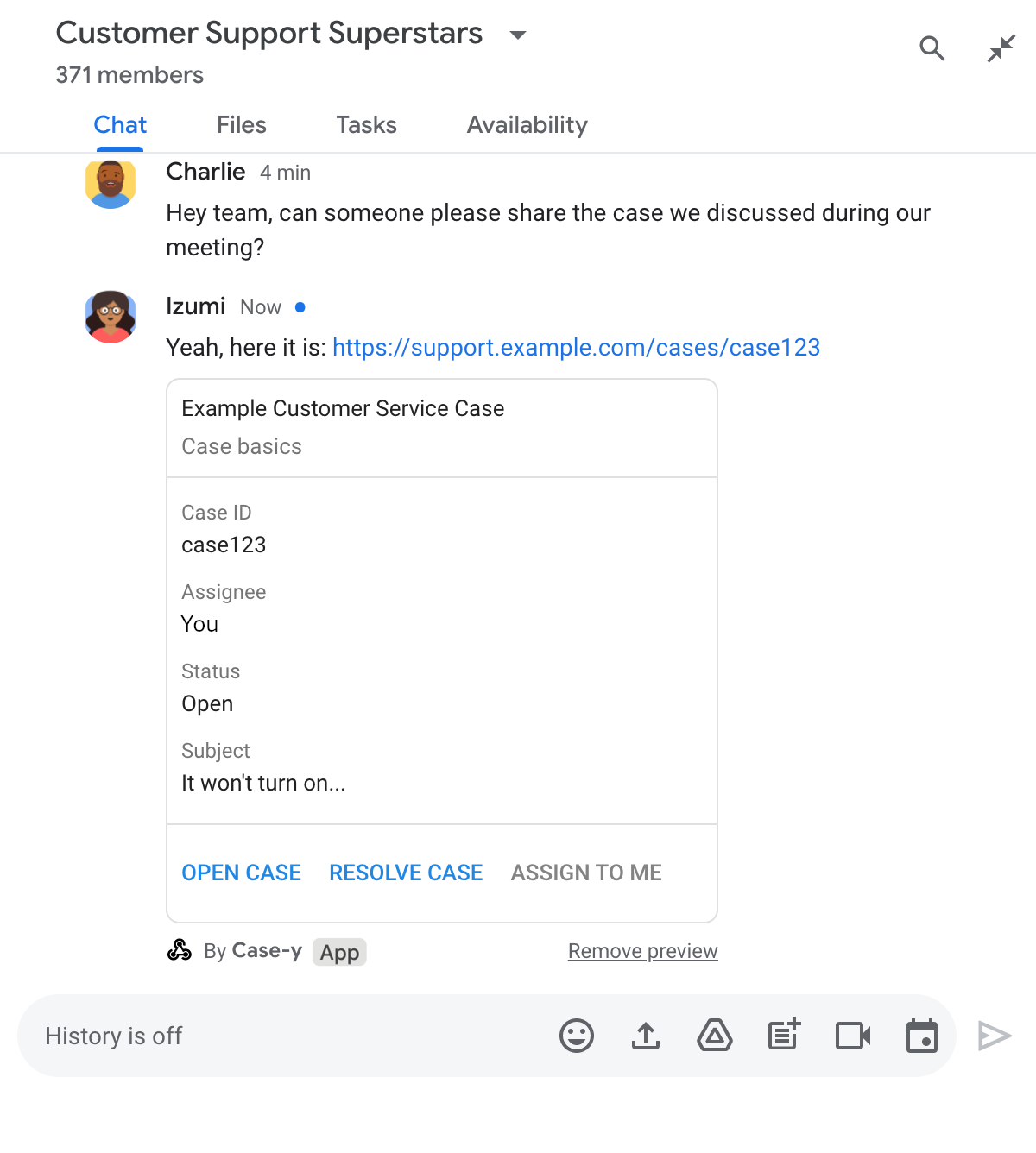
תצוגה מקדימה של קישור באפליקציית Chat עם גרסה מעודכנת של כרטיס שמצורף להודעה

Node.js

node/chat/preview-link/index.js
/**
 * Respond to clicks by assigning and updating the card that's attached to a
 * message previewed link of the pattern "support.example.com".
 *
 * @param {Object} chatMessage The chat message object from Google Workspace Add On event.
 * @return {Object} Action response depending on the message author.
 */
function handleCardClick(chatMessage) {
  // Creates the updated card that displays "You" for the assignee
  // and that disables the button.
  //
  // A hard-coded card is used in this example. In a real-life scenario,
  // an actual assign action would be performed before building the card.
  const message = { cardsV2: [{
    cardId: 'attachCard',
    card: {
      header: {
        title: 'Example Customer Service Case',
        subtitle: 'Case basics',
      },
      sections: [{ widgets: [
        { decoratedText: { topLabel: 'Case ID', text: 'case123'}},
        // The assignee is now "You"
        { decoratedText: { topLabel: 'Assignee', text: 'You'}},
        { decoratedText: { topLabel: 'Status', text: 'Open'}},
        { decoratedText: { topLabel: 'Subject', text: 'It won\'t turn on...' }},
        { buttonList: { buttons: [{
          text: 'OPEN CASE',
          onClick: { openLink: {
            url: 'https://support.example.com/orders/case123'
          }},
        }, {
          text: 'RESOLVE CASE',
          onClick: { openLink: {
            url: 'https://support.example.com/orders/case123?resolved=y',
          }},
        }, {
          text: 'ASSIGN TO ME',
          // The button is now disabled
          disabled: true,
          onClick: { action: { function: FUNCTION_URL }}
        }]}}
      ]}]
    }
  }]};

  // Use the adequate action response type. It depends on whether the message
  // the preview link card is attached to was created by a human or a Chat app.
  if(chatMessage.sender.type === 'HUMAN') {
    return { hostAppDataAction: { chatDataAction: { updateInlinePreviewAction: message }}};
  } else {
    return { hostAppDataAction: { chatDataAction: { updateMessageAction: message }}};
  }
}

מחליפים את הערך FUNCTION_URL בנקודת הקצה של HTTP שמטפלת בלחיצות על הלחצן.

Python

python/chat/preview-link/main.py
def handle_card_click(chatMessage: dict) -> dict:
  """Respond to clicks by assigning and updating the card that's attached to a
  message previewed link of the pattern "support.example.com".

  - Reply with text messages that echo "text.example.com" link URLs in messages.
  - Attach cards to messages with "support.example.com" link URLs.

  Args:
      chatMessage (Mapping[str, Any]): The chat message object from Google Workspace Add On event.

  Returns:
      Mapping[str, Any]: Action response depending on the message author.
  """
  # Creates the updated card that displays "You" for the assignee
  # and that disables the button.
  #
  # A hard-coded card is used in this example. In a real-life scenario,
  # an actual assign action would be performed before building the card.
  message = { 'cardsV2': [{
    'cardId': 'attachCard',
    'card': {
      'header': {
        'title': 'Example Customer Service Case',
        'subtitle': 'Case basics',
      },
      'sections': [{ 'widgets': [
      { 'decoratedText': { 'topLabel': 'Case ID', 'text': 'case123'}},
      # The assignee is now "You"
      { 'decoratedText': { 'topLabel': 'Assignee', 'text': 'You'}},
      { 'decoratedText': { 'topLabel': 'Status', 'text': 'Open'}},
      { 'decoratedText': { 'topLabel': 'Subject', 'text': 'It won\'t turn on...' }},
      { 'buttonList': { 'buttons': [{
        'text': 'OPEN CASE',
        'onClick': { 'openLink': {
          'url': 'https://support.example.com/orders/case123'
        }},
      }, {
        'text': 'RESOLVE CASE',
        'onClick': { 'openLink': {
          'url': 'https://support.example.com/orders/case123?resolved=y',
        }},
      }, {
        'text': 'ASSIGN TO ME',
        # The button is now disabled
        'disabled': True,
        'onClick': { 'action': { 'function': FUNCTION_URL }}
      }]}}
      ]}]
    }
  }]}

  # Use the adequate action response type. It depends on whether the message
  # the preview link card is attached to was created by a human or a Chat app.
  if chatMessage.get('sender').get('type') == 'HUMAN':
    return { 'hostAppDataAction': { 'chatDataAction': { 'updateInlinePreviewAction': message }}}
  else:
    return { 'hostAppDataAction': { 'chatDataAction': { 'updateMessageAction': message }}}

מחליפים את הערך FUNCTION_URL בנקודת הקצה של HTTP שמטפלת בלחיצות על הלחצן.

Java

java/chat/preview-link/src/main/java/com/google/chat/previewLink/App.java
/**
 * Respond to clicks by assigning and updating the card that's attached to a
 * message previewed link of the pattern "support.example.com".
 *
 * @param chatMessage The chat message object from Google Workspace Add On event.
 * @return Action response depending on the message author.
 */
GenericJson handleCardClick(JsonNode chatMessage) {
  // Creates the updated card that displays "You" for the assignee
  // and that disables the button.
  //
  // A hard-coded card is used in this example. In a real-life scenario,
  // an actual assign action would be performed before building the card.
  Message message = new Message().setCardsV2(List.of(new CardWithId()
    .setCardId("attachCard")
    .setCard(new GoogleAppsCardV1Card()
      .setHeader(new GoogleAppsCardV1CardHeader()
        .setTitle("Example Customer Service Case")
        .setSubtitle("Case basics"))
      .setSections(List.of(new GoogleAppsCardV1Section().setWidgets(List.of(
        new GoogleAppsCardV1Widget().setDecoratedText(new GoogleAppsCardV1DecoratedText()
          .setTopLabel("Case ID")
          .setText("case123")),
        // The assignee is now "You"
        new GoogleAppsCardV1Widget().setDecoratedText(new GoogleAppsCardV1DecoratedText()
          .setTopLabel("Assignee")
          .setText("You")),
        new GoogleAppsCardV1Widget().setDecoratedText(new GoogleAppsCardV1DecoratedText()
          .setTopLabel("Status")
          .setText("Open")),
        new GoogleAppsCardV1Widget().setDecoratedText(new GoogleAppsCardV1DecoratedText()
          .setTopLabel("Subject")
          .setText("It won't turn on...")),
        new GoogleAppsCardV1Widget().setButtonList(new GoogleAppsCardV1ButtonList()
          .setButtons(List.of(
            new GoogleAppsCardV1Button()
              .setText("OPEN CASE")
              .setOnClick(new GoogleAppsCardV1OnClick()
                .setOpenLink(new GoogleAppsCardV1OpenLink()
                  .setUrl("https://support.example.com/orders/case123"))),
            new GoogleAppsCardV1Button()
              .setText("RESOLVE CASE")
              .setOnClick(new GoogleAppsCardV1OnClick()
                .setOpenLink(new GoogleAppsCardV1OpenLink()
                  .setUrl("https://support.example.com/orders/case123?resolved=y"))),
            new GoogleAppsCardV1Button()
              .setText("ASSIGN TO ME")
              // The button is now disabled
              .setDisabled(true)
              .setOnClick(new GoogleAppsCardV1OnClick()
                .setAction(new GoogleAppsCardV1Action().setFunction(FUNCTION_URL)))
          ))
        )
      ))))
    )
  ));

  // Use the adequate action response type. It depends on whether the message
  // the preview link card is attached to was created by a human or a Chat app.
  if("HUMAN".equals(chatMessage.at("/sender/type").asText())) {
    return new GenericJson() {{
      put("hostAppDataAction", new GenericJson() {{
        put("chatDataAction", new GenericJson() {{
          put("updateInlinePreviewAction", message);
        }});
      }});
    }};
  } else {
    return new GenericJson() {{
      put("hostAppDataAction", new GenericJson() {{
        put("chatDataAction", new GenericJson() {{
          put("updateMessageAction", message);
        }});
      }});
    }};
  }
}

מחליפים את הערך FUNCTION_URL בנקודת הקצה של HTTP שמטפלת בלחיצות על הלחצן.

Apps Script

apps-script/chat/preview-link/preview-link.gs
/**
 * Assigns and updates the card that's attached to a message with a
 * previewed link of the pattern "support.example.com".
 *
 * @param {Object} event The event object from the Google Workspace add-on.
 * @return {Object} Action response depending on the message author.
 */
function assign(event) {
  // Creates the updated card that displays "You" for the assignee
  // and that disables the button.
  //
  // A hard-coded card is used in this example. In a real-life scenario,
  // an actual assign action would be performed before building the card.
  const message = { cardsV2: [{
    cardId: 'attachCard',
    card: {
      header: {
        title: 'Example Customer Service Case',
        subtitle: 'Case summary',
      },
      sections: [{ widgets: [
        { decoratedText: { topLabel: 'Case ID', text: 'case123'}},
        // The assignee is now "You"
        { decoratedText: { topLabel: 'Assignee', text: 'You'}},
        { decoratedText: { topLabel: 'Status', text: 'Open'}},
        { decoratedText: { topLabel: 'Subject', text: 'It won\'t turn on...' }},
        { buttonList: { buttons: [{
          text: 'OPEN CASE',
          onClick: { openLink: {
            url: 'https://support.example.com/orders/case123'
          }},
        }, {
          text: 'RESOLVE CASE',
          onClick: { openLink: {
            url: 'https://support.example.com/orders/case123?resolved=y',
          }},
        }, {
          text: 'ASSIGN TO ME',
          // The button is now disabled
          disabled: true,
          onClick: { action: { function: 'assign'}}
        }]}}
      ]}]
    }
  }]};

  // Use the adequate action response type. It depends on whether the message
  // the preview link card is attached to was created by a human or a Chat app.
  if(event.chat.buttonClickedPayload.message.sender.type === 'HUMAN') {
    return { hostAppDataAction: { chatDataAction: { updateInlinePreviewAction: message }}};
  } else {
    return { hostAppDataAction: { chatDataAction: { updateMessageAction: message }}};
  }
}

מגבלות ושיקולים

כשמגדירים תצוגות מקדימות של קישורים לאפליקציית Chat, חשוב לשים לב למגבלות ולשיקולים הבאים:

  • כל אפליקציה ל-Chat תומכת בתצוגה מקדימה של קישורים לעד 5 תבניות של כתובות URL.
  • באפליקציות של Chat מוצגת תצוגה מקדימה של קישור אחד לכל הודעה. אם יש כמה קישורים שאפשר לראות את התצוגה המקדימה שלהם בהודעה אחת, רק התצוגה המקדימה של הקישור הראשון תוצג.
  • באפליקציות צ'אט מוצגת תצוגה מקדימה רק לקישורים שמתחילים ב-https://, ולכן תופיע תצוגה מקדימה של https://support.example.com/cases/, אבל לא של support.example.com/cases/.
  • אלא אם ההודעה כוללת מידע אחר שנשלח לאפליקציית Chat, כמו פקודה דרך שורת הפקודות, רק כתובת ה-URL של הקישור נשלחת לאפליקציית Chat על ידי התצוגות המקדימות של הקישורים.
  • אם משתמש מפרסם את הקישור, אפליקציית Chat יכולה לעדכן את כרטיס התצוגה המקדימה של הקישור רק אם משתמשים מבצעים אינטראקציה עם הכרטיס, למשל לחיצה על לחצן. אי אפשר להפעיל את המתודה update() של Chat API במשאב Message כדי לעדכן הודעה של משתמש באופן אסינכרוני.
  • אפליקציות ל-Chat צריכות להציג תצוגה מקדימה של קישורים לכל המשתתפים במרחב, ולכן ההודעה לא יכולה לכלול את השדה privateMessageViewer.

במהלך ההטמעה של תצוגה מקדימה של קישורים, יכול להיות שתצטרכו לנפות באגים באפליקציית Chat על ידי קריאת היומנים של האפליקציה. כדי לקרוא את היומנים, נכנסים אל Logs Explorer במסוף Google Cloud.