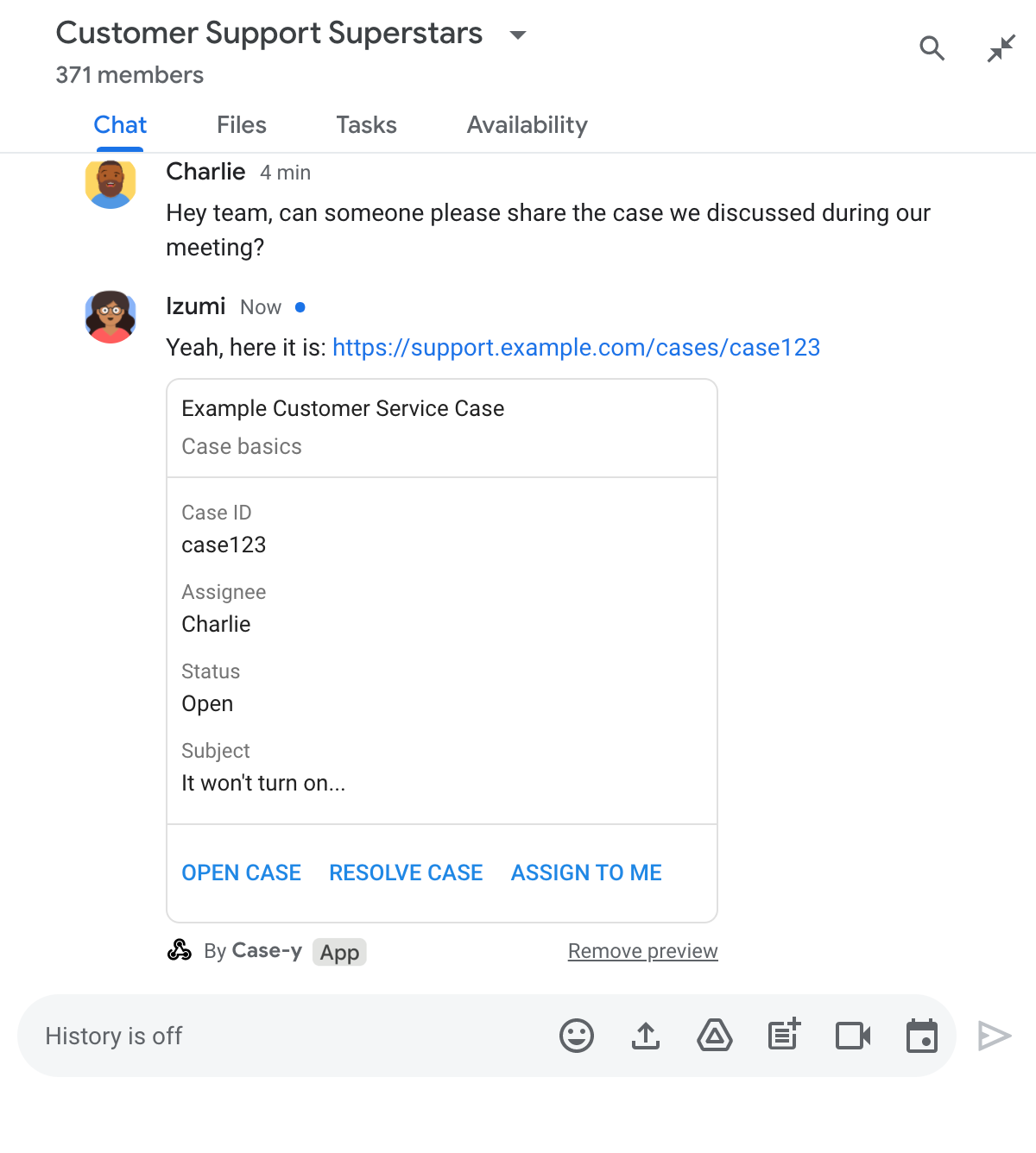
ดูตัวอย่างลิงก์ในข้อความ Google Chat

หากไม่ต้องการให้ผู้ใช้เปลี่ยนบริบทเมื่อแชร์ลิงก์ใน Google Chat แอป Chat ของคุณจะแสดงตัวอย่างลิงก์ได้โดยแนบการ์ดไปกับข้อความ ซึ่งจะให้ข้อมูลเพิ่มเติมและช่วยให้ผู้ใช้ดำเนินการได้จาก Google Chat โดยตรง

ตัวอย่างเช่น ลองนึกถึงพื้นที่ Google Chat ที่มีตัวแทนฝ่ายบริการลูกค้าทั้งหมดของบริษัท และแอป Chat ชื่อ Case-y ตัวแทนมักจะแชร์ลิงก์ไปยังเคสการบริการลูกค้าในพื้นที่ทำงานของ Chat และ ทุกครั้งที่แชร์ เพื่อนร่วมงานจะต้องเปิดลิงก์เคสเพื่อดูรายละเอียด เช่น ผู้รับมอบหมาย สถานะ และเรื่อง ในทำนองเดียวกัน หากมีผู้ต้องการเป็นเจ้าของเคสหรือเปลี่ยนสถานะ ก็ต้องเปิดลิงก์

การแสดงตัวอย่างลิงก์ช่วยให้แอป Chat ในพื้นที่ Case-y แนบการ์ดที่แสดงผู้รับมอบหมาย สถานะ และเรื่องได้ทุกครั้งที่มีคน แชร์ลิงก์เคส ปุ่มในการ์ดช่วยให้ตัวแทนรับเคสเป็นของตนเองและเปลี่ยนสถานะได้โดยตรงจากสตรีมแชท

เมื่อมีคนเพิ่มลิงก์ในข้อความ ชิปจะปรากฏขึ้นเพื่อแจ้งให้ทราบ ว่าแอป Chat อาจแสดงตัวอย่างลิงก์
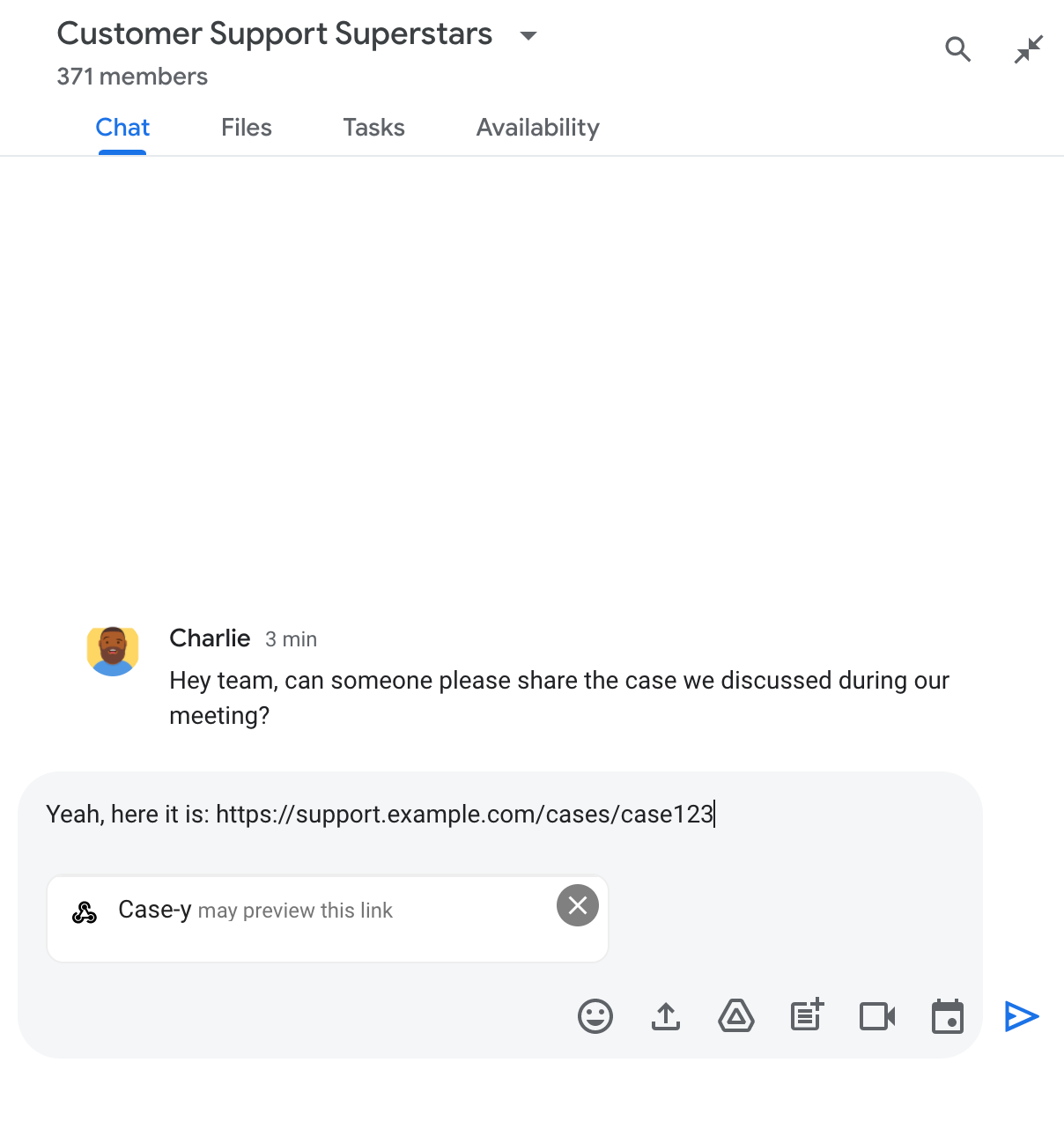
ชิปที่ระบุว่าแอป Chat อาจแสดงตัวอย่างลิงก์

หลังจากส่งข้อความแล้ว ระบบจะส่งลิงก์ไปยังแอป Chat ซึ่งจะสร้างและแนบการ์ดไปกับข้อความของผู้ใช้

แอป Chat แสดงตัวอย่างลิงก์โดยแนบการ์ดไปกับข้อความ

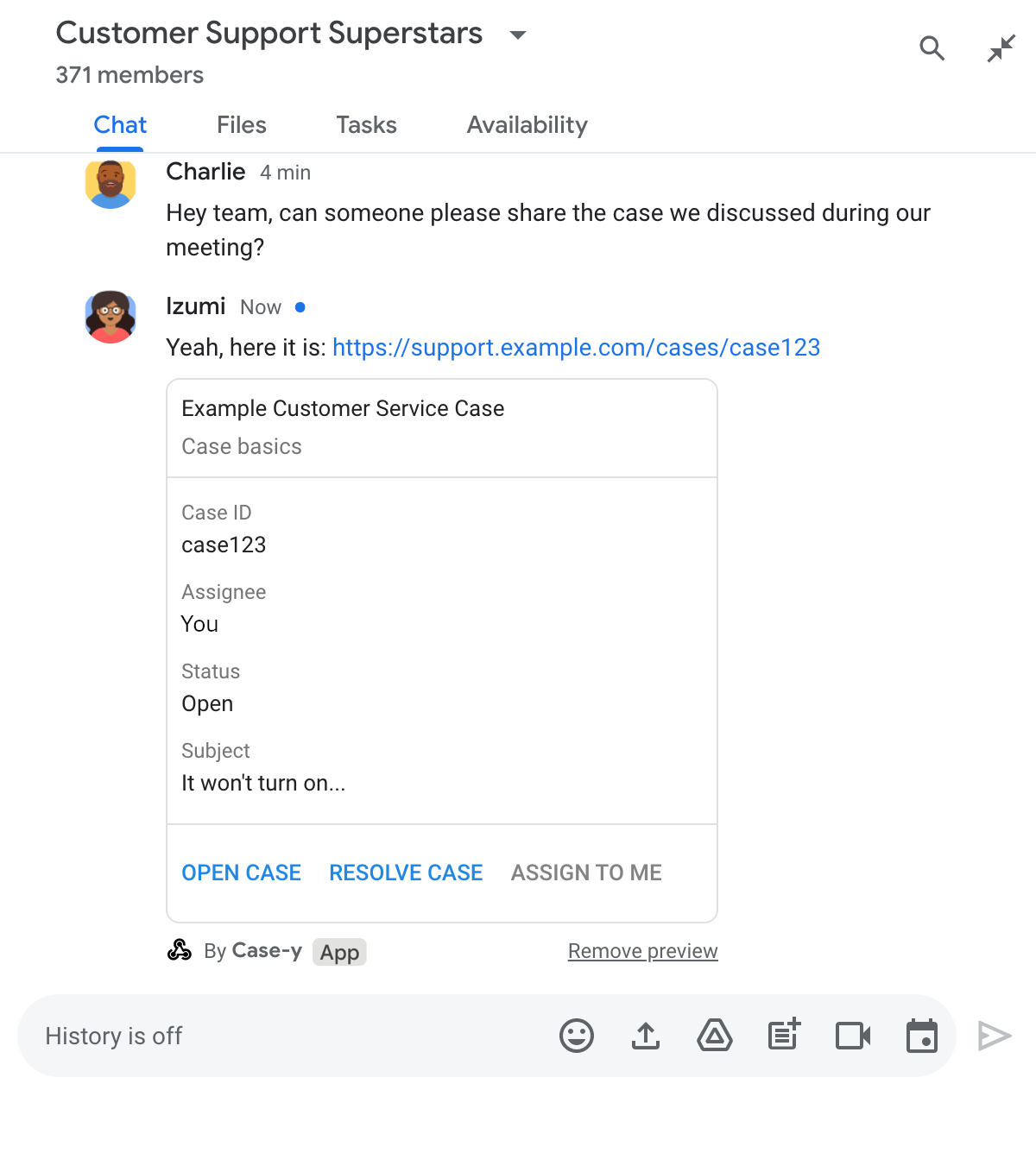
การ์ดจะแสดงข้อมูลเพิ่มเติมเกี่ยวกับลิงก์ รวมถึงองค์ประกอบแบบอินเทอร์แอกทีฟ เช่น ปุ่ม ข้างลิงก์ แอปแชทสามารถอัปเดตการ์ดที่แนบมาเพื่อตอบสนองต่อ การโต้ตอบของผู้ใช้ เช่น การคลิกปุ่ม

หากไม่ต้องการให้แอป Chat แสดงตัวอย่างลิงก์โดยแนบการ์ดไปกับข้อความ ผู้ใช้สามารถป้องกันการแสดงตัวอย่างได้โดยคลิก ในชิปตัวอย่าง ผู้ใช้ สามารถนำการ์ดที่แนบมาออกได้ทุกเมื่อโดยคลิกนำตัวอย่างออก

ข้อกำหนดเบื้องต้น

HTTP

ส่วนเสริมของ Google Workspace ที่ขยาย Google Chat หากต้องการสร้าง ให้ทำตามเริ่มต้นใช้งาน HTTP

Apps Script

ส่วนเสริมของ Google Workspace ที่ขยาย Google Chat หากต้องการสร้าง ให้ทำตามการเริ่มต้นใช้งาน Apps Script อย่างรวดเร็ว

ลงทะเบียนลิงก์ที่เฉพาะเจาะจง เช่น example.com, support.example.com และ support.example.com/cases/ เป็นรูปแบบ URL ในหน้าการกำหนดค่าของแอป Chat ในคอนโซล Google Cloud เพื่อให้แอป Chat แสดงตัวอย่างลิงก์เหล่านั้นได้
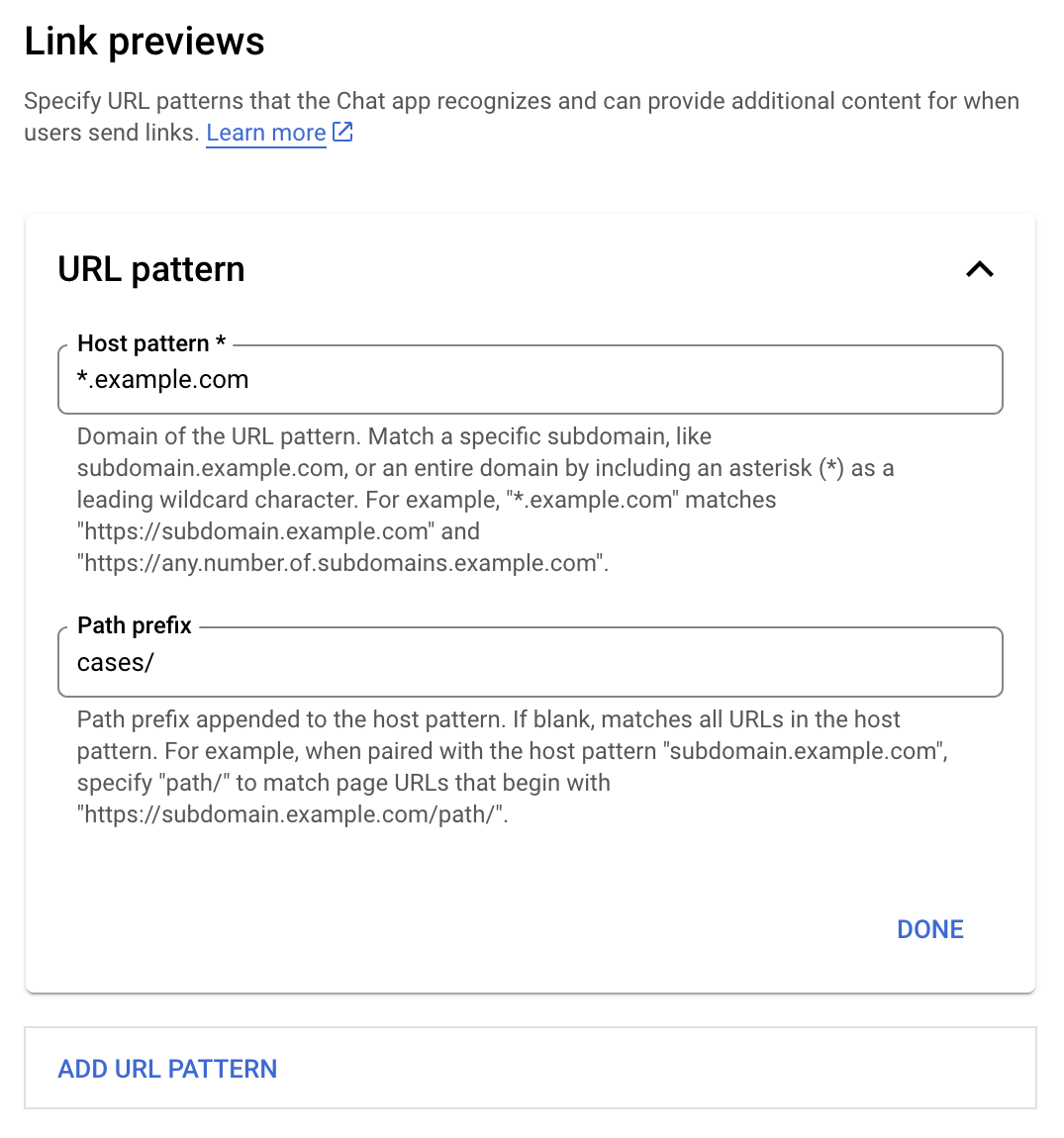
เมนูการกำหนดค่าตัวอย่างลิงก์

  1. เปิด Google Cloud Console
  2. คลิกลูกศรลง ข้าง "Google Cloud" แล้วเปิดโปรเจ็กต์ของแอป Chat
  3. พิมพ์ Google Chat API ในช่องค้นหา แล้วคลิก Google Chat API
  4. คลิกจัดการ > การกำหนดค่า
  5. ในส่วนตัวอย่างลิงก์ ให้เพิ่มหรือแก้ไขรูปแบบ URL
    1. หากต้องการกำหนดค่าตัวอย่างลิงก์สำหรับรูปแบบ URL ใหม่ ให้คลิกเพิ่มรูปแบบ URL
    2. หากต้องการแก้ไขการกำหนดค่าสำหรับรูปแบบ URL ที่มีอยู่ ให้คลิกลูกศรลง
  6. ในช่องรูปแบบโฮสต์ ให้ป้อนโดเมนของรูปแบบ URL แอป Chat จะแสดงตัวอย่างลิงก์ไปยังโดเมนนี้

    หากต้องการให้แอป Chat แสดงตัวอย่างลิงก์สำหรับโดเมนย่อยที่เฉพาะเจาะจง เช่น subdomain.example.com ให้ระบุโดเมนย่อย

    หากต้องการให้แอป Chat แสดงตัวอย่างลิงก์สำหรับทั้งโดเมน ให้ระบุอักขระไวลด์การ์ดที่มีเครื่องหมายดอกจัน (*) เป็นโดเมนย่อย เช่น *.example.com ตรงกับ subdomain.example.com และ any.number.of.subdomains.example.com

  7. ในช่องคำนำหน้าเส้นทาง ให้ป้อนเส้นทางที่จะต่อท้ายโดเมนรูปแบบโฮสต์

    หากต้องการให้ตรงกับ URL ทั้งหมดในโดเมนรูปแบบโฮสต์ ให้เว้นคำนำหน้าเส้นทางว่างไว้

    ตัวอย่างเช่น หากรูปแบบโฮสต์คือ support.example.com หากต้องการจับคู่ URL สำหรับเคสที่โฮสต์ที่ support.example.com/cases/ ให้ป้อน cases/

  8. คลิกเสร็จสิ้น

  9. คลิกบันทึก

ตอนนี้เมื่อใดก็ตามที่มีคนใส่ลิงก์ที่ตรงกับรูปแบบ URL ของตัวอย่างลิงก์ในข้อความในพื้นที่ใน Chat ที่มีแอป Chat ของคุณ แอปจะแสดงตัวอย่างลิงก์

หลังจากกำหนดค่าการแสดงตัวอย่างลิงก์สำหรับลิงก์หนึ่งๆ แล้ว แอป Chat จะจดจำและแสดงตัวอย่างลิงก์ได้โดย แนบข้อมูลเพิ่มเติมไปกับลิงก์

ในพื้นที่ใน Chat ที่มีแอป Chat ของคุณ เมื่อข้อความของใครก็ตามมีลิงก์ที่ตรงกับรูปแบบ URL ของตัวอย่างลิงก์ แอป Chat ของคุณจะได้รับออบเจ็กต์เหตุการณ์ที่มี MessagePayload ใน เพย์โหลด ออบเจ็กต์ message.matchedUrl มีลิงก์ที่ผู้ใช้ใส่ไว้ในข้อความ

JSON

message: {
  matchedUrl: {
    url: "https://support.example.com/cases/case123"
  },
  ... // other message attributes redacted
}

การตรวจสอบว่ามีฟิลด์ matchedUrl ในเพย์โหลดของเหตุการณ์ MESSAGE หรือไม่ จะช่วยให้แอป Chat เพิ่มข้อมูลลงในข้อความที่มีลิงก์ที่แสดงตัวอย่างได้ แอป Chat สามารถ ตอบกลับด้วยข้อความธรรมดาหรือแนบบัตรก็ได้

ตอบกลับด้วยข้อความ

สำหรับการตอบกลับพื้นฐาน แอป Chat สามารถแสดงตัวอย่างลิงก์ โดยการตอบกลับด้วยข้อความ ไปยังลิงก์ ตัวอย่างนี้แนบข้อความที่ทำซ้ำ URL ของลิงก์ที่ตรงกับรูปแบบ URL ของตัวอย่างลิงก์

Node.js

node/chat/preview-link/index.js
// Reply with a text message for URLs of the subdomain "text"
if (chatMessage.matchedUrl.url.includes("text.example.com")) {
  return { hostAppDataAction: { chatDataAction: { createMessageAction: { message: {
    text: 'event.chat.messagePayload.message.matchedUrl.url: ' + chatMessage.matchedUrl.url
  }}}}};
}

แทนที่ FUNCTION_URL ด้วยปลายทาง HTTP ที่จัดการ การคลิกปุ่ม

Python

python/chat/preview-link/main.py
# Reply with a text message for URLs of the subdomain "text"
if "text.example.com" in chatMessage.get('matchedUrl').get('url'):
  return { 'hostAppDataAction': { 'chatDataAction': { 'createMessageAction': { 'message': {
    'text': 'event.chat.messagePayload.message.matchedUrl.url: ' + chatMessage.get('matchedUrl').get('url')
  }}}}}

แทนที่ FUNCTION_URL ด้วยปลายทาง HTTP ที่จัดการ การคลิกปุ่ม

Java

java/chat/preview-link/src/main/java/com/google/chat/previewLink/App.java
// Reply with a text message for URLs of the subdomain "text"
if (chatMessage.at("/matchedUrl/url").asText().contains("text.example.com")) {
  return new GenericJson() {{
    put("hostAppDataAction", new GenericJson() {{
      put("chatDataAction", new GenericJson() {{
        put("createMessageAction", new GenericJson() {{
          put("message", new GenericJson() {{
            put("text", "event.chat.messagePayload.message.matchedUrl.url: " + chatMessage.at("/matchedUrl/url").asText());
          }});
        }});
      }});
    }});
  }};
}

แทนที่ FUNCTION_URL ด้วยปลายทาง HTTP ที่จัดการการคลิกปุ่ม

Apps Script

apps-script/chat/preview-link/preview-link.gs
// Reply with a text message for URLs of the subdomain "text".
if (chatMessage.matchedUrl.url.includes("text.example.com")) {
  return { hostAppDataAction: { chatDataAction: { createMessageAction: { message: {
    text: 'event.chat.messagePayload.message.matchedUrl.url: ' + chatMessage.matchedUrl.url
  }}}}};
}

หากต้องการแนบการ์ดกับลิงก์ที่แสดงตัวอย่าง ให้ส่งคืนการดำเนินการ DataActions พร้อมกับออบเจ็กต์ ChatDataActionMarkup ประเภท UpdateInlinePreviewAction

ในตัวอย่างต่อไปนี้ แอป Chat จะเพิ่มการ์ดตัวอย่าง ลงในข้อความที่มีรูปแบบ URL support.example.com

แอป Chat แสดงตัวอย่างลิงก์โดยแนบการ์ดไปกับข้อความ

Node.js

node/chat/preview-link/index.js
// Attach a card to the message for URLs of the subdomain "support"
if (chatMessage.matchedUrl.url.includes("support.example.com")) {
  // A hard-coded card is used in this example. In a real-life scenario,
  // the case information would be fetched and used to build the card.
  return { hostAppDataAction: { chatDataAction: { updateInlinePreviewAction: { cardsV2: [{
    cardId: 'attachCard',
    card: {
      header: {
        title: 'Example Customer Service Case',
        subtitle: 'Case basics',
      },
      sections: [{ widgets: [
      { decoratedText: { topLabel: 'Case ID', text: 'case123'}},
      { decoratedText: { topLabel: 'Assignee', text: 'Charlie'}},
      { decoratedText: { topLabel: 'Status', text: 'Open'}},
      { decoratedText: { topLabel: 'Subject', text: 'It won\'t turn on...' }},
      { buttonList: { buttons: [{
        text: 'OPEN CASE',
        onClick: { openLink: {
          url: 'https://support.example.com/orders/case123'
        }},
      }, {
        text: 'RESOLVE CASE',
        onClick: { openLink: {
          url: 'https://support.example.com/orders/case123?resolved=y',
        }},
      }, {
        text: 'ASSIGN TO ME',
        onClick: { action: { function: FUNCTION_URL }}
      }]}}
      ]}]
    }
  }]}}}};
}

แทนที่ FUNCTION_URL ด้วยปลายทาง HTTP ที่จัดการ การคลิกปุ่ม

Python

python/chat/preview-link/main.py
# Attach a card to the message for URLs of the subdomain "support"
if "support.example.com" in chatMessage.get('matchedUrl').get('url'):
  # A hard-coded card is used in this example. In a real-life scenario,
  # the case information would be fetched and used to build the card.
  return { 'hostAppDataAction': { 'chatDataAction': { 'updateInlinePreviewAction': { 'cardsV2': [{
    'cardId': 'attachCard',
    'card': {
      'header': {
        'title': 'Example Customer Service Case',
        'subtitle': 'Case basics',
      },
      'sections': [{ 'widgets': [
      { 'decoratedText': { 'topLabel': 'Case ID', 'text': 'case123'}},
      { 'decoratedText': { 'topLabel': 'Assignee', 'text': 'Charlie'}},
      { 'decoratedText': { 'topLabel': 'Status', 'text': 'Open'}},
      { 'decoratedText': { 'topLabel': 'Subject', 'text': 'It won\'t turn on...' }},
      { 'buttonList': { 'buttons': [{
        'text': 'OPEN CASE',
        'onClick': { 'openLink': {
          'url': 'https://support.example.com/orders/case123'
        }},
      }, {
        'text': 'RESOLVE CASE',
        'onClick': { 'openLink': {
          'url': 'https://support.example.com/orders/case123?resolved=y',
        }},
      }, {
        'text': 'ASSIGN TO ME',
        'onClick': { 'action': { 'function': FUNCTION_URL }}
      }]}}
      ]}]
    }
  }]}}}}

แทนที่ FUNCTION_URL ด้วยปลายทาง HTTP ที่จัดการ การคลิกปุ่ม

Java

java/chat/preview-link/src/main/java/com/google/chat/previewLink/App.java
// Attach a card to the message for URLs of the subdomain "support"
if (chatMessage.at("/matchedUrl/url").asText().contains("support.example.com")) {
  // A hard-coded card is used in this example. In a real-life scenario,
  // the case information would be fetched and used to build the card.
  CardWithId cardV2 = new CardWithId()
    .setCardId("attachCard")
    .setCard(new GoogleAppsCardV1Card()
      .setHeader(new GoogleAppsCardV1CardHeader()
        .setTitle("Example Customer Service Case")
        .setSubtitle("Case basics"))
      .setSections(List.of(new GoogleAppsCardV1Section().setWidgets(List.of(
        new GoogleAppsCardV1Widget().setDecoratedText(new GoogleAppsCardV1DecoratedText()
          .setTopLabel("Case ID")
          .setText("case123")),
        new GoogleAppsCardV1Widget().setDecoratedText(new GoogleAppsCardV1DecoratedText()
          .setTopLabel("Assignee")
          .setText("Charlie")),
        new GoogleAppsCardV1Widget().setDecoratedText(new GoogleAppsCardV1DecoratedText()
          .setTopLabel("Status")
          .setText("Open")),
        new GoogleAppsCardV1Widget().setDecoratedText(new GoogleAppsCardV1DecoratedText()
          .setTopLabel("Subject")
          .setText("It won't turn on...")),
        new GoogleAppsCardV1Widget().setButtonList(new GoogleAppsCardV1ButtonList()
          .setButtons(List.of(
            new GoogleAppsCardV1Button()
              .setText("OPEN CASE")
            .setOnClick(new GoogleAppsCardV1OnClick()
                .setOpenLink(new GoogleAppsCardV1OpenLink()
                  .setUrl("https://support.example.com/orders/case123"))),
            new GoogleAppsCardV1Button()
              .setText("RESOLVE CASE")
            .setOnClick(new GoogleAppsCardV1OnClick()
                .setOpenLink(new GoogleAppsCardV1OpenLink()
                  .setUrl("https://support.example.com/orders/case123?resolved=y"))),
            new GoogleAppsCardV1Button()
              .setText("ASSIGN TO ME")
              .setOnClick(new GoogleAppsCardV1OnClick()
                .setAction(new GoogleAppsCardV1Action().setFunction(FUNCTION_URL)))
          ))
        )
      ))))
    );

  return new GenericJson() {{
    put("hostAppDataAction", new GenericJson() {{
      put("chatDataAction", new GenericJson() {{
        put("updateInlinePreviewAction", new GenericJson() {{
          put("cardsV2", List.of(cardV2));
        }});
      }});
    }});
  }};
}

แทนที่ FUNCTION_URL ด้วยปลายทาง HTTP ที่จัดการ การคลิกปุ่ม

Apps Script

apps-script/chat/preview-link/preview-link.gs
// Attach a card to the message for URLs of the subdomain "support".
if (chatMessage.matchedUrl.url.includes("support.example.com")) {
  // A hard-coded card is used in this example. In a real-life scenario,
  // the case information would be fetched and used to build the card.
  return { hostAppDataAction: { chatDataAction: { updateInlinePreviewAction: { cardsV2: [{
    cardId: 'attachCard',
    card: {
      header: {
        title: 'Example Customer Service Case',
        subtitle: 'Case summary',
      },
      sections: [{ widgets: [
      { decoratedText: { topLabel: 'Case ID', text: 'case123'}},
      { decoratedText: { topLabel: 'Assignee', text: 'Charlie'}},
      { decoratedText: { topLabel: 'Status', text: 'Open'}},
      { decoratedText: { topLabel: 'Subject', text: 'It won\'t turn on...' }},
      { buttonList: { buttons: [{
        text: 'OPEN CASE',
        onClick: { openLink: {
          url: 'https://support.example.com/orders/case123'
        }},
      }, {
        text: 'RESOLVE CASE',
        onClick: { openLink: {
          url: 'https://support.example.com/orders/case123?resolved=y',
        }},
      }, {
        text: 'ASSIGN TO ME',
        // Clicking this button triggers the execution of the function
        // "assign" from the Apps Script project.
        onClick: { action: { function: 'assign'}}
      }]}}
      ]}]
    }
  }]}}}};
}

แอป Chat สามารถอัปเดตการ์ดแสดงตัวอย่างลิงก์ได้เมื่อ ผู้ใช้โต้ตอบกับการ์ด เช่น คลิกปุ่มในการ์ด

หากต้องการอัปเดตการ์ด แอป Chat ต้องส่งคืนการดำเนินการ DataActions พร้อม ออบเจ็กต์ ChatDataActionMarkup อย่างใดอย่างหนึ่งต่อไปนี้

  • หากผู้ใช้ส่งข้อความ ให้ส่งคืนออบเจ็กต์ UpdateMessageAction
  • หากแอป Chat ส่งข้อความ ให้แสดงผลออบเจ็กต์ UpdateInlinePreviewAction

หากต้องการระบุว่าใครเป็นผู้ส่งข้อความ ให้ใช้เพย์โหลดของเหตุการณ์ (buttonClickedPayload) เพื่อตรวจสอบว่าผู้ส่ง (message.sender.type) ตั้งค่าเป็น HUMAN (ผู้ใช้) หรือ BOT (แอป Chat)

ตัวอย่างต่อไปนี้แสดงวิธีที่แอป Chat อัปเดต ตัวอย่างลิงก์ทุกครั้งที่ผู้ใช้คลิกปุ่มมอบหมายให้ฉัน โดยการอัปเดตฟิลด์ผู้รับมอบหมายของการ์ดและปิดใช้ปุ่ม

แอปแชทแสดงตัวอย่างลิงก์ที่มีการ์ดเวอร์ชันที่อัปเดตแล้วแนบไปกับข้อความ

Node.js

node/chat/preview-link/index.js
/**
 * Respond to clicks by assigning and updating the card that's attached to a
 * message previewed link of the pattern "support.example.com".
 *
 * @param {Object} chatMessage The chat message object from Google Workspace Add On event.
 * @return {Object} Action response depending on the message author.
 */
function handleCardClick(chatMessage) {
  // Creates the updated card that displays "You" for the assignee
  // and that disables the button.
  //
  // A hard-coded card is used in this example. In a real-life scenario,
  // an actual assign action would be performed before building the card.
  const message = { cardsV2: [{
    cardId: 'attachCard',
    card: {
      header: {
        title: 'Example Customer Service Case',
        subtitle: 'Case basics',
      },
      sections: [{ widgets: [
        { decoratedText: { topLabel: 'Case ID', text: 'case123'}},
        // The assignee is now "You"
        { decoratedText: { topLabel: 'Assignee', text: 'You'}},
        { decoratedText: { topLabel: 'Status', text: 'Open'}},
        { decoratedText: { topLabel: 'Subject', text: 'It won\'t turn on...' }},
        { buttonList: { buttons: [{
          text: 'OPEN CASE',
          onClick: { openLink: {
            url: 'https://support.example.com/orders/case123'
          }},
        }, {
          text: 'RESOLVE CASE',
          onClick: { openLink: {
            url: 'https://support.example.com/orders/case123?resolved=y',
          }},
        }, {
          text: 'ASSIGN TO ME',
          // The button is now disabled
          disabled: true,
          onClick: { action: { function: FUNCTION_URL }}
        }]}}
      ]}]
    }
  }]};

  // Use the adequate action response type. It depends on whether the message
  // the preview link card is attached to was created by a human or a Chat app.
  if(chatMessage.sender.type === 'HUMAN') {
    return { hostAppDataAction: { chatDataAction: { updateInlinePreviewAction: message }}};
  } else {
    return { hostAppDataAction: { chatDataAction: { updateMessageAction: message }}};
  }
}

แทนที่ FUNCTION_URL ด้วยปลายทาง HTTP ที่จัดการ การคลิกปุ่ม

Python

python/chat/preview-link/main.py
def handle_card_click(chatMessage: dict) -> dict:
  """Respond to clicks by assigning and updating the card that's attached to a
  message previewed link of the pattern "support.example.com".

  - Reply with text messages that echo "text.example.com" link URLs in messages.
  - Attach cards to messages with "support.example.com" link URLs.

  Args:
      chatMessage (Mapping[str, Any]): The chat message object from Google Workspace Add On event.

  Returns:
      Mapping[str, Any]: Action response depending on the message author.
  """
  # Creates the updated card that displays "You" for the assignee
  # and that disables the button.
  #
  # A hard-coded card is used in this example. In a real-life scenario,
  # an actual assign action would be performed before building the card.
  message = { 'cardsV2': [{
    'cardId': 'attachCard',
    'card': {
      'header': {
        'title': 'Example Customer Service Case',
        'subtitle': 'Case basics',
      },
      'sections': [{ 'widgets': [
      { 'decoratedText': { 'topLabel': 'Case ID', 'text': 'case123'}},
      # The assignee is now "You"
      { 'decoratedText': { 'topLabel': 'Assignee', 'text': 'You'}},
      { 'decoratedText': { 'topLabel': 'Status', 'text': 'Open'}},
      { 'decoratedText': { 'topLabel': 'Subject', 'text': 'It won\'t turn on...' }},
      { 'buttonList': { 'buttons': [{
        'text': 'OPEN CASE',
        'onClick': { 'openLink': {
          'url': 'https://support.example.com/orders/case123'
        }},
      }, {
        'text': 'RESOLVE CASE',
        'onClick': { 'openLink': {
          'url': 'https://support.example.com/orders/case123?resolved=y',
        }},
      }, {
        'text': 'ASSIGN TO ME',
        # The button is now disabled
        'disabled': True,
        'onClick': { 'action': { 'function': FUNCTION_URL }}
      }]}}
      ]}]
    }
  }]}

  # Use the adequate action response type. It depends on whether the message
  # the preview link card is attached to was created by a human or a Chat app.
  if chatMessage.get('sender').get('type') == 'HUMAN':
    return { 'hostAppDataAction': { 'chatDataAction': { 'updateInlinePreviewAction': message }}}
  else:
    return { 'hostAppDataAction': { 'chatDataAction': { 'updateMessageAction': message }}}

แทนที่ FUNCTION_URL ด้วยปลายทาง HTTP ที่จัดการ การคลิกปุ่ม

Java

java/chat/preview-link/src/main/java/com/google/chat/previewLink/App.java
/**
 * Respond to clicks by assigning and updating the card that's attached to a
 * message previewed link of the pattern "support.example.com".
 *
 * @param chatMessage The chat message object from Google Workspace Add On event.
 * @return Action response depending on the message author.
 */
GenericJson handleCardClick(JsonNode chatMessage) {
  // Creates the updated card that displays "You" for the assignee
  // and that disables the button.
  //
  // A hard-coded card is used in this example. In a real-life scenario,
  // an actual assign action would be performed before building the card.
  Message message = new Message().setCardsV2(List.of(new CardWithId()
    .setCardId("attachCard")
    .setCard(new GoogleAppsCardV1Card()
      .setHeader(new GoogleAppsCardV1CardHeader()
        .setTitle("Example Customer Service Case")
        .setSubtitle("Case basics"))
      .setSections(List.of(new GoogleAppsCardV1Section().setWidgets(List.of(
        new GoogleAppsCardV1Widget().setDecoratedText(new GoogleAppsCardV1DecoratedText()
          .setTopLabel("Case ID")
          .setText("case123")),
        // The assignee is now "You"
        new GoogleAppsCardV1Widget().setDecoratedText(new GoogleAppsCardV1DecoratedText()
          .setTopLabel("Assignee")
          .setText("You")),
        new GoogleAppsCardV1Widget().setDecoratedText(new GoogleAppsCardV1DecoratedText()
          .setTopLabel("Status")
          .setText("Open")),
        new GoogleAppsCardV1Widget().setDecoratedText(new GoogleAppsCardV1DecoratedText()
          .setTopLabel("Subject")
          .setText("It won't turn on...")),
        new GoogleAppsCardV1Widget().setButtonList(new GoogleAppsCardV1ButtonList()
          .setButtons(List.of(
            new GoogleAppsCardV1Button()
              .setText("OPEN CASE")
              .setOnClick(new GoogleAppsCardV1OnClick()
                .setOpenLink(new GoogleAppsCardV1OpenLink()
                  .setUrl("https://support.example.com/orders/case123"))),
            new GoogleAppsCardV1Button()
              .setText("RESOLVE CASE")
              .setOnClick(new GoogleAppsCardV1OnClick()
                .setOpenLink(new GoogleAppsCardV1OpenLink()
                  .setUrl("https://support.example.com/orders/case123?resolved=y"))),
            new GoogleAppsCardV1Button()
              .setText("ASSIGN TO ME")
              // The button is now disabled
              .setDisabled(true)
              .setOnClick(new GoogleAppsCardV1OnClick()
                .setAction(new GoogleAppsCardV1Action().setFunction(FUNCTION_URL)))
          ))
        )
      ))))
    )
  ));

  // Use the adequate action response type. It depends on whether the message
  // the preview link card is attached to was created by a human or a Chat app.
  if("HUMAN".equals(chatMessage.at("/sender/type").asText())) {
    return new GenericJson() {{
      put("hostAppDataAction", new GenericJson() {{
        put("chatDataAction", new GenericJson() {{
          put("updateInlinePreviewAction", message);
        }});
      }});
    }};
  } else {
    return new GenericJson() {{
      put("hostAppDataAction", new GenericJson() {{
        put("chatDataAction", new GenericJson() {{
          put("updateMessageAction", message);
        }});
      }});
    }};
  }
}

แทนที่ FUNCTION_URL ด้วยปลายทาง HTTP ที่จัดการการคลิกปุ่ม

Apps Script

apps-script/chat/preview-link/preview-link.gs
/**
 * Assigns and updates the card that's attached to a message with a
 * previewed link of the pattern "support.example.com".
 *
 * @param {Object} event The event object from the Google Workspace add-on.
 * @return {Object} Action response depending on the message author.
 */
function assign(event) {
  // Creates the updated card that displays "You" for the assignee
  // and that disables the button.
  //
  // A hard-coded card is used in this example. In a real-life scenario,
  // an actual assign action would be performed before building the card.
  const message = { cardsV2: [{
    cardId: 'attachCard',
    card: {
      header: {
        title: 'Example Customer Service Case',
        subtitle: 'Case summary',
      },
      sections: [{ widgets: [
        { decoratedText: { topLabel: 'Case ID', text: 'case123'}},
        // The assignee is now "You"
        { decoratedText: { topLabel: 'Assignee', text: 'You'}},
        { decoratedText: { topLabel: 'Status', text: 'Open'}},
        { decoratedText: { topLabel: 'Subject', text: 'It won\'t turn on...' }},
        { buttonList: { buttons: [{
          text: 'OPEN CASE',
          onClick: { openLink: {
            url: 'https://support.example.com/orders/case123'
          }},
        }, {
          text: 'RESOLVE CASE',
          onClick: { openLink: {
            url: 'https://support.example.com/orders/case123?resolved=y',
          }},
        }, {
          text: 'ASSIGN TO ME',
          // The button is now disabled
          disabled: true,
          onClick: { action: { function: 'assign'}}
        }]}}
      ]}]
    }
  }]};

  // Use the adequate action response type. It depends on whether the message
  // the preview link card is attached to was created by a human or a Chat app.
  if(event.chat.buttonClickedPayload.message.sender.type === 'HUMAN') {
    return { hostAppDataAction: { chatDataAction: { updateInlinePreviewAction: message }}};
  } else {
    return { hostAppDataAction: { chatDataAction: { updateMessageAction: message }}};
  }
}

ข้อจำกัดและข้อควรพิจารณา

เมื่อกำหนดค่าตัวอย่างลิงก์สำหรับแอป Chat โปรดทราบข้อจำกัดและข้อควรพิจารณาต่อไปนี้

  • แอป Chat แต่ละแอปรองรับตัวอย่างลิงก์สำหรับรูปแบบ URL สูงสุด 5 รูปแบบ
  • แอปแชทจะแสดงตัวอย่างลิงก์ 1 รายการต่อข้อความ หากมีลิงก์ที่แสดงตัวอย่างได้หลายลิงก์ในข้อความเดียว ระบบจะแสดงตัวอย่างเฉพาะลิงก์แรกที่แสดงตัวอย่างได้
  • แอปแชทจะแสดงตัวอย่างเฉพาะลิงก์ที่ขึ้นต้นด้วย https:// ดังนั้น https://support.example.com/cases/ จะแสดงตัวอย่าง แต่ support.example.com/cases/ จะไม่แสดง
  • หากข้อความไม่มีข้อมูลอื่นๆ ที่ส่งไปยังแอป Chat เช่น คำสั่งเครื่องหมายทับ ตัวอย่างลิงก์จะส่งเฉพาะ URL ของลิงก์ไปยังแอป Chat
  • หากผู้ใช้โพสต์ลิงก์ แอป Chat จะอัปเดต การ์ดตัวอย่างลิงก์ได้ก็ต่อเมื่อผู้ใช้โต้ตอบกับการ์ด เช่น คลิกปุ่ม คุณจะเรียกใช้เมธอด update() ของ Chat API ในแหล่งข้อมูล Message เพื่ออัปเดตข้อความของผู้ใช้แบบไม่พร้อมกันไม่ได้
  • แอปแชทต้องแสดงตัวอย่างลิงก์สำหรับทุกคนในพื้นที่ทำงาน ดังนั้นข้อความต้องละเว้นฟิลด์ privateMessageViewer

ขณะติดตั้งใช้งานตัวอย่างลิงก์ คุณอาจต้องแก้ไขข้อบกพร่องของแอป Chat โดยอ่านบันทึกของแอป หากต้องการอ่านบันทึก ให้ไปที่ Logs Explorer ในคอนโซล Google Cloud