Xem trước đường liên kết trong tin nhắn trên Google Chat

Để ngăn người dùng chuyển đổi ngữ cảnh khi chia sẻ đường liên kết trong Google Chat, ứng dụng Chat của bạn có thể xem trước đường liên kết bằng cách đính kèm thẻ vào tin nhắn của họ. Thẻ này cung cấp thêm thông tin và cho phép mọi người thực hiện hành động ngay trong Google Chat.

Ví dụ: hãy tưởng tượng một không gian trên Google Chat có tất cả nhân viên dịch vụ khách hàng của một công ty, cộng với một ứng dụng Chat có tên là Case-y. Các nhân viên thường xuyên chia sẻ đường liên kết đến các trường hợp dịch vụ khách hàng trong không gian trò chuyện và mỗi khi họ làm như vậy, đồng nghiệp của họ phải mở đường liên kết đến trường hợp đó để xem các thông tin chi tiết như người được giao, trạng thái và chủ đề. Tương tự, nếu muốn tiếp quản một trường hợp hoặc thay đổi trạng thái, thì họ cần mở đường liên kết.

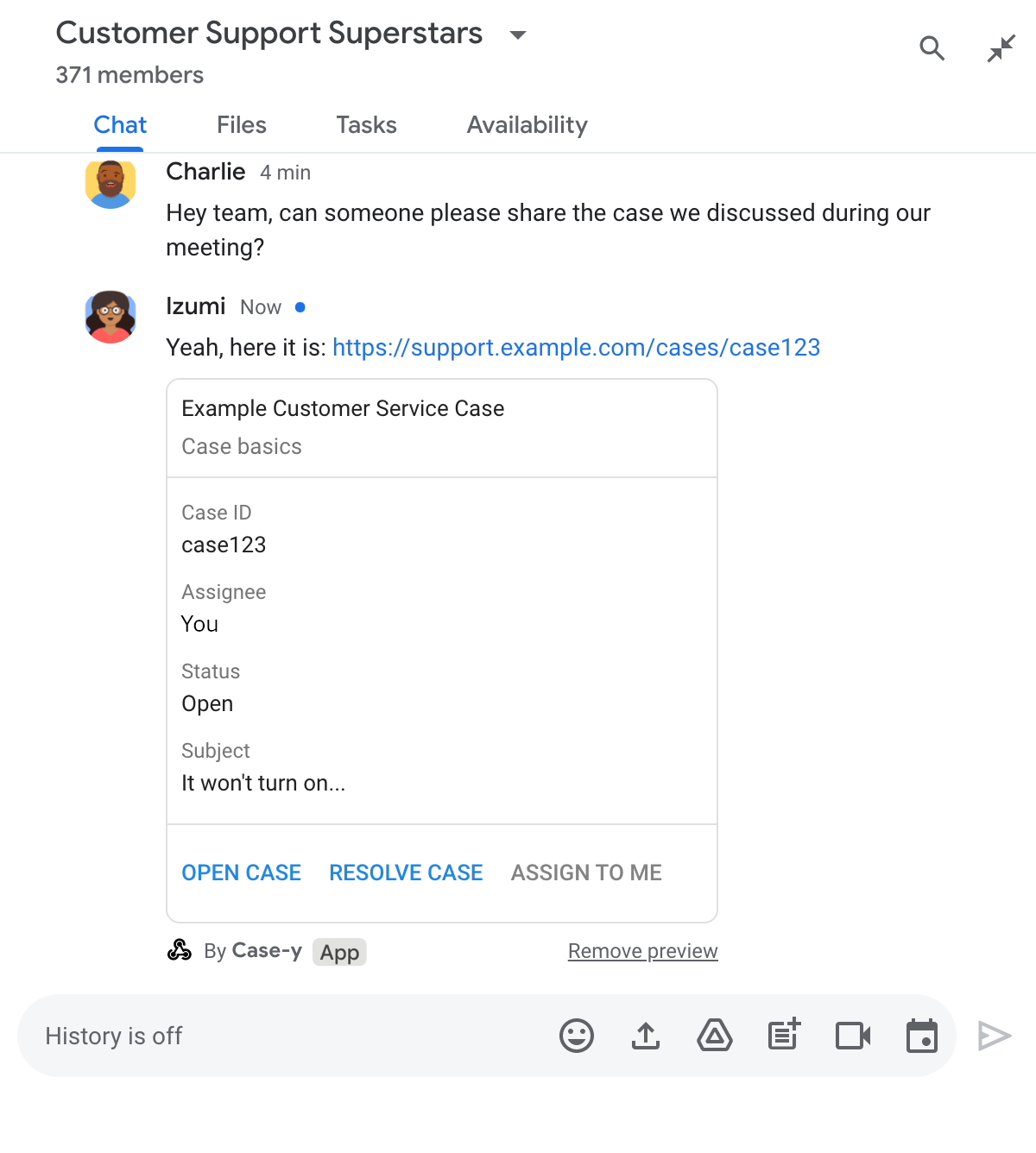
Tính năng xem trước đường liên kết cho phép ứng dụng Chat thường trú của không gian, Case-y, đính kèm thẻ cho biết người được giao, trạng thái và tiêu đề bất cứ khi nào có người chia sẻ đường liên kết đến một trường hợp. Các nút trên thẻ cho phép nhân viên tiếp quản trường hợp và thay đổi trạng thái ngay trong luồng trò chuyện.

Khi người dùng thêm một đường liên kết vào tin nhắn, một chip sẽ xuất hiện để cho họ biết rằng ứng dụng Chat có thể xem trước đường liên kết đó.
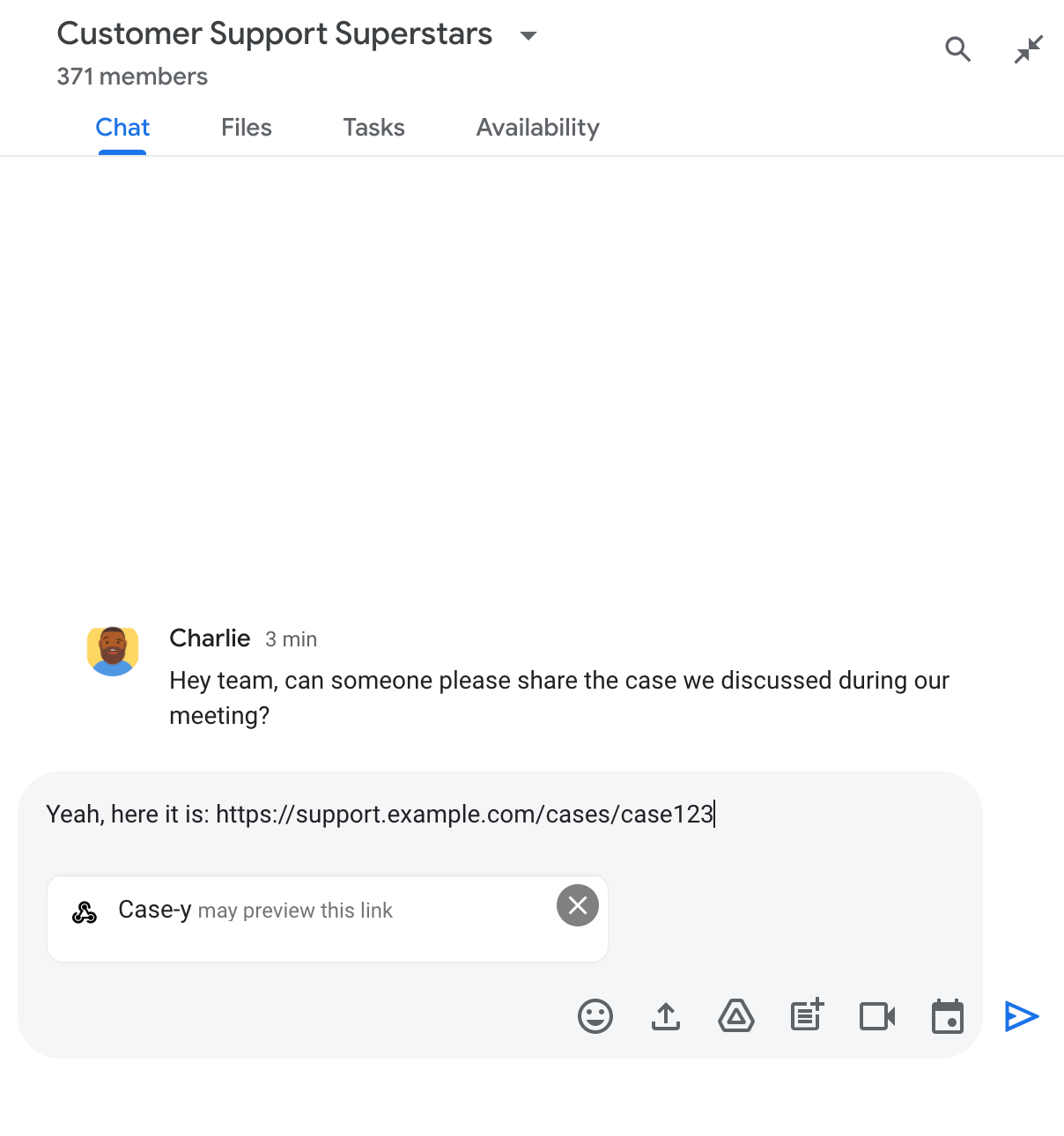
Chip cho biết ứng dụng Chat có thể xem trước một đường liên kết

Sau khi gửi thông báo, đường liên kết sẽ được gửi đến ứng dụng Chat. Sau đó, ứng dụng này sẽ tạo và đính kèm thẻ vào thông báo của người dùng.
Ứng dụng Chat xem trước một đường liên kết bằng cách đính kèm thẻ vào tin nhắn

Bên cạnh đường liên kết, thẻ này cung cấp thêm thông tin về đường liên kết, bao gồm cả các phần tử tương tác như nút. Ứng dụng trò chuyện của bạn có thể cập nhật thẻ đính kèm để phản hồi các hoạt động tương tác của người dùng, chẳng hạn như lượt nhấp vào nút.

Nếu không muốn ứng dụng Chat xem trước đường liên kết bằng cách đính kèm thẻ vào tin nhắn, người dùng có thể ngăn việc xem trước bằng cách nhấp vào biểu tượng trên chip xem trước. Người dùng có thể xoá thẻ đính kèm bất cứ lúc nào bằng cách nhấp vào Xoá bản xem trước.

Điều kiện tiên quyết

HTTP

Một tiện ích bổ sung của Google Workspace giúp mở rộng Google Chat. Để tạo một ứng dụng, hãy hoàn tất hướng dẫn nhanh về HTTP.

Apps Script

Một tiện ích bổ sung của Google Workspace giúp mở rộng Google Chat. Để tạo một ứng dụng, hãy hoàn tất hướng dẫn bắt đầu nhanh về Apps Script.

Đăng ký các đường liên kết cụ thể (chẳng hạn như example.com, support.example.comsupport.example.com/cases/) dưới dạng mẫu URL trên trang cấu hình của ứng dụng Chat trong bảng điều khiển Google Cloud để ứng dụng Chat có thể xem trước các đường liên kết đó.
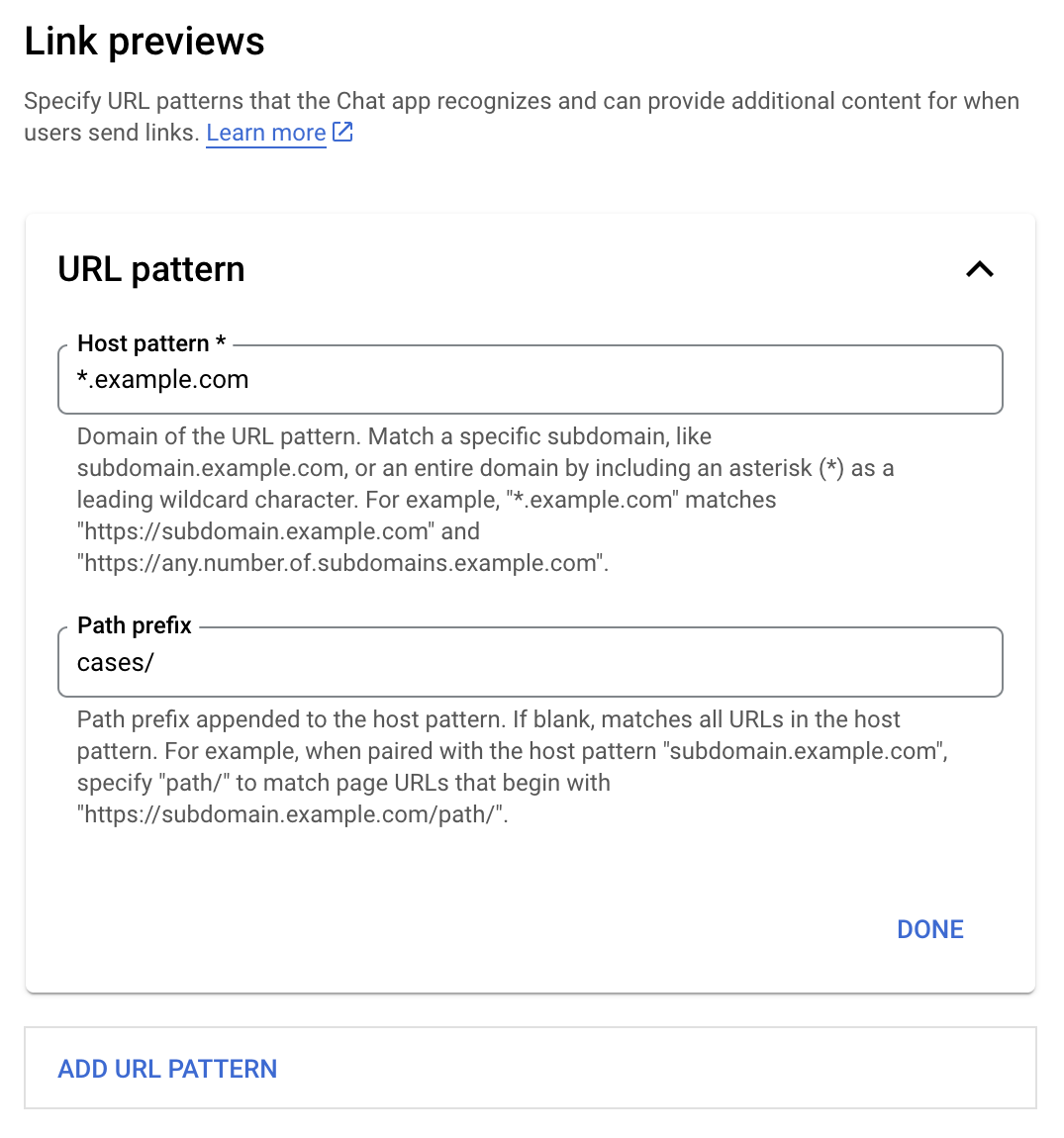
Trình đơn cấu hình bản xem trước đường liên kết

  1. Mở Google Cloud Console.
  2. Bên cạnh "Google Cloud", hãy nhấp vào biểu tượng Mũi tên xuống rồi mở dự án của ứng dụng Chat.
  3. Trong trường tìm kiếm, hãy nhập Google Chat API rồi nhấp vào Google Chat API.
  4. Nhấp vào Quản lý > Cấu hình.
  5. Trong phần Xem trước đường liên kết, hãy thêm hoặc chỉnh sửa một mẫu URL.
    1. Để định cấu hình tính năng xem trước đường liên kết cho một mẫu URL mới, hãy nhấp vào Thêm mẫu URL.
    2. Để chỉnh sửa cấu hình cho một mẫu URL hiện có, hãy nhấp vào biểu tượng Mũi tên xuống .
  6. Trong trường Mẫu máy chủ lưu trữ, hãy nhập miền của mẫu URL. Ứng dụng Chat sẽ xem trước các đường liên kết đến miền này.

    Để ứng dụng Chat xem trước đường liên kết cho một miền con cụ thể, chẳng hạn như subdomain.example.com, hãy thêm miền con đó.

    Để ứng dụng Chat xem trước đường liên kết cho toàn bộ miền, hãy chỉ định ký tự đại diện có dấu hoa thị (*) làm miền con. Ví dụ: *.example.com khớp với subdomain.example.comany.number.of.subdomains.example.com.

  7. Trong trường Tiền tố đường dẫn, hãy nhập một đường dẫn để thêm vào miền mẫu máy chủ lưu trữ.

    Để so khớp tất cả URL trong miền mẫu máy chủ, hãy để trống Tiền tố đường dẫn.

    Ví dụ: nếu Mẫu máy chủ lưu trữ là support.example.com, để so khớp các URL cho những trường hợp được lưu trữ tại support.example.com/cases/, hãy nhập cases/.

  8. Nhấp vào Xong.

  9. Nhấp vào Lưu.

Giờ đây, bất cứ khi nào có người thêm một đường liên kết khớp với mẫu URL xem trước đường liên kết vào một tin nhắn trong không gian Chat có ứng dụng Chat của bạn, thì ứng dụng của bạn sẽ xem trước đường liên kết đó.

Sau khi bạn định cấu hình tính năng xem trước đường liên kết cho một đường liên kết nhất định, ứng dụng Chat có thể nhận dạng và xem trước đường liên kết đó bằng cách đính kèm thêm thông tin vào đường liên kết.

Trong các không gian Chat có ứng dụng Chat của bạn, khi tin nhắn của người dùng chứa một đường liên kết khớp với mẫu URL xem trước đường liên kết, ứng dụng Chat của bạn sẽ nhận được một đối tượng sự kiệnMessagePayload. Trong tải trọng, đối tượng message.matchedUrl chứa đường liên kết mà người dùng đã thêm vào tin nhắn:

JSON

message: {
  matchedUrl: {
    url: "https://support.example.com/cases/case123"
  },
  ... // other message attributes redacted
}

Bằng cách kiểm tra sự hiện diện của trường matchedUrl trong tải trọng sự kiện MESSAGE, ứng dụng Chat của bạn có thể thêm thông tin vào thông báo có đường liên kết được xem trước. Ứng dụng Chat có thể trả lời bằng tin nhắn văn bản cơ bản hoặc đính kèm thẻ.

Trả lời bằng tin nhắn văn bản

Đối với các câu trả lời cơ bản, ứng dụng Chat của bạn có thể xem trước một đường liên kết bằng cách trả lời bằng tin nhắn văn bản cho một đường liên kết. Ví dụ này đính kèm một thông báo lặp lại URL của đường liên kết khớp với một mẫu URL xem trước đường liên kết.

Node.js

node/chat/preview-link/index.js
// Reply with a text message for URLs of the subdomain "text"
if (chatMessage.matchedUrl.url.includes("text.example.com")) {
  return { hostAppDataAction: { chatDataAction: { createMessageAction: { message: {
    text: 'event.chat.messagePayload.message.matchedUrl.url: ' + chatMessage.matchedUrl.url
  }}}}};
}

Thay thế FUNCTION_URL bằng điểm cuối HTTP xử lý các lượt nhấp vào nút.

Python

python/chat/preview-link/main.py
# Reply with a text message for URLs of the subdomain "text"
if "text.example.com" in chatMessage.get('matchedUrl').get('url'):
  return { 'hostAppDataAction': { 'chatDataAction': { 'createMessageAction': { 'message': {
    'text': 'event.chat.messagePayload.message.matchedUrl.url: ' + chatMessage.get('matchedUrl').get('url')
  }}}}}

Thay thế FUNCTION_URL bằng điểm cuối HTTP xử lý các lượt nhấp vào nút.

Java

java/chat/preview-link/src/main/java/com/google/chat/previewLink/App.java
// Reply with a text message for URLs of the subdomain "text"
if (chatMessage.at("/matchedUrl/url").asText().contains("text.example.com")) {
  return new GenericJson() {{
    put("hostAppDataAction", new GenericJson() {{
      put("chatDataAction", new GenericJson() {{
        put("createMessageAction", new GenericJson() {{
          put("message", new GenericJson() {{
            put("text", "event.chat.messagePayload.message.matchedUrl.url: " + chatMessage.at("/matchedUrl/url").asText());
          }});
        }});
      }});
    }});
  }};
}

Thay thế FUNCTION_URL bằng điểm cuối HTTP xử lý các lượt nhấp vào nút.

Apps Script

apps-script/chat/preview-link/preview-link.gs
// Reply with a text message for URLs of the subdomain "text".
if (chatMessage.matchedUrl.url.includes("text.example.com")) {
  return { hostAppDataAction: { chatDataAction: { createMessageAction: { message: {
    text: 'event.chat.messagePayload.message.matchedUrl.url: ' + chatMessage.matchedUrl.url
  }}}}};
}

Để đính kèm thẻ vào một đường liên kết được xem trước, hãy trả về thao tác DataActions bằng đối tượng ChatDataActionMarkup thuộc loại UpdateInlinePreviewAction.

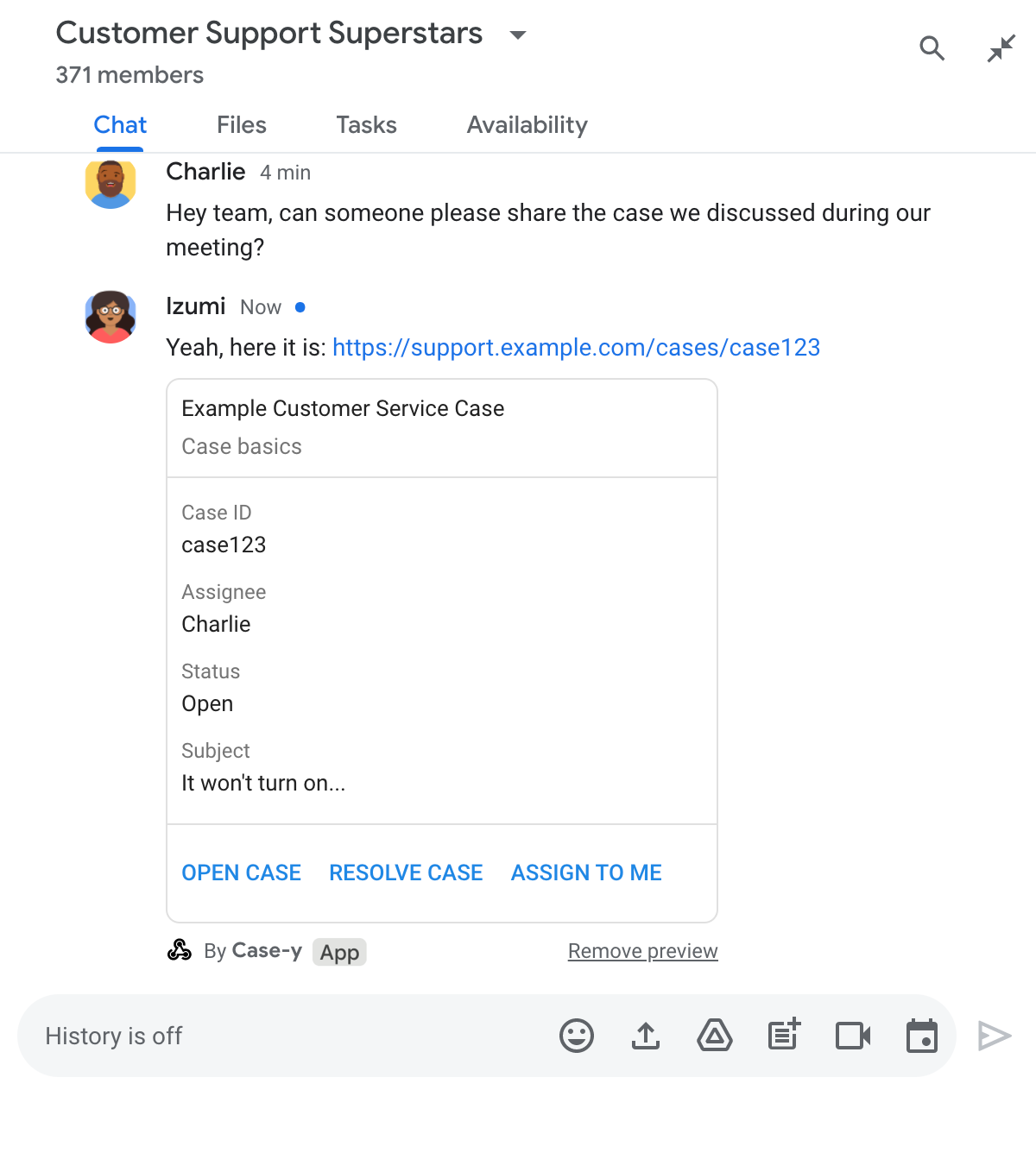
Trong ví dụ sau, một ứng dụng Chat sẽ thêm thẻ xem trước vào những tin nhắn có chứa mẫu URL support.example.com.

Ứng dụng Chat xem trước một đường liên kết bằng cách đính kèm thẻ vào tin nhắn

Node.js

node/chat/preview-link/index.js
// Attach a card to the message for URLs of the subdomain "support"
if (chatMessage.matchedUrl.url.includes("support.example.com")) {
  // A hard-coded card is used in this example. In a real-life scenario,
  // the case information would be fetched and used to build the card.
  return { hostAppDataAction: { chatDataAction: { updateInlinePreviewAction: { cardsV2: [{
    cardId: 'attachCard',
    card: {
      header: {
        title: 'Example Customer Service Case',
        subtitle: 'Case basics',
      },
      sections: [{ widgets: [
      { decoratedText: { topLabel: 'Case ID', text: 'case123'}},
      { decoratedText: { topLabel: 'Assignee', text: 'Charlie'}},
      { decoratedText: { topLabel: 'Status', text: 'Open'}},
      { decoratedText: { topLabel: 'Subject', text: 'It won\'t turn on...' }},
      { buttonList: { buttons: [{
        text: 'OPEN CASE',
        onClick: { openLink: {
          url: 'https://support.example.com/orders/case123'
        }},
      }, {
        text: 'RESOLVE CASE',
        onClick: { openLink: {
          url: 'https://support.example.com/orders/case123?resolved=y',
        }},
      }, {
        text: 'ASSIGN TO ME',
        onClick: { action: { function: FUNCTION_URL }}
      }]}}
      ]}]
    }
  }]}}}};
}

Thay thế FUNCTION_URL bằng điểm cuối HTTP xử lý các lượt nhấp vào nút.

Python

python/chat/preview-link/main.py
# Attach a card to the message for URLs of the subdomain "support"
if "support.example.com" in chatMessage.get('matchedUrl').get('url'):
  # A hard-coded card is used in this example. In a real-life scenario,
  # the case information would be fetched and used to build the card.
  return { 'hostAppDataAction': { 'chatDataAction': { 'updateInlinePreviewAction': { 'cardsV2': [{
    'cardId': 'attachCard',
    'card': {
      'header': {
        'title': 'Example Customer Service Case',
        'subtitle': 'Case basics',
      },
      'sections': [{ 'widgets': [
      { 'decoratedText': { 'topLabel': 'Case ID', 'text': 'case123'}},
      { 'decoratedText': { 'topLabel': 'Assignee', 'text': 'Charlie'}},
      { 'decoratedText': { 'topLabel': 'Status', 'text': 'Open'}},
      { 'decoratedText': { 'topLabel': 'Subject', 'text': 'It won\'t turn on...' }},
      { 'buttonList': { 'buttons': [{
        'text': 'OPEN CASE',
        'onClick': { 'openLink': {
          'url': 'https://support.example.com/orders/case123'
        }},
      }, {
        'text': 'RESOLVE CASE',
        'onClick': { 'openLink': {
          'url': 'https://support.example.com/orders/case123?resolved=y',
        }},
      }, {
        'text': 'ASSIGN TO ME',
        'onClick': { 'action': { 'function': FUNCTION_URL }}
      }]}}
      ]}]
    }
  }]}}}}

Thay thế FUNCTION_URL bằng điểm cuối HTTP xử lý các lượt nhấp vào nút.

Java

java/chat/preview-link/src/main/java/com/google/chat/previewLink/App.java
// Attach a card to the message for URLs of the subdomain "support"
if (chatMessage.at("/matchedUrl/url").asText().contains("support.example.com")) {
  // A hard-coded card is used in this example. In a real-life scenario,
  // the case information would be fetched and used to build the card.
  CardWithId cardV2 = new CardWithId()
    .setCardId("attachCard")
    .setCard(new GoogleAppsCardV1Card()
      .setHeader(new GoogleAppsCardV1CardHeader()
        .setTitle("Example Customer Service Case")
        .setSubtitle("Case basics"))
      .setSections(List.of(new GoogleAppsCardV1Section().setWidgets(List.of(
        new GoogleAppsCardV1Widget().setDecoratedText(new GoogleAppsCardV1DecoratedText()
          .setTopLabel("Case ID")
          .setText("case123")),
        new GoogleAppsCardV1Widget().setDecoratedText(new GoogleAppsCardV1DecoratedText()
          .setTopLabel("Assignee")
          .setText("Charlie")),
        new GoogleAppsCardV1Widget().setDecoratedText(new GoogleAppsCardV1DecoratedText()
          .setTopLabel("Status")
          .setText("Open")),
        new GoogleAppsCardV1Widget().setDecoratedText(new GoogleAppsCardV1DecoratedText()
          .setTopLabel("Subject")
          .setText("It won't turn on...")),
        new GoogleAppsCardV1Widget().setButtonList(new GoogleAppsCardV1ButtonList()
          .setButtons(List.of(
            new GoogleAppsCardV1Button()
              .setText("OPEN CASE")
            .setOnClick(new GoogleAppsCardV1OnClick()
                .setOpenLink(new GoogleAppsCardV1OpenLink()
                  .setUrl("https://support.example.com/orders/case123"))),
            new GoogleAppsCardV1Button()
              .setText("RESOLVE CASE")
            .setOnClick(new GoogleAppsCardV1OnClick()
                .setOpenLink(new GoogleAppsCardV1OpenLink()
                  .setUrl("https://support.example.com/orders/case123?resolved=y"))),
            new GoogleAppsCardV1Button()
              .setText("ASSIGN TO ME")
              .setOnClick(new GoogleAppsCardV1OnClick()
                .setAction(new GoogleAppsCardV1Action().setFunction(FUNCTION_URL)))
          ))
        )
      ))))
    );

  return new GenericJson() {{
    put("hostAppDataAction", new GenericJson() {{
      put("chatDataAction", new GenericJson() {{
        put("updateInlinePreviewAction", new GenericJson() {{
          put("cardsV2", List.of(cardV2));
        }});
      }});
    }});
  }};
}

Thay thế FUNCTION_URL bằng điểm cuối HTTP xử lý các lượt nhấp vào nút.

Apps Script

apps-script/chat/preview-link/preview-link.gs
// Attach a card to the message for URLs of the subdomain "support".
if (chatMessage.matchedUrl.url.includes("support.example.com")) {
  // A hard-coded card is used in this example. In a real-life scenario,
  // the case information would be fetched and used to build the card.
  return { hostAppDataAction: { chatDataAction: { updateInlinePreviewAction: { cardsV2: [{
    cardId: 'attachCard',
    card: {
      header: {
        title: 'Example Customer Service Case',
        subtitle: 'Case summary',
      },
      sections: [{ widgets: [
      { decoratedText: { topLabel: 'Case ID', text: 'case123'}},
      { decoratedText: { topLabel: 'Assignee', text: 'Charlie'}},
      { decoratedText: { topLabel: 'Status', text: 'Open'}},
      { decoratedText: { topLabel: 'Subject', text: 'It won\'t turn on...' }},
      { buttonList: { buttons: [{
        text: 'OPEN CASE',
        onClick: { openLink: {
          url: 'https://support.example.com/orders/case123'
        }},
      }, {
        text: 'RESOLVE CASE',
        onClick: { openLink: {
          url: 'https://support.example.com/orders/case123?resolved=y',
        }},
      }, {
        text: 'ASSIGN TO ME',
        // Clicking this button triggers the execution of the function
        // "assign" from the Apps Script project.
        onClick: { action: { function: 'assign'}}
      }]}}
      ]}]
    }
  }]}}}};
}

Ứng dụng Chat có thể cập nhật thẻ xem trước đường liên kết khi người dùng tương tác với thẻ đó, chẳng hạn như nhấp vào một nút trên thẻ.

Để cập nhật thẻ, ứng dụng Chat của bạn phải trả về thao tác DataActions bằng một trong các đối tượng ChatDataActionMarkup sau:

Để xác định người gửi tin nhắn, hãy sử dụng tải trọng sự kiện (buttonClickedPayload) để kiểm tra xem người gửi (message.sender.type) có được đặt thành HUMAN (người dùng) hay BOT (ứng dụng Chat) hay không.

Ví dụ sau đây cho thấy cách một ứng dụng trò chuyện cập nhật bản xem trước đường liên kết bất cứ khi nào người dùng nhấp vào nút Giao cho tôi bằng cách cập nhật trường Người được giao của thẻ và vô hiệu hoá nút này.

Ứng dụng trò chuyện xem trước một đường liên kết có phiên bản thẻ mới nhất được đính kèm vào một tin nhắn

Node.js

node/chat/preview-link/index.js
/**
 * Respond to clicks by assigning and updating the card that's attached to a
 * message previewed link of the pattern "support.example.com".
 *
 * @param {Object} chatMessage The chat message object from Google Workspace Add On event.
 * @return {Object} Action response depending on the message author.
 */
function handleCardClick(chatMessage) {
  // Creates the updated card that displays "You" for the assignee
  // and that disables the button.
  //
  // A hard-coded card is used in this example. In a real-life scenario,
  // an actual assign action would be performed before building the card.
  const message = { cardsV2: [{
    cardId: 'attachCard',
    card: {
      header: {
        title: 'Example Customer Service Case',
        subtitle: 'Case basics',
      },
      sections: [{ widgets: [
        { decoratedText: { topLabel: 'Case ID', text: 'case123'}},
        // The assignee is now "You"
        { decoratedText: { topLabel: 'Assignee', text: 'You'}},
        { decoratedText: { topLabel: 'Status', text: 'Open'}},
        { decoratedText: { topLabel: 'Subject', text: 'It won\'t turn on...' }},
        { buttonList: { buttons: [{
          text: 'OPEN CASE',
          onClick: { openLink: {
            url: 'https://support.example.com/orders/case123'
          }},
        }, {
          text: 'RESOLVE CASE',
          onClick: { openLink: {
            url: 'https://support.example.com/orders/case123?resolved=y',
          }},
        }, {
          text: 'ASSIGN TO ME',
          // The button is now disabled
          disabled: true,
          onClick: { action: { function: FUNCTION_URL }}
        }]}}
      ]}]
    }
  }]};

  // Use the adequate action response type. It depends on whether the message
  // the preview link card is attached to was created by a human or a Chat app.
  if(chatMessage.sender.type === 'HUMAN') {
    return { hostAppDataAction: { chatDataAction: { updateInlinePreviewAction: message }}};
  } else {
    return { hostAppDataAction: { chatDataAction: { updateMessageAction: message }}};
  }
}

Thay thế FUNCTION_URL bằng điểm cuối HTTP xử lý các lượt nhấp vào nút.

Python

python/chat/preview-link/main.py
def handle_card_click(chatMessage: dict) -> dict:
  """Respond to clicks by assigning and updating the card that's attached to a
  message previewed link of the pattern "support.example.com".

  - Reply with text messages that echo "text.example.com" link URLs in messages.
  - Attach cards to messages with "support.example.com" link URLs.

  Args:
      chatMessage (Mapping[str, Any]): The chat message object from Google Workspace Add On event.

  Returns:
      Mapping[str, Any]: Action response depending on the message author.
  """
  # Creates the updated card that displays "You" for the assignee
  # and that disables the button.
  #
  # A hard-coded card is used in this example. In a real-life scenario,
  # an actual assign action would be performed before building the card.
  message = { 'cardsV2': [{
    'cardId': 'attachCard',
    'card': {
      'header': {
        'title': 'Example Customer Service Case',
        'subtitle': 'Case basics',
      },
      'sections': [{ 'widgets': [
      { 'decoratedText': { 'topLabel': 'Case ID', 'text': 'case123'}},
      # The assignee is now "You"
      { 'decoratedText': { 'topLabel': 'Assignee', 'text': 'You'}},
      { 'decoratedText': { 'topLabel': 'Status', 'text': 'Open'}},
      { 'decoratedText': { 'topLabel': 'Subject', 'text': 'It won\'t turn on...' }},
      { 'buttonList': { 'buttons': [{
        'text': 'OPEN CASE',
        'onClick': { 'openLink': {
          'url': 'https://support.example.com/orders/case123'
        }},
      }, {
        'text': 'RESOLVE CASE',
        'onClick': { 'openLink': {
          'url': 'https://support.example.com/orders/case123?resolved=y',
        }},
      }, {
        'text': 'ASSIGN TO ME',
        # The button is now disabled
        'disabled': True,
        'onClick': { 'action': { 'function': FUNCTION_URL }}
      }]}}
      ]}]
    }
  }]}

  # Use the adequate action response type. It depends on whether the message
  # the preview link card is attached to was created by a human or a Chat app.
  if chatMessage.get('sender').get('type') == 'HUMAN':
    return { 'hostAppDataAction': { 'chatDataAction': { 'updateInlinePreviewAction': message }}}
  else:
    return { 'hostAppDataAction': { 'chatDataAction': { 'updateMessageAction': message }}}

Thay thế FUNCTION_URL bằng điểm cuối HTTP xử lý các lượt nhấp vào nút.

Java

java/chat/preview-link/src/main/java/com/google/chat/previewLink/App.java
/**
 * Respond to clicks by assigning and updating the card that's attached to a
 * message previewed link of the pattern "support.example.com".
 *
 * @param chatMessage The chat message object from Google Workspace Add On event.
 * @return Action response depending on the message author.
 */
GenericJson handleCardClick(JsonNode chatMessage) {
  // Creates the updated card that displays "You" for the assignee
  // and that disables the button.
  //
  // A hard-coded card is used in this example. In a real-life scenario,
  // an actual assign action would be performed before building the card.
  Message message = new Message().setCardsV2(List.of(new CardWithId()
    .setCardId("attachCard")
    .setCard(new GoogleAppsCardV1Card()
      .setHeader(new GoogleAppsCardV1CardHeader()
        .setTitle("Example Customer Service Case")
        .setSubtitle("Case basics"))
      .setSections(List.of(new GoogleAppsCardV1Section().setWidgets(List.of(
        new GoogleAppsCardV1Widget().setDecoratedText(new GoogleAppsCardV1DecoratedText()
          .setTopLabel("Case ID")
          .setText("case123")),
        // The assignee is now "You"
        new GoogleAppsCardV1Widget().setDecoratedText(new GoogleAppsCardV1DecoratedText()
          .setTopLabel("Assignee")
          .setText("You")),
        new GoogleAppsCardV1Widget().setDecoratedText(new GoogleAppsCardV1DecoratedText()
          .setTopLabel("Status")
          .setText("Open")),
        new GoogleAppsCardV1Widget().setDecoratedText(new GoogleAppsCardV1DecoratedText()
          .setTopLabel("Subject")
          .setText("It won't turn on...")),
        new GoogleAppsCardV1Widget().setButtonList(new GoogleAppsCardV1ButtonList()
          .setButtons(List.of(
            new GoogleAppsCardV1Button()
              .setText("OPEN CASE")
              .setOnClick(new GoogleAppsCardV1OnClick()
                .setOpenLink(new GoogleAppsCardV1OpenLink()
                  .setUrl("https://support.example.com/orders/case123"))),
            new GoogleAppsCardV1Button()
              .setText("RESOLVE CASE")
              .setOnClick(new GoogleAppsCardV1OnClick()
                .setOpenLink(new GoogleAppsCardV1OpenLink()
                  .setUrl("https://support.example.com/orders/case123?resolved=y"))),
            new GoogleAppsCardV1Button()
              .setText("ASSIGN TO ME")
              // The button is now disabled
              .setDisabled(true)
              .setOnClick(new GoogleAppsCardV1OnClick()
                .setAction(new GoogleAppsCardV1Action().setFunction(FUNCTION_URL)))
          ))
        )
      ))))
    )
  ));

  // Use the adequate action response type. It depends on whether the message
  // the preview link card is attached to was created by a human or a Chat app.
  if("HUMAN".equals(chatMessage.at("/sender/type").asText())) {
    return new GenericJson() {{
      put("hostAppDataAction", new GenericJson() {{
        put("chatDataAction", new GenericJson() {{
          put("updateInlinePreviewAction", message);
        }});
      }});
    }};
  } else {
    return new GenericJson() {{
      put("hostAppDataAction", new GenericJson() {{
        put("chatDataAction", new GenericJson() {{
          put("updateMessageAction", message);
        }});
      }});
    }};
  }
}

Thay thế FUNCTION_URL bằng điểm cuối HTTP xử lý các lượt nhấp vào nút.

Apps Script

apps-script/chat/preview-link/preview-link.gs
/**
 * Assigns and updates the card that's attached to a message with a
 * previewed link of the pattern "support.example.com".
 *
 * @param {Object} event The event object from the Google Workspace add-on.
 * @return {Object} Action response depending on the message author.
 */
function assign(event) {
  // Creates the updated card that displays "You" for the assignee
  // and that disables the button.
  //
  // A hard-coded card is used in this example. In a real-life scenario,
  // an actual assign action would be performed before building the card.
  const message = { cardsV2: [{
    cardId: 'attachCard',
    card: {
      header: {
        title: 'Example Customer Service Case',
        subtitle: 'Case summary',
      },
      sections: [{ widgets: [
        { decoratedText: { topLabel: 'Case ID', text: 'case123'}},
        // The assignee is now "You"
        { decoratedText: { topLabel: 'Assignee', text: 'You'}},
        { decoratedText: { topLabel: 'Status', text: 'Open'}},
        { decoratedText: { topLabel: 'Subject', text: 'It won\'t turn on...' }},
        { buttonList: { buttons: [{
          text: 'OPEN CASE',
          onClick: { openLink: {
            url: 'https://support.example.com/orders/case123'
          }},
        }, {
          text: 'RESOLVE CASE',
          onClick: { openLink: {
            url: 'https://support.example.com/orders/case123?resolved=y',
          }},
        }, {
          text: 'ASSIGN TO ME',
          // The button is now disabled
          disabled: true,
          onClick: { action: { function: 'assign'}}
        }]}}
      ]}]
    }
  }]};

  // Use the adequate action response type. It depends on whether the message
  // the preview link card is attached to was created by a human or a Chat app.
  if(event.chat.buttonClickedPayload.message.sender.type === 'HUMAN') {
    return { hostAppDataAction: { chatDataAction: { updateInlinePreviewAction: message }}};
  } else {
    return { hostAppDataAction: { chatDataAction: { updateMessageAction: message }}};
  }
}

Giới hạn và điểm cần cân nhắc

Khi bạn định cấu hình bản xem trước đường liên kết cho ứng dụng Chat, hãy lưu ý những giới hạn và điểm cần cân nhắc sau:

  • Mỗi ứng dụng Chat hỗ trợ tính năng xem trước đường liên kết cho tối đa 5 mẫu URL.
  • Các ứng dụng trò chuyện xem trước một đường liên kết cho mỗi tin nhắn. Nếu có nhiều đường liên kết có thể xem trước trong một tin nhắn, thì chỉ đường liên kết có thể xem trước đầu tiên được xem trước.
  • Các ứng dụng trò chuyện chỉ xem trước những đường liên kết bắt đầu bằng https://, vì vậy, https://support.example.com/cases/ có thể xem trước, nhưng support.example.com/cases/ thì không.
  • Trừ phi tin nhắn có chứa thông tin khác được gửi đến ứng dụng Chat, chẳng hạn như lệnh dấu gạch chéo, nếu không, chỉ URL của đường liên kết được gửi đến ứng dụng Chat bằng tính năng xem trước đường liên kết.
  • Nếu người dùng đăng đường liên kết, thì ứng dụng Chat chỉ có thể cập nhật thẻ xem trước đường liên kết nếu người dùng tương tác với thẻ, chẳng hạn như nhấp vào nút. Bạn không thể gọi phương thức update() của Chat API trên tài nguyên Message để cập nhật thông báo của người dùng một cách không đồng bộ.
  • Các ứng dụng trò chuyện phải xem trước đường liên kết cho mọi người trong không gian, vì vậy, thông báo phải bỏ qua trường privateMessageViewer.

Khi triển khai tính năng xem trước đường liên kết, có thể bạn cần gỡ lỗi ứng dụng Chat bằng cách đọc nhật ký của ứng dụng. Để đọc nhật ký, hãy truy cập vào Trình khám phá nhật ký trên bảng điều khiển Google Cloud.