
本页将说明 Google Chat 应用如何发送消息来回复用户互动。
-
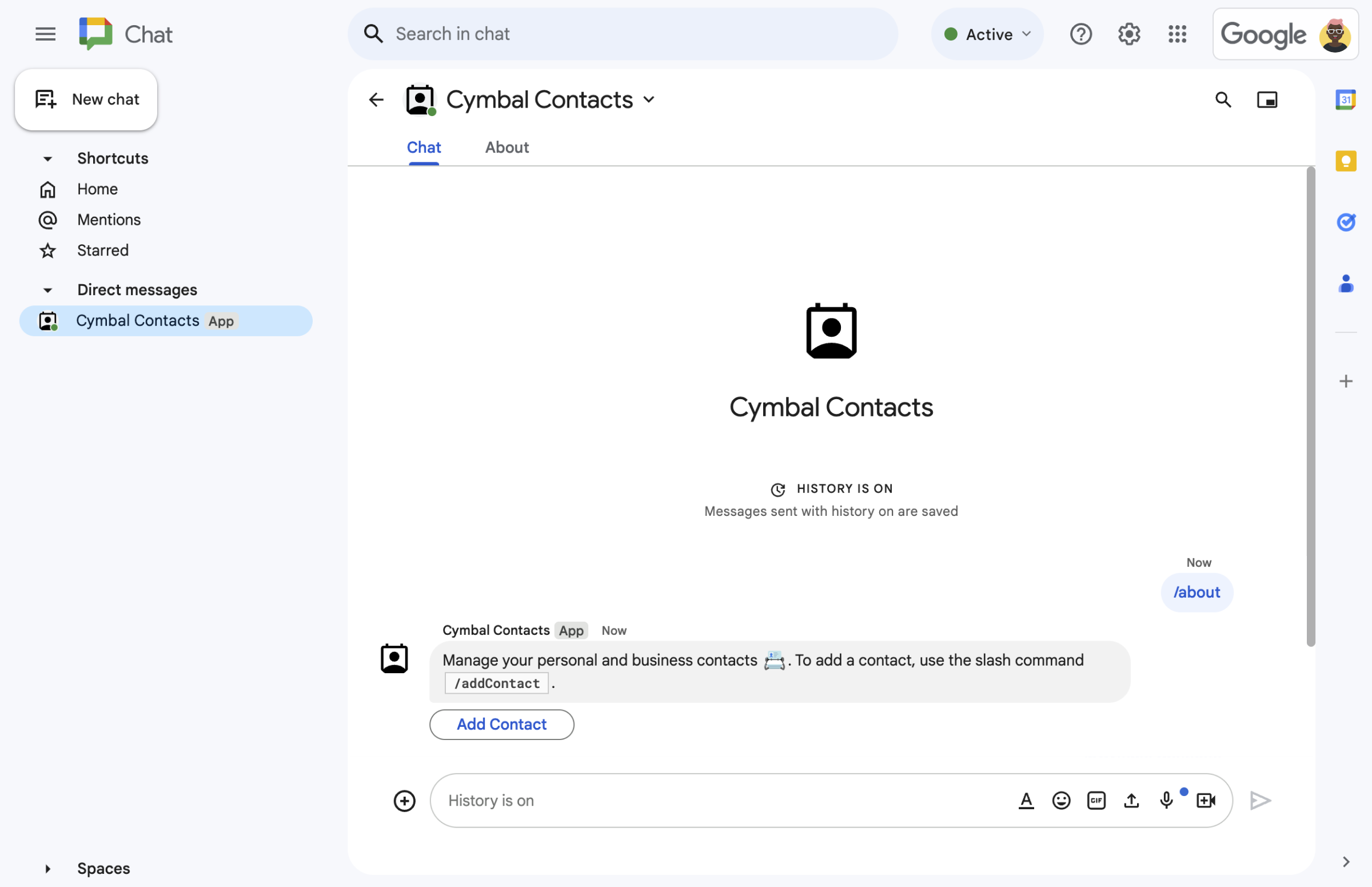
图 1.Chat 应用使用文本消息和按钮来响应斜杠命令。 -
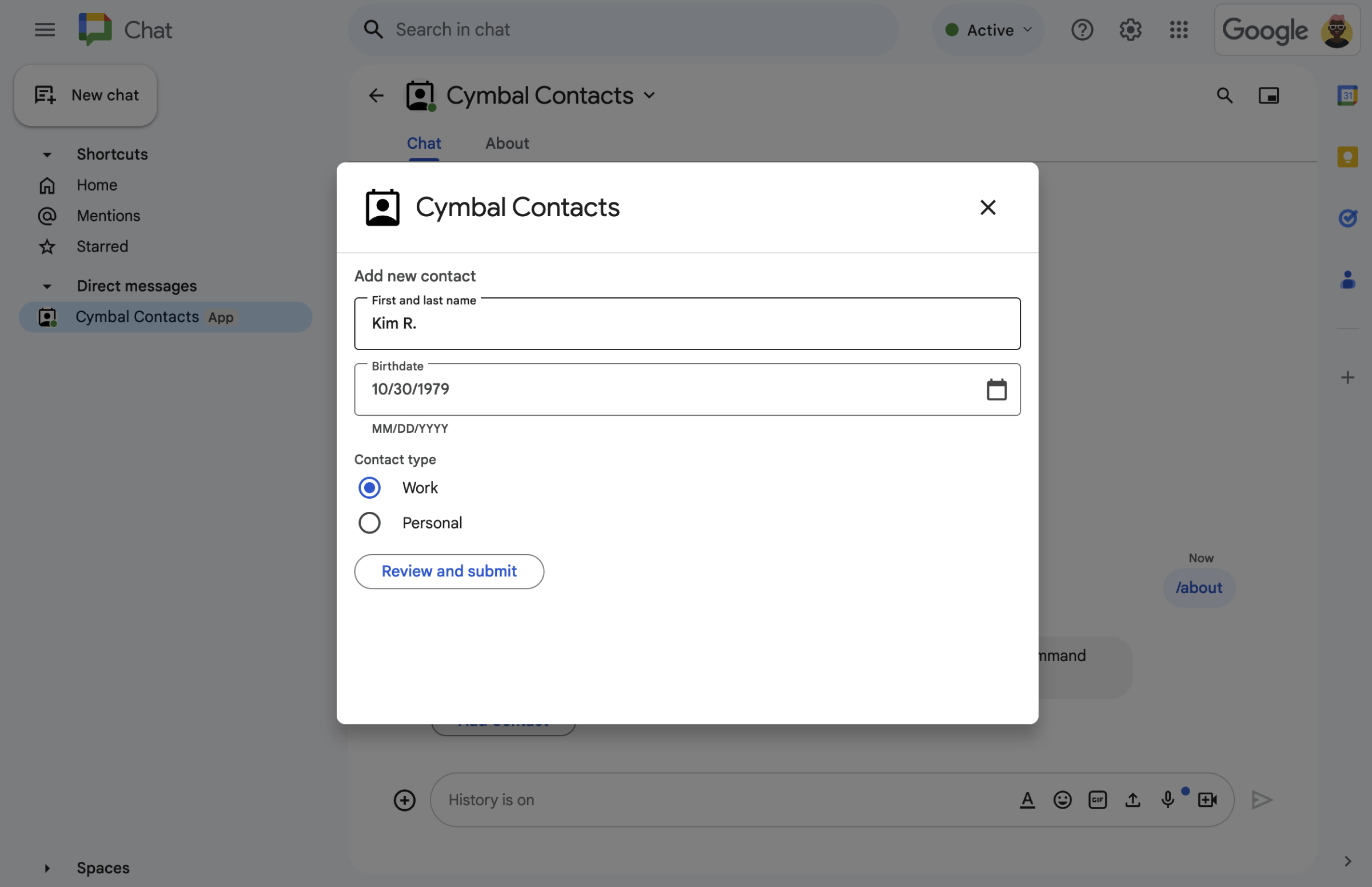
图 2.Chat 应用会打开一个对话框,供用户输入信息。 -
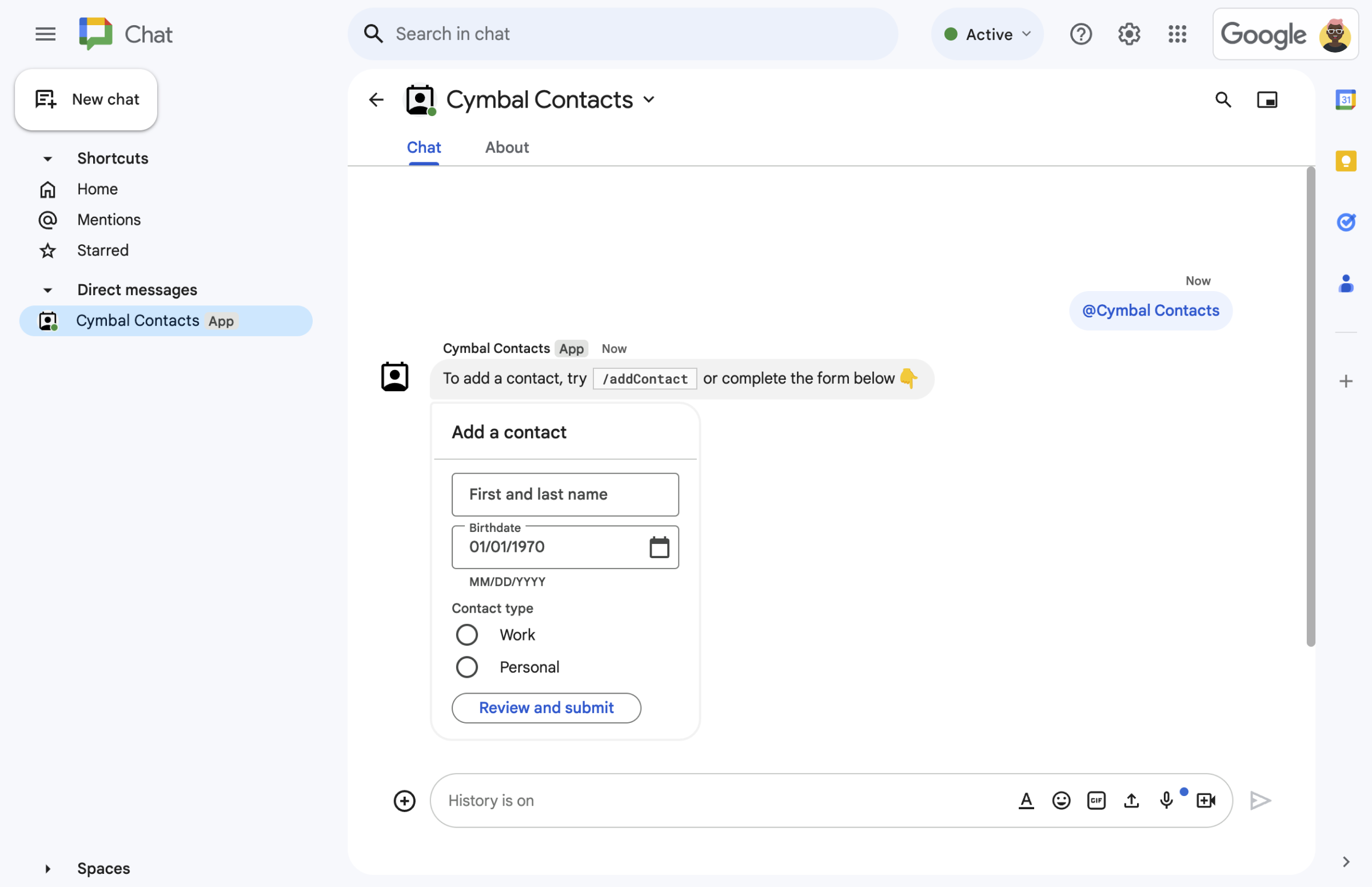
图 5.Chat 应用会发送一条包含文本和互动卡片的消息。
前提条件
HTTP
一个扩展 Google Chat 的 Google Workspace 插件。如需构建一个, 请完成 HTTP 快速入门。
Apps 脚本
一个扩展 Google Chat 的 Google Workspace 插件。如需构建一个, 请完成 Apps 脚本快速入门。
设计消息
Chat 应用可以在消息中包含以下任何内容:
- 包含超链接、“@”提及和表情符号的文本。
- 一张或多张卡片,这些卡片可以显示在消息中,也可以作为对话框在新窗口中打开。
- 一个或多个辅助 widget,这些 widget 是显示在消息中的任何文本或卡片之后的按钮。
如需了解如何设计消息,请参阅以下 Google Chat API 文档:
使用消息回复
Chat 应用可以使用消息来响应以下任何触发器或互动:
- **消息** 触发器,例如 用户“@”提及 Chat 应用或向其发送私信。
- **已添加到聊天室** 触发器, 例如用户从 Google Workspace Marketplace 安装 Chat 应用或将其添加到聊天室。
- 点击消息或对话框中的卡片上的按钮。例如,当用户输入信息并点击“提交”时。
否则,Chat 应用可以通过 调用 Google Chat API主动发送消息。
如需使用消息回复,请返回包含
CreateMessageAction 对象的 DataActions 操作:
{ "hostAppDataAction": { "chatDataAction": { "createMessageAction": {
  "message": MESSAGE
}}}
将 MESSAGE 替换为 Chat API 中的
Message
资源。如需详细了解操作的工作原理,请参阅
Chat 操作。
在以下示例中,Chat 应用会在每次添加到聊天室时创建并发送一条文本消息。如需在用户将您的 Chat 应用添加到聊天室时发送文本消息,您的 Chat 应用会通过返回 DataActions 操作来响应已添加到聊天室 触发器:
Node.js
/**
 * Sends an onboarding message when the Chat app is added to a space.
 *
 * @param {Object} req The request object from Google Workspace add-on.
 * @param {Object} res The response object from the Chat app.
 */
exports.cymbalApp = function cymbalApp(req, res) {
  const chatEvent = req.body.chat;
  // Send an onboarding message when added to a Chat space
  if (chatEvent.addedToSpacePayload) {
    res.json({ hostAppDataAction: { chatDataAction: { createMessageAction: { message: {
      text: 'Hi, Cymbal at your service. I help you manage your calendar' +
        'from Google Chat. Take a look at your schedule today by typing' +
        '`/checkCalendar`, or schedule a meeting with `/scheduleMeeting`. ' +
        'To learn what else I can do, type `/help`.'
    }}}}});
  }
};
Python
from flask import Flask, request, json
app = Flask(__name__)

@app.route('/', methods=['POST'])
def cymbal_app():
  """Sends an onboarding message when the Chat app is added to a space.

  Returns:
    Mapping[str, Any]: The response object from the Chat app.
  """
  chat_event = request.get_json()["chat"]
  if "addedToSpacePayload" in chat_event:
    return json.jsonify({ "hostAppDataAction": { "chatDataAction": {
      "createMessageAction": { "message": {
        "text": 'Hi, Cymbal at your service. I help you manage your calendar' +
        'from Google Chat. Take a look at your schedule today by typing' +
        '`/checkCalendar`, or schedule a meeting with `/scheduleMeeting`. ' +
        'To learn what else I can do, type `/help`.'
      }}
    }}})
Java
@SpringBootApplication
@RestController
public class App {
  public static void main(String[] args) {
    SpringApplication.run(App.class, args);
  }

  /*
   * Sends an onboarding message when the Chat app is added to a space.
   *
   * @return The response object from the Chat app.
   */
  @PostMapping("/")
  @ResponseBody
  public GenericJson onEvent(@RequestBody JsonNode event) throws Exception {
    JsonNode chatEvent = event.at("/chat");
    if(!chatEvent.at("/addedToSpacePayload").isEmpty()) {
      return new GenericJson() { {
        put("hostAppDataAction", new GenericJson() { {
          put("chatDataAction", new GenericJson() { {
            put("createMessageAction", new GenericJson() { {
              put("message", new Message().setText(
                "Hi, Cymbal at your service. I help you manage your calendar" +
                "from Google Chat. Take a look at your schedule today by typing" +
                "`/checkCalendar`, or schedule a meeting with `/scheduleMeeting`. " +
                "To learn what else I can do, type `/help`."
              ));
            } });
          } });
        } });
      } };
    }
  }
}
Apps 脚本
/**
 * Sends an onboarding message when the Chat app is added to a space.
 *
 * @param {Object} event The event object from Chat API.
 * @return {Object} Response from the Chat app.
 */
function onAddedToSpace(event) {
  return { hostAppDataAction: { chatDataAction: { createMessageAction: { message: {
    text: 'Hi, Cymbal at your service. I help you manage your calendar' +
          'from Google Chat. Take a look at your schedule today by typing' +
          '`/checkCalendar`, or schedule a meeting with `/scheduleMeeting`. ' +
          'To learn what else I can do, type `/help`.'
  }}}}};
}
该代码示例会返回以下文本消息:

如需查看有关如何使用消息回复的其他示例,请参阅以下指南:
更新消息
Chat 应用还可以更新其发送的消息。例如,在用户提交对话框或点击消息中的按钮后更新消息。
如需更新 Chat 应用消息,请返回操作
DataActions,其中包含
UpdateMessageAction,如
以下示例所示:
{ "hostAppDataAction": { "chatDataAction": { "updateMessageAction": {
  "message": MESSAGE
}}}}
将 MESSAGE 替换为 Chat API 中的
Message
资源。
如需详细了解操作的工作原理,请参阅 Chat 操作。
Chat 应用还可以更新用户发送的消息,以返回用户发送的链接的预览。如需了解详情,请参阅 预览 Google Chat 消息中的链接。
使用 Google Chat API 回复互动或发送主动消息
Chat 应用可能需要使用 Google Chat API 来响应互动,而不是返回插件操作。例如,Chat 应用必须调用 Google Chat API 才能执行以下任何操作:
- 按计划发送消息,或发送有关外部资源更改的消息。例如,有关新问题或案例的通知。
- 在互动发生 30 秒后回复。例如,在完成长时间运行的任务后使用消息回复。
- 在互动发生的聊天室之外发送消息。
- 代表 Chat 用户发送消息。
如需使用 Chat API 发送消息,您必须设置身份验证,并对 Message 资源调用 create() 方法。如需了解相关步骤,请参阅
使用 Google Chat API 发送消息。
相关主题
- 构建 Google Chat 界面
- 响应快速命令
- 响应斜杠命令
- 打开互动式对话框
- 从 Google Chat 用户处收集信息
- 预览 Google Chat 消息中的链接
- 使用 Google Chat API 发送消息