
ভূমিকা
জিরো-টাচ এনরোলমেন্ট API ডিভাইস রিসেলারদের তাদের ইন্টিগ্রেশন অটোমেট করতে সাহায্য করে। আপনার সংস্থার সেলস টুল জিরো-টাচ এনরোলমেন্টে বিল্ড-ইন করা যেতে পারে—যা আপনার ব্যবহারকারী এবং আপনার গ্রাহকদের আরও প্রোডাক্টিভ করে তোলে। আপনার ব্যবহারকারীদের সাহায্য করতে API ব্যবহার করুন:
- গ্রাহকের জিরো-টাচ এনরোলমেন্ট অ্যাকাউন্টে কেনা ডিভাইস অ্যাসাইন করুন।
- আপনার গ্রাহকের জিরো-টাচ এনরোলমেন্ট অ্যাকাউন্ট তৈরি করুন।
- আপনার সংস্থার টেলিফোন এবং অর্ডার মেটাডেটা ডিভাইসে অ্যাটাচ করুন।
- আপনার গ্রাহকদের অ্যাসাইন করা ডিভাইস সম্পর্কে রিপোর্ট তৈরি করা।
এই ডকুমেন্ট API-এর সাথে পরিচয় করিয়ে দেয় এবং প্যাটার্ন ব্যাখ্যা করে। আপনি যদি নিজে API এক্সপ্লোর করতে চান, তাহলে Java, .NET, অথবা Python-এর জন্য কুইকস্টার্ট ব্যবহার করে দেখুন।
API কনসেপ্ট
গ্রাহক এবং ডিভাইস হল API-তে আপনার ব্যবহার করা মূল রিসোর্স। গ্রাহক তৈরি করতে, create নম্বরে কল করুন। আপনি দাবি API পদ্ধতি ব্যবহার করে
ডিভাইস তৈরি করতে পারবেন (নিচে দেখুন)। এছাড়াও, আপনার প্রতিষ্ঠান জিরো-টাচ এনরোলমেন্ট পোর্টাল ব্যবহার করে
গ্রাহক ও ডিভাইস তৈরি করতে পারে।
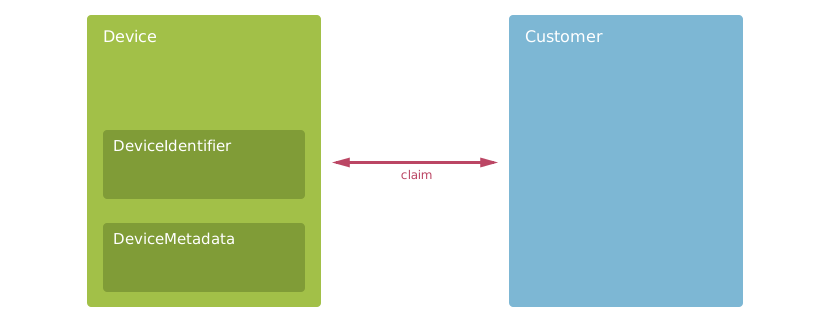
- গ্রাহক
- আপনার প্রতিষ্ঠান যেসব কোম্পানির কাছে ডিভাইস বিক্রি করে। গ্রাহকদের কাছে
nameএবংIDআছে। আপনি যখন কোনও গ্রাহকের ডিভাইস দাবি করতে বা খুঁজতে চান তখন গ্রাহক ব্যবহার করুন। আরও জানতে,Customerদেখুন। - ডিভাইস
- আপনার প্রতিষ্ঠান কোনও গ্রাহককে জিরো-টাচ এনরোলমেন্ট-উপযোগী Android বা ChromeOS ডিভাইস
বিক্রি করে। ডিভাইসে হার্ডওয়্যার আইডি, মেটাডেটা ও গ্রাহকের
দাবি থাকে। API-এর ক্ষেত্রে ডিভাইস হল মূল বিষয়, তাই আপনি প্রায় সব পদ্ধতিতে
সেগুলি ব্যবহার করেন। আরও জানতে,
Deviceদেখুন। - DeviceIdentifier
- তৈরি করা ডিভাইস শনাক্ত করতে IMEI বা MEID-এর মতো হার্ডওয়্যার আইডি এনক্যাপসুলেট করে। আপনি যে ডিভাইস খুঁজতে, আপডেট করতে বা দাবি করতে চান, সেটিকে টার্গেট করতে
DeviceIdentifierব্যবহার করুন। আরও জানতে, আইডেন্টিফায়ার পড়ুন। - DeviceMetadata
- ডিভাইসের জন্য মেটাডেটার কী-ভ্যালু পেয়ার স্টোর করে। আপনার প্রতিষ্ঠানের মেটাডেটা স্টোর করতে
DeviceMetadataব্যবহার করুন। আরও জানতে, ডিভাইস মেটাডেটা পড়ুন।
আপনার অ্যাপ ব্যবহার করতে পারে এমন সব API পদ্ধতি ও রিসোর্সের তালিকা দেখতে, API রেফারেন্স দেখুন।
গ্রাহক তৈরি করুন
Android ডিভাইসের ক্ষেত্রে, রিসেলারকে তার গ্রাহকের হয়ে গ্রাহক অ্যাকাউন্ট তৈরি করার দায়িত্ব নিতে হয়। গ্রাহক এই অ্যাকাউন্ট ব্যবহার করে জিরো-টাচ পোর্টালে অ্যাক্সেস পাবেন এবং তার ডিভাইসের জন্য প্রভিশনিং সেটিংস কনফিগার করতে পারবেন। ChromeOS ডিভাইসের জন্য এটি প্রয়োজন নেই, যাদের আগে থেকেই Google Workspace অ্যাকাউন্ট আছে, তারা সেটি ব্যবহার করে প্রভিশনিং সেটিংস কনফিগার করতে পারবেন।
জিরো-টাচ এনরোলমেন্টের জন্য গ্রাহক অ্যাকাউন্ট তৈরি করতে আপনি create API পদ্ধতি কল করতে পারেন। আপনার গ্রাহকরা তাদের জিরো-টাচ এনরোলমেন্ট পোর্টালে কোম্পানির নাম দেখতে পান, তাই আপনার অ্যাপের ব্যবহারকারীকে এটি সঠিক কিনা তা কনফার্ম করতে হবে। গ্রাহক তৈরি করার পরে আপনি গ্রাহকের নাম এডিট করতে পারবেন না।
মালিক হতে হলে, আপনাকে কমপক্ষে একটি কর্পোরেট ইমেল আইডি অন্তর্ভুক্ত করতে হবে, যা একটি Google অ্যাকাউন্টের সাথে যুক্ত। আপনি API-এর সাথে ব্যক্তিগত Gmail অ্যাকাউন্ট ব্যবহার করতে পারবেন না। অ্যাকাউন্ট যুক্ত করার ব্যাপারে গ্রাহকের সাহায্যের প্রয়োজন হলে, Google অ্যাকাউন্ট যুক্ত করুন লিঙ্ক থেকে নির্দেশাবলী পাঠান।
API কল করে আপনি কোনও গ্রাহক তৈরি করার পরে, তিনি তার কর্মচারীদের পোর্টাল অ্যাক্সেস ম্যানেজ করেন — আপনি API ব্যবহার করে আপনার গ্রাহকের ব্যবহারকারীদের এডিট করতে পারবেন না। নিচের স্নিপেট থেকে আপনি কীভাবে গ্রাহক তৈরি করবেন তা দেখানো হয়েছে:
Java
// Provide the customer data as a Company type.
// The API requires a name and owners.
Company customer = new Company();
customer.setCompanyName("XYZ Corp");
customer.setOwnerEmails(Arrays.asList("liz@example.com", "darcy@example.com"));
customer.setAdminEmails(Collections.singletonList("jane@example.com"));

// Use our reseller ID for the parent resource name.
String parentResource = String.format("partners/%d", PARTNER_ID);

// Call the API to create the customer using the values in the company object.
CreateCustomerRequest body = new CreateCustomerRequest();
body.setCustomer(customer);
Company response = service.partners().customers().create(parentResource, body).execute();
.NET
// Provide the customer data as a Company type.
// The API requires a name and owners.
var customer = new Company
{
    CompanyName = "XYZ Corp",
    OwnerEmails = new String[] { "liz@example.com", "darcy@example.com" },
    AdminEmails = new String[] { "jane@example.com" }
};

// Use our reseller ID for the parent resource name.
var parentResource = String.Format("partners/{0}", PartnerId);

// Call the API to create the customer using the values in the company object.
var body = new CreateCustomerRequest
{
    Customer = customer
};
var request = service.Partners.Customers.Create(body, parentResource);
var response = request.Execute();
Python
# Provide the customer data as a Company type. The API requires
# a name and at least one owner.
company = {'companyName':'XYZ Corp', \
  'ownerEmails':['liz@example.com', 'darcy@example.com'], \
  'adminEmails':['jane@example.com']}

# Use our reseller ID for the parent resource name.
parent_resource = 'partners/{0}'.format(PARTNER_ID)

# Call the API to create the customer using the values in the company object.
response = service.partners().customers().create(parent=parent_resource,
    body={'customer':company}).execute()
আপনার গ্রাহকের কর্মচারীদের জন্য মালিক ও অ্যাডমিন ভূমিকা সম্পর্কে আরও জানতে, পোর্টাল ব্যবহারকারী পড়ুন।
গ্রাহকদের জন্য ডিভাইস দাবি করুন
আপনার গ্রাহকরা ডিভাইস কেনার পরে, তারা তাদের অ্যাকাউন্টে এই ডিভাইসগুলির জন্য প্রভিশনিং সেটিংস কনফিগার করতে চাইবেন। কোনও ডিভাইস দাবি করলে, সেটি জিরো-টাচ এনরোলমেন্টে যোগ করা হয় এবং গ্রাহক প্রভিশনিং সেটিংস কনফিগার করার সুবিধা পান।
ডিভাইসের প্রোভিশনিং রেকর্ডে জিরো-টাচ এনরোলমেন্টের জন্য একটি বিভাগ থাকে। আপনি
গ্রাহকের জন্য রেকর্ডের জিরো-টাচ এনরোলমেন্ট বিভাগ দাবি করে ডিভাইস অ্যাসাইন
করতে পারেন। আর্গুমেন্ট হিসেবে গ্রাহকের সাথে
partners.devices.claim বা
partners.devices.claimAsync মেথড কল করুন। sectionType-এর জন্য
SECTION_TYPE_ZERO_TOUCH-কে সবসময় ভ্যালু হিসেবে প্রদান করুন।
অন্য কোনও গ্রাহকের জন্য একই ডিভাইস দাবি করার আগে আপনাকে গ্রাহকের ডিভাইস আনক্লেম (নিচে দেখুন) করতে হবে। নতুন ডিভাইস তৈরি করার সময়, দাবি করার পদ্ধতি
IMEI বা MEID, বা সিরিয়াল নম্বর,
প্রস্তুতকারকের নাম ও মডেল এবং ChromeOS ডিভাইসের জন্য
অ্যাটেস্ট করা ডিভাইস আইডি সহ DeviceIdentifier ফিল্ড যাচাই করে।
নিচের স্নিপেট থেকে বোঝা যাবে যে কীভাবে কোনও ডিভাইসের মালিকানা দাবি করতে হয়:
Java
// Identify the device to claim.
DeviceIdentifier identifier = new DeviceIdentifier();
// The manufacturer value is optional but recommended for cellular devices
identifier.setManufacturer("Google");
identifier.setImei("098765432109875");

// Create the body to connect the customer with the device.
ClaimDeviceRequest body = new ClaimDeviceRequest();
body.setDeviceIdentifier(identifier);
body.setCustomerId(customerId);
body.setSectionType("SECTION_TYPE_ZERO_TOUCH");

// Claim the device.
ClaimDeviceResponse response = service.partners().devices().claim(PARTNER_ID, body).execute();
.NET
// Identify the device to claim.
var deviceIdentifier = new DeviceIdentifier
{
    // The manufacturer value is optional but recommended for cellular devices
    Manufacturer = "Google",
    Imei = "098765432109875"
};

// Create the body to connect the customer with the device.
ClaimDeviceRequest body = new ClaimDeviceRequest
{
    DeviceIdentifier = deviceIdentifier,
    CustomerId = CustomerId,
    SectionType = "SECTION_TYPE_ZERO_TOUCH"
};

// Claim the device.
var response = service.Partners.Devices.Claim(body, PartnerId).Execute();
Python
# Identify the device to claim.
# The manufacturer value is optional but recommended for cellular devices
device_identifier = {'manufacturer':'Google', 'imei':'098765432109875'}

# Create the body to connect the customer with the device.
request_body = {'deviceIdentifier':device_identifier, \
    'customerId':customer_id, \
    'sectionType':'SECTION_TYPE_ZERO_TOUCH'}

# Claim the device.
response = service.partners().devices().claim(partnerId=PARTNER_ID,
    body=request_body).execute()
ডিভাইসের দাবি বাতিল করা হচ্ছে
আপনার সংস্থা কোনও গ্রাহকের থেকে ডিভাইসের মালিকানা ছেড়ে দিতে পারে। কোনও ডিভাইস আনক্লেম করলে
সেটি জিরো-টাচ এনরোলমেন্ট থেকে সরিয়ে দেওয়া হয়। কোনও রিসেলার এমন কোনও ডিভাইসের দাবি প্রত্যাহার করতে পারেন যা
তিনি অন্য অ্যাকাউন্টে মাইগ্রেট করতে চান, ফেরত দিতে চান বা ভুলবশত দাবি করেছেন।
কোনও গ্রাহকের থেকে ডিভাইস আনক্লেম করতে
partners.devices.unclaim বা
partners.devices.unclaimAsync মেথড কল করুন।
ভেন্ডর
আপনার ডিলার নেটওয়ার্কে রিসেলার পার্টনার, গ্লোবাল রিসেলার নেটওয়ার্কে স্থানীয় অপারেটর বা আপনার হয়ে ডিভাইস বিক্রি করে এমন কোনও সংস্থার প্রতিনিধিত্ব করার জন্য আপনি ভেন্ডর ব্যবহার করতে পারেন। ভেন্ডর আপনাকে ব্যবহারকারী, গ্রাহক ও ডিভাইস আলাদা করতে সাহায্য করে:
- আপনার তৈরি করা ভেন্ডররা আপনার জিরো-টাচ এনরোলমেন্ট অ্যাকাউন্ট বা একে অপরের অ্যাকাউন্ট দেখতে পাবেন না।
- আপনি নিজের ভেন্ডরের গ্রাহক ও ডিভাইস দেখতে এবং ভেন্ডরের ডিভাইস আনরেজিস্টার করতে পারবেন। তবে, আপনি নিজের ভেন্ডরের গ্রাহকদের ডিভাইস অ্যাসাইন করতে পারবেন না।
আপনার প্রতিষ্ঠানের জন্য ভেন্ডর তৈরি করতে পোর্টাল ব্যবহার করুন — আপনি API ব্যবহার করতে পারবেন না। নতুন ভেন্ডর তৈরি করতে আপনার অ্যাকাউন্টের ভূমিকা অবশ্যই
মালিক হতে হবে। আপনার সংস্থার ভেন্ডর থাকলে,
আপনি partners.vendors.list কল করে আপনার
ভেন্ডরদের তালিকাভুক্ত করতে পারেন এবং partners.vendors.customers.list
কল করে আপনার ভেন্ডরের গ্রাহকদের পেতে পারেন। নিম্নলিখিত উদাহরণে এই দুটি পদ্ধতিই ব্যবহার করা হয়েছে
যাতে বিক্রেতার গ্রাহকদের জন্য পরিষেবার শর্তাবলীর স্ট্যাটাস দেখিয়ে
একটি রিপোর্ট প্রিন্ট করা যায়:
Java
// First, get the organization's vendors.
String parentResource = String.format("partners/%d", PARTNER_ID);
ListVendorsResponse results = service.partners().vendors().list(parentResource).execute();
if (results.getVendors() == null) {
  return;
}

// For each vendor, report the company name and a maximum 5 customers.
for (Company vendor: results.getVendors()) {
  System.out.format("\n%s customers\n", vendor.getCompanyName());
  System.out.println("---");
  // Use the vendor's API resource name as the parent resource.
  AndroidProvisioningPartner.Partners.Vendors.Customers.List customerRequest =
      service.partners().vendors().customers().list(vendor.getName());
  customerRequest.setPageSize(5);
  ListVendorCustomersResponse customerResponse = customerRequest.execute();

  List<Company> customers = customerResponse.getCustomers();
  if (customers == null) {
    System.out.println("No customers");
    break;
  } else {
    for (Company customer: customers) {
      System.out.format("%s: %s\n",
          customer.getCompanyName(),
          customer.getTermsStatus());
    }
  }
}
.NET
// First, get the organization's vendors.
var parentResource = String.Format("partners/{0}", PartnerId);
var results = service.Partners.Vendors.List(parentResource).Execute();
if (results.Vendors == null)
{
    return;
}

// For each vendor, report the company name and a maximum 5 customers.
foreach (Company vendor in results.Vendors)
{
    Console.WriteLine("\n{0} customers", vendor);
    Console.WriteLine("---");
    // Use the vendor's API resource name as the parent resource.
    PartnersResource.VendorsResource.CustomersResource.ListRequest customerRequest =
        service.Partners.Vendors.Customers.List(vendor.Name);
    customerRequest.PageSize = 5;
    var customerResponse = customerRequest.Execute();

    IList<Company> customers = customerResponse.Customers;
    if (customers == null)
    {
        Console.WriteLine("No customers");
        break;
    }
    else
    {
        foreach (Company customer in customers)
        {
            Console.WriteLine("{0}: {1}", customer.Name, customer.TermsStatus);
        }
    }
}
Python
# First, get the organization's vendors.
parent_resource = 'partners/{0}'.format(PARTNER_ID)
vendor_response = service.partners().vendors().list(
    parent=parent_resource).execute()
if 'vendors' not in vendor_response:
  return

# For each vendor, report the company name and a maximum 5 customers.
for vendor in vendor_response['vendors']:
  print '\n{0} customers'.format(vendor['companyName'])
  print '---'
  # Use the vendor's API resource name as the parent resource.
  customer_response = service.partners().vendors().customers().list(
      parent=vendor['name'], pageSize=5).execute()
  if 'customers' not in customer_response:
    print 'No customers'
    break
  for customer in customer_response['customers']:
    print '  {0}: {1}'.format(customer['name'], customer['termsStatus'])
আপনার কাছে ডিভাইসের কালেকশন থাকলে, কোন রিসেলার বা ভেন্ডর ডিভাইসটি দাবি করেছে তা আপনাকে জানতে হতে পারে। রিসেলার আইডির সংখ্যা পেতে, ডিভাইসের দাবি রেকর্ডে
resellerId ফিল্ডের ভ্যালু দেখুন।
আপনার সংস্থা কোনও ভেন্ডরের দাবি করা ডিভাইস আনক্লেম করতে পারে। অন্যান্য API কলের জন্য যা ডিভাইস পরিবর্তন করে, API পদ্ধতি কল করার আগে আপনার প্রতিষ্ঠান ডিভাইসটি দাবি করেছে কিনা তা আপনার চেক করা উচিত। আপনি কীভাবে এটি করতে পারেন তা নিম্নলিখিত উদাহরণ থেকে দেখুন:
Java
// Get the devices claimed for two customers: one of our organization's
// customers and one of our vendor's customers.
FindDevicesByOwnerRequest body = new FindDevicesByOwnerRequest();
body.setSectionType("SECTION_TYPE_ZERO_TOUCH");
body.setCustomerId(Arrays.asList(resellerCustomerId, vendorCustomerId));
body.setLimit(MAX_PAGE_SIZE);
FindDevicesByOwnerResponse response =
    service.partners().devices().findByOwner(PARTNER_ID, body).execute();
if (response.getDevices() == null) {
  return;
}

for (Device device: response.getDevices()) {
  // Confirm the device was claimed by our reseller and not a vendor before
  // updating metadata in another method.
  for (DeviceClaim claim: device.getClaims()) {
    if (claim.getResellerId() == PARTNER_ID) {
      updateDeviceMetadata(device.getDeviceId());
      break;
    }
  }
}
.NET
// Get the devices claimed for two customers: one of our organization's
// customers and one of our vendor's customers.
FindDevicesByOwnerRequest body = new FindDevicesByOwnerRequest
{
    Limit = MaxPageSize,
    SectionType = "SECTION_TYPE_ZERO_TOUCH",
    CustomerId = new List<long?>
    {
        resellerCustomerId,
        vendorCustomerId
    }
};
var response = service.Partners.Devices.FindByOwner(body, PartnerId).Execute();
if (response.Devices == null)
{
    return;
}

foreach (Device device in response.Devices)
{
    // Confirm the device was claimed by our reseller and not a vendor before
    // updating metadata in another method.
    foreach (DeviceClaim claim in device.Claims)
    {
        if (claim.ResellerId == PartnerId)
        {
            UpdateDeviceMetadata(device.DeviceId);
            break;
        }
    }
}
Python
# Get the devices claimed for two customers: one of our organization's
# customers and one of our vendor's customers.
request_body = {'limit':MAX_PAGE_SIZE, \
  'pageToken':None, \
  'customerId':[reseller_customer_id, vendor_customer_id], \
  'sectionType':'SECTION_TYPE_ZERO_TOUCH'}
response = service.partners().devices().findByOwner(partnerId=PARTNER_ID,
    body=request_body).execute()

for device in response['devices']:
  # Confirm the device was claimed by our reseller and not a vendor before
  # updating metadata in another method.
  for claim in device['claims']:
    if claim['resellerId'] == PARTNER_ID:
      update_device_metadata(device['deviceId'])
      break
দীর্ঘ সময় ধরে চলা ব্যাচ অপারেশন
API-তে ডিভাইস পদ্ধতির অ্যাসিঙ্ক্রোনাস ভার্সন অন্তর্ভুক্ত থাকে।
এইসব পদ্ধতি অনেক ডিভাইসের ব্যাচ প্রসেসিংয়ের অনুমতি দেয়, যেখানে সিঙ্ক্রোনাস
পদ্ধতি প্রতিটি API অনুরোধের জন্য একটি ডিভাইস প্রসেস করে। অ্যাসিঙ্ক্রোনাস পদ্ধতির নামের শেষে
Async সাফিক্স থাকে, যেমন claimAsync।
প্রসেসিং সম্পূর্ণ হওয়ার আগেই অ্যাসিঙ্ক্রোনাস API পদ্ধতি ফলাফল প্রদান করে। অ্যাসিঙ্ক্রোনাস পদ্ধতি আপনার অ্যাপ (বা টুল) ব্যবহারকারীদের জন্য প্রতিক্রিয়াশীল থাকতে সাহায্য করে যখন তারা দীর্ঘ সময় ধরে চলা অপারেশন সম্পূর্ণ হওয়ার জন্য অপেক্ষা করে। আপনার অ্যাপকে নিয়মিতভাবে অপারেশনের স্ট্যাটাস চেক করতে হবে।
অপারেশন
দীর্ঘ সময় ধরে চলা ব্যাচ অপারেশন ট্র্যাক করতে আপনি Operation ব্যবহার করেন। অ্যাসিঙ্ক্রোনাস পদ্ধতিতে সফলভাবে কল করা হলে, উত্তরে অপারেশনের রেফারেন্স ফেরত আসে। নিচের JSON স্নিপেটটি
updateMetadataAsync কল করার পরে একটি সাধারণ প্রতিক্রিয়া দেখায়:
{
  "name": "operations/apibatchoperation/1234567890123476789"
}
প্রতিটি অপারেশনে আলাদা আলাদা টাস্কের তালিকা থাকে। অপারেশনে থাকা টাস্কের স্ট্যাটাস ও ফলাফল সম্পর্কে তথ্য জানতে
operations.get কল করুন। নিচের স্নিপেট থেকে আপনি কীভাবে এটি করতে পারেন
তা দেখানো হয়েছে। আপনার নিজের অ্যাপে, আপনাকে যেকোনও সমস্যা ম্যানেজ করতে হবে।
Java
// Build out the request body to apply the same order number to a customer's
// purchase of 2 devices.
UpdateMetadataArguments firstUpdate = new UpdateMetadataArguments();
firstUpdate.setDeviceMetadata(metadata);
firstUpdate.setDeviceId(firstTargetDeviceId);

UpdateMetadataArguments secondUpdate = new UpdateMetadataArguments();
secondUpdate.setDeviceMetadata(metadata);
secondUpdate.setDeviceId(firstTargetDeviceId);

// Start the device metadata update.
UpdateDeviceMetadataInBatchRequest body = new UpdateDeviceMetadataInBatchRequest();
body.setUpdates(Arrays.asList(firstUpdate, secondUpdate));
Operation response = service
    .partners()
    .devices()
    .updateMetadataAsync(PARTNER_ID, body)
    .execute();

// Assume the metadata update started, so get the Operation for the update.
Operation operation = service.operations().get(response.getName()).execute();
.NET
// Build out the request body to apply the same order number to a customer's
// purchase of 2 devices.
var updates = new List<UpdateMetadataArguments>
{
    new UpdateMetadataArguments
    {
        DeviceMetadata = metadata,
        DeviceId = firstTargetDeviceId
    },
    new UpdateMetadataArguments
    {
        DeviceMetadata = metadata,
        DeviceId = secondTargetDeviceId
    }
};

// Start the device metadata update.
UpdateDeviceMetadataInBatchRequest body = new UpdateDeviceMetadataInBatchRequest
{
    Updates = updates
};
var response = service.Partners.Devices.UpdateMetadataAsync(body, PartnerId).Execute();

// Assume the metadata update started, so get the Operation for the update.
Operation operation = service.Operations.Get(response.Name).Execute();
Python
# Build out the request body to apply the same order number to a customer's
# purchase of 2 devices.
updates = [{'deviceMetadata':metadata,'deviceId':first_target_device_id},
    {'deviceMetadata':metadata,'deviceId':second_target_device_id}]

# Start the device metadata update.
response = service.partners().devices().updateMetadataAsync(
    partnerId=PARTNER_ID, body={'updates':updates}).execute()

# Assume the metadata update started, so get the Operation for the update.
operation = service.operations().get(name=response['name']).execute()
কোনও অপারেশন শেষ হয়েছে কিনা তা জানতে, true ভ্যালু সহ done ফিল্ডের জন্য
অপারেশন চেক করুন। done না থাকলে বা false হলে, অপারেশন এখনও
চলছে।
প্রতিক্রিয়া
কোনও অপারেশন শেষ হওয়ার পরে, API ফলাফল সহ অপারেশন আপডেট করে—এমনকি
যদি সব বা কোনও আলাদা টাস্ক সফল না হয়। response ফিল্ড হল একটি
DevicesLongRunningOperationResponse
অবজেক্ট যা অপারেশনে প্রতিটি ডিভাইসের প্রসেসিংয়ের বিবরণ দেয়।
কোনও টাস্ক সম্পূর্ণ না হলে তা দক্ষতার সাথে খুঁজে পেতে successCount ফিল্ডটি পরীক্ষা করুন এবং
ফলাফলের বড় তালিকা বারবার দেখা এড়ান। DevicesLongRunningOperationResponse-এর perDeviceStatus ফিল্ড হল
OperationPerDevice ইনস্ট্যান্সের তালিকা, যেখানে অপারেশনে
প্রতিটি ডিভাইসের বিবরণ দেওয়া আছে। তালিকার ক্রম আসল অনুরোধের টাস্কের সাথে ম্যাচ করে।
প্রতিটি OperationPerDevice টাস্কে একটি result ফিল্ড এবং সার্ভারের পাওয়া অনুরোধের
রিমাইন্ডার সারসংক্ষেপ থাকে। result ফিল্ড ব্যবহার করে
টাস্কটি সম্পূর্ণ হয়েছে নাকি হয়নি তা চেক করুন।
নিচের JSON স্নিপেট updateMetadataAsync-এ কল করার পরে কোনও অপারেশন থেকে পাওয়া সাধারণ উত্তরের অংশ দেখায়:
"response": {
  "perDeviceStatus": [
    {
      "result": {
        "deviceId": "12345678901234567",
        "status": "SINGLE_DEVICE_STATUS_SUCCESS"
      },
      "updateMetadata": {
        "deviceId": "12345678901234567",
        "deviceMetadata": {
          "entries": {
            "phonenumber": "+1 (800) 555-0100"
          }
        }
      }
    }
  ],
  "successCount": 1
}
প্রগ্রেস ট্র্যাক করুন
আপনার অ্যাপকে যদি প্রোগ্রেস ট্র্যাক করতে হয়, তাহলে আপনাকে নির্দিষ্ট সময় অন্তর অপারেশন
আবার ফেচ করতে হবে। metadata ফিল্ডে একটি
DevicesLongRunningOperationMetadata
ইনস্ট্যান্স থাকে যা আপনার অ্যাপকে চলমান অপারেশনের লেটেস্ট প্রগ্রেস চেক করতে সাহায্য করে। অপারেশনের
প্রোগ্রেস ট্র্যাক করতে, নিম্নলিখিত সারণীতে তালিকাভুক্ত
DevicesLongRunningOperationMetadata-এর ফিল্ড ব্যবহার করুন:
| ফিল্ড | সাধারণ ব্যবহার |
|---|---|
processingStatus
|
অপারেশন যত এগোবে, BATCH_PROCESS_PENDING থেকে
BATCH_PROCESS_IN_PROGRESS, এবং তারপর
BATCH_PROCESS_PROCESSED-এ পরিবর্তন হবে। |
progress
|
প্রসেস করা আপডেটের শতাংশ। আপনার অ্যাপ এটি ব্যবহার করে
শেষ হওয়ার সময় অনুমান করতে পারে। কারণ অপারেশন শেষ হওয়ার সময় progress
ভ্যালু ১০০ হতে পারে,
তাই অপারেশন শেষ হয়েছে কিনা এবং ফলাফল আছে কিনা তা জানতে
অপারেশনের done ফিল্ড চেক করুন। |
devicesCount
|
অপারেশনে আপডেটের সংখ্যা দেখায়। API যদি কিছু আপডেট পার্স করতে না পারে, তাহলে এটি আপনার অনুরোধে থাকা আপডেটের সংখ্যা থেকে আলাদা হতে পারে। |
নিচের সহজ উদাহরণটি দেখায় যে কীভাবে একটি অ্যাপ পোলিং ইন্টারভাল সেট করতে প্রগ্রেস মেটাডেটা ব্যবহার করতে পারে। আপনার অ্যাপে, পোলিংয়ের জন্য আরও অত্যাধুনিক টাস্ক রানার প্রয়োজন হতে পারে। আপনাকে সমস্যা সমাধানের পদ্ধতিও যোগ করতে হবে।
Java
// Milliseconds between polling the API.
private static long MIN_INTERVAL = 2000;
private static long MAX_INTERVAL = 10000;

// ...
// Start the device metadata update.
Operation response = service
    .partners()
    .devices()
    .updateMetadataAsync(PARTNER_ID, body)
    .execute();
String operationName = response.getName();

// Start polling for completion.
long startTime = new Date().getTime();
while (true) {

  // Get the latest update on the operation's progress using the API.
  Operation operation = service.operations().get(operationName).execute();

  if (operation.get("done") != null && operation.getDone()) {
    // The operation is finished. Print the status.
    System.out.format("Operation complete: %s of %s successful device updates\n",
        operation.getResponse().get("successCount"),
        operation.getMetadata().get("devicesCount"));
    break;

  } else {
    // Estimate how long the operation *should* take - within min and max value.
    BigDecimal opProgress = (BigDecimal) operation.getMetadata().get("progress");
    double progress = opProgress.longValue();
    long interval = MAX_INTERVAL;
    if (progress > 0) {
      interval = (long) ((new Date().getTime() - startTime) *
          ((100.0 - progress) / progress));
    }
    interval = Math.max(MIN_INTERVAL, Math.min(interval, MAX_INTERVAL));

    // Sleep until the operation should be complete.
    Thread.sleep(interval);
  }
}
.NET
// Milliseconds between polling the API.
private static double MinInterval = 2000;
private static double MaxInterval = 10000;

// ...
// Start the device metadata update.
var response = service.Partners.Devices.UpdateMetadataAsync(body, PartnerId).Execute();
var operationName = response.Name;

// Start polling for completion.
var startTime = DateTime.Now;
while (true)
{

    // Get the latest update on the operation's progress using the API.
    Operation operation = service.Operations.Get(operationName).Execute();

    if (operation.Done == true)
    {
        // The operation is finished. Print the status.
        Console.WriteLine("Operation complete: {0} of {1} successful device updates",
                          operation.Response["successCount"],
                          operation.Metadata["devicesCount"]);
        break;
    }
    else
    {
        // Estimate how long the operation *should* take - within min and max value.
        double progress = (double)(long)operation.Metadata["progress"];
        double interval = MaxInterval;
        if (progress > 0)
        {
            interval = DateTime.Now.Subtract(startTime).TotalMilliseconds *
                                     ((100.0 - progress) / progress);
        }
        interval = Math.Max(MinInterval, Math.Min(interval, MaxInterval));

        // Sleep until the operation should be complete.
        System.Threading.Thread.Sleep((int)interval);
    }
}
Python
# Seconds between polling the API.
MIN_INTERVAL = 2;
MAX_INTERVAL = 10;

# ...
# Start the device metadata update
response = service.partners().devices().updateMetadataAsync(
  partnerId=PARTNER_ID, body={'updates':updates}).execute()

op_name = response['name']
start_time = time.time()

# Start polling for completion
while True:
  # Get the latest update on the operation's progress using the API
  op = service.operations().get(name=op_name).execute()

  if 'done' in op and op['done']:
    # The operation is finished. Print the status.
    print('Operation complete: {0} of {1} successful device updates'.format(
      op['response']['successCount'], op['metadata']['devicesCount']
    ))
    break
  else:
    # Estimate how long the operation *should* take - within min and max.
    progress = op['metadata']['progress']
    interval = MIN_INTERVAL
    if progress > 0:
      interval = (time.time() - start_time) * ((100.0 - progress) / progress)
    interval = max(MIN_INTERVAL, min(interval, MAX_INTERVAL))

    # Sleep until the operation should be complete.
    time.sleep(interval)
আপনার অ্যাপের ব্যবহারকারীদের জন্য উপযুক্ত এমন একটি পোলিং পদ্ধতি বেছে নিন। কিছু অ্যাপ ব্যবহারকারী নিয়মিত প্রোগ্রেস আপডেট থেকে উপকৃত হতে পারেন, যদি তারা কোনও প্রসেস সম্পূর্ণ হওয়ার জন্য অপেক্ষা করেন।
পৃষ্ঠা অনুযায়ী ফলাফল
partners.devices.findByOwner API পদ্ধতি
ডিভাইসের অনেক বড় তালিকা দেখাতে পারে। উত্তরের সাইজ কমাতে, এটি এবং
অন্যান্য API পদ্ধতি (যেমন
partners.devices.findByIdentifier)
পৃষ্ঠাভিত্তিক ফলাফল দেখায়। পৃষ্ঠাভিত্তিক ফলাফলের মাধ্যমে, আপনার অ্যাপ্লিকেশন বারবার
অনুরোধ করতে এবং একবারে একটি পৃষ্ঠা করে বড় তালিকা প্রসেস করতে পারে।
API মেথড কল করার পরে, রেসপন্সে
nextPageToken-এর জন্য কোনও ভ্যালু আছে কিনা তা চেক করুন। nextPageToken
যদি null না হয়, তাহলে আপনার অ্যাপ আবার পদ্ধতি কল করে ডিভাইসের অন্য পৃষ্ঠা ফেচ করার জন্য এটি ব্যবহার করতে পারে। limit প্যারামিটারে ডিভাইসের সংখ্যার জন্য আপনাকে একটি ঊর্ধ্বসীমা সেট করতে হবে। nextPageToken যদি null হয়, তাহলে আপনার অ্যাপ শেষ পৃষ্ঠার জন্য
অনুরোধ করেছে।
নিচের উদাহরণে দেখানো হয়েছে যে আপনার অ্যাপ কীভাবে ডিভাইসের তালিকা প্রিন্ট করতে পারে, একবারে একটি পৃষ্ঠা:
Java
private static long MAX_PAGE_SIZE = 10;

// ...
/**
 * Demonstrates how to loop through paginated lists of devices.
 * @param pageToken       The token specifying which result page to return.
 * @throws IOException    If the zero-touch API call fails.
 */
private void printDevices(String pageToken) throws IOException {

  // Create the request body to find the customer's devices.
  FindDevicesByOwnerRequest body = new FindDevicesByOwnerRequest();
  body.setLimit(MAX_PAGE_SIZE);
  body.setSectionType("SECTION_TYPE_ZERO_TOUCH");
  body.setCustomerId(Collections.singletonList(targetCustomerId));

  // Call the API to get a page of Devices. Send a page token from the method
  // argument (might be None). If the page token is None, the API returns the first page.
  FindDevicesByOwnerResponse response =
      service.partners().devices().findByOwner(PARTNER_ID, body).execute();
  if (response.getDevices() == null) {
    return;
  }

  // Print the devices included in this page of results.
  for (Device device: response.getDevices()) {
    System.out.format("Device %s\n", device.getName());
  }
  System.out.println("---");

  // Check to see if another page of devices is available. If yes,
  // fetch and print the devices.
  if (response.getNextPageToken() != null) {
    this.printDevices(response.getNextPageToken());
  }
}

// ...
// Pass null to start printing the first page of devices.
printDevices(null);
.NET
private static int MaxPageSize = 10;

// ...
/// <summary>Demonstrates how to loop through paginated lists of devices.</summary>
/// <param name="pageToken">The token specifying which result page to return.</param>
private void PrintDevices(string pageToken)
{
    // Create the request body to find the customer's devices.
    FindDevicesByOwnerRequest body = new FindDevicesByOwnerRequest
    {
        PageToken = pageToken,
        Limit = MaxPageSize,
        SectionType = "SECTION_TYPE_ZERO_TOUCH",
        CustomerId = new List<long?>
        {
            targetCustomerId
        }
    };

    // Call the API to get a page of Devices. Send a page token from the method
    // argument (might be None). If the page token is None, the API returns the first page.
    var response = service.Partners.Devices.FindByOwner(body, PartnerId).Execute();
    if (response.Devices == null)
    {
        return;
    }

    // Print the devices included in this page of results.
    foreach (Device device in response.Devices)
    {
        Console.WriteLine("Device: {0}", device.Name);
    }
    Console.WriteLine("---");

    // Check to see if another page of devices is available. If yes,
    // fetch and print the devices.
    if (response.NextPageToken != null)
    {
        this.PrintDevices(response.NextPageToken);
    }
}

// ...
// Pass null to start printing the first page of devices.
PrintDevices(null);
Python
MAX_PAGE_SIZE = 10;

# ...
def print_devices(page_token):
  """Demonstrates how to loop through paginated lists of devices.

  Args:
    page_token: The token specifying which result page to return.
  """

   # Create the body to find the customer's devices.
  request_body = {'limit':MAX_PAGE_SIZE, \
    'pageToken':page_token, \
    'customerId':[target_customer_id], \
    'sectionType':'SECTION_TYPE_ZERO_TOUCH'}

  # Call the API to get a page of Devices. Send a page token from the method
  # argument (might be None). If the page token is None,
  # the API returns the first page.
  response = service.partners().devices().findByOwner(partnerId=PARTNER_ID,
    body=request_body).execute()

  # Print the devices included in this page of results.
  for device in response['devices']:
    print 'Device: {0}'.format(device['name'])
  print '---'

  # Check to see if another page of devices is available. If yes,
  # fetch and print the devices.
  if 'nextPageToken' in response:
    print_devices(response['nextPageToken'])

# ...
# Pass None to start printing the first page of devices.
print_devices(None);
পরবর্তী ধাপ
API কীভাবে কাজ করে তা এখন আপনি জানেন, তাই Java, .NET অথবা Python-এর জন্য কুইকস্টার্টের মাধ্যমে উদাহরণগুলি ব্যবহার করে দেখুন। API কলের উদাহরণ দেখতে এবং API কল করার এক্সপেরিমেন্ট করতে আপনি colab ব্যবহার করতে পারেন।