
以 OAuth 為基礎的 Google 登入「簡化」連結類型,會在以 OAuth 為基礎的帳戶連結上新增 Google 登入功能。這項功能可讓 Google 使用者透過語音順暢地連結帳戶,也能讓使用非 Google 身分註冊服務的使用者連結帳戶。
這類連結會先進行 Google 登入,讓您檢查系統中是否有使用者的 Google 個人資料資訊。如果系統找不到使用者的資訊,就會啟動標準 OAuth 流程。使用者也可以選擇使用 Google 個人資料資訊建立新帳戶。
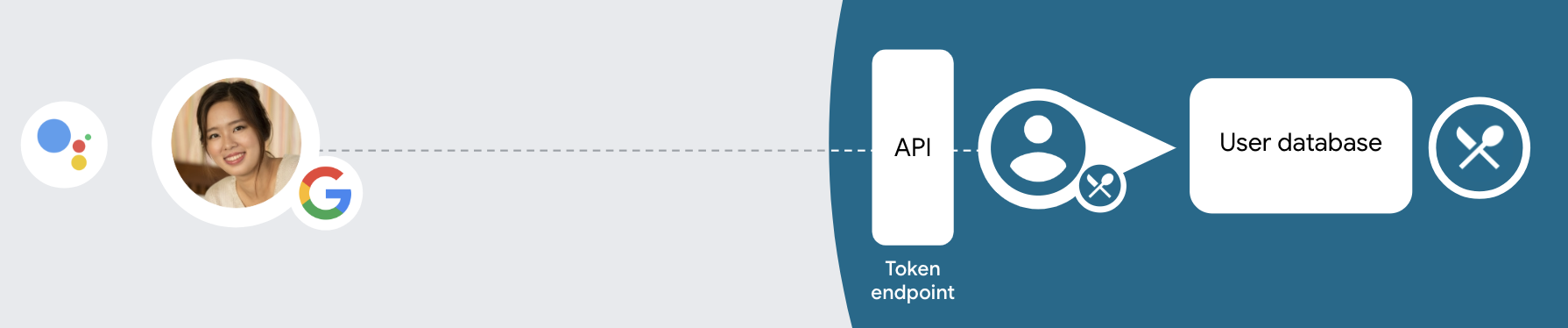
如要使用簡化連結類型執行帳戶連結,請按照下列一般步驟操作:
- 首先,請使用者同意存取他們的 Google 個人資料。
- 使用個人資料中的資訊識別使用者。
- 如果驗證系統中沒有相符的 Google 使用者,系統會根據您在 Actions 管理中心設定的 Actions 專案,決定是否允許透過語音或僅透過網站建立使用者帳戶,然後繼續執行流程。
- 如果允許透過語音建立帳戶,請驗證從 Google 收到的 ID 權杖。然後根據 ID 權杖中包含的設定檔資訊建立使用者。
- 如果不允許透過語音建立帳戶,系統會將使用者轉移至瀏覽器,載入授權頁面並完成使用者建立流程。
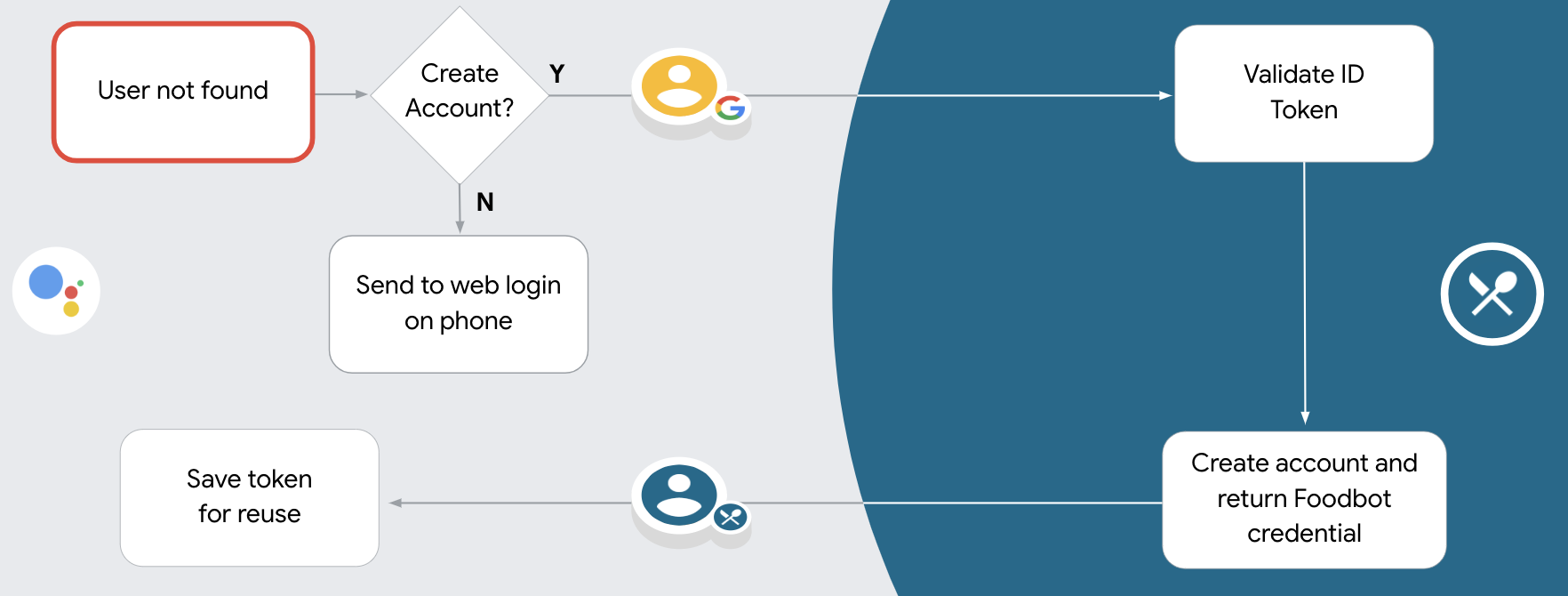
支援透過語音建立帳戶
如果允許使用者透過語音建立帳戶,Google 助理會詢問使用者是否要執行下列操作:
- 使用對方的 Google 帳戶資訊在系統上建立新帳戶,或
- 如果使用者有現有的非 Google 帳戶,請使用其他帳戶登入驗證系統。
如要盡量減少帳戶建立流程的阻力,建議允許透過語音建立帳戶。如果使用者想使用現有的非 Google 帳戶登入,才需要離開語音流程。
禁止透過語音建立帳戶
如果禁止透過語音建立使用者帳戶,Google 助理會開啟您提供的使用者驗證網站網址。如果互動發生在沒有螢幕的裝置上,Google 助理會引導使用者前往手機,繼續完成帳戶連結流程。
在下列情況下,建議禁止建立:
您不希望允許非 Google 帳戶使用者建立新帳戶,而是希望他們連結至驗證系統中的現有帳戶。舉例來說,如果您提供會員方案,可能需要確保使用者不會失去現有帳戶累積的點數。
您必須完全掌控帳戶建立流程。舉例來說,如果您需要在帳戶建立期間向使用者顯示服務條款,可以禁止建立帳戶。
實作以 OAuth 為基礎的 Google 登入「簡化」連結
帳戶會透過業界標準的 OAuth 2.0 流程連結。 Actions on Google 支援隱含和授權碼流程。
在隱式程式碼流程中,Google 會在使用者的瀏覽器中開啟您的授權端點。成功登入後,系統會將長期存取權杖傳回 Google。從現在起,每次透過 Google 助理傳送給您動作的要求中,都會包含這個存取權杖。
在授權碼流程中,您需要兩個端點:
- 授權端點,該端點負責將登入 UI 提供給未登入的使用者,並以簡碼授權代碼的形式,記錄使用者要求的存取權。
- 權杖交換端點,負責以下兩種交換類型:
- 交換長期更新權杖的授權碼和短期存取權杖。這項交換作業會在使用者完成帳戶連結流程時進行。
- 對短期存取權杖交換交換憑證。當 Google 需要新的存取權杖,因為更新權杖已過期時,就會發生此交換行為。
雖然隱含程式碼流程的實作方式較簡單,但 Google 建議使用隱含流程發布的存取權杖不會過期,因為若權杖與隱含流程搭配使用,就會強制使用者重新連結帳戶。如果基於安全考量而需要權杖過期,您應該考慮改用授權碼流程。
設定專案
如要設定專案以使用簡化連結,請按照下列步驟操作:
- 開啟 Actions 管理中心,然後選取要使用的專案。
- 按一下「開發」分頁,然後選擇「帳戶連結」。
- 將「帳戶連結」旁的切換鈕設為開啟。
- 在「帳戶建立」部分中,選取「是」。
在「連結類型」中,選取「OAuth 和 Google 登入」和「隱含」。
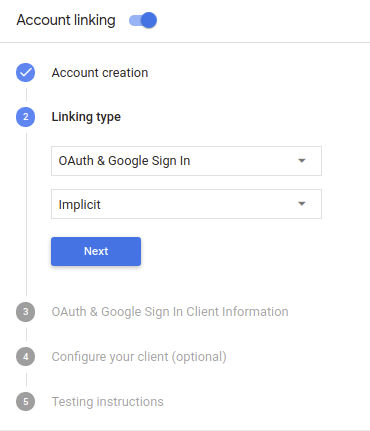
在「Client Information」(客戶資訊) 中,執行下列操作:
- 為「Google 簽發給動作的用戶端 ID」指派值,以識別來自 Google 的要求。
- 插入授權和權杖交換端點的網址。
按一下 [儲存]。
導入 OAuth 伺服器
為支援 OAuth 2.0 隱含流程,您的服務會進行授權 並可透過 HTTPS 存取端點這個端點會負責驗證 徵得使用者同意,才能存取資料。授權端點 為使用者提供未登入並記錄登入的登入使用者介面 同意授予請求的存取權。
當您的動作需要呼叫服務的其中一個已授權 API 時,Google 會使用 以取得使用者授權,讓他們能在自己的
由 Google 發起的一般 OAuth 2.0 隱含流程工作階段,是 下列流程:
- Google 會在使用者的瀏覽器中開啟授權端點。 使用者登入後,並授權 Google 存取 並透過您的 API 取得資料。
- 您的服務會建立存取權杖,並傳回給 將使用者的瀏覽器重新導向回 Google,取得存取權杖 附加在要求中
- Google 會呼叫服務的 API,並將存取權杖附加至 每個要求您的服務會確認存取權杖是否已授予 Google 授權存取 API,然後完成 API 呼叫。
處理授權要求
當您的動作需要透過 OAuth 2.0 隱含流程進行帳戶連結時, Google 會在要求中附加以下內容,將使用者傳送到您的授權端點 分別是
| 授權端點參數 | |
|---|---|
client_id |
您指派給 Google 的用戶端 ID。 |
redirect_uri |
您傳送回應到這項要求的網址。 |
state |
傳回給 Google 的記帳金額,值維持不變 重新導向 URI |
response_type |
要在回應中傳回的值類型。以 OAuth 2.0 隱含
回應類型則一律為 token。 |
舉例來說,如果您的授權端點位於 https://myservice.example.com/auth,
要求看起來可能像這樣:
GET https://myservice.example.com/auth?client_id=GOOGLE_CLIENT_ID&redirect_uri=REDIRECT_URI&state=STATE_STRING&response_type=token
如要讓授權端點處理登入要求,請按照下列步驟操作:
確認
client_id和redirect_uri的值如下: 防止授予非預期或設定錯誤的用戶端應用程式存取權:- 確認
client_id與您用戶端 ID 相符 而是指派給 Google - 確認
redirect_uri指定的網址 參數的格式如下:https://oauth-redirect.googleusercontent.com/r/YOUR_PROJECT_ID
- 確認
檢查使用者是否已登入您的服務。如果使用者未簽署 的登入或申請流程。
產生 Google 將用來存取您的 API 的存取權杖。 存取權杖可以是任何字串值,但必須明確代表 以及該權杖適用的用戶端,且不可猜測。
傳送 HTTP 回應,將使用者的瀏覽器重新導向至網址 由
redirect_uri參數指定。包含所有 網址片段中的下列參數:access_token:您剛剛產生的存取權杖token_type:字串bearerstate:原始資料中未經修改的狀態值 要求 以下是最終網址的範例:https://oauth-redirect.googleusercontent.com/r/YOUR_PROJECT_ID#access_token=ACCESS_TOKEN&token_type=bearer&state=STATE_STRING
Google 的 OAuth 2.0 重新導向處理常式將收到存取權杖並確認
state 值未變更。Google 取得
服務的存取權杖,Google 會在後續的呼叫中附加該權杖
作為 AppRequest 的一部分動作。
處理自動連結
當使用者同意您的動作存取其 Google 個人資料後,Google 傳送的要求包含已簽署的 Google 使用者身分識別資訊。 聲明包含使用者的 Google 帳戶 ID、姓名、 以及電子郵件地址為專案設定的憑證交換端點會處理
如果驗證系統中已有對應的 Google 帳戶,
權杖交換端點會傳回使用者權杖如果 Google 帳戶不是
與現有使用者相符,權杖交換端點會傳回 user_not_found 錯誤。
這項要求的格式如下:
POST /token HTTP/1.1
Host: oauth2.example.com
Content-Type: application/x-www-form-urlencoded

grant_type=urn:ietf:params:oauth:grant-type:jwt-bearer&intent=get&assertion=JWT&consent_code=CONSENT_CODE&scope=SCOPES
您的權杖交換端點必須能處理下列參數:
| 權杖端點參數 | |
|---|---|
grant_type |
要交換的權杖類型。對於這些要求,這個
參數值為 urn:ietf:params:oauth:grant-type:jwt-bearer。 |
intent |
這類要求的參數值為 `get`。 |
assertion |
JSON Web Token (JWT),提供已簽署 識別使用者的身分JWT 包含使用者的 Google 帳戶 ID、名稱和電子郵件地址。 |
consent_code |
選用:出現一次性代碼時,系統會發送一次性代碼, 使用者已同意您的動作存取指定範圍。 |
scope |
選用:您設定 Google 向使用者要求的範圍。 |
當權杖交換端點收到連結要求時,應執行 包括:
驗證並解碼 JWT 斷言
您可以使用適用於您語言的 JWT 解碼程式庫,驗證 JWT 斷言並解碼。 使用 Google 的公開金鑰 (適用於 JWK PEM 格式),用來驗證符記 簽章。
解碼後的 JWT 斷言會如下所示:
{
  "sub": 1234567890,        // The unique ID of the user's Google Account
  "iss": "https://accounts.google.com",        // The assertion's issuer
  "aud": "123-abc.apps.googleusercontent.com", // Your server's client ID
  "iat": 233366400,         // Unix timestamp of the assertion's creation time
  "exp": 233370000,         // Unix timestamp of the assertion's expiration time
  "name": "Jan Jansen",
  "given_name": "Jan",
  "family_name": "Jansen",
  "email": "jan@gmail.com", // If present, the user's email address
  "locale": "en_US"
}
除了驗證權杖的簽章外,也請驗證斷言的核發機構
(iss 欄位) 為「https://accounts.google.com」,而目標對象 (aud 欄位)
是指派給動作的用戶端 ID。
檢查驗證系統是否已有 Google 帳戶
確認是否符合下列任一條件:
- 在斷言的
sub欄位中,Google 帳戶 ID 位於您的使用者資料庫中。 - 斷言中的電子郵件地址與您使用者資料庫中的使用者相符。
如果任一條件為 true,表示使用者已註冊,您可以核發 存取權杖
如果聲明中未提供 Google 帳戶 ID 或電子郵件地址
與您資料庫中的使用者相符,這表示對方尚未註冊。在這種情況下,您的
權杖交換端點應傳回 HTTP 401 錯誤,指定 error=user_not_found。
如以下範例所示:
HTTP/1.1 401 Unauthorized
Content-Type: application/json;charset=UTF-8

{
  "error":"user_not_found",
}
user_not_found 錯誤的 401 錯誤回應時,
使用 intent 參數值來呼叫權杖交換端點
設為 create 並傳送包含使用者個人資訊的 ID 權杖
。
透過 Google 登入功能處理帳戶建立作業
當使用者需要在您的服務上建立帳戶時,Google 會
要求傳送至權杖交換端點
intent=create,如以下範例所示:
POST /token HTTP/1.1
Host: oauth2.example.com
Content-Type: application/x-www-form-urlencoded

response_type=token&grant_type=urn:ietf:params:oauth:grant-type:jwt-bearer&scope=SCOPES&intent=create&consent_code=CONSENT_CODE&assertion=JWT[&NEW_ACCOUNT_INFO]
assertion 參數包含專為您提供的 JSON Web Token (JWT) 提供的
經簽署的 Google 使用者身分識別資訊。JWT 包含
包含使用者的 Google 帳戶 ID、名稱和電子郵件地址,您可以使用
為您的服務建立新帳戶。
如要回應帳戶建立要求,您的權杖交換端點必須 包括:
驗證並解碼 JWT 斷言
您可以使用適用於您語言的 JWT 解碼程式庫,驗證 JWT 斷言並解碼。 使用 Google 的公開金鑰 (適用於 JWK PEM 格式),用來驗證符記 簽章。
解碼後的 JWT 斷言會如下所示:
{
  "sub": 1234567890,        // The unique ID of the user's Google Account
  "iss": "https://accounts.google.com",        // The assertion's issuer
  "aud": "123-abc.apps.googleusercontent.com", // Your server's client ID
  "iat": 233366400,         // Unix timestamp of the assertion's creation time
  "exp": 233370000,         // Unix timestamp of the assertion's expiration time
  "name": "Jan Jansen",
  "given_name": "Jan",
  "family_name": "Jansen",
  "email": "jan@gmail.com", // If present, the user's email address
  "locale": "en_US"
}
除了驗證權杖的簽章外,也請驗證斷言的核發機構
(iss 欄位) 為「https://accounts.google.com」,而目標對象 (aud 欄位)
是指派給動作的用戶端 ID。
驗證使用者資訊並建立新帳戶
確認是否符合下列任一條件:
- 在斷言的
sub欄位中,Google 帳戶 ID 位於您的使用者資料庫中。 - 斷言中的電子郵件地址與您使用者資料庫中的使用者相符。
如果符合任一條件,請提示使用者連結現有帳戶
回應該請求,並傳回 HTTP 401 錯誤,
error=linking_error 和使用者的電子郵件地址為 login_hint,如
範例:
HTTP/1.1 401 Unauthorized
Content-Type: application/json;charset=UTF-8

{
  "error":"linking_error",
  "login_hint":"foo@bar.com"
}
如果兩個條件皆不成立,請使用這項資訊建立新的使用者帳戶 使用這組 API新帳戶通常不會設定密碼。是 建議您在其他平台中加入 Google 登入功能,方便使用者登入 透過 Google 顯示在應用程式各平台上此外,也可以 透過電子郵件,使用可啟動密碼復原流程的連結,讓使用者完成設定 一組密碼登入其他平台
建立完畢後,請核發存取權杖 ,並傳回 JSON 物件中 也就是您的 HTTPS 回應內文,如以下範例所示:
{
  "token_type": "Bearer",
  "access_token": "ACCESS_TOKEN",

  "expires_in": SECONDS_TO_EXPIRATION
}
設計驗證流程的語音使用者介面
檢查使用者是否已通過驗證,然後開始帳戶連結流程
- 在 Actions Console 中開啟 Actions Builder 專案。
- 在動作中建立新場景,開始連結帳戶:
- 按一下「場景」。
- 按一下「新增」 (+) 圖示,即可新增場景。
- 在新建立的場景中,按一下「條件」的「新增」圖示 add。
- 新增條件,檢查與對話相關聯的使用者是否為已驗證使用者。如果檢查失敗,動作就無法在對話期間執行帳戶連結,且應改為提供不需要帳戶連結的功能存取權。
- 在「條件」下方的
Enter new expression欄位中,輸入下列邏輯:user.verificationStatus != "VERIFIED" - 在「轉場效果」下方,選取不需要連結帳戶的場景,或是僅限訪客使用的功能進入點場景。
- 在「條件」下方的
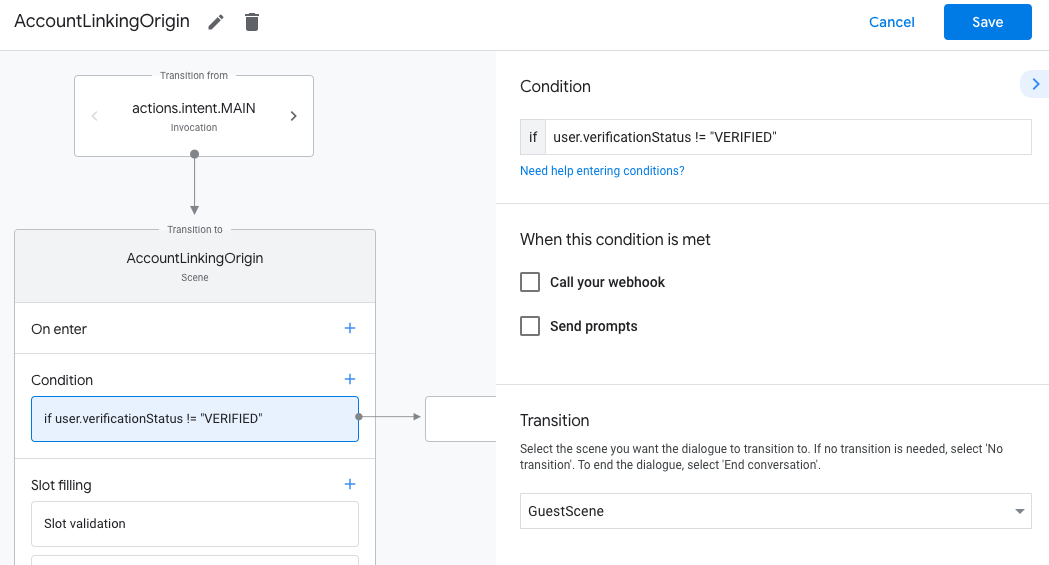
- 按一下「條件」的「新增」add圖示。
- 新增條件,在使用者沒有相關聯的身分時觸發帳戶連結流程。
- 在「條件」下方的
Enter new expression欄位中,輸入下列邏輯:user.verificationStatus == "VERIFIED" - 在「Transition」下方,選取「Account Linking」系統場景。
- 按一下 [儲存]。
- 在「條件」下方的
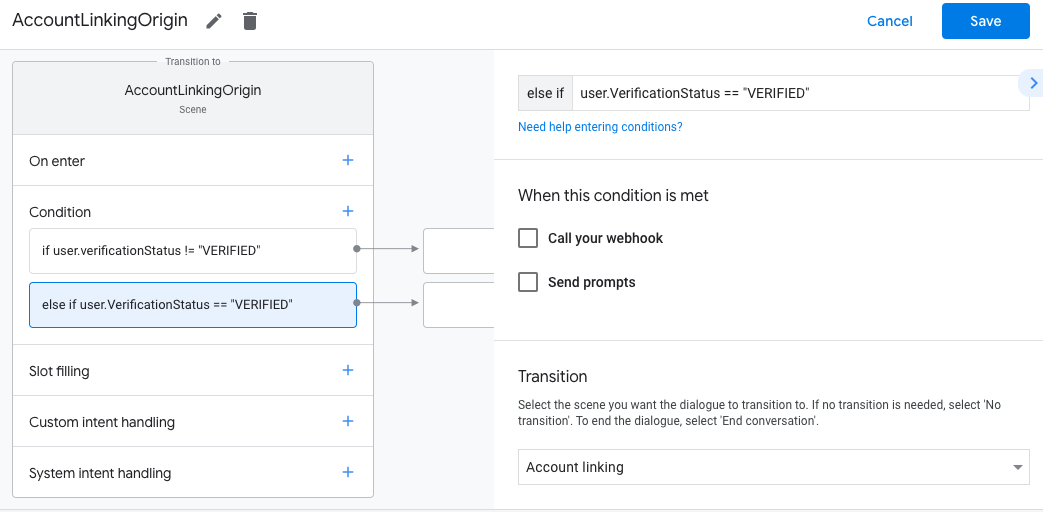
儲存後,專案中會新增名為「<SceneName>_AccountLinking」的帳戶連結系統場景。
自訂帳戶連結場景
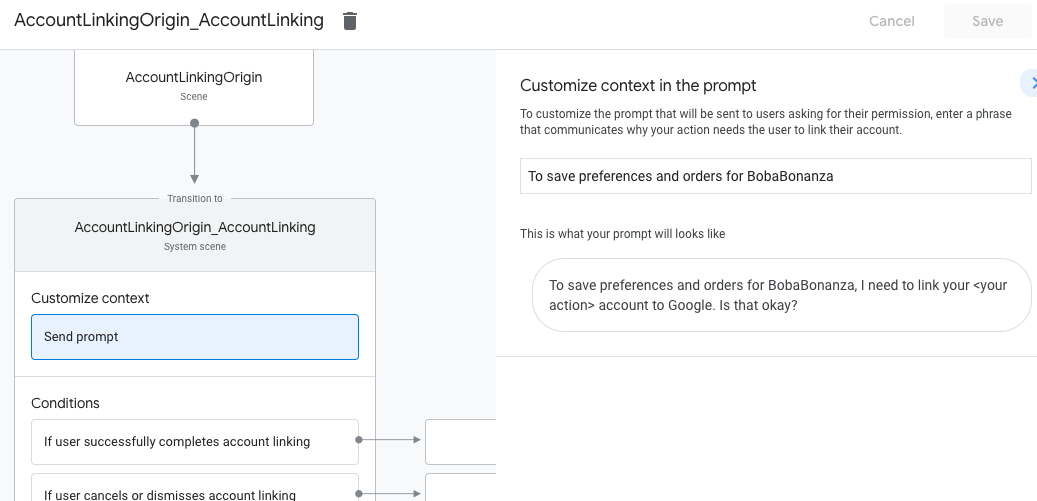
- 在「場景」下方,選取帳戶連結系統場景。
- 按一下「傳送提示」,並新增簡短句子,向使用者說明動作為何需要存取身分識別資訊 (例如「儲存偏好設定」)。
- 按一下 [儲存]。
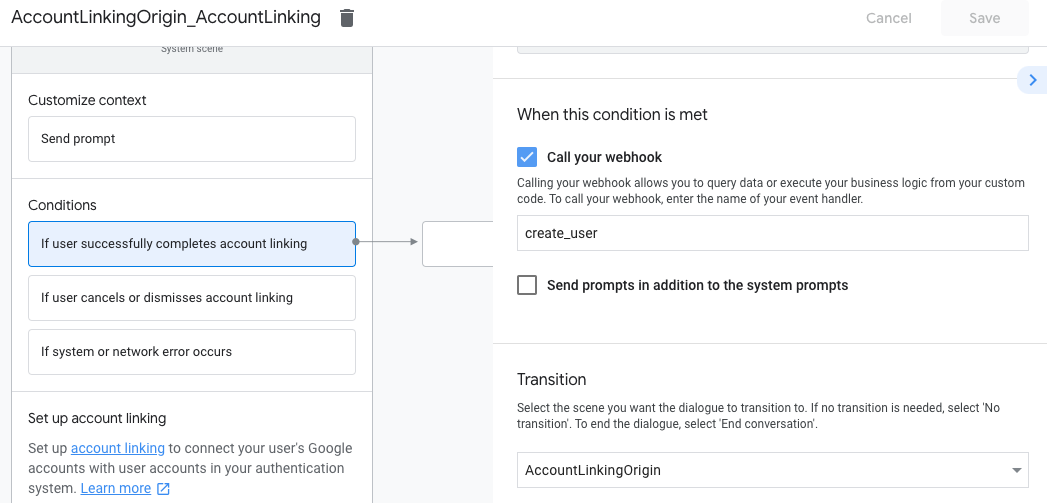
- 按一下「條件」下方的「如果使用者成功完成帳戶連結」。
- 設定使用者同意連結帳戶時,流程應如何繼續進行。 舉例來說,呼叫 Webhook 來處理任何必要的自訂商業邏輯,然後返回原始場景。
- 按一下 [儲存]。
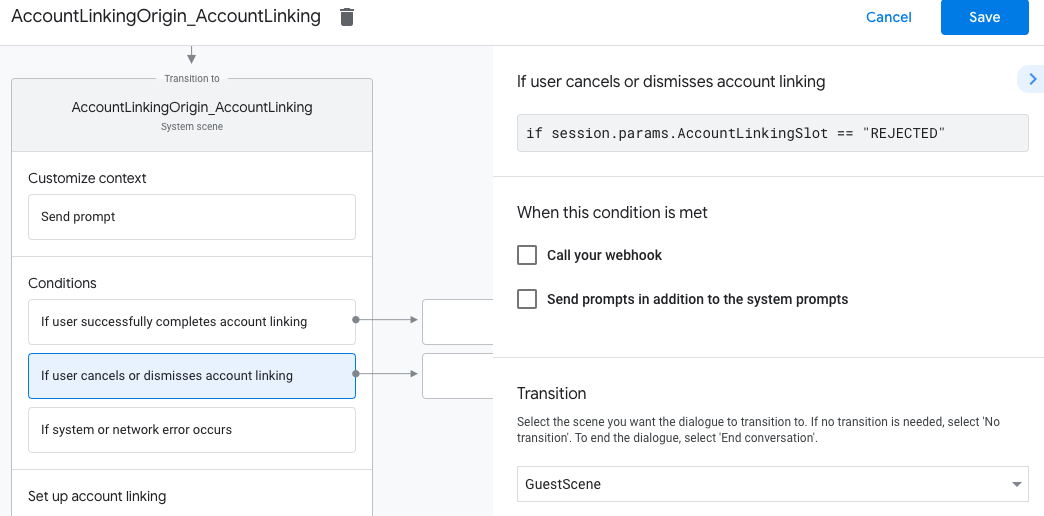
- 在「條件」下方,按一下「如果使用者取消或關閉帳戶連結」。
- 設定使用者不同意連結帳戶時,流程應如何進行。舉例來說,傳送確認訊息,然後重新導向至不需要帳戶連結的功能場景。
- 按一下 [儲存]。
- 在「條件」下方,按一下「如果發生系統或網路錯誤」。
- 設定帳戶連結流程因系統或網路錯誤而無法完成時,流程應如何繼續。舉例來說,傳送確認訊息,然後重新導向至不需要帳戶連結的功能場景。
- 按一下 [儲存]。
處理資料存取要求
如果Google 助理要求包含存取權杖,請先檢查存取權杖是否有效且未過期,然後從使用者帳戶資料庫中擷取與權杖相關聯的使用者帳戶。