
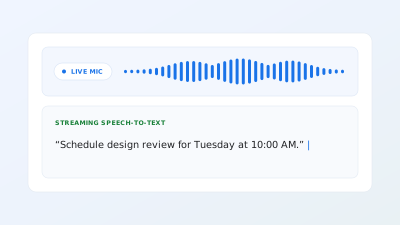
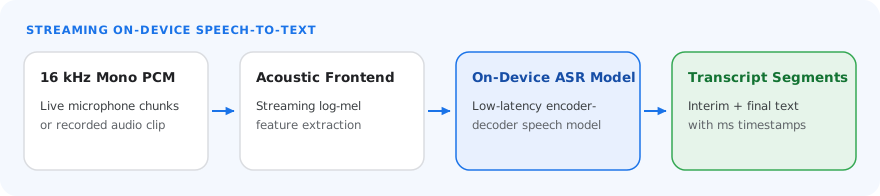
The MediaPipe Audio Transcriber task lets you turn speech into text on the device. You can use this task to add live captions, dictation, voice notes, or voice commands to your app. This task operates on audio data with a machine learning (ML) model, either as a complete audio clip or as a continuous stream, and outputs transcript segments with timestamps. While audio is streaming, the task can also return interim results that are refined as more audio arrives.
Quickstart
Install the SDK for your platform, prepare audio input data, initialize the task with a model, and transcribe complete clips or live audio streams.
Web
Audio clip
import { AudioTranscriber, FilesetResolver } from "@mediapipe/tasks-audio";

const audio = await FilesetResolver.forAudioTasks(
  "https://cdn.jsdelivr.net/npm/@mediapipe/tasks-audio@latest/wasm"
);
const transcriber = await AudioTranscriber.createFromOptions(audio, {
  baseOptions: {
    modelAssetPath: "parakeet_tdt_0.6b_v3_5s_i8_stateful.litertlm",
    delegate: "GPU",
  },
  sampleRateHz: 16000,
  cacheDir: ":nocache",
});

// Single-call transcription of a complete 16 kHz mono Float32Array clip
const audioCtx = new AudioContext({ sampleRate: 16000 });
const response = await fetch("speech_clip.wav");
const audioBuffer = await audioCtx.decodeAudioData(await response.arrayBuffer());
const result = await transcriber.transcribe(audioBuffer.getChannelData(0));
console.log(result.text);
Audio stream
import { AudioTranscriber, FilesetResolver } from "@mediapipe/tasks-audio";

const audio = await FilesetResolver.forAudioTasks(
  "https://cdn.jsdelivr.net/npm/@mediapipe/tasks-audio@latest/wasm"
);
const transcriber = await AudioTranscriber.createFromOptions(audio, {
  baseOptions: {
    modelAssetPath: "parakeet_tdt_0.6b_v3_5s_i8_stateful.litertlm",
    delegate: "GPU",
  },
  sampleRateHz: 16000,
  enableInterimResults: true,
  cacheDir: ":nocache",
});
await transcriber.prewarm();

// Feed contiguous microphone PCM chunks (buffered in order)
for await (const pcmChunk of microphoneChunks) {
  const partial = await transcriber.transcribeStream(pcmChunk);
  console.log(partial.text, partial.segments);
}
const finalResult = await transcriber.finishStream();
Android (Kotlin)
Audio clip
import com.google.mediapipe.tasks.audio.audiotranscriber.AudioTranscriber
import com.google.mediapipe.tasks.audio.audiotranscriber.AudioTranscriber.AudioTranscriberOptions
import com.google.mediapipe.tasks.core.BaseOptions

val modelPath = "${context.filesDir}/parakeet_tdt_0.6b_v3_5s_i8_stateful.litertlm"
val options = AudioTranscriberOptions.builder()
    .setBaseOptions(BaseOptions.builder().setModelAssetPath(modelPath).build())
    .setSampleRateHz(16000)
    .build()

val audioTranscriber = AudioTranscriber.createFromOptions(context, options)

// Single-utterance clip: pass endOfStream = true to flush immediately
val result = audioTranscriber.transcribe(pcmClipSamples, /* endOfStream = */ true)
showResult(result)
Audio stream
import android.media.AudioRecord
import com.google.mediapipe.tasks.audio.audiotranscriber.AudioTranscriber
import com.google.mediapipe.tasks.audio.audiotranscriber.AudioTranscriber.AudioTranscriberOptions
import com.google.mediapipe.tasks.core.BaseOptions

val modelPath = "${context.filesDir}/parakeet_tdt_0.6b_v3_5s_i8_stateful.litertlm"
val options = AudioTranscriberOptions.builder()
    .setBaseOptions(BaseOptions.builder().setModelAssetPath(modelPath).build())
    .setSampleRateHz(16000)
    .setEnableInterimResults(true)
    .build()

val audioTranscriber = AudioTranscriber.createFromOptions(context, options)
val chunk = FloatArray(3200) // 200 ms at 16 kHz (AudioFormat.ENCODING_PCM_FLOAT)

// Stream contiguous AudioRecord chunks, then flush with finishStream()
while (isRecording) {
    val read = audioRecord.read(chunk, 0, chunk.size, AudioRecord.READ_BLOCKING)
    if (read > 0) {
        showResult(audioTranscriber.transcribe(chunk.copyOf(read)))
    }
}
showResult(audioTranscriber.finishStream())
Android (Java)
Audio clip
import com.google.mediapipe.tasks.audio.audiotranscriber.AudioTranscriber;
import com.google.mediapipe.tasks.audio.audiotranscriber.AudioTranscriber.AudioTranscriberOptions;
import com.google.mediapipe.tasks.audio.audiotranscriber.AudioTranscriberResult;
import com.google.mediapipe.tasks.core.BaseOptions;

String modelPath = context.getFilesDir() + "/parakeet_tdt_0.6b_v3_5s_i8_stateful.litertlm";
AudioTranscriberOptions options = AudioTranscriberOptions.builder()
    .setBaseOptions(BaseOptions.builder().setModelAssetPath(modelPath).build())
    .setSampleRateHz(16000)
    .build();

AudioTranscriber audioTranscriber = AudioTranscriber.createFromOptions(context, options);

// Single-utterance clip: pass endOfStream = true to flush immediately
AudioTranscriberResult result = audioTranscriber.transcribe(pcmClipSamples, /* endOfStream= */ true);
showResult(result);
Audio stream
import android.media.AudioRecord;
import com.google.mediapipe.tasks.audio.audiotranscriber.AudioTranscriber;
import com.google.mediapipe.tasks.audio.audiotranscriber.AudioTranscriber.AudioTranscriberOptions;
import com.google.mediapipe.tasks.core.BaseOptions;
import java.util.Arrays;

String modelPath = context.getFilesDir() + "/parakeet_tdt_0.6b_v3_5s_i8_stateful.litertlm";
AudioTranscriberOptions options = AudioTranscriberOptions.builder()
    .setBaseOptions(BaseOptions.builder().setModelAssetPath(modelPath).build())
    .setSampleRateHz(16000)
    .setEnableInterimResults(true)
    .build();

AudioTranscriber audioTranscriber = AudioTranscriber.createFromOptions(context, options);
float[] chunk = new float[3200]; // 200 ms at 16 kHz (AudioFormat.ENCODING_PCM_FLOAT)

// Stream contiguous AudioRecord chunks, then flush with finishStream()
while (isRecording) {
    int read = audioRecord.read(chunk, 0, chunk.length, AudioRecord.READ_BLOCKING);
    if (read > 0) {
        showResult(audioTranscriber.transcribe(Arrays.copyOf(chunk, read)));
    }
}
showResult(audioTranscriber.finishStream());
iOS
Audio clip
import Foundation
import MediaPipeTasksAudio

guard let modelPath = Bundle.main.path(
    forResource: "parakeet_tdt_0.6b_v3_5s_i8_stateful",
    ofType: "litertlm"
) else { return }

let options = AudioTranscriberOptions()
options.baseOptions.modelAssetPath = modelPath
options.sampleRateHz = 16000

let audioTranscriber = try AudioTranscriber(options: options)

// Complete clip ([Float]): pass endOfStream: true to transcribe and flush in one call
let result = try clipSamples.withUnsafeBufferPointer { ptr in
    try audioTranscriber.transcribe(samples: ptr.baseAddress, count: UInt(ptr.count), endOfStream: true)
}
Audio stream
import Foundation
import MediaPipeTasksAudio

guard let modelPath = Bundle.main.path(
    forResource: "parakeet_tdt_0.6b_v3_5s_i8_stateful",
    ofType: "litertlm"
) else { return }

let options = AudioTranscriberOptions()
options.baseOptions.modelAssetPath = modelPath
options.sampleRateHz = 16000
options.enableInterimResults = true

let audioTranscriber = try AudioTranscriber(options: options)

// Stream ([Float]): pass endOfStream: false per mic buffer, then finishStream()
let partial = try micChunk.withUnsafeBufferPointer { ptr in
    try audioTranscriber.transcribe(samples: ptr.baseAddress, count: UInt(ptr.count), endOfStream: false)
}
let finalResult = try audioTranscriber.finishStream()
Python
Audio clip
import mediapipe as mp

BaseOptions = mp.tasks.BaseOptions
AudioTranscriber = mp.tasks.audio.AudioTranscriber
AudioTranscriberOptions = mp.tasks.audio.AudioTranscriberOptions

options = AudioTranscriberOptions(
    base_options=BaseOptions(
        model_asset_path="parakeet_tdt_0.6b_v3_5s_i8_stateful.litertlm",
        delegate=BaseOptions.Delegate.CPU,
    ),
    sample_rate_hz=16000,
)

with AudioTranscriber.create_from_options(options) as transcriber:
    # Complete clip: pass end_of_stream=True to transcribe and flush in one call
    result = transcriber.transcribe(clip_samples, end_of_stream=True)
    print(result.text)
Audio stream
import mediapipe as mp

BaseOptions = mp.tasks.BaseOptions
AudioTranscriber = mp.tasks.audio.AudioTranscriber
AudioTranscriberOptions = mp.tasks.audio.AudioTranscriberOptions

options = AudioTranscriberOptions(
    base_options=BaseOptions(
        model_asset_path="parakeet_tdt_0.6b_v3_5s_i8_stateful.litertlm",
        delegate=BaseOptions.Delegate.CPU,
    ),
    sample_rate_hz=16000,
    enable_interim_results=True,
)

with AudioTranscriber.create_from_options(options) as transcriber:
    while is_recording:
        partial = transcriber.transcribe(read_next_chunk(), end_of_stream=False)
        show_result(partial)
    final_result = transcriber.finish_stream()
Task details
This section describes the capabilities, inputs, outputs, and configuration options of this task.
Features
- Streaming transcription - Pass audio in small chunks, for example from the microphone, and get transcript segments back while the user speaks.
- Audio clip transcription - Transcribe a complete recording in a single call.
- Interim results - Optionally get early, non-final hypotheses for low-latency captions. The task replaces them with final segments as more audio arrives.
- Segment timestamps - Each segment includes its start and end time in the audio.
- Prewarming - Load the model ahead of time to reduce the latency of the first result.
- On-device processing - The task processes audio entirely on the device and doesn't send audio or transcripts off the device.
[-1.0, 1.0] (Float32Array on Web, float[] on Android, UnsafePointer<Float> on iOS, or np.ndarray in Python),
provided as one of the following:- Audio clip
- Audio stream
See Prepare audio input data for AudioContext, AudioWorkletNode, AudioRecord, and PCM buffer examples.
AudioTranscriberResult containing a combined text string (getText() on Android) and a list of segments:transcript: the recognized text of the segmentisFinal(is_finalin Python): whether the segment is final or an interim hypothesisfromTimestampMs/toTimestampMs(fromTimestampInMilliseconds/toTimestampInMillisecondson iOS,from_timestamp_ms/to_timestamp_msin Python): the start and end time of the segment in the audio, in milliseconds
Configuration options
This task has the following configuration options:
Web
| Option Name | Description | Value Range | Default Value |
|---|---|---|---|
baseOptions.modelAssetPath |
Path (or URL / modelAssetBuffer as a Uint8Array or ReadableStreamDefaultReader on Web, or modelAssetFileDescriptor on Android) to the speech recognition model file (.litertlm). Keep the original filename so the task can auto-detect the model family. |
File path / URL | Required |
baseOptions.delegate |
Hardware acceleration delegate used to run the model. | {CPU, GPU} |
CPU ("GPU" on Web) |
sampleRateHz |
Sample rate of the input audio, in Hz. Inputs at other rates are automatically resampled to 16 kHz before transcription. | Positive number | 16000 |
enableInterimResults |
Whether to return interim hypotheses while audio is streaming before the final segment is emitted. | Boolean |
false |
modelArchitecture |
Model family. With AUTO, the task detects the architecture from the model bundle. Use OMNI for open-weights models such as Parakeet when auto-detection is not applicable. |
{AUTO, OMNI} |
AUTO |
cacheDir |
Writable directory where the task caches compiled model artifacts for faster subsequent startups (cacheDirectory on iOS). To turn caching off (for example, in the browser's virtual file system on Web or on iOS), set this to ":nocache". |
Directory path | Not set |
Android
| Option Name | Description | Value Range | Default Value |
|---|---|---|---|
baseOptions.modelAssetPath |
Path (or URL / modelAssetBuffer as a Uint8Array or ReadableStreamDefaultReader on Web, or modelAssetFileDescriptor on Android) to the speech recognition model file (.litertlm). Keep the original filename so the task can auto-detect the model family. |
File path / URL | Required |
baseOptions.delegate |
Hardware acceleration delegate used to run the model. | {CPU, GPU} |
CPU ("GPU" on Web) |
sampleRateHz |
Sample rate of the input audio, in Hz. Inputs at other rates are automatically resampled to 16 kHz before transcription. | Positive number | 16000 |
enableInterimResults |
Whether to return interim hypotheses while audio is streaming before the final segment is emitted. | Boolean |
false |
modelArchitecture |
Model family. With AUTO, the task detects the architecture from the model bundle. Use OMNI for open-weights models such as Parakeet when auto-detection is not applicable. |
{AUTO, OMNI} |
AUTO |
cacheDir |
Writable directory where the task caches compiled model artifacts for faster subsequent startups (cacheDirectory on iOS). To turn caching off (for example, in the browser's virtual file system on Web or on iOS), set this to ":nocache". |
Directory path | Not set |
iOS
| Option Name | Description | Value Range | Default Value |
|---|---|---|---|
baseOptions.modelAssetPath |
Path (or URL / modelAssetBuffer as a Uint8Array or ReadableStreamDefaultReader on Web, or modelAssetFileDescriptor on Android) to the speech recognition model file (.litertlm). Keep the original filename so the task can auto-detect the model family. |
File path / URL | Required |
baseOptions.delegate |
Hardware acceleration delegate used to run the model. | {CPU, GPU} |
CPU ("GPU" on Web) |
sampleRateHz |
Sample rate of the input audio, in Hz. Inputs at other rates are automatically resampled to 16 kHz before transcription. | Positive number | 16000 |
enableInterimResults |
Whether to return interim hypotheses while audio is streaming before the final segment is emitted. | Boolean |
false |
modelArchitecture |
Model family. With AUTO, the task detects the architecture from the model bundle. Use OMNI for open-weights models such as Parakeet when auto-detection is not applicable. |
{AUTO, OMNI} |
AUTO |
cacheDirectory |
Writable directory where the task caches compiled model artifacts for faster subsequent startups (cacheDirectory on iOS). To turn caching off (for example, in the browser's virtual file system on Web or on iOS), set this to ":nocache". |
Directory path | Not set |
Python
| Option Name | Description | Value Range | Default Value |
|---|---|---|---|
base_options.model_asset_path |
Path (or URL / modelAssetBuffer as a Uint8Array or ReadableStreamDefaultReader on Web, or modelAssetFileDescriptor on Android) to the speech recognition model file (.litertlm). Keep the original filename so the task can auto-detect the model family. |
File path / URL | Required |
base_options.delegate |
Hardware acceleration delegate used to run the model. | {CPU, GPU} |
CPU ("GPU" on Web) |
sample_rate_hz |
Sample rate of the input audio, in Hz. Inputs at other rates are automatically resampled to 16 kHz before transcription. | Positive number | 16000 |
enable_interim_results |
Whether to return interim hypotheses while audio is streaming before the final segment is emitted. | Boolean |
False |
model_architecture |
Model family. With AUTO, the task detects the architecture from the model bundle. Use OMNI for open-weights models such as Parakeet when auto-detection is not applicable. |
{AUTO, OMNI} |
AUTO |
cache_dir |
Writable directory where the task caches compiled model artifacts for faster subsequent startups (cacheDirectory on iOS). To turn caching off (for example, in the browser's virtual file system on Web or on iOS), set this to ":nocache". |
Directory path | Not set |
Task output
Each AudioTranscriberResult yields one or more transcription segments with partial or finalized text and millisecond timestamps:
| Field | Type | Description |
|---|---|---|
text |
string |
Complete concatenated transcript text across all segments. |
segments |
TranscriptionSegment[] |
Ordered list of partial or finalized transcription segments. |
transcript |
string |
Transcribed speech text for an individual segment. |
isFinal |
boolean |
true once the decoder has finalized the segment; false for live partial hypotheses (is_final in Python). |
startTimeMs |
number (milliseconds) |
Segment start timestamp relative to the start of the audio stream (from_timestamp_ms in Python). |
endTimeMs |
number (milliseconds) |
Segment end timestamp relative to the start of the audio stream (to_timestamp_ms in Python). |
Example AudioTranscriberResult payload
The following example shows one finalized segment followed by an active partial hypothesis during streaming transcription:
{
  segments: [
    { transcript: "Turn on the kitchen lights", isFinal: true, startTimeMs: 0, endTimeMs: 1840 },
    { transcript: "and set a timer for", isFinal: false, startTimeMs: 1840, endTimeMs: 2600 }
  ]
}
Models
The Audio Transcriber requires a speech recognition model in the LiteRT-LM
(.litertlm) format. The model isn't included in the MediaPipe Tasks
libraries. Download the model from Hugging Face, store it on the device, and
pass its local path to the task, as shown in the Quickstart.
Parakeet TDT 0.6B v3 (recommended)
Parakeet TDT 0.6B v3 is an NVIDIA speech recognition model that transcribes 25 European languages and outputs punctuated, capitalized text.
| Model name | Languages | Quantization type | Size | Model card | Versions |
|---|---|---|---|---|---|
| Parakeet TDT 0.6B v3 | 25 European languages | INT8 | About 615 MB | Model card | Latest |
Model license and attribution
NVIDIA publishes Parakeet TDT 0.6B v3 under the Creative Commons Attribution 4.0 (CC-BY-4.0) license. If you distribute an app that uses this model, give appropriate credit to NVIDIA, for example in your app's open source notices.