

Na tej stronie dowiesz się, jak deweloperzy aplikacji innych firm mogą korzystać z usługi rozwiązywania problemów, aby utworzyć w aplikacji stronę diagnostyczną dla swojej firmy.
Za pomocą interfejsu Accounts API możesz sprawdzić problemy wpływające na Twoje konto biznesowe i na każde konto, do którego masz dostęp.
Ponosisz odpowiedzialność za przestrzeganie zasad dotyczących reklam produktowych i bezpłatnych informacji. Google Shopping zastrzega sobie prawo do egzekwowania tych zasad i podejmowania odpowiednich działań, jeśli znajdziemy treści lub zachowania, które je naruszają.
Za pomocą tej usługi możesz tworzyć interfejsy podobne do stron diagnostyki konta i informacji o produkcie w Merchant Center.
Usługa rozwiązywania problemów jest przeznaczona tylko dla interfejsów innych firm. Prośby powinny być wywoływane, gdy firma wchodzi w interakcję z interfejsem aplikacji. Aby zautomatyzować diagnostykę własnego konta firmowego, zapoznaj się z przewodnikiem dotyczącym problemów z kontem.
Aby ułatwić rozwiązywanie problemów z Twoją firmą, zalecamy udostępnienie w aplikacji tych stron:
- Diagnostyka konta
- Diagnostyka produktów
Różne opcje wdrażania strony diagnostycznej
Stronę diagnostyczną możesz wdrożyć na różne sposoby. W zależności od potrzeb wybierz opcję, która określa sposób obsługi złożonych działań diagnostycznych. W żądaniu możesz ustawić parametr user_input_action_option na jedną z tych opcji:
REDIRECT_TO_MERCHANT_CENTER: jest to opcja domyślna. Działania, które wymagają wyświetlania dodatkowych treści lub otrzymywania dodatkowych danych od firmy, nie są w pełni zaimplementowane w aplikacji. W ich przypadku interfejs API udostępnia link do przekierowania na odpowiednią stronę w Merchant Center, na której firma może wykonać działanie.BUILT_IN_USER_INPUT_ACTIONS: możesz wdrożyć w aplikacji złożone działania, które wymagają danych wejściowych użytkownika.
Wdrażanie strony diagnostyki
Z tej sekcji dowiesz się, jak wdrożyć stronę diagnostyki. Używa domyślnej (prostej) opcji do obsługi złożonych działań jako przekierowań do Merchant Center.
Implementacja
Proponujemy, aby strona Diagnostyka wyglądała tak:
- Firma otwiera w Twojej aplikacji stronę diagnostyczną.
- Aplikacja wysyła prośbę o diagnostykę, wywołując usługę
issueresolution.
Przykładowe żądanie:
POST https://merchantapi.googleapis.com/issueresolution/v1/accounts/{ACCOUNT_ID}:renderaccountissues?timeZone=America/Los_Angeles&languageCode=en-GB { }
Zastąp {ACCOUNT_ID} unikalnym identyfikatorem konta, dla którego chcesz wywołać przetwarzanie działania.
Aplikacja wyświetla diagnostykę i zalecane działania z odpowiedzi dla firmy. Przykładowa odpowiedź:
{
  "renderedIssues": [
    {
      "title": "Misrepresentation",
      "impact": {
        "message": "Prevents all products from showing in all countries",
        "severity": "ERROR",
        "breakdowns": [
          {
            "regions": [
              {
                "code": "001",
                "name": "All countries"
              }
            ],
            "details": [
              "Products not showing organically"
            ]
          }
        ]
      },
      "prerenderedContent": "\u003cdiv class=\"issue-detail\"\u003e\u003cdiv class=\"issue-content\"\u003e\u003cp class=\"content-element\"\u003e\u003cspan class=\"segment\"\u003eBased on the information available about your business, there is reason to believe that customers are being misled on Google. Review the Misrepresentation policy and make changes to your Merchant Center and/or online store.u003c/span\u003e\u003c/p\u003e\u003cp class=\"content-element root-causes-intro\"\u003e\u003cspan class=\"segment\"\u003eMake sure your Merchant Center and online store follow the following best practices / guidelines\u003c/span\u003e\u003c/p\u003e\u003cul class=\"content-element root-causes\"\u003e\u003cli\u003e\u003cp\u003e\u003cspan class=\"segment\"\u003eProvide transparency about your business identity, business model, policies and how your customers can interact with you\u003c/span\u003e\u003c/p\u003e\u003c/li\u003e\u003cli\u003e\u003cp\u003e\u003cspan class=\"segment\"\u003ePromote your online reputation by showing reviews or highlighting any badges or seals of approval\u003c/span\u003e\u003c/p\u003e\u003c/li\u003e\u003cli\u003e\u003cp class=\"tooltip tooltip-style-info\"\u003e\u003cspan class=\"segment\"\u003eUse a professional design for your online store that includes an SSL certificate\u003c/span\u003e\u003cspan class=\"tooltip-icon\"\u003e\u003cbr\u003e\u003c/span\u003e\u003cspan class=\"tooltip-text\"\u003e\u003cspan class=\"segment\"\u003eMake sure it's accessible for all users without any redirects and doesn't have any placeholders for text and images.u003c/span\u003e\u003c/span\u003e\u003c/p\u003e\u003c/li\u003e\u003cli\u003e\u003cp class=\"tooltip tooltip-style-info\"\u003e\u003cspan class=\"segment\"\u003eProvide information in the business information settings in your Merchant Center\u003c/span\u003e\u003cspan class=\"tooltip-icon\"\u003e\u003cbr\u003e\u003c/span\u003e\u003cspan class=\"tooltip-text\"\u003e\u003cspan class=\"segment\"\u003eLink any relevant third-party platforms to your Merchant Center and create a Google Business Profile.u003c/span\u003e\u003c/span\u003e\u003c/p\u003e\u003c/li\u003e\u003cli\u003e\u003cp\u003e\u003cspan class=\"segment\"\u003eFollow SEO guidelines, improve your eligibility for seller ratings and match your product data in your Merchant Center with your online store\u003c/span\u003e\u003c/p\u003e\u003c/li\u003e\u003c/ul\u003e\u003ca href=\"https://support.google.com/merchants/answer/6150127?hl=en-US\" class=\"content-element\"\u003eLearn more about the Misrepresentation policy\u003c/a\u003e\u003c/div\u003e\u003c/div\u003e",
      "actions": [
        {
          "externalAction": {
            "type": "REVIEW_ACCOUNT_ISSUE_IN_MERCHANT_CENTER",
            "uri": "https://merchants.google.com/mc/products/diagnostics/accountissues?a=672911686&hl=en-US"
          },
          "buttonLabel": "Request review",
          "isAvailable": true
        }
      ],
      "prerenderedOutOfCourtDisputeSettlement": "\u003cdetails class=\"ods-section\"\u003e\u003csummary\u003eShow additional options available to you\u003c/summary\u003e\u003cp class=\"ods-description\"\u003e\u003cspan class=\"segment\"\u003eYou may have the option to request an external appeal. You'll also be asked to provide your routing and reference IDs.\u003c/span\u003e \u003ca href=\"https://support.google.com/european-union-digital-services-act-redress-options?hl=en-GB\" target=\"_blank\" class=\"segment\"\u003eLearn more about external appeals\u003c/a\u003e\u003c/p\u003e\u003cp class=\"ods-param ods-routing-id\"\u003e\u003cspan class=\"segment ods-param-header\"\u003eRouting ID:\u003c/span\u003e \u003cspan class=\"segment ods-param-value\"\u003eRDAX\u003c/span\u003e\u003c/p\u003e\u003cp class=\"ods-param ods-reference-id\"\u003e\u003cspan class=\"segment ods-param-header\"\u003eReference ID:\u003c/span\u003e \u003cspan class=\"segment ods-param-value\"\u003e672911686\u003c/span\u003e\u003c/p\u003e\u003c/details\u003e"
    },
    {
      "title": "Adult-oriented content",
      "impact": {
        "message": "Prevents all products from showing in all countries",
        "severity": "ERROR",
        "breakdowns": [
          {
            "regions": [
              {
                "code": "001",
                "name": "All countries"
              }
            ],
            "details": [
              "Products not showing organically"
            ]
          }
        ]
      },
      "prerenderedContent": "\u003cdiv class=\"issue-detail\"\u003e\u003cdiv class=\"callout-banners\"\u003e\u003cdiv class=\"callout-banner callout-banner-info\"\u003e\u003cp\u003e\u003cspan class=\"segment\"\u003eReview requested on Aug 9, 2023. It can take a few days to complete.u003c/span\u003e\u003c/p\u003e\u003c/div\u003e\u003c/div\u003e\u003cdiv class=\"issue-content\"\u003e\u003cp class=\"content-element\"\u003e\u003cspan class=\"segment\"\u003eThere was a problem identified with the sale of prohibited adult products on your online store. In the case that you are intentionally selling adult items, enable Adult content in Settings in your Merchant Center. In your product file, use the \u003c/span\u003e\u003cspan class=\"segment segment-attribute\"\u003eadult\u003c/span\u003e\u003cspan class=\"segment\"\u003e attribute for specific products.u003c/span\u003e\u003c/p\u003e\u003cp class=\"content-element root-causes-intro\"\u003e\u003cspan class=\"segment\"\u003eMake sure the products meet the policy requirements\u003c/span\u003e\u003c/p\u003e\u003cul class=\"content-element root-causes\"\u003e\u003cli\u003e\u003cp class=\"tooltip tooltip-style-info\"\u003e\u003cspan class=\"segment\"\u003eAdult oriented content may be prohibited or restricted depending on the product sold and the country it is sold\u003c/span\u003e\u003cspan class=\"tooltip-icon\"\u003e\u003cbr\u003e\u003c/span\u003e\u003cspan class=\"tooltip-text\"\u003e\u003cspan class=\"segment\"\u003eSee a full list of countries in the HelpCenter\u003c/span\u003e\u003c/span\u003e\u003c/p\u003e\u003c/li\u003e\u003cli\u003e\u003cp class=\"tooltip tooltip-style-info\"\u003e\u003cspan class=\"segment\"\u003eDon't list sexually explicit content that is intended to arouse or includes content such as text, image, audio, or video of graphic sexual acts intended to arouse\u003c/span\u003e\u003cspan class=\"tooltip-icon\"\u003e\u003cbr\u003e\u003c/span\u003e\u003cspan class=\"tooltip-text\"\u003e\u003cspan class=\"segment\"\u003eExamples: Graphic depictions of sexual acts in progress, including hardcore pornography, any type of genital, anal, or oral sexual activity; graphic depictions of masturbation or genital arousal and language explicitly referencing arousal, masturbation, cartoon porn, or hentai\u003c/span\u003e\u003c/span\u003e\u003c/p\u003e\u003c/li\u003e\u003c/ul\u003e\u003ca href=\"https://support.google.com/merchants/answer/6150138?hl=en-US#wycd-restricted-adult-content\" class=\"content-element\"\u003eLearn more about the Adult-oriented content policy\u003c/a\u003e\u003c/div\u003e\u003c/div\u003e"
    },
    {
      "title": "Missing return and refund policy",
      "impact": {
        "message": "Limits visibility of all products in all countries",
        "severity": "ERROR",
        "breakdowns": [
          {
            "regions": [
              {
                "code": "001",
                "name": "All countries"
              }
            ],
            "details": [
              "Limited visibility for products showing organically"
            ]
          }
        ]
      },
      "prerenderedContent": "\u003cdiv class=\"issue-detail\"\u003e\u003cdiv class=\"issue-content\"\u003e\u003cp class=\"content-element\"\u003e\u003cspan class=\"segment\"\u003eThere was a problem identified with the return and/or refund policy of your online store. Update your return or refund policy to provide customers a transparent shopping experience.u003c/span\u003e\u003c/p\u003e\u003cp class=\"content-element root-causes-intro\"\u003e\u003cspan class=\"segment\"\u003eMake sure your products meet the Shopping policy requirements\u003c/span\u003e\u003c/p\u003e\u003cul class=\"content-element root-causes\"\u003e\u003cli\u003e\u003cp class=\"tooltip tooltip-style-info\"\u003e\u003cspan class=\"segment\"\u003eIt's available on your online store\u003c/span\u003e\u003cspan class=\"tooltip-icon\"\u003e\u003cbr\u003e\u003c/span\u003e\u003cspan class=\"tooltip-text\"\u003e\u003cspan class=\"segment\"\u003eWe recommend that you have a separate landing page for your policy and link to it from the other pages on your online store, so that it's easy to find.u003c/span\u003e\u003c/span\u003e\u003c/p\u003e\u003c/li\u003e\u003cli\u003e\u003cp class=\"tooltip tooltip-style-info\"\u003e\u003cspan class=\"segment\"\u003eIt's available in the language of the country you're selling in or in English\u003c/span\u003e\u003cspan class=\"tooltip-icon\"\u003e\u003cbr\u003e\u003c/span\u003e\u003cspan class=\"tooltip-text\"\u003e\u003cspan class=\"segment\"\u003eMake sure that the return and/or refund policy is available in the target language or in English. Ideally, users should be given the option to select the return and/or refund policy in their own language.u003c/span\u003e\u003c/span\u003e\u003c/p\u003e\u003c/li\u003e\u003cli\u003e\u003cp\u003e\u003cspan class=\"segment\"\u003eIt's accessible to everyone visiting your online store, without having to log in, sign up or enter any personal information\u003c/span\u003e\u003c/p\u003e\u003c/li\u003e\u003c/ul\u003e\u003ca href=\"https://support.google.com/merchants/answer/9158778?hl=en-US\" class=\"content-element\"\u003eLearn more about Missing return and refund policy\u003c/a\u003e\u003c/div\u003e\u003c/div\u003e",
      "actions": [
        {
          "externalAction": {
            "type": "REVIEW_ACCOUNT_ISSUE_IN_MERCHANT_CENTER",
            "uri": "https://merchants.google.com/mc/products/diagnostics/accountissues?a=672911686&hl=en-US"
          },
         "buttonLabel": "Request review",
         "isAvailable": true
        }
      ]
    }
  ]
}
Zalecamy wyświetlanie problemów w kolejności, w jakiej są zwracane, z użyciem znaków
titleiimpact.message. Zalecamy też wyświetlanieimpact.breakdownsproblemu, gdy wskaźnik myszy znajduje się nad tytułem lub opisem problemu.Firma klika problem na liście.
Aplikacja wyświetla szczegółowe
impactkażdego problemu w przypadku poszczególnychcountry,destination,prerendered_content,prerendered_out_of_court_dispute_settlementa także przyciski umożliwiające podjęcieactionsw celu rozwiązania problemu. Istnieją różne rodzaje działań:- Działania zewnętrzne: wskaż stronę zewnętrzną, np. w Merchant Center, na której firma może rozwiązać problem.
- Wbudowane proste działania: wskaż stronę w aplikacji, na której firma może rozwiązać problem.
- Wbudowane działania związane z danymi wejściowymi użytkownika: otwórz okno, w którym firma może podać wymagane informacje i poprosić o wykonanie działania. Ten typ działania jest dostępny tylko wtedy, gdy
BUILT_IN_USER_INPUT_ACTIONSzostało zgłoszone.
- Firma postępuje zgodnie z instrukcjami, aby rozwiązać problem.
- Firma ponownie wczytuje stronę diagnostyki w Twojej aplikacji.
- Aplikacja przesyła kolejne żądanie do usługi
IssueResolutioni wyświetla zaktualizowaną listę problemów.
Aby sprawdzić implementację, możesz porównać informacje wyświetlane przez gotową aplikację ze stronami diagnostyki w Merchant Center.
Makiety interfejsu
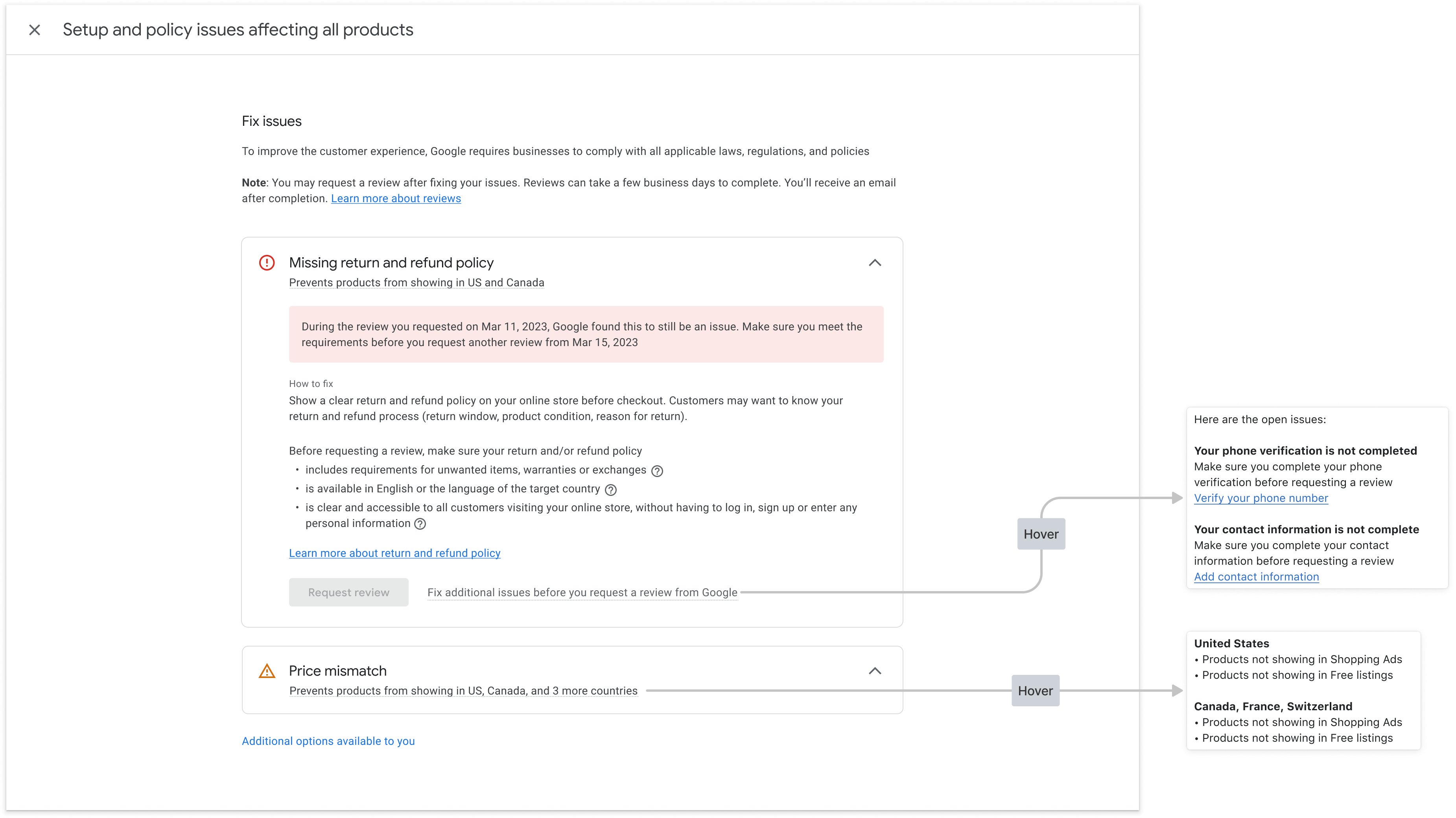
Oto przykład, jak możesz wyświetlić informacje z odpowiedzi renderaccountissues na stronie diagnostyki konta. Obiekty w interfejsie są mapowane na odpowiednie pola interfejsu API w maku. Podobną stronę możesz utworzyć w przypadku informacji o produktach.
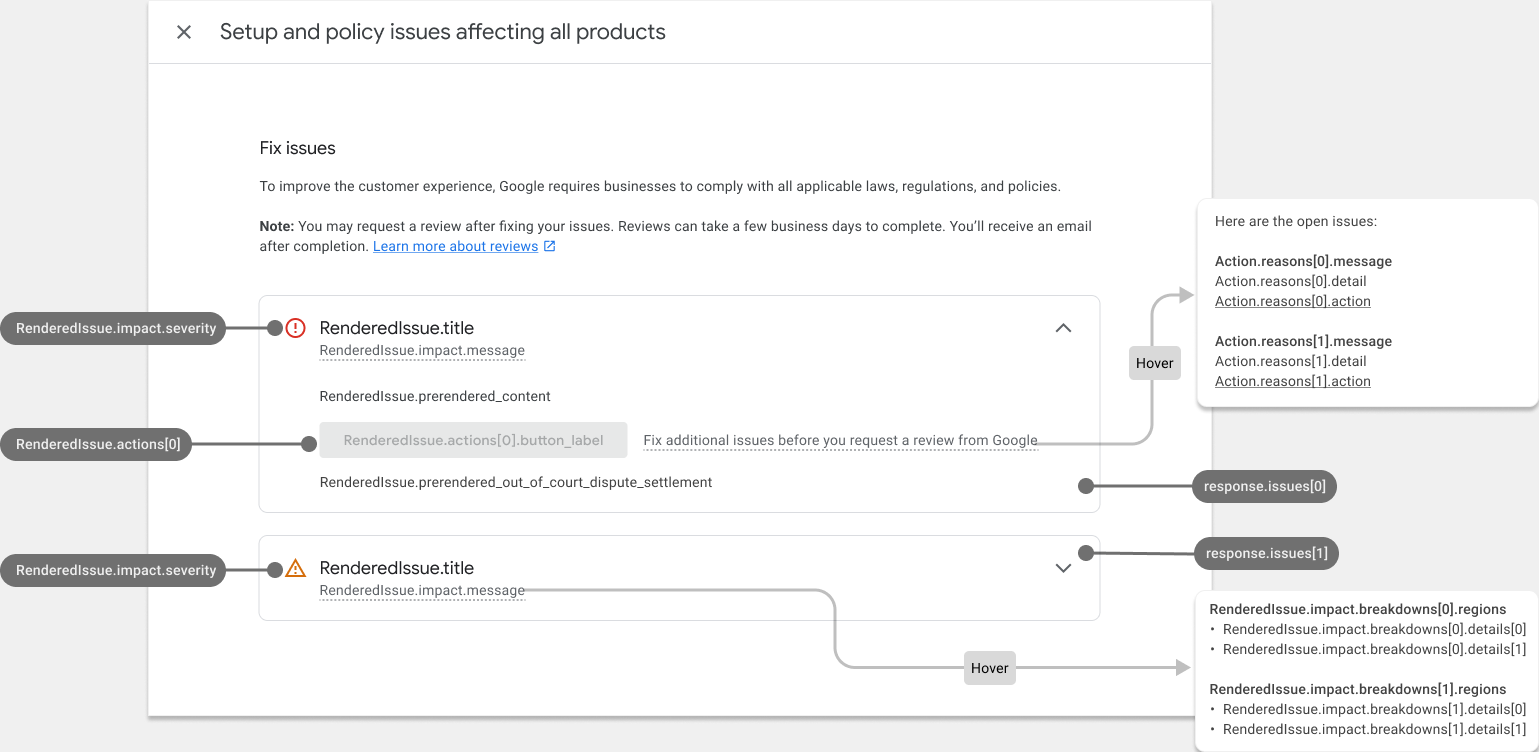
Tak wygląda wypełniona strona diagnostyki konta:
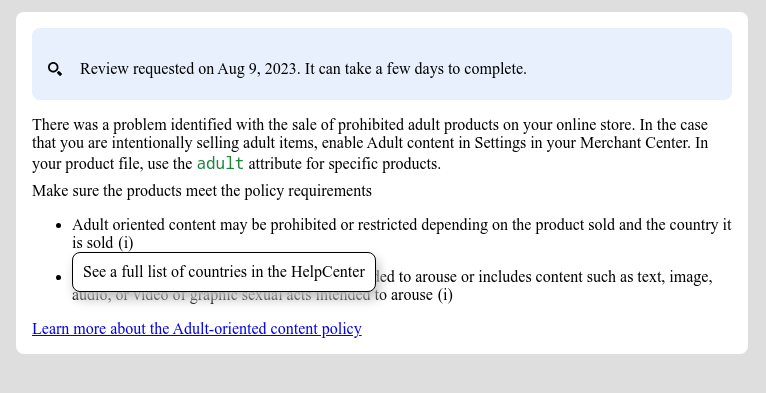
Styl wstępnie wyrenderowanego kodu HTML
Odpowiedź na wywołanie usługi rozwiązywania problemów zawiera pole prerendered_content, czyli szczegóły każdego problemu w formacie HTML. Możesz umieścić te treści HTML bezpośrednio w interfejsie, aby wyświetlić problem w czytelnej formie.
Możesz zobaczyć elementy HTML z klasą new-element. Klasa new-element jest stosowana do elementów dodawanych do kodu HTML po zintegrowaniu z usługą IssueResolution. Zalecamy ukrywanie elementów z klasą new-element, aby można było je ostylować przed wyświetleniem użytkownikom w aplikacji.
Oto przykład wartości pola prerendered_content:
<div class="issue-detail">
  <div class="callout-banners">
    <div class="callout-banner callout-banner-info"><p><span class="segment">Review requested on Aug 9, 2023. It can take a few days to complete.</span>
    </p></div>
  </div>
  <div class="issue-content"><p class="content-element"><span class="segment">There was a problem identified with the sale of prohibited adult products on your online store. In the case that you are intentionally selling adult items, enable Adult content in Settings in your Merchant Center. In your product file, use the </span><span
      class="segment segment-attribute">adult</span><span class="segment"> attribute for specific products.</span>
  </p>
    <p class="content-element root-causes-intro"><span class="segment">Make sure the products meet the policy requirements</span>
    </p>
    <ul class="content-element root-causes">
      <li><p class="tooltip tooltip-style-info"><span class="segment">Adult oriented content may be prohibited or restricted depending on the product sold and the country it is sold</span><span
          class="tooltip-icon"><br></span><span class="tooltip-text"><span class="segment">See a full list of countries in the HelpCenter</span></span>
      </p></li>
      <li><p class="tooltip tooltip-style-info"><span class="segment">Don't list sexually explicit content that is intended to arouse or includes content such as text, image, audio, or video of graphic sexual acts intended to arouse</span><span
          class="tooltip-icon"><br></span><span class="tooltip-text"><span class="segment">Examples: Graphic depictions of sexual acts in progress, including hardcore pornography, any type of genital, anal, or oral sexual activity; graphic depictions of masturbation or genital arousal and language explicitly referencing arousal, masturbation, cartoon porn, or hentai</span></span>
      </p></li>
    </ul>
    <a href="https://support.google.com/merchants/answer/6150138?hl=en-US#wycd-restricted-adult-content"
       class="content-element">Learn more about the Adult-oriented content policy</a></div>
</div>
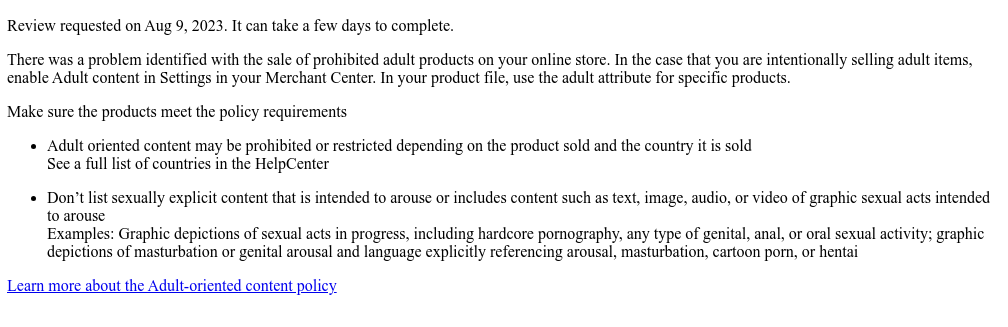
Oto jak wygląda osadzony w aplikacji powyższy kod HTMLprerendered_content bez żadnych stylów:
Możesz użyć wielu klas CSS, aby dostosować sposób renderowania treści w interfejsie. Oto przykładowy kod CSS, którego możesz użyć:
issue-detail {
  text-align: left;
  width: 700px;
  border-radius: 8px;
  background: white;
  margin: 16px;
  padding: 16px;
}

.content-element {
  margin: 8px 0 8px 0;
  display: block;
}

/* callout banners */
.callout-banners {
  margin: 0 0 16px 0;
}

.callout-banner {
  display: block;
  padding: 16px 16px 6px 16px;
  margin: 0 0 8px 0;
  border-radius: 8px;
}

.callout-banner-info {
  background: #e8f0fe;
}

.callout-banner-warning {
  background: #fef7e0;
}

.callout-banner-error {
  background: #fce8e6;
}

/* add an icon to the callout banner */
.callout-banner p {
  background-repeat: no-repeat;
  padding-left: 32px;
}

.callout-banner-error p {
  background-image: url("https://fonts.gstatic.com/s/i/short-term/release/googlesymbols/error/default/20px.svg");
}

.callout-banner-warning p {
  background-image: url("https://fonts.gstatic.com/s/i/short-term/release/googlesymbols/warning/default/20px.svg");
}

.callout-banner-info p {
  background-image: url("https://fonts.gstatic.com/s/i/short-term/release/googlesymbols/search/default/20px.svg");
}

/* segments with style */
.segment-attribute {
  color: #198639;
  font-family: monospace, monospace;
}

.segment-bold {
  font-weight: bold;
}

.segment-italic {
  font-style: italic;
}

/* tooltip */
.tooltip {
  position: relative;
}

.tooltip-style-info .tooltip-icon:before {
  content: '(i)';
  font-style: normal;
  font-weight: normal;
  text-decoration: inherit;
  margin-left: 5px;
}

.tooltip-style-question .tooltip-icon:before {
  content: '(?)';
  font-style: normal;
  font-weight: normal;
  text-decoration: inherit;
  margin-left: 5px;
}

.tooltip .tooltip-text {
  visibility: hidden;
  text-align: left;
  background: white;
  border-radius: 8px;
  padding: 5px 0;
  border: 1px solid;
  padding: 10px;
  box-shadow: 3px 7px 12px #c1c1c1;
  position: absolute;
  z-index: 1;
}

.tooltip:hover .tooltip-text {
  visibility: visible;
}

/* table */
table.content-element {
  margin: 16px 0 16px 0;
  border: 1px solid #ccc;
  border-collapse: collapse;
  margin: 1em 0;
}

table.content-element th {
  background-color: #eee;
}

table.content-element th, table td {
  border: 1px solid #ddd;
  font-size: 0.9em;
  padding: 0.3em 1em;
}

/* hidde elements added in future, until they are supported in your application */
.new-element {
  visibility: hidden;
}
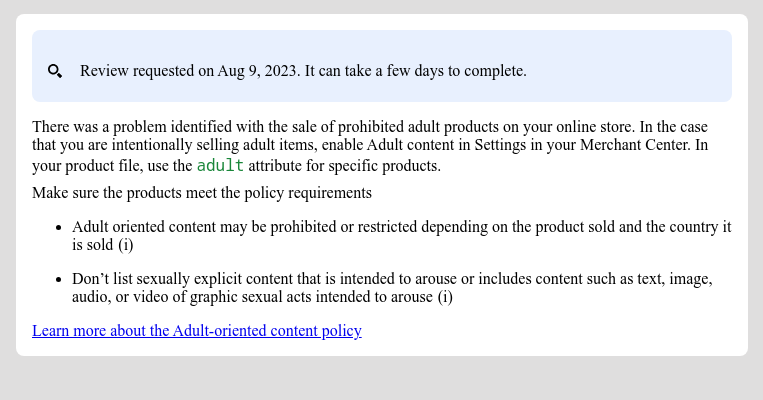
Oto jak wygląda renderowana treść, jeśli użyjesz powyższego kodu CSS:
Możesz też skonfigurować i wyświetlać etykietki za pomocą CSS:
Implementowanie wbudowanego działania z danymi wejściowymi użytkownika
Wbudowane działanie z danymi wejściowymi użytkownika pozwala udostępniać w aplikacji złożone funkcje diagnostyczne. Zalecamy wdrożenie go w formie okna dialogowego, w którym firma może podać swoje dane, przeczytać dodatkowe informacje i potwierdzić prośbę.
Każda czynność zawiera co najmniej 1 ścieżkę czynności. W przypadku niektórych działań może być więcej niż jeden proces. Na przykład może istnieć inny proces, gdy firma prosi o dodatkowe sprawdzenie, ponieważ nie zgadza się z decyzją, a inny, gdy problem został już rozwiązany.
Aby poprosić o dane do wdrożenia złożonych działań z użyciem danych wejściowych użytkownika, musisz ustawić pole user_input_action_option na wartość BUILT_IN_USER_INPUT_ACTIONS.
POST https://merchantapi.googleapis.com/issueresolution/v1/accounts/{ACCOUNT_ID}:renderaccountissues?timeZone=America/Los_Angeles&languageCode=en-GB
{
"user_input_action_option": "BUILT_IN_USER_INPUT_ACTIONS"
}
Zastąp {ACCOUNT_ID} unikalnym identyfikatorem konta, dla którego chcesz wywołać przetwarzanie działania.
Implementacja
Oto jak powinna wyglądać strona diagnostyki, która wymaga od użytkownika podania informacji:
Użytkownik klika przycisk polecenia.
- Jeśli dostępnych jest kilka procesów, aplikacja oferuje je wszystkie, aby użytkownik mógł wybrać jeden z nich w zależności od swoich zamiarów.
- Użytkownik wybiera przepływ.
Aplikacja wyświetla tytuł, wiadomość, wywołanie i formularz danych wejściowych użytkownika dla wybranego przepływu działania. Zalecamy wyświetlanie tych szczegółów w oknie dialogowym.
- Wywołanie, jeśli występuje, zawiera ważne informacje, które mają pomóc użytkownikowi lepiej zrozumieć, jak działa działanie, i co zrobić, aby osiągnąć sukces. Zalecamy wyróżnienie tego komunikatu i dostosowanie jego stylu do wagi problemu.
- Jeśli w procesie są jakieś pola wejściowe, muszą być one wyświetlane, aby użytkownik mógł podać wartości. Jeśli pole do wprowadzania danych jest oznaczone jako wymagane, aplikacja nie powinna zezwalać firmie na wysłanie prośby, dopóki nie poda ona wartości.
Użytkownik czyta informacje i podaje wymagane wartości.
Użytkownik potwierdza prośbę, klikając przycisk.
Aplikacja wywołuje usługę rozwiązywania problemów, aby rozpocząć przetwarzanie działania. Przykładowe żądanie:
POST https://merchantapi.googleapis.com/issueresolution/v1/accounts/{ACCOUNT_ID}:triggeraction

{
  actionContext: "ActionContextValue=",
  actionInput: { actionFlowId: "flow1",
  inputValues: [
  { input_field_id: "input1", checkbox_input_value: { value: true } }
  ]
}
Zastąp {ACCOUNT_ID} unikalnym identyfikatorem konta, dla którego chcesz wywołać przetwarzanie działania.
Aplikacja wyświetla komunikat z potwierdzeniem zwrócony przez usługę
IssueResolution.- Jeśli usługa zwróci błąd weryfikacji ze stanem
INVALID_ARGUMENT, zawiera on szczegółowe informacje i zlokalizowany komunikat o błędzie, który należy wyświetlić firmie. Zalecamy wyświetlanie takiego błędu w pobliżu pola do wprowadzania danych, którego dotyczy. Oto przykład odpowiedzi:
{ "error": { "code": 400, "message": "[actionInput.inputValues] Invalid user input", "status": "INVALID_ARGUMENT", "details": [ { "@type": "type.googleapis.com/google.rpc.ErrorInfo", "reason": "invalid", "domain": "global" }, { "@type": "type.googleapis.com/google.rpc.BadRequest", "fieldViolations": [ { "field": "actionInput.inputValues.input", "description": "The field is required" } ] } ] } }- Jeśli usługa zwróci nieprawidłowy stan lub błąd wewnętrzny (oznaczony stanami
FAILED_PRECONDITIONiINTERNAL), aplikacja powinna poprosić firmę o ponowne wczytanie strony lub spróbowanie później.
- Jeśli usługa zwróci błąd weryfikacji ze stanem