

本文档列出了适用于 Merchant API 的配额。
Merchant API 使用配额来帮助确保所有用户都能获得稳定公平的环境。配额可防止任何单个 API 用户对系统施加过大的负载,从而确保高性能。了解这些配额对于管理商品数据以及在 Google 上扩展业务规模至关重要。
一般概念
Merchant API 配额通过配额组进行管理。
API 方法会映射到配额组。此映射的结构可能会有所不同:
- 每个组包含一种方法:某些配额组仅适用于一种 API 方法。例如,列出数据源的方法
accounts.dataSources.list有自己的专用配额组。 - 每个组包含多种方法(捆绑):相关方法通常捆绑在一起,归入一个配额组。该组中的所有方法共享相同的每日限额和每分钟限额。常见示例包括:
- 将相关方法和资源(例如
merchant-accounts-read-methods)的所有读取操作归为一组。 - 将相关方法和资源(例如
merchant-accounts-write-methods)的所有写入操作归为一组。
- 将相关方法和资源(例如
无论方法调用的类型如何,每次方法调用都只计为一次。包含 250 个项目的 list 请求仅计入一次,而不是 250 个 get 请求。
内置 HTTP 批处理不会影响配额。批量请求中的每个单独请求都会计入配额。例如,包含 500 个 insert 请求的批量请求将按 500 个单独的 insert 方法请求收费。
专用区域批处理的例外情况:专用区域批处理方法(batchCreate、batchUpdate、batchDelete)计为针对 merchant_regions 配额组的单次 API 调用,无论载荷中包含多少个区域操作。
为了有效管理集成,您应查看与您打算使用的每种 API 方法相关联的特定配额组。您可以在配额列表方法中找到这些详细信息。如需了解详情,请参阅监控和可见性。
更新政策
Merchant API 在更新方面强制执行以下政策:
- 默认情况下,您每天最多可以更新两次商品。您应将调用均匀分布在一天中,以符合每分钟配额。
- 默认情况下,您每天最多只能更新两次子账号。您的每日子账号更新配额是根据允许的子账号总数计算出的总限额。
- 默认情况下,您每天只能为每个子账号调用数据源方法(例如
list或create)最多两次。
速率配额
每个配额组都有两种类型的限制(以及每日用量):
- 每日限额 (
quotaLimit):每天允许的请求数上限。每日配额限额会在世界协调时间 (UTC) 中午 12:00 重置。 - 每分钟限制 (
quotaMinuteLimit):每分钟允许的最大请求数,用于控制请求速率。每分钟配额限制使用滚动窗口,强制执行期从首次针对相应方法和资源发出 API 调用的那一刻开始。例如,如果您在 10:01:30 AM 进行调用,则相应方法的每分钟配额窗口将运行到 10:02:30 AM。 - 每日用量 (
quotaUsage):已发出并计入当天每日限额的请求数。如果缺少该字段,则表示相应群组尚未消耗任何配额。
您可以在 quotas.list 方法的响应中找到前面描述的三个字段(quotaLimit、quotaMinuteLimit 和 quotaUsage)。
不同配额组的具体每日限额和每分钟限额差异很大。预期量较高或系统成本较低的操作(例如读取产品数据)通常具有较高的限制。相反,账号修改等更密集或更敏感的操作可能具有较低的限制。
配额分配和层次结构
本部分将说明 Merchant API 代表谁跟踪和应用配额用量:
一般来说,配额是根据发出 API 请求的用户收取的。
- 独立账号:对于对 API 调用进行身份验证的独立账号,相应请求会计入该账号的配额。
- 示例:商家 Shoe Store A(账号 ID:12345)使用自己的服务账号进行身份验证,以调用
products.insert,该调用以自己的账号 (accounts/12345) 为目标。配额是从 Shoe Store A 的配额池中消耗的。
- 示例:商家 Shoe Store A(账号 ID:12345)使用自己的服务账号进行身份验证,以调用
- 高级账号:以高级账号的身份进行身份验证时,即使目标是子账号,也会消耗高级账号池中的配额。
- 示例:代理机构零售管理账号(高级账号 ID:12345)管理着子账号服装店 B(账号 ID:11111)。
代理机构使用自己的凭据进行身份验证,并调用以服装店 B (
accounts/11111) 为目标的products.insert。配额从父级代理机构的资源池(高级账号 ID:12345)中消耗,而不是从子账号的资源池中消耗。
- 示例:代理机构零售管理账号(高级账号 ID:12345)管理着子账号服装店 B(账号 ID:11111)。
代理机构使用自己的凭据进行身份验证,并调用以服装店 B (
- 子账号:如果 API 调用是使用子账号的凭据进行身份验证的,则配额将从该子账号的个人池中扣除。即使受父级高级账号管理,其运作方式也与独立账号相同。
- 示例:沿用之前的设置,如果服装店 B(账号 ID:11111)使用专门为其子账号设置的凭据来调用以其自身账号 (
accounts/11111) 为目标的products.insert,则配额将从服装店 B 的个人配额池中消耗,而父级代理机构的配额池则不受影响。
- 示例:沿用之前的设置,如果服装店 B(账号 ID:11111)使用专门为其子账号设置的凭据来调用以其自身账号 (
一般规则的例外情况
不过,配额分配的一般规则也有一些例外情况:
- Accounts.list:此方法的配额会针对发出调用的经过身份验证的用户或服务账号收取,而不是针对 Merchant Center 账号 ID 收取。
其配额使用情况不会显示在标准 Merchant Center API 诊断页面中。如果您拥有高级账号,建议您使用
accounts.listSubaccounts方法,该方法会占用您的高级账号配额。 - 问题解决方法:这些方法始终计入所请求账号的配额,即使是其他账号对请求进行身份验证也是如此。
分配层次结构
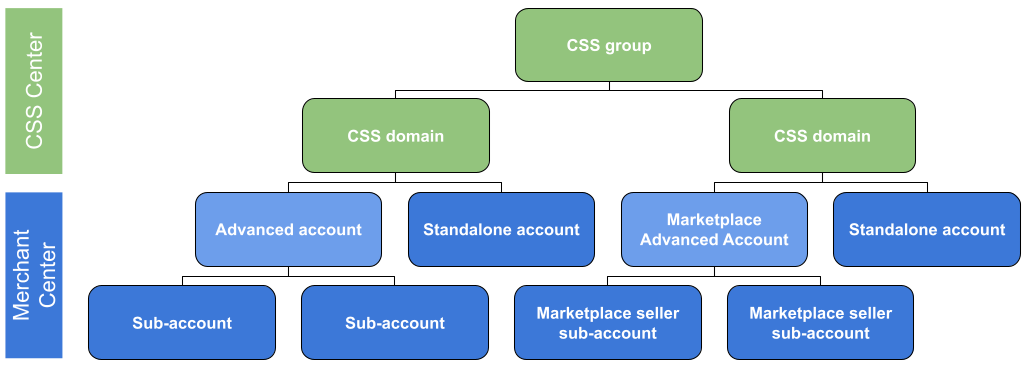
购物比较服务 (CSS):CSS 是汇总商品优惠并将用户引导至零售商网站进行购买的网站。 进行 API 调用时,配额会应用于您进行身份验证时所针对的特定 CSS 组、CSS 网域、账号或子账号。
示例:
- 一个名为 Europe Shopping Group(账号 ID:10001)的 CSS 组想要列出其关联的 CSS 网域。通过使用自己的凭据进行身份验证来发出此 API 调用,配额将直接从欧洲购物群组配额池中消耗。
- CSS 网域 TopDeals CSS(账号 ID:20002)进行身份验证,以调用以其关联的某个商家账号 (
accounts/30003) 为目标的方法来分配标签。配额是从 TopDeals CSS 的配额池中消耗的,而不是从商家账号的配额池中消耗的。
购物平台:购物平台是托管多个独立商家的在线平台。它们是特殊的高级账号,可让您为每位卖家创建单独的子账号。
下图显示了 CSS 组、CSS、市场、高级账号、独立账号和子账号的层次结构。
自动调整配额
Merchant API 针对特定服务提供自动配额管理系统,该系统会根据您的用量、商品和账号规模,为不断成长的商家调整配额限制。Merchant API 每天都会重新计算这些配额。
纳入自动配额调整的配额组包括:
产品服务
- 与
products和productInputs资源相关的方法的所有配额组。 - 每日通话配额通常设置为商家拥有的优惠配额数量的 2 倍。这假设商家可能需要每天最多更新两次每个产品。
- 单个产品可以更新两次以上,但您的每日 API 调用总数不得超过每日调用总配额。
账号服务
- 与 Merchant API 中各种精细的账号相关资源相关的方法的所有配额组。
- 每日调用配额设置为相应账号允许的子账号数量上限。这样一来,每个子账号每天最多可以进行两次读取调用。
数据源服务
- 高级账号在子账号中执行的与 Merchant API 中数据源相关资源(例如
list或create)相关的所有方法配额组。 - 每日调用配额通常设置为高级账号拥有的子账号数量的 2 倍。此假设的前提是,商家每天最多可以更新每个子账号的数据源两次。
只有上述服务具有自动配额调整功能。其他服务具有默认配额,任何增加都必须手动申请。如需了解详情,请参阅配额增加流程部分。
超出配额后会发生什么情况
超出配额后,API 响应和 Merchant Center 账号中的“诊断”页面中会显示错误:
- 每分钟:
quota/request_rate_too_high
{
    "error": {
        "code": 429,
        "message": "Quota per minute exceeded. Please distribute your requests over a longer time period. For more information check https://developers.google.com/merchant/api/guides/quotas-limits",
        "status": "RESOURCE_EXHAUSTED",
        "details": [
            {
                "@type": "type.googleapis.com/google.rpc.ErrorInfo",
                "reason": "quotaExceeded",
                "domain": "merchantapi.googleapis.com",
                "metadata": {
                    "HELP_CENTER_LINK": "https://developers.google.com/merchant/api/guides/quotas-limits",
                    "REASON": "QUOTA_REQUEST_RATE_TOO_HIGH"
                }
            }
        ]
    }
}
- 每天:
quota/daily_limit_exceeded
{
    "error": {
        "code": 429,
        "message": "Daily request quota exceeded. Please reduce number of requests. For more information check https://developers.google.com/merchant/api/guides/quotas-limits",
        "status": "RESOURCE_EXHAUSTED",
        "details": [
            {
                "@type": "type.googleapis.com/google.rpc.ErrorInfo",
                "reason": "quotaExceeded",
                "domain": "merchantapi.googleapis.com",
                "metadata": {
                    "HELP_CENTER_LINK": "https://developers.google.com/merchant/api/guides/quotas-limits",
                    "REASON": "QUOTA_TOO_MANY_REQUESTS"
                }
            }
        ]
    }
}
以下错误是 Merchant Center 限制,与 Merchant API 配额无关。您可以尝试申请增加商品、Feed 或子账号的配额:
too_many_items:已超出商家配额too_many_subaccounts:已达到子账号数量上限
监控和可见性
如需检查账号的当前调用配额和用量,请使用账号名称调用 quotas.list。
POST https://merchantapi.googleapis.com/quota/v1/accounts/{ACCOUNT_ID}/quotas
Content-Type: application/json
Authorization: Bearer {ACCESS_TOKEN}
替换以下内容:
ACCOUNT_ID:您的 Merchant Center IDACCESS_TOKEN:用于进行 API 调用的授权令牌
如果请求成功,API 会返回一个 quotaGroups 资源列表,其中包含配额组的资源 name、不同的配额以及组配额适用的方法。
{
    "quotaGroups": [
        {
            "name": "accounts/{ACCOUNT_ID}/quotas/merchant-quota-listquotagroups",
            "quotaUsage": "2",
            "quotaLimit": "1000",
            "methodDetails": [
                {
                    "method": "quotaservice.listquotagroups",
                    "version": "v1",
                    "subapi": "quota",
                    "path": "quota/v1/quotaservice.listquotagroups"
                }
            ],
            "quotaMinuteLimit": "10"
        },
        {
            "name": "accounts/{ACCOUNT_ID}/quotas/merchant-commission-group-list",
            "quotaLimit": "10000",
            "methodDetails": [
                {
                    "method": "commissiongroupservice.listcommissiongroups",
                    "version": "v1",
                    "subapi": "youtube",
                    "path": "youtube/v1/commissiongroupservice.listcommissiongroups"
                }
            ],
            "quotaMinuteLimit": "60"
        },
        {
            "name": "accounts/{ACCOUNT_ID}/quotas/merchant-merchantreviews-list",
            "quotaLimit": "20000000",
            "methodDetails": [
                {
                    "method": "merchantreviewsservice.listmerchantreviews",
                    "version": "v1",
                    "subapi": "reviews",
                    "path": "reviews/v1/merchantreviewsservice.listmerchantreviews"
                }
            ],
            "quotaMinuteLimit": "60000"
        }
    ]
}
配额增加流程
如需申请更多配额,请打开联系支持团队表单,在“问题/疑问”字段中选择“配额增加申请”,然后填写所有必填字段,包括您的 Merchant Center ID、目标方法和业务理由。
- 对于具有自动配额的资源(高级账号的
products、accounts和datasources):您只能针对特殊情况(例如在新市场中发布应用或在流量高峰购物季期间)申请临时增加配额。我们不接受针对这些类型的资源的永久性配额增加请求。 - 对于所有其他没有自动配额的资源:根据需要申请增加配额。
建议您定期检查配额,确保您的实现方案有足够的配额,并了解配额是如何自动调整的。
使用 quotas.list 方法可查看每个 API 方法组的当前每日配额限制、每分钟限制和当前每日用量。
最佳做法
实施这些最佳实践有助于确保集成顺利运行、避免出现意外的配额错误,并高效利用 Merchant Center 资源。
优化请求分配
- 均匀分布请求:避免一次性发送大量请求。请将每日 API 调用次数均匀分布在一天中,以确保不超过每分钟的配额限制 (
quotaMinuteLimit)。 - 主动节流:在应用中实现客户端速率限制(节流)。不要仅依赖 Google 的服务器来拒绝过多的流量。在源头控制请求速率。
优雅的错误处理
- 处理 HTTP 429:您的应用必须准备好处理 429 Too Many Requests 错误 (
quota/request_rate_too_high)。 - 带抖动的指数退避算法:在重试失败的请求(尤其是在收到 429 错误后)时,请使用指数退避算法(增加等待时间)并添加“抖动”(随机延迟)。抖动可防止“重试风暴”,即多个客户端实例在完全相同的时间重试,导致服务器再次过载。
- 遵循重试提示:如果 API 响应包含重试详细信息或标头,请使用它们来确定何时恢复调用。
最大限度减少冗余调用
- 防止过时的调用 (404 NOT_FOUND):避免请求或删除不再存在的资源。即使是失败的调用也会消耗 API 配额。在 Merchant Center API 诊断中监控
NOT_FOUND错误,以检测过时的状态跟踪或不必要的轮询。 - 更新前验证:在发送更新请求之前,请检查数据是否确实已更改。避免发送写入相同值的更新。
- 使用缓存:在适当的时候将读取响应(例如商品详情、设置)缓存到本地,以避免针对未更改的数据重复调用
get或list。
浏览配额层次结构和例外情况
- 高级账号和子账号:如果您使用的是高级账号,则应在高级账号一级进行身份验证,这样通话才能计入高级账号的共享资源池。
- 使用
listSubaccounts:对于高级账号,请使用accounts.listSubaccounts而不是accounts.list。accounts.list配额会向调用用户(而非 MC ID)收取,并且不会显示在标准诊断信息中。listSubaccounts会占用您的 MCA 配额。