
创建和上传操作 Feed
创建和上传操作 Feed 时,请按照以下说明操作:
- 按照操作数据文件的操作
Feed
中所述的规范操作。我们建议为每次上传使用唯一的操作数据文件名。
在文件名中添加时间戳,例如
action_1633621547.json。 - 在文件集描述符中,将
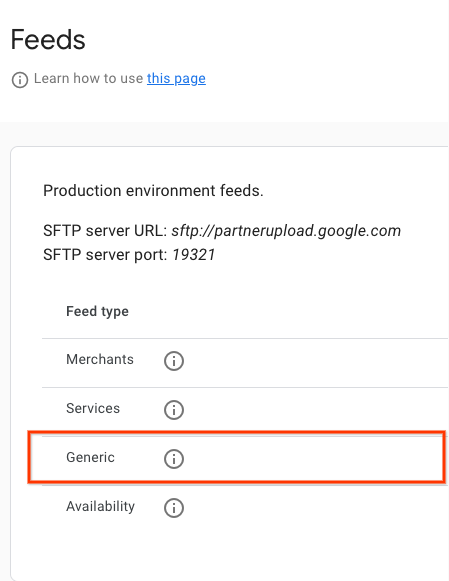
name字段设置为reservewithgoogle.action.v2。如需查看描述符文件示例,请参阅 JSON 示例。 我们建议为每次上传使用唯一的描述符文件名。 在文件名中添加时间戳,例如action_1633621547.filesetdesc.json。 描述符文件必须上传到通用 SFTP 服务器。 - 每天将 Feed 作为完整 刷新上传到通用 SFTP 服务器。
- 您可以在合作伙伴门户网站的 “配置”>“Feed”部分中找到 SFTP 服务器详细信息。
- 在合作伙伴门户网站的 Feed > 历史记录部分中查看 Feed 提取状态。
定义
ActionFeed 定义
message ActionFeed {
  repeated ActionDetail data = 1;
}
ActionDetail 定义
message ActionDetail {
  string entity_id = 2;
  string link_id = 3;

  // Deep link for action detail
  string url = 4;

  // The actions that can be performed using this deep link. At least one
  // Action must be specified.
  repeated Action actions = 1;
}
Action 定义
// Information about an Action which could be performed.
message Action {
  // Deprecated fields not to be reused.
  reserved 1;

  oneof action_info {
    AppointmentInfo appointment_info = 2;
  }
}
AppointmentInfo 定义
// Indicates that the parent Action is for booking an appointment.
// In v2 of the Action feed, the deep link URL is specified on ActionDetail.url,
// so this message has no fields and should be set as an empty object
// (for example, "appointment_info": {} in JSON).
message AppointmentInfo {
}
操作 Feed 示例
操作 Feed
{
  "data": [
    {
      "entity_id": "appointments-merchant-1",
      "link_id": "appointment-link-1",
      "url": "https://www.partnerwebsite.com/appointment/appointment-partner-1",
      "actions":[
        {
          "appointment_info": {}
        }
      ]
    }
  ]
}
描述符文件
{
  "generation_timestamp": 1677540395,
  "name": "reservewithgoogle.action.v2",
  "data_file": [
    "action_1677540395_0001.json",
    "action_1677540395_0002.json"

  ]
}