
ऐक्शन फ़ीड बनाना और अपलोड करना
ऐक्शन फ़ीड बनाते और अपलोड करते समय, इन निर्देशों का पालन करें:
- ऐक्शन डेटा फ़ाइलों के लिए, ऐक्शन फ़ीड में बताई गई खास बातों का पालन करें. हमारा सुझाव है कि हर अपलोड के लिए, ऐक्शन डेटा फ़ाइल के यूनीक नामों का इस्तेमाल करें.
फ़ाइल के नाम में टाइमस्टैंप शामिल करें. उदाहरण के लिए,
action_1633621547.json. - फ़ाइलसेट डिस्क्रिप्टर में,
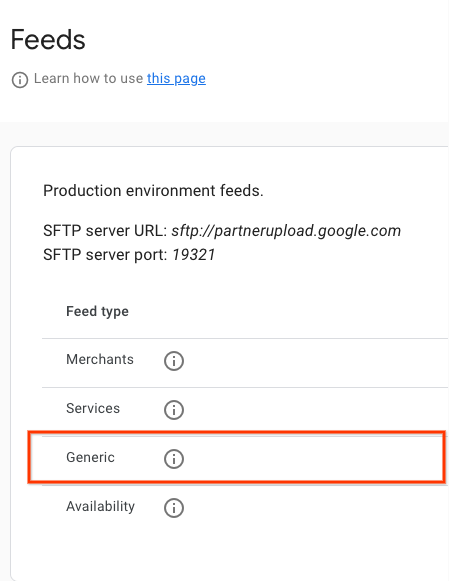
nameफ़ील्ड कोreservewithgoogle.action.v2पर सेट करें. डिस्क्रिप्टर फ़ाइल का उदाहरण देखने के लिए, JSON का सैंपल देखें. हमारा सुझाव है कि हर बार अपलोड करने के लिए, यूनीक डिस्क्रिप्टर फ़ाइल के नामों का इस्तेमाल करें. फ़ाइल के नाम में टाइमस्टैंप शामिल करें. उदाहरण के लिए,action_1633621547.filesetdesc.json. डिस्क्रिप्टर फ़ाइल को सामान्य एसएफ़टीपी सर्वर पर अपलोड करना ज़रूरी है. - सामान्य एसएफ़टीपी सर्वर पर, फ़ीड को रोज़ाना पूरी तरह से रीफ़्रेश करके अपलोड करें.
- एसएफ़टीपी सर्वर की जानकारी, Partner Portal के कॉन्फ़िगरेशन > फ़ीड सेक्शन में देखी जा सकती है.
- फ़ीड में डेटा डालने की स्थिति देखने के लिए, Partners पोर्टल के डेटा डालना > इतिहास सेक्शन में जाएं.
परिभाषाएं
ActionFeed की परिभाषा
message ActionFeed {
  option features.(pb.java).nest_in_file_class = YES;

  repeated ActionDetail data = 1;
}
ActionDetail की परिभाषा
message ActionDetail {
  option features.(pb.java).nest_in_file_class = YES;

  string entity_id = 2;
  string link_id = 3;

  // Deep link for action detail
  string url = 4;

  // The actions that can be performed using this deep link. At least one
  // Action must be specified.
  repeated Action actions = 1;
}
कार्रवाई की परिभाषा
// Information about an Action which could be performed.
message Action {
  option features.(pb.java).nest_in_file_class = YES;

  // Deprecated fields not to be reused.
  reserved 1;

  oneof action_info {
    AppointmentInfo appointment_info = 2;

  }
}
AppointmentInfo की परिभाषा
// Indicates that the parent Action is for booking an appointment.
// In v2 of the Action feed, the deep link URL is specified on ActionDetail.url,
// so this message has no fields and should be set as an empty object
// (for example, "appointment_info": {} in JSON).
message AppointmentInfo {
  option features.(pb.java).nest_in_file_class = YES;

}
ऐक्शन फ़ीड के सैंपल
ऐक्शन फ़ीड
{
  "data": [
    {
      "entity_id": "appointments-merchant-1",
      "link_id": "appointment-link-1",
      "url": "https://www.partnerwebsite.com/appointment/appointment-partner-1",
      "actions":[
        {
          "appointment_info": {}
        }
      ]
    }
  ]
}
ब्यौरे वाली फ़ाइल
{
  "generation_timestamp": 1677540395,
  "name": "reservewithgoogle.action.v2",
  "data_file": [
    "action_1677540395_0001.json",
    "action_1677540395_0002.json"

  ]
}