
להעלות מוצרים ולנהל חשבונות Merchant Center.
שירות Merchant API מאפשר להשתמש ב-Merchant API ב-Google Apps Script כדי להעלות מוצרים ולנהל חשבונות Merchant Center.
מידע מפורט על Merchant API מופיע במסמכי התיעוד. בדומה לכל השירותים המתקדמים ב-Apps Script, שירות Merchant API משתמש באותם אובייקטים, שיטות ופרמטרים כמו ה-API הציבורי.
Merchant API הוא אוסף של ממשקי API משניים – קבוצות של שירותים ומשאבים קשורים. זו רשימת ממשקי ה-API המשניים.
כדי להשתמש בשירות Merchant API ב-Apps Script, צריך לבצע את השלבים הבאים:
מוודאים שהפרויקט ב-Apps Script מקושר לפרויקט רגיל ב-Google Cloud. מידע נוסף זמין במאמר בנושא שימוש בפרויקט בענן אחר רגיל.
מפעילים את השירות המתקדם של Apps Script, כמו שמתואר במסמך הזה:
- מפעילים את
appsscript.jsonבפרויקטים חדשים. - הפעלת Apps Script בפרויקטים קיימים.
- מפעילים את
רושמים את פרויקט Google Cloud הרגיל בחשבון Merchant Center, כמו שמתואר במדריך תחילת העבודה עם Merchant API.
הפעלה של שירות מתקדם ב-Apps Script
אפשר להפעיל את שירות Apps Script באחת משתי הדרכים הבאות:
הפעלת ממשקי API ב-appsscript.json
בדוגמה הבאה מוצג קובץ appsscript.json שמאפשר גישה ל-API המשני של מוצרים, חשבונות, דוחות ומקורות נתונים.
בכלי לעריכת Apps Script, בוחרים באפשרות Project Settings (הגדרות הפרויקט) .
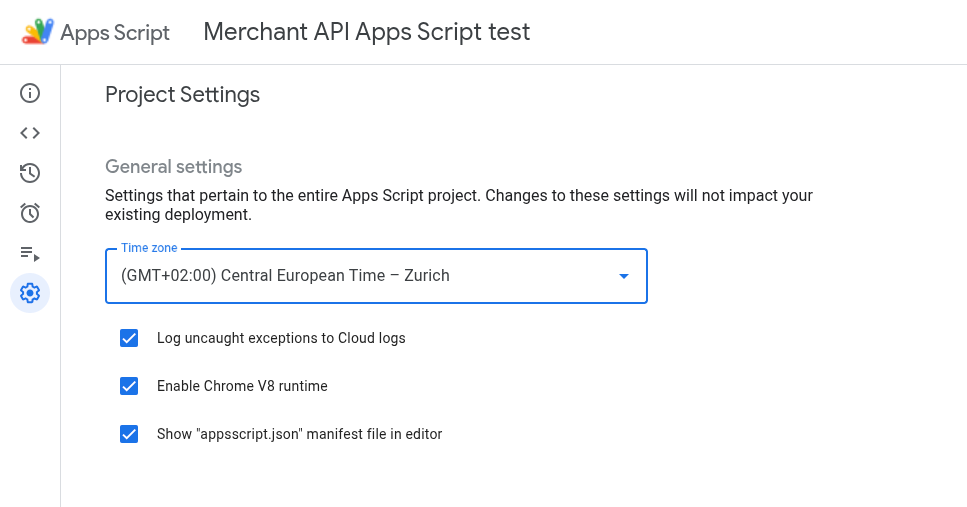
מפעילים את האפשרות הצגת קובץ המניפסט 'appsscript.json' בעורך.
בכלי העריכה, בוחרים את הקובץ
appsscript.json.מחליפים את התוכן של קובץ
appsscript.jsonבתוכן הבא:{ "dependencies": { "enabledAdvancedServices": [ { "userSymbol": "MerchantApiAccounts", "version": "accounts_v1", "serviceId": "merchantapi" }, { "userSymbol": "MerchantApiDataSources", "version": "datasources_v1", "serviceId": "merchantapi" }, { "userSymbol": "MerchantApiProducts", "version": "products_v1", "serviceId": "merchantapi" }, { "userSymbol": "MerchantApiReports", "version": "reports_v1", "serviceId": "merchantapi" } ] }, "exceptionLogging": "STACKDRIVER", "runtimeVersion": "V8" }לוחצים על שמירה.
עכשיו אפשר להתייחס אל ממשקי ה-API המשניים הבאים בקוד בתור:
א.
MerchantApiAccountsב.
MerchantApiDataSourcesג.
MerchantApiProductsד.
MerchantApiReports
הפעלת Apps Script עבור ממשקי API משניים נוספים או פרויקטים קיימים
כדי להפעיל ממשקי API משניים בפרויקטים קיימים:
פותחים את פרויקט Apps Script.
בצד ימין, לוחצים על עורך < >.
בצד ימין, ליד שירותים, לוחצים על הוספת שירות +.
בבורר הגרסאות, בוחרים את ה-API המשני שרוצים להפעיל.
מוסיפים את המזהה עם שם ה-API המשני. לדוגמה, כדי להפעיל את Inventories sub-API, בוחרים בגרסה
inventories_v1ומשנים את המזהה ל-MerchantApiInventories.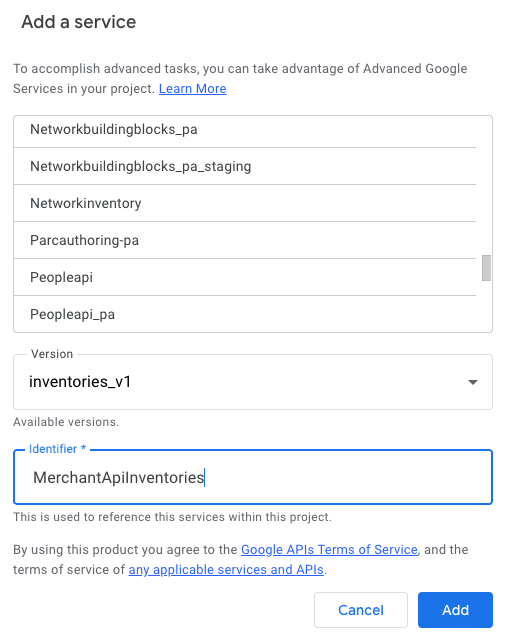
מעכשיו אפשר להפנות אל Inventories sub-API בקוד בתור
MerchantApiInventories.
קוד לדוגמה
בקטע הזה מוסבר איך להשתמש ב-Merchant API לתכונות נבחרות.
פרסום המוצרים
בדוגמה הזו מוצגות הפעולות שצריך לבצע כדי להציג את המוצרים בחשבון Merchant Center נתון.
/**
* Lists all products for a given Merchant Center account.
*/
function productList() {
// IMPORTANT:
// Enable the Merchant API Products sub-API Advanced Service and call it
// "MerchantApiProducts"
// Replace this with your Merchant Center ID.
const accountId = '<MERCHANT_CENTER_ID>';
// Construct the parent name
const parent = 'accounts/' + accountId;
try {
console.log('Sending list Products request');
let pageToken;
// Set the page size to 1000. This is the maximum allowed page size.
let pageSize = 1000;
console.log('Retrieved products below:');
// Call the Products.list API method. Use the pageToken to iterate through
// all pages of results.
do {
response = MerchantApiProducts.Accounts.Products.list(parent, {pageToken, pageSize});
console.log(response);
pageToken = response.nextPageToken;
} while (pageToken); // Exits when there is no next page token.
} catch (e) {
console.log('ERROR!');
console.log(e);
}
}
סינון מוצרים שנפסלו
בדוגמה הזו מוסבר איך לסנן מוצרים שנפסלו בחשבון Merchant Center.
/**
* Demonstrates how to filter disapproved products using the Merchant API Reports service.
*/
function filterDisapprovedProducts() {
// IMPORTANT:
// Enable the Merchant API Reports sub-API Advanced Service and call it
// "MerchantApiReports"
// Enable the Merchant API Products sub-API Advanced Service and call it
// "MerchantApiProducts"
// Replace this with your Merchant Center ID.
const accountId = '<INSERT_MERCHANT_CENTER_ID>';
// Construct the parent name
const parent = 'accounts/' + accountId;
try {
console.log('Sending search Report request');
// Set pageSize to the maximum value (default: 1000)
let pageSize = 1000;
let pageToken;
// The query below is an example of a query for the productView that gets product informations
// for all disapproved products.
let query = 'SELECT offer_id,' +
'id,' +
'price,' +
'title' +
' FROM product_view' +
' WHERE aggregated_reporting_context_status = "NOT_ELIGIBLE_OR_DISAPPROVED"';
// Call the Reports.search API method. Use the pageToken to iterate through
// all pages of results.
do {
response =
MerchantApiReports.Accounts.Reports.search({query, pageSize, pageToken}, parent);
for (const reportRow of response.results) {
console.log("Printing data from Product View:");
console.log(reportRow);
// OPTIONALLY, you can get the full product details by calling the GetProduct method.
let productName = parent + "/products/" + reportRow.getProductView().getId();
product = MerchantApiProducts.Accounts.Products.get(productName);
console.log(product);
}
pageToken = response.nextPageToken;
} while (pageToken); // Exits when there is no next page token.
} catch (e) {
console.log('ERROR!');
console.log('Error message:' + e.message);
}
}
אחזור דוח של חשבון נתון
בדוגמה הזו מוסבר איך לאחזר דוח עבור חשבון Merchant Center נתון.
/**
* Searches a report for a given Merchant Center account.
*/
function searchReport() {
// IMPORTANT:
// Enable the Merchant API Reports sub-API Advanced Service and call it
// "MerchantApiReports"
// Replace this with your Merchant Center ID.
const accountId = '<MERCHANT_CENTER_ID>';
// Construct the parent name
const parent = 'accounts/' + accountId;
try {
console.log('Sending search Report request');
// Set pageSize to the maximum value (default: 1000)
let pageSize = 1000;
let pageToken;
// Uncomment the desired query from below. Documentation can be found at
// https://developers.google.com/merchant/api/reference/rest/reports_v1beta/accounts.reports#ReportRow
// The query below is an example of a query for the product_view.
let query = 'SELECT offer_id,' +
'id,' +
'price,' +
'gtin,' +
'item_issues,' +
'channel,' +
'language_code,' +
'feed_label,' +
'title,' +
'brand,' +
'category_l1,' +
'product_type_l1,' +
'availability,' +
'shipping_label,' +
'thumbnail_link,' +
'click_potential' +
' FROM product_view';
/*
// The query below is an example of a query for the
price_competitiveness_product_view. let query = "SELECT offer_id,"
+ "id,"
+ "benchmark_price,"
+ "report_country_code,"
+ "price,"
+ "title,"
+ "brand,"
+ "category_l1,"
+ "product_type_l1"
+ " FROM price_competitiveness_product_view"
+ " WHERE date BETWEEN '2023-03-03' AND '2025-03-10'"; */
/*
// The query below is an example of a query for the
price_insights_product_view. let query = "SELECT offer_id,"
+ "id,"
+ "suggested_price,"
+ "price,"
+ "effectiveness,"
+ "title,"
+ "brand,"
+ "category_l1,"
+ "product_type_l1,"
+ "predicted_impressions_change_fraction,"
+ "predicted_clicks_change_fraction,"
+ "predicted_conversions_change_fraction"
+ " FROM price_insights_product_view"; */
/*
// The query below is an example of a query for the
product_performance_view. let query = "SELECT offer_id,"
+ "conversion_value,"
+ "marketing_method,"
+ "customer_country_code,"
+ "title,"
+ "brand,"
+ "category_l1,"
+ "product_type_l1,"
+ "custom_label0,"
+ "clicks,"
+ "impressions,"
+ "click_through_rate,"
+ "conversions,"
+ "conversion_rate"
+ " FROM product_performance_view"
+ " WHERE date BETWEEN '2023-03-03' AND '2025-03-10'"; */
// Call the Reports.search API method. Use the pageToken to iterate through
// all pages of results.
do {
response =
MerchantApiReports.Accounts.Reports.search({query, pageSize, pageToken}, parent);
for (const reportRow of response.results) {
console.log(reportRow);
}
pageToken = response.nextPageToken;
} while (pageToken); // Exits when there is no next page token.
} catch (e) {
console.log('ERROR!');
console.log(e);
console.log('Error message:' + e.message);
if (e.stack) {
console.log('Stack trace:' + e.stack);
}
}
}
הצגת רשימה של כל מקורות הנתונים
בדוגמה הזו מוצגות כל הדרכים לרישום של מקורות נתונים בחשבון Merchant Center נתון.
/**
* Lists all data sources for a given Merchant Center account.
*/
function listDataSources() {
// IMPORTANT:
// Enable the Merchant API DataSources sub-API Advanced Service and call it
// "MerchantApiDataSources"
// Replace this with your Merchant Center ID.
const accountId = '<MERCHANT_CENTER_ID>';
// Construct the parent name
const parent = 'accounts/' + accountId;
let dataSources = [];
let primaryDataSources = [];
try {
console.log('Sending list DataSources request');
let pageToken;
let pageSize = 10;
// Call the DataSources.list API method. Use the pageToken to iterate through
// all pages of results.
do {
response =
MerchantApiDataSources.Accounts.DataSources.list(parent, {pageSize, pageToken});
for (const datasource of response.dataSources) {
dataSources.push(datasource);
if (datasource.primaryProductDataSource) {
primaryDataSources.push(datasource);
}
}
pageToken = response.nextPageToken;
} while (pageToken); // Exits when there is no next page token.
console.log('Retrieved ' + dataSources.length + ' data sources.');
console.log(
'There were ' + primaryDataSources.length +
' primary product data sources.');
} catch (e) {
console.log('ERROR!');
console.log(e);
}
}