

Сервис Merchant API позволяет использовать Merchant API в Google Apps Script для загрузки товаров и управления учетными записями Merchant Center.
Подробную информацию об API для продавцов см. в справочной документации . Как и все расширенные сервисы в Apps Script, сервис API для продавцов использует те же объекты, методы и параметры, что и публичный API.
Merchant API — это набор под-API — групп связанных сервисов и ресурсов. Вот список под-API .
Чтобы использовать сервис Merchant API в Apps Script, выполните следующие действия:
Убедитесь, что ваш проект Apps Script связан со стандартным проектом Google Cloud. Дополнительную информацию см. в разделе «Использование другого стандартного проекта Cloud» .
Включите службу Apps Script Advanced, как описано в этом документе:
- Включите файл
appsscript.jsonдля новых проектов. - Включите Apps Script для существующих проектов.
- Включите файл
Зарегистрируйте свой стандартный проект Google Cloud в своей учетной записи Merchant Center, как описано в кратком руководстве по использованию Merchant API.
Включить службу Apps Script Advanced
Включить службу Apps Script можно одним из двух способов:
Включите API в файле appsscript.json
В следующем примере показан файл appsscript.json , который включает в себя под-API для продуктов, учетных записей, отчетов и источников данных.
В редакторе Apps Script выберите проекта» .
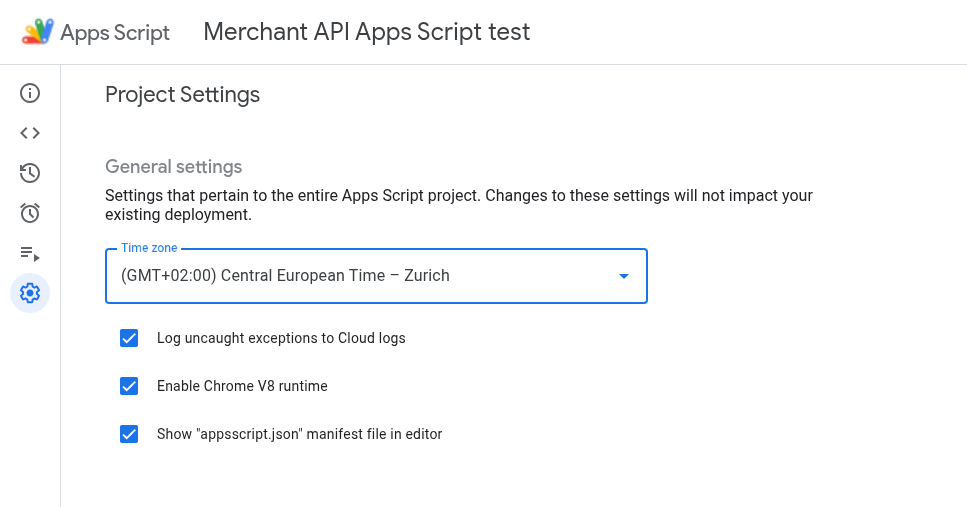
Включите параметр « Показывать файл манифеста "appsscript.json" в редакторе» .
В редакторе выберите файл
appsscript.json.Замените содержимое файла
appsscript.jsonследующим:{ "dependencies": { "enabledAdvancedServices": [ { "userSymbol": "MerchantApiAccounts", "version": "accounts_v1", "serviceId": "merchantapi" }, { "userSymbol": "MerchantApiDataSources", "version": "datasources_v1", "serviceId": "merchantapi" }, { "userSymbol": "MerchantApiProducts", "version": "products_v1", "serviceId": "merchantapi" }, { "userSymbol": "MerchantApiReports", "version": "reports_v1", "serviceId": "merchantapi" } ] }, "exceptionLogging": "STACKDRIVER", "runtimeVersion": "V8" }Нажмите « Сохранить ».
Теперь вы можете ссылаться на следующие вложенные API в своем коде следующим образом:
а.
MerchantApiAccountsb.
MerchantApiDataSourcesc.
MerchantApiProductsd.
MerchantApiReports
Включите Apps Script для дополнительных под-API или существующих проектов.
Чтобы включить вложенные API в существующих проектах, выполните следующие действия:
Откройте свой проект Apps Script.
Слева нажмите «Редактор» < > .
Слева, рядом с пунктом «Услуги» , нажмите «Добавить услугу +» .
В селекторе версий выберите нужный вам вложенный API.
Добавьте к идентификатору имя вашего под-API. Например, чтобы включить под-API «Запасы», выберите версию
inventories_v1и измените идентификатор наMerchantApiInventories.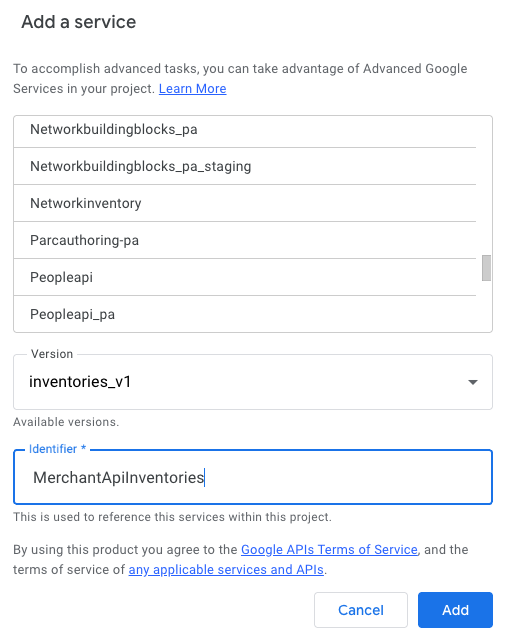
Теперь вы можете ссылаться на под-API Inventories в своем коде как
MerchantApiInventories.
Пример кода
В этом разделе объясняется, как использовать API продавца для реализации некоторых функций.
Перечислите товары
В этом примере показано, как составить список товаров для заданной учетной записи Merchant Center.
/**
* Lists all products for a given Merchant Center account.
*/
function productList() {
// IMPORTANT:
// Enable the Merchant API Products sub-API Advanced Service and call it
// "MerchantApiProducts"
// Replace this with your Merchant Center ID.
const accountId = '<MERCHANT_CENTER_ID>';
// Construct the parent name
const parent = 'accounts/' + accountId;
try {
console.log('Sending list Products request');
let pageToken;
// Set the page size to 1000. This is the maximum allowed page size.
let pageSize = 1000;
console.log('Retrieved products below:');
// Call the Products.list API method. Use the pageToken to iterate through
// all pages of results.
do {
response = MerchantApiProducts.Accounts.Products.list(parent, {pageToken, pageSize});
console.log(response);
pageToken = response.nextPageToken;
} while (pageToken); // Exits when there is no next page token.
} catch (e) {
console.log('ERROR!');
console.log(e);
}
}
Отфильтровать неразрешенные товары
В этом примере показано, как отфильтровать отклоненные товары в учетной записи Merchant Center.
/**
* Demonstrates how to filter disapproved products using the Merchant API Reports service.
*/
function filterDisapprovedProducts() {
// IMPORTANT:
// Enable the Merchant API Reports sub-API Advanced Service and call it
// "MerchantApiReports"
// Enable the Merchant API Products sub-API Advanced Service and call it
// "MerchantApiProducts"
// Replace this with your Merchant Center ID.
const accountId = '<INSERT_MERCHANT_CENTER_ID>';
// Construct the parent name
const parent = 'accounts/' + accountId;
try {
console.log('Sending search Report request');
// Set pageSize to the maximum value (default: 1000)
let pageSize = 1000;
let pageToken;
// The query below is an example of a query for the productView that gets product informations
// for all disapproved products.
let query = 'SELECT offer_id,' +
'id,' +
'price,' +
'title' +
' FROM product_view' +
' WHERE aggregated_reporting_context_status = "NOT_ELIGIBLE_OR_DISAPPROVED"';
// Call the Reports.search API method. Use the pageToken to iterate through
// all pages of results.
do {
response =
MerchantApiReports.Accounts.Reports.search({query, pageSize, pageToken}, parent);
for (const reportRow of response.results) {
console.log("Printing data from Product View:");
console.log(reportRow);
// OPTIONALLY, you can get the full product details by calling the GetProduct method.
let productName = parent + "/products/" + reportRow.getProductView().getId();
product = MerchantApiProducts.Accounts.Products.get(productName);
console.log(product);
}
pageToken = response.nextPageToken;
} while (pageToken); // Exits when there is no next page token.
} catch (e) {
console.log('ERROR!');
console.log('Error message:' + e.message);
}
}
Получить отчет по заданному аккаунту
В этом примере показано, как получить отчет для заданной учетной записи Merchant Center.
/**
* Searches a report for a given Merchant Center account.
*/
function searchReport() {
// IMPORTANT:
// Enable the Merchant API Reports sub-API Advanced Service and call it
// "MerchantApiReports"
// Replace this with your Merchant Center ID.
const accountId = '<MERCHANT_CENTER_ID>';
// Construct the parent name
const parent = 'accounts/' + accountId;
try {
console.log('Sending search Report request');
// Set pageSize to the maximum value (default: 1000)
let pageSize = 1000;
let pageToken;
// Uncomment the desired query from below. Documentation can be found at
// https://developers.google.com/merchant/api/reference/rest/reports_v1beta/accounts.reports#ReportRow
// The query below is an example of a query for the product_view.
let query = 'SELECT offer_id,' +
'id,' +
'price,' +
'gtin,' +
'item_issues,' +
'language_code,' +
'feed_label,' +
'title,' +
'brand,' +
'category_l1,' +
'product_type_l1,' +
'availability,' +
'shipping_label,' +
'thumbnail_link,' +
'click_potential' +
' FROM product_view';
/*
// The query below is an example of a query for the
price_competitiveness_product_view. let query = "SELECT offer_id,"
+ "id,"
+ "benchmark_price,"
+ "report_country_code,"
+ "price,"
+ "title,"
+ "brand,"
+ "category_l1,"
+ "product_type_l1"
+ " FROM price_competitiveness_product_view"
+ " WHERE date BETWEEN '2023-03-03' AND '2025-03-10'"; */
/*
// The query below is an example of a query for the
price_insights_product_view. let query = "SELECT offer_id,"
+ "id,"
+ "suggested_price,"
+ "price,"
+ "effectiveness,"
+ "title,"
+ "brand,"
+ "category_l1,"
+ "product_type_l1,"
+ "predicted_impressions_change_fraction,"
+ "predicted_clicks_change_fraction,"
+ "predicted_conversions_change_fraction"
+ " FROM price_insights_product_view"; */
/*
// The query below is an example of a query for the
product_performance_view. let query = "SELECT offer_id,"
+ "conversion_value,"
+ "marketing_method,"
+ "customer_country_code,"
+ "title,"
+ "brand,"
+ "category_l1,"
+ "product_type_l1,"
+ "custom_label0,"
+ "clicks,"
+ "impressions,"
+ "click_through_rate,"
+ "conversions,"
+ "conversion_rate"
+ " FROM product_performance_view"
+ " WHERE date BETWEEN '2023-03-03' AND '2025-03-10'"; */
// Call the Reports.search API method. Use the pageToken to iterate through
// all pages of results.
do {
response =
MerchantApiReports.Accounts.Reports.search({query, pageSize, pageToken}, parent);
for (const reportRow of response.results) {
console.log(reportRow);
}
pageToken = response.nextPageToken;
} while (pageToken); // Exits when there is no next page token.
} catch (e) {
console.log('ERROR!');
console.log(e);
console.log('Error message:' + e.message);
if (e.stack) {
console.log('Stack trace:' + e.stack);
}
}
}
Перечислите все источники данных
В этом примере показано, как перечислить все источники данных в заданной учетной записи Merchant Center.
/**
* Lists all data sources for a given Merchant Center account.
*/
function listDataSources() {
// IMPORTANT:
// Enable the Merchant API DataSources sub-API Advanced Service and call it
// "MerchantApiDataSources"
// Replace this with your Merchant Center ID.
const accountId = '<MERCHANT_CENTER_ID>';
// Construct the parent name
const parent = 'accounts/' + accountId;
let dataSources = [];
let primaryDataSources = [];
try {
console.log('Sending list DataSources request');
let pageToken;
let pageSize = 10;
// Call the DataSources.list API method. Use the pageToken to iterate through
// all pages of results.
do {
response =
MerchantApiDataSources.Accounts.DataSources.list(parent, {pageSize, pageToken});
for (const datasource of response.dataSources) {
dataSources.push(datasource);
if (datasource.primaryProductDataSource) {
primaryDataSources.push(datasource);
}
}
pageToken = response.nextPageToken;
} while (pageToken); // Exits when there is no next page token.
console.log('Retrieved ' + dataSources.length + ' data sources.');
console.log(
'There were ' + primaryDataSources.length +
' primary product data sources.');
} catch (e) {
console.log('ERROR!');
console.log(e);
}
}