Tasks サービス

Google Tasks API を使用します。

Tasks サービスを使用すると、Google Apps Script で Google Tasks API を使用できます。この API を使用すると、ユーザーは Gmail でタスクを管理できます。

これは、使用前に有効にする必要がある拡張サービスです。

リファレンス

このサービスの詳細については、Tasks API のリファレンス ドキュメントをご覧ください。Apps Script のすべての高度なサービスと同様に、タスク サービスでは、公開 API と同じオブジェクト、メソッド、パラメータを使用します。詳細については、メソッドのシグネチャの決定方法をご覧ください。

問題を報告したり、その他のサポートを利用したりするには、タスクのサポートガイドをご覧ください。

サンプル アプリケーション

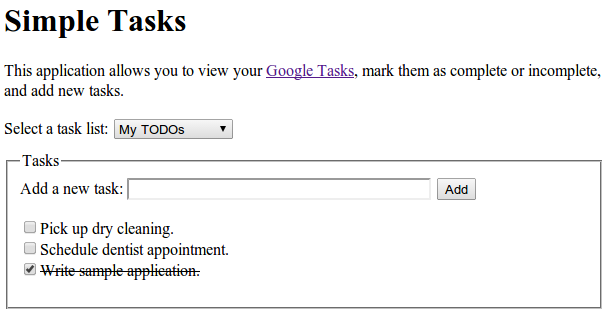
サンプル ウェブ アプリケーション Simple Tasks は、読み取りオペレーションと書き込みオペレーションの両方で Tasks サービスを使用する方法を示しています。完全なソースコードは、GitHub リポジトリで確認できます。

サンプルコード

次のサンプルコードでは、API のバージョン 1 を使用します。

タスクリストの一覧を取得する

このサンプルでは、アカウント内の ToDo リストを一覧表示します。

advanced/tasks.gs
/**
 * Lists the titles and IDs of tasksList.
 * @see https://developers.google.com/tasks/reference/rest/v1/tasklists/list
 */
function listTaskLists() {
  try {
    // Returns all the authenticated user's task lists.
    const taskLists = Tasks.Tasklists.list();
    // If taskLists are available then print all tasklists.
    if (!taskLists.items) {
      console.log("No task lists found.");
      return;
    }
    // Print the tasklist title and tasklist id.
    for (let i = 0; i < taskLists.items.length; i++) {
      const taskList = taskLists.items[i];
      console.log(
        'Task list with title "%s" and ID "%s" was found.',
        taskList.title,
        taskList.id,
      );
    }
  } catch (err) {
    // TODO (developer) - Handle exception from Task API
    console.log("Failed with an error %s ", err.message);
  }
}

タスクの一覧表示

このサンプルでは、特定のタスクリスト内のタスクを一覧表示します。

advanced/tasks.gs
/**
 * Lists task items for a provided tasklist ID.
 * @param  {string} taskListId The tasklist ID.
 * @see https://developers.google.com/tasks/reference/rest/v1/tasks/list
 */
function listTasks(taskListId) {
  try {
    // List the task items of specified tasklist using taskList id.
    const tasks = Tasks.Tasks.list(taskListId);
    // If tasks are available then print all task of given tasklists.
    if (!tasks.items) {
      console.log("No tasks found.");
      return;
    }
    // Print the task title and task id of specified tasklist.
    for (let i = 0; i < tasks.items.length; i++) {
      const task = tasks.items[i];
      console.log(
        'Task with title "%s" and ID "%s" was found.',
        task.title,
        task.id,
      );
    }
  } catch (err) {
    // TODO (developer) - Handle exception from Task API
    console.log("Failed with an error %s", err.message);
  }
}

タスクを追加

このサンプルでは、タスクリストに新しいタスクを追加します。

advanced/tasks.gs
/**
 * Adds a task to a tasklist.
 * @param {string} taskListId The tasklist to add to.
 * @see https://developers.google.com/tasks/reference/rest/v1/tasks/insert
 */
function addTask(taskListId) {
  // Task details with title and notes for inserting new task
  let task = {
    title: "Pick up dry cleaning",
    notes: "Remember to get this done!",
  };
  try {
    // Call insert method with taskDetails and taskListId to insert Task to specified tasklist.
    task = Tasks.Tasks.insert(task, taskListId);
    // Print the Task ID of created task.
    console.log('Task with ID "%s" was created.', task.id);
  } catch (err) {
    // TODO (developer) - Handle exception from Tasks.insert() of Task API
    console.log("Failed with an error %s", err.message);
  }
}