

يمكنك جعل ميزات البيانات تستجيب لأحداث النقر، واستخدام الحدث لعرض قيمة سمة للميزة التي تم النقر عليها.
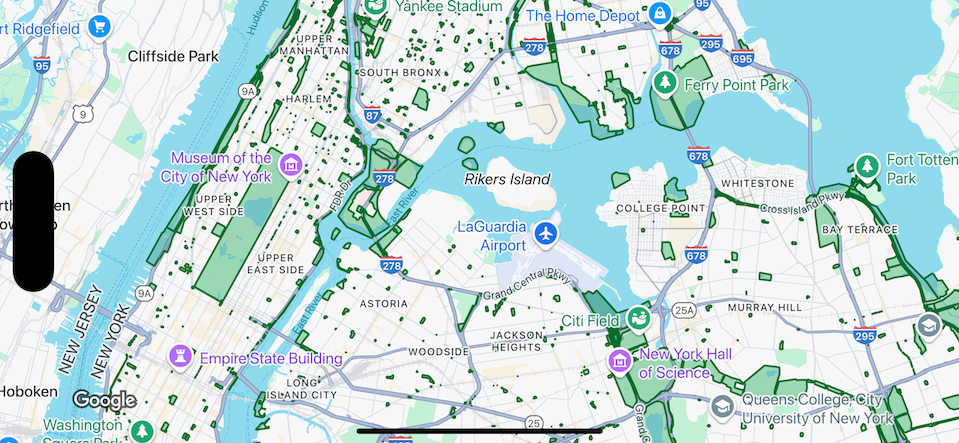
التعامل مع أحداث طبقة مجموعة البيانات
يعرض هذا المثال ميزات البيانات لمجموعة بيانات برقم التعريف YOUR_DATASET_ID، وينفّذ دالة delegate لعرض قيمة سمة للميزة التي تم النقر عليها.
في هذا المثال، تعرض مجموعة البيانات
الحدائق في مدينة نيويورك.
بالنسبة إلى كل عنصر في مجموعة البيانات يتوافق مع منتزه، تحتوي مجموعة البيانات على
سمة باسم acres تتضمّن المساحة السطحية للمنتزه. بالنسبة إلى حديقة تم النقر عليها، اعرض قيمة السمة acres.
Swift
class SampleViewController: UIViewController {

  private lazy var mapView: GMSMapView = {
    let options = GMSMapViewOptions()
    options.mapID = GMSMapID(identifier: "YOUR_MAP_ID")
    options.camera = GMSCameraPosition(latitude: 40.7, longitude: -74, zoom: 12)
    return GMSMapView(options: options)
  }()

  // Set default styles.
  view = mapView
  let style = FeatureStyle(fill: .green.withAlphaComponent(0.5), stroke: .green, strokeWidth: 2)
  mapView.datasetFeatureLayer(of: "YOUR_DATASET_ID").style = { _ in style }
  mapView.delegate = self
}

extension SampleViewController: GMSMapViewDelegate {
  func mapView(_ mapView: GMSMapView, didTap features: [Feature], in featureLayer: FeatureLayer<Feature>, atLocation: CLLocationCoordinate2D) {
    let toast = UIAlertController(title: "Area of park", message: (features.compactMap { ($0 as? DatasetFeature)?.datasetAttributes["acres"] }).joined(separator: ", "), preferredStyle: .alert)
    present(toast, animated: true, completion: nil)
  }
}
Objective-C
@interface SampleViewController: UIViewController <GMSMapViewDelegate>
@end

@implementation SampleViewController
- (void)loadView {
    GMSMapViewOptions *options = [[GMSMapViewOptions alloc] init];
    options.camera = [GMSCameraPosition cameraWithLatitude:40.7 longitude:-74 zoom:12];
    options.mapID = [GMSMapID mapIDWithIdentifier:@"YOUR_MAP_ID"];
    GMSMapView *mapView = [[GMSMapView alloc] initWithOptions:options];
    mapView.delegate = self;

    // Set default styles.
    GMSFeatureStyle *style = [GMSFeatureStyle styleWithFillColor:[[UIColor greenColor] colorWithAlphaComponent:0.5] strokeColor:[UIColor greenColor] strokeWidth:2.0];
    [mapView datasetFeatureLayerOfDatasetID:@"YOUR_DATASET_ID"].style = ^(GMSDatasetFeature *feature) { return style; };

    self.view = mapView;
}

- (void)mapView:(GMSMapView *)mapView didTapFeatures:(NSArray<id<GMSFeature>> *)features inFeatureLayer:(GMSFeatureLayer *)featureLayer atLocation:(CLLocationCoordinate2D)location {
  NSMutableArray<NSString *> *parkAreas = [NSMutableArray array];

  for (id<GMSFeature> feature in features) {
    if (![feature isKindOfClass:[GMSDatasetFeature class]]) { continue; }
    NSString *nameDefinedInDataset = ((GMSDatasetFeature *)feature).datasetAttributes[@"acres"];
    [parkAreas addObject:nameDefinedInDataset];
  }

  UIAlertController *toast = [UIAlertController alertControllerWithTitle:@"Area of park" message:[parkAreas componentsJoinedByString:@", "] preferredStyle:UIAlertControllerStyleAlert];
  [self presentViewController:toast animated:YES completion:nil];
}
@end