

ویژگیهای داده را طوری تنظیم کنید که به رویدادهای ضربه زدن پاسخ دهند و از این رویداد برای نمایش مقدار مشخصه برای ویژگیای که روی آن ضربه زده شده است استفاده کنید.
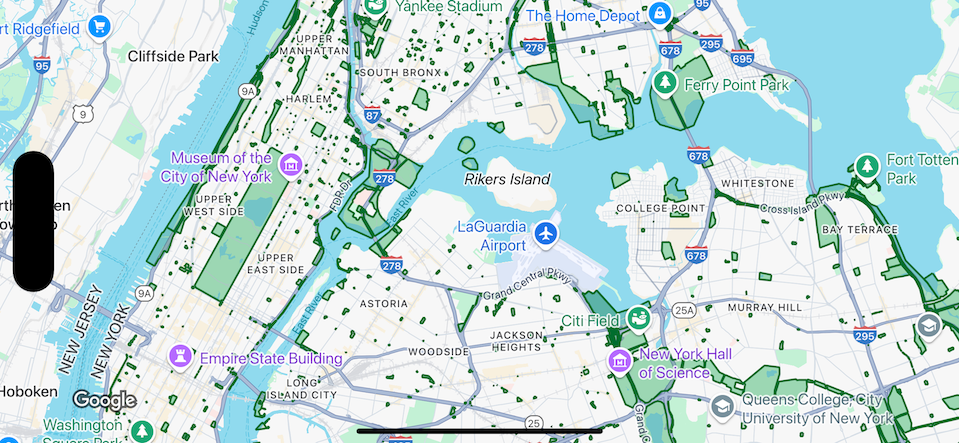
مدیریت رویدادهای لایه مجموعه داده
این مثال ویژگیهای داده را برای مجموعه دادهای با شناسه YOUR_DATASET_ID نشان میدهد و تابع delegate را برای نمایش مقدار مشخصه برای ویژگی تکضرب زدهشده پیادهسازی میکند.
در این مثال، مجموعهداده
پارکهای نیویورک سیتی را نشان میدهد.
برای هر ویژگی مجموعه داده، که مربوط به یک پارک است، مجموعه داده حاوی مشخصهای بهنام acres است که مساحت پارک را دربرمیگیرد. برای پارک تکضرب زدهشده، مقدار مشخصه acres را نمایش دهید.
Swift
class SampleViewController: UIViewController {

  private lazy var mapView: GMSMapView = {
    let options = GMSMapViewOptions()
    options.mapID = GMSMapID(identifier: "YOUR_MAP_ID")
    options.camera = GMSCameraPosition(latitude: 40.7, longitude: -74, zoom: 12)
    return GMSMapView(options: options)
  }()

  // Set default styles.
  view = mapView
  let style = FeatureStyle(fill: .green.withAlphaComponent(0.5), stroke: .green, strokeWidth: 2)
  mapView.datasetFeatureLayer(of: "YOUR_DATASET_ID").style = { _ in style }
  mapView.delegate = self
}

extension SampleViewController: GMSMapViewDelegate {
  func mapView(_ mapView: GMSMapView, didTap features: [Feature], in featureLayer: FeatureLayer<Feature>, atLocation: CLLocationCoordinate2D) {
    let toast = UIAlertController(title: "Area of park", message: (features.compactMap { ($0 as? DatasetFeature)?.datasetAttributes["acres"] }).joined(separator: ", "), preferredStyle: .alert)
    present(toast, animated: true, completion: nil)
  }
}
آبجکتیو-سی
@interface SampleViewController: UIViewController <GMSMapViewDelegate>
@end

@implementation SampleViewController
- (void)loadView {
    GMSMapViewOptions *options = [[GMSMapViewOptions alloc] init];
    options.camera = [GMSCameraPosition cameraWithLatitude:40.7 longitude:-74 zoom:12];
    options.mapID = [GMSMapID mapIDWithIdentifier:@"YOUR_MAP_ID"];
    GMSMapView *mapView = [[GMSMapView alloc] initWithOptions:options];
    mapView.delegate = self;

    // Set default styles.
    GMSFeatureStyle *style = [GMSFeatureStyle styleWithFillColor:[[UIColor greenColor] colorWithAlphaComponent:0.5] strokeColor:[UIColor greenColor] strokeWidth:2.0];
    [mapView datasetFeatureLayerOfDatasetID:@"YOUR_DATASET_ID"].style = ^(GMSDatasetFeature *feature) { return style; };

    self.view = mapView;
}

- (void)mapView:(GMSMapView *)mapView didTapFeatures:(NSArray<id<GMSFeature>> *)features inFeatureLayer:(GMSFeatureLayer *)featureLayer atLocation:(CLLocationCoordinate2D)location {
  NSMutableArray<NSString *> *parkAreas = [NSMutableArray array];

  for (id<GMSFeature> feature in features) {
    if (![feature isKindOfClass:[GMSDatasetFeature class]]) { continue; }
    NSString *nameDefinedInDataset = ((GMSDatasetFeature *)feature).datasetAttributes[@"acres"];
    [parkAreas addObject:nameDefinedInDataset];
  }

  UIAlertController *toast = [UIAlertController alertControllerWithTitle:@"Area of park" message:[parkAreas componentsJoinedByString:@", "] preferredStyle:UIAlertControllerStyleAlert];
  [self presentViewController:toast animated:YES completion:nil];
}
@end