

Sie können Datenelemente auf Tipp-Ereignisse reagieren lassen und das Ereignis verwenden, um den Wert eines Attributs für das angetippte Element anzuzeigen.
Dataset-Ebenen-Ereignisse verarbeiten
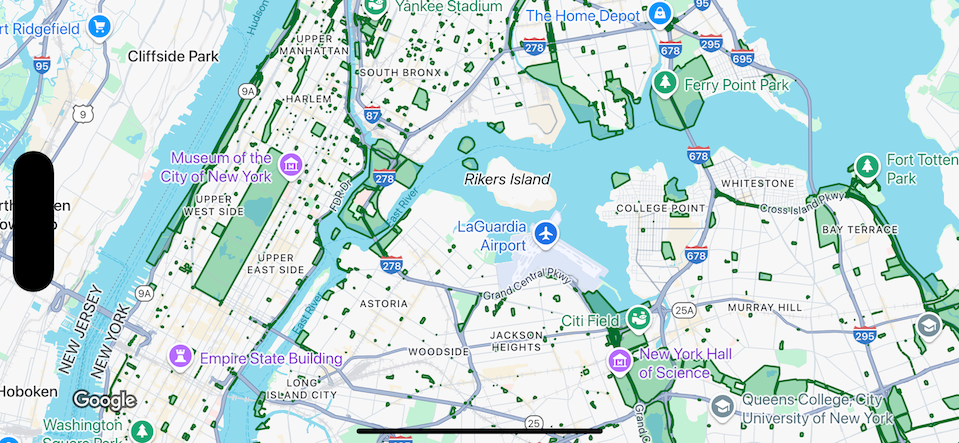
In diesem Beispiel werden Datenelemente für ein Dataset mit der ID YOUR_DATASET_ID gezeigt. Außerdem wird die Delegate-Funktion implementiert, um den Wert eines Attributs für das angetippte Element anzuzeigen.
In diesem Beispiel zeigt das Dataset Parks in New York City.
Für jedes Dataset-Feature, das einem Park entspricht, enthält das Dataset ein Attribut namens acres, das die Fläche des Parks enthält. Für einen angetippten Park wird der Wert des Attributs acres angezeigt.
Swift
class SampleViewController: UIViewController {

  private lazy var mapView: GMSMapView = {
    let options = GMSMapViewOptions()
    options.mapID = GMSMapID(identifier: "YOUR_MAP_ID")
    options.camera = GMSCameraPosition(latitude: 40.7, longitude: -74, zoom: 12)
    return GMSMapView(options: options)
  }()

  // Set default styles.
  view = mapView
  let style = FeatureStyle(fill: .green.withAlphaComponent(0.5), stroke: .green, strokeWidth: 2)
  mapView.datasetFeatureLayer(of: "YOUR_DATASET_ID").style = { _ in style }
  mapView.delegate = self
}

extension SampleViewController: GMSMapViewDelegate {
  func mapView(_ mapView: GMSMapView, didTap features: [Feature], in featureLayer: FeatureLayer<Feature>, atLocation: CLLocationCoordinate2D) {
    let toast = UIAlertController(title: "Area of park", message: (features.compactMap { ($0 as? DatasetFeature)?.datasetAttributes["acres"] }).joined(separator: ", "), preferredStyle: .alert)
    present(toast, animated: true, completion: nil)
  }
}
Objective-C
@interface SampleViewController: UIViewController <GMSMapViewDelegate>
@end

@implementation SampleViewController
- (void)loadView {
    GMSMapViewOptions *options = [[GMSMapViewOptions alloc] init];
    options.camera = [GMSCameraPosition cameraWithLatitude:40.7 longitude:-74 zoom:12];
    options.mapID = [GMSMapID mapIDWithIdentifier:@"YOUR_MAP_ID"];
    GMSMapView *mapView = [[GMSMapView alloc] initWithOptions:options];
    mapView.delegate = self;

    // Set default styles.
    GMSFeatureStyle *style = [GMSFeatureStyle styleWithFillColor:[[UIColor greenColor] colorWithAlphaComponent:0.5] strokeColor:[UIColor greenColor] strokeWidth:2.0];
    [mapView datasetFeatureLayerOfDatasetID:@"YOUR_DATASET_ID"].style = ^(GMSDatasetFeature *feature) { return style; };

    self.view = mapView;
}

- (void)mapView:(GMSMapView *)mapView didTapFeatures:(NSArray<id<GMSFeature>> *)features inFeatureLayer:(GMSFeatureLayer *)featureLayer atLocation:(CLLocationCoordinate2D)location {
  NSMutableArray<NSString *> *parkAreas = [NSMutableArray array];

  for (id<GMSFeature> feature in features) {
    if (![feature isKindOfClass:[GMSDatasetFeature class]]) { continue; }
    NSString *nameDefinedInDataset = ((GMSDatasetFeature *)feature).datasetAttributes[@"acres"];
    [parkAreas addObject:nameDefinedInDataset];
  }

  UIAlertController *toast = [UIAlertController alertControllerWithTitle:@"Area of park" message:[parkAreas componentsJoinedByString:@", "] preferredStyle:UIAlertControllerStyleAlert];
  [self presentViewController:toast animated:YES completion:nil];
}
@end