

적응형 배너를 사용하면 광고 너비를 지정하여 최적의 광고 크기를 결정할 수 있습니다. 또한 적응형 배너는 기기별로 광고 크기를 최적화하여 실적을 극대화합니다. 이에 따라 실적이 향상될 수 있습니다.
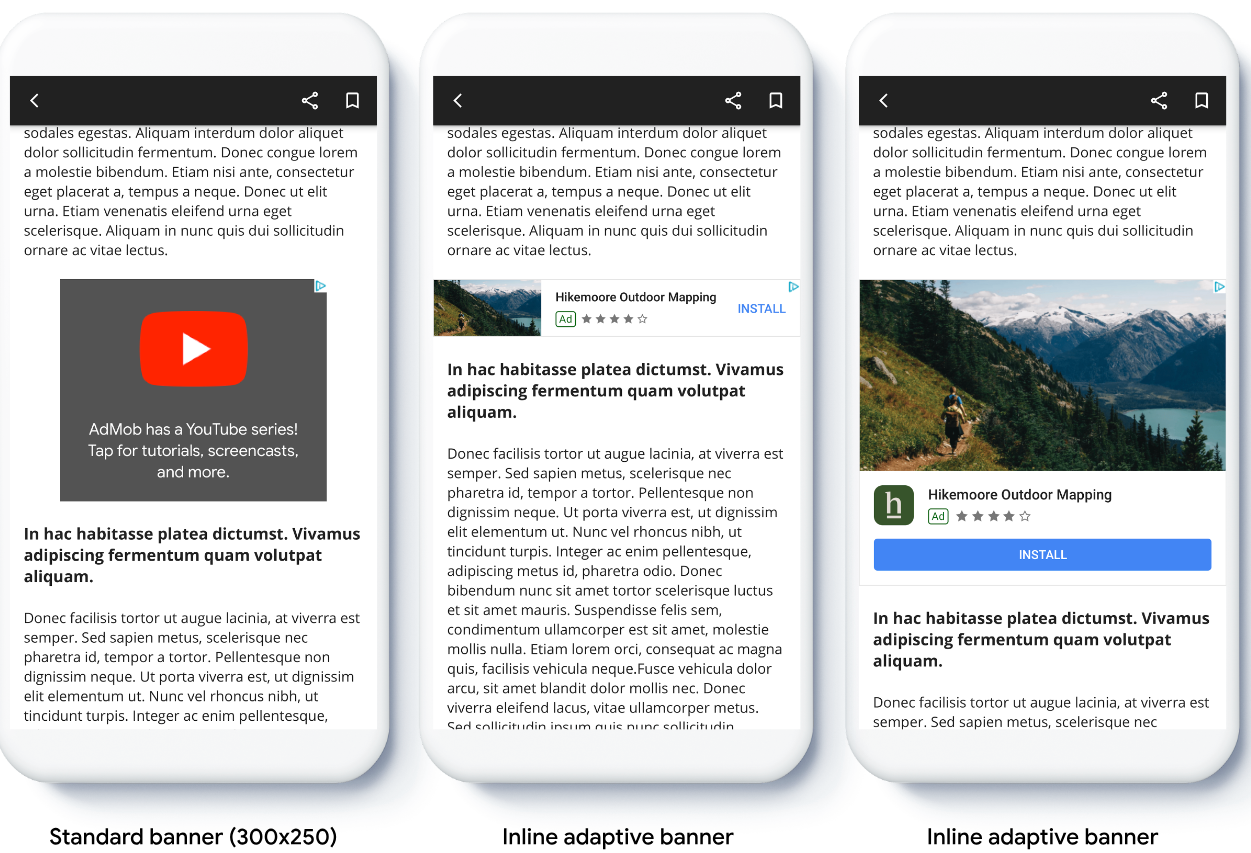
인라인 적응형 배너는 앵커 적응형 배너와 비교할 때 더 크고, 세로로 길며, 고정된 높이가 아닌 가변적인 높이를 사용합니다. 인라인 적응형 배너 높이는 가변적이므로 화면 전체를 가득 채울 수도 있고 지정된 최대 높이까지 커질 수 있습니다.
인라인 적응형 배너는 스크롤 가능한 콘텐츠에 배치합니다. 예를 들면 다음과 같습니다.
시작하기 전에
계속하려면 다음과 같은 상태여야 합니다.
- 시작 가이드인 배너 광고를 완료했습니다.
인라인 적응형 배너 구현
다음 예에서는 기기의 안전 영역 너비를 사용하여 인라인 적응형 광고 크기를 만듭니다.
Swift
// Make sure the ad fits inside the readable area.
let adWidth = view.bounds.inset(by: view.safeAreaInsets).width
bannerView.adSize = currentOrientationInlineAdaptiveBanner(width: adWidth)
Objective-C
// Make sure the ad fits inside the readable area.
CGFloat adWidth = CGRectGetWidth(UIEdgeInsetsInsetRect(view.bounds, view.safeAreaInsets));
bannerView.adSize = GADCurrentOrientationInlineAdaptiveBannerAdSizeWithWidth(adWidth);
앱에서 적응형 배너를 구현하는 경우 다음 사항에 유의하세요.
- 인라인 적응형 배너 크기는 가능한 너비를 모두 사용할 때 가장 효과적으로 작동합니다. 대부분의 경우 사용 중인 기기 화면의 전체 너비 또는 배너가 게재된 웹페이지의 콘텐츠 전체 너비입니다. 광고를 게재할 뷰의 너비, 기기 너비, 상위 콘텐츠 너비, 적용되는 안전 영역을 파악해야 합니다.
- 적응형 크기를 사용하려면 광고 항목을 업데이트하거나 새 광고 항목을 만들어야 할 수 있습니다. 자세히 알아보세요.
인라인 적응형 배너 크기 방향 지정
특정 방향에 맞게 인라인 적응형 배너 광고를 미리 로드하려면 다음 메서드를 사용하세요.
GADPortraitInlineAdaptiveBannerAdSizeWithWidth(CGFloat width)GADLandscapeInlineAdaptiveBannerAdSizeWithWidth(CGFloat width)
앱이 세로 모드 및 가로 모드의 뷰를 모두 지원하고 현재 방향으로 적응형 배너 광고를 미리 로드하려면 GADCurrentOrientationInlineAdaptiveBannerAdSizeWithWidth(CGFloat width)를 사용하세요. 이 메서드는 현재 방향으로 광고를 로드합니다.
인라인 적응형 배너의 높이 제한
기본적으로 maxHeight 값 없이 인스턴스화된 인라인 적응형 배너의 maxHeight는 기기 높이와 같습니다. 인라인 적응형 배너의 높이를 제한하려면 GADInlineAdaptiveBannerAdSizeWithWidthAndMaxHeight(CGFloat width, CGFloat maxHeight) 메서드를 사용하세요.
추가 리소스
GitHub의 예
샘플 애플리케이션을 다운로드하여 인라인 적응형 배너가 어떻게 작동하는지 확인하세요.