

4.1.5 轉換追蹤
價值和業務影響
如要為商家客戶的廣告活動提供 Google 生態系統強大的機器學習和分析功能,請在客戶網站上安插轉換追蹤和再行銷代碼。
Google Ads 中的轉換是指使用者在點按廣告後,採取了特定動作,例如購買產品、安裝行動應用程式或註冊電子郵件名單。轉換追蹤可提供重要洞察資料,瞭解使用者在觀看或點擊廣告後採取的動作,包括計算和比較投資報酬率 (ROI) 的資訊,協助客戶決定廣告支出的重點。追蹤也有助於確保資料可用於對帳。訂單會因產品或類別而異,因此轉換追蹤功能也能顯示特定商家資訊群組的銷售轉換情形。
轉換目標是指一組具有相同基本目標的轉換動作。舉例來說,「購買」轉換目標可能包含「網站購物」和「店內銷售」轉換動作。
系統仍會使用轉換動作追蹤轉換,並最佳化廣告活動。您建立轉換動作後,Google 會將這些動作歸入轉換目標。
購物轉換動作
實作本文所述的轉換追蹤功能後,商家 Google Ads 帳戶就能評估購買轉換次數和這些轉換的價值。如果沒有轉換追蹤功能,您就無法評估廣告活動帶來的業務價值 (以廣告投資報酬率而言)。此外,這項功能還會傳送額外的資料信號,協助廣告活動提升成效。
其他轉換動作
雖然只需要購物轉換動作,但追蹤其他轉換動作可為商家提供更多洞察資料。建議您盡可能記錄所有事項,同時實作多個核心轉換動作。如需建議轉換動作的完整清單,請參閱技術 API 指南一節。
一般來說,建議擷取下列內容:
- 與價值直接相關的任何成功事件
- 有助於核心轉換的成功事件,例如 add_to_cart 和 sign_up。
- 互動和使用者互動,有助於廣告主瞭解如何吸引使用者
次要轉換動作僅供觀察和記錄,不會影響出價。進一步瞭解主要和次要轉換動作。
使用者體驗指南
為盡量降低錯誤風險,建議您以程式輔助方式導入轉換追蹤,不必輸入商家資料,但請務必讓商家知道已設定轉換追蹤。
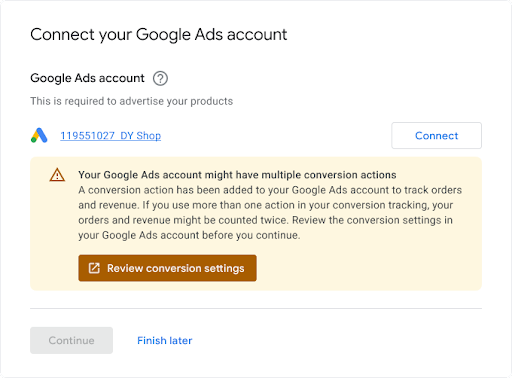
商家連結現有 Google Ads 帳戶時,建議顯示通知,告知帳戶可能已設定轉換追蹤,因為可能會有衝突需要解決。範例如下所示。
技術指南
轉換追蹤的運作方式如下。本節將詳細說明每個步驟:
將該轉換動作的代碼或程式碼片段,加入網站或行動應用程式。詳情請參閱「為網站設定轉換追蹤」。
每當有顧客點按廣告,系統便會在顧客的電腦或行動裝置上暫存 Cookie。
當消費者完成廣告主定義的動作時,Google 會透過加入的程式碼片段辨識出 Cookie,並記錄轉換,同時視需要記錄「價值」等其他參數。
必備條件
開始前,請確認您有 Google 代碼開發人員 ID。如果您沒有 Google 代碼開發人員 ID,請填寫 Google 代碼開發人員 ID 申請表單。開發人員 ID 與其他 ID 不同,例如評估 ID 或轉換 ID,這些 ID 是由使用者新增至網站評估程式碼。
建立及設定轉換動作
以下範例說明如何建立轉換動作,並將其新增至 Google Ads 帳戶。每個範例都會為您處理所有背景驗證工作,並逐步說明如何建立轉換動作:
Java
// Copyright 2018 Google LLC // // Licensed under the Apache License, Version 2.0 (the "License"); // you may not use this file except in compliance with the License. // You may obtain a copy of the License at // // https://www.apache.org/licenses/LICENSE-2.0 // // Unless required by applicable law or agreed to in writing, software // distributed under the License is distributed on an "AS IS" BASIS, // WITHOUT WARRANTIES OR CONDITIONS OF ANY KIND, either express or implied. // See the License for the specific language governing permissions and // limitations under the License. package com.google.ads.googleads.examples.remarketing; import static com.google.ads.googleads.examples.utils.CodeSampleHelper.getPrintableDateTime; import com.beust.jcommander.Parameter; import com.google.ads.googleads.examples.utils.ArgumentNames; import com.google.ads.googleads.examples.utils.CodeSampleParams; import com.google.ads.googleads.lib.GoogleAdsClient; import com.google.ads.googleads.v24.enums.ConversionActionCategoryEnum.ConversionActionCategory; import com.google.ads.googleads.v24.enums.ConversionActionStatusEnum.ConversionActionStatus; import com.google.ads.googleads.v24.enums.ConversionActionTypeEnum.ConversionActionType; import com.google.ads.googleads.v24.errors.GoogleAdsError; import com.google.ads.googleads.v24.errors.GoogleAdsException; import com.google.ads.googleads.v24.resources.ConversionAction; import com.google.ads.googleads.v24.resources.ConversionAction.ValueSettings; import com.google.ads.googleads.v24.services.ConversionActionOperation; import com.google.ads.googleads.v24.services.ConversionActionServiceClient; import com.google.ads.googleads.v24.services.MutateConversionActionResult; import com.google.ads.googleads.v24.services.MutateConversionActionsResponse; import java.io.FileNotFoundException; import java.io.IOException; import java.util.Collections; /** Adds a conversion action. */ public class AddConversionAction { private static class AddConversionActionParams extends CodeSampleParams { @Parameter(names = ArgumentNames.CUSTOMER_ID, required = true) private Long customerId; } public static void main(String[] args) { AddConversionActionParams params = new AddConversionActionParams(); if (!params.parseArguments(args)) { // Either pass the required parameters for this example on the command line, or insert them // into the code here. See the parameter class definition above for descriptions. params.customerId = Long.parseLong("INSERT_CUSTOMER_ID_HERE"); } GoogleAdsClient googleAdsClient = null; try { googleAdsClient = GoogleAdsClient.newBuilder().fromPropertiesFile().build(); } catch (FileNotFoundException fnfe) { System.err.printf( "Failed to load GoogleAdsClient configuration from file. Exception: %s%n", fnfe); System.exit(1); } catch (IOException ioe) { System.err.printf("Failed to create GoogleAdsClient. Exception: %s%n", ioe); System.exit(1); } try { new AddConversionAction().runExample(googleAdsClient, params.customerId); } catch (GoogleAdsException gae) { // GoogleAdsException is the base class for most exceptions thrown by an API request. // Instances of this exception have a message and a GoogleAdsFailure that contains a // collection of GoogleAdsErrors that indicate the underlying causes of the // GoogleAdsException. System.err.printf( "Request ID %s failed due to GoogleAdsException. Underlying errors:%n", gae.getRequestId()); int i = 0; for (GoogleAdsError googleAdsError : gae.getGoogleAdsFailure().getErrorsList()) { System.err.printf(" Error %d: %s%n", i++, googleAdsError); } System.exit(1); } } /** * Runs the example. * * @param googleAdsClient the Google Ads API client. * @param customerId the client customer ID. * @throws GoogleAdsException if an API request failed with one or more service errors. */ private void runExample(GoogleAdsClient googleAdsClient, long customerId) { // Creates a ConversionAction. ConversionAction conversionAction = ConversionAction.newBuilder() // Note that conversion action names must be unique. If a conversion action already // exists with the specified conversion_action_name the create operation will fail with // a ConversionActionError.DUPLICATE_NAME error. .setName("Earth to Mars Cruises Conversion #" + getPrintableDateTime()) .setCategory(ConversionActionCategory.DEFAULT) .setType(ConversionActionType.WEBPAGE) .setStatus(ConversionActionStatus.ENABLED) .setViewThroughLookbackWindowDays(15L) .setValueSettings( ValueSettings.newBuilder() .setDefaultValue(23.41) .setAlwaysUseDefaultValue(true) .build()) .build(); // Creates the operation. ConversionActionOperation operation = ConversionActionOperation.newBuilder().setCreate(conversionAction).build(); try (ConversionActionServiceClient conversionActionServiceClient = googleAdsClient.getLatestVersion().createConversionActionServiceClient()) { MutateConversionActionsResponse response = conversionActionServiceClient.mutateConversionActions( Long.toString(customerId), Collections.singletonList(operation)); System.out.printf("Added %d conversion actions:%n", response.getResultsCount()); for (MutateConversionActionResult result : response.getResultsList()) { System.out.printf( "New conversion action added with resource name: '%s'%n", result.getResourceName()); } } } }
C#
// Copyright 2019 Google LLC // // Licensed under the Apache License, Version 2.0 (the "License"); // you may not use this file except in compliance with the License. // You may obtain a copy of the License at // // http://www.apache.org/licenses/LICENSE-2.0 // // Unless required by applicable law or agreed to in writing, software // distributed under the License is distributed on an "AS IS" BASIS, // WITHOUT WARRANTIES OR CONDITIONS OF ANY KIND, either express or implied. // See the License for the specific language governing permissions and // limitations under the License. using CommandLine; using Google.Ads.Gax.Examples; using Google.Ads.GoogleAds.Lib; using Google.Ads.GoogleAds.V24.Errors; using Google.Ads.GoogleAds.V24.Resources; using Google.Ads.GoogleAds.V24.Services; using System; using static Google.Ads.GoogleAds.V24.Enums.ConversionActionCategoryEnum.Types; using static Google.Ads.GoogleAds.V24.Enums.ConversionActionStatusEnum.Types; using static Google.Ads.GoogleAds.V24.Enums.ConversionActionTypeEnum.Types; namespace Google.Ads.GoogleAds.Examples.V24 { /// <summary> /// This code example illustrates adding a conversion action. /// </summary> public class AddConversionAction : ExampleBase { /// <summary> /// Command line options for running the <see cref="AddConversionAction"/> example. /// </summary> public class Options : OptionsBase { /// <summary> /// The Google Ads customer ID for which the conversion action is added. /// </summary> [Option("customerId", Required = true, HelpText = "The Google Ads customer ID for which the conversion action is added.")] public long CustomerId { get; set; } } /// <summary> /// Main method, to run this code example as a standalone application. /// </summary> /// <param name="args">The command line arguments.</param> public static void Main(string[] args) { Options options = ExampleUtilities.ParseCommandLine<Options>(args); AddConversionAction codeExample = new AddConversionAction(); Console.WriteLine(codeExample.Description); codeExample.Run(new GoogleAdsClient(), options.CustomerId); } /// <summary> /// Returns a description about the code example. /// </summary> public override string Description => "This code example illustrates adding a conversion action."; /// <summary> /// Runs the code example. /// </summary> /// <param name="client">The Google Ads client.</param> /// <param name="customerId">The Google Ads customer ID for which the conversion action is /// added.</param> public void Run(GoogleAdsClient client, long customerId) { // Get the ConversionActionService. ConversionActionServiceClient conversionActionService = client.GetService(Services.V24.ConversionActionService); // Note that conversion action names must be unique. // If a conversion action already exists with the specified name the create operation // will fail with a ConversionAction.DUPLICATE_NAME error. string ConversionActionName = "Earth to Mars Cruises Conversion #" + ExampleUtilities.GetRandomString(); // Add a conversion action. ConversionAction conversionAction = new ConversionAction() { Name = ConversionActionName, Category = ConversionActionCategory.Default, Type = ConversionActionType.Webpage, Status = ConversionActionStatus.Enabled, ViewThroughLookbackWindowDays = 15, ValueSettings = new ConversionAction.Types.ValueSettings() { DefaultValue = 23.41, AlwaysUseDefaultValue = true } }; // Create the operation. ConversionActionOperation operation = new ConversionActionOperation() { Create = conversionAction }; try { // Create the conversion action. MutateConversionActionsResponse response = conversionActionService.MutateConversionActions(customerId.ToString(), new ConversionActionOperation[] { operation }); // Display the results. foreach (MutateConversionActionResult newConversionAction in response.Results) { Console.WriteLine($"New conversion action with resource name = " + $"'{newConversionAction.ResourceName}' was added."); } } catch (GoogleAdsException e) { Console.WriteLine("Failure:"); Console.WriteLine($"Message: {e.Message}"); Console.WriteLine($"Failure: {e.Failure}"); Console.WriteLine($"Request ID: {e.RequestId}"); throw; } } } }
PHP
<?php /** * Copyright 2018 Google LLC * * Licensed under the Apache License, Version 2.0 (the "License"); * you may not use this file except in compliance with the License. * You may obtain a copy of the License at * * https://www.apache.org/licenses/LICENSE-2.0 * * Unless required by applicable law or agreed to in writing, software * distributed under the License is distributed on an "AS IS" BASIS, * WITHOUT WARRANTIES OR CONDITIONS OF ANY KIND, either express or implied. * See the License for the specific language governing permissions and * limitations under the License. */ namespace Google\Ads\GoogleAds\Examples\Remarketing; require __DIR__ . '/../../vendor/autoload.php'; use GetOpt\GetOpt; use Google\Ads\GoogleAds\Examples\Utils\ArgumentNames; use Google\Ads\GoogleAds\Examples\Utils\ArgumentParser; use Google\Ads\GoogleAds\Examples\Utils\Helper; use Google\Ads\GoogleAds\Lib\V24\GoogleAdsClient; use Google\Ads\GoogleAds\Lib\V24\GoogleAdsClientBuilder; use Google\Ads\GoogleAds\Lib\V24\GoogleAdsException; use Google\Ads\GoogleAds\Lib\OAuth2TokenBuilder; use Google\Ads\GoogleAds\V24\Enums\ConversionActionCategoryEnum\ConversionActionCategory; use Google\Ads\GoogleAds\V24\Enums\ConversionActionStatusEnum\ConversionActionStatus; use Google\Ads\GoogleAds\V24\Enums\ConversionActionTypeEnum\ConversionActionType; use Google\Ads\GoogleAds\V24\Errors\GoogleAdsError; use Google\Ads\GoogleAds\V24\Resources\ConversionAction; use Google\Ads\GoogleAds\V24\Resources\ConversionAction\ValueSettings; use Google\Ads\GoogleAds\V24\Services\ConversionActionOperation; use Google\Ads\GoogleAds\V24\Services\MutateConversionActionsRequest; use Google\ApiCore\ApiException; /** This example illustrates adding a conversion action. */ class AddConversionAction { private const CUSTOMER_ID = 'INSERT_CUSTOMER_ID_HERE'; public static function main() { // Either pass the required parameters for this example on the command line, or insert them // into the constants above. $options = (new ArgumentParser())->parseCommandArguments([ ArgumentNames::CUSTOMER_ID => GetOpt::REQUIRED_ARGUMENT ]); // Generate a refreshable OAuth2 credential for authentication. $oAuth2Credential = (new OAuth2TokenBuilder())->fromFile()->build(); // Construct a Google Ads client configured from a properties file and the // OAuth2 credentials above. $googleAdsClient = (new GoogleAdsClientBuilder()) ->fromFile() ->withOAuth2Credential($oAuth2Credential) ->build(); try { self::runExample( $googleAdsClient, $options[ArgumentNames::CUSTOMER_ID] ?: self::CUSTOMER_ID ); } catch (GoogleAdsException $googleAdsException) { printf( "Request with ID '%s' has failed.%sGoogle Ads failure details:%s", $googleAdsException->getRequestId(), PHP_EOL, PHP_EOL ); foreach ($googleAdsException->getGoogleAdsFailure()->getErrors() as $error) { /** @var GoogleAdsError $error */ printf( "\t%s: %s%s", $error->getErrorCode()->getErrorCode(), $error->getMessage(), PHP_EOL ); } exit(1); } catch (ApiException $apiException) { printf( "ApiException was thrown with message '%s'.%s", $apiException->getMessage(), PHP_EOL ); exit(1); } } /** * Runs the example. * * @param GoogleAdsClient $googleAdsClient the Google Ads API client * @param int $customerId the customer ID */ public static function runExample(GoogleAdsClient $googleAdsClient, int $customerId) { // Creates a conversion action. $conversionAction = new ConversionAction([ // Note that conversion action names must be unique. // If a conversion action already exists with the specified conversion_action_name // the create operation will fail with a ConversionActionError.DUPLICATE_NAME error. 'name' => 'Earth to Mars Cruises Conversion #' . Helper::getPrintableDatetime(), 'category' => ConversionActionCategory::PBDEFAULT, 'type' => ConversionActionType::WEBPAGE, 'status' => ConversionActionStatus::ENABLED, 'view_through_lookback_window_days' => 15, 'value_settings' => new ValueSettings([ 'default_value' => 23.41, 'always_use_default_value' => true ]) ]); // Creates a conversion action operation. $conversionActionOperation = new ConversionActionOperation(); $conversionActionOperation->setCreate($conversionAction); // Issues a mutate request to add the conversion action. $conversionActionServiceClient = $googleAdsClient->getConversionActionServiceClient(); $response = $conversionActionServiceClient->mutateConversionActions( MutateConversionActionsRequest::build($customerId, [$conversionActionOperation]) ); printf("Added %d conversion actions:%s", $response->getResults()->count(), PHP_EOL); foreach ($response->getResults() as $addedConversionAction) { /** @var ConversionAction $addedConversionAction */ printf( "New conversion action added with resource name: '%s'%s", $addedConversionAction->getResourceName(), PHP_EOL ); } } } AddConversionAction::main();
Python
#!/usr/bin/env python # Copyright 2018 Google LLC # # Licensed under the Apache License, Version 2.0 (the "License"); # you may not use this file except in compliance with the License. # You may obtain a copy of the License at # # https://www.apache.org/licenses/LICENSE-2.0 # # Unless required by applicable law or agreed to in writing, software # distributed under the License is distributed on an "AS IS" BASIS, # WITHOUT WARRANTIES OR CONDITIONS OF ANY KIND, either express or implied. # See the License for the specific language governing permissions and # limitations under the License. """This example illustrates adding a conversion action.""" import argparse import sys import uuid from google.ads.googleads.client import GoogleAdsClient from google.ads.googleads.errors import GoogleAdsException from google.ads.googleads.v24.resources.types.conversion_action import ( ConversionAction, ) from google.ads.googleads.v24.services.services.conversion_action_service import ( ConversionActionServiceClient, ) from google.ads.googleads.v24.services.types.conversion_action_service import ( ConversionActionOperation, MutateConversionActionsResponse, ) def main(client: GoogleAdsClient, customer_id: str) -> None: conversion_action_service: ConversionActionServiceClient = ( client.get_service("ConversionActionService") ) # Create the operation. conversion_action_operation: ConversionActionOperation = client.get_type( "ConversionActionOperation" ) # Create conversion action. conversion_action: ConversionAction = conversion_action_operation.create # Note that conversion action names must be unique. If a conversion action # already exists with the specified conversion_action_name, the create # operation will fail with a ConversionActionError.DUPLICATE_NAME error. conversion_action.name = f"Earth to Mars Cruises Conversion {uuid.uuid4()}" conversion_action.type_ = ( client.enums.ConversionActionTypeEnum.UPLOAD_CLICKS ) conversion_action.category = ( client.enums.ConversionActionCategoryEnum.DEFAULT ) conversion_action.status = client.enums.ConversionActionStatusEnum.ENABLED conversion_action.view_through_lookback_window_days = 15 # Create a value settings object. value_settings: ConversionAction.ValueSettings = ( conversion_action.value_settings ) value_settings.default_value = 15.0 value_settings.always_use_default_value = True # Add the conversion action. conversion_action_response: MutateConversionActionsResponse = ( conversion_action_service.mutate_conversion_actions( customer_id=customer_id, operations=[conversion_action_operation], ) ) print( "Created conversion action " f'"{conversion_action_response.results[0].resource_name}".' ) if __name__ == "__main__": parser: argparse.ArgumentParser = argparse.ArgumentParser( description="Adds a conversion action for specified customer." ) # The following argument(s) should be provided to run the example. parser.add_argument( "-c", "--customer_id", type=str, required=True, help="The Google Ads customer ID.", ) args: argparse.Namespace = parser.parse_args() # GoogleAdsClient will read the google-ads.yaml configuration file in the # home directory if none is specified. googleads_client: GoogleAdsClient = GoogleAdsClient.load_from_storage( version="v24" ) try: main(googleads_client, args.customer_id) except GoogleAdsException as ex: print( f'Request with ID "{ex.request_id}" failed with status ' f'"{ex.error.code().name}" and includes the following errors:' ) for error in ex.failure.errors: print(f'\tError with message "{error.message}".') if error.location: for field_path_element in error.location.field_path_elements: print(f"\t\tOn field: {field_path_element.field_name}") sys.exit(1)
Ruby
#!/usr/bin/env ruby # Encoding: utf-8 # # Copyright 2018 Google LLC # # Licensed under the Apache License, Version 2.0 (the "License"); # you may not use this file except in compliance with the License. # You may obtain a copy of the License at # # https://www.apache.org/licenses/LICENSE-2.0 # # Unless required by applicable law or agreed to in writing, software # distributed under the License is distributed on an "AS IS" BASIS, # WITHOUT WARRANTIES OR CONDITIONS OF ANY KIND, either express or implied. # See the License for the specific language governing permissions and # limitations under the License. # # This code example illustrates adding a conversion action. require 'optparse' require 'google/ads/google_ads' require 'date' require_relative '../shared/error_handler.rb' def add_conversion_action(customer_id) # GoogleAdsClient will read a config file from # ENV['HOME']/google_ads_config.rb when called without parameters client = Google::Ads::GoogleAds::GoogleAdsClient.new # Add a conversion action. conversion_action = client.resource.conversion_action do |ca| ca.name = "Earth to Mars Cruises Conversion #{(Time.new.to_f * 100).to_i}" ca.type = :UPLOAD_CLICKS ca.category = :DEFAULT ca.status = :ENABLED ca.view_through_lookback_window_days = 15 # Create a value settings object. ca.value_settings = client.resource.value_settings do |vs| vs.default_value = 15 vs.always_use_default_value = true end end # Create the operation. conversion_action_operation = client.operation.create_resource.conversion_action(conversion_action) # Add the ad group ad. response = client.service.conversion_action.mutate_conversion_actions( customer_id: customer_id, operations: [conversion_action_operation], ) puts "New conversion action with resource name = #{response.results.first.resource_name}." end if __FILE__ == $0 options = {} # The following parameter(s) should be provided to run the example. You can # either specify these by changing the INSERT_XXX_ID_HERE values below, or on # the command line. # # Parameters passed on the command line will override any parameters set in # code. # # Running the example with -h will print the command line usage. options[:customer_id] = 'INSERT_CUSTOMER_ID_HERE' OptionParser.new do |opts| opts.banner = sprintf('Usage: %s [options]', File.basename(__FILE__)) opts.separator '' opts.separator 'Options:' opts.on('-C', '--customer-id CUSTOMER-ID', String, 'Customer ID') do |v| options[:customer_id] = v end opts.separator '' opts.separator 'Help:' opts.on_tail('-h', '--help', 'Show this message') do puts opts exit end end.parse! begin add_conversion_action(options.fetch(:customer_id).tr("-", "")) rescue Google::Ads::GoogleAds::Errors::GoogleAdsError => e GoogleAdsErrorHandler.handle_google_ads_error(e) raise # Re-raise the error to maintain original script behavior. end end
Perl
#!/usr/bin/perl -w # # Copyright 2019, Google LLC # # Licensed under the Apache License, Version 2.0 (the "License"); # you may not use this file except in compliance with the License. # You may obtain a copy of the License at # # http://www.apache.org/licenses/LICENSE-2.0 # # Unless required by applicable law or agreed to in writing, software # distributed under the License is distributed on an "AS IS" BASIS, # WITHOUT WARRANTIES OR CONDITIONS OF ANY KIND, either express or implied. # See the License for the specific language governing permissions and # limitations under the License. # # This example illustrates adding a conversion action. use strict; use warnings; use utf8; use FindBin qw($Bin); use lib "$Bin/../../lib"; use Google::Ads::GoogleAds::Client; use Google::Ads::GoogleAds::Utils::GoogleAdsHelper; use Google::Ads::GoogleAds::V24::Resources::ConversionAction; use Google::Ads::GoogleAds::V24::Resources::ValueSettings; use Google::Ads::GoogleAds::V24::Enums::ConversionActionCategoryEnum qw(DEFAULT); use Google::Ads::GoogleAds::V24::Enums::ConversionActionTypeEnum qw(WEBPAGE); use Google::Ads::GoogleAds::V24::Enums::ConversionActionStatusEnum qw(ENABLED); use Google::Ads::GoogleAds::V24::Services::ConversionActionService::ConversionActionOperation; use Getopt::Long qw(:config auto_help); use Pod::Usage; use Cwd qw(abs_path); use Data::Uniqid qw(uniqid); # The following parameter(s) should be provided to run the example. You can # either specify these by changing the INSERT_XXX_ID_HERE values below, or on # the command line. # # Parameters passed on the command line will override any parameters set in # code. # # Running the example with -h will print the command line usage. my $customer_id = "INSERT_CUSTOMER_ID_HERE"; sub add_conversion_action { my ($api_client, $customer_id) = @_; # Note that conversion action names must be unique. # If a conversion action already exists with the specified conversion_action_name, # the create operation fails with error ConversionActionError.DUPLICATE_NAME. my $conversion_action_name = "Earth to Mars Cruises Conversion #" . uniqid(); # Create a conversion action. my $conversion_action = Google::Ads::GoogleAds::V24::Resources::ConversionAction->new({ name => $conversion_action_name, category => DEFAULT, type => WEBPAGE, status => ENABLED, viewThroughLookbackWindowDays => 15, valueSettings => Google::Ads::GoogleAds::V24::Resources::ValueSettings->new({ defaultValue => 23.41, alwaysUseDefaultValue => "true" })}); # Create a conversion action operation. my $conversion_action_operation = Google::Ads::GoogleAds::V24::Services::ConversionActionService::ConversionActionOperation ->new({create => $conversion_action}); # Add the conversion action. my $conversion_actions_response = $api_client->ConversionActionService()->mutate({ customerId => $customer_id, operations => [$conversion_action_operation]}); printf "New conversion action added with resource name: '%s'.\n", $conversion_actions_response->{results}[0]{resourceName}; return 1; } # Don't run the example if the file is being included. if (abs_path($0) ne abs_path(__FILE__)) { return 1; } # Get Google Ads Client, credentials will be read from ~/googleads.properties. my $api_client = Google::Ads::GoogleAds::Client->new(); # By default examples are set to die on any server returned fault. $api_client->set_die_on_faults(1); # Parameters passed on the command line will override any parameters set in code. GetOptions("customer_id=s" => \$customer_id); # Print the help message if the parameters are not initialized in the code nor # in the command line. pod2usage(2) if not check_params($customer_id); # Call the example. add_conversion_action($api_client, $customer_id =~ s/-//gr); =pod =head1 NAME add_conversion_action =head1 DESCRIPTION This example illustrates adding a conversion action. =head1 SYNOPSIS add_conversion_action.pl [options] -help Show the help message. -customer_id The Google Ads customer ID. =cut
curl
由於上述範例本質上是通用的,因此請參閱下列額外注意事項,確保最高成效廣告活動的 ConversionAction 設定正確無誤。每個轉換動作都應按照下列方式設定:
類型 - 將 ConversionActionType 設為 WEBPAGE,因為這些購買事件發生在網站上。
可出價 - 針對主要轉換動作 (購買) 設為
true,以盡量提高廣告活動的銷售量。如果是次要轉換動作 (例如加入購物車),請將值設為false。類別 - 為每個轉換動作 (主要或次要) 設定 ConversionActionCategory。下方列出我們建議導入的 7 項轉換動作,以及各項動作的相關對話動作類別。注意:Google Ads 會根據轉換動作的類別,自動將其指派給標準轉換目標。舉例來說,系統會將購買轉換動作指派給名為「購物」的標準轉換目標。之後,您可以設定最高成效廣告活動,針對這項購買目標進行最佳化。
建議的轉換動作清單如下。建議您至少導入前四項轉換動作,並盡可能導入其他建議動作。
您也可以考慮導入與線上銷售相關的其他事件。如要進行更精細的追蹤,您也可以建立其他轉換動作或自訂轉換動作 (例如,使用者每次在網站上使用搜尋選項時,系統就會記錄「新增付款資訊」動作;或者,使用者每次在網站上使用搜尋選項時,系統就會記錄「搜尋」動作)。次要轉換動作可為商家提供額外的追蹤功能,Google Ads 則會使用這些動作進行觀察。
| 優先順序 | 轉換動作 | 轉換動作類別 | Google 代碼事件名稱 | 說明 |
|---|---|---|---|---|
| 必填 | 購買 | 購買 | purchase | 使用者完成購買 |
| 強烈建議所有商店建構工具使用者採用 | 加入購物車 | ADD_TO_CART | add_to_cart | 使用者將產品加入購物車 |
| 強烈建議所有商店建構工具使用者採用 | 開始結帳 | BEGIN_CHECKOUT | begin_checkout | 使用者開始結帳程序 |
| 強烈建議所有商店建構工具使用者採用 | 查看項目 | PAGE_VIEW | page_view | 使用者開啟產品頁面 |
| 建議視情況使用 (通常不適用於商店建立工具) | 註冊 | SIGNUP | sign_up | 使用者註冊帳戶 |
| 建議視情況使用 (通常不適用於商店建立工具) | 產生待開發客戶 | SUBMIT_LEAD_FORM | generate_lead | 使用者透過表單產生待開發客戶 |
| 建議視情況使用 (通常不適用於商店建立工具) | 訂閱 | SUBSCRIBE_PAID | 不適用 (自訂) | 使用者訂閱付費服務 |
| 建議視情況使用 (通常不適用於商店建立工具) | 預約 | BOOK_APPOINTMENT | 不適用 (自訂) | 使用者預約 |
| 建議視情況使用 (通常不適用於商店建立工具) | 要求報價 | REQUEST_QUOTE | 不適用 (自訂) | 使用者提交表單,要求提供預估價格 |
目前已有 Google Ads 帳戶的商家
如果允許商家使用現有 Google Ads 帳戶加入,帳戶可能已有轉換動作。我們不建議使用現有的轉換動作,因為無法保證設定正確。此外,您還必須採取額外步驟,才能處理下列潛在情況:
帳戶有多個目標 (例如購買 + 網頁瀏覽 + 聯絡人),且都標示為「帳戶預設」。建立新廣告活動時,系統預設會針對所有目標進行最佳化,但最高成效廣告活動不適用這項設定。
帳戶已有一或多個轉換動作,用於追蹤購買行為,且已歸類在「購買」目標下。這表示廣告活動會重複計算購買次數,因為有兩個轉換代碼觸發。
如要確保最高成效廣告活動只使用自訂轉換動作,請按照下列步驟操作:
建立 CustomConversionGoal,然後將購買轉換動作新增至目標的
conversion_actions[]清單。將狀態設為「已啟用」。在最高成效廣告活動的 ConversionGoalCampaignConfig 中,將
custom_conversion_goal設為您在步驟 (1) 中建立的自訂目標。完成步驟 (2) 後,Google Ads 應會自動更新廣告活動的 ConversionGoalCampaignConfig,將
goal_config_level設為 CAMPAIGN (而非 CUSTOMER,後者會引導系統使用帳戶預設目標),但建議您再次確認是否確實發生這種情況。
擷取轉換動作的代碼
建立轉換動作後,您必須在廣告主網站的轉換頁面中,插入稱為「代碼」的對應程式碼片段。為確保 Google Ads 能評估所有轉換,不論顧客使用的瀏覽器為何,建議您一律使用新版 Google Ads 轉換追蹤代碼。這個代碼包含兩個部分:
global_site_tag,必須安裝在廣告主網站的每個網頁上。event_snippet,應放置在表示轉換動作的網頁上,例如結帳確認或待開發客戶提交頁面。
您可以使用 ConversionActionService 擷取這兩部分。
代碼會設定 Cookie,用於儲存顧客的專屬 ID,或是將顧客帶到網站的廣告點擊。Cookie 會從轉換追蹤代碼內含的 Google 點擊 ID (GCLID) 參數接收廣告點擊資訊。您必須啟用廣告主的網站和待開發客戶追蹤系統,以便擷取及儲存 Google 點擊 ID。這是 Google Ads 為每次 Google 廣告曝光提供的專屬 ID。
進一步瞭解全域代碼和安裝位置
Google 代碼 (gtag.js) 是一組標記架構和 API,可讓您將事件資料傳送至 Google Ads 和 Google Analytics。全域網站代碼會與事件程式碼片段或電話程式碼片段共同運作,追蹤轉換。在廣告主網站上每個網頁的 <head> 區段中加入 Google 代碼,並設定代碼與 Google Ads 搭配使用。接著,您可以使用 gtag() 指令擷取事件並將資料傳送至 Google Ads。如要瞭解運作方式,請參閱「使用全域網站代碼來追蹤 Google Ads 轉換」。
搭配 Google 代碼使用下列指令:
config:初始化 Google 產品 (Google Ads、Analytics 等)、設定設定,並準備將資料傳送至帳戶。
事件:傳送事件 (例如購買 (建議) 或加入購物車 (次要轉換動作)),藉此登錄轉換。 建議您參閱 gtag.js 事件參考指南。
set:設定網頁上所有事件通用的參數,例如幣別。
以下範例是全域網站代碼的 JavaScript 程式碼片段,可將資料傳送至 Google Ads。GOOGLE_CONVERSION_ID 預留位置值是單一廣告主帳戶的專屬數值 ID。
<!-- Google Tag (gtag.js) - Google Ads: GOOGLE_CONVERSION_ID -->
<script async src="https://www.googletagmanager.com/gtag/js?id=AW-GOOGLE_CONVERSION_ID">
</script>
<script>
  window.dataLayer = window.dataLayer || [];
  function gtag(){dataLayer.push(arguments)};
  gtag('js', new Date());
   gtag('set', 'developer_id.<developer ID>', true); // Replace with your Google tag Developer ID
  gtag('config', 'AW-GOOGLE_CONVERSION_ID');
</script>
每個網頁只能出現一次 Google 代碼片段。如果已有 gtag.js 執行個體,請將新的代碼 ID 新增至現有代碼。如要將資料傳送至多個帳戶,您可以為使用的每個帳戶新增對「config」指令的呼叫,並指定每個帳戶的轉換 ID,如下例所示:
<!-- Google Tag (gtag.js) - Google Ads: GOOGLE_CONVERSION_ID_1 -->
<script async src="https://www.googletagmanager.com/gtag/js?id=AW-GOOGLE_CONVERSION_ID_1"></script>
<script>
  window.dataLayer = window.dataLayer || [];
  function gtag(){dataLayer.push(arguments)};
  gtag('js', new Date());
  gtag('config', 'AW-GOOGLE_CONVERSION_ID_1');
  gtag('config', 'AW-GOOGLE_CONVERSION_ID_2');
</script>
進一步瞭解事件程式碼片段和安裝位置
如要追蹤購買轉換,請務必在轉換頁面安插購買事件程式碼片段。通常是訂單確認頁面。該程式碼可以安插在全域代碼片段之後的任何位置。次要轉換動作的事件程式碼片段 (例如:加入購物車) 應放置在對應的網頁中。
在下方的程式碼片段範例中,AW-CONVERSION_ID 和 gTag_developer_ID 分別代表 Google Ads 帳戶和 Google 代碼開發人員帳戶專屬的轉換 ID,AW-CONVERSION_LABEL 則代表每個轉換動作專屬的轉換標籤:
<!-- Event snippet for a purchase conversion page -->
<script>
  gtag('event', 'conversion', {
       'send_to':'AW-CONVERSION_ID/CONVERSION_LABEL',
       'developer_id.<gTag developer ID>': true,
       'transaction_id': '<transaction_id (string)>' //unique ID for the transaction (e.g. an order ID); it's used for de-duplication purposes
       'value': 1.0,
       'currency': 'USD', //three-letter currency code, useful for advertisers who accept multiple currencies
       'country': 'US',
       'new_customer': false, //new customer acquisition goal
       'tax': 1.24, //tax cost-US only
       'shipping': 0.00, //shipping cost-US only
       'delivery_postal_code': '94043', //shipping data validation-US only
       'estimated_delivery_date': '2020-07-31', //shipping validation-US only
       'aw_merchant_id': 12345, //shipping validation-US only
       'aw_feed_country': 'US', //shipping validation-US only
       'aw_feed_language': 'EN', //shipping validation-US only
       'items': [
       {
             'id': 'P12345',
             'name': 'Android Warhol T-Shirt',
             'quantity': 2,
             'price': 12.04,
             'estimated_delivery_date': '2020-07-31', //shipping-US only
              'google_business_vertical': 'retail'
       }, …],
  });
</script>
雖然部分參數為選用,但建議您盡量提供每個事件的可用資訊。進一步瞭解各事件類型可用的參數。
參數可以針對使用者與網站/應用程式的互動方式,提供更多相關資訊。
如要根據點擊次數評估轉換事件 (例如網站使用 AJAX 時,使用者點選按鈕或動態回應),也可以改用下列程式碼片段:
<!-- Event snippet for test conversion click -->
In your html page, add the snippet and call gtag_report_conversion when someone clicks on the chosen link or button. -->
<script>
function gtag_report_conversion(url) {
  var callback = function () {
    if (typeof(url) != 'undefined') {
      window.location = url;
    }
  };
  gtag('event', 'conversion', {
      'send_to': 'AW-CONVERSION_ID/CONVERSION_LABEL',
      'value': 1.0,
      'event_callback': callback,
      //other parameters
  });
  return false;
}
</script>
導入 Consent API (又稱同意聲明模式)
Google 代碼內建 Consent API,可管理使用者同意聲明。這項功能可區分使用者對廣告用途 Cookie 和數據分析用途 Cookie 的同意聲明。
預期結果是客戶整合 gtag('consent', 'update' {...}) 呼叫後,無須採取任何行動。這項設定可確保 Google 代碼 (Google Ads、Floodlight、Google Analytics、轉換連接器) 能夠讀取最新的使用者同意聲明狀態,並將該狀態納入傳送至 Google 的網路要求 (透過 &gcs 參數)。
其他導入步驟包括部署或協助廣告主部署 (例如透過使用者介面) gtag('consent', default' {...}) 狀態,以及解除封鎖 Google 代碼 (例如:不根據同意聲明設定條件觸發),以便啟用同意聲明模式,以符合同意聲明規定的方式觸發代碼。
如需實作詳情,請參閱「管理同意聲明設定 (網站)」。
訣竅
您可以在 Google Ads 管理員帳戶中,使用單一轉換程式碼代碼,追蹤所有廣告主帳戶的轉換。請參閱這篇文章,瞭解跨帳戶轉換追蹤。
如要測試轉換追蹤導入作業是否正常運作,最好的方法是前往其中一個商家的網站 (或內部測試網站),然後實際購買商品。接著,您可以在 Google Tag Assistant 工具中觀察,並使用這份疑難排解指南,確認 Google Ads 已偵測到代碼,並成功記錄轉換。如需其他疑難排解資訊,請參閱「全網站標記疑難排解」一文。
您可以搭配強化轉換功能使用上述轉換代碼, 提升轉換評估準確度, 並提高出價效益。 進一步瞭解如何設定強化轉換。 導入強化轉換前,請先確認商家符合 Google Ads 的強化轉換顧客數位資料政策。