

4.3.2 Opzione di fatturazione consolidata
La figura seguente mostra un modo consigliato per organizzare gli account Google Ads e gli account inserzionista.
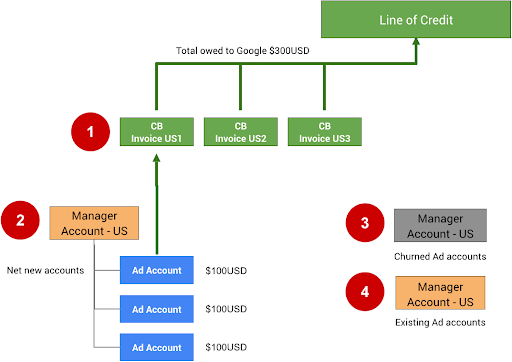
Le seguenti note si riferiscono ai numeri nella figura precedente:
Una fattura consolidata ha un limite di 15.000 per il numero di account o fatture che possono essere aggiunti. Se la prima fattura consolidata (CB US1) raggiunge 15.000 fatture o account, tutte le fatture o gli account futuri devono essere aggiunti a CB US2.
La fatturazione consolidata può essere configurata per il tuo account amministratore tramite la compilazione del modulo di richiesta di fatturazione consolidata. Devi prima disporre di una linea di credito approvata da Google. Se non ne hai ancora una, puoi richiederla tramite il modulo Contatta Google.
Gli account inattivi (abbandonati) possono essere spostati in un altro account amministratore. La separazione di questi account ti aiuta a rimanere entro il limite di 15.000. Per precauzione, ti consigliamo di rimuovere l'ordine di budget per questi account in modo che non possano continuare a spendere a meno che non vengano riattivati manualmente.
Se la tua integrazione consente agli utenti di utilizzare account Google Ads esistenti, crea un account amministratore separato. La fatturazione consolidata non deve essere utilizzata per gli account esistenti, in quanto potrebbero già spendere per altri tipi di campagne e probabilmente hanno già configurato la fatturazione diretta.
Per configurare la fatturazione consolidata direttamente nella UI di Google Ads, segui le istruzioni riportate in Configurare la fatturazione consolidata.
Tech Guidance
Per configurare e gestire la fatturazione per gli account Google Ads commerciante utilizzando l'API,
utilizza le risorse BillingSetup per ottenere e gestire la configurazione
della fatturazione a livello di account. Una configurazione di fatturazione è un'associazione tra un
account pagamenti e un account Google Ads specifico. Determina
chi paga l'account di un inserzionista. Segui le
istruzioni per la configurazione della fatturazione.
Gestisci budget dell'account
Un budget dell'account definisce le proprietà del budget a livello di account, ad esempio ora di inizio, ora di fine e limite di spesa. Tutte le modifiche ai budget dell'account vengono apportate
inviando proposte di budget dell'account separate che, dopo essere state esaminate e
approvate, diventano budget dell'account. Utilizza le risorse AccountBudgetProposal
per creare nuovi AccountBudgets o aggiornare quelli esistenti.
Gli esempi riportati di seguito mostrano come creare una nuova proposta di budget:
Java
private void runExample(GoogleAdsClient googleAdsClient, long customerId, long billingSetupId) { // Creates an AccountBudgetProposal. This will be reviewed offline by Google Ads, and if // approved will become an AccountBudget. AccountBudgetProposal proposal = AccountBudgetProposal.newBuilder() .setBillingSetup(ResourceNames.billingSetup(customerId, billingSetupId)) .setProposalType(AccountBudgetProposalType.CREATE) .setProposedName("Account Budget (example)") // Specifies the account budget starts immediately. .setProposedStartTimeType(TimeType.NOW) // Alternatively you can specify a specific start time. Refer to the // AccountBudgetProposal // resource documentation for allowed formats. // // .setProposedStartDateTime("2020-01-02 03:04:05") // Specifies that the budget runs forever. .setProposedEndTimeType(TimeType.FOREVER) // Alternatively you can specify a specific end time. Allowed formats are as above. // .setProposedEndDateTime("2021-02-03 04:05:06") // Optional: sets notes for the budget. These are free text and do not effect budget // delivery. // .setProposedNotes("Received prepayment of $0.01") // Sets the spending limit to 0.01, measured in the Google Ads account currency. .setProposedSpendingLimitMicros(10_000) // Optional: sets PO number for record keeping. This value is at the user's // discretion, and has no effect on Google Billing & Payments. // .setProposedPurchaseOrderNumber("PO number 12345") .build(); // Creates an operation which will add the new AccountBudgetProposal. AccountBudgetProposalOperation operation = AccountBudgetProposalOperation.newBuilder().setCreate(proposal).build(); try (AccountBudgetProposalServiceClient accountBudgetProposalServiceClient = googleAdsClient.getLatestVersion().createAccountBudgetProposalServiceClient()) { // Sends the request to the Account Budget Proposal Service. MutateAccountBudgetProposalResponse response = accountBudgetProposalServiceClient.mutateAccountBudgetProposal( String.valueOf(customerId), operation); System.out.printf( "Account budget proposal created: %s.%n", response.getResult().getResourceName()); } }
C#
public void Run(GoogleAdsClient client, long customerId, long billingSetupId) { // Get the AccountBudgetProposalServiceClient. AccountBudgetProposalServiceClient proposalService = client.GetService(Services.V26.AccountBudgetProposalService); // Create an AccountBudgetProposal. The proposal will be reviewed offline by Google Ads, // and if approved will become an AccountBudget. AccountBudgetProposal proposal = new AccountBudgetProposal() { BillingSetup = ResourceNames.BillingSetup(customerId, billingSetupId), ProposalType = AccountBudgetProposalType.Create, ProposedName = "Account Budget (example)", // Specify the account budget starts immediately ProposedStartTimeType = TimeType.Now, // Alternatively, you can specify a specific start time. Refer to the // AccountBudgetProposal resource documentation for allowed formats. // //ProposedStartDateTime = "2020-01-02 03:04:05", // Specify that the budget runs forever. ProposedEndTimeType = TimeType.Forever, // Alternatively you can specify a specific end time. Allowed formats are as above. //ProposedEndDateTime = "2021-02-03 04:05:06", // Optional: set notes for the budget. These are free text and do not effect budget // delivery. //ProposedNotes = "Received prepayment of $0.01", // Set the spending limit to 0.01, measured in the Google Ads account currency. ProposedSpendingLimitMicros = 10_000 // Optional: set PO number for record keeping. This value is at the user's // discretion, and has no effect on Google Billing & Payments. //ProposedPurchaseOrderNumber = "PO number 12345" }; // Create an operation which will add the new AccountBudgetProposal AccountBudgetProposalOperation operation = new AccountBudgetProposalOperation() { Create = proposal }; try { // Send the request to the Account Budget Proposal Service. MutateAccountBudgetProposalResponse response = proposalService. MutateAccountBudgetProposal(customerId.ToString(), operation); // Display the results. Console.WriteLine($"Account budget proposal '{response.Result.ResourceName}' " + "was created."); } catch (GoogleAdsException e) { Console.WriteLine("Failure:"); Console.WriteLine($"Message: {e.Message}"); Console.WriteLine($"Failure: {e.Failure}"); Console.WriteLine($"Request ID: {e.RequestId}"); throw; } }
PHP
public static function runExample( GoogleAdsClient $googleAdsClient, int $customerId, int $billingSetupId ) { // Constructs an account budget proposal. $accountBudgetProposal = new AccountBudgetProposal([ 'billing_setup' => ResourceNames::forBillingSetup($customerId, $billingSetupId), 'proposal_type' => AccountBudgetProposalType::CREATE, 'proposed_name' => 'Account Budget (example)', // Specifies the account budget starts immediately. 'proposed_start_time_type' => TimeType::NOW, // Alternatively you can specify a specific start time. Refer to the // AccountBudgetProposal class for allowed formats. // // 'proposed_start_date_time' => '2020-01-02 03:04:05', // Specify that the budget runs forever. 'proposed_end_time_type' => TimeType::FOREVER, // Alternatively you can specify a specific end time. Allowed formats are as above. // 'proposed_end_date_time' => '2021-02-03 04:05:06', // Optional: set notes for the budget. These are free text and do not effect budget // delivery. // 'proposed_notes' => 'Received prepayment of $0.01', // Optional: set PO number for record keeping. This value is at the user's // discretion, and has no effect on Google Billing & Payments. // 'proposed_purchase_order_number' => 'PO number 12345', // Set the spending limit to 0.01, measured in the Google Ads account currency. 'proposed_spending_limit_micros' => 10000 ]); $accountBudgetProposalOperation = new AccountBudgetProposalOperation(); $accountBudgetProposalOperation->setCreate($accountBudgetProposal); // Issues a mutate request to add the account budget proposal. $accountBudgetProposalServiceClient = $googleAdsClient->getAccountBudgetProposalServiceClient(); $response = $accountBudgetProposalServiceClient->mutateAccountBudgetProposal( MutateAccountBudgetProposalRequest::build($customerId, $accountBudgetProposalOperation) ); printf( "Added an account budget proposal with resource name '%s'.%s", $response->getResult()->getResourceName(), PHP_EOL ); }
Python
def main(client: GoogleAdsClient, customer_id: str, billing_setup_id: str): account_budget_proposal_service = client.get_service( "AccountBudgetProposalService" ) billing_setup_service = client.get_service("BillingSetupService") account_budget_proposal_operation = client.get_type( "AccountBudgetProposalOperation" ) proposal = account_budget_proposal_operation.create proposal.proposal_type = client.enums.AccountBudgetProposalTypeEnum.CREATE proposal.billing_setup = billing_setup_service.billing_setup_path( customer_id, billing_setup_id ) proposal.proposed_name = "Account Budget Proposal (example)" # Specify the account budget starts immediately proposal.proposed_start_time_type = client.enums.TimeTypeEnum.NOW # Alternatively you can specify a specific start time. Refer to the # AccountBudgetProposal resource documentation for allowed formats. # # proposal.proposed_start_date_time = '2020-01-02 03:04:05' # Specify that the budget runs forever proposal.proposed_end_time_type = client.enums.TimeTypeEnum.FOREVER # Alternatively you can specify a specific end time. Allowed formats are as # above. # # proposal.proposed_end_date_time = '2021-01-02 03:04:05' # Optional: set notes for the budget. These are free text and do not effect # budget delivery. # # proposal.proposed_notes = 'Received prepayment of $0.01' proposal.proposed_spending_limit_micros = 10000 account_budget_proposal_response = ( account_budget_proposal_service.mutate_account_budget_proposal( customer_id=customer_id, operation=account_budget_proposal_operation, ) ) print( "Created account budget proposal " f'"{account_budget_proposal_response.result.resource_name}".' )
Ruby
def add_account_budget_proposal(customer_id, billing_setup_id) # GoogleAdsClient will read a config file from # ENV['HOME']/google_ads_config.rb when called without parameters client = Google::Ads::GoogleAds::GoogleAdsClient.new operation = client.operation.create_resource.account_budget_proposal do |proposal| proposal.billing_setup = client.path.billing_setup(customer_id, billing_setup_id) proposal.proposal_type = :CREATE proposal.proposed_name = 'Account Budget (example)' # Specify the account budget starts immediately proposal.proposed_start_time_type = :NOW # Alternatively you can specify a specific start time. Refer to the # AccountBudgetProposal resource documentation for allowed formats. # # proposal.proposed_start_date_time = '2020-01-02 03:04:05' # Specify that the budget runs forever. proposal.proposed_end_time_type = :FOREVER # Alternatively you can specify a specific end time. Allowed formats are as # above. # # proposal.proposed_end_date_time = '2021-01-02 03:04:05' # Optional: set notes for the budget. These are free text and do not affect # budget delivery. # # proposal.proposed_notes = 'Received prepayment of $0.01' # Set the spending limit to 0.01, measured in the Google Ads account currency. proposal.proposed_spending_limit_micros = 10_000 end account_budget_proposal_service = client.service.account_budget_proposal # Add budget proposal. response = account_budget_proposal_service.mutate_account_budget_proposal( customer_id: customer_id, operation: operation, ) puts sprintf("Created budget proposal %s.", response.results.first.resource_name) end
Perl
sub add_account_budget_proposal { my ($api_client, $customer_id, $billing_setup_id) = @_; # Create an account budget proposal. my $account_budget_proposal = Google::Ads::GoogleAds::V26::Resources::AccountBudgetProposal->new({ billingSetup => Google::Ads::GoogleAds::V26::Utils::ResourceNames::billing_setup( $customer_id, $billing_setup_id ), proposalType => CREATE, proposedName => "Account Budget (example)", # Specify that the account budget starts immediately. proposedStartTimeType => NOW, # Alternatively you can specify a specific start time. Refer to the # AccountBudgetProposal class for allowed formats. # # proposedStartDateTime => "2020-01-02 03:04:05", # Specify that the account budget runs forever. proposedEndDateTime => FOREVER, # Alternatively you can specify a specific end time. Allowed formats are as below. # proposedEndDateTime => "2021-02-03 04:05:06", # Optional: set notes for the budget. These are free text and do not effect budget # delivery. # proposedNotes => "Received prepayment of $0.01", # Optional: set PO number for record keeping. This value is at the user's # discretion, and has no effect on Google Billing & Payments. # proposedPurchaseOrderNumber => "PO number 12345", # Set the spending limit to 0.01, measured in the Google Ads account currency. proposedSpendingLimitMicros => 10000 }); # Create an account budget proposal operation. my $account_budget_proposal_operation = Google::Ads::GoogleAds::V26::Services::AccountBudgetProposalService::AccountBudgetProposalOperation ->new({ create => $account_budget_proposal }); # Add the account budget proposal. my $account_budget_proposal_response = $api_client->AccountBudgetProposalService()->mutate({ customerId => $customer_id, operation => $account_budget_proposal_operation }); printf "Created account budget proposal '%s'.\n", $account_budget_proposal_response->{result}{resourceName}; return 1; }
curl
Per aggiornare i budget dell'account, utilizza AccountBudgetProposalService per
gestire i parametri del budget. Le operazioni di gestione più comuni sono l'aggiornamento del limite di spesa e dei campi data e ora. Per un elenco completo dei campi modificabili, consulta AccountBudgetProposal. L'esempio seguente mostra
come aggiornare il limite di spesa proposto per un budget dell'account esistente.
Java
private void runExample(GoogleAdsClient googleAdsClient, long customerId, long billingSetupId) { // Creates an AccountBudgetProposal. This will be reviewed offline by Google Ads, and if // approved will become an AccountBudget. AccountBudgetProposal proposal = AccountBudgetProposal.newBuilder() .setBillingSetup(ResourceNames.billingSetup(customerId, billingSetupId)) .setProposalType(AccountBudgetProposalType.CREATE) .setProposedName("Account Budget (example)") // Specifies the account budget starts immediately. .setProposedStartTimeType(TimeType.NOW) // Alternatively you can specify a specific start time. Refer to the // AccountBudgetProposal // resource documentation for allowed formats. // // .setProposedStartDateTime("2020-01-02 03:04:05") // Specifies that the budget runs forever. .setProposedEndTimeType(TimeType.FOREVER) // Alternatively you can specify a specific end time. Allowed formats are as above. // .setProposedEndDateTime("2021-02-03 04:05:06") // Optional: sets notes for the budget. These are free text and do not effect budget // delivery. // .setProposedNotes("Received prepayment of $0.01") // Sets the spending limit to 0.01, measured in the Google Ads account currency. .setProposedSpendingLimitMicros(10_000) // Optional: sets PO number for record keeping. This value is at the user's // discretion, and has no effect on Google Billing & Payments. // .setProposedPurchaseOrderNumber("PO number 12345") .build(); // Creates an operation which will add the new AccountBudgetProposal. AccountBudgetProposalOperation operation = AccountBudgetProposalOperation.newBuilder().setCreate(proposal).build(); try (AccountBudgetProposalServiceClient accountBudgetProposalServiceClient = googleAdsClient.getLatestVersion().createAccountBudgetProposalServiceClient()) { // Sends the request to the Account Budget Proposal Service. MutateAccountBudgetProposalResponse response = accountBudgetProposalServiceClient.mutateAccountBudgetProposal( String.valueOf(customerId), operation); System.out.printf( "Account budget proposal created: %s.%n", response.getResult().getResourceName()); } }
C#
public void Run(GoogleAdsClient client, long customerId, long billingSetupId) { // Get the AccountBudgetProposalServiceClient. AccountBudgetProposalServiceClient proposalService = client.GetService(Services.V26.AccountBudgetProposalService); // Create an AccountBudgetProposal. The proposal will be reviewed offline by Google Ads, // and if approved will become an AccountBudget. AccountBudgetProposal proposal = new AccountBudgetProposal() { BillingSetup = ResourceNames.BillingSetup(customerId, billingSetupId), ProposalType = AccountBudgetProposalType.Create, ProposedName = "Account Budget (example)", // Specify the account budget starts immediately ProposedStartTimeType = TimeType.Now, // Alternatively, you can specify a specific start time. Refer to the // AccountBudgetProposal resource documentation for allowed formats. // //ProposedStartDateTime = "2020-01-02 03:04:05", // Specify that the budget runs forever. ProposedEndTimeType = TimeType.Forever, // Alternatively you can specify a specific end time. Allowed formats are as above. //ProposedEndDateTime = "2021-02-03 04:05:06", // Optional: set notes for the budget. These are free text and do not effect budget // delivery. //ProposedNotes = "Received prepayment of $0.01", // Set the spending limit to 0.01, measured in the Google Ads account currency. ProposedSpendingLimitMicros = 10_000 // Optional: set PO number for record keeping. This value is at the user's // discretion, and has no effect on Google Billing & Payments. //ProposedPurchaseOrderNumber = "PO number 12345" }; // Create an operation which will add the new AccountBudgetProposal AccountBudgetProposalOperation operation = new AccountBudgetProposalOperation() { Create = proposal }; try { // Send the request to the Account Budget Proposal Service. MutateAccountBudgetProposalResponse response = proposalService. MutateAccountBudgetProposal(customerId.ToString(), operation); // Display the results. Console.WriteLine($"Account budget proposal '{response.Result.ResourceName}' " + "was created."); } catch (GoogleAdsException e) { Console.WriteLine("Failure:"); Console.WriteLine($"Message: {e.Message}"); Console.WriteLine($"Failure: {e.Failure}"); Console.WriteLine($"Request ID: {e.RequestId}"); throw; } }
PHP
public static function runExample( GoogleAdsClient $googleAdsClient, int $customerId, int $billingSetupId ) { // Constructs an account budget proposal. $accountBudgetProposal = new AccountBudgetProposal([ 'billing_setup' => ResourceNames::forBillingSetup($customerId, $billingSetupId), 'proposal_type' => AccountBudgetProposalType::CREATE, 'proposed_name' => 'Account Budget (example)', // Specifies the account budget starts immediately. 'proposed_start_time_type' => TimeType::NOW, // Alternatively you can specify a specific start time. Refer to the // AccountBudgetProposal class for allowed formats. // // 'proposed_start_date_time' => '2020-01-02 03:04:05', // Specify that the budget runs forever. 'proposed_end_time_type' => TimeType::FOREVER, // Alternatively you can specify a specific end time. Allowed formats are as above. // 'proposed_end_date_time' => '2021-02-03 04:05:06', // Optional: set notes for the budget. These are free text and do not effect budget // delivery. // 'proposed_notes' => 'Received prepayment of $0.01', // Optional: set PO number for record keeping. This value is at the user's // discretion, and has no effect on Google Billing & Payments. // 'proposed_purchase_order_number' => 'PO number 12345', // Set the spending limit to 0.01, measured in the Google Ads account currency. 'proposed_spending_limit_micros' => 10000 ]); $accountBudgetProposalOperation = new AccountBudgetProposalOperation(); $accountBudgetProposalOperation->setCreate($accountBudgetProposal); // Issues a mutate request to add the account budget proposal. $accountBudgetProposalServiceClient = $googleAdsClient->getAccountBudgetProposalServiceClient(); $response = $accountBudgetProposalServiceClient->mutateAccountBudgetProposal( MutateAccountBudgetProposalRequest::build($customerId, $accountBudgetProposalOperation) ); printf( "Added an account budget proposal with resource name '%s'.%s", $response->getResult()->getResourceName(), PHP_EOL ); }
Python
def main(client: GoogleAdsClient, customer_id: str, billing_setup_id: str): account_budget_proposal_service = client.get_service( "AccountBudgetProposalService" ) billing_setup_service = client.get_service("BillingSetupService") account_budget_proposal_operation = client.get_type( "AccountBudgetProposalOperation" ) proposal = account_budget_proposal_operation.create proposal.proposal_type = client.enums.AccountBudgetProposalTypeEnum.CREATE proposal.billing_setup = billing_setup_service.billing_setup_path( customer_id, billing_setup_id ) proposal.proposed_name = "Account Budget Proposal (example)" # Specify the account budget starts immediately proposal.proposed_start_time_type = client.enums.TimeTypeEnum.NOW # Alternatively you can specify a specific start time. Refer to the # AccountBudgetProposal resource documentation for allowed formats. # # proposal.proposed_start_date_time = '2020-01-02 03:04:05' # Specify that the budget runs forever proposal.proposed_end_time_type = client.enums.TimeTypeEnum.FOREVER # Alternatively you can specify a specific end time. Allowed formats are as # above. # # proposal.proposed_end_date_time = '2021-01-02 03:04:05' # Optional: set notes for the budget. These are free text and do not effect # budget delivery. # # proposal.proposed_notes = 'Received prepayment of $0.01' proposal.proposed_spending_limit_micros = 10000 account_budget_proposal_response = ( account_budget_proposal_service.mutate_account_budget_proposal( customer_id=customer_id, operation=account_budget_proposal_operation, ) ) print( "Created account budget proposal " f'"{account_budget_proposal_response.result.resource_name}".' )
Ruby
def add_account_budget_proposal(customer_id, billing_setup_id) # GoogleAdsClient will read a config file from # ENV['HOME']/google_ads_config.rb when called without parameters client = Google::Ads::GoogleAds::GoogleAdsClient.new operation = client.operation.create_resource.account_budget_proposal do |proposal| proposal.billing_setup = client.path.billing_setup(customer_id, billing_setup_id) proposal.proposal_type = :CREATE proposal.proposed_name = 'Account Budget (example)' # Specify the account budget starts immediately proposal.proposed_start_time_type = :NOW # Alternatively you can specify a specific start time. Refer to the # AccountBudgetProposal resource documentation for allowed formats. # # proposal.proposed_start_date_time = '2020-01-02 03:04:05' # Specify that the budget runs forever. proposal.proposed_end_time_type = :FOREVER # Alternatively you can specify a specific end time. Allowed formats are as # above. # # proposal.proposed_end_date_time = '2021-01-02 03:04:05' # Optional: set notes for the budget. These are free text and do not affect # budget delivery. # # proposal.proposed_notes = 'Received prepayment of $0.01' # Set the spending limit to 0.01, measured in the Google Ads account currency. proposal.proposed_spending_limit_micros = 10_000 end account_budget_proposal_service = client.service.account_budget_proposal # Add budget proposal. response = account_budget_proposal_service.mutate_account_budget_proposal( customer_id: customer_id, operation: operation, ) puts sprintf("Created budget proposal %s.", response.results.first.resource_name) end
Perl
sub add_account_budget_proposal { my ($api_client, $customer_id, $billing_setup_id) = @_; # Create an account budget proposal. my $account_budget_proposal = Google::Ads::GoogleAds::V26::Resources::AccountBudgetProposal->new({ billingSetup => Google::Ads::GoogleAds::V26::Utils::ResourceNames::billing_setup( $customer_id, $billing_setup_id ), proposalType => CREATE, proposedName => "Account Budget (example)", # Specify that the account budget starts immediately. proposedStartTimeType => NOW, # Alternatively you can specify a specific start time. Refer to the # AccountBudgetProposal class for allowed formats. # # proposedStartDateTime => "2020-01-02 03:04:05", # Specify that the account budget runs forever. proposedEndDateTime => FOREVER, # Alternatively you can specify a specific end time. Allowed formats are as below. # proposedEndDateTime => "2021-02-03 04:05:06", # Optional: set notes for the budget. These are free text and do not effect budget # delivery. # proposedNotes => "Received prepayment of $0.01", # Optional: set PO number for record keeping. This value is at the user's # discretion, and has no effect on Google Billing & Payments. # proposedPurchaseOrderNumber => "PO number 12345", # Set the spending limit to 0.01, measured in the Google Ads account currency. proposedSpendingLimitMicros => 10000 }); # Create an account budget proposal operation. my $account_budget_proposal_operation = Google::Ads::GoogleAds::V26::Services::AccountBudgetProposalService::AccountBudgetProposalOperation ->new({ create => $account_budget_proposal }); # Add the account budget proposal. my $account_budget_proposal_response = $api_client->AccountBudgetProposalService()->mutate({ customerId => $customer_id, operation => $account_budget_proposal_operation }); printf "Created account budget proposal '%s'.\n", $account_budget_proposal_response->{result}{resourceName}; return 1; }
curl
Per terminare un budget dell'account attivo, imposta l'ora di fine sull'ora attuale
inviando una proposta con AccountBudgetProposalType.END.
Emettere fatture
Se attivata dall'inserzionista, viene emessa una fattura mensile. Le fatture contengono dettagli come aggiustamenti, costi normativi, tasse e budget dell'account e possono essere scaricate come file PDF. In genere, in qualità di amministratore, li utilizzi per riconciliare automaticamente le fatture dei tuoi clienti. Per attivare la fatturazione, devi disporre di quanto segue:
Avere la fatturazione mensile attivata per l'account Google Ads. Consulta le guide sulle configurazioni di fatturazione e sui budget dell'account per scoprire come gestire la fatturazione utilizzando l'API Google Ads.
Se impostato,
login-customer-iddeve specificare l'ID cliente di un account amministratore che gestisce l'account Google Ads per il quale stai recuperando le fatture. Nell'interfaccia utente di Google Ads, questo account è etichettato come amministratore pagamenti.
Recupera le risorse Invoice per i dati delle fatture utilizzando
InvoiceService. Richiedi il metodo InvoiceService.ListInvoices,
impostando tutti i campi obbligatori in ListInvoicesRequest:
customer_id, billing_setup, issue_year e issue_month. I seguenti esempi mostrano come effettuare questa richiesta:
Java
// Issues the request. ListInvoicesResponse response = invoiceServiceClient.listInvoices( String.valueOf(customerId), ResourceNames.billingSetup(customerId, billingSetupId), String.valueOf(oneMonthAgo.getYear()), MonthOfYear.valueOf(oneMonthAgo.getMonth().toString()));
C#
ListInvoicesResponse response = invoiceServiceClient.ListInvoices(customerId.ToString(), ResourceNames.BillingSetup(customerId, billingSetupId), // Year must be 2019 or later. lastMonthDateTime.Year.ToString("yyyy"), lastMonth);
PHP
// Issues the request. $response = $googleAdsClient->getInvoiceServiceClient()->listInvoices( ListInvoicesRequest::build( $customerId, ResourceNames::forBillingSetup($customerId, $billingSetupId), // The year needs to be 2019 or later. date('Y', $lastMonth), MonthOfYear::value(strtoupper(date('F', $lastMonth))) ) );
Python
# Issues a request to list invoices. response = client.get_service("InvoiceService").list_invoices( customer_id=customer_id, billing_setup=client.get_service("GoogleAdsService").billing_setup_path( customer_id, billing_setup_id ), # The year needs to be 2019 or later, per the docs: # https://developers.google.com/google-ads/api/docs/billing/invoice?hl=en#retrieving_invoices issue_year=str(last_month.year), issue_month=last_month.strftime("%B").upper(), )
Ruby
# Issues a request to list invoices. response = client.service.invoice.list_invoices( customer_id: customer_id, billing_setup: client.path.billing_setup(customer_id, billing_setup_id), # The year needs to be 2019 or later. issue_year: last_month.year.to_s, # '%^B' option returns the uppercased full month name (e.g. 'JANUARY'). issue_month: last_month.strftime("%^B").to_sym, )
Perl
# Issue the request. my $response = $api_client->InvoiceService()->list({ customerId => $customer_id, billingSetup => Google::Ads::GoogleAds::V26::Utils::ResourceNames::billing_setup( ($customer_id, $billing_setup_id) ), # The year needs to be 2019 or later. issueYear => strftime("%Y", @last_month), issueMonth => uc(strftime("%B", @last_month))});
curl
La risposta è un oggetto ListInvoicesResponse che contiene l'elenco dei
Invoices corrispondenti. Una fattura combina i dati di tutti gli account Google Ads
con configurazioni di fatturazione che utilizzano lo stesso account pagamenti sottostante
di quello utilizzato dalla configurazione di fatturazione richiesta. Ciò si verifica solo quando l'account pagamenti sottostante è idoneo per la fatturazione consolidata.