

4.3.2 ตัวเลือกการเรียกเก็บเงินรวม
รูปที่ 1 แสดงวิธีที่แนะนําในการจัดระเบียบบัญชีดูแลจัดการ Google Ads และบัญชีผู้ลงโฆษณา
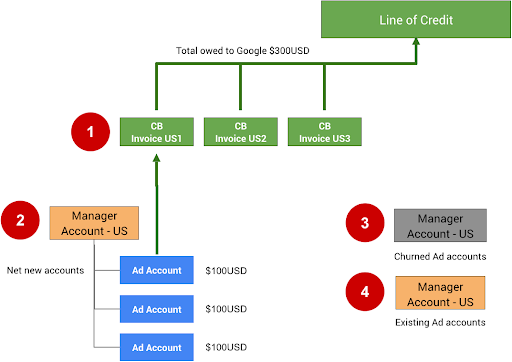
หมายเหตุต่อไปนี้อ้างอิงถึงตัวเลขในรูปภาพด้านบน
การเรียกเก็บเงินรวม (CB) มีขีดจำกัด 15,000 บัญชีหรือใบแจ้งหนี้ที่เพิ่มได้ หากการเรียกเก็บเงินรวมฉบับแรก (CB US1) มีใบแจ้งหนี้หรือบัญชีถึง 15, 000 รายการ คุณควรเพิ่มใบแจ้งหนี้หรือบัญชีที่กำลังจะมาถึงทั้งหมดลงใน CB US2
คุณตั้งค่าการเรียกเก็บเงินรวมสำหรับบัญชีดูแลจัดการได้โดยสมัครผ่านแบบฟอร์มการสมัครใช้การเรียกเก็บเงินรวม ก่อนอื่นคุณต้องมีวงเงินเครดิตที่ได้รับอนุมัติจาก Google หากยังไม่มี คุณสามารถสมัคร ผ่านแบบฟอร์มติดต่อ Google
คุณย้ายบัญชีที่ไม่มีการใช้งาน (เลิกใช้งาน) ไปยังบัญชีดูแลจัดการอื่นได้ การแยกบัญชีเหล่านี้จะช่วยให้คุณไม่เกินขีดจำกัด 15,000 รายการ เพื่อเป็นการป้องกัน เราขอแนะนำให้คุณนำคำสั่งงบประมาณสำหรับบัญชีเหล่านี้ออก เพื่อไม่ให้ มีการใช้จ่ายต่อไปจนกว่าจะมีการเปิดใช้งานอีกครั้งด้วยตนเอง
หากการผสานรวมอนุญาตให้ผู้ใช้ใช้บัญชี Google Ads ที่มีอยู่ ให้สร้าง บัญชีดูแลจัดการแยกต่างหากสำหรับบัญชีเหล่านี้ ไม่ควรใช้การเรียกเก็บเงินรวมสำหรับ บัญชีที่มีอยู่ เนื่องจากบัญชีเหล่านั้นอาจใช้จ่ายกับแคมเปญประเภทอื่นๆ อยู่แล้ว และ น่าจะมีการตั้งค่าการเรียกเก็บเงินโดยตรงอยู่แล้ว
หากต้องการตั้งค่าการเรียกเก็บเงินรวมใน UI ของ Google Ads โดยตรง ให้ทำตาม วิธีการในตั้งค่าการเรียกเก็บเงินรวม
คำแนะนำด้านเทคนิค
หากต้องการตั้งค่าและจัดการการเรียกเก็บเงินสำหรับบัญชี Google Ads ของผู้ขายโดยใช้ API
ให้ใช้แหล่งข้อมูล BillingSetup เพื่อรับและจัดการการกำหนดค่าการเรียกเก็บเงินทั้งบัญชี
การตั้งค่าการเรียกเก็บเงินคือการเชื่อมโยงระหว่างบัญชีการชำระเงินกับบัญชี Google Ads ที่เฉพาะเจาะจง ซึ่งจะกำหนดว่าใครเป็นผู้ชำระเงินสำหรับบัญชีของผู้ลงโฆษณา ทำตามวิธีการตั้งค่าการเรียกเก็บเงิน
จัดการงบประมาณของบัญชี
งบประมาณบัญชีจะกําหนดพร็อพเพอร์ตี้งบประมาณระดับบัญชี เช่น เวลาเริ่มต้น เวลาสิ้นสุด และวงเงินใช้จ่าย การเปลี่ยนแปลงงบประมาณบัญชีทั้งหมดจะดำเนินการโดย
การส่งข้อเสนองบประมาณบัญชีแยกต่างหาก ซึ่งหลังจากได้รับการตรวจสอบและ
อนุมัติแล้วจะกลายเป็นงบประมาณบัญชี ใช้แหล่งข้อมูล AccountBudgetProposal
เพื่อสร้าง AccountBudgets ใหม่หรืออัปเดตที่มีอยู่
ตัวอย่างต่อไปนี้แสดงวิธีสร้างข้อเสนองบประมาณใหม่
Java
private void runExample(GoogleAdsClient googleAdsClient, long customerId, long billingSetupId) { // Creates an AccountBudgetProposal. This will be reviewed offline by Google Ads, and if // approved will become an AccountBudget. AccountBudgetProposal proposal = AccountBudgetProposal.newBuilder() .setBillingSetup(ResourceNames.billingSetup(customerId, billingSetupId)) .setProposalType(AccountBudgetProposalType.CREATE) .setProposedName("Account Budget (example)") // Specifies the account budget starts immediately. .setProposedStartTimeType(TimeType.NOW) // Alternatively you can specify a specific start time. Refer to the // AccountBudgetProposal // resource documentation for allowed formats. // // .setProposedStartDateTime("2020-01-02 03:04:05") // Specifies that the budget runs forever. .setProposedEndTimeType(TimeType.FOREVER) // Alternatively you can specify a specific end time. Allowed formats are as above. // .setProposedEndDateTime("2021-02-03 04:05:06") // Optional: sets notes for the budget. These are free text and do not effect budget // delivery. // .setProposedNotes("Received prepayment of $0.01") // Sets the spending limit to 0.01, measured in the Google Ads account currency. .setProposedSpendingLimitMicros(10_000) // Optional: sets PO number for record keeping. This value is at the user's // discretion, and has no effect on Google Billing & Payments. // .setProposedPurchaseOrderNumber("PO number 12345") .build(); // Creates an operation which will add the new AccountBudgetProposal. AccountBudgetProposalOperation operation = AccountBudgetProposalOperation.newBuilder().setCreate(proposal).build(); try (AccountBudgetProposalServiceClient accountBudgetProposalServiceClient = googleAdsClient.getLatestVersion().createAccountBudgetProposalServiceClient()) { // Sends the request to the Account Budget Proposal Service. MutateAccountBudgetProposalResponse response = accountBudgetProposalServiceClient.mutateAccountBudgetProposal( String.valueOf(customerId), operation); System.out.printf( "Account budget proposal created: %s.%n", response.getResult().getResourceName()); } }
C#
public void Run(GoogleAdsClient client, long customerId, long billingSetupId) { // Get the AccountBudgetProposalServiceClient. AccountBudgetProposalServiceClient proposalService = client.GetService(Services.V26.AccountBudgetProposalService); // Create an AccountBudgetProposal. The proposal will be reviewed offline by Google Ads, // and if approved will become an AccountBudget. AccountBudgetProposal proposal = new AccountBudgetProposal() { BillingSetup = ResourceNames.BillingSetup(customerId, billingSetupId), ProposalType = AccountBudgetProposalType.Create, ProposedName = "Account Budget (example)", // Specify the account budget starts immediately ProposedStartTimeType = TimeType.Now, // Alternatively, you can specify a specific start time. Refer to the // AccountBudgetProposal resource documentation for allowed formats. // //ProposedStartDateTime = "2020-01-02 03:04:05", // Specify that the budget runs forever. ProposedEndTimeType = TimeType.Forever, // Alternatively you can specify a specific end time. Allowed formats are as above. //ProposedEndDateTime = "2021-02-03 04:05:06", // Optional: set notes for the budget. These are free text and do not effect budget // delivery. //ProposedNotes = "Received prepayment of $0.01", // Set the spending limit to 0.01, measured in the Google Ads account currency. ProposedSpendingLimitMicros = 10_000 // Optional: set PO number for record keeping. This value is at the user's // discretion, and has no effect on Google Billing & Payments. //ProposedPurchaseOrderNumber = "PO number 12345" }; // Create an operation which will add the new AccountBudgetProposal AccountBudgetProposalOperation operation = new AccountBudgetProposalOperation() { Create = proposal }; try { // Send the request to the Account Budget Proposal Service. MutateAccountBudgetProposalResponse response = proposalService. MutateAccountBudgetProposal(customerId.ToString(), operation); // Display the results. Console.WriteLine($"Account budget proposal '{response.Result.ResourceName}' " + "was created."); } catch (GoogleAdsException e) { Console.WriteLine("Failure:"); Console.WriteLine($"Message: {e.Message}"); Console.WriteLine($"Failure: {e.Failure}"); Console.WriteLine($"Request ID: {e.RequestId}"); throw; } }
PHP
public static function runExample( GoogleAdsClient $googleAdsClient, int $customerId, int $billingSetupId ) { // Constructs an account budget proposal. $accountBudgetProposal = new AccountBudgetProposal([ 'billing_setup' => ResourceNames::forBillingSetup($customerId, $billingSetupId), 'proposal_type' => AccountBudgetProposalType::CREATE, 'proposed_name' => 'Account Budget (example)', // Specifies the account budget starts immediately. 'proposed_start_time_type' => TimeType::NOW, // Alternatively you can specify a specific start time. Refer to the // AccountBudgetProposal class for allowed formats. // // 'proposed_start_date_time' => '2020-01-02 03:04:05', // Specify that the budget runs forever. 'proposed_end_time_type' => TimeType::FOREVER, // Alternatively you can specify a specific end time. Allowed formats are as above. // 'proposed_end_date_time' => '2021-02-03 04:05:06', // Optional: set notes for the budget. These are free text and do not effect budget // delivery. // 'proposed_notes' => 'Received prepayment of $0.01', // Optional: set PO number for record keeping. This value is at the user's // discretion, and has no effect on Google Billing & Payments. // 'proposed_purchase_order_number' => 'PO number 12345', // Set the spending limit to 0.01, measured in the Google Ads account currency. 'proposed_spending_limit_micros' => 10000 ]); $accountBudgetProposalOperation = new AccountBudgetProposalOperation(); $accountBudgetProposalOperation->setCreate($accountBudgetProposal); // Issues a mutate request to add the account budget proposal. $accountBudgetProposalServiceClient = $googleAdsClient->getAccountBudgetProposalServiceClient(); $response = $accountBudgetProposalServiceClient->mutateAccountBudgetProposal( MutateAccountBudgetProposalRequest::build($customerId, $accountBudgetProposalOperation) ); printf( "Added an account budget proposal with resource name '%s'.%s", $response->getResult()->getResourceName(), PHP_EOL ); }
Python
def main(client: GoogleAdsClient, customer_id: str, billing_setup_id: str): account_budget_proposal_service = client.get_service( "AccountBudgetProposalService" ) billing_setup_service = client.get_service("BillingSetupService") account_budget_proposal_operation = client.get_type( "AccountBudgetProposalOperation" ) proposal = account_budget_proposal_operation.create proposal.proposal_type = client.enums.AccountBudgetProposalTypeEnum.CREATE proposal.billing_setup = billing_setup_service.billing_setup_path( customer_id, billing_setup_id ) proposal.proposed_name = "Account Budget Proposal (example)" # Specify the account budget starts immediately proposal.proposed_start_time_type = client.enums.TimeTypeEnum.NOW # Alternatively you can specify a specific start time. Refer to the # AccountBudgetProposal resource documentation for allowed formats. # # proposal.proposed_start_date_time = '2020-01-02 03:04:05' # Specify that the budget runs forever proposal.proposed_end_time_type = client.enums.TimeTypeEnum.FOREVER # Alternatively you can specify a specific end time. Allowed formats are as # above. # # proposal.proposed_end_date_time = '2021-01-02 03:04:05' # Optional: set notes for the budget. These are free text and do not effect # budget delivery. # # proposal.proposed_notes = 'Received prepayment of $0.01' proposal.proposed_spending_limit_micros = 10000 account_budget_proposal_response = ( account_budget_proposal_service.mutate_account_budget_proposal( customer_id=customer_id, operation=account_budget_proposal_operation, ) ) print( "Created account budget proposal " f'"{account_budget_proposal_response.result.resource_name}".' )
Ruby
def add_account_budget_proposal(customer_id, billing_setup_id) # GoogleAdsClient will read a config file from # ENV['HOME']/google_ads_config.rb when called without parameters client = Google::Ads::GoogleAds::GoogleAdsClient.new operation = client.operation.create_resource.account_budget_proposal do |proposal| proposal.billing_setup = client.path.billing_setup(customer_id, billing_setup_id) proposal.proposal_type = :CREATE proposal.proposed_name = 'Account Budget (example)' # Specify the account budget starts immediately proposal.proposed_start_time_type = :NOW # Alternatively you can specify a specific start time. Refer to the # AccountBudgetProposal resource documentation for allowed formats. # # proposal.proposed_start_date_time = '2020-01-02 03:04:05' # Specify that the budget runs forever. proposal.proposed_end_time_type = :FOREVER # Alternatively you can specify a specific end time. Allowed formats are as # above. # # proposal.proposed_end_date_time = '2021-01-02 03:04:05' # Optional: set notes for the budget. These are free text and do not affect # budget delivery. # # proposal.proposed_notes = 'Received prepayment of $0.01' # Set the spending limit to 0.01, measured in the Google Ads account currency. proposal.proposed_spending_limit_micros = 10_000 end account_budget_proposal_service = client.service.account_budget_proposal # Add budget proposal. response = account_budget_proposal_service.mutate_account_budget_proposal( customer_id: customer_id, operation: operation, ) puts sprintf("Created budget proposal %s.", response.results.first.resource_name) end
Perl
sub add_account_budget_proposal { my ($api_client, $customer_id, $billing_setup_id) = @_; # Create an account budget proposal. my $account_budget_proposal = Google::Ads::GoogleAds::V26::Resources::AccountBudgetProposal->new({ billingSetup => Google::Ads::GoogleAds::V26::Utils::ResourceNames::billing_setup( $customer_id, $billing_setup_id ), proposalType => CREATE, proposedName => "Account Budget (example)", # Specify that the account budget starts immediately. proposedStartTimeType => NOW, # Alternatively you can specify a specific start time. Refer to the # AccountBudgetProposal class for allowed formats. # # proposedStartDateTime => "2020-01-02 03:04:05", # Specify that the account budget runs forever. proposedEndDateTime => FOREVER, # Alternatively you can specify a specific end time. Allowed formats are as below. # proposedEndDateTime => "2021-02-03 04:05:06", # Optional: set notes for the budget. These are free text and do not effect budget # delivery. # proposedNotes => "Received prepayment of $0.01", # Optional: set PO number for record keeping. This value is at the user's # discretion, and has no effect on Google Billing & Payments. # proposedPurchaseOrderNumber => "PO number 12345", # Set the spending limit to 0.01, measured in the Google Ads account currency. proposedSpendingLimitMicros => 10000 }); # Create an account budget proposal operation. my $account_budget_proposal_operation = Google::Ads::GoogleAds::V26::Services::AccountBudgetProposalService::AccountBudgetProposalOperation ->new({ create => $account_budget_proposal }); # Add the account budget proposal. my $account_budget_proposal_response = $api_client->AccountBudgetProposalService()->mutate({ customerId => $customer_id, operation => $account_budget_proposal_operation }); printf "Created account budget proposal '%s'.\n", $account_budget_proposal_response->{result}{resourceName}; return 1; }
curl
หากต้องการอัปเดตงบประมาณบัญชี ให้ใช้ AccountBudgetProposalService เพื่อ
จัดการพารามิเตอร์งบประมาณ การดำเนินการจัดการที่พบบ่อยที่สุดคือการ
อัปเดตวงเงินใช้จ่ายและฟิลด์วันที่เวลา ดูรายการฟิลด์ที่
แก้ไขได้ทั้งหมดได้ที่ AccountBudgetProposal ตัวอย่างต่อไปนี้แสดง
วิธีอัปเดตวงเงินใช้จ่ายที่เสนอสำหรับงบประมาณบัญชีที่มีอยู่
Java
private void runExample(GoogleAdsClient googleAdsClient, long customerId, long billingSetupId) { // Creates an AccountBudgetProposal. This will be reviewed offline by Google Ads, and if // approved will become an AccountBudget. AccountBudgetProposal proposal = AccountBudgetProposal.newBuilder() .setBillingSetup(ResourceNames.billingSetup(customerId, billingSetupId)) .setProposalType(AccountBudgetProposalType.CREATE) .setProposedName("Account Budget (example)") // Specifies the account budget starts immediately. .setProposedStartTimeType(TimeType.NOW) // Alternatively you can specify a specific start time. Refer to the // AccountBudgetProposal // resource documentation for allowed formats. // // .setProposedStartDateTime("2020-01-02 03:04:05") // Specifies that the budget runs forever. .setProposedEndTimeType(TimeType.FOREVER) // Alternatively you can specify a specific end time. Allowed formats are as above. // .setProposedEndDateTime("2021-02-03 04:05:06") // Optional: sets notes for the budget. These are free text and do not effect budget // delivery. // .setProposedNotes("Received prepayment of $0.01") // Sets the spending limit to 0.01, measured in the Google Ads account currency. .setProposedSpendingLimitMicros(10_000) // Optional: sets PO number for record keeping. This value is at the user's // discretion, and has no effect on Google Billing & Payments. // .setProposedPurchaseOrderNumber("PO number 12345") .build(); // Creates an operation which will add the new AccountBudgetProposal. AccountBudgetProposalOperation operation = AccountBudgetProposalOperation.newBuilder().setCreate(proposal).build(); try (AccountBudgetProposalServiceClient accountBudgetProposalServiceClient = googleAdsClient.getLatestVersion().createAccountBudgetProposalServiceClient()) { // Sends the request to the Account Budget Proposal Service. MutateAccountBudgetProposalResponse response = accountBudgetProposalServiceClient.mutateAccountBudgetProposal( String.valueOf(customerId), operation); System.out.printf( "Account budget proposal created: %s.%n", response.getResult().getResourceName()); } }
C#
public void Run(GoogleAdsClient client, long customerId, long billingSetupId) { // Get the AccountBudgetProposalServiceClient. AccountBudgetProposalServiceClient proposalService = client.GetService(Services.V26.AccountBudgetProposalService); // Create an AccountBudgetProposal. The proposal will be reviewed offline by Google Ads, // and if approved will become an AccountBudget. AccountBudgetProposal proposal = new AccountBudgetProposal() { BillingSetup = ResourceNames.BillingSetup(customerId, billingSetupId), ProposalType = AccountBudgetProposalType.Create, ProposedName = "Account Budget (example)", // Specify the account budget starts immediately ProposedStartTimeType = TimeType.Now, // Alternatively, you can specify a specific start time. Refer to the // AccountBudgetProposal resource documentation for allowed formats. // //ProposedStartDateTime = "2020-01-02 03:04:05", // Specify that the budget runs forever. ProposedEndTimeType = TimeType.Forever, // Alternatively you can specify a specific end time. Allowed formats are as above. //ProposedEndDateTime = "2021-02-03 04:05:06", // Optional: set notes for the budget. These are free text and do not effect budget // delivery. //ProposedNotes = "Received prepayment of $0.01", // Set the spending limit to 0.01, measured in the Google Ads account currency. ProposedSpendingLimitMicros = 10_000 // Optional: set PO number for record keeping. This value is at the user's // discretion, and has no effect on Google Billing & Payments. //ProposedPurchaseOrderNumber = "PO number 12345" }; // Create an operation which will add the new AccountBudgetProposal AccountBudgetProposalOperation operation = new AccountBudgetProposalOperation() { Create = proposal }; try { // Send the request to the Account Budget Proposal Service. MutateAccountBudgetProposalResponse response = proposalService. MutateAccountBudgetProposal(customerId.ToString(), operation); // Display the results. Console.WriteLine($"Account budget proposal '{response.Result.ResourceName}' " + "was created."); } catch (GoogleAdsException e) { Console.WriteLine("Failure:"); Console.WriteLine($"Message: {e.Message}"); Console.WriteLine($"Failure: {e.Failure}"); Console.WriteLine($"Request ID: {e.RequestId}"); throw; } }
PHP
public static function runExample( GoogleAdsClient $googleAdsClient, int $customerId, int $billingSetupId ) { // Constructs an account budget proposal. $accountBudgetProposal = new AccountBudgetProposal([ 'billing_setup' => ResourceNames::forBillingSetup($customerId, $billingSetupId), 'proposal_type' => AccountBudgetProposalType::CREATE, 'proposed_name' => 'Account Budget (example)', // Specifies the account budget starts immediately. 'proposed_start_time_type' => TimeType::NOW, // Alternatively you can specify a specific start time. Refer to the // AccountBudgetProposal class for allowed formats. // // 'proposed_start_date_time' => '2020-01-02 03:04:05', // Specify that the budget runs forever. 'proposed_end_time_type' => TimeType::FOREVER, // Alternatively you can specify a specific end time. Allowed formats are as above. // 'proposed_end_date_time' => '2021-02-03 04:05:06', // Optional: set notes for the budget. These are free text and do not effect budget // delivery. // 'proposed_notes' => 'Received prepayment of $0.01', // Optional: set PO number for record keeping. This value is at the user's // discretion, and has no effect on Google Billing & Payments. // 'proposed_purchase_order_number' => 'PO number 12345', // Set the spending limit to 0.01, measured in the Google Ads account currency. 'proposed_spending_limit_micros' => 10000 ]); $accountBudgetProposalOperation = new AccountBudgetProposalOperation(); $accountBudgetProposalOperation->setCreate($accountBudgetProposal); // Issues a mutate request to add the account budget proposal. $accountBudgetProposalServiceClient = $googleAdsClient->getAccountBudgetProposalServiceClient(); $response = $accountBudgetProposalServiceClient->mutateAccountBudgetProposal( MutateAccountBudgetProposalRequest::build($customerId, $accountBudgetProposalOperation) ); printf( "Added an account budget proposal with resource name '%s'.%s", $response->getResult()->getResourceName(), PHP_EOL ); }
Python
def main(client: GoogleAdsClient, customer_id: str, billing_setup_id: str): account_budget_proposal_service = client.get_service( "AccountBudgetProposalService" ) billing_setup_service = client.get_service("BillingSetupService") account_budget_proposal_operation = client.get_type( "AccountBudgetProposalOperation" ) proposal = account_budget_proposal_operation.create proposal.proposal_type = client.enums.AccountBudgetProposalTypeEnum.CREATE proposal.billing_setup = billing_setup_service.billing_setup_path( customer_id, billing_setup_id ) proposal.proposed_name = "Account Budget Proposal (example)" # Specify the account budget starts immediately proposal.proposed_start_time_type = client.enums.TimeTypeEnum.NOW # Alternatively you can specify a specific start time. Refer to the # AccountBudgetProposal resource documentation for allowed formats. # # proposal.proposed_start_date_time = '2020-01-02 03:04:05' # Specify that the budget runs forever proposal.proposed_end_time_type = client.enums.TimeTypeEnum.FOREVER # Alternatively you can specify a specific end time. Allowed formats are as # above. # # proposal.proposed_end_date_time = '2021-01-02 03:04:05' # Optional: set notes for the budget. These are free text and do not effect # budget delivery. # # proposal.proposed_notes = 'Received prepayment of $0.01' proposal.proposed_spending_limit_micros = 10000 account_budget_proposal_response = ( account_budget_proposal_service.mutate_account_budget_proposal( customer_id=customer_id, operation=account_budget_proposal_operation, ) ) print( "Created account budget proposal " f'"{account_budget_proposal_response.result.resource_name}".' )
Ruby
def add_account_budget_proposal(customer_id, billing_setup_id) # GoogleAdsClient will read a config file from # ENV['HOME']/google_ads_config.rb when called without parameters client = Google::Ads::GoogleAds::GoogleAdsClient.new operation = client.operation.create_resource.account_budget_proposal do |proposal| proposal.billing_setup = client.path.billing_setup(customer_id, billing_setup_id) proposal.proposal_type = :CREATE proposal.proposed_name = 'Account Budget (example)' # Specify the account budget starts immediately proposal.proposed_start_time_type = :NOW # Alternatively you can specify a specific start time. Refer to the # AccountBudgetProposal resource documentation for allowed formats. # # proposal.proposed_start_date_time = '2020-01-02 03:04:05' # Specify that the budget runs forever. proposal.proposed_end_time_type = :FOREVER # Alternatively you can specify a specific end time. Allowed formats are as # above. # # proposal.proposed_end_date_time = '2021-01-02 03:04:05' # Optional: set notes for the budget. These are free text and do not affect # budget delivery. # # proposal.proposed_notes = 'Received prepayment of $0.01' # Set the spending limit to 0.01, measured in the Google Ads account currency. proposal.proposed_spending_limit_micros = 10_000 end account_budget_proposal_service = client.service.account_budget_proposal # Add budget proposal. response = account_budget_proposal_service.mutate_account_budget_proposal( customer_id: customer_id, operation: operation, ) puts sprintf("Created budget proposal %s.", response.results.first.resource_name) end
Perl
sub add_account_budget_proposal { my ($api_client, $customer_id, $billing_setup_id) = @_; # Create an account budget proposal. my $account_budget_proposal = Google::Ads::GoogleAds::V26::Resources::AccountBudgetProposal->new({ billingSetup => Google::Ads::GoogleAds::V26::Utils::ResourceNames::billing_setup( $customer_id, $billing_setup_id ), proposalType => CREATE, proposedName => "Account Budget (example)", # Specify that the account budget starts immediately. proposedStartTimeType => NOW, # Alternatively you can specify a specific start time. Refer to the # AccountBudgetProposal class for allowed formats. # # proposedStartDateTime => "2020-01-02 03:04:05", # Specify that the account budget runs forever. proposedEndDateTime => FOREVER, # Alternatively you can specify a specific end time. Allowed formats are as below. # proposedEndDateTime => "2021-02-03 04:05:06", # Optional: set notes for the budget. These are free text and do not effect budget # delivery. # proposedNotes => "Received prepayment of $0.01", # Optional: set PO number for record keeping. This value is at the user's # discretion, and has no effect on Google Billing & Payments. # proposedPurchaseOrderNumber => "PO number 12345", # Set the spending limit to 0.01, measured in the Google Ads account currency. proposedSpendingLimitMicros => 10000 }); # Create an account budget proposal operation. my $account_budget_proposal_operation = Google::Ads::GoogleAds::V26::Services::AccountBudgetProposalService::AccountBudgetProposalOperation ->new({ create => $account_budget_proposal }); # Add the account budget proposal. my $account_budget_proposal_response = $api_client->AccountBudgetProposalService()->mutate({ customerId => $customer_id, operation => $account_budget_proposal_operation }); printf "Created account budget proposal '%s'.\n", $account_budget_proposal_response->{result}{resourceName}; return 1; }
curl
หากต้องการสิ้นสุดงบประมาณบัญชีที่ใช้งานอยู่ ให้ตั้งเวลาสิ้นสุดเป็นเวลาปัจจุบันโดย
ส่งข้อเสนอพร้อม AccountBudgetProposalType.END
ออกใบแจ้งหนี้
ระบบจะออกใบแจ้งหนี้รายเดือนเมื่อผู้ลงโฆษณาเปิดใช้ ใบแจ้งหนี้มีรายละเอียดต่างๆ เช่น การปรับ ค่าใช้จ่ายด้านกฎระเบียบ ภาษี และงบประมาณของบัญชี และสามารถดาวน์โหลดเป็นไฟล์ PDF ได้ ในฐานะผู้จัดการ คุณมักจะใช้รหัสลูกค้าเพื่อ กระทบยอดใบแจ้งหนี้ของลูกค้าโดยอัตโนมัติ คุณต้องมีสิ่งต่อไปนี้เพื่อ เปิดใช้การแจ้งหนี้
เปิดใช้การแจ้งหนี้รายเดือนสําหรับบัญชี Google Ads ดูคำแนะนำเกี่ยวกับการตั้งค่าการเรียกเก็บเงินและงบประมาณของบัญชีเพื่อดูวิธีจัดการ การเรียกเก็บเงินโดยใช้ Google Ads API
หากตั้งค่าไว้
login-customer-idต้องระบุรหัสลูกค้าของบัญชีดูแลจัดการที่จัดการบัญชี Google Ads ที่คุณกำลังเรียกใบแจ้งหนี้ ซึ่งมีป้ายกำกับเป็นบัญชีดูแลจัดการการเรียกเก็บเงินใน UI ของ Google Ads
เรียกข้อมูลทรัพยากร Invoice สำหรับข้อมูลใบแจ้งหนี้โดยใช้
InvoiceService ขอเมธอด InvoiceService.ListInvoices
โดยตั้งค่าฟิลด์ที่จำเป็นทั้งหมดใน ListInvoicesRequest ดังนี้
customer_id, billing_setup, issue_year และ issue_month ตัวอย่างต่อไปนี้แสดงวิธีส่งคำขอนี้
Java
// Issues the request. ListInvoicesResponse response = invoiceServiceClient.listInvoices( String.valueOf(customerId), ResourceNames.billingSetup(customerId, billingSetupId), String.valueOf(oneMonthAgo.getYear()), MonthOfYear.valueOf(oneMonthAgo.getMonth().toString()));
C#
ListInvoicesResponse response = invoiceServiceClient.ListInvoices(customerId.ToString(), ResourceNames.BillingSetup(customerId, billingSetupId), // Year must be 2019 or later. lastMonthDateTime.Year.ToString("yyyy"), lastMonth);
PHP
// Issues the request. $response = $googleAdsClient->getInvoiceServiceClient()->listInvoices( ListInvoicesRequest::build( $customerId, ResourceNames::forBillingSetup($customerId, $billingSetupId), // The year needs to be 2019 or later. date('Y', $lastMonth), MonthOfYear::value(strtoupper(date('F', $lastMonth))) ) );
Python
# Issues a request to list invoices. response = client.get_service("InvoiceService").list_invoices( customer_id=customer_id, billing_setup=client.get_service("GoogleAdsService").billing_setup_path( customer_id, billing_setup_id ), # The year needs to be 2019 or later, per the docs: # https://developers.google.com/google-ads/api/docs/billing/invoice?hl=en#retrieving_invoices issue_year=str(last_month.year), issue_month=last_month.strftime("%B").upper(), )
Ruby
# Issues a request to list invoices. response = client.service.invoice.list_invoices( customer_id: customer_id, billing_setup: client.path.billing_setup(customer_id, billing_setup_id), # The year needs to be 2019 or later. issue_year: last_month.year.to_s, # '%^B' option returns the uppercased full month name (e.g. 'JANUARY'). issue_month: last_month.strftime("%^B").to_sym, )
Perl
# Issue the request. my $response = $api_client->InvoiceService()->list({ customerId => $customer_id, billingSetup => Google::Ads::GoogleAds::V26::Utils::ResourceNames::billing_setup( ($customer_id, $billing_setup_id) ), # The year needs to be 2019 or later. issueYear => strftime("%Y", @last_month), issueMonth => uc(strftime("%B", @last_month))});
curl
การตอบกลับคือออบเจ็กต์ ListInvoicesResponse ที่มีรายการ Invoices ที่ตรงกัน ใบแจ้งหนี้จะรวมข้อมูลของบัญชี Google Ads ทั้งหมดที่มีการตั้งค่าการเรียกเก็บเงินซึ่งใช้บัญชีการชำระเงินเบื้องหลังเดียวกันกับที่ใช้ในการตั้งค่าการเรียกเก็บเงินที่ขอ กรณีนี้จะเกิดขึ้นก็ต่อเมื่อบัญชีการชำระเงินพื้นฐานมีสิทธิ์ใช้การเรียกเก็บเงินรวม