

4.3.2 合併帳單選項
下圖顯示 Google Ads 管理員帳戶和廣告主帳戶的建議整理方式。
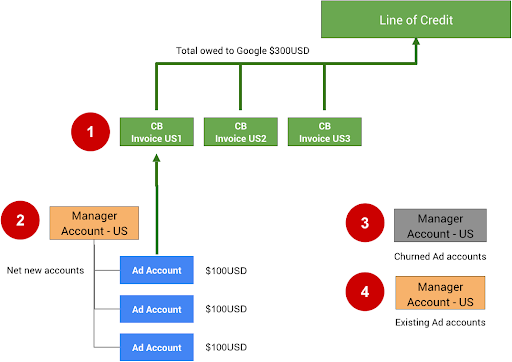
以下附註對應上圖中的數字:
合併帳單 (CB) 最多可新增 15,000 個帳戶或月結單。如果第一個合併帳單 (CB US1) 達到 15, 000 筆應付憑據或帳戶,所有即將產生的應付憑據或帳戶都應加入 CB US2。
如要為管理員帳戶設定合併帳單,請填寫合併帳單申請表。你必須先向 Google 申請並獲得核准信用額度。如果還沒有,請透過「與 Google 聯絡」表單申請。
閒置帳戶 (已流失) 可以移至其他管理員帳戶。 分開使用這些帳戶有助於避免超出 15,000 個的限制。為防範未然,建議您移除這些帳戶的預算訂單,這樣一來,除非手動重新啟用,否則這些帳戶就無法繼續支出。
如果您的整合服務允許使用者使用現有 Google Ads 帳戶,請為這些帳戶建立個別的管理員帳戶。現有帳戶不應使用合併帳單,因為這些帳戶可能已在其他廣告活動類型中支出費用,而且可能已設定直接付款。
如要直接在 Google Ads 使用者介面中設定合併帳單,請按照「設定合併帳單」一文中的操作說明。
技術指南
如要使用 API 設定及管理商家 Google Ads 帳戶的帳單,請使用 BillingSetup 資源來取得及管理帳戶層級的帳單設定。帳單設定是指付款帳戶與特定 Google Ads 帳戶之間的關聯。這項設定實際上決定了誰要支付廣告主帳戶的費用。按照帳單設定操作說明操作。
管理帳戶預算
帳戶預算會定義帳戶層級的預算屬性,例如開始時間、結束時間和支出上限。如要變更帳戶預算,請分別提交帳戶預算提案,提案經過審查並核准後,就會成為帳戶預算。使用 AccountBudgetProposal 資源建立新的 AccountBudgets 或更新現有資源。
下列範例說明如何建立新的預算提案:
Java
private void runExample(GoogleAdsClient googleAdsClient, long customerId, long billingSetupId) { // Creates an AccountBudgetProposal. This will be reviewed offline by Google Ads, and if // approved will become an AccountBudget. AccountBudgetProposal proposal = AccountBudgetProposal.newBuilder() .setBillingSetup(ResourceNames.billingSetup(customerId, billingSetupId)) .setProposalType(AccountBudgetProposalType.CREATE) .setProposedName("Account Budget (example)") // Specifies the account budget starts immediately. .setProposedStartTimeType(TimeType.NOW) // Alternatively you can specify a specific start time. Refer to the // AccountBudgetProposal // resource documentation for allowed formats. // // .setProposedStartDateTime("2020-01-02 03:04:05") // Specifies that the budget runs forever. .setProposedEndTimeType(TimeType.FOREVER) // Alternatively you can specify a specific end time. Allowed formats are as above. // .setProposedEndDateTime("2021-02-03 04:05:06") // Optional: sets notes for the budget. These are free text and do not effect budget // delivery. // .setProposedNotes("Received prepayment of $0.01") // Sets the spending limit to 0.01, measured in the Google Ads account currency. .setProposedSpendingLimitMicros(10_000) // Optional: sets PO number for record keeping. This value is at the user's // discretion, and has no effect on Google Billing & Payments. // .setProposedPurchaseOrderNumber("PO number 12345") .build(); // Creates an operation which will add the new AccountBudgetProposal. AccountBudgetProposalOperation operation = AccountBudgetProposalOperation.newBuilder().setCreate(proposal).build(); try (AccountBudgetProposalServiceClient accountBudgetProposalServiceClient = googleAdsClient.getLatestVersion().createAccountBudgetProposalServiceClient()) { // Sends the request to the Account Budget Proposal Service. MutateAccountBudgetProposalResponse response = accountBudgetProposalServiceClient.mutateAccountBudgetProposal( String.valueOf(customerId), operation); System.out.printf( "Account budget proposal created: %s.%n", response.getResult().getResourceName()); } }
C#
public void Run(GoogleAdsClient client, long customerId, long billingSetupId) { // Get the AccountBudgetProposalServiceClient. AccountBudgetProposalServiceClient proposalService = client.GetService(Services.V26.AccountBudgetProposalService); // Create an AccountBudgetProposal. The proposal will be reviewed offline by Google Ads, // and if approved will become an AccountBudget. AccountBudgetProposal proposal = new AccountBudgetProposal() { BillingSetup = ResourceNames.BillingSetup(customerId, billingSetupId), ProposalType = AccountBudgetProposalType.Create, ProposedName = "Account Budget (example)", // Specify the account budget starts immediately ProposedStartTimeType = TimeType.Now, // Alternatively, you can specify a specific start time. Refer to the // AccountBudgetProposal resource documentation for allowed formats. // //ProposedStartDateTime = "2020-01-02 03:04:05", // Specify that the budget runs forever. ProposedEndTimeType = TimeType.Forever, // Alternatively you can specify a specific end time. Allowed formats are as above. //ProposedEndDateTime = "2021-02-03 04:05:06", // Optional: set notes for the budget. These are free text and do not effect budget // delivery. //ProposedNotes = "Received prepayment of $0.01", // Set the spending limit to 0.01, measured in the Google Ads account currency. ProposedSpendingLimitMicros = 10_000 // Optional: set PO number for record keeping. This value is at the user's // discretion, and has no effect on Google Billing & Payments. //ProposedPurchaseOrderNumber = "PO number 12345" }; // Create an operation which will add the new AccountBudgetProposal AccountBudgetProposalOperation operation = new AccountBudgetProposalOperation() { Create = proposal }; try { // Send the request to the Account Budget Proposal Service. MutateAccountBudgetProposalResponse response = proposalService. MutateAccountBudgetProposal(customerId.ToString(), operation); // Display the results. Console.WriteLine($"Account budget proposal '{response.Result.ResourceName}' " + "was created."); } catch (GoogleAdsException e) { Console.WriteLine("Failure:"); Console.WriteLine($"Message: {e.Message}"); Console.WriteLine($"Failure: {e.Failure}"); Console.WriteLine($"Request ID: {e.RequestId}"); throw; } }
PHP
public static function runExample( GoogleAdsClient $googleAdsClient, int $customerId, int $billingSetupId ) { // Constructs an account budget proposal. $accountBudgetProposal = new AccountBudgetProposal([ 'billing_setup' => ResourceNames::forBillingSetup($customerId, $billingSetupId), 'proposal_type' => AccountBudgetProposalType::CREATE, 'proposed_name' => 'Account Budget (example)', // Specifies the account budget starts immediately. 'proposed_start_time_type' => TimeType::NOW, // Alternatively you can specify a specific start time. Refer to the // AccountBudgetProposal class for allowed formats. // // 'proposed_start_date_time' => '2020-01-02 03:04:05', // Specify that the budget runs forever. 'proposed_end_time_type' => TimeType::FOREVER, // Alternatively you can specify a specific end time. Allowed formats are as above. // 'proposed_end_date_time' => '2021-02-03 04:05:06', // Optional: set notes for the budget. These are free text and do not effect budget // delivery. // 'proposed_notes' => 'Received prepayment of $0.01', // Optional: set PO number for record keeping. This value is at the user's // discretion, and has no effect on Google Billing & Payments. // 'proposed_purchase_order_number' => 'PO number 12345', // Set the spending limit to 0.01, measured in the Google Ads account currency. 'proposed_spending_limit_micros' => 10000 ]); $accountBudgetProposalOperation = new AccountBudgetProposalOperation(); $accountBudgetProposalOperation->setCreate($accountBudgetProposal); // Issues a mutate request to add the account budget proposal. $accountBudgetProposalServiceClient = $googleAdsClient->getAccountBudgetProposalServiceClient(); $response = $accountBudgetProposalServiceClient->mutateAccountBudgetProposal( MutateAccountBudgetProposalRequest::build($customerId, $accountBudgetProposalOperation) ); printf( "Added an account budget proposal with resource name '%s'.%s", $response->getResult()->getResourceName(), PHP_EOL ); }
Python
def main(client: GoogleAdsClient, customer_id: str, billing_setup_id: str): account_budget_proposal_service = client.get_service( "AccountBudgetProposalService" ) billing_setup_service = client.get_service("BillingSetupService") account_budget_proposal_operation = client.get_type( "AccountBudgetProposalOperation" ) proposal = account_budget_proposal_operation.create proposal.proposal_type = client.enums.AccountBudgetProposalTypeEnum.CREATE proposal.billing_setup = billing_setup_service.billing_setup_path( customer_id, billing_setup_id ) proposal.proposed_name = "Account Budget Proposal (example)" # Specify the account budget starts immediately proposal.proposed_start_time_type = client.enums.TimeTypeEnum.NOW # Alternatively you can specify a specific start time. Refer to the # AccountBudgetProposal resource documentation for allowed formats. # # proposal.proposed_start_date_time = '2020-01-02 03:04:05' # Specify that the budget runs forever proposal.proposed_end_time_type = client.enums.TimeTypeEnum.FOREVER # Alternatively you can specify a specific end time. Allowed formats are as # above. # # proposal.proposed_end_date_time = '2021-01-02 03:04:05' # Optional: set notes for the budget. These are free text and do not effect # budget delivery. # # proposal.proposed_notes = 'Received prepayment of $0.01' proposal.proposed_spending_limit_micros = 10000 account_budget_proposal_response = ( account_budget_proposal_service.mutate_account_budget_proposal( customer_id=customer_id, operation=account_budget_proposal_operation, ) ) print( "Created account budget proposal " f'"{account_budget_proposal_response.result.resource_name}".' )
Ruby
def add_account_budget_proposal(customer_id, billing_setup_id) # GoogleAdsClient will read a config file from # ENV['HOME']/google_ads_config.rb when called without parameters client = Google::Ads::GoogleAds::GoogleAdsClient.new operation = client.operation.create_resource.account_budget_proposal do |proposal| proposal.billing_setup = client.path.billing_setup(customer_id, billing_setup_id) proposal.proposal_type = :CREATE proposal.proposed_name = 'Account Budget (example)' # Specify the account budget starts immediately proposal.proposed_start_time_type = :NOW # Alternatively you can specify a specific start time. Refer to the # AccountBudgetProposal resource documentation for allowed formats. # # proposal.proposed_start_date_time = '2020-01-02 03:04:05' # Specify that the budget runs forever. proposal.proposed_end_time_type = :FOREVER # Alternatively you can specify a specific end time. Allowed formats are as # above. # # proposal.proposed_end_date_time = '2021-01-02 03:04:05' # Optional: set notes for the budget. These are free text and do not affect # budget delivery. # # proposal.proposed_notes = 'Received prepayment of $0.01' # Set the spending limit to 0.01, measured in the Google Ads account currency. proposal.proposed_spending_limit_micros = 10_000 end account_budget_proposal_service = client.service.account_budget_proposal # Add budget proposal. response = account_budget_proposal_service.mutate_account_budget_proposal( customer_id: customer_id, operation: operation, ) puts sprintf("Created budget proposal %s.", response.results.first.resource_name) end
Perl
sub add_account_budget_proposal { my ($api_client, $customer_id, $billing_setup_id) = @_; # Create an account budget proposal. my $account_budget_proposal = Google::Ads::GoogleAds::V26::Resources::AccountBudgetProposal->new({ billingSetup => Google::Ads::GoogleAds::V26::Utils::ResourceNames::billing_setup( $customer_id, $billing_setup_id ), proposalType => CREATE, proposedName => "Account Budget (example)", # Specify that the account budget starts immediately. proposedStartTimeType => NOW, # Alternatively you can specify a specific start time. Refer to the # AccountBudgetProposal class for allowed formats. # # proposedStartDateTime => "2020-01-02 03:04:05", # Specify that the account budget runs forever. proposedEndDateTime => FOREVER, # Alternatively you can specify a specific end time. Allowed formats are as below. # proposedEndDateTime => "2021-02-03 04:05:06", # Optional: set notes for the budget. These are free text and do not effect budget # delivery. # proposedNotes => "Received prepayment of $0.01", # Optional: set PO number for record keeping. This value is at the user's # discretion, and has no effect on Google Billing & Payments. # proposedPurchaseOrderNumber => "PO number 12345", # Set the spending limit to 0.01, measured in the Google Ads account currency. proposedSpendingLimitMicros => 10000 }); # Create an account budget proposal operation. my $account_budget_proposal_operation = Google::Ads::GoogleAds::V26::Services::AccountBudgetProposalService::AccountBudgetProposalOperation ->new({ create => $account_budget_proposal }); # Add the account budget proposal. my $account_budget_proposal_response = $api_client->AccountBudgetProposalService()->mutate({ customerId => $customer_id, operation => $account_budget_proposal_operation }); printf "Created account budget proposal '%s'.\n", $account_budget_proposal_response->{result}{resourceName}; return 1; }
curl
如要更新帳戶預算,請使用 AccountBudgetProposalService 管理預算參數。最常見的管理作業是更新支出上限和日期時間欄位。如需可變動欄位的完整清單,請參閱 AccountBudgetProposal。以下範例說明如何更新現有帳戶預算的建議支出上限。
Java
private void runExample(GoogleAdsClient googleAdsClient, long customerId, long billingSetupId) { // Creates an AccountBudgetProposal. This will be reviewed offline by Google Ads, and if // approved will become an AccountBudget. AccountBudgetProposal proposal = AccountBudgetProposal.newBuilder() .setBillingSetup(ResourceNames.billingSetup(customerId, billingSetupId)) .setProposalType(AccountBudgetProposalType.CREATE) .setProposedName("Account Budget (example)") // Specifies the account budget starts immediately. .setProposedStartTimeType(TimeType.NOW) // Alternatively you can specify a specific start time. Refer to the // AccountBudgetProposal // resource documentation for allowed formats. // // .setProposedStartDateTime("2020-01-02 03:04:05") // Specifies that the budget runs forever. .setProposedEndTimeType(TimeType.FOREVER) // Alternatively you can specify a specific end time. Allowed formats are as above. // .setProposedEndDateTime("2021-02-03 04:05:06") // Optional: sets notes for the budget. These are free text and do not effect budget // delivery. // .setProposedNotes("Received prepayment of $0.01") // Sets the spending limit to 0.01, measured in the Google Ads account currency. .setProposedSpendingLimitMicros(10_000) // Optional: sets PO number for record keeping. This value is at the user's // discretion, and has no effect on Google Billing & Payments. // .setProposedPurchaseOrderNumber("PO number 12345") .build(); // Creates an operation which will add the new AccountBudgetProposal. AccountBudgetProposalOperation operation = AccountBudgetProposalOperation.newBuilder().setCreate(proposal).build(); try (AccountBudgetProposalServiceClient accountBudgetProposalServiceClient = googleAdsClient.getLatestVersion().createAccountBudgetProposalServiceClient()) { // Sends the request to the Account Budget Proposal Service. MutateAccountBudgetProposalResponse response = accountBudgetProposalServiceClient.mutateAccountBudgetProposal( String.valueOf(customerId), operation); System.out.printf( "Account budget proposal created: %s.%n", response.getResult().getResourceName()); } }
C#
public void Run(GoogleAdsClient client, long customerId, long billingSetupId) { // Get the AccountBudgetProposalServiceClient. AccountBudgetProposalServiceClient proposalService = client.GetService(Services.V26.AccountBudgetProposalService); // Create an AccountBudgetProposal. The proposal will be reviewed offline by Google Ads, // and if approved will become an AccountBudget. AccountBudgetProposal proposal = new AccountBudgetProposal() { BillingSetup = ResourceNames.BillingSetup(customerId, billingSetupId), ProposalType = AccountBudgetProposalType.Create, ProposedName = "Account Budget (example)", // Specify the account budget starts immediately ProposedStartTimeType = TimeType.Now, // Alternatively, you can specify a specific start time. Refer to the // AccountBudgetProposal resource documentation for allowed formats. // //ProposedStartDateTime = "2020-01-02 03:04:05", // Specify that the budget runs forever. ProposedEndTimeType = TimeType.Forever, // Alternatively you can specify a specific end time. Allowed formats are as above. //ProposedEndDateTime = "2021-02-03 04:05:06", // Optional: set notes for the budget. These are free text and do not effect budget // delivery. //ProposedNotes = "Received prepayment of $0.01", // Set the spending limit to 0.01, measured in the Google Ads account currency. ProposedSpendingLimitMicros = 10_000 // Optional: set PO number for record keeping. This value is at the user's // discretion, and has no effect on Google Billing & Payments. //ProposedPurchaseOrderNumber = "PO number 12345" }; // Create an operation which will add the new AccountBudgetProposal AccountBudgetProposalOperation operation = new AccountBudgetProposalOperation() { Create = proposal }; try { // Send the request to the Account Budget Proposal Service. MutateAccountBudgetProposalResponse response = proposalService. MutateAccountBudgetProposal(customerId.ToString(), operation); // Display the results. Console.WriteLine($"Account budget proposal '{response.Result.ResourceName}' " + "was created."); } catch (GoogleAdsException e) { Console.WriteLine("Failure:"); Console.WriteLine($"Message: {e.Message}"); Console.WriteLine($"Failure: {e.Failure}"); Console.WriteLine($"Request ID: {e.RequestId}"); throw; } }
PHP
public static function runExample( GoogleAdsClient $googleAdsClient, int $customerId, int $billingSetupId ) { // Constructs an account budget proposal. $accountBudgetProposal = new AccountBudgetProposal([ 'billing_setup' => ResourceNames::forBillingSetup($customerId, $billingSetupId), 'proposal_type' => AccountBudgetProposalType::CREATE, 'proposed_name' => 'Account Budget (example)', // Specifies the account budget starts immediately. 'proposed_start_time_type' => TimeType::NOW, // Alternatively you can specify a specific start time. Refer to the // AccountBudgetProposal class for allowed formats. // // 'proposed_start_date_time' => '2020-01-02 03:04:05', // Specify that the budget runs forever. 'proposed_end_time_type' => TimeType::FOREVER, // Alternatively you can specify a specific end time. Allowed formats are as above. // 'proposed_end_date_time' => '2021-02-03 04:05:06', // Optional: set notes for the budget. These are free text and do not effect budget // delivery. // 'proposed_notes' => 'Received prepayment of $0.01', // Optional: set PO number for record keeping. This value is at the user's // discretion, and has no effect on Google Billing & Payments. // 'proposed_purchase_order_number' => 'PO number 12345', // Set the spending limit to 0.01, measured in the Google Ads account currency. 'proposed_spending_limit_micros' => 10000 ]); $accountBudgetProposalOperation = new AccountBudgetProposalOperation(); $accountBudgetProposalOperation->setCreate($accountBudgetProposal); // Issues a mutate request to add the account budget proposal. $accountBudgetProposalServiceClient = $googleAdsClient->getAccountBudgetProposalServiceClient(); $response = $accountBudgetProposalServiceClient->mutateAccountBudgetProposal( MutateAccountBudgetProposalRequest::build($customerId, $accountBudgetProposalOperation) ); printf( "Added an account budget proposal with resource name '%s'.%s", $response->getResult()->getResourceName(), PHP_EOL ); }
Python
def main(client: GoogleAdsClient, customer_id: str, billing_setup_id: str): account_budget_proposal_service = client.get_service( "AccountBudgetProposalService" ) billing_setup_service = client.get_service("BillingSetupService") account_budget_proposal_operation = client.get_type( "AccountBudgetProposalOperation" ) proposal = account_budget_proposal_operation.create proposal.proposal_type = client.enums.AccountBudgetProposalTypeEnum.CREATE proposal.billing_setup = billing_setup_service.billing_setup_path( customer_id, billing_setup_id ) proposal.proposed_name = "Account Budget Proposal (example)" # Specify the account budget starts immediately proposal.proposed_start_time_type = client.enums.TimeTypeEnum.NOW # Alternatively you can specify a specific start time. Refer to the # AccountBudgetProposal resource documentation for allowed formats. # # proposal.proposed_start_date_time = '2020-01-02 03:04:05' # Specify that the budget runs forever proposal.proposed_end_time_type = client.enums.TimeTypeEnum.FOREVER # Alternatively you can specify a specific end time. Allowed formats are as # above. # # proposal.proposed_end_date_time = '2021-01-02 03:04:05' # Optional: set notes for the budget. These are free text and do not effect # budget delivery. # # proposal.proposed_notes = 'Received prepayment of $0.01' proposal.proposed_spending_limit_micros = 10000 account_budget_proposal_response = ( account_budget_proposal_service.mutate_account_budget_proposal( customer_id=customer_id, operation=account_budget_proposal_operation, ) ) print( "Created account budget proposal " f'"{account_budget_proposal_response.result.resource_name}".' )
Ruby
def add_account_budget_proposal(customer_id, billing_setup_id) # GoogleAdsClient will read a config file from # ENV['HOME']/google_ads_config.rb when called without parameters client = Google::Ads::GoogleAds::GoogleAdsClient.new operation = client.operation.create_resource.account_budget_proposal do |proposal| proposal.billing_setup = client.path.billing_setup(customer_id, billing_setup_id) proposal.proposal_type = :CREATE proposal.proposed_name = 'Account Budget (example)' # Specify the account budget starts immediately proposal.proposed_start_time_type = :NOW # Alternatively you can specify a specific start time. Refer to the # AccountBudgetProposal resource documentation for allowed formats. # # proposal.proposed_start_date_time = '2020-01-02 03:04:05' # Specify that the budget runs forever. proposal.proposed_end_time_type = :FOREVER # Alternatively you can specify a specific end time. Allowed formats are as # above. # # proposal.proposed_end_date_time = '2021-01-02 03:04:05' # Optional: set notes for the budget. These are free text and do not affect # budget delivery. # # proposal.proposed_notes = 'Received prepayment of $0.01' # Set the spending limit to 0.01, measured in the Google Ads account currency. proposal.proposed_spending_limit_micros = 10_000 end account_budget_proposal_service = client.service.account_budget_proposal # Add budget proposal. response = account_budget_proposal_service.mutate_account_budget_proposal( customer_id: customer_id, operation: operation, ) puts sprintf("Created budget proposal %s.", response.results.first.resource_name) end
Perl
sub add_account_budget_proposal { my ($api_client, $customer_id, $billing_setup_id) = @_; # Create an account budget proposal. my $account_budget_proposal = Google::Ads::GoogleAds::V26::Resources::AccountBudgetProposal->new({ billingSetup => Google::Ads::GoogleAds::V26::Utils::ResourceNames::billing_setup( $customer_id, $billing_setup_id ), proposalType => CREATE, proposedName => "Account Budget (example)", # Specify that the account budget starts immediately. proposedStartTimeType => NOW, # Alternatively you can specify a specific start time. Refer to the # AccountBudgetProposal class for allowed formats. # # proposedStartDateTime => "2020-01-02 03:04:05", # Specify that the account budget runs forever. proposedEndDateTime => FOREVER, # Alternatively you can specify a specific end time. Allowed formats are as below. # proposedEndDateTime => "2021-02-03 04:05:06", # Optional: set notes for the budget. These are free text and do not effect budget # delivery. # proposedNotes => "Received prepayment of $0.01", # Optional: set PO number for record keeping. This value is at the user's # discretion, and has no effect on Google Billing & Payments. # proposedPurchaseOrderNumber => "PO number 12345", # Set the spending limit to 0.01, measured in the Google Ads account currency. proposedSpendingLimitMicros => 10000 }); # Create an account budget proposal operation. my $account_budget_proposal_operation = Google::Ads::GoogleAds::V26::Services::AccountBudgetProposalService::AccountBudgetProposalOperation ->new({ create => $account_budget_proposal }); # Add the account budget proposal. my $account_budget_proposal_response = $api_client->AccountBudgetProposalService()->mutate({ customerId => $customer_id, operation => $account_budget_proposal_operation }); printf "Created account budget proposal '%s'.\n", $account_budget_proposal_response->{result}{resourceName}; return 1; }
curl
如要終止有效帳戶預算,請傳送含有 AccountBudgetProposalType.END 的提案,將結束時間設為目前時間。
開立月結單
廣告主啟用後,系統會每月開立月結單。應付憑據包含調整項、法規費用、稅金和帳戶預算等詳細資料,且可下載為 PDF 檔案。管理員通常會使用這些帳戶自動對帳,以處理自己的客戶月結單。如要啟用月結付款,請準備下列項目:
Google Ads 帳戶已啟用月結。請參閱帳戶帳單設定和預算指南,瞭解如何使用 Google Ads API 管理帳單。
如果已設定,
login-customer-id必須指定管理員帳戶的客戶 ID,該帳戶會管理您要擷取月結單的 Google Ads 帳戶。在 Google Ads 使用者介面中,這會標示為「付款管理員」。
使用 InvoiceService 擷取月結單資料的 Invoice 資源。要求 InvoiceService.ListInvoices 方法,並在 ListInvoicesRequest 中設定所有必要欄位:customer_id、billing_setup、issue_year 和 issue_month。以下範例說明如何提出這項要求:
Java
// Issues the request. ListInvoicesResponse response = invoiceServiceClient.listInvoices( String.valueOf(customerId), ResourceNames.billingSetup(customerId, billingSetupId), String.valueOf(oneMonthAgo.getYear()), MonthOfYear.valueOf(oneMonthAgo.getMonth().toString()));
C#
ListInvoicesResponse response = invoiceServiceClient.ListInvoices(customerId.ToString(), ResourceNames.BillingSetup(customerId, billingSetupId), // Year must be 2019 or later. lastMonthDateTime.Year.ToString("yyyy"), lastMonth);
PHP
// Issues the request. $response = $googleAdsClient->getInvoiceServiceClient()->listInvoices( ListInvoicesRequest::build( $customerId, ResourceNames::forBillingSetup($customerId, $billingSetupId), // The year needs to be 2019 or later. date('Y', $lastMonth), MonthOfYear::value(strtoupper(date('F', $lastMonth))) ) );
Python
# Issues a request to list invoices. response = client.get_service("InvoiceService").list_invoices( customer_id=customer_id, billing_setup=client.get_service("GoogleAdsService").billing_setup_path( customer_id, billing_setup_id ), # The year needs to be 2019 or later, per the docs: # https://developers.google.com/google-ads/api/docs/billing/invoice?hl=en#retrieving_invoices issue_year=str(last_month.year), issue_month=last_month.strftime("%B").upper(), )
Ruby
# Issues a request to list invoices. response = client.service.invoice.list_invoices( customer_id: customer_id, billing_setup: client.path.billing_setup(customer_id, billing_setup_id), # The year needs to be 2019 or later. issue_year: last_month.year.to_s, # '%^B' option returns the uppercased full month name (e.g. 'JANUARY'). issue_month: last_month.strftime("%^B").to_sym, )
Perl
# Issue the request. my $response = $api_client->InvoiceService()->list({ customerId => $customer_id, billingSetup => Google::Ads::GoogleAds::V26::Utils::ResourceNames::billing_setup( ($customer_id, $billing_setup_id) ), # The year needs to be 2019 or later. issueYear => strftime("%Y", @last_month), issueMonth => uc(strftime("%B", @last_month))});
curl
回應是 ListInvoicesResponse 物件,其中包含相符 Invoices 的清單。月結單會合併所有 Google Ads 帳戶的資料,這些帳戶的帳單設定與所要求的帳單設定使用相同的付款帳戶。只有在基礎付款帳戶符合合併結帳資格時,才會發生這種情況。