

您必须在 Google Ads 转化账号中启用转化跟踪,才能记录转化。本指南详细介绍了如何确认是否已启用转化跟踪,如果尚未启用,则启用转化跟踪,以及如何检索有关现有转化操作的信息。
大多数转化操作还需要您执行其他步骤才能跟踪。如需详细了解各种转化操作类型及其 要求,请参阅转化操作类别和 创建转化操作。
准备提供用户意见征求
导入转化数据或用户数据时,您必须确认自己有权与 Google 共享转化数据。您可以使用以下两种方式之一来执行此操作:
- 配置账号级默认用户意见征求设置。在 Google Ads 界面中,依次点击 工具 > 数据管理器 > 用户意见征求设置 > 默认用户意见征求设置。
- 在每个导入的转化数据或用户数据载荷中设置用户意见征求字段(例如
ClickConversion.consent、CallConversion.consent或UserData.consent)。
设置网站以跟踪转化
如果您要跟踪网站转化情况或为潜在客户实现增强型转化,请先配置网站代码植入。按照 为增强型潜在客户转化配置 Google 代码中的步骤操作, 或者按照为增强型潜在客户转化配置 增强型潜在客户转化中的步骤使用 Google 跟踪代码管理器。
在 Google Ads 转化账号中启用转化跟踪
请按照以下步骤验证账号的转化跟踪设置,并创建或检索转化操作。
启用转化跟踪的步骤
检索有关转化跟踪设置的信息
您可以查询 Customer 资源的
ConversionTrackingSetting,以检查账号的转化跟踪设置并确认是否已启用转化跟踪。使用
GoogleAdsService.SearchStream发出以下查询:
SELECT
  customer.conversion_tracking_setting.google_ads_conversion_customer,
  customer.conversion_tracking_setting.conversion_tracking_status,
  customer.conversion_tracking_setting.conversion_tracking_id,
  customer.conversion_tracking_setting.cross_account_conversion_tracking_id
FROM customer
google_ads_conversion_customer 字段表示为该客户创建和管理转化的 Google Ads 账号。对于使用
跨账号转化
跟踪的客户,这是经理账号的 ID
。在 Google Ads API 请求中,应将 Google Ads 转化客户 ID 作为 customer_id 提供,以创建和管理转化。请注意,即使未启用转化跟踪,系统也会填充此字段。
The
conversion_tracking_status
字段表示是否已启用转化跟踪,以及账号
是否在使用跨账号转化跟踪。
在 Google Ads 转化客户下创建转化操作
如果 conversion_tracking_status 值为 NOT_CONVERSION_TRACKED,则表示账号未启用转化跟踪。若要启用转化跟踪
,请在 Google Ads 转化账号中创建至少一个 ConversionAction,如以下示例所示。或者,您
也可以按照
Google Ads 帮助中心文章中有关要启用的转化类型的转化跟踪
设置的说明,在界面中创建转化操作。
请注意,通过 Google Ads API 发送增强型转化时,系统会自动启用增强型转化,但您可以通过 Google Ads 界面停用增强型转化。
代码示例
Java
private void runExample(GoogleAdsClient googleAdsClient, long customerId) { // Creates a ConversionAction. ConversionAction conversionAction = ConversionAction.newBuilder() // Note that conversion action names must be unique. If a conversion action already // exists with the specified conversion_action_name the create operation will fail with // a ConversionActionError.DUPLICATE_NAME error. .setName("Earth to Mars Cruises Conversion #" + getPrintableDateTime()) .setCategory(ConversionActionCategory.DEFAULT) .setType(ConversionActionType.WEBPAGE) .setStatus(ConversionActionStatus.ENABLED) .setViewThroughLookbackWindowDays(15L) .setValueSettings( ValueSettings.newBuilder() .setDefaultValue(23.41) .setAlwaysUseDefaultValue(true) .build()) .build(); // Creates the operation. ConversionActionOperation operation = ConversionActionOperation.newBuilder().setCreate(conversionAction).build(); try (ConversionActionServiceClient conversionActionServiceClient = googleAdsClient.getLatestVersion().createConversionActionServiceClient()) { MutateConversionActionsResponse response = conversionActionServiceClient.mutateConversionActions( Long.toString(customerId), Collections.singletonList(operation)); System.out.printf("Added %d conversion actions:%n", response.getResultsCount()); for (MutateConversionActionResult result : response.getResultsList()) { System.out.printf( "New conversion action added with resource name: '%s'%n", result.getResourceName()); } } }
C#
public void Run(GoogleAdsClient client, long customerId) { // Get the ConversionActionService. ConversionActionServiceClient conversionActionService = client.GetService(Services.V26.ConversionActionService); // Note that conversion action names must be unique. // If a conversion action already exists with the specified name the create operation // will fail with a ConversionAction.DUPLICATE_NAME error. string ConversionActionName = "Earth to Mars Cruises Conversion #" + ExampleUtilities.GetRandomString(); // Add a conversion action. ConversionAction conversionAction = new ConversionAction() { Name = ConversionActionName, Category = ConversionActionCategory.Default, Type = ConversionActionType.Webpage, Status = ConversionActionStatus.Enabled, ViewThroughLookbackWindowDays = 15, ValueSettings = new ConversionAction.Types.ValueSettings() { DefaultValue = 23.41, AlwaysUseDefaultValue = true } }; // Create the operation. ConversionActionOperation operation = new ConversionActionOperation() { Create = conversionAction }; try { // Create the conversion action. MutateConversionActionsResponse response = conversionActionService.MutateConversionActions(customerId.ToString(), new ConversionActionOperation[] { operation }); // Display the results. foreach (MutateConversionActionResult newConversionAction in response.Results) { Console.WriteLine($"New conversion action with resource name = " + $"'{newConversionAction.ResourceName}' was added."); } } catch (GoogleAdsException e) { Console.WriteLine("Failure:"); Console.WriteLine($"Message: {e.Message}"); Console.WriteLine($"Failure: {e.Failure}"); Console.WriteLine($"Request ID: {e.RequestId}"); throw; } }
PHP
public static function runExample(GoogleAdsClient $googleAdsClient, int $customerId) { // Creates a conversion action. $conversionAction = new ConversionAction( [ // Note that conversion action names must be unique. // If a conversion action already exists with the specified conversion_action_name // the create operation will fail with a ConversionActionError.DUPLICATE_NAME error. 'name' => 'Earth to Mars Cruises Conversion #' . Helper::getPrintableDatetime(), 'category' => ConversionActionCategory::PBDEFAULT, 'type' => ConversionActionType::WEBPAGE, 'status' => ConversionActionStatus::ENABLED, 'view_through_lookback_window_days' => 15, 'value_settings' => new ValueSettings( [ 'default_value' => 23.41, 'always_use_default_value' => true ] ) ] ); // Creates a conversion action operation. $conversionActionOperation = new ConversionActionOperation(); $conversionActionOperation->setCreate($conversionAction); // Issues a mutate request to add the conversion action. $conversionActionServiceClient = $googleAdsClient->getConversionActionServiceClient(); $response = $conversionActionServiceClient->mutateConversionActions( MutateConversionActionsRequest::build($customerId, [$conversionActionOperation]) ); printf("Added %d conversion actions:%s", $response->getResults()->count(), PHP_EOL); foreach ($response->getResults() as $addedConversionAction) { /** * @var ConversionAction $addedConversionAction */ printf( "New conversion action added with resource name: '%s'%s", $addedConversionAction->getResourceName(), PHP_EOL ); } }
Python
def main(client: GoogleAdsClient, customer_id: str) -> None: conversion_action_service: ConversionActionServiceClient = ( client.get_service("ConversionActionService") ) # Create the operation. conversion_action_operation: ConversionActionOperation = client.get_type( "ConversionActionOperation" ) # Create conversion action. conversion_action: ConversionAction = conversion_action_operation.create # Note that conversion action names must be unique. If a conversion action # already exists with the specified conversion_action_name, the create # operation will fail with a ConversionActionError.DUPLICATE_NAME error. conversion_action.name = f"Earth to Mars Cruises Conversion {uuid.uuid4()}" conversion_action.type_ = ( client.enums.ConversionActionTypeEnum.UPLOAD_CLICKS ) conversion_action.category = ( client.enums.ConversionActionCategoryEnum.DEFAULT ) conversion_action.status = client.enums.ConversionActionStatusEnum.ENABLED conversion_action.view_through_lookback_window_days = 15 # Create a value settings object. value_settings: ConversionAction.ValueSettings = ( conversion_action.value_settings ) value_settings.default_value = 15.0 value_settings.always_use_default_value = True # Add the conversion action. conversion_action_response: MutateConversionActionsResponse = ( conversion_action_service.mutate_conversion_actions( customer_id=customer_id, operations=[conversion_action_operation], ) ) print( "Created conversion action " f'"{conversion_action_response.results[0].resource_name}".' )
Ruby
def add_conversion_action(customer_id) # GoogleAdsClient will read a config file from # ENV['HOME']/google_ads_config.rb when called without parameters client = Google::Ads::GoogleAds::GoogleAdsClient.new # Add a conversion action. conversion_action = client.resource.conversion_action do |ca| ca.name = "Earth to Mars Cruises Conversion #{(Time.new.to_f * 100).to_i}" ca.type = :UPLOAD_CLICKS ca.category = :DEFAULT ca.status = :ENABLED ca.view_through_lookback_window_days = 15 # Create a value settings object. ca.value_settings = client.resource.value_settings do |vs| vs.default_value = 15 vs.always_use_default_value = true end end # Create the operation. conversion_action_operation = client.operation.create_resource.conversion_action(conversion_action) # Add the ad group ad. response = client.service.conversion_action.mutate_conversion_actions( customer_id: customer_id, operations: [conversion_action_operation], ) puts "New conversion action with resource name = #{response.results.first.resource_name}." end
Perl
sub add_conversion_action { my ($api_client, $customer_id) = @_; # Note that conversion action names must be unique. # If a conversion action already exists with the specified conversion_action_name, # the create operation fails with error ConversionActionError.DUPLICATE_NAME. my $conversion_action_name = "Earth to Mars Cruises Conversion #" . uniqid(); # Create a conversion action. my $conversion_action = Google::Ads::GoogleAds::V26::Resources::ConversionAction->new({ name => $conversion_action_name, category => DEFAULT, type => WEBPAGE, status => ENABLED, viewThroughLookbackWindowDays => 15, valueSettings => Google::Ads::GoogleAds::V26::Resources::ValueSettings->new({ defaultValue => 23.41, alwaysUseDefaultValue => "true" })}); # Create a conversion action operation. my $conversion_action_operation = Google::Ads::GoogleAds::V26::Services::ConversionActionService::ConversionActionOperation ->new({create => $conversion_action}); # Add the conversion action. my $conversion_actions_response = $api_client->ConversionActionService()->mutate({ customerId => $customer_id, operations => [$conversion_action_operation]}); printf "New conversion action added with resource name: '%s'.\n", $conversion_actions_response->{results}[0]{resourceName}; return 1; }
curl
确保 type
设置为正确的
ConversionActionType
值。如需详细了解如何在 Google Ads API 中创建转化操作,请参阅
创建
转化操作。
检索现有转化操作
您可以发出以下查询,以检索现有转化操作的详细信息。确保请求中的客户 ID 设置为您之前确定的 Google Ads
转化客户,并且转化操作类型
设置为正确的
ConversionActionType
值。
SELECT
  conversion_action.id,
  conversion_action.resource_name,
  conversion_action.name,
  conversion_action.type,
  conversion_action.category,
  conversion_action.status
FROM conversion_action

WHERE conversion_action.type = 'INSERT_CONVERSION_ACTION_TYPE'
跨账号转化跟踪
借助跨账号转化跟踪,Google Ads 账号可以代表其他账号导入转化数据,这些账号可能投放了促成转化的广告。这有助于简化集成,因为您可以整合发出导入请求的账号。
在 Google Ads API 中启用跨账号转化跟踪
您可以在创建或更新客户账号时使用 Google Ads API 选择启用跨账号转化跟踪。
在 Customer 资源中,将
conversion_tracking_setting.google_ads_conversion_customer
字段设置为应
代表客户账号管理转化操作的经理账号的 资源名称。
修改客户账号的转化客户的请求必须由将成为客户的新转化客户的经理账号发送。
为此,请将 login-customer-id 设置为经理账号
ID。
当您选择启用跨账号转化跟踪,或为现有客户账号切换转化 跟踪经理时,适用的注意事项与您在界面中进行此更改时相同 。具体而言:
- 客户账号将采用其新转化跟踪经理的默认转化价值规则和默认客户生命周期目标。
- 定位到特定转化操作的广告系列将改为使用转化经理账号的默认转化目标。如果您继续定位到特定转化操作,可能会产生不一致的行为,因为经理账号与客户账号的目标可能有所不同。请确保您的广告系列针对正确的目标进行了优化。
- 如果某个账号属于多个经理账号,则该账号只能使用一个经理账号的转化操作。如果未指定转化跟踪账号,该账号将默认使用自身作为转化跟踪账号。
跨账号导入转化数据
启用跨账号跟踪后,客户账号和经理账号可以代表广告投放账号导入转化数据。这样一来,您就可以简化导入逻辑,无需在导入时确定每个转化的投放账号,只需从账号树中选择一个账号即可导入所有转化。
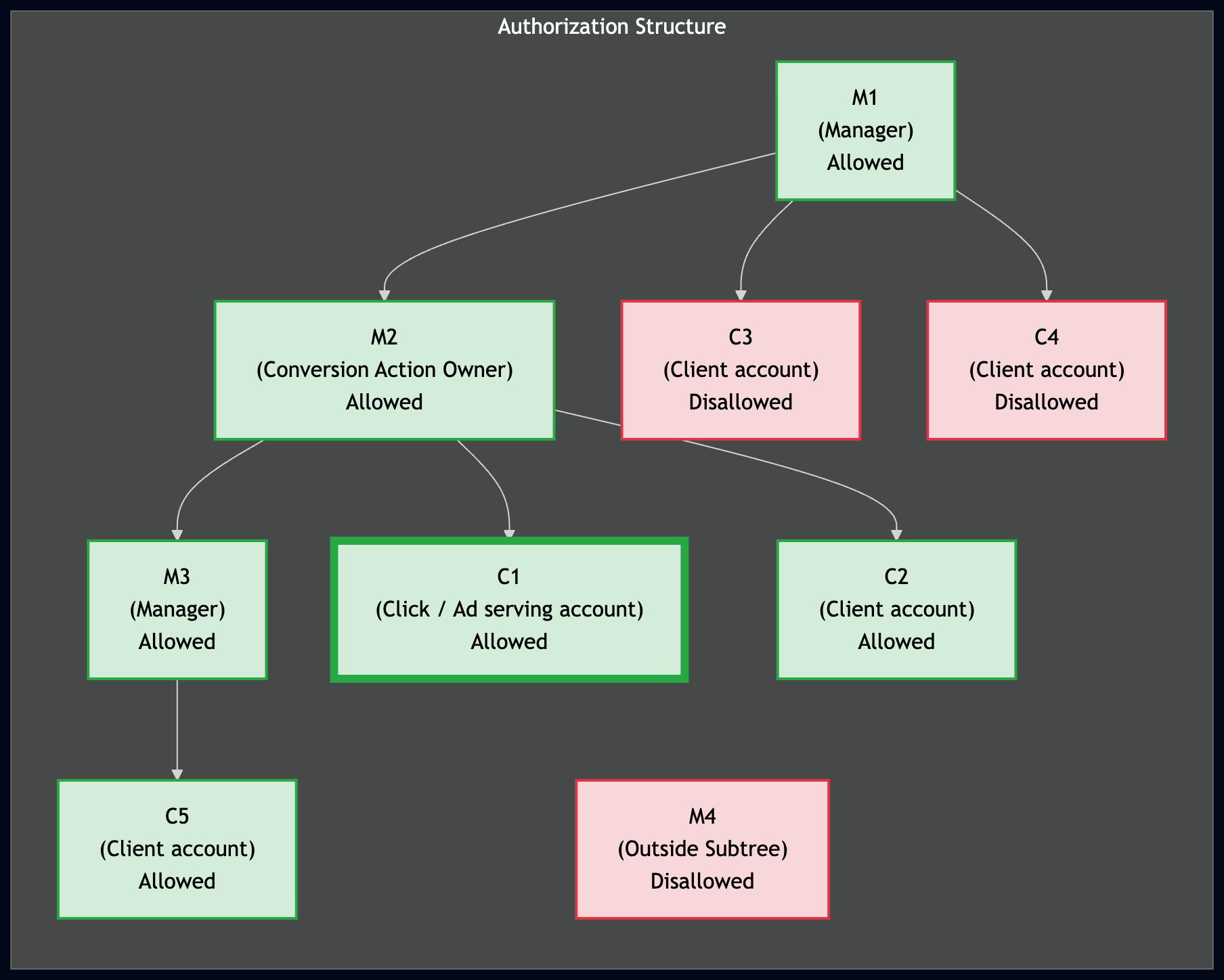
如需成功上传转化,上传账号必须有权访问转化操作。在跨账号跟踪层次结构中,如果上传账号是账号树中转化操作所有者的父级(经理)或子级,则该账号有权访问该操作。
下图展示了导入转化的授权结构。其中,C1 是投放促成转化的广告的客户账号,M2 是转化操作所有者,也是 C1 的转化跟踪父级。以绿色突出显示的账号可以代表 C1 导入转化,而以红色突出显示的账号则不能。
创建转化操作
如需衡量转化,请为您要跟踪的转化操作的
type设置ConversionAction。
例如,在线购买和来电需要不同的转化操作。
在 API 中设置新转化操作的最佳方式是使用
添加转化操作代码示例。该示例会为您处理所有
后台身份验证任务,并引导您创建
ConversionAction。
大多数转化操作还需要您执行其他步骤才能跟踪。例如,如需跟踪网站上的转化,您必须将一个名为代码的代码 段添加到网站上的转化页面。如需 详细了解其他转化操作类型的要求,请参阅我们的 Google Ads 帮助中心文章中的转化类型。
如果您使用的是 跨账号转化跟踪,
ConversionActionService 会返回以下
转化操作:
- 账号用于跨账号转化跟踪的经理账号定义的所有转化操作
- 客户已积累统计信息的所有转化操作,包括系统定义的操作和经理拥有的操作(即使该经理随后取消关联)
- 客户在自己的账号中定义的所有操作
- 在关联的 Google Analytics 媒体资源中创建的 Analytics 转化。
这包括未导入到 Google Ads 的 Analytics 转化操作,
其状态为
HIDDEN。
代码示例
以下代码示例将引导您完成创建新转化操作的过程。具体而言,它会创建一个
type 设置为 UPLOAD_CLICKS的转化操作。
它还会将 category 设置为
DEFAULT。
系统会应用以下默认设置:
Google Ads API 会自动设置
primary_for_goal字段 ,但您可以明确设置此字段,以控制转化操作与转化目标结合使用时对账号中的报告和出价的影响。Google Ads API 会自动将
counting_type设置为MANY_PER_CLICK。如需了解详情,请参阅 转化统计选项简介。Google Ads API 会通过 将
attribution_model_settings字段 设置为AttributionModel的GOOGLE_SEARCH_ATTRIBUTION_DATA_DRIVEN值,将归因模型设置为“以数据为依据”。如需详细了解归因模型,请参阅归因 模型简介。
Java
private void runExample(GoogleAdsClient googleAdsClient, long customerId) { // Creates a ConversionAction. ConversionAction conversionAction = ConversionAction.newBuilder() // Note that conversion action names must be unique. If a conversion action already // exists with the specified conversion_action_name the create operation will fail with // a ConversionActionError.DUPLICATE_NAME error. .setName("Earth to Mars Cruises Conversion #" + getPrintableDateTime()) .setCategory(ConversionActionCategory.DEFAULT) .setType(ConversionActionType.WEBPAGE) .setStatus(ConversionActionStatus.ENABLED) .setViewThroughLookbackWindowDays(15L) .setValueSettings( ValueSettings.newBuilder() .setDefaultValue(23.41) .setAlwaysUseDefaultValue(true) .build()) .build(); // Creates the operation. ConversionActionOperation operation = ConversionActionOperation.newBuilder().setCreate(conversionAction).build(); try (ConversionActionServiceClient conversionActionServiceClient = googleAdsClient.getLatestVersion().createConversionActionServiceClient()) { MutateConversionActionsResponse response = conversionActionServiceClient.mutateConversionActions( Long.toString(customerId), Collections.singletonList(operation)); System.out.printf("Added %d conversion actions:%n", response.getResultsCount()); for (MutateConversionActionResult result : response.getResultsList()) { System.out.printf( "New conversion action added with resource name: '%s'%n", result.getResourceName()); } } }
C#
public void Run(GoogleAdsClient client, long customerId) { // Get the ConversionActionService. ConversionActionServiceClient conversionActionService = client.GetService(Services.V26.ConversionActionService); // Note that conversion action names must be unique. // If a conversion action already exists with the specified name the create operation // will fail with a ConversionAction.DUPLICATE_NAME error. string ConversionActionName = "Earth to Mars Cruises Conversion #" + ExampleUtilities.GetRandomString(); // Add a conversion action. ConversionAction conversionAction = new ConversionAction() { Name = ConversionActionName, Category = ConversionActionCategory.Default, Type = ConversionActionType.Webpage, Status = ConversionActionStatus.Enabled, ViewThroughLookbackWindowDays = 15, ValueSettings = new ConversionAction.Types.ValueSettings() { DefaultValue = 23.41, AlwaysUseDefaultValue = true } }; // Create the operation. ConversionActionOperation operation = new ConversionActionOperation() { Create = conversionAction }; try { // Create the conversion action. MutateConversionActionsResponse response = conversionActionService.MutateConversionActions(customerId.ToString(), new ConversionActionOperation[] { operation }); // Display the results. foreach (MutateConversionActionResult newConversionAction in response.Results) { Console.WriteLine($"New conversion action with resource name = " + $"'{newConversionAction.ResourceName}' was added."); } } catch (GoogleAdsException e) { Console.WriteLine("Failure:"); Console.WriteLine($"Message: {e.Message}"); Console.WriteLine($"Failure: {e.Failure}"); Console.WriteLine($"Request ID: {e.RequestId}"); throw; } }
PHP
public static function runExample(GoogleAdsClient $googleAdsClient, int $customerId) { // Creates a conversion action. $conversionAction = new ConversionAction( [ // Note that conversion action names must be unique. // If a conversion action already exists with the specified conversion_action_name // the create operation will fail with a ConversionActionError.DUPLICATE_NAME error. 'name' => 'Earth to Mars Cruises Conversion #' . Helper::getPrintableDatetime(), 'category' => ConversionActionCategory::PBDEFAULT, 'type' => ConversionActionType::WEBPAGE, 'status' => ConversionActionStatus::ENABLED, 'view_through_lookback_window_days' => 15, 'value_settings' => new ValueSettings( [ 'default_value' => 23.41, 'always_use_default_value' => true ] ) ] ); // Creates a conversion action operation. $conversionActionOperation = new ConversionActionOperation(); $conversionActionOperation->setCreate($conversionAction); // Issues a mutate request to add the conversion action. $conversionActionServiceClient = $googleAdsClient->getConversionActionServiceClient(); $response = $conversionActionServiceClient->mutateConversionActions( MutateConversionActionsRequest::build($customerId, [$conversionActionOperation]) ); printf("Added %d conversion actions:%s", $response->getResults()->count(), PHP_EOL); foreach ($response->getResults() as $addedConversionAction) { /** * @var ConversionAction $addedConversionAction */ printf( "New conversion action added with resource name: '%s'%s", $addedConversionAction->getResourceName(), PHP_EOL ); } }
Python
def main(client: GoogleAdsClient, customer_id: str) -> None: conversion_action_service: ConversionActionServiceClient = ( client.get_service("ConversionActionService") ) # Create the operation. conversion_action_operation: ConversionActionOperation = client.get_type( "ConversionActionOperation" ) # Create conversion action. conversion_action: ConversionAction = conversion_action_operation.create # Note that conversion action names must be unique. If a conversion action # already exists with the specified conversion_action_name, the create # operation will fail with a ConversionActionError.DUPLICATE_NAME error. conversion_action.name = f"Earth to Mars Cruises Conversion {uuid.uuid4()}" conversion_action.type_ = ( client.enums.ConversionActionTypeEnum.UPLOAD_CLICKS ) conversion_action.category = ( client.enums.ConversionActionCategoryEnum.DEFAULT ) conversion_action.status = client.enums.ConversionActionStatusEnum.ENABLED conversion_action.view_through_lookback_window_days = 15 # Create a value settings object. value_settings: ConversionAction.ValueSettings = ( conversion_action.value_settings ) value_settings.default_value = 15.0 value_settings.always_use_default_value = True # Add the conversion action. conversion_action_response: MutateConversionActionsResponse = ( conversion_action_service.mutate_conversion_actions( customer_id=customer_id, operations=[conversion_action_operation], ) ) print( "Created conversion action " f'"{conversion_action_response.results[0].resource_name}".' )
Ruby
def add_conversion_action(customer_id) # GoogleAdsClient will read a config file from # ENV['HOME']/google_ads_config.rb when called without parameters client = Google::Ads::GoogleAds::GoogleAdsClient.new # Add a conversion action. conversion_action = client.resource.conversion_action do |ca| ca.name = "Earth to Mars Cruises Conversion #{(Time.new.to_f * 100).to_i}" ca.type = :UPLOAD_CLICKS ca.category = :DEFAULT ca.status = :ENABLED ca.view_through_lookback_window_days = 15 # Create a value settings object. ca.value_settings = client.resource.value_settings do |vs| vs.default_value = 15 vs.always_use_default_value = true end end # Create the operation. conversion_action_operation = client.operation.create_resource.conversion_action(conversion_action) # Add the ad group ad. response = client.service.conversion_action.mutate_conversion_actions( customer_id: customer_id, operations: [conversion_action_operation], ) puts "New conversion action with resource name = #{response.results.first.resource_name}." end
Perl
sub add_conversion_action { my ($api_client, $customer_id) = @_; # Note that conversion action names must be unique. # If a conversion action already exists with the specified conversion_action_name, # the create operation fails with error ConversionActionError.DUPLICATE_NAME. my $conversion_action_name = "Earth to Mars Cruises Conversion #" . uniqid(); # Create a conversion action. my $conversion_action = Google::Ads::GoogleAds::V26::Resources::ConversionAction->new({ name => $conversion_action_name, category => DEFAULT, type => WEBPAGE, status => ENABLED, viewThroughLookbackWindowDays => 15, valueSettings => Google::Ads::GoogleAds::V26::Resources::ValueSettings->new({ defaultValue => 23.41, alwaysUseDefaultValue => "true" })}); # Create a conversion action operation. my $conversion_action_operation = Google::Ads::GoogleAds::V26::Services::ConversionActionService::ConversionActionOperation ->new({create => $conversion_action}); # Add the conversion action. my $conversion_actions_response = $api_client->ConversionActionService()->mutate({ customerId => $customer_id, operations => [$conversion_action_operation]}); printf "New conversion action added with resource name: '%s'.\n", $conversion_actions_response->{results}[0]{resourceName}; return 1; }
curl
您可以在客户端库的 Remarketing 文件夹中 以及代码示例集合中查看此示例:添加转化操作代码 示例。
ConversionActionService.MutateConversionActions 字段参考文档
使用 MutateConversionActions 中的
ConversionActionService,以在 Google Ads 转化客户下创建、更新或
移除转化操作:
POST https://googleads.googleapis.com/v26/customers/{customer_id}/conversionActions:mutate
下表列出了
MutateConversionActionsRequest中的顶级请求和操作字段:
| 字段 | 要求 | 说明 |
|---|---|---|
customer_id |
必填 | Google Ads 转化客户 (google_ads_conversion_customer) 的 10 位数 ID (string),不含连字符。 |
partial_failure |
可选 | 如果为 true (bool),则执行有效操作,失败的操作会在 partial_failure_error 中返回错误。默认值为 false。 |
validate_only |
可选 | 如果为 true (bool),则验证请求,但不执行突变。 |
response_content_type |
可选 | ResponseContentType ,用于控制响应是仅返回 resource_name(RESOURCE_NAME_ONLY,默认值),还是返回经过突变的 ConversionAction 对象 (MUTABLE_RESOURCE)。 |
operations[].create |
必填(创建时) | 要创建的 ConversionAction 资源。不应包含 resource_name。 |
operations[].update |
必填(更新时) | 要更新的 ConversionAction 资源(必须包含 resource_name 和 ConversionActionOperation 上的同级 update_mask)。 |
operations[].update_mask |
必填(更新时) | FieldMask(以英文逗号分隔的经过修改的 ConversionAction 字段路径列表,采用 snake_case 格式;REST JSON updateMask 接受 snake_case 或 camelCase,而 gRPC 和客户端库需要 snake_case)位于 ConversionActionOperation 上(update 的同级,而不是嵌套在 ConversionAction 中)。 |
operations[].remove |
必填(移除时) | 要移除的转化操作的资源名称 (customers/{customer_id}/conversionActions/{action_id})。 |
在 ConversionAction 中
operations[].create 或 operations[].update 中配置时,请遵守以下字段
要求和可变性限制(如需了解特定于类型的错误规则,请参阅 验证):
ConversionAction 字段 |
要求和可变性 | 说明 |
|---|---|---|
name |
必填(可变) | 转化客户账号中的唯一显示名称 (string)。 |
type |
create 时必填(IMMUTABLE) |
ConversionActionType(例如 WEBPAGE、UPLOAD_CLICKS、UPLOAD_CALLS、AD_CALL 或 WEBSITE_CALL)。 |
category |
可选(可变) | ConversionActionCategory (例如 DEFAULT、PURCHASE、SUBMIT_LEAD_FORM、SIGNUP 或 PHONE_CALL_LEAD)。默认值为 DEFAULT。 |
status |
可选(可变) | ConversionActionStatus (ENABLED、REMOVED 或 HIDDEN)。默认值为 ENABLED。 |
primary_for_goal |
可选(可变) | bool,用于控制操作在标准客户和广告系列转化目标中是否可出价(注意:CustomConversionGoal 资源会忽略此设置)。默认值为 true。 |
counting_type |
可选(可变) | ConversionActionCountingType (默认值为 MANY_PER_CLICK,或 ONE_PER_CLICK)。 |
value_settings |
可选(可变) | ValueSettings(default_value、default_currency_code、always_use_default_value)。 |
attribution_model_settings |
可选(可变) | AttributionModelSettings (attribution_model:默认值为 GOOGLE_SEARCH_ATTRIBUTION_DATA_DRIVEN 或 GOOGLE_ADS_LAST_CLICK)。 |
click_through_lookback_window_days |
可选(可变) | int64,点击型转化回溯期(以天为单位)(大多数类型为 1 到 90;来电类型为 1 到 60)。 |
view_through_lookback_window_days |
可选(可变) | int64,浏览型转化回溯期(以天为单位)(大多数类型为 1 到 30;来电类型未设置)。 |
phone_call_duration_seconds |
仅限来电类型(可变) | int64,最短通话时长(以秒为单位)(0 到 10000)。 |
app_id |
仅限应用类型(创建后不可变) | 移动应用标识符 (string);只能在 create 时为应用转化操作设置。 |
include_in_conversions_metric |
在突变中为只读 | 无法直接修改;请改为配置 primary_for_goal。 |
tag_snippets[] |
OUTPUT_ONLY |
在 WEBPAGE 转化操作中填充的网站跟踪代码段 (TagSnippet)。 |
REST 请求和响应结构
如需通过 REST 创建或更新 ConversionAction,请向
ConversionActionService.MutateConversionActions 发送
POST 请求。
更新现有转化操作时,请在
操作对象上将 updateMask 指定为 update 的同级:
POST https://googleads.googleapis.com/v26/customers/{customer_id}/conversionActions:mutate
{
  "operations": [
    {
      "create": {
        "name": "Earth to Mars Cruise Conversion",
        "type": "UPLOAD_CLICKS",
        "category": "DEFAULT",
        "status": "ENABLED",
        "primaryForGoal": true,
        "countingType": "ONE_PER_CLICK",
        "clickThroughLookbackWindowDays": "60",
        "valueSettings": {
          "defaultValue": 23.41,
          "defaultCurrencyCode": "USD",
          "alwaysUseDefaultValue": true
        }
      }
    },
    {
      "updateMask": "primary_for_goal,value_settings.default_value",
      "update": {
        "resourceName": "customers/{customer_id}/conversionActions/6666666666",
        "primaryForGoal": false,
        "valueSettings": {
          "defaultValue": 45.00
        }
      }
    }
  ]
}
如果响应成功,则会在 results[] 中返回
MutateConversionActionResult 条目:
{
  "results": [
    {
      "resourceName": "customers/{customer_id}/conversionActions/7777777777"
    },
    {
      "resourceName": "customers/{customer_id}/conversionActions/6666666666"
    }
  ]
}
使用 GAQL 检查转化操作设置和代码段
除了在 Steps to enable conversion
tracking 中显示的基本查询之外,您还可以使用
GoogleAdsService.SearchStream 查询
conversion_action 资源,以检查 primary_for_goal、
归因模型状态、回溯期、价值设置和网站
tag_snippets:
SELECT
  conversion_action.id,
  conversion_action.resource_name,
  conversion_action.name,
  conversion_action.type,
  conversion_action.category,
  conversion_action.status,
  conversion_action.primary_for_goal,
  conversion_action.counting_type,
  conversion_action.click_through_lookback_window_days,
  conversion_action.view_through_lookback_window_days,
  conversion_action.value_settings.default_value,
  conversion_action.value_settings.default_currency_code,
  conversion_action.value_settings.always_use_default_value,
  conversion_action.attribution_model_settings.attribution_model,
  conversion_action.attribution_model_settings.data_driven_model_status,
  conversion_action.tag_snippets
FROM conversion_action
WHERE conversion_action.status = 'ENABLED'
验证
Google Ads 和 Google Ads API 支持各种转化操作,因此某些
验证规则会因 type 操作而异。
创建转化操作时最常见的错误是
DUPLICATE_NAME。请确保为每个转化操作使用唯一的名称。
以下是一些有关设置 ConversionAction 字段的提示:
- 所有枚举字段
- 尝试将任何枚举字段设置为
UNKNOWN会导致RequestError.INVALID_ENUM_VALUE错误。 app_id- “
app_id”属性不可变,只能在创建新的 应用转化时设置。 attribution_model_settings- 将其设置为已废弃的选项会导致
一个
CANNOT_SET_RULE_BASED_ATTRIBUTION_MODELS错误。 Google Ads 仅支持GOOGLE_ADS_LAST_CLICK和GOOGLE_SEARCH_ATTRIBUTION_DATA_DRIVEN。 click_through_lookback_window_days将此属性设置为超出允许范围的值会导致
RangeError.TOO_LOW或RangeError.TOO_HIGH错误。对于
AD_CALL或WEBSITE_CALL转化操作,此属性必须介于 1 天和 60 天之间。对于大多数其他转化操作,允许的范围为 1 天到 90 天。include_in_conversions_metric在
create或update操作中设置此值会导致FieldError.IMMUTABLE_FIELD错误。请改为按照 转化目标指南中的说明设置primary_for_goal。phone_call_duration_seconds尝试在非来电转化操作中设置此属性会导致
FieldError.VALUE_MUST_BE_UNSET错误。typetype属性不可变,只能在创建新转化时设置。更新
type等于UNKNOWN的转化操作会导致MutateError.MUTATE_NOT_ALLOWED错误。value_settings对于
WEBSITE_CALL或AD_CALL转化操作,value_settings必须将always_use_default_value设置为true。在创建或更新此值时指定false值会导致INVALID_VALUE错误。view_through_lookback_window_days将此属性设置为超出允许范围的值会导致
RangeError.TOO_LOW或RangeError.TOO_HIGH错误。对于大多数转化操作,允许的范围为 1 天到 30 天。无法在
AD_CALL或WEBSITE_CALL转化操作中设置此属性。指定值会导致VALUE_MUST_BE_UNSET错误。