

Google Ads API を使用して、Google 広告のオンライン クリック コンバージョンを管理できます。オンライン クリック コンバージョンを使用すると、ウェブサイトなどのオンラインでの売り上げにつながった広告をトラッキングできます。
オンライン コンバージョンは Google タグを使用してトラッキングされますが、Google Ads API を使用して調整または拡張できます。
Google タグをすでに設定していて、オンライン コンバージョンを調整する場合は、コンバージョンの調整のページをご覧ください。Google タグが設定されていて、ユーザー提供データ(拡張コンバージョン(ウェブ向け))を使用してオンライン コンバージョンを強化する場合は、このまま読み進めてください。
拡張コンバージョン(ウェブ向け)
次のセクションでは、オンライン クリック コンバージョン(拡張コンバージョン(ウェブ向け))を強化する方法について説明します。
拡張コンバージョン(ウェブ向け)では、ユーザーがコンバージョンしたときに、クリック ID(GCLID など)とオーダー ID を Google 広告に自動的に送信するタグを設定する必要があります。拡張コンバージョンは、Google タグ マネージャー、Google タグ、Google Ads API のいずれかを使って設定できます。Google Ads API を使用すると、コンバージョン イベントと同時にではなく、コンバージョン イベントから 24 時間以内にファーストパーティ コンバージョン データを送信できるというメリットがあります。これにより、顧客データベースや CRM システムなど、さまざまなソースからファーストパーティ データを見つけることができます。
拡張コンバージョン(ウェブ向け)の仕組み
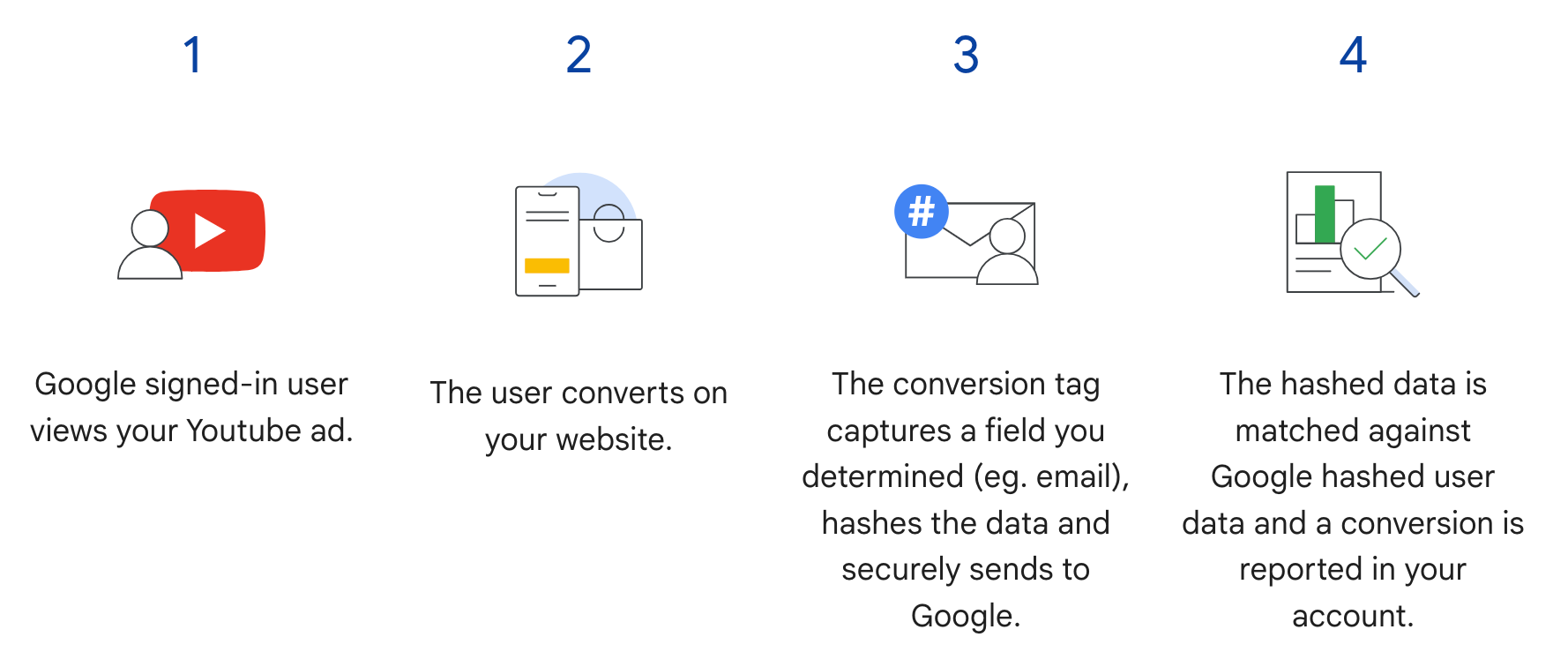
Google Ads API の拡張コンバージョン(ウェブ向け)は、次の図のステップ 3 を補完します。ユーザーがコンバージョンを達成したときにハッシュ化されたユーザー情報を送信する代わりに、タグは GCLID とオーダー ID のみを送信し、ハッシュ化されたユーザー情報は、後でオーダー ID とハッシュ化されたデータをインポートすることで送信します。拡張コンバージョン(ウェブ向け)について詳しくは、拡張コンバージョンについてをご覧ください。
前提条件
拡張コンバージョン(ウェブ向け)を使用するには、顧客データに関する規約に同意する必要があります。顧客データに関する規約に同意しているかどうかは、Google 広告の広告コンバージョン顧客に次のクエリを発行することで確認できます。
SELECT
  customer.id,
  customer.conversion_tracking_setting.accepted_customer_data_terms
FROM customer
accepted_customer_data_terms が false の場合は、拡張コンバージョン(ウェブ向け)を設定するの手順に沿って、この前提条件を満たしてください。
タグ付けを設定する
ウェブサイトのタグ設定は、Google Ads API を使用して拡張コンバージョン(ウェブ向け)を設定するの手順に沿って行うことができます。コンバージョンのマッチングをサポートするために、コンバージョン トラッキング タグにトランザクション ID(オーダー ID)を追加することをおすすめします。
API の実装
Google Ads API で拡張コンバージョン(ウェブ向け)をインポートする全体的なフローは次のとおりです。
メールアドレス、電話番号、送付先住所などのユーザー提供データを正規化してハッシュ化します。
正規化およびハッシュ化されたユーザー提供データで
ConversionAdjustmentオブジェクトを入力します。ConversionAdjustmentUploadServiceにConversionAdjustmentオブジェクトをインポートします。
ユーザー提供データを正規化、ハッシュ化する
プライバシー保護の観点から、次のデータはインポートする前に SHA-256 を使用してハッシュ化する必要があります。
- メールアドレス
- 電話番号
- 名
- 姓
- 番地
次のデータはハッシュ化しないでください。
- 国
- 都道府県
- 市区町村
- 郵便番号
ハッシュ結果を標準化するには、値をハッシュ化する前に以下を行う必要があります。
- 先頭と末尾の空白文字を削除する。
- テキストを小文字に変換する。
- 電話番号を E164 規格の形式にする。
拡張コンバージョンのメールアドレスの形式
拡張コンバージョンのマッチ率を最大化するには、次の手順に沿ってメールアドレスの形式を適切に設定し、ハッシュ化する必要があります。
標準の正規化を適用する(すべてのメールアドレス):
- 先頭と末尾の ASCII 空白文字を削除します。
- メールアドレスのすべての文字を小文字に変換します。
ドメイン固有の正規化を適用する(
gmail.comとgooglemail.comのみ):- メールアドレスを小文字に変換した後、ドメイン(
@記号の後)がgmail.comかgooglemail.comかを確認します。 - ピリオド(
.)を削除する: ユーザー名部分(@記号の前)から、すべてのピリオド文字を削除します。 - プラス接尾辞(
+)を削除する: ユーザー名の部分から、最初のプラス記号(+)と、それ以降の@記号までのすべての文字を削除します。- 例:
Jane.Doe+Shopping@googlemail.comは最初にjane.doe+shopping@googlemail.com(小文字)になり、次にjanedoe@googlemail.com(Gmail と Googlemail のルール)になります。
- 例:
- その他のドメイン:
gmail.comまたはgooglemail.com以外のドメインの場合、ユーザー名からピリオドやプラス記号の接尾辞を削除しないでください。標準の正規化(空白文字の削除と小文字への変換)のみを適用します。- 例:
user.name+NYC@Example.comはuser.name+nyc@example.comに正規化されます。
- 例:
- メールアドレスを小文字に変換した後、ドメイン(
正規化されたメールアドレスをハッシュ化します。
- 正規化されたメール文字列を UTF-8 バイトとしてエンコードします。
- SHA-256 アルゴリズムを使用して UTF-8 バイトをハッシュ化します。
- 結果のダイジェストを小文字の 16 進数文字列(64 文字)としてフォーマットします。
import hashlib
import re


def normalize_and_hash_email(email: str) -> str:
    """Normalizes and SHA-256 hashes an email address for enhanced conversions."""
    normalized = email.strip().lower()
    parts = normalized.split("@")
    if len(parts) != 2:
        raise ValueError("Invalid email address format.")
    username, domain = parts
    if domain in ("gmail.com", "googlemail.com"):
        username = username.replace(".", "")
        username = re.sub(r"\+.*$", "", username)
    normalized = f"{username}@{domain}"
    return hashlib.sha256(normalized.encode("utf-8")).hexdigest()
サンプルコード
この例では、ユーザー提供データを正規化してハッシュする方法を示します。
Java
private String normalizeAndHash(MessageDigest digest, String s, boolean trimIntermediateSpaces) throws UnsupportedEncodingException { // Normalizes by first converting all characters to lowercase, then trimming spaces. String normalized = s.toLowerCase(); if (trimIntermediateSpaces) { // Removes leading, trailing, and intermediate spaces. normalized = normalized.replaceAll("\\s+", ""); } else { // Removes only leading and trailing spaces. normalized = normalized.trim(); } // Hashes the normalized string using the hashing algorithm. byte[] hash = digest.digest(normalized.getBytes("UTF-8")); StringBuilder result = new StringBuilder(); for (byte b : hash) { result.append(String.format("%02x", b)); } return result.toString(); } /** * Returns the result of normalizing and hashing an email address. For this use case, Google Ads * requires removal of any '.' characters or trailing '+' and characters that follow it from the * username portion of the email address if the domain is {@code gmail.com} or {@code * googlemail.com}. * * @param digest the digest to use to hash the normalized string. * @param emailAddress the email address to normalize and hash. */ private String normalizeAndHashEmailAddress(MessageDigest digest, String emailAddress) throws UnsupportedEncodingException { // Removes all whitespace (leading, trailing, and intermediate) from the email address. String normalizedEmail = emailAddress.toLowerCase().replaceAll("\\s+", ""); String[] emailParts = normalizedEmail.split("@", 2); if (emailParts.length == 2 && emailParts[1].matches("^(gmail|googlemail)\\.com$")) { // Removes any '.' characters from the portion of the email address before the domain if the // domain is gmail.com or googlemail.com. emailParts[0] = emailParts[0].replaceAll("\\.", ""); // Removes any '+' and all characters that follow it from the portion of the email address // before the domain if the domain is gmail.com or googlemail.com. emailParts[0] = emailParts[0].replaceAll("\\+.*", ""); normalizedEmail = String.format("%s@%s", emailParts[0], emailParts[1]); } return normalizeAndHash(digest, normalizedEmail, true); } /** * Returns the result of normalizing and hashing a phone number. For this use case, Google Ads * requires phone numbers to be in E.164 format. * * @param digest the digest to use to hash the normalized string. * @param phoneNumber the phone number to normalize and hash. */ private String normalizeAndHashPhoneNumber(MessageDigest digest, String phoneNumber) throws UnsupportedEncodingException { // Removes non-digit characters and prepends a leading '+' sign. String digitsOnly = phoneNumber.replaceAll("[^0-9]", ""); String formattedPhone = "+" + digitsOnly; if (!formattedPhone.matches("^\\+[1-9]\\d{6,14}$")) { throw new IllegalArgumentException("Phone number must be in E.164 format: " + phoneNumber); } return normalizeAndHash(digest, formattedPhone, true); }
C#
/// <summary> /// Normalizes the email address and hashes it. For this use case, Google Ads requires /// removal of any '.' characters preceding <code>gmail.com</code> or /// <code>googlemail.com</code>. /// </summary> /// <param name="emailAddress">The email address.</param> /// <returns>The hash code.</returns> private string NormalizeAndHashEmailAddress(string emailAddress) { string normalizedEmail = emailAddress.ToLower(); string[] emailParts = normalizedEmail.Split('@'); if (emailParts.Length > 1 && (emailParts[1] == "gmail.com" || emailParts[1] == "googlemail.com")) { // Removes any '.' characters from the portion of the email address before // the domain if the domain is gmail.com or googlemail.com. emailParts[0] = emailParts[0].Replace(".", ""); normalizedEmail = $"{emailParts[0]}@{emailParts[1]}"; } return NormalizeAndHash(normalizedEmail); } /// <summary> /// Normalizes and hashes a string value. /// </summary> /// <param name="value">The value to normalize and hash.</param> /// <returns>The normalized and hashed value.</returns> private static string NormalizeAndHash(string value) { return ToSha256String(digest, ToNormalizedValue(value)); } /// <summary> /// Hash a string value using SHA-256 hashing algorithm. /// </summary> /// <param name="digest">Provides the algorithm for SHA-256.</param> /// <param name="value">The string value (e.g. an email address) to hash.</param> /// <returns>The hashed value.</returns> private static string ToSha256String(SHA256 digest, string value) { byte[] digestBytes = digest.ComputeHash(Encoding.UTF8.GetBytes(value)); // Convert the byte array into an unhyphenated hexadecimal string. return BitConverter.ToString(digestBytes).Replace("-", string.Empty); } /// <summary> /// Removes leading and trailing whitespace and converts all characters to /// lower case. /// </summary> /// <param name="value">The value to normalize.</param> /// <returns>The normalized value.</returns> private static string ToNormalizedValue(string value) { return value.Trim().ToLower(); }
PHP
private static function normalizeAndHash( string $hashAlgorithm, string $value, bool $trimIntermediateSpaces ): string { // Normalizes by first converting all characters to lowercase, then trimming spaces. $normalized = strtolower($value); if ($trimIntermediateSpaces === true) { // Removes leading, trailing, and intermediate spaces. $normalized = str_replace(' ', '', $normalized); } else { // Removes only leading and trailing spaces. $normalized = trim($normalized); } return hash($hashAlgorithm, strtolower(trim($normalized))); } /** * Returns the result of normalizing and hashing an email address. For this use case, Google * Ads requires removal of any '.' characters preceding "gmail.com" or "googlemail.com". * * @param string $hashAlgorithm the hash algorithm to use * @param string $emailAddress the email address to normalize and hash * @return string the normalized and hashed email address */ private static function normalizeAndHashEmailAddress( string $hashAlgorithm, string $emailAddress ): string { $normalizedEmail = strtolower($emailAddress); $emailParts = explode("@", $normalizedEmail); if ( count($emailParts) > 1 && preg_match('/^(gmail|googlemail)\.com\s*/', $emailParts[1]) ) { // Removes any '.' characters from the portion of the email address before the domain // if the domain is gmail.com or googlemail.com. $emailParts[0] = str_replace(".", "", $emailParts[0]); $normalizedEmail = sprintf('%s@%s', $emailParts[0], $emailParts[1]); } return self::normalizeAndHash($hashAlgorithm, $normalizedEmail, true); }
Python
def normalize_and_hash_email_address(email_address): """Returns the result of normalizing and hashing an email address. For this use case, Google Ads requires removal of any '.' characters preceding "gmail.com" or "googlemail.com" Args: email_address: An email address to normalize. Returns: A normalized (lowercase, removed whitespace) and SHA-265 hashed string. """ normalized_email = email_address.strip().lower() email_parts = normalized_email.split("@") # Check that there are at least two segments if len(email_parts) > 1: # Removes any '.' and '+' characters from the portion of the email address # before the domain chars_to_remove = ".+" translation_table = str.maketrans("", "", chars_to_remove) email_parts[0] = email_parts[0].translate(translation_table) normalized_email = "@".join(email_parts) return normalize_and_hash(normalized_email) def normalize_and_hash(s): """Normalizes and hashes a string with SHA-256. Private customer data must be hashed during upload, as described at: https://support.google.com/google-ads/answer/9888656 Args: s: The string to perform this operation on. Returns: A normalized (lowercase, removed whitespace) and SHA-256 hashed string. """ return hashlib.sha256(s.strip().lower().encode()).hexdigest()
Ruby
# Returns the result of normalizing and then hashing the string using the # provided digest. Private customer data must be hashed during upload, as # described at https://support.google.com/google-ads/answer/9888656. def normalize_and_hash(str) # Remove leading and trailing whitespace and ensure all letters are lowercase # before hasing. Digest::SHA256.hexdigest(str.strip.downcase) end # Returns the result of normalizing and hashing an email address. For this use # case, Google Ads requires removal of any '.' characters preceding 'gmail.com' # or 'googlemail.com'. def normalize_and_hash_email(email) email_parts = email.downcase.split("@") # Removes any '.' characters from the portion of the email address before the # domain if the domain is gmail.com or googlemail.com. if email_parts.last =~ /^(gmail|googlemail)\.com\s*/ email_parts[0] = email_parts[0].gsub('.', '') end normalize_and_hash(email_parts.join('@')) end
Perl
sub normalize_and_hash { my $value = shift; my $trim_intermediate_spaces = shift; if ($trim_intermediate_spaces) { $value =~ s/\s+//g; } else { $value =~ s/^\s+|\s+$//g; } return sha256_hex(lc $value); } # Returns the result of normalizing and hashing an email address. For this use # case, Google Ads requires removal of any '.' characters preceding 'gmail.com' # or 'googlemail.com'. sub normalize_and_hash_email_address { my $email_address = shift; my $normalized_email = lc $email_address; my @email_parts = split('@', $normalized_email); if (scalar @email_parts > 1 && $email_parts[1] =~ /^(gmail|googlemail)\.com\s*/) { # Remove any '.' characters from the portion of the email address before the # domain if the domain is 'gmail.com' or 'googlemail.com'. $email_parts[0] =~ s/\.//g; $normalized_email = sprintf '%s@%s', $email_parts[0], $email_parts[1]; } return normalize_and_hash($normalized_email, 1); }
curl
ConversionAdjustment オブジェクトに入力する
次のセクションでは、オーダー ID、メールアドレス、電話番号、住所の識別子を含む拡張調整を作成する方法について説明します。必要に応じて、標準化とハッシュ化が適用されます。ベスト プラクティスとして、gclid が利用可能な場合は、調整に含めます。
このステップは、コンバージョンの調整をインポートするガイドとほぼ同じですが、次の点に注意してください。
- 正規化およびハッシュ化されたユーザーデータを
user_identifiersに入力します。複数のユーザー識別子を使用できる場合は、識別子ごとに個別のUserIdentifierを作成します(最大 5 つ)。
Java
// Creates a builder for constructing the enhancement adjustment. ConversionAdjustment.Builder enhancementBuilder = ConversionAdjustment.newBuilder().setAdjustmentType(ConversionAdjustmentType.ENHANCEMENT); // Extracts user email, phone, and address info from the raw data, normalizes and hashes it, // then wraps it in UserIdentifier objects. // Creates a separate UserIdentifier object for each. The data in this example is hardcoded, but // in your application you might read the raw data from an input file. // IMPORTANT: Since the identifier attribute of UserIdentifier // (https://developers.google.com/google-ads/api/reference/rpc/latest/UserIdentifier) is a // oneof // (https://protobuf.dev/programming-guides/proto3/#oneof-features), you must set only ONE of // hashedEmail, hashedPhoneNumber, mobileId, thirdPartyUserId, or addressInfo. Setting more // than one of these attributes on the same UserIdentifier will clear all the other members // of the oneof. For example, the following code is INCORRECT and will result in a // UserIdentifier with ONLY a hashedPhoneNumber. // // UserIdentifier incorrectlyPopulatedUserIdentifier = // UserIdentifier.newBuilder() // .setHashedEmail("...") // .setHashedPhoneNumber("...") // .build(); ImmutableMap.Builder<String, String> rawRecordBuilder = ImmutableMap.<String, String>builder() // Email address that includes a period (.) and plus (+) suffix before the Gmail domain. .put("email", "alex.2+myalias@gmail.com") // Address that includes all four required elements: first name, last name, country // code, and postal code. .put("firstName", "Alex") .put("lastName", "Quinn") .put("countryCode", "US") .put("postalCode", "94045") // Phone number to be converted to E.164 format, with a leading '+' as required. .put("phone", "+1 800-555-0102") // This example lets you put conversion details as arguments, but in reality you might // store this data alongside other user data, so we include it in this sample user // record. .put("orderId", orderId) .put("conversionActionId", Long.toString(conversionActionId)) .put("currencyCode", "USD"); // Adds entries for the optional fields. if (conversionDateTime != null) { rawRecordBuilder.put("conversionDateTime", conversionDateTime); } if (userAgent != null) { rawRecordBuilder.put("userAgent", userAgent); } // Builds the map representing the record. Map<String, String> rawRecord = rawRecordBuilder.build(); // Creates a SHA256 message digest for hashing user identifiers in a privacy-safe way, as // described at https://support.google.com/google-ads/answer/9888656. MessageDigest sha256Digest = MessageDigest.getInstance("SHA-256"); // Creates a list for the user identifiers. List<UserIdentifier> userIdentifiers = new ArrayList<>(); // Creates a user identifier using the hashed email address, using the normalize and hash method // specifically for email addresses. UserIdentifier emailIdentifier = UserIdentifier.newBuilder() // Optional: specify the user identifier source. .setUserIdentifierSource(UserIdentifierSource.FIRST_PARTY) // Uses the normalize and hash method specifically for email addresses. .setHashedEmail(normalizeAndHashEmailAddress(sha256Digest, rawRecord.get("email"))) .build(); userIdentifiers.add(emailIdentifier); // Checks if the record has a phone number, and if so, adds a UserIdentifier for it. if (rawRecord.containsKey("phone")) { UserIdentifier hashedPhoneNumberIdentifier = UserIdentifier.newBuilder() .setHashedPhoneNumber( normalizeAndHashPhoneNumber(sha256Digest, rawRecord.get("phone"))) .build(); // Adds the hashed phone number identifier to the UserData object's list. userIdentifiers.add(hashedPhoneNumberIdentifier); } // Checks if the record has all the required mailing address elements, and if so, adds a // UserIdentifier for the mailing address. if (rawRecord.containsKey("firstName")) { // Checks if the record contains all the other required elements of a mailing address. Set<String> missingAddressKeys = new HashSet<>(); for (String addressKey : new String[] {"lastName", "countryCode", "postalCode"}) { if (!rawRecord.containsKey(addressKey)) { missingAddressKeys.add(addressKey); } } if (!missingAddressKeys.isEmpty()) { System.out.printf( "Skipping addition of mailing address information because the following required keys" + " are missing: %s%n", missingAddressKeys); } else { // Creates an OfflineUserAddressInfo object that contains all the required elements of a // mailing address. OfflineUserAddressInfo addressInfo = OfflineUserAddressInfo.newBuilder() .setHashedFirstName( normalizeAndHash(sha256Digest, rawRecord.get("firstName"), false)) .setHashedLastName(normalizeAndHash(sha256Digest, rawRecord.get("lastName"), false)) .setCountryCode(rawRecord.get("countryCode")) .setPostalCode(rawRecord.get("postalCode")) .build(); UserIdentifier addressIdentifier = UserIdentifier.newBuilder().setAddressInfo(addressInfo).build(); // Adds the address identifier to the UserData object's list. userIdentifiers.add(addressIdentifier); } } // Adds the user identifiers to the enhancement adjustment. enhancementBuilder.addAllUserIdentifiers(userIdentifiers);
C#
// Normalize and hash the raw data, then wrap it in UserIdentifier objects. // Create a separate UserIdentifier object for each. The data in this example is // hardcoded, but in your application you might read the raw data from an input file. // // IMPORTANT: Since the identifier attribute of UserIdentifier // (https://developers.google.com/google-ads/api/reference/rpc/latest/UserIdentifier) // is a oneof // (https://protobuf.dev/programming-guides/proto3/#oneof-features), you must set // only ONE of hashed_email, hashed_phone_number, mobile_id, third_party_user_id, // or address-info. Setting more than one of these attributes on the same UserIdentifier // will clear all the other members of the oneof. For example, the following code is // INCORRECT and will result in a UserIdentifier with ONLY a hashed_phone_number: // UserIdentifier incorrectlyPopulatedUserIdentifier = new UserIdentifier() // { // HashedEmail = "..." // HashedPhoneNumber = "..." // } UserIdentifier addressIdentifier = new UserIdentifier() { AddressInfo = new OfflineUserAddressInfo() { HashedFirstName = NormalizeAndHash("Dana"), HashedLastName = NormalizeAndHash("Quinn"), HashedStreetAddress = NormalizeAndHash("1600 Amphitheatre Pkwy"), City = "Mountain View", State = "CA", PostalCode = "94043", CountryCode = "US" }, // Optional: Specifies the user identifier source. UserIdentifierSource = UserIdentifierSource.FirstParty }; // Creates a user identifier using the hashed email address. UserIdentifier emailIdentifier = new UserIdentifier() { UserIdentifierSource = UserIdentifierSource.FirstParty, // Uses the normalize and hash method specifically for email addresses. HashedEmail = NormalizeAndHashEmailAddress("dana@example.com") }; // Adds the user identifiers to the enhancement adjustment. enhancement.UserIdentifiers.AddRange(new[] { addressIdentifier, emailIdentifier });
PHP
// Creates the conversion enhancement. $enhancement = new ConversionAdjustment(['adjustment_type' => ConversionAdjustmentType::ENHANCEMENT]); // Extracts user email, phone, and address info from the raw data, normalizes and hashes it, // then wraps it in UserIdentifier objects. // Creates a separate UserIdentifier object for each. The data in this example is hardcoded, // but in your application you might read the raw data from an input file. // IMPORTANT: Since the identifier attribute of UserIdentifier // (https://developers.google.com/google-ads/api/reference/rpc/latest/UserIdentifier) is a // oneof // (https://protobuf.dev/programming-guides/proto3/#oneof-features), you must set only ONE // of hashedEmail, hashedPhoneNumber, mobileId, thirdPartyUserId, or addressInfo. Setting // more than one of these attributes on the same UserIdentifier will clear all the other // members of the oneof. For example, the following code is INCORRECT and will result in a // UserIdentifier with ONLY a hashedPhoneNumber. // // $incorrectlyPopulatedUserIdentifier = new UserIdentifier([ // 'hashed_email' => '...', // 'hashed_phone_number' => '...' // ]); $rawRecord = [ // Email address that includes a period (.) before the Gmail domain. 'email' => 'alex.2@example.com', // Address that includes all four required elements: first name, last name, country // code, and postal code. 'firstName' => 'Alex', 'lastName' => 'Quinn', 'countryCode' => 'US', 'postalCode' => '94045', // Phone number to be converted to E.164 format, with a leading '+' as required. 'phone' => '+1 800 5550102', // This example lets you input conversion details as arguments, but in reality you might // store this data alongside other user data, so we include it in this sample user // record. 'orderId' => $orderId, 'conversionActionId' => $conversionActionId, 'conversionDateTime' => $conversionDateTime, 'currencyCode' => 'USD' ]; // Creates a list for the user identifiers. $userIdentifiers = []; // Uses the SHA-256 hash algorithm for hashing user identifiers in a privacy-safe way, as // described at https://support.google.com/google-ads/answer/9888656. $hashAlgorithm = "sha256"; // Creates a user identifier using the hashed email address, using the normalize and hash // method specifically for email addresses. $emailIdentifier = new UserIdentifier( [ // Uses the normalize and hash method specifically for email addresses. 'hashed_email' => self::normalizeAndHashEmailAddress( $hashAlgorithm, $rawRecord['email'] ), // Optional: Specifies the user identifier source. 'user_identifier_source' => UserIdentifierSource::FIRST_PARTY ] ); $userIdentifiers[] = $emailIdentifier; // Checks if the record has a phone number, and if so, adds a UserIdentifier for it. if (array_key_exists('phone', $rawRecord)) { $hashedPhoneNumberIdentifier = new UserIdentifier( [ 'hashed_phone_number' => self::normalizeAndHash( $hashAlgorithm, $rawRecord['phone'], true ) ] ); // Adds the hashed email identifier to the user identifiers list. $userIdentifiers[] = $hashedPhoneNumberIdentifier; } // Checks if the record has all the required mailing address elements, and if so, adds a // UserIdentifier for the mailing address. if (array_key_exists('firstName', $rawRecord)) { // Checks if the record contains all the other required elements of a mailing // address. $missingAddressKeys = []; foreach (['lastName', 'countryCode', 'postalCode'] as $addressKey) { if (!array_key_exists($addressKey, $rawRecord)) { $missingAddressKeys[] = $addressKey; } } if (!empty($missingAddressKeys)) { printf( "Skipping addition of mailing address information because the " . "following required keys are missing: %s%s", json_encode($missingAddressKeys), PHP_EOL ); } else { // Creates an OfflineUserAddressInfo object that contains all the required // elements of a mailing address. $addressIdentifier = new UserIdentifier( [ 'address_info' => new OfflineUserAddressInfo( [ 'hashed_first_name' => self::normalizeAndHash( $hashAlgorithm, $rawRecord['firstName'], false ), 'hashed_last_name' => self::normalizeAndHash( $hashAlgorithm, $rawRecord['lastName'], false ), 'country_code' => $rawRecord['countryCode'], 'postal_code' => $rawRecord['postalCode'] ] ) ] ); // Adds the address identifier to the user identifiers list. $userIdentifiers[] = $addressIdentifier; } } // Adds the user identifiers to the conversion. $enhancement->setUserIdentifiers($userIdentifiers);
Python
# Extracts user email, phone, and address info from the raw data, normalizes # and hashes it, then wraps it in UserIdentifier objects. Creates a separate # UserIdentifier object for each. The data in this example is hardcoded, but # in your application you might read the raw data from an input file. # IMPORTANT: Since the identifier attribute of UserIdentifier # (https://developers.google.com/google-ads/api/reference/rpc/latest/UserIdentifier) # is a oneof # (https://protobuf.dev/programming-guides/proto3/#oneof-features), you must # set only ONE of hashed_email, hashed_phone_number, mobile_id, # third_party_user_id, or address_info. Setting more than one of these # attributes on the same UserIdentifier will clear all the other members of # the oneof. For example, the following code is INCORRECT and will result in # a UserIdentifier with ONLY a hashed_phone_number: # # incorrectly_populated_user_identifier = client.get_type("UserIdentifier") # incorrectly_populated_user_identifier.hashed_email = "..."" # incorrectly_populated_user_identifier.hashed_phone_number = "..."" raw_record = { # Email address that includes a period (.) before the Gmail domain. "email": "alex.2@example.com", # Address that includes all four required elements: first name, last # name, country code, and postal code. "first_name": "Alex", "last_name": "Quinn", "country_code": "US", "postal_code": "94045", # Phone number to be converted to E.164 format, with a leading '+' as # required. "phone": "+1 800 5550102", # This example lets you input conversion details as arguments, but in # reality you might store this data alongside other user data, so we # include it in this sample user record. "order_id": order_id, "conversion_action_id": conversion_action_id, "conversion_date_time": conversion_date_time, "currency_code": "USD", "user_agent": user_agent, } # Constructs the enhancement adjustment. conversion_adjustment = client.get_type("ConversionAdjustment") conversion_adjustment.adjustment_type = ( client.enums.ConversionAdjustmentTypeEnum.ENHANCEMENT ) # Creates a user identifier using the hashed email address, using the # normalize and hash method specifically for email addresses. email_identifier = client.get_type("UserIdentifier") # Optional: Specifies the user identifier source. email_identifier.user_identifier_source = ( client.enums.UserIdentifierSourceEnum.FIRST_PARTY ) # Uses the normalize and hash method specifically for email addresses. email_identifier.hashed_email = normalize_and_hash_email_address( raw_record["email"] ) # Adds the email identifier to the conversion adjustment. conversion_adjustment.user_identifiers.append(email_identifier) # Checks if the record has a phone number, and if so, adds a UserIdentifier # for it. if raw_record.get("phone") is not None: phone_identifier = client.get_type("UserIdentifier") phone_identifier.hashed_phone_number = normalize_and_hash( raw_record["phone"] ) # Adds the phone identifier to the conversion adjustment. conversion_adjustment.user_identifiers.append(phone_identifier) # Checks if the record has all the required mailing address elements, and if # so, adds a UserIdentifier for the mailing address. if raw_record.get("first_name") is not None: # Checks if the record contains all the other required elements of a # mailing address. required_keys = ["last_name", "country_code", "postal_code"] # Builds a new list of the required keys that are missing from # raw_record. missing_keys = [ key for key in required_keys if key not in raw_record.keys() ] if len(missing_keys) > 0: print( "Skipping addition of mailing address information because the" f"following required keys are missing: {missing_keys}" ) else: # Creates a user identifier using sample values for the user address, # hashing where required. address_identifier = client.get_type("UserIdentifier") address_info = address_identifier.address_info address_info.hashed_first_name = normalize_and_hash( raw_record["first_name"] ) address_info.hashed_last_name = normalize_and_hash( raw_record["last_name"] ) address_info.country_code = raw_record["country_code"] address_info.postal_code = raw_record["postal_code"] # Adds the address identifier to the conversion adjustment. conversion_adjustment.user_identifiers.append(address_identifier)
Ruby
# Extracts user email, phone, and address info from the raw data, normalizes # and hashes it, then wraps it in UserIdentifier objects. Creates a separate # UserIdentifier object for each. The data in this example is hardcoded, but # in your application you might read the raw data from an input file. # IMPORTANT: Since the identifier attribute of UserIdentifier # (https://developers.google.com/google-ads/api/reference/rpc/latest/UserIdentifier) # is a oneof # (https://protobuf.dev/programming-guides/proto3/#oneof-features), you must # set only ONE of hashed_email, hashed_phone_number, mobile_id, # third_party_user_id, or address_info. Setting more than one of these # attributes on the same UserIdentifier will clear all the other members of # the oneof. For example, the following code is INCORRECT and will result in # a UserIdentifier with ONLY a hashed_phone_number: # # incorrectly_populated_user_identifier.hashed_email = "..."" # incorrectly_populated_user_identifier.hashed_phone_number = "..."" raw_record = { # Email address that includes a period (.) before the Gmail domain. "email" => "alex.2@example.com", # Address that includes all four required elements: first name, last # name, country code, and postal code. "first_name" => "Alex", "last_name" => "Quinn", "country_code" => "US", "postal_code" => "94045", # Phone number to be converted to E.164 format, with a leading '+' as # required. "phone" => "+1 800 5550102", # This example lets you input conversion details as arguments, but in # reality you might store this data alongside other user data, so we # include it in this sample user record. "order_id" => order_id, "conversion_action_id" => conversion_action_id, "conversion_date_time" => conversion_date_time, "currency_code" => "USD", "user_agent" => user_agent, } enhancement = client.resource.conversion_adjustment do |ca| ca.conversion_action = client.path.conversion_action(customer_id, conversion_action_id) ca.adjustment_type = :ENHANCEMENT ca.order_id = order_id # Sets the conversion date and time if provided. Providing this value is # optional but recommended. unless conversion_date_time.nil? ca.gclid_date_time_pair = client.resource.gclid_date_time_pair do |pair| pair.conversion_date_time = conversion_date_time end end # Creates a user identifier using the hashed email address, using the # normalize and hash method specifically for email addresses. ca.user_identifiers << client.resource.user_identifier do |ui| # Uses the normalize and hash method specifically for email addresses. ui.hashed_email = normalize_and_hash_email(raw_record["email"]) # Optional: Specifies the user identifier source. ui.user_identifier_source = :FIRST_PARTY end # Checks if the record has a phone number, and if so, adds a UserIdentifier # for it. unless raw_record["phone"].nil? ca.user_identifiers << client.resource.user_identifier do |ui| ui.hashed_phone_number = normalize_and_hash_email(raw_record["phone"]) end end # Checks if the record has all the required mailing address elements, and if # so, adds a UserIdentifier for the mailing address. unless raw_record["first_name"].nil? # Checks if the record contains all the other required elements of a # mailing address. required_keys = ["last_name", "country_code", "postal_code"] # Builds a new list of the required keys that are missing from # raw_record. missing_keys = required_keys - raw_record.keys if missing_keys puts( "Skipping addition of mailing address information because the" \ "following required keys are missing: #{missing_keys}" ) else ca.user_identifiers << client.resource.user_identifier do |ui| ui.address_info = client.resource.offline_user_address_info do |info| # Certain fields must be hashed using SHA256 in order to handle # identifiers in a privacy-safe way, as described at # https://support.google.com/google-ads/answer/9888656. info.hashed_first_name = normalize_and_hash( raw_record["first_name"]) info.hashed_last_name = normalize_and_hash( raw_record["last_name"]) info.postal_code = normalize_and_hash(raw_record["country_code"]) info.country_code = normalize_and_hash(raw_record["postal_code"]) end end end end
Perl
# Construct the enhancement adjustment. my $enhancement = Google::Ads::GoogleAds::V26::Services::ConversionAdjustmentUploadService::ConversionAdjustment ->new({ adjustmentType => ENHANCEMENT }); # Extract user email, phone, and address info from the raw data, # normalize and hash it, then wrap it in UserIdentifier objects. # Create a separate UserIdentifier object for each. # The data in this example is hardcoded, but in your application # you might read the raw data from an input file. # # IMPORTANT: Since the identifier attribute of UserIdentifier # (https://developers.google.com/google-ads/api/reference/rpc/latest/UserIdentifier) # is a oneof # (https://protobuf.dev/programming-guides/proto3/#oneof-features), you must set # only ONE of hashed_email, hashed_phone_number, mobile_id, third_party_user_id, # or address-info. Setting more than one of these attributes on the same UserIdentifier # will clear all the other members of the oneof. For example, the following code is # INCORRECT and will result in a UserIdentifier with ONLY a hashed_phone_number: # # my $incorrect_user_identifier = Google::Ads::GoogleAds::V26::Common::UserIdentifier->new({ # hashedEmail => '...', # hashedPhoneNumber => '...', # }); my $raw_record = { # Email address that includes a period (.) before the Gmail domain. email => 'alex.2@example.com', # Address that includes all four required elements: first name, last # name, country code, and postal code. firstName => 'Alex', lastName => 'Quinn', countryCode => 'US', postalCode => '94045', # Phone number to be converted to E.164 format, with a leading '+' as # required. phone => '+1 800 5550102', # This example lets you input conversion details as arguments, # but in reality you might store this data alongside other user data, # so we include it in this sample user record. orderId => $order_id, conversionActionId => $conversion_action_id, conversionDateTime => $conversion_date_time, currencyCode => "USD", userAgent => $user_agent, }; my $user_identifiers = []; # Create a user identifier using the hashed email address, using the normalize # and hash method specifically for email addresses. my $hashed_email = normalize_and_hash_email_address($raw_record->{email}); push( @$user_identifiers, Google::Ads::GoogleAds::V26::Common::UserIdentifier->new({ hashedEmail => $hashed_email, # Optional: Specify the user identifier source. userIdentifierSource => FIRST_PARTY })); # Check if the record has a phone number, and if so, add a UserIdentifier for it. if (defined $raw_record->{phone}) { # Add the hashed phone number identifier to the list of UserIdentifiers. push( @$user_identifiers, Google::Ads::GoogleAds::V26::Common::UserIdentifier->new({ hashedPhoneNumber => normalize_and_hash($raw_record->{phone}, 1)})); } # Confirm the record has all the required mailing address elements, and if so, add # a UserIdentifier for the mailing address. if (defined $raw_record->{firstName}) { my $required_keys = ["lastName", "countryCode", "postalCode"]; my $missing_keys = []; foreach my $key (@$required_keys) { if (!defined $raw_record->{$key}) { push(@$missing_keys, $key); } } if (@$missing_keys) { print "Skipping addition of mailing address information because the following" . "keys are missing: " . join(",", @$missing_keys); } else { push( @$user_identifiers, Google::Ads::GoogleAds::V26::Common::UserIdentifier->new({ addressInfo => Google::Ads::GoogleAds::V26::Common::OfflineUserAddressInfo->new({ # First and last name must be normalized and hashed. hashedFirstName => normalize_and_hash($raw_record->{firstName}), hashedLastName => normalize_and_hash($raw_record->{lastName}), # Country code and zip code are sent in plain text. countryCode => $raw_record->{countryCode}, postalCode => $raw_record->{postalCode}, })})); } } # Add the user identifiers to the enhancement adjustment. $enhancement->{userIdentifiers} = $user_identifiers;
curl
order_id、adjustment_type(ENHANCEMENT)、conversion_action(WEBPAGE)を設定します。必要に応じて、gclid_date_time_pair(yyyy-mm-dd HH:mm:ss+|-HH:mm形式、例:2022-01-01 19:32:45-05:00(夏時間を無視))、user_agentも設定します。
Java
// Sets the conversion action. enhancementBuilder.setConversionAction( ResourceNames.conversionAction( customerId, Long.parseLong(rawRecord.get("conversionActionId")))); // Sets the order ID. Enhancements MUST use order ID instead of GCLID date/time pair. enhancementBuilder.setOrderId(rawRecord.get("orderId")); // Sets the conversion date and time if provided. Providing this value is optional but // recommended. if (rawRecord.containsKey("conversionDateTime")) { enhancementBuilder.setGclidDateTimePair( GclidDateTimePair.newBuilder() .setConversionDateTime(rawRecord.get("conversionDateTime"))); } // Sets the user agent if provided. This should match the user agent of the request that sent // the original conversion so the conversion and its enhancement are either both attributed as // same-device or both attributed as cross-device. if (rawRecord.containsKey("userAgent")) { enhancementBuilder.setUserAgent(rawRecord.get("userAgent")); }
C#
// Set the conversion action. enhancement.ConversionAction = ResourceNames.ConversionAction(customerId, conversionActionId); // Set the order ID. Enhancements MUST use order ID instead of GCLID date/time pair. enhancement.OrderId = orderId; // Sets the conversion date and time if provided. Providing this value is optional but // recommended. if (string.IsNullOrEmpty(conversionDateTime)) { enhancement.GclidDateTimePair = new GclidDateTimePair() { ConversionDateTime = conversionDateTime }; } // Sets optional fields where a value was provided. if (!string.IsNullOrEmpty(userAgent)) { // Sets the user agent. This should match the user agent of the request that // sent the original conversion so the conversion and its enhancement are either // both attributed as same-device or both attributed as cross-device. enhancement.UserAgent = userAgent; }
PHP
// Sets the conversion action. $enhancement->setConversionAction( ResourceNames::forConversionAction($customerId, $rawRecord['conversionActionId']) ); // Sets the order ID. Enhancements MUST use order ID instead of GCLID date/time pair. if (!empty($rawRecord['orderId'])) { $enhancement->setOrderId($rawRecord['orderId']); } // Sets the conversion date and time if provided. Providing this value is optional but // recommended. if (!empty($rawRecord['conversionDateTime'])) { // Sets the conversion date and time if provided. Providing this value is optional but // recommended. $enhancement->setGclidDateTimePair( new GclidDateTimePair( [ 'conversion_date_time' => $rawRecord['conversionDateTime'] ] ) ); } // Sets the user agent if provided. This should match the user agent of the request that // sent the original conversion so the conversion and its enhancement are either both // attributed as same-device or both attributed as cross-device. if (!empty($rawRecord['userAgent'])) { $enhancement->setUserAgent($rawRecord['userAgent']); }
Python
conversion_action_service = client.get_service("ConversionActionService") # Sets the conversion action. conversion_adjustment.conversion_action = ( conversion_action_service.conversion_action_path( customer_id, raw_record["conversion_action_id"] ) ) # Sets the order ID. Enhancements MUST use order ID instead of GCLID # date/time pair. conversion_adjustment.order_id = order_id # Sets the conversion date and time if provided. Providing this value is # optional but recommended. if raw_record.get("conversion_date_time"): conversion_adjustment.gclid_date_time_pair.conversion_date_time = ( raw_record["conversion_date_time"] ) # Sets optional fields where a value was provided if raw_record.get("user_agent"): # Sets the user agent. This should match the user agent of the request # that sent the original conversion so the conversion and its # enhancement are either both attributed as same-device or both # attributed as cross-device. conversion_adjustment.user_agent = user_agent
Ruby
ca.conversion_action = client.path.conversion_action(customer_id, conversion_action_id) ca.adjustment_type = :ENHANCEMENT ca.order_id = order_id # Sets the conversion date and time if provided. Providing this value is # optional but recommended. unless conversion_date_time.nil? ca.gclid_date_time_pair = client.resource.gclid_date_time_pair do |pair| pair.conversion_date_time = conversion_date_time end end # Creates a user identifier using the hashed email address, using the # normalize and hash method specifically for email addresses. ca.user_identifiers << client.resource.user_identifier do |ui| # Uses the normalize and hash method specifically for email addresses. ui.hashed_email = normalize_and_hash_email(raw_record["email"]) # Optional: Specifies the user identifier source. ui.user_identifier_source = :FIRST_PARTY end # Checks if the record has a phone number, and if so, adds a UserIdentifier # for it. unless raw_record["phone"].nil? ca.user_identifiers << client.resource.user_identifier do |ui| ui.hashed_phone_number = normalize_and_hash_email(raw_record["phone"]) end end # Checks if the record has all the required mailing address elements, and if # so, adds a UserIdentifier for the mailing address. unless raw_record["first_name"].nil? # Checks if the record contains all the other required elements of a # mailing address. required_keys = ["last_name", "country_code", "postal_code"] # Builds a new list of the required keys that are missing from # raw_record. missing_keys = required_keys - raw_record.keys if missing_keys puts( "Skipping addition of mailing address information because the" \ "following required keys are missing: #{missing_keys}" ) else ca.user_identifiers << client.resource.user_identifier do |ui| ui.address_info = client.resource.offline_user_address_info do |info| # Certain fields must be hashed using SHA256 in order to handle # identifiers in a privacy-safe way, as described at # https://support.google.com/google-ads/answer/9888656. info.hashed_first_name = normalize_and_hash( raw_record["first_name"]) info.hashed_last_name = normalize_and_hash( raw_record["last_name"]) info.postal_code = normalize_and_hash(raw_record["country_code"]) info.country_code = normalize_and_hash(raw_record["postal_code"]) end end end end # Sets optional fields where a value was provided. unless user_agent.nil? # Sets the user agent. This should match the user agent of the request # that sent the original conversion so the conversion and its enhancement # are either both attributed as same-device or both attributed as # cross-device. ca.user_agent = user_agent end
Perl
# Set the conversion action. $enhancement->{conversionAction} = Google::Ads::GoogleAds::V26::Utils::ResourceNames::conversion_action( $customer_id, $raw_record->{conversionActionId}); # Set the order ID. Enhancements MUST use order ID instead of GCLID date/time pair. $enhancement->{orderId} = $raw_record->{orderId}; # Set the conversion date and time if provided. Providing this value is optional # but recommended. if (defined $raw_record->{conversionDateTime}) { $enhancement->{gclidDateTimePair} = Google::Ads::GoogleAds::V26::Services::ConversionAdjustmentUploadService::GclidDateTimePair ->new({ conversionDateTime => $raw_record->{conversionDateTime}}); } # Set the user agent if provided. This should match the user agent of the # request that sent the original conversion so the conversion and its enhancement # are either both attributed as same-device or both attributed as cross-device. if (defined $raw_record->{userAgent}) { $enhancement->{userAgent} = $raw_record->{userAgent}; }
curl
Request スキーマと ConversionAdjustment スキーマの概要
次の表は、ConversionAdjustmentUploadService.UploadConversionAdjustments を使用してウェブの拡張コンバージョンをアップロードする際の、UploadConversionAdjustmentsRequest の最上位フィールドと ConversionAdjustment(conversion_adjustments[])のアイテムごとのフィールドをまとめたものです。
| リクエスト フィールド | 要件 | 形式と制限事項 |
|---|---|---|
customer_id |
必須 | Google 広告コンバージョンのお客様 ID(customer.conversion_tracking_setting の google_ads_conversion_customer)に設定します。ハイフンは含めません。 |
conversion_adjustments[] |
必須 | リクエストあたり最大 2,000 個の ConversionAdjustment エントリ(TOO_MANY_ADJUSTMENTS_IN_REQUEST)。 |
partial_failure |
必須 | 有効な調整が処理され、行レベルのエラーが partial_failure_error で返されるように、true に設定する必要があります。 |
validate_only |
省略可 | true の場合、調整を実行せずにリクエストを検証します。 |
job_id |
省略可 | 正の int32(1~2^31 - 1。0 は未設定のセンチネルで、指定すると INVALID_JOB_ID を返します)を使用して、job_summaries の単一の論理ジョブで複数のリクエストをグループ化します。 |
conversion_adjustments[] の各 ConversionAdjustment(リクエストあたり最大 2,000 件の調整)は、次のフィールドをサポートしています。
ConversionAdjustment フィールド |
要件 | 形式と制限事項 |
|---|---|---|
adjustment_type |
必須 | ENHANCEMENT(ConversionAdjustmentType)に設定する必要があります。 |
conversion_action |
必須 | アップロード(TOO_RECENT_CONVERSION_ACTION)の少なくとも 6 時間前に作成された type = WEBPAGE を含む ENABLED コンバージョン アクションのリソース名(customers/{conversion_customer_id}/conversionActions/{action_id})。 |
order_id |
必須 | 強化するコンバージョンのトランザクション ID。ウェブサイト コンバージョン タグによって送信されたオーダー ID と一致する必要があります。 |
user_identifiers[] |
必須 | 1 つの拡張機能につき 1 ~ 5 個の UserIdentifier オブジェクト。エントリごとにオプションの user_identifier_source(FIRST_PARTY など)と 1 つの識別子を設定します。• hashed_email: SHA-256 の 16 進文字列。• hashed_phone_number: E.164 SHA-256 16 進文字列。• address_info: OfflineUserAddressInfo。SHA-256 でハッシュ化された hashed_first_name、hashed_last_name、hashed_street_address、ハッシュ化されていない city、state、country_code、postal_code。 |
gclid_date_time_pair |
任意(推奨) | GclidDateTimePair。gclid と conversion_date_time(yyyy-mm-dd HH:mm:ss+|-HH:mm、例: 2022-01-01 19:32:45-05:00(夏時間を無視)、例: 2026-06-01 14:30:00-04:00)を含む、元のコンバージョンの日時。54 日以上経過したコンバージョンは調整できません(CONVERSION_EXPIRED)。 |
adjustment_date_time |
省略可 | 調整が行われたタイムスタンプ(yyyy-mm-dd HH:mm:ss+|-HH:mm、例: 2022-01-01 19:32:45-05:00(夏時間は無視))。設定する場合は、conversion_date_time より後のタイムスタンプにする必要があります。 |
user_agent |
省略可 | 元のコンバージョン リクエストの HTTP User-Agent ヘッダー文字列。これにより、コンバージョンと拡張機能で同じデバイス アトリビューション(same-device または cross-device)が共有されます。 |
restatement_value |
ENHANCEMENT に設定しない |
adjustment_type が ENHANCEMENT の場合は無視されます。コンバージョンの値を変更するには、adjustment_type = RESTATEMENT を使用して別のオペレーションを送信します。 |
コンバージョンのインポートの改善
Java
// Creates the conversion adjustment upload service client. try (ConversionAdjustmentUploadServiceClient conversionUploadServiceClient = googleAdsClient.getLatestVersion().createConversionAdjustmentUploadServiceClient()) { // Uploads the enhancement adjustment. Partial failure should always be set to true. // NOTE: This request contains a single adjustment as a demonstration. However, if you have // multiple adjustments to upload, it's best to upload multiple adjustments per request // instead of sending a separate request per adjustment. See the following for per-request // limits: // https://developers.google.com/google-ads/api/docs/best-practices/quotas#conversion_adjustment_upload_service UploadConversionAdjustmentsResponse response = conversionUploadServiceClient.uploadConversionAdjustments( UploadConversionAdjustmentsRequest.newBuilder() .setCustomerId(Long.toString(customerId)) .addConversionAdjustments(enhancementBuilder) // Enables partial failure (must be true). .setPartialFailure(true) .build());
C#
// Uploads the enhancement adjustment. Partial failure should always be set to true. // // NOTE: This request contains a single adjustment as a demonstration. // However, if you have multiple adjustments to upload, it's best to upload // multiple adjustmenst per request instead of sending a separate request per // adjustment. See the following for per-request limits: // https://developers.google.com/google-ads/api/docs/best-practices/quotas#conversion_adjust UploadConversionAdjustmentsResponse response = conversionAdjustmentUploadService.UploadConversionAdjustments( new UploadConversionAdjustmentsRequest() { CustomerId = customerId.ToString(), ConversionAdjustments = { enhancement }, // Enables partial failure (must be true). PartialFailure = true, });
PHP
// Issues a request to upload the conversion enhancement. $conversionAdjustmentUploadServiceClient = $googleAdsClient->getConversionAdjustmentUploadServiceClient(); // NOTE: This request contains a single adjustment as a demonstration. However, if you have // multiple adjustments to upload, it's best to upload multiple adjustments per request // instead of sending a separate request per adjustment. See the following for per-request // limits: // https://developers.google.com/google-ads/api/docs/best-practices/quotas#conversion_adjustment_upload_service $response = $conversionAdjustmentUploadServiceClient->uploadConversionAdjustments( // Enables partial failure (must be true). UploadConversionAdjustmentsRequest::build($customerId, [$enhancement], true) );
Python
# Creates the conversion adjustment upload service client. conversion_adjustment_upload_service = client.get_service( "ConversionAdjustmentUploadService" ) # Uploads the enhancement adjustment. Partial failure should always be set # to true. # NOTE: This request only uploads a single conversion, but if you have # multiple conversions to upload, it's still best to upload them in a single # request. See the following for per-request limits for reference: # https://developers.google.com/google-ads/api/docs/best-practices/quotas#conversion_upload_service response = conversion_adjustment_upload_service.upload_conversion_adjustments( customer_id=customer_id, conversion_adjustments=[conversion_adjustment], # Enables partial failure (must be true). partial_failure=True, )
Ruby
response = client.service.conversion_adjustment_upload.upload_conversion_adjustments( customer_id: customer_id, # NOTE: This request only uploads a single conversion, but if you have # multiple conversions to upload, it's still best to upload them in a single # request. See the following for per-request limits for reference: # https://developers.google.com/google-ads/api/docs/best-practices/quotas#conversion_upload_service conversion_adjustments: [enhancement], # Partial failure must be set to true. partial_failure: true, )
Perl
# Upload the enhancement adjustment. Partial failure should always be set to true. # # NOTE: This request contains a single adjustment as a demonstration. # However, if you have multiple adjustments to upload, it's best to # upload multiple adjustments per request instead of sending a separate # request per adjustment. See the following for per-request limits: # https://developers.google.com/google-ads/api/docs/best-practices/quotas#conversion_adjustment_upload_service my $response = $api_client->ConversionAdjustmentUploadService() ->upload_conversion_adjustments({ customerId => $customer_id, conversionAdjustments => [$enhancement], # Enable partial failure (must be true). partialFailure => "true" });
curl
REST リクエストとレスポンスの構造
REST 経由で ConversionAdjustmentUploadService.UploadConversionAdjustments を呼び出す場合は、partialFailure を true に設定して POST リクエストを送信します。
POST https://googleads.googleapis.com/v26/customers/{customer_id}:uploadConversionAdjustments
{
  "partialFailure": true,
  "jobId": 2001,
  "conversionAdjustments": [
    {
      "conversionAction": "customers/{customer_id}/conversionActions/{conversion_action_id}",
      "adjustmentType": "ENHANCEMENT",
      "orderId": "ORDER-2026-1001",
      "gclidDateTimePair": {
        "gclid": "EAIaIQobChMI...",
        "conversionDateTime": "2026-06-01 14:30:00-04:00"
      },
      "userAgent": "Mozilla/5.0 (Macintosh; Intel Mac OS X 10_15_7)",
      "userIdentifiers": [
        {
          "userIdentifierSource": "FIRST_PARTY",
          "hashedEmail": "f660ab912ec121d1b1e928a0bb4bc61b15f5ad44d5efdc4e1c92a25e99b8e44a"
        },
        {
          "userIdentifierSource": "FIRST_PARTY",
          "hashedPhoneNumber": "42975f8f9e46c2e13c1a2294957e5cb8d8e6f4f7341a036c6e595bc9f5e24621"
        },
        {
          "userIdentifierSource": "FIRST_PARTY",
          "addressInfo": {
            "hashedFirstName": "a665a45920422f9d417e4867efdc4fb8a04a1f3fff1fa07e998e86f7f7a27ae3",
            "hashedLastName": "b3a8e0e1f9ab1bfe3a36f231f676f78bb30a519d2b21e6c530c0eee8ebb4a5d0",
            "hashedStreetAddress": "35a9e381b1a27567549b5f8a6f783c167ebf809f1c4d6a9e367240484d8ce281",
            "city": "New York",
            "state": "NY",
            "postalCode": "10011",
            "countryCode": "US"
          }
        }
      ]
    },
    {
      "conversionAction": "customers/{customer_id}/conversionActions/{conversion_action_id}",
      "adjustmentType": "ENHANCEMENT",
      "userIdentifiers": [
        {
          "userIdentifierSource": "FIRST_PARTY",
          "hashedEmail": "f660ab912ec121d1b1e928a0bb4bc61b15f5ad44d5efdc4e1c92a25e99b8e44a"
        }
      ]
    }
  ]
}
この 2 つの調整バッチでは、2 番目の調整で orderId が省略されています。成功した行は results[] に入力された ConversionAdjustmentResult エントリを返し、失敗した行は results[] に空の {} オブジェクトを返し、UploadConversionAdjustmentsResponse の partialFailureError に行レベルのエラーの詳細を返します。
{
  "results": [
    {
      "gclidDateTimePair": {
        "gclid": "EAIaIQobChMI...",
        "conversionDateTime": "2026-06-01 14:30:00-04:00"
      },
      "orderId": "ORDER-2026-1001",
      "conversionAction": "customers/{customer_id}/conversionActions/{conversion_action_id}",
      "adjustmentType": "ENHANCEMENT"
    },
    {}
  ],
  "jobId": "2001",
  "partialFailureError": {
    "code": 3,
    "message": "The required field was not present., at conversion_adjustments[1].order_id",
    "details": [
      {
        "@type": "type.googleapis.com/google.ads.googleads.v26.errors.GoogleAdsFailure",
        "errors": [
          {
            "errorCode": {
              "fieldError": "REQUIRED"
            },
            "message": "The required field was not present.",
            "location": {
              "fieldPathElements": [
                {
                  "fieldName": "conversion_adjustments",
                  "index": 1
                },
                {
                  "fieldName": "order_id"
                }
              ]
            }
          }
        ]
      }
    ]
  }
}
インポートを確認する
拡張コンバージョン API の診断レポートを使用して、拡張コンバージョン(ウェブ向け)が正常に機能していることを確認し、設定の問題を診断します。
オフライン データ診断を使用して、最近のインポートの全体的な健全性を確認します。
GAQL を使用してアップロード診断をクエリする
また、コンバージョンのお客様 ID に対して offline_conversion_upload_client_summary をクエリすることで、アカウント単位のアップロードの健全性、最近のジョブ数、エラーアラートをプログラムで確認することもできます。
SELECT
  customer.id,
  offline_conversion_upload_client_summary.client,
  offline_conversion_upload_client_summary.status,
  offline_conversion_upload_client_summary.total_event_count,
  offline_conversion_upload_client_summary.successful_event_count,
  offline_conversion_upload_client_summary.success_rate,
  offline_conversion_upload_client_summary.pending_event_count,
  offline_conversion_upload_client_summary.pending_rate,
  offline_conversion_upload_client_summary.last_upload_date_time,
  offline_conversion_upload_client_summary.alerts,
  offline_conversion_upload_client_summary.daily_summaries,
  offline_conversion_upload_client_summary.job_summaries
FROM offline_conversion_upload_client_summary
キャンペーンのコンバージョン指標をレポートする際は、ユーザー インターフェースの指標のマッピングを参照して、Google 広告の UI 指標と Google Ads API のレポート フィールドを関連付けます。conversion_action リソースをクエリして、特定のコンバージョン アクションのコンバージョン数の合計とコンバージョン値の合計を表示することもできます。
ベスト プラクティス
ウェブ向け拡張コンバージョンを実装する際は、次のベスト プラクティスを念頭に置いてください。
お客様の ID を確認する
コンバージョンをインポートする際は、コンバージョン アクションを含み、コンバージョン トラッキングを行うアカウントに顧客 ID を設定する必要があります。この設定を確認するには、配信中の Google 広告 Customer リソースで ConversionTrackingSetting をクエリします。GoogleAdsService.SearchStream を使用して次のクエリを発行し、customer.conversion_tracking_setting.google_ads_conversion_customer の値を見つけます。
SELECT
  customer.conversion_tracking_setting.google_ads_conversion_customer,
  customer.conversion_tracking_setting.conversion_tracking_status,
  customer.conversion_tracking_setting.conversion_tracking_id,
  customer.conversion_tracking_setting.cross_account_conversion_tracking_id
FROM customer
コンバージョンをインポートするリクエストで、customer_id を google_ads_conversion_customer 値に設定します。
複数の識別子がある場合は、それらを含める
コンバージョンの GCLID がある場合は、パフォーマンスを向上させるために user_identifiers に加えて送信することをおすすめします。また、コンバージョンに複数の UserIdentifier がある場合は、それらをすべて含めることで、一致する可能性が高まります。すべての識別子を同じ ConversionAdjustment に含めます。
統合の設定時に部分的な失敗エラーを確認する
拡張コンバージョン(ウェブ向け)の統合を初めて設定する場合は、レスポンスの partial_failure_error フィールドで部分的なエラーを確認して対処します。設定に問題がある場合は、このフィールドを調べて問題を調査し、解決できます。部分的な障害のエラー処理に関する詳細と例については、専用の部分的な障害に関するガイドをご覧ください。
部分的な失敗エラーで表面化した問題を解決し、統合が完了したら、オフライン データ診断を使用して、コンバージョンの健全性を定期的に確認します。
1 つのリクエストで複数の調整をバッチ処理する
インポートする調整が複数ある場合は、調整ごとにインポート リクエストを送信するのではなく、オペレーションを 1 つの UploadConversionAdjustmentsRequest にバッチ処理します(リクエストごとに最大 2,000 件のコンバージョン調整)。
リクエストあたりの調整数の上限については、割り当てガイドをご覧ください。オフライン データ診断で一連のリクエストを同じ論理ジョブにグループ化する場合は、すべてのリクエストの job_id を同じ値に設定します。
トラブルシューティング
拡張コンバージョン API の診断レポートを使用して、拡張コンバージョン(ウェブ向け)が正常に機能していることを確認し、設定の問題を診断します。
一般的なエラーをデバッグする
次のガイダンスは、拡張コンバージョン(ウェブ向け)に関する一般的なエラーの診断と修正に役立ちます。
| エラー | |
|---|---|
CONVERSION_NOT_FOUND
|
指定されたコンバージョン アクションとコンバージョン ID のペア、または order_id のコンバージョンが見つかりませんでした。コンバージョンが、リクエストの customer_id で指定された
Google 広告コンバージョンのお客様の Google 広告コンバージョンであることを確認します。また、 gclid ではなく gbraid
または wbraid が入力されたクリックのコンバージョンではないことを確認します。
Google 広告では、これらのコンバージョンに対する拡張コンバージョン(ウェブ向け)はサポートされていません。 |
CUSTOMER_NOT_ACCEPTED_CUSTOMER_DATA_TERMS
|
リクエストの customer_id で顧客データに関する利用規約に同意していません。手順については、前提条件ガイドをご覧ください。 |
CONVERSION_ALREADY_ENHANCED
|
このコンバージョンは、指定された order_id と conversion_action で調整をすでに受けています。コンバージョンごとに一意の order_id を指定してください。 |
CONVERSION_ACTION_NOT_ELIGIBLE_FOR_ENHANCEMENT
|
指定された conversion_action は、拡張コンバージョン(ウェブ向け)の対象ではありません。Google 広告の管理画面で、リクエストで参照されているコンバージョン アクションの [拡張コンバージョンを有効にする] チェックボックスがオンになっていることを確認します。手順については、ヘルプセンターをご覧ください。 |