

Interfejsu Google Ads API możesz używać do zarządzania konwersjami online po kliknięciu w Google Ads. Konwersje online po kliknięciu pomagają śledzić reklamy, które doprowadziły do sprzedaży w internecie, np. w witrynie.
Konwersje online są śledzone za pomocą tagu Google, ale możesz je dostosowywać lub ulepszać za pomocą interfejsu Google Ads API.
Jeśli masz już skonfigurowany tag Google i chcesz dostosować konwersje online, zapoznaj się z artykułem Dostosowania konwersji. Jeśli masz skonfigurowany tag Google i chcesz ulepszyć konwersje online za pomocą danych przekazywanych przez użytkowników, czyli konwersji rozszerzonych w kampaniach internetowych, czytaj dalej.
Konwersje rozszerzone w kampaniach internetowych
W następnej sekcji wyjaśniamy, jak ulepszyć konwersje polegające na kliknięciu online, czyli konwersje rozszerzone w kampaniach internetowych.
Konwersje rozszerzone w kampaniach internetowych wymagają skonfigurowania tagu, który po dokonaniu konwersji przez użytkownika automatycznie wysyła do Google Ads identyfikator kliknięcia, np. identyfikator kliknięcia Google, oraz identyfikator zamówienia. Konwersje rozszerzone możesz skonfigurować za pomocą Menedżera tagów Google, tagu Google lub interfejsu Google Ads API. Korzystanie z interfejsu Google Ads API umożliwia wysyłanie własnych danych o konwersjach w ciągu 24 godzin od zdarzenia konwersji, a nie w tym samym czasie. Umożliwia to znajdowanie danych własnych z innych źródeł, takich jak baza danych klientów lub system CRM.
Jak działają konwersje rozszerzone w kampaniach internetowych
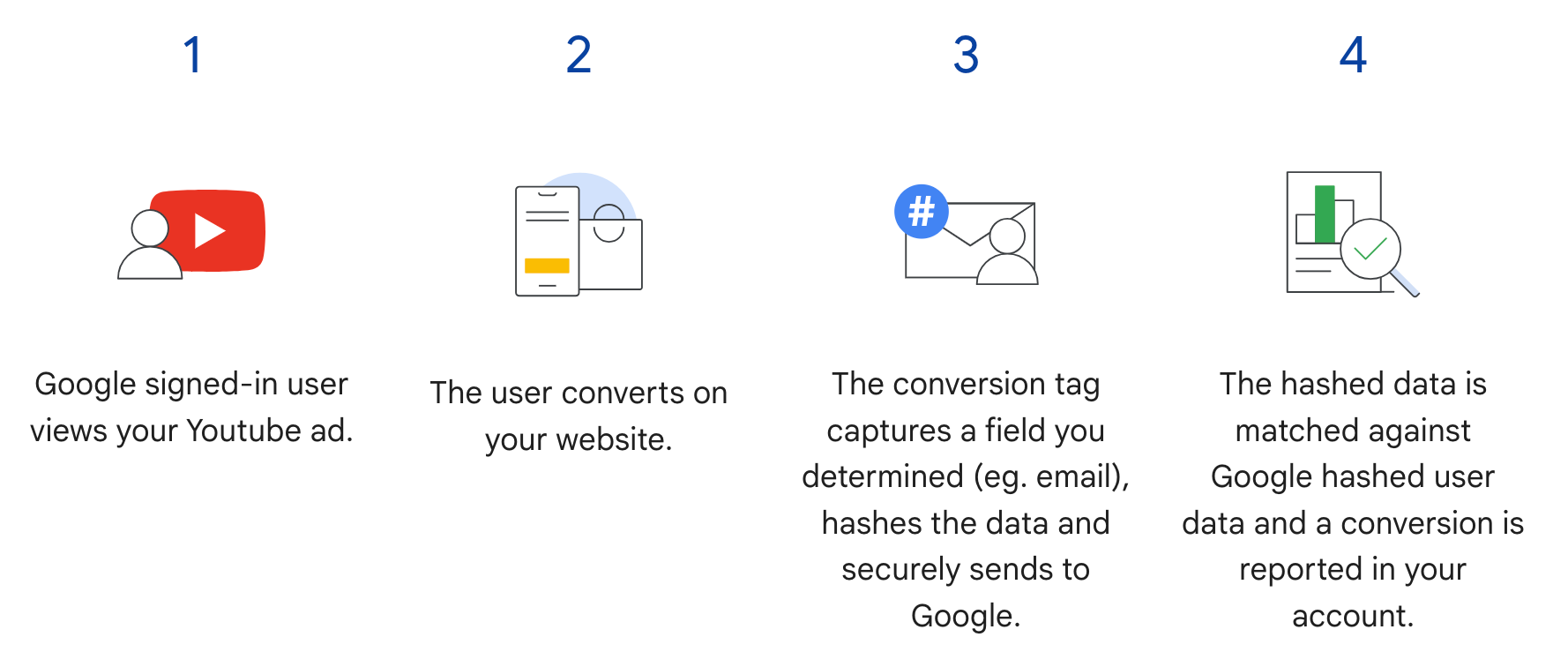
Konwersje rozszerzone w kampaniach internetowych w interfejsie Google Ads API uzupełniają krok 3 na poniższym diagramie. Zamiast wysyłać zaszyfrowane informacje o użytkowniku, gdy dokona on konwersji, tag wysyła tylko identyfikator kliknięcia Google i identyfikator zamówienia, a zaszyfrowane informacje o użytkowniku wysyłasz później, importując identyfikator zamówienia wraz z zaszyfrowanymi danymi. Więcej informacji o konwersjach rozszerzonych w kampaniach internetowych znajdziesz w artykule Konwersje rozszerzone.
Wymagania wstępne
Aby korzystać z konwersji rozszerzonych w kampaniach internetowych, musisz zaakceptować warunki dotyczące danych klienta. Aby sprawdzić, czy zaakceptowano warunki dotyczące danych klienta, wyślij do konta konwersji Google Ads to zapytanie:
SELECT
  customer.id,
  customer.conversion_tracking_setting.accepted_customer_data_terms
FROM customer
Jeśli accepted_customer_data_terms to false, postępuj zgodnie z instrukcjami w artykule Konfigurowanie konwersji rozszerzonych w kampaniach internetowych, aby spełnić to wymaganie.
Konfigurowanie tagowania
Skonfiguruj tagowanie w witrynie zgodnie z instrukcjami podanymi w artykule Konfigurowanie konwersji rozszerzonych w kampaniach internetowych za pomocą interfejsu Google Ads API.
Jeśli używasz interfejsu Google Ads API do konwersji rozszerzonych w kampaniach internetowych, musisz też dodać identyfikatory transakcji (identyfikatory zamówień) do tagu konwersji w witrynie. Google Ads używa identyfikatora transakcji, aby dopasować pole order_id każdego ulepszenia interfejsu API do odpowiedniego zdarzenia konwersji.
Implementacja interfejsu API
Oto ogólny proces importowania konwersji rozszerzonych w kampaniach internetowych w interfejsie Google Ads API.
Znormalizuj i zaszyfruj dane przekazywane przez użytkowników, takie jak adres e-mail, numer telefonu i adres pocztowy.
Wypełnij obiekty
ConversionAdjustmentznormalizowanymi i zaszyfrowanymi danymi przekazywanymi przez użytkowników.Zaimportuj obiekty
ConversionAdjustmentdoConversionAdjustmentUploadService.
Normalizowanie i szyfrowanie danych przekazywanych przez użytkowników
Ze względu na kwestie związane z ochroną prywatności przed zaimportowaniem należy zaszyfrować te dane za pomocą algorytmu SHA-256:
- Adres e-mail
- Numer telefonu
- Imię
- Nazwisko
- Adres
Nie szyfruj tych danych:
- Kraj (
country_code, sformatowany jako 2-literowy kod ISO 3166-1 alfa-2) - Stan (
state) - Miasto (
city) - Kod pocztowy (
postal_code)
Aby ustandaryzować wyniki szyfrowania, przed zaszyfrowaniem tych wartości wykonaj te czynności:
- Usuń spacje na początku i na końcu ciągu.
- zmienić pisownię tekstu na małe litery,
- sformatuj numery telefonów zgodnie ze standardem E.164.
Formatowanie adresów e-mail na potrzeby konwersji rozszerzonych
Aby zapewnić najwyższe współczynniki dopasowania w przypadku konwersji rozszerzonych, musisz prawidłowo sformatować i zaszyfrować adresy e-mail, wykonując te czynności:
Zastosuj standardową normalizację (wszystkie adresy e-mail):
- Usuń wszystkie spacje ASCII na początku i na końcu.
- Wszystkie litery w adresie e-mail muszą być małe.
Zastosuj normalizację dotyczącą domeny (tylko
gmail.comigooglemail.com):- Po zmianie wielkości liter w adresie e-mail sprawdź, czy domena (po symbolu
@) togmail.comlubgooglemail.com. - Usuń kropki (
.): z nazwy użytkownika (przed symbolem@) usuń wszystkie kropki. - Usuń sufiksy z plusem (
+): z części nazwy użytkownika usuń pierwszy znak plusa (+) i wszystkie kolejne znaki aż do symbolu@.- Przykład:
Jane.Doe+Shopping@googlemail.comnajpierw zmienia się wjane.doe+shopping@googlemail.com(małe litery), a następnie wjanedoe@googlemail.com(reguły Gmaila i Googlemail).
- Przykład:
- Inne domeny: w przypadku domen innych niż
gmail.comigooglemail.comnie usuwaj kropek ani sufiksów ze znakiem plus z nazwy użytkownika. Zastosuj tylko standardową normalizację (usuń spacje i przekonwertuj na małe litery).- Przykład:
user.name+NYC@Example.comjest normalizowany douser.name+nyc@example.com.
- Przykład:
- Po zmianie wielkości liter w adresie e-mail sprawdź, czy domena (po symbolu
Zaszyfruj znormalizowany adres e-mail:
- Zakoduj znormalizowany ciąg znaków adresu e-mail jako bajty UTF-8.
- Zaszyfruj bajty UTF-8 za pomocą algorytmu SHA-256.
- Sformatuj wynikowy skrót jako ciąg szesnastkowy składający się z małych liter (64 znaki).
import hashlib
import re


def normalize_and_hash_email(email: str) -> str:
    """Normalizes and SHA-256 hashes an email address for enhanced conversions."""
    normalized = email.strip().lower()
    parts = normalized.split("@")
    if len(parts) != 2:
        raise ValueError("Invalid email address format.")
    username, domain = parts
    if domain in ("gmail.com", "googlemail.com"):
        username = username.replace(".", "")
        username = re.sub(r"\+.*$", "", username)
    normalized = f"{username}@{domain}"
    return hashlib.sha256(normalized.encode("utf-8")).hexdigest()
Przykładowy kod
Ten przykład pokazuje, jak normalizować i szyfrować dane przekazywane przez użytkowników.
Java
private String normalizeAndHash(MessageDigest digest, String s, boolean trimIntermediateSpaces) throws UnsupportedEncodingException { // Normalizes by first converting all characters to lowercase, then trimming spaces. String normalized = s.toLowerCase(); if (trimIntermediateSpaces) { // Removes leading, trailing, and intermediate spaces. normalized = normalized.replaceAll("\\s+", ""); } else { // Removes only leading and trailing spaces. normalized = normalized.trim(); } // Hashes the normalized string using the hashing algorithm. byte[] hash = digest.digest(normalized.getBytes("UTF-8")); StringBuilder result = new StringBuilder(); for (byte b : hash) { result.append(String.format("%02x", b)); } return result.toString(); } /** * Returns the result of normalizing and hashing an email address. For this use case, Google Ads * requires removal of any '.' characters or trailing '+' and characters that follow it from the * username portion of the email address if the domain is {@code gmail.com} or {@code * googlemail.com}. * * @param digest the digest to use to hash the normalized string. * @param emailAddress the email address to normalize and hash. */ private String normalizeAndHashEmailAddress(MessageDigest digest, String emailAddress) throws UnsupportedEncodingException { // Removes all whitespace (leading, trailing, and intermediate) from the email address. String normalizedEmail = emailAddress.toLowerCase().replaceAll("\\s+", ""); String[] emailParts = normalizedEmail.split("@", 2); if (emailParts.length == 2 && emailParts[1].matches("^(gmail|googlemail)\\.com$")) { // Removes any '.' characters from the portion of the email address before the domain if the // domain is gmail.com or googlemail.com. emailParts[0] = emailParts[0].replaceAll("\\.", ""); // Removes any '+' and all characters that follow it from the portion of the email address // before the domain if the domain is gmail.com or googlemail.com. emailParts[0] = emailParts[0].replaceAll("\\+.*", ""); normalizedEmail = String.format("%s@%s", emailParts[0], emailParts[1]); } return normalizeAndHash(digest, normalizedEmail, true); } /** * Returns the result of normalizing and hashing a phone number. For this use case, Google Ads * requires phone numbers to be in E.164 format. * * @param digest the digest to use to hash the normalized string. * @param phoneNumber the phone number to normalize and hash. */ private String normalizeAndHashPhoneNumber(MessageDigest digest, String phoneNumber) throws UnsupportedEncodingException { // Removes non-digit characters and prepends a leading '+' sign. String digitsOnly = phoneNumber.replaceAll("[^0-9]", ""); String formattedPhone = "+" + digitsOnly; if (!formattedPhone.matches("^\\+[1-9]\\d{6,14}$")) { throw new IllegalArgumentException("Phone number must be in E.164 format: " + phoneNumber); } return normalizeAndHash(digest, formattedPhone, true); }
C#
/// <summary> /// Normalizes the email address and hashes it. For this use case, Google Ads requires /// removal of any '.' characters preceding <code>gmail.com</code> or /// <code>googlemail.com</code>. /// </summary> /// <param name="emailAddress">The email address.</param> /// <returns>The hash code.</returns> private string NormalizeAndHashEmailAddress(string emailAddress) { string normalizedEmail = emailAddress.ToLower(); string[] emailParts = normalizedEmail.Split('@'); if (emailParts.Length > 1 && (emailParts[1] == "gmail.com" || emailParts[1] == "googlemail.com")) { // Removes any '.' characters from the portion of the email address before // the domain if the domain is gmail.com or googlemail.com. emailParts[0] = emailParts[0].Replace(".", ""); normalizedEmail = $"{emailParts[0]}@{emailParts[1]}"; } return NormalizeAndHash(normalizedEmail); } /// <summary> /// Normalizes and hashes a string value. /// </summary> /// <param name="value">The value to normalize and hash.</param> /// <returns>The normalized and hashed value.</returns> private static string NormalizeAndHash(string value) { return ToSha256String(digest, ToNormalizedValue(value)); } /// <summary> /// Hash a string value using SHA-256 hashing algorithm. /// </summary> /// <param name="digest">Provides the algorithm for SHA-256.</param> /// <param name="value">The string value (e.g. an email address) to hash.</param> /// <returns>The hashed value.</returns> private static string ToSha256String(SHA256 digest, string value) { byte[] digestBytes = digest.ComputeHash(Encoding.UTF8.GetBytes(value)); // Convert the byte array into an unhyphenated hexadecimal string. return BitConverter.ToString(digestBytes).Replace("-", string.Empty); } /// <summary> /// Removes leading and trailing whitespace and converts all characters to /// lower case. /// </summary> /// <param name="value">The value to normalize.</param> /// <returns>The normalized value.</returns> private static string ToNormalizedValue(string value) { return value.Trim().ToLower(); }
PHP
private static function normalizeAndHash( string $hashAlgorithm, string $value, bool $trimIntermediateSpaces ): string { // Normalizes by first converting all characters to lowercase, then trimming spaces. $normalized = strtolower($value); if ($trimIntermediateSpaces === true) { // Removes leading, trailing, and intermediate spaces. $normalized = str_replace(' ', '', $normalized); } else { // Removes only leading and trailing spaces. $normalized = trim($normalized); } return hash($hashAlgorithm, strtolower(trim($normalized))); } /** * Returns the result of normalizing and hashing an email address. For this use case, Google * Ads requires removal of any '.' characters preceding "gmail.com" or "googlemail.com". * * @param string $hashAlgorithm the hash algorithm to use * @param string $emailAddress the email address to normalize and hash * @return string the normalized and hashed email address */ private static function normalizeAndHashEmailAddress( string $hashAlgorithm, string $emailAddress ): string { $normalizedEmail = strtolower($emailAddress); $emailParts = explode("@", $normalizedEmail); if ( count($emailParts) > 1 && preg_match('/^(gmail|googlemail)\.com\s*/', $emailParts[1]) ) { // Removes any '.' characters from the portion of the email address before the domain // if the domain is gmail.com or googlemail.com. $emailParts[0] = str_replace(".", "", $emailParts[0]); $normalizedEmail = sprintf('%s@%s', $emailParts[0], $emailParts[1]); } return self::normalizeAndHash($hashAlgorithm, $normalizedEmail, true); }
Python
def normalize_and_hash_email_address(email_address): """Returns the result of normalizing and hashing an email address. For this use case, Google Ads requires removal of any '.' characters preceding "gmail.com" or "googlemail.com" Args: email_address: An email address to normalize. Returns: A normalized (lowercase, removed whitespace) and SHA-265 hashed string. """ normalized_email = email_address.strip().lower() email_parts = normalized_email.split("@") # Check that there are at least two segments if len(email_parts) > 1: # Removes any '.' and '+' characters from the portion of the email address # before the domain chars_to_remove = ".+" translation_table = str.maketrans("", "", chars_to_remove) email_parts[0] = email_parts[0].translate(translation_table) normalized_email = "@".join(email_parts) return normalize_and_hash(normalized_email) def normalize_and_hash(s): """Normalizes and hashes a string with SHA-256. Private customer data must be hashed during upload, as described at: https://support.google.com/google-ads/answer/9888656 Args: s: The string to perform this operation on. Returns: A normalized (lowercase, removed whitespace) and SHA-256 hashed string. """ return hashlib.sha256(s.strip().lower().encode()).hexdigest()
Ruby
# Returns the result of normalizing and then hashing the string using the # provided digest. Private customer data must be hashed during upload, as # described at https://support.google.com/google-ads/answer/9888656. def normalize_and_hash(str) # Remove leading and trailing whitespace and ensure all letters are lowercase # before hasing. Digest::SHA256.hexdigest(str.strip.downcase) end # Returns the result of normalizing and hashing an email address. For this use # case, Google Ads requires removal of any '.' characters preceding 'gmail.com' # or 'googlemail.com'. def normalize_and_hash_email(email) email_parts = email.downcase.split("@") # Removes any '.' characters from the portion of the email address before the # domain if the domain is gmail.com or googlemail.com. if email_parts.last =~ /^(gmail|googlemail)\.com\s*/ email_parts[0] = email_parts[0].gsub('.', '') end normalize_and_hash(email_parts.join('@')) end
Perl
sub normalize_and_hash { my $value = shift; my $trim_intermediate_spaces = shift; if ($trim_intermediate_spaces) { $value =~ s/\s+//g; } else { $value =~ s/^\s+|\s+$//g; } return sha256_hex(lc $value); } # Returns the result of normalizing and hashing an email address. For this use # case, Google Ads requires removal of any '.' characters preceding 'gmail.com' # or 'googlemail.com'. sub normalize_and_hash_email_address { my $email_address = shift; my $normalized_email = lc $email_address; my @email_parts = split('@', $normalized_email); if (scalar @email_parts > 1 && $email_parts[1] =~ /^(gmail|googlemail)\.com\s*/) { # Remove any '.' characters from the portion of the email address before the # domain if the domain is 'gmail.com' or 'googlemail.com'. $email_parts[0] =~ s/\.//g; $normalized_email = sprintf '%s@%s', $email_parts[0], $email_parts[1]; } return normalize_and_hash($normalized_email, 1); }
curl
Wypełnianie obiektów ConversionAdjustment
W tej sekcji pokazujemy, jak utworzyć korektę ulepszenia, która zawiera identyfikator zamówienia oraz identyfikatory adresu e-mail, numeru telefonu i adresu pocztowego, z zastosowaniem wymaganej standaryzacji i haszowania. Zgodnie ze sprawdzonymi metodami uwzględnij w korekcie parametr gclid, jeśli jest dostępny.
Ten krok jest prawie identyczny z instrukcjami podanymi w artykule Importowanie korekt konwersji, ale występują tu pewne różnice:
- Wypełnij pole
user_identifiersznormalizowanymi i zaszyfrowanymi danymi użytkownika. Jeśli masz wielu użytkowników, utwórz osobny obiektUserIdentifierdla każdego z nich (maksymalnie 5 identyfikatorów). Aby uwzględnić adres pocztowy w poluaddress_info, podaj wszystkie 4 wymagane pola (hashed_first_name,hashed_last_name,country_codeipostal_code). Jeśli któreś z tych 4 pól jest niedostępne (np. gdy masz tylko imię i nazwisko użytkownika), pomiń obiektUserIdentifierw poluaddress_info.
Java
// Creates a builder for constructing the enhancement adjustment. ConversionAdjustment.Builder enhancementBuilder = ConversionAdjustment.newBuilder().setAdjustmentType(ConversionAdjustmentType.ENHANCEMENT); // Extracts user email, phone, and address info from the raw data, normalizes and hashes it, // then wraps it in UserIdentifier objects. // Creates a separate UserIdentifier object for each. The data in this example is hardcoded, but // in your application you might read the raw data from an input file. // IMPORTANT: Since the identifier attribute of UserIdentifier // (https://developers.google.com/google-ads/api/reference/rpc/latest/UserIdentifier) is a // oneof // (https://protobuf.dev/programming-guides/proto3/#oneof-features), you must set only ONE of // hashedEmail, hashedPhoneNumber, mobileId, thirdPartyUserId, or addressInfo. Setting more // than one of these attributes on the same UserIdentifier will clear all the other members // of the oneof. For example, the following code is INCORRECT and will result in a // UserIdentifier with ONLY a hashedPhoneNumber. // // UserIdentifier incorrectlyPopulatedUserIdentifier = // UserIdentifier.newBuilder() // .setHashedEmail("...") // .setHashedPhoneNumber("...") // .build(); ImmutableMap.Builder<String, String> rawRecordBuilder = ImmutableMap.<String, String>builder() // Email address that includes a period (.) and plus (+) suffix before the Gmail domain. .put("email", "alex.2+myalias@gmail.com") // Address that includes all four required elements: first name, last name, country // code, and postal code. .put("firstName", "Alex") .put("lastName", "Quinn") .put("countryCode", "US") .put("postalCode", "94045") // Phone number to be converted to E.164 format, with a leading '+' as required. .put("phone", "+1 800-555-0102") // This example lets you put conversion details as arguments, but in reality you might // store this data alongside other user data, so we include it in this sample user // record. .put("orderId", orderId) .put("conversionActionId", Long.toString(conversionActionId)) .put("currencyCode", "USD"); // Adds entries for the optional fields. if (conversionDateTime != null) { rawRecordBuilder.put("conversionDateTime", conversionDateTime); } if (userAgent != null) { rawRecordBuilder.put("userAgent", userAgent); } // Builds the map representing the record. Map<String, String> rawRecord = rawRecordBuilder.build(); // Creates a SHA256 message digest for hashing user identifiers in a privacy-safe way, as // described at https://support.google.com/google-ads/answer/9888656. MessageDigest sha256Digest = MessageDigest.getInstance("SHA-256"); // Creates a list for the user identifiers. List<UserIdentifier> userIdentifiers = new ArrayList<>(); // Creates a user identifier using the hashed email address, using the normalize and hash method // specifically for email addresses. UserIdentifier emailIdentifier = UserIdentifier.newBuilder() // Optional: specify the user identifier source. .setUserIdentifierSource(UserIdentifierSource.FIRST_PARTY) // Uses the normalize and hash method specifically for email addresses. .setHashedEmail(normalizeAndHashEmailAddress(sha256Digest, rawRecord.get("email"))) .build(); userIdentifiers.add(emailIdentifier); // Checks if the record has a phone number, and if so, adds a UserIdentifier for it. if (rawRecord.containsKey("phone")) { UserIdentifier hashedPhoneNumberIdentifier = UserIdentifier.newBuilder() .setHashedPhoneNumber( normalizeAndHashPhoneNumber(sha256Digest, rawRecord.get("phone"))) .build(); // Adds the hashed phone number identifier to the UserData object's list. userIdentifiers.add(hashedPhoneNumberIdentifier); } // Checks if the record has all the required mailing address elements, and if so, adds a // UserIdentifier for the mailing address. if (rawRecord.containsKey("firstName")) { // Checks if the record contains all the other required elements of a mailing address. Set<String> missingAddressKeys = new HashSet<>(); for (String addressKey : new String[] {"lastName", "countryCode", "postalCode"}) { if (!rawRecord.containsKey(addressKey)) { missingAddressKeys.add(addressKey); } } if (!missingAddressKeys.isEmpty()) { System.out.printf( "Skipping addition of mailing address information because the following required keys" + " are missing: %s%n", missingAddressKeys); } else { // Creates an OfflineUserAddressInfo object that contains all the required elements of a // mailing address. OfflineUserAddressInfo addressInfo = OfflineUserAddressInfo.newBuilder() .setHashedFirstName( normalizeAndHash(sha256Digest, rawRecord.get("firstName"), false)) .setHashedLastName(normalizeAndHash(sha256Digest, rawRecord.get("lastName"), false)) .setCountryCode(rawRecord.get("countryCode")) .setPostalCode(rawRecord.get("postalCode")) .build(); UserIdentifier addressIdentifier = UserIdentifier.newBuilder().setAddressInfo(addressInfo).build(); // Adds the address identifier to the UserData object's list. userIdentifiers.add(addressIdentifier); } } // Adds the user identifiers to the enhancement adjustment. enhancementBuilder.addAllUserIdentifiers(userIdentifiers);
C#
// Normalize and hash the raw data, then wrap it in UserIdentifier objects. // Create a separate UserIdentifier object for each. The data in this example is // hardcoded, but in your application you might read the raw data from an input file. // // IMPORTANT: Since the identifier attribute of UserIdentifier // (https://developers.google.com/google-ads/api/reference/rpc/latest/UserIdentifier) // is a oneof // (https://protobuf.dev/programming-guides/proto3/#oneof-features), you must set // only ONE of hashed_email, hashed_phone_number, mobile_id, third_party_user_id, // or address-info. Setting more than one of these attributes on the same UserIdentifier // will clear all the other members of the oneof. For example, the following code is // INCORRECT and will result in a UserIdentifier with ONLY a hashed_phone_number: // UserIdentifier incorrectlyPopulatedUserIdentifier = new UserIdentifier() // { // HashedEmail = "..." // HashedPhoneNumber = "..." // } UserIdentifier addressIdentifier = new UserIdentifier() { AddressInfo = new OfflineUserAddressInfo() { HashedFirstName = NormalizeAndHash("Dana"), HashedLastName = NormalizeAndHash("Quinn"), HashedStreetAddress = NormalizeAndHash("1600 Amphitheatre Pkwy"), City = "Mountain View", State = "CA", PostalCode = "94043", CountryCode = "US" }, // Optional: Specifies the user identifier source. UserIdentifierSource = UserIdentifierSource.FirstParty }; // Creates a user identifier using the hashed email address. UserIdentifier emailIdentifier = new UserIdentifier() { UserIdentifierSource = UserIdentifierSource.FirstParty, // Uses the normalize and hash method specifically for email addresses. HashedEmail = NormalizeAndHashEmailAddress("dana@example.com") }; // Adds the user identifiers to the enhancement adjustment. enhancement.UserIdentifiers.AddRange(new[] { addressIdentifier, emailIdentifier });
PHP
// Creates the conversion enhancement. $enhancement = new ConversionAdjustment(['adjustment_type' => ConversionAdjustmentType::ENHANCEMENT]); // Extracts user email, phone, and address info from the raw data, normalizes and hashes it, // then wraps it in UserIdentifier objects. // Creates a separate UserIdentifier object for each. The data in this example is hardcoded, // but in your application you might read the raw data from an input file. // IMPORTANT: Since the identifier attribute of UserIdentifier // (https://developers.google.com/google-ads/api/reference/rpc/latest/UserIdentifier) is a // oneof // (https://protobuf.dev/programming-guides/proto3/#oneof-features), you must set only ONE // of hashedEmail, hashedPhoneNumber, mobileId, thirdPartyUserId, or addressInfo. Setting // more than one of these attributes on the same UserIdentifier will clear all the other // members of the oneof. For example, the following code is INCORRECT and will result in a // UserIdentifier with ONLY a hashedPhoneNumber. // // $incorrectlyPopulatedUserIdentifier = new UserIdentifier([ // 'hashed_email' => '...', // 'hashed_phone_number' => '...' // ]); $rawRecord = [ // Email address that includes a period (.) before the Gmail domain. 'email' => 'alex.2@example.com', // Address that includes all four required elements: first name, last name, country // code, and postal code. 'firstName' => 'Alex', 'lastName' => 'Quinn', 'countryCode' => 'US', 'postalCode' => '94045', // Phone number to be converted to E.164 format, with a leading '+' as required. 'phone' => '+1 800 5550102', // This example lets you input conversion details as arguments, but in reality you might // store this data alongside other user data, so we include it in this sample user // record. 'orderId' => $orderId, 'conversionActionId' => $conversionActionId, 'conversionDateTime' => $conversionDateTime, 'currencyCode' => 'USD' ]; // Creates a list for the user identifiers. $userIdentifiers = []; // Uses the SHA-256 hash algorithm for hashing user identifiers in a privacy-safe way, as // described at https://support.google.com/google-ads/answer/9888656. $hashAlgorithm = "sha256"; // Creates a user identifier using the hashed email address, using the normalize and hash // method specifically for email addresses. $emailIdentifier = new UserIdentifier( [ // Uses the normalize and hash method specifically for email addresses. 'hashed_email' => self::normalizeAndHashEmailAddress( $hashAlgorithm, $rawRecord['email'] ), // Optional: Specifies the user identifier source. 'user_identifier_source' => UserIdentifierSource::FIRST_PARTY ] ); $userIdentifiers[] = $emailIdentifier; // Checks if the record has a phone number, and if so, adds a UserIdentifier for it. if (array_key_exists('phone', $rawRecord)) { $hashedPhoneNumberIdentifier = new UserIdentifier( [ 'hashed_phone_number' => self::normalizeAndHash( $hashAlgorithm, $rawRecord['phone'], true ) ] ); // Adds the hashed email identifier to the user identifiers list. $userIdentifiers[] = $hashedPhoneNumberIdentifier; } // Checks if the record has all the required mailing address elements, and if so, adds a // UserIdentifier for the mailing address. if (array_key_exists('firstName', $rawRecord)) { // Checks if the record contains all the other required elements of a mailing // address. $missingAddressKeys = []; foreach (['lastName', 'countryCode', 'postalCode'] as $addressKey) { if (!array_key_exists($addressKey, $rawRecord)) { $missingAddressKeys[] = $addressKey; } } if (!empty($missingAddressKeys)) { printf( "Skipping addition of mailing address information because the " . "following required keys are missing: %s%s", json_encode($missingAddressKeys), PHP_EOL ); } else { // Creates an OfflineUserAddressInfo object that contains all the required // elements of a mailing address. $addressIdentifier = new UserIdentifier( [ 'address_info' => new OfflineUserAddressInfo( [ 'hashed_first_name' => self::normalizeAndHash( $hashAlgorithm, $rawRecord['firstName'], false ), 'hashed_last_name' => self::normalizeAndHash( $hashAlgorithm, $rawRecord['lastName'], false ), 'country_code' => $rawRecord['countryCode'], 'postal_code' => $rawRecord['postalCode'] ] ) ] ); // Adds the address identifier to the user identifiers list. $userIdentifiers[] = $addressIdentifier; } } // Adds the user identifiers to the conversion. $enhancement->setUserIdentifiers($userIdentifiers);
Python
# Extracts user email, phone, and address info from the raw data, normalizes # and hashes it, then wraps it in UserIdentifier objects. Creates a separate # UserIdentifier object for each. The data in this example is hardcoded, but # in your application you might read the raw data from an input file. # IMPORTANT: Since the identifier attribute of UserIdentifier # (https://developers.google.com/google-ads/api/reference/rpc/latest/UserIdentifier) # is a oneof # (https://protobuf.dev/programming-guides/proto3/#oneof-features), you must # set only ONE of hashed_email, hashed_phone_number, mobile_id, # third_party_user_id, or address_info. Setting more than one of these # attributes on the same UserIdentifier will clear all the other members of # the oneof. For example, the following code is INCORRECT and will result in # a UserIdentifier with ONLY a hashed_phone_number: # # incorrectly_populated_user_identifier = client.get_type("UserIdentifier") # incorrectly_populated_user_identifier.hashed_email = "..."" # incorrectly_populated_user_identifier.hashed_phone_number = "..."" raw_record = { # Email address that includes a period (.) before the Gmail domain. "email": "alex.2@example.com", # Address that includes all four required elements: first name, last # name, country code, and postal code. "first_name": "Alex", "last_name": "Quinn", "country_code": "US", "postal_code": "94045", # Phone number to be converted to E.164 format, with a leading '+' as # required. "phone": "+1 800 5550102", # This example lets you input conversion details as arguments, but in # reality you might store this data alongside other user data, so we # include it in this sample user record. "order_id": order_id, "conversion_action_id": conversion_action_id, "conversion_date_time": conversion_date_time, "currency_code": "USD", "user_agent": user_agent, } # Constructs the enhancement adjustment. conversion_adjustment = client.get_type("ConversionAdjustment") conversion_adjustment.adjustment_type = ( client.enums.ConversionAdjustmentTypeEnum.ENHANCEMENT ) # Creates a user identifier using the hashed email address, using the # normalize and hash method specifically for email addresses. email_identifier = client.get_type("UserIdentifier") # Optional: Specifies the user identifier source. email_identifier.user_identifier_source = ( client.enums.UserIdentifierSourceEnum.FIRST_PARTY ) # Uses the normalize and hash method specifically for email addresses. email_identifier.hashed_email = normalize_and_hash_email_address( raw_record["email"] ) # Adds the email identifier to the conversion adjustment. conversion_adjustment.user_identifiers.append(email_identifier) # Checks if the record has a phone number, and if so, adds a UserIdentifier # for it. if raw_record.get("phone") is not None: phone_identifier = client.get_type("UserIdentifier") phone_identifier.hashed_phone_number = normalize_and_hash( raw_record["phone"] ) # Adds the phone identifier to the conversion adjustment. conversion_adjustment.user_identifiers.append(phone_identifier) # Checks if the record has all the required mailing address elements, and if # so, adds a UserIdentifier for the mailing address. if raw_record.get("first_name") is not None: # Checks if the record contains all the other required elements of a # mailing address. required_keys = ["last_name", "country_code", "postal_code"] # Builds a new list of the required keys that are missing from # raw_record. missing_keys = [ key for key in required_keys if key not in raw_record.keys() ] if len(missing_keys) > 0: print( "Skipping addition of mailing address information because the" f"following required keys are missing: {missing_keys}" ) else: # Creates a user identifier using sample values for the user address, # hashing where required. address_identifier = client.get_type("UserIdentifier") address_info = address_identifier.address_info address_info.hashed_first_name = normalize_and_hash( raw_record["first_name"] ) address_info.hashed_last_name = normalize_and_hash( raw_record["last_name"] ) address_info.country_code = raw_record["country_code"] address_info.postal_code = raw_record["postal_code"] # Adds the address identifier to the conversion adjustment. conversion_adjustment.user_identifiers.append(address_identifier)
Ruby
# Extracts user email, phone, and address info from the raw data, normalizes # and hashes it, then wraps it in UserIdentifier objects. Creates a separate # UserIdentifier object for each. The data in this example is hardcoded, but # in your application you might read the raw data from an input file. # IMPORTANT: Since the identifier attribute of UserIdentifier # (https://developers.google.com/google-ads/api/reference/rpc/latest/UserIdentifier) # is a oneof # (https://protobuf.dev/programming-guides/proto3/#oneof-features), you must # set only ONE of hashed_email, hashed_phone_number, mobile_id, # third_party_user_id, or address_info. Setting more than one of these # attributes on the same UserIdentifier will clear all the other members of # the oneof. For example, the following code is INCORRECT and will result in # a UserIdentifier with ONLY a hashed_phone_number: # # incorrectly_populated_user_identifier.hashed_email = "..."" # incorrectly_populated_user_identifier.hashed_phone_number = "..."" raw_record = { # Email address that includes a period (.) before the Gmail domain. "email" => "alex.2@example.com", # Address that includes all four required elements: first name, last # name, country code, and postal code. "first_name" => "Alex", "last_name" => "Quinn", "country_code" => "US", "postal_code" => "94045", # Phone number to be converted to E.164 format, with a leading '+' as # required. "phone" => "+1 800 5550102", # This example lets you input conversion details as arguments, but in # reality you might store this data alongside other user data, so we # include it in this sample user record. "order_id" => order_id, "conversion_action_id" => conversion_action_id, "conversion_date_time" => conversion_date_time, "currency_code" => "USD", "user_agent" => user_agent, } enhancement = client.resource.conversion_adjustment do |ca| ca.conversion_action = client.path.conversion_action(customer_id, conversion_action_id) ca.adjustment_type = :ENHANCEMENT ca.order_id = order_id # Sets the conversion date and time if provided. Providing this value is # optional but recommended. unless conversion_date_time.nil? ca.gclid_date_time_pair = client.resource.gclid_date_time_pair do |pair| pair.conversion_date_time = conversion_date_time end end # Creates a user identifier using the hashed email address, using the # normalize and hash method specifically for email addresses. ca.user_identifiers << client.resource.user_identifier do |ui| # Uses the normalize and hash method specifically for email addresses. ui.hashed_email = normalize_and_hash_email(raw_record["email"]) # Optional: Specifies the user identifier source. ui.user_identifier_source = :FIRST_PARTY end # Checks if the record has a phone number, and if so, adds a UserIdentifier # for it. unless raw_record["phone"].nil? ca.user_identifiers << client.resource.user_identifier do |ui| ui.hashed_phone_number = normalize_and_hash_email(raw_record["phone"]) end end # Checks if the record has all the required mailing address elements, and if # so, adds a UserIdentifier for the mailing address. unless raw_record["first_name"].nil? # Checks if the record contains all the other required elements of a # mailing address. required_keys = ["last_name", "country_code", "postal_code"] # Builds a new list of the required keys that are missing from # raw_record. missing_keys = required_keys - raw_record.keys if missing_keys puts( "Skipping addition of mailing address information because the" \ "following required keys are missing: #{missing_keys}" ) else ca.user_identifiers << client.resource.user_identifier do |ui| ui.address_info = client.resource.offline_user_address_info do |info| # Certain fields must be hashed using SHA256 in order to handle # identifiers in a privacy-safe way, as described at # https://support.google.com/google-ads/answer/9888656. info.hashed_first_name = normalize_and_hash( raw_record["first_name"]) info.hashed_last_name = normalize_and_hash( raw_record["last_name"]) info.postal_code = normalize_and_hash(raw_record["country_code"]) info.country_code = normalize_and_hash(raw_record["postal_code"]) end end end end
Perl
# Construct the enhancement adjustment. my $enhancement = Google::Ads::GoogleAds::V26::Services::ConversionAdjustmentUploadService::ConversionAdjustment ->new({ adjustmentType => ENHANCEMENT }); # Extract user email, phone, and address info from the raw data, # normalize and hash it, then wrap it in UserIdentifier objects. # Create a separate UserIdentifier object for each. # The data in this example is hardcoded, but in your application # you might read the raw data from an input file. # # IMPORTANT: Since the identifier attribute of UserIdentifier # (https://developers.google.com/google-ads/api/reference/rpc/latest/UserIdentifier) # is a oneof # (https://protobuf.dev/programming-guides/proto3/#oneof-features), you must set # only ONE of hashed_email, hashed_phone_number, mobile_id, third_party_user_id, # or address-info. Setting more than one of these attributes on the same UserIdentifier # will clear all the other members of the oneof. For example, the following code is # INCORRECT and will result in a UserIdentifier with ONLY a hashed_phone_number: # # my $incorrect_user_identifier = Google::Ads::GoogleAds::V26::Common::UserIdentifier->new({ # hashedEmail => '...', # hashedPhoneNumber => '...', # }); my $raw_record = { # Email address that includes a period (.) before the Gmail domain. email => 'alex.2@example.com', # Address that includes all four required elements: first name, last # name, country code, and postal code. firstName => 'Alex', lastName => 'Quinn', countryCode => 'US', postalCode => '94045', # Phone number to be converted to E.164 format, with a leading '+' as # required. phone => '+1 800 5550102', # This example lets you input conversion details as arguments, # but in reality you might store this data alongside other user data, # so we include it in this sample user record. orderId => $order_id, conversionActionId => $conversion_action_id, conversionDateTime => $conversion_date_time, currencyCode => "USD", userAgent => $user_agent, }; my $user_identifiers = []; # Create a user identifier using the hashed email address, using the normalize # and hash method specifically for email addresses. my $hashed_email = normalize_and_hash_email_address($raw_record->{email}); push( @$user_identifiers, Google::Ads::GoogleAds::V26::Common::UserIdentifier->new({ hashedEmail => $hashed_email, # Optional: Specify the user identifier source. userIdentifierSource => FIRST_PARTY })); # Check if the record has a phone number, and if so, add a UserIdentifier for it. if (defined $raw_record->{phone}) { # Add the hashed phone number identifier to the list of UserIdentifiers. push( @$user_identifiers, Google::Ads::GoogleAds::V26::Common::UserIdentifier->new({ hashedPhoneNumber => normalize_and_hash($raw_record->{phone}, 1)})); } # Confirm the record has all the required mailing address elements, and if so, add # a UserIdentifier for the mailing address. if (defined $raw_record->{firstName}) { my $required_keys = ["lastName", "countryCode", "postalCode"]; my $missing_keys = []; foreach my $key (@$required_keys) { if (!defined $raw_record->{$key}) { push(@$missing_keys, $key); } } if (@$missing_keys) { print "Skipping addition of mailing address information because the following" . "keys are missing: " . join(",", @$missing_keys); } else { push( @$user_identifiers, Google::Ads::GoogleAds::V26::Common::UserIdentifier->new({ addressInfo => Google::Ads::GoogleAds::V26::Common::OfflineUserAddressInfo->new({ # First and last name must be normalized and hashed. hashedFirstName => normalize_and_hash($raw_record->{firstName}), hashedLastName => normalize_and_hash($raw_record->{lastName}), # Country code and zip code are sent in plain text. countryCode => $raw_record->{countryCode}, postalCode => $raw_record->{postalCode}, })})); } } # Add the user identifiers to the enhancement adjustment. $enhancement->{userIdentifiers} = $user_identifiers;
curl
- Ustaw
order_id,adjustment_type(ENHANCEMENT) iconversion_action(WEBPAGE) oraz opcjonalniegclid_date_time_pair(w formacieyyyy-mm-dd HH:mm:ss+|-HH:mm, na przykład:2022-01-01 19:32:45-05:00(z pominięciem czasu letniego)) iuser_agent:
Java
// Sets the conversion action. enhancementBuilder.setConversionAction( ResourceNames.conversionAction( customerId, Long.parseLong(rawRecord.get("conversionActionId")))); // Sets the order ID. Enhancements MUST use order ID instead of GCLID date/time pair. enhancementBuilder.setOrderId(rawRecord.get("orderId")); // Sets the conversion date and time if provided. Providing this value is optional but // recommended. if (rawRecord.containsKey("conversionDateTime")) { enhancementBuilder.setGclidDateTimePair( GclidDateTimePair.newBuilder() .setConversionDateTime(rawRecord.get("conversionDateTime"))); } // Sets the user agent if provided. This should match the user agent of the request that sent // the original conversion so the conversion and its enhancement are either both attributed as // same-device or both attributed as cross-device. if (rawRecord.containsKey("userAgent")) { enhancementBuilder.setUserAgent(rawRecord.get("userAgent")); }
C#
// Set the conversion action. enhancement.ConversionAction = ResourceNames.ConversionAction(customerId, conversionActionId); // Set the order ID. Enhancements MUST use order ID instead of GCLID date/time pair. enhancement.OrderId = orderId; // Sets the conversion date and time if provided. Providing this value is optional but // recommended. if (string.IsNullOrEmpty(conversionDateTime)) { enhancement.GclidDateTimePair = new GclidDateTimePair() { ConversionDateTime = conversionDateTime }; } // Sets optional fields where a value was provided. if (!string.IsNullOrEmpty(userAgent)) { // Sets the user agent. This should match the user agent of the request that // sent the original conversion so the conversion and its enhancement are either // both attributed as same-device or both attributed as cross-device. enhancement.UserAgent = userAgent; }
PHP
// Sets the conversion action. $enhancement->setConversionAction( ResourceNames::forConversionAction($customerId, $rawRecord['conversionActionId']) ); // Sets the order ID. Enhancements MUST use order ID instead of GCLID date/time pair. if (!empty($rawRecord['orderId'])) { $enhancement->setOrderId($rawRecord['orderId']); } // Sets the conversion date and time if provided. Providing this value is optional but // recommended. if (!empty($rawRecord['conversionDateTime'])) { // Sets the conversion date and time if provided. Providing this value is optional but // recommended. $enhancement->setGclidDateTimePair( new GclidDateTimePair( [ 'conversion_date_time' => $rawRecord['conversionDateTime'] ] ) ); } // Sets the user agent if provided. This should match the user agent of the request that // sent the original conversion so the conversion and its enhancement are either both // attributed as same-device or both attributed as cross-device. if (!empty($rawRecord['userAgent'])) { $enhancement->setUserAgent($rawRecord['userAgent']); }
Python
conversion_action_service = client.get_service("ConversionActionService") # Sets the conversion action. conversion_adjustment.conversion_action = ( conversion_action_service.conversion_action_path( customer_id, raw_record["conversion_action_id"] ) ) # Sets the order ID. Enhancements MUST use order ID instead of GCLID # date/time pair. conversion_adjustment.order_id = order_id # Sets the conversion date and time if provided. Providing this value is # optional but recommended. if raw_record.get("conversion_date_time"): conversion_adjustment.gclid_date_time_pair.conversion_date_time = ( raw_record["conversion_date_time"] ) # Sets optional fields where a value was provided if raw_record.get("user_agent"): # Sets the user agent. This should match the user agent of the request # that sent the original conversion so the conversion and its # enhancement are either both attributed as same-device or both # attributed as cross-device. conversion_adjustment.user_agent = user_agent
Ruby
ca.conversion_action = client.path.conversion_action(customer_id, conversion_action_id) ca.adjustment_type = :ENHANCEMENT ca.order_id = order_id # Sets the conversion date and time if provided. Providing this value is # optional but recommended. unless conversion_date_time.nil? ca.gclid_date_time_pair = client.resource.gclid_date_time_pair do |pair| pair.conversion_date_time = conversion_date_time end end # Creates a user identifier using the hashed email address, using the # normalize and hash method specifically for email addresses. ca.user_identifiers << client.resource.user_identifier do |ui| # Uses the normalize and hash method specifically for email addresses. ui.hashed_email = normalize_and_hash_email(raw_record["email"]) # Optional: Specifies the user identifier source. ui.user_identifier_source = :FIRST_PARTY end # Checks if the record has a phone number, and if so, adds a UserIdentifier # for it. unless raw_record["phone"].nil? ca.user_identifiers << client.resource.user_identifier do |ui| ui.hashed_phone_number = normalize_and_hash_email(raw_record["phone"]) end end # Checks if the record has all the required mailing address elements, and if # so, adds a UserIdentifier for the mailing address. unless raw_record["first_name"].nil? # Checks if the record contains all the other required elements of a # mailing address. required_keys = ["last_name", "country_code", "postal_code"] # Builds a new list of the required keys that are missing from # raw_record. missing_keys = required_keys - raw_record.keys if missing_keys puts( "Skipping addition of mailing address information because the" \ "following required keys are missing: #{missing_keys}" ) else ca.user_identifiers << client.resource.user_identifier do |ui| ui.address_info = client.resource.offline_user_address_info do |info| # Certain fields must be hashed using SHA256 in order to handle # identifiers in a privacy-safe way, as described at # https://support.google.com/google-ads/answer/9888656. info.hashed_first_name = normalize_and_hash( raw_record["first_name"]) info.hashed_last_name = normalize_and_hash( raw_record["last_name"]) info.postal_code = normalize_and_hash(raw_record["country_code"]) info.country_code = normalize_and_hash(raw_record["postal_code"]) end end end end # Sets optional fields where a value was provided. unless user_agent.nil? # Sets the user agent. This should match the user agent of the request # that sent the original conversion so the conversion and its enhancement # are either both attributed as same-device or both attributed as # cross-device. ca.user_agent = user_agent end
Perl
# Set the conversion action. $enhancement->{conversionAction} = Google::Ads::GoogleAds::V26::Utils::ResourceNames::conversion_action( $customer_id, $raw_record->{conversionActionId}); # Set the order ID. Enhancements MUST use order ID instead of GCLID date/time pair. $enhancement->{orderId} = $raw_record->{orderId}; # Set the conversion date and time if provided. Providing this value is optional # but recommended. if (defined $raw_record->{conversionDateTime}) { $enhancement->{gclidDateTimePair} = Google::Ads::GoogleAds::V26::Services::ConversionAdjustmentUploadService::GclidDateTimePair ->new({ conversionDateTime => $raw_record->{conversionDateTime}}); } # Set the user agent if provided. This should match the user agent of the # request that sent the original conversion so the conversion and its enhancement # are either both attributed as same-device or both attributed as cross-device. if (defined $raw_record->{userAgent}) { $enhancement->{userAgent} = $raw_record->{userAgent}; }
curl
Podsumowanie schematu Request i ConversionAdjustment
W tabelach poniżej znajdziesz podsumowanie pól najwyższego poziomu w UploadConversionAdjustmentsRequest i pól dotyczących poszczególnych elementów w ConversionAdjustment (conversion_adjustments[]) podczas przesyłania konwersji rozszerzonych w kampaniach internetowych za pomocą ConversionAdjustmentUploadService.UploadConversionAdjustments:
| Pole żądania | Wymaganie | Format i ograniczenia |
|---|---|---|
customer_id |
Wymagane | Ustaw identyfikator klienta konwersji z reklam Google Ads (google_ads_conversion_customer na customer.conversion_tracking_setting) bez łączników. |
conversion_adjustments[] |
Wymagane | Maksymalnie 2000 wpisów ConversionAdjustment na żądanie (TOO_MANY_ADJUSTMENTS_IN_REQUEST). |
partial_failure |
Wymagane | Musi mieć wartość true, aby prawidłowe korekty były przetwarzane, a błędy na poziomie wiersza były zwracane w partial_failure_error. |
validate_only |
Opcjonalny | Jeśli ma wartość true, sprawdza żądanie bez wprowadzania korekt. |
job_id |
Opcjonalny | Dodatnia wartość int32 (od 1 do 2^31 - 1; 0 to nieustawiona wartość wartownicza, która zwraca INVALID_JOB_ID, jeśli jest określona) służąca do grupowania wielu żądań w ramach jednego zadania logicznego w job_summaries. |
Każdy element ConversionAdjustment w conversion_adjustments[] (maksymalnie 2000 dostosowań na żądanie) obsługuje te pola:
ConversionAdjustment pole |
Wymaganie | Format i ograniczenia |
|---|---|---|
adjustment_type |
Wymagane | Trzeba ustawić na: ENHANCEMENT (ConversionAdjustmentType). |
conversion_action |
Wymagane | Nazwa zasobu (customers/{conversion_customer_id}/conversionActions/{action_id}) działania powodującego konwersję ENABLED z type = WEBPAGE utworzonego co najmniej 6 godzin przed przesłaniem (TOO_RECENT_CONVERSION_ACTION). |
order_id |
Wymagane | Identyfikator transakcji konwersji, którą chcesz ulepszyć. Musi on być zgodny z identyfikatorem zamówienia wysyłanym przez tag konwersji w witrynie. |
user_identifiers[] |
Wymagane | Od 1 do 5 obiektów UserIdentifier na ulepszenie. Ustaw opcjonalne pole user_identifier_source (np. FIRST_PARTY) i 1 pole identyfikatora na wpis:
|
gclid_date_time_pair |
Opcjonalne (zalecane) | Obiekt GclidDateTimePair zawierający pola gclid i conversion_date_time pierwotnej konwersji w formacie yyyy-mm-dd HH:mm:ss+|-HH:mm (np. 2026-06-01 14:30:00-04:00). Prześlij ulepszenia w ciągu 24 godzin od zdarzenia konwersji. Komunikat GclidDateTimePair akceptuje tylko pole gclid. Google Ads nie obsługuje konwersji rozszerzonych w kampaniach internetowych, gdy kliknięcie wypełnia parametr gbraid lub wbraid zamiast parametru gclid. |
adjustment_date_time |
Opcjonalny | Sygnatura czasowa określająca, kiedy nastąpiła korekta, w formacie yyyy-mm-dd HH:mm:ss+|-HH:mm. Jeśli ta sygnatura czasowa jest ustawiona, musi być późniejsza niż wartość conversion_date_time i nie może być w przyszłości. |
user_agent |
Opcjonalny | Ciąg znaków nagłówka HTTP User-Agent z pierwotnego żądania konwersji, dzięki czemu konwersja i ulepszenie mają to samo urządzenie, któremu przypisano konwersję (same-device lub cross-device). |
restatement_value |
Nie ustawiaj na urządzeniu ENHANCEMENT |
Ignorowana, gdy zasada adjustment_type ma wartość ENHANCEMENT. Aby zmienić wartość konwersji, wyślij osobną operację z parametrem adjustment_type = RESTATEMENT. |
Importowanie ulepszeń konwersji
Java
// Creates the conversion adjustment upload service client. try (ConversionAdjustmentUploadServiceClient conversionUploadServiceClient = googleAdsClient.getLatestVersion().createConversionAdjustmentUploadServiceClient()) { // Uploads the enhancement adjustment. Partial failure should always be set to true. // NOTE: This request contains a single adjustment as a demonstration. However, if you have // multiple adjustments to upload, it's best to upload multiple adjustments per request // instead of sending a separate request per adjustment. See the following for per-request // limits: // https://developers.google.com/google-ads/api/docs/best-practices/quotas#conversion_adjustment_upload_service UploadConversionAdjustmentsResponse response = conversionUploadServiceClient.uploadConversionAdjustments( UploadConversionAdjustmentsRequest.newBuilder() .setCustomerId(Long.toString(customerId)) .addConversionAdjustments(enhancementBuilder) // Enables partial failure (must be true). .setPartialFailure(true) .build());
C#
// Uploads the enhancement adjustment. Partial failure should always be set to true. // // NOTE: This request contains a single adjustment as a demonstration. // However, if you have multiple adjustments to upload, it's best to upload // multiple adjustmenst per request instead of sending a separate request per // adjustment. See the following for per-request limits: // https://developers.google.com/google-ads/api/docs/best-practices/quotas#conversion_adjust UploadConversionAdjustmentsResponse response = conversionAdjustmentUploadService.UploadConversionAdjustments( new UploadConversionAdjustmentsRequest() { CustomerId = customerId.ToString(), ConversionAdjustments = { enhancement }, // Enables partial failure (must be true). PartialFailure = true, });
PHP
// Issues a request to upload the conversion enhancement. $conversionAdjustmentUploadServiceClient = $googleAdsClient->getConversionAdjustmentUploadServiceClient(); // NOTE: This request contains a single adjustment as a demonstration. However, if you have // multiple adjustments to upload, it's best to upload multiple adjustments per request // instead of sending a separate request per adjustment. See the following for per-request // limits: // https://developers.google.com/google-ads/api/docs/best-practices/quotas#conversion_adjustment_upload_service $response = $conversionAdjustmentUploadServiceClient->uploadConversionAdjustments( // Enables partial failure (must be true). UploadConversionAdjustmentsRequest::build($customerId, [$enhancement], true) );
Python
# Creates the conversion adjustment upload service client. conversion_adjustment_upload_service = client.get_service( "ConversionAdjustmentUploadService" ) # Uploads the enhancement adjustment. Partial failure should always be set # to true. # NOTE: This request only uploads a single conversion, but if you have # multiple conversions to upload, it's still best to upload them in a single # request. See the following for per-request limits for reference: # https://developers.google.com/google-ads/api/docs/best-practices/quotas#conversion_upload_service response = conversion_adjustment_upload_service.upload_conversion_adjustments( customer_id=customer_id, conversion_adjustments=[conversion_adjustment], # Enables partial failure (must be true). partial_failure=True, )
Ruby
response = client.service.conversion_adjustment_upload.upload_conversion_adjustments( customer_id: customer_id, # NOTE: This request only uploads a single conversion, but if you have # multiple conversions to upload, it's still best to upload them in a single # request. See the following for per-request limits for reference: # https://developers.google.com/google-ads/api/docs/best-practices/quotas#conversion_upload_service conversion_adjustments: [enhancement], # Partial failure must be set to true. partial_failure: true, )
Perl
# Upload the enhancement adjustment. Partial failure should always be set to true. # # NOTE: This request contains a single adjustment as a demonstration. # However, if you have multiple adjustments to upload, it's best to # upload multiple adjustments per request instead of sending a separate # request per adjustment. See the following for per-request limits: # https://developers.google.com/google-ads/api/docs/best-practices/quotas#conversion_adjustment_upload_service my $response = $api_client->ConversionAdjustmentUploadService() ->upload_conversion_adjustments({ customerId => $customer_id, conversionAdjustments => [$enhancement], # Enable partial failure (must be true). partialFailure => "true" });
curl
Struktura żądania i odpowiedzi REST
Podczas wywoływania ConversionAdjustmentUploadService.UploadConversionAdjustments przez REST wyślij żądanie POST z parametrem partialFailure ustawionym na true:
POST https://googleads.googleapis.com/v26/customers/{customer_id}:uploadConversionAdjustments
{
  "partialFailure": true,
  "jobId": 2001,
  "conversionAdjustments": [
    {
      "conversionAction": "customers/{customer_id}/conversionActions/{conversion_action_id}",
      "adjustmentType": "ENHANCEMENT",
      "orderId": "ORDER-2026-1001",
      "gclidDateTimePair": {
        "gclid": "EAIaIQobChMI...",
        "conversionDateTime": "2026-06-01 14:30:00-04:00"
      },
      "userAgent": "Mozilla/5.0 (Macintosh; Intel Mac OS X 10_15_7)",
      "userIdentifiers": [
        {
          "userIdentifierSource": "FIRST_PARTY",
          "hashedEmail": "f660ab912ec121d1b1e928a0bb4bc61b15f5ad44d5efdc4e1c92a25e99b8e44a"
        },
        {
          "userIdentifierSource": "FIRST_PARTY",
          "hashedPhoneNumber": "42975f8f9e46c2e13c1a2294957e5cb8d8e6f4f7341a036c6e595bc9f5e24621"
        },
        {
          "userIdentifierSource": "FIRST_PARTY",
          "addressInfo": {
            "hashedFirstName": "a665a45920422f9d417e4867efdc4fb8a04a1f3fff1fa07e998e86f7f7a27ae3",
            "hashedLastName": "b3a8e0e1f9ab1bfe3a36f231f676f78bb30a519d2b21e6c530c0eee8ebb4a5d0",
            "hashedStreetAddress": "35a9e381b1a27567549b5f8a6f783c167ebf809f1c4d6a9e367240484d8ce281",
            "city": "New York",
            "state": "NY",
            "postalCode": "10011",
            "countryCode": "US"
          }
        }
      ]
    },
    {
      "conversionAction": "customers/{customer_id}/conversionActions/{conversion_action_id}",
      "adjustmentType": "ENHANCEMENT",
      "userIdentifiers": [
        {
          "userIdentifierSource": "FIRST_PARTY",
          "hashedEmail": "f660ab912ec121d1b1e928a0bb4bc61b15f5ad44d5efdc4e1c92a25e99b8e44a"
        }
      ]
    }
  ]
}
W tym zbiorze 2 korekt, w którym druga korekta pomija orderId,
wiersze, które zostały przetworzone prawidłowo, zwracają wypełnione wpisy ConversionAdjustmentResult w results[],
natomiast wiersze, które nie zostały przetworzone prawidłowo, zwracają puste obiekty {} w results[] wraz ze szczegółami błędów na poziomie wiersza w partialFailureError w UploadConversionAdjustmentsResponse:
{
  "results": [
    {
      "gclidDateTimePair": {
        "gclid": "EAIaIQobChMI...",
        "conversionDateTime": "2026-06-01 14:30:00-04:00"
      },
      "orderId": "ORDER-2026-1001",
      "conversionAction": "customers/{customer_id}/conversionActions/{conversion_action_id}",
      "adjustmentType": "ENHANCEMENT"
    },
    {}
  ],
  "jobId": "2001",
  "partialFailureError": {
    "code": 3,
    "message": "The required field was not present., at conversion_adjustments[1].order_id",
    "details": [
      {
        "@type": "type.googleapis.com/google.ads.googleads.v26.errors.GoogleAdsFailure",
        "errors": [
          {
            "errorCode": {
              "fieldError": "REQUIRED"
            },
            "message": "The required field was not present.",
            "location": {
              "fieldPathElements": [
                {
                  "fieldName": "conversion_adjustments",
                  "index": 1
                },
                {
                  "fieldName": "order_id"
                }
              ]
            }
          }
        ]
      }
    ]
  }
}
Sprawdzanie importów
Sprawdzaj zarówno diagnostykę w interfejsie Google Ads, jak i diagnostykę danych offline, ponieważ każde narzędzie sprawdza inny etap potoku:
- Raport diagnostyczny konwersji rozszerzonych (interfejs Google Ads):
sprawdza asynchroniczne dopasowywanie zdarzeń tagu witryny i ulepszeń interfejsu API. Sprawdź, czy nie brakuje identyfikatorów transakcji w tagach, czy nie występują niezgodności między wartościami
order_idw tagach i interfejsie API, czy nie ma niskiego pokrycia ulepszeń interfejsu API, nieznormalizowanych danych użytkownika lub niekompletnych póladdress_info. W przypadku tych problemów nie są zwracane błędy interfejsu API ani nie pojawiają się one w diagnostyce danych offline. Instrukcje rozwiązywania problemów znajdziesz w artykule Alerty diagnostyczne w interfejsie po przesłaniu danych za pomocą interfejsu API. - Diagnostyka danych offline (interfejs Google Ads API): śledzi stan pozyskiwania danych przez interfejs API na poziomie żądania i błędy weryfikacji, takie jak
INVALID_USER_IDENTIFIER,CONVERSION_ALREADY_ENHANCEDlubFieldError.REQUIRED. StanEXCELLENTpotwierdza tylko, że interfejs API zaakceptował Twoje żądaniaENHANCEMENT, a nie że przesłane ulepszenia pasują do zdarzeń tagu witryny.
Wykonywanie zapytań dotyczących diagnostyki przesyłania za pomocą GAQL
Możesz też programowo sprawdzać stan przesyłania na poziomie konta, liczbę ostatnich zadań i alerty o błędach, wysyłając zapytanie offline_conversion_upload_client_summary do identyfikatora klienta konwersji:
SELECT
  customer.id,
  offline_conversion_upload_client_summary.client,
  offline_conversion_upload_client_summary.status,
  offline_conversion_upload_client_summary.total_event_count,
  offline_conversion_upload_client_summary.successful_event_count,
  offline_conversion_upload_client_summary.success_rate,
  offline_conversion_upload_client_summary.pending_event_count,
  offline_conversion_upload_client_summary.pending_rate,
  offline_conversion_upload_client_summary.last_upload_date_time,
  offline_conversion_upload_client_summary.alerts,
  offline_conversion_upload_client_summary.daily_summaries,
  offline_conversion_upload_client_summary.job_summaries
FROM offline_conversion_upload_client_summary
Podczas raportowania danych o konwersjach w kampaniach zapoznaj się z artykułem Mapowanie danych interfejsu, aby powiązać dane interfejsu Google Ads z polami raportowania interfejsu Google Ads API. Możesz też wysłać zapytanie do zasobu conversion_action, aby wyświetlić łączną liczbę konwersji i łączną wartość konwersji w przypadku danego działania powodującego konwersję.
Sprawdzone metody
Podczas wdrażania konwersji rozszerzonych w kampaniach internetowych pamiętaj o tych sprawdzonych metodach.
Sprawdzanie identyfikatora klienta
Gdy importujesz konwersje, identyfikator klienta musi być ustawiony na konto, które zawiera działanie powodujące konwersję i które śledzi konwersje. Aby sprawdzić to ustawienie, wyślij zapytanie do zasobu Customer Google Ads, który wyświetla reklamy, o ConversionTrackingSetting. Aby znaleźć wartość customer.conversion_tracking_setting.google_ads_conversion_customer, wyślij to zapytanie za pomocą GoogleAdsService.SearchStream.
SELECT
  customer.conversion_tracking_setting.google_ads_conversion_customer,
  customer.conversion_tracking_setting.conversion_tracking_status,
  customer.conversion_tracking_setting.conversion_tracking_id,
  customer.conversion_tracking_setting.cross_account_conversion_tracking_id
FROM customer
W żądaniach importowania konwersji ustaw parametr customer_id na wartość google_ads_conversion_customer.
Jeśli masz kilka identyfikatorów, podaj je.
Jeśli masz wartość gclid dla konwersji, wyślij ją w polu gclid_date_time_pair oprócz pola user_identifiers, aby zwiększyć skuteczność. Komunikat GclidDateTimePair akceptuje tylko pole gclid, dlatego Google Ads nie obsługuje konwersji rozszerzonych w kampaniach internetowych, gdy kliknięcie wypełnia parametr gbraid lub wbraid zamiast parametru gclid.
Jeśli masz więcej niż 1 obiekt UserIdentifier dla konwersji, uwzględnij je wszystkie w tym samym obiekcie ConversionAdjustment, aby zwiększyć prawdopodobieństwo dopasowania.
Sprawdzanie błędów częściowego niepowodzenia podczas konfigurowania integracji
Podczas pierwszej konfiguracji konwersji rozszerzonych w kampaniach internetowych sprawdź i rozwiąż wszystkie błędy częściowe w polu partial_failure_error odpowiedzi. Jeśli w konfiguracji występują problemy, możesz sprawdzić to pole, aby je zbadać i rozwiązać. Więcej informacji i przykładów dotyczących obsługi błędów częściowych znajdziesz w przewodniku po błędach częściowych.
Po rozwiązaniu problemów w polu partial_failure_error i zakończeniu integracji monitoruj oba narzędzia diagnostyczne. Sprawdź diagnostykę danych offline, aby poznać stan pozyskiwania danych przez interfejs API, oraz raport diagnostyczny konwersji rozszerzonych w interfejsie Google Ads, aby poznać stan dopasowywania tagów do interfejsu API.
Grupowanie wielu korekt w jednym żądaniu
Jeśli masz do zaimportowania wiele dostosowań, połącz operacje (maksymalnie 2000 dostosowań konwersji na żądanie) w jedną UploadConversionAdjustmentsRequest, zamiast wysyłać żądanie importu dla każdego dostosowania.
Limity liczby korekt na żądanie znajdziesz w przewodniku po limitach. Jeśli chcesz, aby diagnostyka danych offline grupowała zestaw żądań w ramach tego samego zadania logicznego, ustaw we wszystkich żądaniach tę samą wartość parametru job_id.
Rozwiązywanie problemów
Aby sprawdzić, czy konwersje rozszerzone w kampaniach internetowych działają zgodnie z oczekiwaniami, użyj raportu z diagnostyki konwersji rozszerzonych w interfejsie Google Ads. Jeśli alerty w interfejsie pojawiają się mimo udanego przesłania danych przez interfejs API, zapoznaj się z artykułem Alerty diagnostyczne w interfejsie po udanym przesłaniu danych przez interfejs API.
Debugowanie typowych błędów
Poniższe wskazówki pomogą Ci diagnozować i rozwiązywać typowe błędy związane z konwersjami rozszerzonymi w kampaniach internetowych.
| Błąd | |
|---|---|
CUSTOMER_NOT_ACCEPTED_CUSTOMER_DATA_TERMS
|
Warunki dotyczące danych klienta nie zostały zaakceptowane w przypadku customer_id żądania. Instrukcje znajdziesz w przewodniku dotyczącym wymagań wstępnych.
|
CONVERSION_ALREADY_ENHANCED
|
Ta konwersja otrzymała już dostosowanie ENHANCEMENT z podanymi polami order_id i conversion_action. Pamiętaj, aby dla każdej konwersji podać unikalną wartość order_id.
|
CONVERSION_ACTION_NOT_ELIGIBLE_FOR_ENHANCEMENT
|
Podany identyfikator conversion_action nie kwalifikuje się do korzystania z konwersji rozszerzonych w kampaniach internetowych. W interfejsie Google Ads zaznacz pole Włącz konwersje rozszerzone w przypadku działania powodującego konwersję, do którego odwołujesz się w żądaniu. Instrukcje znajdziesz w Centrum pomocy.
|
INVALID_USER_IDENTIFIER
|
Pole zaszyfrowanego identyfikatora użytkownika (hashed_email, hashed_phone_number, hashed_first_name, hashed_last_name lub hashed_street_address) nie jest prawidłowym 64-znakowym skrótem SHA-256 w systemie szesnastkowym. Przed zaimportowaniem danych przekazywanych przez użytkowników znormalizuj je i zaszyfruj. Instrukcje znajdziesz w artykule Normalizacja i haszowanie danych przekazywanych przez użytkowników.
|
CONVERSION_NOT_FOUND
|
Google Ads nie może znaleźć konwersji pasującej do podanego pola W przypadku korekt |